-
git问题: git@10.18.*.*: Permission denied (publickey,password)
遇到的问题:
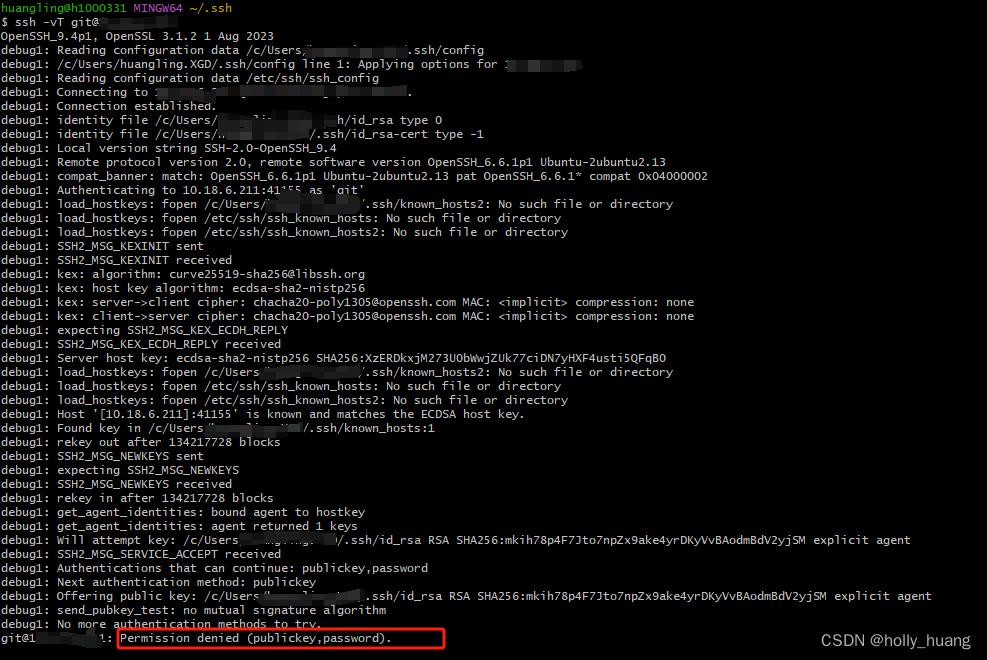
openSSH版本太高,openssh高版本默认禁止ssh-rsa加密算法,直接换ed25519
执行以下命令:
在.ssh目录下执行:ssh-keygen -t ed25519 -C “youremail.com”
ssh-add ~/.ssh/id_ed25519
将id_ed25519.pub添加到后台网页ssh key中
eval `ssh-agent -s`
修改config文件:
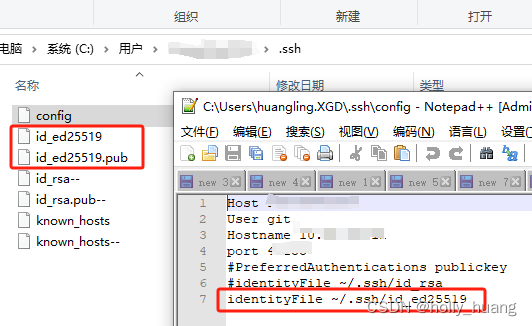
测试:
ssh -vT git@10.18..darling@h1111 MINGW64 ~/.ssh $ debug1: load_hostkeys: fopen /c/Users/yourdir/.ssh/known_hosts: No such file or directory debug1: load_hostkeys: fopen /c/Users/yourdir/.ssh/known_hosts2: No such file or directory debug1: load_hostkeys: fopen /etc/ssh/ssh_known_hosts: No such file or directory debug1: load_hostkeys: fopen /etc/ssh/ssh_known_hosts2: No such file or directory debug1: checking without port identifier debug1: load_hostkeys: fopen /c/Users/yourdir/.ssh/known_hosts: No such file or directory debug1: load_hostkeys: fopen /c/Users/yourdir/.ssh/known_hosts2: No such file or directory debug1: load_hostkeys: fopen /etc/ssh/ssh_known_hosts: No such file or directory debug1: load_hostkeys: fopen /etc/ssh/ssh_known_hosts2: No such file or directory debug1: hostkeys_find_by_key_hostfile: hostkeys file /c/Users/yourdir/.ssh/known_hosts does not exist debug1: hostkeys_find_by_key_hostfile: hostkeys file /c/Users/yourdir/.ssh/known_hosts2 does not exist debug1: hostkeys_find_by_key_hostfile: hostkeys file /etc/ssh/ssh_known_hosts does not exist debug1: hostkeys_find_by_key_hostfile: hostkeys file /etc/ssh/ssh_known_hosts2 does not exist The authenticity of host '[10.18.*.*]:41155 ([10.18.*.*]:41155)' can't be established. ED25519 key fingerprint is SHA256:YQTF1GhPP+gABu9xpqa+5u9dOCqr9cBySU7Ng+mBsic. This key is not known by any other names. Are you sure you want to continue connecting (yes/no/[fingerprint])? yes Warning: Permanently added '[10.18.*.*]:41155' (ED25519) to the list of known hosts. debug1: rekey out after 134217728 blocks debug1: SSH2_MSG_NEWKEYS sent debug1: expecting SSH2_MSG_NEWKEYS debug1: SSH2_MSG_NEWKEYS received debug1: rekey in after 134217728 blocks debug1: get_agent_identities: bound agent to hostkey debug1: get_agent_identities: ssh_fetch_identitylist: agent contains no identities debug1: Will attempt key: /c/Users/yourdir/.ssh/id_ed25519 ED25519 SHA256:ZL5zqdaIG4n9BR8y1PVQsw7pWDj6IS/3k9U3gPqL6iI explicit debug1: SSH2_MSG_SERVICE_ACCEPT received debug1: Authentications that can continue: publickey,password debug1: Next authentication method: publickey debug1: Offering public key: /c/Users/yourdir/.ssh/id_ed25519 ED25519 SHA256:ZL5zqdaIG4n9BR8y1PVQsw7pWDj6IS/3k9U3gPqL6iI explicit debug1: Server accepts key: /c/Users/yourdir/.ssh/id_ed25519 ED25519 SHA256:ZL5zqdaIG4n9BR8y1PVQsw7pWDj6IS/3k9U3gPqL6iI explicit Authenticated to 10.18.*.* ([10.18.*.*]:41155) using "publickey". debug1: channel 0: new session [client-session] (inactive timeout: 0) debug1: Requesting no-more-sessions@openssh.com debug1: Entering interactive session. debug1: pledge: filesystem debug1: Remote: Forced command. debug1: Remote: Port forwarding disabled. debug1: Remote: X11 forwarding disabled. debug1: Remote: Agent forwarding disabled. debug1: Remote: Pty allocation disabled. debug1: Remote: Forced command. debug1: Remote: Port forwarding disabled. debug1: Remote: X11 forwarding disabled. debug1: Remote: Agent forwarding disabled. debug1: Remote: Pty allocation disabled. PTY allocation request failed on channel 0 Welcome to GitLab, @darling! debug1: client_input_channel_req: channel 0 rtype exit-status reply 0 debug1: client_input_channel_req: channel 0 rtype eow@openssh.com reply 0 debug1: channel 0: free: client-session, nchannels 1 Connection to 10.18.*.* closed. Transferred: sent 2456, received 2708 bytes, in 0.6 seconds Bytes per second: sent 4442.7, received 4898.6 debug1: Exit status 0- 1
- 2
- 3
- 4
- 5
- 6
- 7
- 8
- 9
- 10
- 11
- 12
- 13
- 14
- 15
- 16
- 17
- 18
- 19
- 20
- 21
- 22
- 23
- 24
- 25
- 26
- 27
- 28
- 29
- 30
- 31
- 32
- 33
- 34
- 35
- 36
- 37
- 38
- 39
- 40
- 41
- 42
- 43
- 44
- 45
- 46
- 47
- 48
- 49
- 50
- 51
- 52
- 53
- 54
- 55
- 56
- 57
- 58
测试成功
-
相关阅读:
借助docker在本地模拟线上CI/CD流水线编译流程
【华为OD机试真题 python】 跳格子【2022 Q4 | 200分】
宠物领养|基于SprinBoot+vue的宠物领养管理系统(源码+数据库+文档)
基于springboot+vue的充电桩智能充电管理系统
JavaScript:js基础2
使用go pprof进行golang程序内存分析
葡萄糖氧化酶(GOD)修饰纳米金(Nano-Au)/壳聚糖(CS)/1-丁基-3-甲基咪唑六氟磷酸盐(BMIMPF6)复合材料
Python操作XML文件总结
python脚本分享:xml文件批量修改
正则表达式中的元字符,量词:贪婪和非贪婪,转义符: \s: 记得使用-z --null-data: 使用ascii码中空字符来替换新行,分组:““,和‘‘
- 原文地址:https://blog.csdn.net/huangling07031190/article/details/134480161
