-
ROS参数服务器(Param):通信模型、Hello World与拓展
参数服务器在ROS中主要用于实现不同节点之间的数据共享。
参数服务器相当于是独立于所有节点的一个公共容器,可以将数据存储在该容器中,被不同的节点调用,当然不同的节点也可以往其中存储数据。
使用场景一般存储一些机器人的固有参数,如产品定义、全局配置等。
主要思想就是一个共享数据域,供不同节点使用。
一、参数服务器通讯模型
参数服务器模型涉及到三个角色:
- Master (管理者)
- Setter(设置者)
- User(使用者)
Master 负责管理参数与 Setter/User 的操作,Setter 可以向 Master 设置参数,User 可以从 Master 获取参数。
这里只是方便说明,实际上通讯方操作参数前不会向 ROS Master 注册身份信息,所以对 ROS Master 而言,没有 Setter 与 User 之分,每个访问参数服务器的通讯方都是使用者。
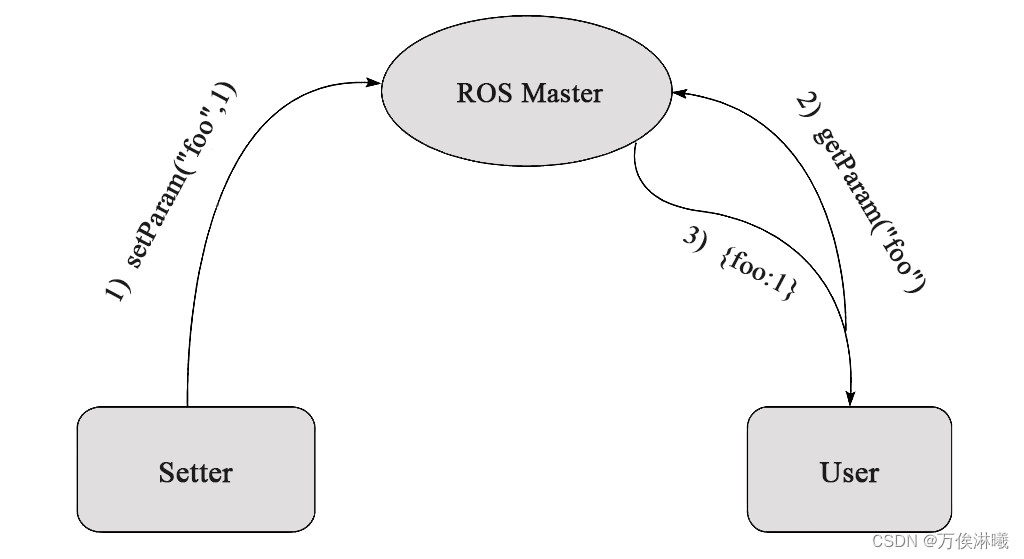
通讯流程:
- 1)Setter设置参数
Setter 通过 RPC 向参数服务器设置参数(包括参数名与参数值),ROS Master 将参数保存到参数列表中。
- 2)User获取参数
User 通过 RPC 向参数服务器发送参数查找请求,请求中包含要查找的参数名。
- 3)ROS Master返回参数信息
ROS Master 根据请求提供的参数名查找参数值,并将查询结果通过 RPC 发送给 User。
参数服务器使用 XMLRPC 数据格式存储参数,支持的数据类型如下:
- 32-bit integers
- booleans
- strings
- doubles
- iso8601 dates
- lists
- base64-encoded binary data
Note:
二、Param Hello World
万物始于Hello World,同样,使用Hello World介绍参数服务器的简单使用。
使用参数服务器,通讯方操作参数前没有向 ROS Master 注册身份信息,直接对参数进行操作。
接下来实现一个简单的参数操作,设置不同数据类型的参数,如机器人的
名字(name)、长(length)、宽(width)、高(height)等,并对其进行读取删除等操作。2.1 创建并初始化功能包
(这一步不是必须,这里只是为了方便清晰的说明,也可以使用已有的包,在包里新增节点等方法)
首先创建
param_hello_world包,命令如下:catkin_creat_pkg param_hello_world roscpp rospy- 1
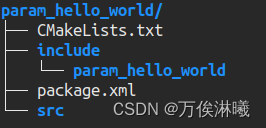
创建后,文件结构如下:
2.2 操作参数(C++版)
ROS 为 C++ 提供了两套 API,如下:
- 通过
ros::NodeHandle对象调用 - 通过
ros::param名空间调用
示例如下:
在创建的
param_hello_world包路径下有一个src目录,在这里存储C++源码,我们创建param_hello_world_set.cpp和param_hello_world_get.cpp,修改CMakeLists.txt,添加如下内容:add_executable(${PROJECT_NAME}_set src/param_hello_world_set.cpp) add_executable(${PROJECT_NAME}_get src/param_hello_world_get.cpp) target_link_libraries(${PROJECT_NAME}_set ${catkin_LIBRARIES} ) target_link_libraries(${PROJECT_NAME}_get ${catkin_LIBRARIES} )- 1
- 2
- 3
- 4
- 5
- 6
- 7
- 8
- 9
- 10
编辑
param_hello_world_set.cpp内容如下:#includeint main(int argc, char **argv) { setlocale(LC_ALL, ""); ros::init(argc, argv, "param_hello_world_set"); ros::NodeHandle nh; std::cout << std::endl << "********** ros::NodeHandle **********" << std::endl; { std::string name = "vbot"; std::string geometry = "rectangle"; double wheel_radius = 0.1; int wheel_num = 4; bool vision = true; std::vector<double> base_size = {0.7, 0.6, 0.3}; std::map<std::string, int> sensor_id = {{"camera", 0}, {"laser", 2}}; // 设置参数 std::cout << "-- 设置参数 --" << std::endl; nh.setParam("name", "vbot"); // 字符串, char* nh.setParam("geometry", geometry); // 字符串, string nh.setParam("wheel_radius", wheel_radius); // double nh.setParam("wheel_num", wheel_num); // int nh.setParam("vision", vision); // bool nh.setParam("base_size", base_size); // vector nh.setParam("sensor_id", sensor_id); // map // 验证是否设置成功 system("rosparam get name"); system("rosparam get geometry"); system("rosparam get wheel_radius"); system("rosparam get wheel_num"); system("rosparam get vision"); system("rosparam get base_size"); system("rosparam get sensor_id"); } std::cout << std::endl << "********** ros::param **********" << std::endl; { std::string name = "vbot"; std::string geometry = "rectangle"; double wheel_radius = 0.1; int wheel_num = 4; bool vision = true; std::vector<double> base_size = {0.7, 0.6, 0.3}; std::map<std::string, int> sensor_id = {{"camera", 0}, {"laser", 2}}; // 设置参数 std::cout << "-- 设置参数 --" << std::endl; ros::param::set("name_p", "vbot"); // 字符串, char* ros::param::set("geometry_p", geometry); // 字符串, string ros::param::set("wheel_radius_p", wheel_radius); // double ros::param::set("wheel_num_p", wheel_num); // int ros::param::set("vision_p", vision); // bool ros::param::set("base_size_p", base_size); // vector ros::param::set("sensor_id_p", sensor_id); // map // 验证是否设置成功 system("rosparam get name_p"); system("rosparam get geometry_p"); system("rosparam get wheel_radius_p"); system("rosparam get wheel_num_p"); system("rosparam get vision_p"); system("rosparam get base_size_p"); system("rosparam get sensor_id_p"); } return 0; } - 1
- 2
- 3
- 4
- 5
- 6
- 7
- 8
- 9
- 10
- 11
- 12
- 13
- 14
- 15
- 16
- 17
- 18
- 19
- 20
- 21
- 22
- 23
- 24
- 25
- 26
- 27
- 28
- 29
- 30
- 31
- 32
- 33
- 34
- 35
- 36
- 37
- 38
- 39
- 40
- 41
- 42
- 43
- 44
- 45
- 46
- 47
- 48
- 49
- 50
- 51
- 52
- 53
- 54
- 55
- 56
- 57
- 58
- 59
- 60
- 61
- 62
- 63
- 64
- 65
- 66
- 67
- 68
- 69
- 70
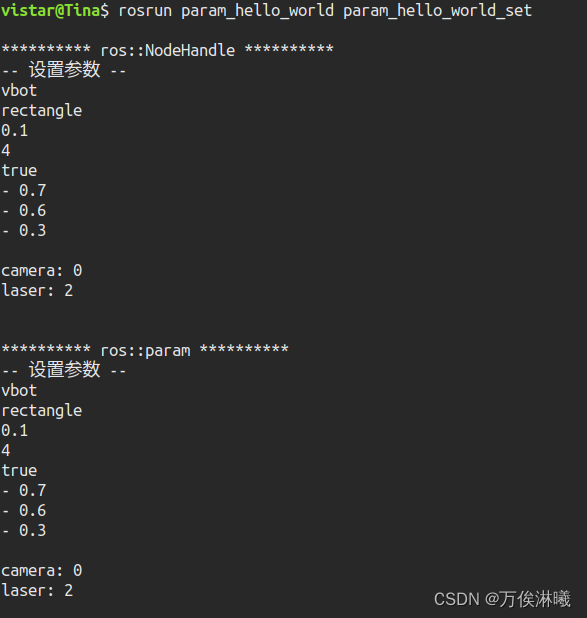
编译运行,结果如下:
编辑
param_hello_world_get.cpp内容如下:#includeint main(int argc, char **argv) { setlocale(LC_ALL, ""); ros::init(argc, argv, "param_hello_world_get"); ros::NodeHandle nh; std::cout << std::endl << "********** ros::NodeHandle **********" << std::endl; { // 修改参数 std::cout << std::endl << "-- 修改参数 --" << std::endl; nh.setParam("name", "mybot"); // 字符串, char* nh.setParam("geometry", "circular"); // 字符串, char* nh.setParam("wheel_radius", 0.15); // double nh.setParam("wheel_num", 2); // int nh.setParam("vision", false); // bool std::vector<double> base_size = {0.2, 0.04}; nh.setParam("base_size", base_size); // vector std::map<std::string, int> sensor_id = {{"camera", 0}, {"laser", 2}}; sensor_id.insert({"ultrasonic", 5}); ros::param::set("sensor_id", sensor_id); // map // 获取参数 std::cout << std::endl << "-- 获取参数 --" << std::endl; std::string name; std::string geometry; double wheel_radius; int wheel_num; bool vision; nh.getParam("name", name); nh.getParam("geometry", geometry); nh.getParam("wheel_radius", wheel_radius); nh.getParam("wheel_num", wheel_num); nh.getParam("vision", vision); nh.getParam("base_size", base_size); nh.getParam("sensor_id", sensor_id); ROS_INFO("ros::NodeHandle getParam, name: %s, geometry: %s, wheel_radius: %lf, wheel: %d, vision: %s, base_size: (%lf, %lf)", name.c_str(), geometry.c_str(), wheel_radius, wheel_num, vision ? "true" : "false", base_size[0], base_size[1]); for (auto sensor : sensor_id) { ROS_INFO("ros::NodeHandle getParam, %s_id: %d", sensor.first.c_str(), sensor.second); } // 删除参数 std::cout << std::endl << "-- 删除参数 --" << std::endl; nh.deleteParam("vision"); system("rosparam get vision"); // 其他操作函数 std::cout << std::endl << "-- 其他操作函数 --" << std::endl; double wheel_radius1; wheel_radius1 = nh.param("wheel_radius", wheel_radius1); ROS_INFO("param, wheel_radius: %lf", wheel_radius1); nh.getParamCached("wheel_radius", wheel_radius1); std::vector<std::string> keys_v; nh.getParamNames(keys_v); for (auto key : keys_v) { ROS_INFO("getParamNames, key: %s", key.c_str()); } if (nh.hasParam("vision")) { ROS_INFO("hasParam, 存在该参数"); } else { ROS_INFO("hasParam, 不存在该参数"); } std::string result; nh.searchParam("name", result); ROS_INFO("searchParam, result: %s", result.c_str()); } std::cout << std::endl << "********** ros::param **********" << std::endl; { // 修改参数 std::cout << std::endl << "-- 修改参数 --" << std::endl; ros::param::set("name_p", "mybot"); // 字符串, char* ros::param::set("geometry_p", "circular"); // 字符串, char* ros::param::set("wheel_radius_p", 0.15); // double ros::param::set("wheel_num_p", 2); // int ros::param::set("vision_p", false); // bool std::vector<double> base_size = {0.2, 0.04}; ros::param::set("base_size_p", base_size); // vector std::map<std::string, int> sensor_id = {{"camera", 0}, {"laser", 2}}; sensor_id.insert({"ultrasonic", 5}); ros::param::set("sensor_id_p", sensor_id); // map // 获取参数 std::cout << std::endl << "-- 获取参数 --" << std::endl; std::string name; std::string geometry; double wheel_radius; int wheel_num; bool vision; ros::param::get("name_p", name); ros::param::get("geometry_p", geometry); ros::param::get("wheel_radius_p", wheel_radius); ros::param::get("wheel_num_p", wheel_num); ros::param::get("vision_p", vision); ros::param::get("base_size_p", base_size); ros::param::get("sensor_id_p", sensor_id); ROS_INFO("ros::param get, name: %s, geometry: %s, wheel_radius: %lf, wheel: %d, vision: %s, base_size: (%lf, %lf)", name.c_str(), geometry.c_str(), wheel_radius, wheel_num, vision ? "true" : "false", base_size[0], base_size[1]); for (auto sensor : sensor_id) { ROS_INFO("ros::param getParam, %s_id: %d", sensor.first.c_str(), sensor.second); } // 删除参数 std::cout << std::endl << "-- 删除参数 --" << std::endl; ros::param::del("vision_p"); system("rosparam get vision_p"); // 其他操作函数 std::cout << std::endl << "-- 其他操作函数 --" << std::endl; double wheel_radius1; wheel_radius1 = ros::param::param("wheel_radius", wheel_radius1); ROS_INFO("param, wheel_radius: %lf", wheel_radius1); ros::param::getCached("wheel_radius", wheel_radius1); std::vector<std::string> keys_v; ros::param::getParamNames(keys_v); for (auto key : keys_v) { ROS_INFO("getParamNames, key: %s", key.c_str()); } if (ros::param::has("vision")) { ROS_INFO("has, 存在该参数"); } else { ROS_INFO("has, 不存在该参数"); } std::string result; ros::param::search("name", result); ROS_INFO("search, result: %s", result.c_str()); } return 0; } - 1
- 2
- 3
- 4
- 5
- 6
- 7
- 8
- 9
- 10
- 11
- 12
- 13
- 14
- 15
- 16
- 17
- 18
- 19
- 20
- 21
- 22
- 23
- 24
- 25
- 26
- 27
- 28
- 29
- 30
- 31
- 32
- 33
- 34
- 35
- 36
- 37
- 38
- 39
- 40
- 41
- 42
- 43
- 44
- 45
- 46
- 47
- 48
- 49
- 50
- 51
- 52
- 53
- 54
- 55
- 56
- 57
- 58
- 59
- 60
- 61
- 62
- 63
- 64
- 65
- 66
- 67
- 68
- 69
- 70
- 71
- 72
- 73
- 74
- 75
- 76
- 77
- 78
- 79
- 80
- 81
- 82
- 83
- 84
- 85
- 86
- 87
- 88
- 89
- 90
- 91
- 92
- 93
- 94
- 95
- 96
- 97
- 98
- 99
- 100
- 101
- 102
- 103
- 104
- 105
- 106
- 107
- 108
- 109
- 110
- 111
- 112
- 113
- 114
- 115
- 116
- 117
- 118
- 119
- 120
- 121
- 122
- 123
- 124
- 125
- 126
- 127
- 128
- 129
- 130
- 131
- 132
- 133
- 134
- 135
- 136
- 137
- 138
- 139
- 140
- 141
- 142
- 143
- 144
- 145
- 146
- 147
- 148
- 149
- 150
- 151
- 152
- 153
- 154
- 155
- 156
- 157
- 158
- 159
- 160
- 161
- 162
- 163
- 164
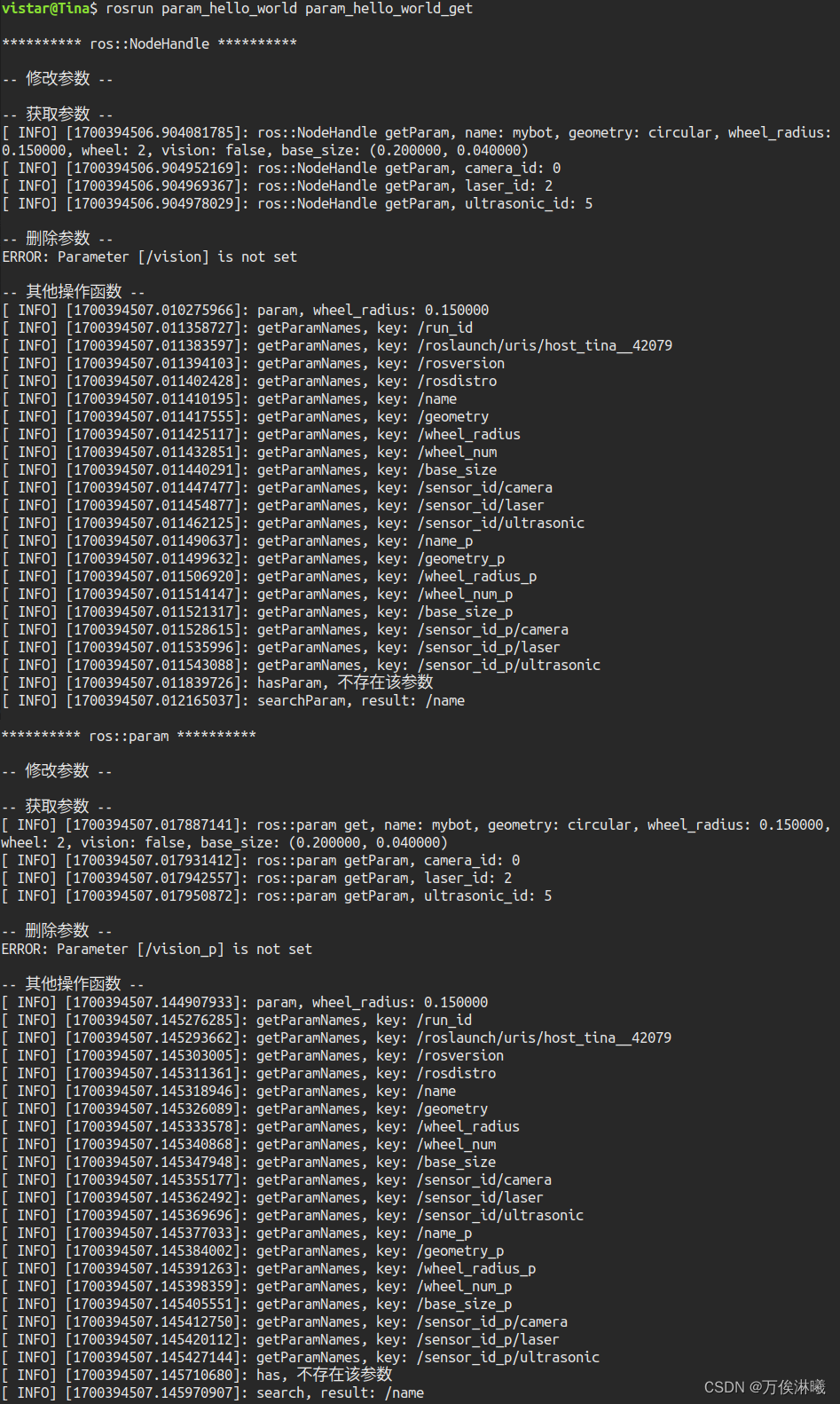
编译运行,结果如下:
2.3 其他操作参数的函数
除了上文提到的
setParam()、getParam()、deleteParam()函数,还有一些其他的参数操作函数,如下:这里只以通过 ros::NodeHandle 对象调用为例,通过 ros::param 名空间调用类似,只多了一个 unsubscribeCachedParam函数,后面说明
1.param
获取
param_name的值,如果param_name不存在,则返回default_val原型: T param(const std::string& param_name, const T& default_val) const
double wheel_radius2; wheel_radius2 = nh.param("wheel_radius", wheel_radius2); ROS_INFO("param, wheel_radius: %lf", wheel_radius2);- 1
- 2
- 3
2.getParamCached()
与
getParam()使用方法一样。首次调用会判断该参数是否获取过,如果获取过则从缓存读取,并向
Master订阅该参数的变化,不再像getParam()一样通过RPC向Master获取,以提高效率。示例参考
getParam()。3.getParamNames()
获取所有设置到 Master 的参数的键,并通过 vector 返回。
原型:bool getParamNames(std::vector
std::vector<std::string> keys_v; nh.getParamNames(keys_v); for (auto key : keys_v) { ROS_INFO("getParamNames, key: %s", key.c_str()); }- 1
- 2
- 3
- 4
- 5
- 6
4.hasParam()
判断是否存在该参数
原型:bool hasParam(const std::string& key) const;
if (nh.hasParam("vision")) { ROS_INFO("存在该参数"); } else { ROS_INFO("不存在该参数"); }- 1
- 2
- 3
- 4
- 5
- 6
- 7
- 8
5.searchParam()
搜索给定参数名,如果存在,返回键名,不存在返回空字符串。
原型:bool searchParam(const std::string& key, std::string& result) const;
std::string result; nh.searchParam("name", result); ROS_INFO("searchParam, result: %s", result.c_str());- 1
- 2
- 3
6.unsubscribeCachedParam() (ros::param特有)
不明白该函数有什么具体作用,如果你知道欢迎交流(留言或加下方微信)。
没有找到官方说明,源码及注释如下:
头文件:
param.h
源文件:
param.cpp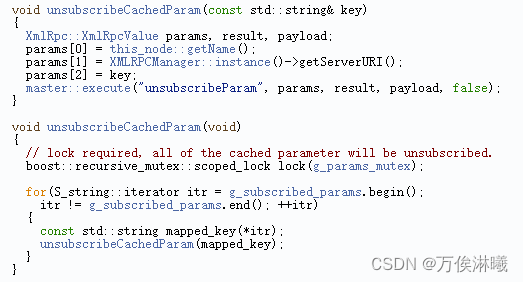
直译注释为:取消订阅master中的缓存参数
猜测和
getCached()有关,getCached()会订阅参数变化,unsubscribeCachedParam则是取消订阅,但验证未生效:// 设置参数 ros::param::set("wheel_radius", 0.15); // 首次调用getCached,这里会订阅"wheel_radius"的变化 double wheel_radius; ros::param::getCached("wheel_radius", wheel_radius); ROS_INFO("before unsubscribeCachedParam, wheel_radius: %lf", wheel_radius); // 调用unsubscribeCachedParam取消订阅 ros::param::unsubscribeCachedParam("wheel_radius"); // 修改master中的"wheel_radius"值 // 由于已取消参数变化的订阅,此次变化不会同步到缓存 // 所以master中的值是0.5,而缓存中的值是0.15 ros::param::set("wheel_radius", 0.5); // 再次调用getCached, // 理论上,再次调用getCached,会从缓存读取,此时缓存中的值是0.15 double wheel_radius1; ros::param::getCached("wheel_radius", wheel_radius1); ROS_INFO("after unsubscribeCachedParam, wheel_radius1: %lf", wheel_radius1);- 1
- 2
- 3
- 4
- 5
- 6
- 7
- 8
- 9
- 10
- 11
- 12
- 13
- 14
- 15
- 16
- 17
- 18
- 19
- 20
- 21
实际输出为:
before unsubscribeCachedParam, wheel_radius: 0.15 after unsubscribeCachedParam, wheel_radius: 0.50- 1
- 2
欢迎交流(留言或加下方微信)。
2.4 操作参数(Python版)
与 C++ 不同,ROS 只为 Python 提供了一套操作参数的 API。
在创建的
param_hello_world包路径下src目录的同级,创建一个scripts目录,在这里存储脚本(如python脚本),修改CMakeLists.txt,添加如下内容:catkin_install_python(PROGRAMS scripts/param_hello_world_set.py scripts/param_hello_world_get.py DESTINATION ${CATKIN_PACKAGE_BIN_DESTINATION} )- 1
- 2
- 3
- 4
- 5
在
scripts中创建param_hello_world_set.py编辑内容如下:import rospy import os if __name__ == "__main__": rospy.init_node("param_hello_world_set") # 设置参数 rospy.set_param("name", "vbot") # 字符串, string rospy.set_param("geometry", "rectangle") # 字符串, string rospy.set_param("wheel_radius", 0.1) # double rospy.set_param("wheel_num", 4) # int rospy.set_param("vision", True) # bool rospy.set_param("base_size", [0.7, 0.6, 0.3]) # list rospy.set_param("sensor_id", {"camera": 0, "laser": 2}) # dictionary # 验证是否设置成功 os.system("rosparam get name") os.system("rosparam get geometry") os.system("rosparam get wheel_radius") os.system("rosparam get wheel_num") os.system("rosparam get vision") os.system("rosparam get base_size") os.system("rosparam get sensor_id")- 1
- 2
- 3
- 4
- 5
- 6
- 7
- 8
- 9
- 10
- 11
- 12
- 13
- 14
- 15
- 16
- 17
- 18
- 19
- 20
- 21
- 22
- 23
- 24
- 25
在
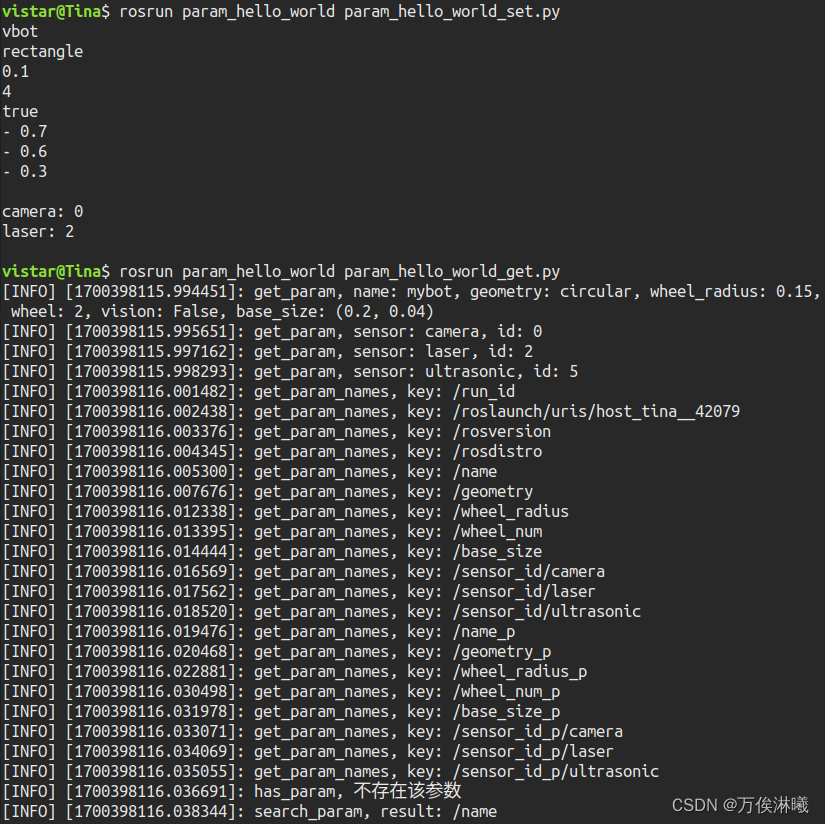
scripts中创建param_hello_world_get.py编辑内容如下:import rospy if __name__ == "__main__": rospy.init_node("param_hello_world_get") # 修改参数 rospy.set_param("name", "mybot") # 字符串, string rospy.set_param("geometry", "circular") # 字符串, string rospy.set_param("wheel_radius", 0.15) # double rospy.set_param("wheel_num", 2) # int rospy.set_param("vision", False) # bool rospy.set_param("base_size", [0.2, 0.04]) # list rospy.set_param("sensor_id", {"camera": 0, "laser": 2, "ultrasonic": 5}) # dictionary # 获取参数 name = rospy.get_param("name") # 字符串, string geometry = rospy.get_param("geometry") # 字符串, string wheel_radius = rospy.get_param("wheel_radius") # double wheel_num = rospy.get_param("wheel_num") # int vision = rospy.get_param("vision") # bool base_size = rospy.get_param("base_size") # list sensor_id = rospy.get_param("sensor_id") # dictionary rospy.loginfo("get_param, name: {}, geometry: {}, wheel_radius: {}, wheel: {}, vision: {}, base_size: ({}, {})" .format(name, geometry, wheel_radius, wheel_num, vision, base_size[0], base_size[1])) for key, value in sensor_id.items(): rospy.loginfo("get_param, sensor: {}, id: {}".format(key, value)) # 删除参数 rospy.delete_param("vision") # 其他操作 wheel_radius1 = rospy.get_param_cached("wheel_radius") keys = rospy.get_param_names() for key in keys: rospy.loginfo("get_param_names, key: {}".format(key)) if rospy.has_param("vision"): rospy.loginfo("has_param, 存在该参数") else: rospy.loginfo("has_param, 不存在该参数") result = rospy.search_param("name") rospy.loginfo("search_param, result: {}".format(result))- 1
- 2
- 3
- 4
- 5
- 6
- 7
- 8
- 9
- 10
- 11
- 12
- 13
- 14
- 15
- 16
- 17
- 18
- 19
- 20
- 21
- 22
- 23
- 24
- 25
- 26
- 27
- 28
- 29
- 30
- 31
- 32
- 33
- 34
- 35
- 36
- 37
- 38
- 39
- 40
- 41
- 42
- 43
- 44
- 45
- 46
编译执行结果如下:
-
相关阅读:
蓝桥等考Python组别八级003
【python基础】函数-值传递
中国人民大学与加拿大女王大学金融硕士——热爱会穿越时间,埋在心底的读研梦也是
python可视化库以及常见的可视化工具
数据库&SQL
分布式技术之dubbo
7.1ASP.NET Core中的依赖注入
缺口的大利润!伦敦银如何使用缺口交易
IS 2022 | 字节AI Lab联合南科大提出:利用伪标注数据提升端到端S2ST
Codeforces-895 (Div3)
- 原文地址:https://blog.csdn.net/maizousidemao/article/details/134497398
