-
django理解02 前后端分离中的问题
前后端分离相对于传统方式的问题
- 前后端数据交换的问题
- 跨域问题
页面js往自身程序(django服务)发送请求,这是浏览器默认接受响应
而请求其它地方是浏览器认为存在潜在危险。自动隔离请求!!!跨域问题的解决:
从后端入手(前端也可以)
安装模块pip install django-cors-headers- 1
settings.py中
- 注册,添加中间件等配置
INSTALLED_APPS = ( ... 'corsheaders' ) MIDDLEWARE = [ ... 'corsheaders.middleware.CorsMiddleware', #'django.middleware.common.CommonMiddleware', 这个是原本就存在的 ] #跨域处理 #跨域增加忽略 CORS_ALLOW_CREDENTIALS = True CORS_ORIGIN_ALLOW_ALL = True CORS_ORIGIN_WHITLIST = ( '*' ) CORS_ALLOW_METHODS = ( 'GET', 'POST', ) CORS_ALLOW_HEADERS = ( 'XMLHttpRequest', 'X_FILENAME', 'accept-encoding', 'authorization', 'content-type', 'dnt', 'origin', 'user-agent', 'x-csrftoken', 'x-requested-with', 'Pragma', )- 1
- 2
- 3
- 4
- 5
- 6
- 7
- 8
- 9
- 10
- 11
- 12
- 13
- 14
- 15
- 16
- 17
- 18
- 19
- 20
- 21
- 22
- 23
- 24
- 25
- 26
- 27
- 28
- 29
- 30
- 31
- 32
- 33
- 34
- 35
- 36
- 37
解决后的测试:
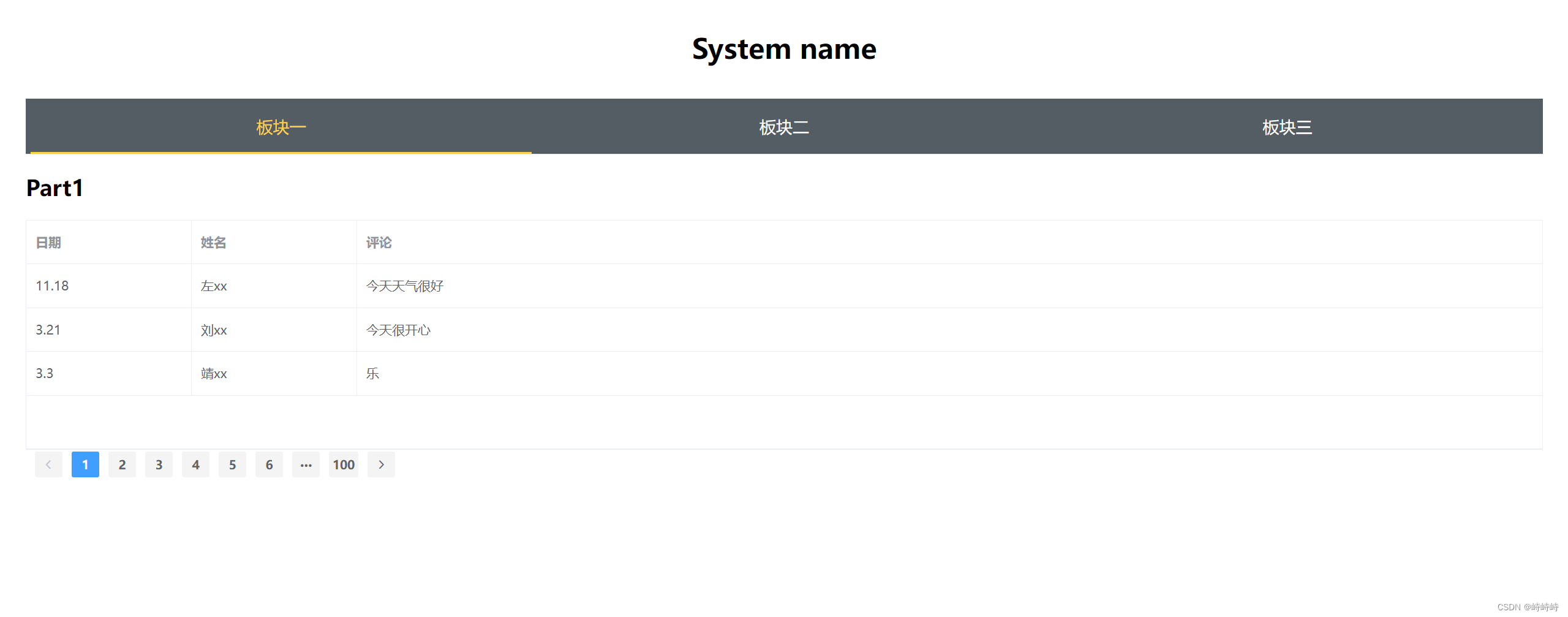
后端:#api test def get(request): data_list = [ {"comment":"今天天气很好","date":"11.18","name":"左xx"}, {"comment":"今天很开心","date":"3.21","name":"刘xx"}, {"comment": "乐", "date": "3.3", "name": "靖xx"} ] request_data = {"code":200,"message":"请求成功"} request_data["data"] = data_list return JsonResponse(request_data)- 1
- 2
- 3
- 4
- 5
- 6
- 7
- 8
- 9
- 10
前端:
<template> <div> <h1>Part1</h1> <el-table :data="tableData" height="250" border style="width: 100%"> <el-table-column prop="date" label="日期" width="180"> </el-table-column> <el-table-column prop="name" label="姓名" width="180"> </el-table-column> <el-table-column prop="comment" label="评论"> </el-table-column> </el-table> <el-pagination background layout="prev, pager, next" :total="1000"> </el-pagination> </div> </template> <script> import axios from 'axios'; export default { data() { return { tableData: [], } }, methods:{ }, mounted(){ //发送异步请求,获取数据 axios.get("http://127.0.0.1:8000/get/").then((result) =>{ this.tableData=result.data.data; //从返回的result中获取需要的信息 }); // alert(this.tableData); } } </script>- 1
- 2
- 3
- 4
- 5
- 6
- 7
- 8
- 9
- 10
- 11
- 12
- 13
- 14
- 15
- 16
- 17
- 18
- 19
- 20
- 21
- 22
- 23
- 24
- 25
- 26
- 27
- 28
- 29
- 30
- 31
- 32
- 33
- 34
- 35
- 36
- 37
- 38
- 39
- 40
- 41
- 42
- 43
- 44
- 45
- 46
- 47
- 48
- 49
- 50
- 51
- 52
- 53
效果图:
下一步
考虑加入数据库
-
相关阅读:
qsort 函数的使用及其模拟实现
助力财务管理转型升级——宁夏烟草智能财务共享中心建设
ES6对象
Ribbon学习笔记二
Android Studio开发工具学习之Git远程仓库拉取与推送
Packet Tracer - 在 IPv4 和 IPv6 的 EIGRP 中传播默认路由
Visual Studio Code将中文写入变量时,中文老是乱码问题
二次规划的基础知识理论(更新中)
Java面试题之——异常和错误
树莓派4B(Ubuntu 22.04 server)与Windows11网线直连(无显示器)
- 原文地址:https://blog.csdn.net/m0_73084903/article/details/134483713
