-
Windows环境VSCode配置OpenCV-项目配置(二)
-
修改c_cpp_properties.json
{ "configurations": [ { "name": "windows-gcc-x64", "includePath": [ "${workspaceFolder}/**", "D:/mingw64/mingw64/include", "D:/openCV_win/build/install/include", "D:/openCV_win/build/install/include/opencv2" ], "compilerPath": "D:/mingw64/mingw64/bin/gcc.exe", "cStandard": "${default}", "cppStandard": "${default}", "intelliSenseMode": "windows-gcc-x64", "compilerArgs": [ "" ] } ], "version": 4 }- 1
- 2
- 3
- 4
- 5
- 6
- 7
- 8
- 9
- 10
- 11
- 12
- 13
- 14
- 15
- 16
- 17
- 18
- 19
- 20
- 21
-
修改tasks.json
{ "tasks": [ { "type": "cppbuild", "label": "C/C++: g++.exe 生成活动文件", "command": "D:\\mingw64\\mingw64\\bin\\g++.exe", "args": [ "-fdiagnostics-color=always", "-g", "${file}", "-o", "${fileDirname}\\${fileBasenameNoExtension}.exe", "-I", "D:/openCV_win/build/install/include/", "-I", "D:/openCV_win/build/install/include/opencv2/", "-L", "D:/openCV_win/build/install/x64/mingw/bin/lib*" ], "options": { "cwd": "${fileDirname}" }, "problemMatcher": [ "$gcc" ], "group": { "kind": "build", "isDefault": true }, "detail": "调试器生成的任务。" } ], "version": "2.0.0" }- 1
- 2
- 3
- 4
- 5
- 6
- 7
- 8
- 9
- 10
- 11
- 12
- 13
- 14
- 15
- 16
- 17
- 18
- 19
- 20
- 21
- 22
- 23
- 24
- 25
- 26
- 27
- 28
- 29
- 30
- 31
-
launch.json
{ "version": "0.2.0", "configurations": [ { "name": "C/C++ Runner: Debug Session", "type": "cppdbg", "request": "launch", "args": [], "stopAtEntry": false, "externalConsole": true, "cwd": "${workspaceFolder}", "program": "${workspaceFolder}\\${fileBasenameNoExtension}.exe", "MIMode": "gdb", "miDebuggerPath": "gdb", "setupCommands": [ { "description": "Enable pretty-printing for gdb", "text": "-enable-pretty-printing", "ignoreFailures": true } ] } ] }- 1
- 2
- 3
- 4
- 5
- 6
- 7
- 8
- 9
- 10
- 11
- 12
- 13
- 14
- 15
- 16
- 17
- 18
- 19
- 20
- 21
- 22
- 23
- 24
-
新建test.cpp
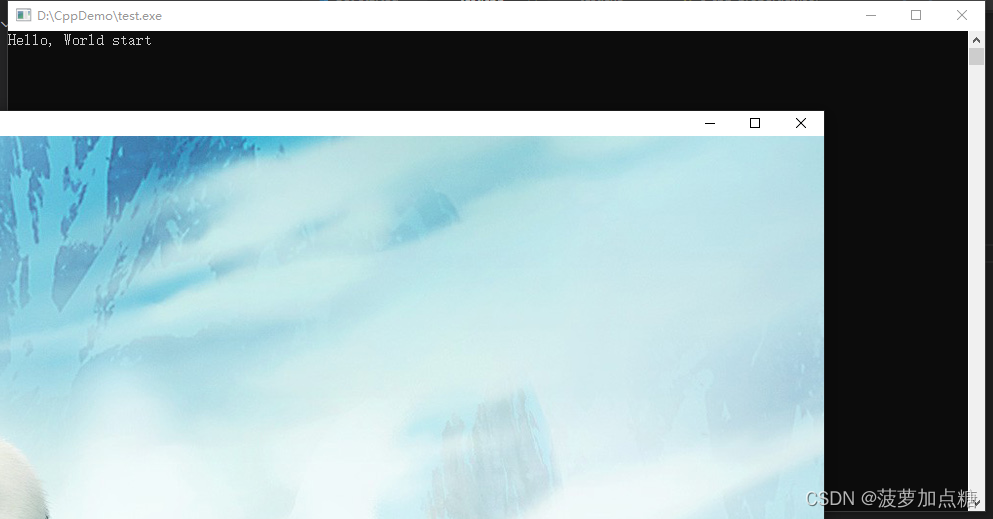
#include#include using namespace std; int main() { std::cout << "Hello, World start" << std::endl; cv::Mat img = cv::imread("C:/Users/Pictures/nba/724224.jpg"); cv::imshow("img", img); cv::waitKey(0); std::cout << "Hello, World end" << std::endl; return 0; } - 1
- 2
- 3
- 4
- 5
- 6
- 7
- 8
- 9
- 10
- 11
- 12
如果F5出错
Unexpected GDB output from command “-exec-run”.
需要修改mingw64的环境变量到git前
运行效果:
-
-
相关阅读:
监控远程log4.net日志
SpringDoc API文档工具集成SpringBoot - Swagger3
【最优化理论】03-无约束优化
力扣第134题 加油站 c++ 暴力 + 贪心
生命在于学习——Stable Diffution(Mac端)
Dragonframe是一个全功能的动画制作工具,专为满足电影,广播电视和电影的要求设计。
基于操作系统的基础IO
一种朴素的消失点计算方法
java之CSV数据的入库
C++习题2
- 原文地址:https://blog.csdn.net/wolf0706/article/details/134449801
