-
SDL音视频渲染
01-SDL简介
官网:https://www.libsdl.org/
文档:http://wiki.libsdl.org/Introduction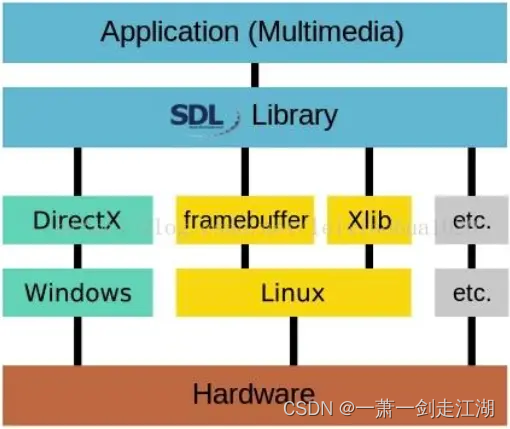
SDL(Simple DirectMedia Layer)是一套开放源代码的跨平台多媒体开发库,使用C语言写成。SDL提供了数种控制图像、声音、输出入的函数,让开发者只要用相同或是相似的代码就可以开发出跨多个平台(Linux、Windows、Mac OS X等)的应用软件。目前SDL多用于开发游戏、模拟器、媒体播放器等多媒体应用领域。
02-Windows环境搭建
下载地址:https://www.libsdl.org/download-2.0.php
先直接下载dll和lib使用

MinGW:Minimalist GNU for Windows
案例
将SDL2-2.0.10拷贝到工程目录
将 SDL2-2.0.10\lib\x86 下的 SDL2.dll 拷贝到工程目录- .prc
- win32 {
- INCLUDEPATH += $$PWD/SDL2-2.0.10/include
- LIBS += $$PWD/SDL2-2.0.10/lib/x86/SDL2.lib
- }
- main.c
- #include <stdio.h>
- #include <SDL.h>
- #undef main
- int main()
- {
- printf("Hello World!\n");
- SDL_Window *window = NULL; // 声明窗口
- SDL_Init(SDL_INIT_VIDEO); // 初始化SDL
- // 创建SDL Window
- window = SDL_CreateWindow("Basic Window", // 标题
- SDL_WINDOWPOS_UNDEFINED, // x
- SDL_WINDOWPOS_UNDEFINED, // y
- 640, // 宽
- 480, // 高
- SDL_WINDOW_OPENGL | SDL_WINDOW_RESIZABLE);// 类型
- if(!window) // 检测是否创建成功
- {
- printf("创建 window 失败, err:%s\n", SDL_GetError());
- return 1;
- }
- SDL_Delay(10000); // 延迟10000ms
- SDL_DestroyWindow(window); // 销毁窗口
- SDL_Quit(); // 释放资源
- return 0;
- }
03-Linux环境搭建
下载地址:https://www.libsdl.org/download-2.0.php
- 下载SDL源码库,SDL2-2.0.10.tar.gz
- 解压,然后依次执行命令
./configure
make
sudo make install. - 如果出现Could not initialize SDL - No available video device(Did you set the DISPLAY variable?)错误
说明系统中没有安装x11的库文件,因此编译出来的SDL库实际上不能用。
下载安装
sudo apt-get install libx11-dev
sudo apt-get install xorg-dev
04-SDL子系统
SDL将功能分成下列数个子系统(subsystem):
◼ SDL_INIT_TIMER:定时器
◼ SDL_INIT_AUDIO:音频
◼ SDL_INIT_VIDEO:视频
◼ SDL_INIT_JOYSTICK:摇杆
◼ SDL_INIT_HAPTIC:触摸屏
◼ SDL_INIT_GAMECONTROLLER:游戏控制器
◼ SDL_INIT_EVENTS:事件
◼ SDL_INIT_EVERYTHING:包含上述所有选项05-SDL Window显示:SDL视频显示函数简介
◼ SDL_Init():初始化SDL系统
◼ SDL_CreateWindow():创建窗口SDL_Window
◼ SDL_CreateRenderer():创建渲染器SDL_Renderer
◼ SDL_CreateTexture():创建纹理SDL_Texture
◼ SDL_UpdateTexture():设置纹理的数据
◼ SDL_RenderCopy():将纹理的数据拷贝给渲染器
◼ SDL_RenderPresent():显示
◼ SDL_Delay():工具函数,用于延时
◼ SDL_Quit():退出SDL系统06-SDL Windows显示:SDL数据结构简介
◼ SDL_Window 代表了一个“窗口”
◼ SDL_Renderer 代表了一个“渲染器”
◼ SDL_Texture 代表了一个“纹理”
◼ SDL_Rect 一个简单的矩形结构存储RGB和存储纹理的区别:
比如一个从左到右由红色渐变到蓝色的矩形,用存储RGB的话就需要把矩形中每个点的具体颜色值存储下来;而纹理只是一些描述信息,比如记录了矩形的大小、起始颜色、终止颜色等信息,显卡可以通过这些信息推算出矩形块的详细信息。
所以相对于存储RGB而已,存储纹理占用的内存要少的多。
案例
新建工程 02-sdl-window
将SDL2-2.0.10拷贝到工程目录
将 SDL2-2.0.10\lib\x86 下的 SDL2.dll 拷贝到工程目录- .prc
- win32 {
- INCLUDEPATH += $$PWD/SDL2-2.0.10/include
- LIBS += $$PWD/SDL2-2.0.10/lib/x86/SDL2.lib
- }
- main.c
- #include <stdio.h>
- #include <SDL.h>
- #undef main
- int main()
- {
- int run = 1;
- SDL_Window *window = NULL;
- SDL_Renderer *renderer = NULL;
- SDL_Texture *texture = NULL;
- SDL_Rect rect; // 长方形,原点在左上角
- rect.w = 50; //方块大小
- rect.h = 50;
- SDL_Init(SDL_INIT_VIDEO);//初始化函数,可以确定希望激活的子系统
- window = SDL_CreateWindow("2 Window",
- SDL_WINDOWPOS_UNDEFINED,
- SDL_WINDOWPOS_UNDEFINED,
- 640,
- 480,
- SDL_WINDOW_OPENGL | SDL_WINDOW_RESIZABLE);// 创建窗口
- if (!window)
- {
- return -1;
- }
- renderer = SDL_CreateRenderer(window, -1, 0);//基于窗口创建渲染器
- if (!renderer)
- {
- return -1;
- }
- texture = SDL_CreateTexture(renderer,
- SDL_PIXELFORMAT_RGBA8888,
- SDL_TEXTUREACCESS_TARGET,
- 640,
- 480); //创建纹理
- if (!texture)
- {
- return -1;
- }
- int show_count = 0;
- while (run)
- {
- rect.x = rand() % 600;
- rect.y = rand() % 400;
- SDL_SetRenderTarget(renderer, texture); // 设置渲染目标为纹理
- SDL_SetRenderDrawColor(renderer, 255, 0, 0, 255); // 纹理背景为黑色
- SDL_RenderClear(renderer); //清屏
- SDL_RenderDrawRect(renderer, &rect); //绘制一个长方形
- SDL_SetRenderDrawColor(renderer, 0, 255, 255, 255); //长方形为白色
- SDL_RenderFillRect(renderer, &rect);
- SDL_SetRenderTarget(renderer, NULL); //恢复默认,渲染目标为窗口
- SDL_RenderCopy(renderer, texture, NULL, NULL); //拷贝纹理到CPU
- SDL_RenderPresent(renderer); //输出到目标窗口上
- SDL_Delay(300);
- if(show_count++ > 30)
- {
- run = 0; // 不跑了
- }
- }
- SDL_DestroyTexture(texture);
- SDL_DestroyRenderer(renderer);
- SDL_DestroyWindow(window); //销毁窗口
- SDL_Quit();
- return 0;
- }
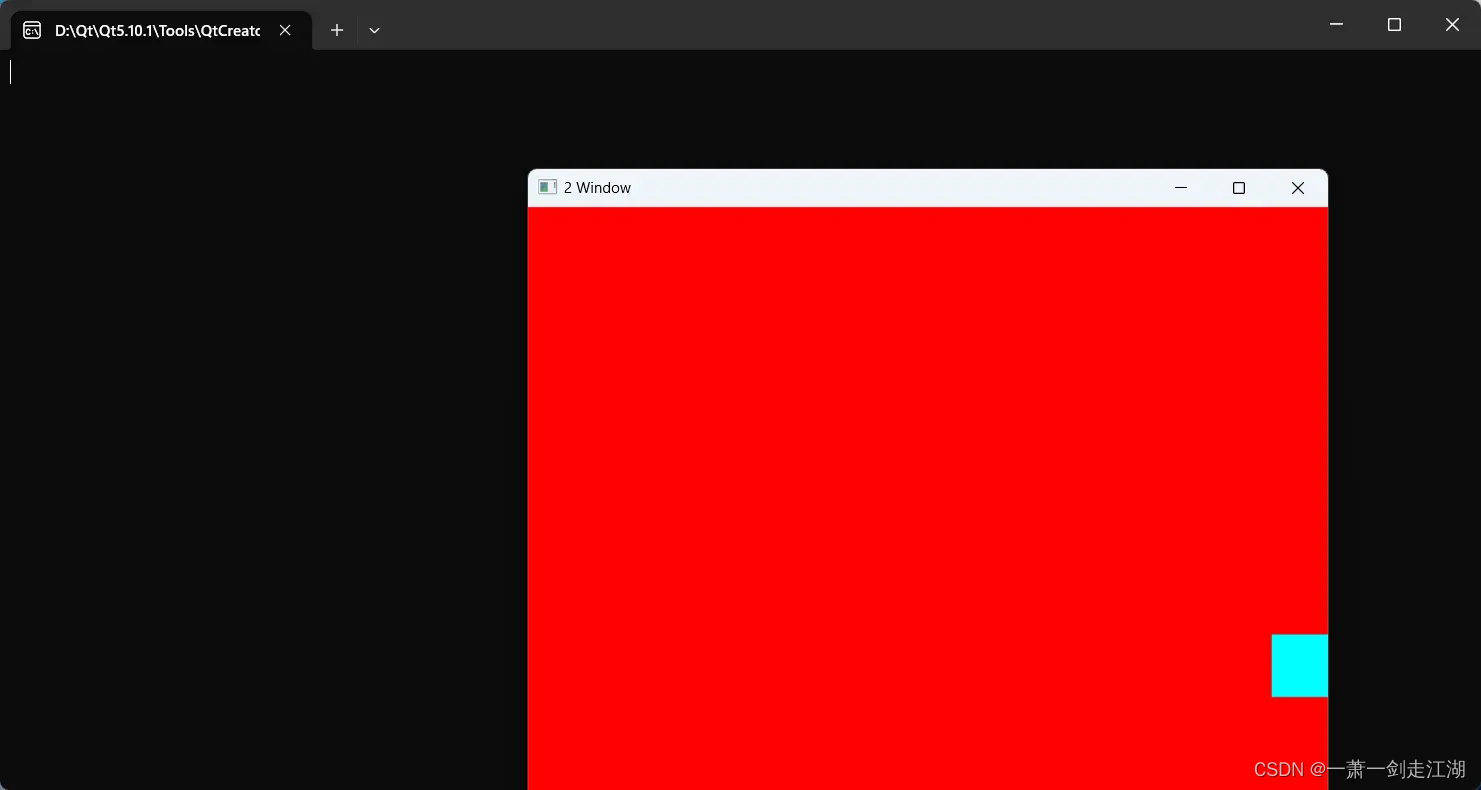
运行
07-SDL事件
SDL事件
◼ 函数
• SDL_WaitEvent():等待一个事件
• SDL_PushEvent():发送一个事件
• SDL_PumpEvents():将硬件设备产生的事件放入事件队列,用于读取事件,在调用该函数之前,必须调用SDL_PumpEvents搜集键盘等事件
• SDL_PeepEvents():从事件队列提取一个事件◼ 数据结构
• SDL_Event:代表一个事件案例
新建工程 03-sdl-event
将 SDL2-2.0.10和SDL2-2.0.10\lib\x86 下的 SDL2.dll 拷贝到工程目录- 03-sdl-event.pro
- TEMPLATE = app
- CONFIG += console
- CONFIG -= app_bundle
- CONFIG -= qt
- SOURCES += main.c
- win32 {
- INCLUDEPATH += $$PWD/SDL2-2.0.10/include
- LIBS += $$PWD/SDL2-2.0.10/lib/x86/SDL2.lib
- }
- main.c
- #include <stdio.h>
- #include <SDL.h>
- #define FF_QUIT_EVENT (SDL_USEREVENT + 2) // 用户自定义事件
- #undef main
- int main(int argc, char* argv[])
- {
- SDL_Window *window = NULL; // Declare a pointer
- SDL_Renderer *renderer = NULL;
- SDL_Init(SDL_INIT_VIDEO); // Initialize SDL2
- // Create an application window with the following settings:
- window = SDL_CreateWindow(
- "An SDL2 window", // window title
- SDL_WINDOWPOS_UNDEFINED, // initial x position
- SDL_WINDOWPOS_UNDEFINED, // initial y position
- 640, // width, in pixels
- 480, // height, in pixels
- SDL_WINDOW_SHOWN | SDL_WINDOW_BORDERLESS// flags - see below
- );
- // Check that the window was successfully created
- if (window == NULL)
- {
- // In the case that the window could not be made...
- printf("Could not create window: %s\n", SDL_GetError());
- return 1;
- }
- /* We must call SDL_CreateRenderer in order for draw calls to affect this window. */
- renderer = SDL_CreateRenderer(window, -1, 0);
- /* Select the color for drawing. It is set to red here. */
- SDL_SetRenderDrawColor(renderer, 255, 0, 0, 255);
- /* Clear the entire screen to our selected color. */
- SDL_RenderClear(renderer);
- /* Up until now everything was drawn behind the scenes.
- This will show the new, red contents of the window. */
- SDL_RenderPresent(renderer);
- SDL_Event event;
- int b_exit = 0;
- for (;;)
- {
- SDL_WaitEvent(&event);
- switch (event.type)
- {
- case SDL_KEYDOWN: /* 键盘事件 */
- switch (event.key.keysym.sym)
- {
- case SDLK_a:
- printf("key down a\n");
- break;
- case SDLK_s:
- printf("key down s\n");
- break;
- case SDLK_d:
- printf("key down d\n");
- break;
- case SDLK_q:
- printf("key down q and push quit event\n");
- SDL_Event event_q;
- event_q.type = FF_QUIT_EVENT;
- SDL_PushEvent(&event_q);
- break;
- default:
- printf("key down 0x%x\n", event.key.keysym.sym);
- break;
- }
- break;
- case SDL_MOUSEBUTTONDOWN: /* 鼠标按下事件 */
- if (event.button.button == SDL_BUTTON_LEFT)
- {
- printf("mouse down left\n");
- }
- else if(event.button.button == SDL_BUTTON_RIGHT)
- {
- printf("mouse down right\n");
- }
- else
- {
- printf("mouse down %d\n", event.button.button);
- }
- break;
- case SDL_MOUSEMOTION: /* 鼠标移动事件 */
- printf("mouse movie (%d,%d)\n", event.button.x, event.button.y);
- break;
- case FF_QUIT_EVENT:
- printf("receive quit event\n");
- b_exit = 1;
- break;
- }
- if(b_exit)
- break;
- }
- //destory renderer
- if (renderer)
- SDL_DestroyRenderer(renderer);
- // Close and destroy the window
- if (window)
- SDL_DestroyWindow(window);
- // Clean up
- SDL_Quit();
- return 0;
- }
构建项目
将 SDL2.dll 拷贝到 build-03-sdl-event-Desktop_Qt_5_10_1_MSVC2015_32bit-Debug 目录
运行
08-SDL线程
SDL多线程
◼ SDL线程创建:SDL_CreateThread
◼ SDL线程等待:SDL_WaitThead
◼ SDL互斥锁:SDL_CreateMutex/SDL_DestroyMutex
◼ SDL锁定互斥:SDL_LockMutex/SDL_UnlockMutex
◼ SDL条件变量(信号量):SDL_CreateCond/SDL_DestoryCond
◼ SDL条件变量(信号量)等待/通知:SDL_CondWait/SDL_CondSingal案例
新建工程 04-sdl-thread
将 SDL2-2.0.10和SDL2-2.0.10\lib\x86 下的 SDL2.dll 拷贝到工程目录- 04-sdl-thread.pro
- TEMPLATE = app
- CONFIG += console
- CONFIG -= app_bundle
- CONFIG -= qt
- SOURCES += main.c
- win32 {
- INCLUDEPATH += $$PWD/SDL2-2.0.10/include
- LIBS += $$PWD/SDL2-2.0.10/lib/x86/SDL2.lib
- }
- main.c
- #include <SDL.h>
- #include <stdio.h>
- SDL_mutex *s_lock = NULL;
- SDL_cond *s_cond = NULL;
- int thread_work(void *arg)
- {
- SDL_LockMutex(s_lock);
- printf(" <============thread_work sleep\n");
- sleep(10); // 用来测试获取锁
- printf(" <============thread_work wait\n");
- // 释放s_lock资源,并等待signal。之所以释放s_lock是让别的线程能够获取到s_lock
- SDL_CondWait(s_cond, s_lock); //另一个线程(1)发送signal和(2)释放lock后,这个函数退出
- printf(" <===========thread_work receive signal, continue to do ~_~!!!\n");
- printf(" <===========thread_work end\n");
- SDL_UnlockMutex(s_lock);
- return 0;
- }
- #undef main
- int main()
- {
- s_lock = SDL_CreateMutex();
- s_cond = SDL_CreateCond();
- SDL_Thread * t = SDL_CreateThread(thread_work,"thread_work",NULL);
- if(!t)
- {
- printf(" %s",SDL_GetError);
- return -1;
- }
- for(int i = 0;i< 2;i++)
- {
- sleep(2);
- printf("main execute =====>\n");
- }
- printf("main SDL_LockMutex(s_lock) before ====================>\n");
- SDL_LockMutex(s_lock); // 获取锁,但是子线程还拿着锁
- printf("main ready send signal====================>\n");
- printf("main SDL_CondSignal(s_cond) before ====================>\n");
- SDL_CondSignal(s_cond); // 发送信号,唤醒等待的线程
- printf("main SDL_CondSignal(s_cond) after ====================>\n");
- sleep(10);
- SDL_UnlockMutex(s_lock);// 释放锁,让其他线程可以拿到锁
- printf("main SDL_UnlockMutex(s_lock) after ====================>\n");
- SDL_WaitThread(t, NULL);
- SDL_DestroyMutex(s_lock);
- SDL_DestroyCond(s_cond);
- return 0;
- }
构建项目
将 SDL2.dll 拷贝到 build-04-sdl-thread-Desktop_Qt_5_10_1_MSVC2015_32bit-Debug 目录
运行

09-SDL YUV显示:SDL视频显示的流程

案例
新建工程 05-sdl-yuv
将 SDL2-2.0.10和SDL2-2.0.10\lib\x86 下的 SDL2.dll 拷贝到工程目录- 05-sdl-yuv.pro
- TEMPLATE = app
- CONFIG += console
- CONFIG -= app_bundle
- CONFIG -= qt
- SOURCES += main.c
- win32 {
- INCLUDEPATH += $$PWD/SDL2-2.0.10/include
- LIBS += $$PWD/SDL2-2.0.10/lib/x86/SDL2.lib
- }
- main.c
- #include <stdio.h>
- #include <string.h>
- #include <SDL.h>
- //自定义消息类型
- #define REFRESH_EVENT (SDL_USEREVENT + 1) // 请求画面刷新事件
- #define QUIT_EVENT (SDL_USEREVENT + 2) // 退出事件
- //定义分辨率
- // YUV像素分辨率
- #define YUV_WIDTH 320
- #define YUV_HEIGHT 240
- //定义YUV格式
- #define YUV_FORMAT SDL_PIXELFORMAT_IYUV
- int s_thread_exit = 0; // 退出标志 = 1则退出
- int refresh_video_timer(void *data)
- {
- while (!s_thread_exit)
- {
- SDL_Event event;
- event.type = REFRESH_EVENT;
- SDL_PushEvent(&event);
- SDL_Delay(40);
- }
- s_thread_exit = 0;
- //push quit event
- SDL_Event event;
- event.type = QUIT_EVENT;
- SDL_PushEvent(&event);
- return 0;
- }
- #undef main
- int main(int argc, char* argv[])
- {
- //初始化 SDL
- if(SDL_Init(SDL_INIT_VIDEO))
- {
- fprintf( stderr, "Could not initialize SDL - %s\n", SDL_GetError());
- return -1;
- }
- // SDL
- SDL_Event event; // 事件
- SDL_Rect rect; // 矩形
- SDL_Window *window = NULL; // 窗口
- SDL_Renderer *renderer = NULL; // 渲染
- SDL_Texture *texture = NULL; // 纹理
- SDL_Thread *timer_thread = NULL; // 请求刷新线程
- uint32_t pixformat = YUV_FORMAT; // YUV420P,即是SDL_PIXELFORMAT_IYUV
- // 分辨率
- // 1. YUV的分辨率
- int video_width = YUV_WIDTH;
- int video_height = YUV_HEIGHT;
- // 2.显示窗口的分辨率
- int win_width = YUV_WIDTH;
- int win_height = YUV_WIDTH;
- // YUV文件句柄
- FILE *video_fd = NULL;
- const char *yuv_path = "yuv420p_320x240.yuv";
- size_t video_buff_len = 0;
- uint8_t *video_buf = NULL; //读取数据后先把放到buffer里面
- // 我们测试的文件是YUV420P格式
- uint32_t y_frame_len = video_width * video_height;
- uint32_t u_frame_len = video_width * video_height / 4;
- uint32_t v_frame_len = video_width * video_height / 4;
- uint32_t yuv_frame_len = y_frame_len + u_frame_len + v_frame_len;
- //创建窗口
- window = SDL_CreateWindow("Simplest YUV Player",
- SDL_WINDOWPOS_UNDEFINED,
- SDL_WINDOWPOS_UNDEFINED,
- video_width, video_height,
- SDL_WINDOW_OPENGL|SDL_WINDOW_RESIZABLE);
- if(!window)
- {
- fprintf(stderr, "SDL: could not create window, err:%s\n",SDL_GetError());
- goto _FAIL;
- }
- // 基于窗口创建渲染器
- renderer = SDL_CreateRenderer(window, -1, 0);
- // 基于渲染器创建纹理
- texture = SDL_CreateTexture(renderer,
- pixformat,
- SDL_TEXTUREACCESS_STREAMING,
- video_width,
- video_height);
- // 分配空间
- video_buf = (uint8_t*)malloc(yuv_frame_len);
- if(!video_buf)
- {
- fprintf(stderr, "Failed to alloce yuv frame space!\n");
- goto _FAIL;
- }
- // 打开YUV文件
- video_fd = fopen(yuv_path, "rb");
- if( !video_fd )
- {
- fprintf(stderr, "Failed to open yuv file\n");
- goto _FAIL;
- }
- // 创建请求刷新线程
- timer_thread = SDL_CreateThread(refresh_video_timer,
- NULL,
- NULL);
- while (1)
- {
- // 收取SDL系统里面的事件
- SDL_WaitEvent(&event);
- if(event.type == REFRESH_EVENT) // 画面刷新事件
- {
- video_buff_len = fread(video_buf, 1, yuv_frame_len, video_fd);
- if(video_buff_len <= 0)
- {
- fprintf(stderr, "Failed to read data from yuv file!\n");
- goto _FAIL;
- }
- // 设置纹理的数据 video_width = 320, plane
- SDL_UpdateTexture(texture, NULL, video_buf, video_width);
- // 显示区域,可以通过修改w和h进行缩放
- rect.x = 0;
- rect.y = 0;
- float w_ratio = win_width * 1.0 /video_width;
- float h_ratio = win_height * 1.0 /video_height;
- // 320x240 怎么保持原视频的宽高比例
- rect.w = video_width * w_ratio;
- rect.h = video_height * h_ratio;
- // rect.w = video_width * 0.5;
- // rect.h = video_height * 0.5;
- // 清除当前显示
- SDL_RenderClear(renderer);
- // 将纹理的数据拷贝给渲染器
- SDL_RenderCopy(renderer, texture, NULL, &rect);
- // 显示
- SDL_RenderPresent(renderer);
- }
- else if(event.type == SDL_WINDOWEVENT)
- {
- //If Resize
- SDL_GetWindowSize(window, &win_width, &win_height);
- printf("SDL_WINDOWEVENT win_width:%d, win_height:%d\n",win_width,
- win_height );
- }
- else if(event.type == SDL_QUIT) //退出事件
- {
- s_thread_exit = 1;
- }
- else if(event.type == QUIT_EVENT)
- {
- break;
- }
- }
- _FAIL:
- s_thread_exit = 1; // 保证线程能够退出
- // 释放资源
- if(timer_thread)
- SDL_WaitThread(timer_thread, NULL); // 等待线程退出
- if(video_buf)
- free(video_buf);
- if(video_fd)
- fclose(video_fd);
- if(texture)
- SDL_DestroyTexture(texture);
- if(renderer)
- SDL_DestroyRenderer(renderer);
- if(window)
- SDL_DestroyWindow(window);
- SDL_Quit();
- return 0;
- }
构建项目
将 SDL2.dll 拷贝到 build-05-sdl-yuv-Desktop_Qt_5_10_1_MinGW_32bit-Debug 目录
将 yuv420p_320x240.yuv 文件 拷贝到build-05-sdl-yuv-Desktop_Qt_5_10_1_MinGW_32bit-Debug目录运行

10-SDL播放音频PCM-打开音频设备
打开音频设备
- int SDLCALL SDL_OpenAudio(SDL_AudioSpec * desired, SDL_AudioSpec * obtained);
- // desired:期望的参数。
- // obtained:实际音频设备的参数,一般情况下设置为NULL即可。
SDL_AudioSpec
- typedef struct SDL_AudioSpec {
- int freq; // 音频采样率
- SDL_AudioFormat format; // 音频数据格式
- Uint8 channels; // 声道数: 1 单声道, 2 立体声
- Uint8 silence; // 设置静音的值,因为声音采样是有符号的,所以0当然就是这个值
- Uint16 samples; // 音频缓冲区中的采样个数,要求必须是2的n次
- Uint16 padding; // 考虑到兼容性的一个参数
- Uint32 size; // 音频缓冲区的大小,以字节为单位
- SDL_AudioCallback callback; // 填充音频缓冲区的回调函数
- void *userdata; // 用户自定义的数据
- } SDL_AudioSpec;
11-SDL播放音频PCM-SDL_AudioCallback
SDL_AudioCallback
- // userdata:SDL_AudioSpec结构中的用户自定义数据,一般情况下可以不用。
- // stream:该指针指向需要填充的音频缓冲区。
- // len:音频缓冲区的大小(以字节为单位)1024*2*2。
- void (SDLCALL * SDL_AudioCallback) (void *userdata, Uint8 *stream, int len);
播放音频数据
- // 当pause_on设置为0的时候即可开始播放音频数据。设置为1的时候,将会
- 播放静音的值。
- void SDLCALL SDL_PauseAudio(int pause_on)
12-SDL播放音频PCM-代码
案例
新建工程 06-sdl-pcm
将 SDL2-2.0.10和SDL2-2.0.10\lib\x86 下的 SDL2.dll 拷贝到工程目录- 06-sdl-pcm.pro
- TEMPLATE = app
- CONFIG += console
- CONFIG -= app_bundle
- CONFIG -= qt
- SOURCES += main.c
- win32 {
- INCLUDEPATH += $$PWD/SDL2-2.0.10/include
- LIBS += $$PWD/SDL2-2.0.10/lib/x86/SDL2.lib
- }
- main.c
- /**
- * SDL2播放PCM
- *
- * 本程序使用SDL2播放PCM音频采样数据。SDL实际上是对底层绘图
- * API(Direct3D,OpenGL)的封装,使用起来明显简单于直接调用底层
- * API。
- * 测试的PCM数据采用采样率44.1k, 采用精度S16SYS, 通道数2
- *
- * 函数调用步骤如下:
- *
- * [初始化]
- * SDL_Init(): 初始化SDL。
- * SDL_OpenAudio(): 根据参数(存储于SDL_AudioSpec)打开音频设备。
- * SDL_PauseAudio(): 播放音频数据。
- *
- * [循环播放数据]
- * SDL_Delay(): 延时等待播放完成。
- *
- */
- #include <stdio.h>
- #include <SDL.h>
- // 每次读取2帧数据, 以1024个采样点一帧 2通道 16bit采样点为例
- #define PCM_BUFFER_SIZE (1024*2*2*2)
- // 音频PCM数据缓存
- static Uint8 *s_audio_buf = NULL;
- // 目前读取的位置
- static Uint8 *s_audio_pos = NULL;
- // 缓存结束位置
- static Uint8 *s_audio_end = NULL;
- //音频设备回调函数
- void fill_audio_pcm(void *udata, Uint8 *stream, int len)
- {
- SDL_memset(stream, 0, len);
- if(s_audio_pos >= s_audio_end) // 数据读取完毕
- {
- return;
- }
- // 数据够了就读预设长度,数据不够就只读部分(不够的时候剩多少就读取多少)
- int remain_buffer_len = s_audio_end - s_audio_pos;
- len = (len < remain_buffer_len) ? len : remain_buffer_len;
- // 拷贝数据到stream并调整音量
- SDL_MixAudio(stream, s_audio_pos, len, SDL_MIX_MAXVOLUME/8);
- printf("len = %d\n", len);
- s_audio_pos += len; // 移动缓存指针
- }
- // 提取PCM文件
- // ffmpeg -i input.mp4 -t 20 -codec:a pcm_s16le -ar 44100 -ac 2 -f s16le 44100_16bit_2ch.pcm
- // 测试PCM文件
- // ffplay -ar 44100 -ac 2 -f s16le 44100_16bit_2ch.pcm
- #undef main
- int main(int argc, char *argv[])
- {
- int ret = -1;
- FILE *audio_fd = NULL;
- SDL_AudioSpec spec;
- const char *path = "44100_16bit_2ch.pcm";
- // 每次缓存的长度
- size_t read_buffer_len = 0;
- //SDL initialize
- if(SDL_Init(SDL_INIT_AUDIO)) // 支持AUDIO
- {
- fprintf(stderr, "Could not initialize SDL - %s\n", SDL_GetError());
- return ret;
- }
- //打开PCM文件
- audio_fd = fopen(path, "rb");
- if(!audio_fd)
- {
- fprintf(stderr, "Failed to open pcm file!\n");
- goto _FAIL;
- }
- s_audio_buf = (uint8_t *)malloc(PCM_BUFFER_SIZE);
- // 音频参数设置SDL_AudioSpec
- spec.freq = 44100; // 采样频率
- spec.format = AUDIO_S16SYS; // 采样点格式
- spec.channels = 2; // 2通道
- spec.silence = 0;
- spec.samples = 1024; // 23.2ms -> 46.4ms 每次读取的采样数量,多久产生一次回调和 samples
- spec.callback = fill_audio_pcm; // 回调函数
- spec.userdata = NULL;
- //打开音频设备
- if(SDL_OpenAudio(&spec, NULL))
- {
- fprintf(stderr, "Failed to open audio device, %s\n", SDL_GetError());
- goto _FAIL;
- }
- //play audio
- SDL_PauseAudio(0);
- int data_count = 0;
- while(1)
- {
- // 从文件读取PCM数据
- read_buffer_len = fread(s_audio_buf, 1, PCM_BUFFER_SIZE, audio_fd);
- if(read_buffer_len == 0)
- {
- break;
- }
- data_count += read_buffer_len; // 统计读取的数据总字节数
- printf("now playing %10d bytes data.\n",data_count);
- s_audio_end = s_audio_buf + read_buffer_len; // 更新buffer的结束位置
- s_audio_pos = s_audio_buf; // 更新buffer的起始位置
- //the main thread wait for a moment
- while(s_audio_pos < s_audio_end)
- {
- SDL_Delay(10); // 等待PCM数据消耗
- }
- }
- printf("play PCM finish\n");
- // 关闭音频设备
- SDL_CloseAudio();
- _FAIL:
- //release some resources
- if(s_audio_buf)
- free(s_audio_buf);
- if(audio_fd)
- fclose(audio_fd);
- //quit SDL
- SDL_Quit();
- return 0;
- }
构建项目
将 SDL2.dll 拷贝到 build-06-sdl-pcm-Desktop_Qt_5_10_1_MinGW_32bit-Debug 目录
将 44100_16bit_2ch.pcm 文件 拷贝到 build-06-sdl-pcm-Desktop_Qt_5_10_1_MinGW_32bit-Debug 目录运行

-
相关阅读:
HarmonyOS/OpenHarmony原生应用开发-华为Serverless云端服务支持说明(一)
node---express
sealos踩坑记录
六、Git远程仓库操作——创建远程库、推送拉取和克隆远程库等操作
测试开发工程师到底是做什么的?
LLM大模型工程师面试经验宝典--基础版(2024.7月最新)
华为OD机试 - 数字序列比大小 - 贪心算法(Java 2023 B卷 100分)
Amazon EKS绑定alb 使用aws-load-balancer-controller(Ingress Controller)对外提供服务
135. 分发糖果
mysql修改字段的更新时间
- 原文地址:https://blog.csdn.net/qq_33301482/article/details/134447318
