-
在Spring Boot中使用Redis的发布订阅功能
Redis的发布订阅模式是一种消息传递模式,它允许多个订阅者订阅一个或多个频道,同时一个发布者可以将消息发布到指定的频道。这种模式在分布式系统中非常有用,可以解决以下问题:
-
实时消息传递:发布订阅模式可以用于实时消息传递,当发布者发布消息到指定频道时,所有订阅该频道的订阅者都能够接收到消息。这对于实时通信、聊天应用、实时数据更新等场景非常有用。
-
解耦系统组件:发布订阅模式可以将系统的不同组件解耦,使得它们可以独立地进行通信。发布者和订阅者之间不需要直接知道彼此的存在,它们只需要通过共享的频道进行通信。这样,系统的各个组件可以独立地进行扩展和修改,而不会对其他组件产生影响。
-
分布式系统通信:在分布式系统中,不同的服务或节点可能需要进行通信和协调。使用发布订阅模式,可以方便地进行跨节点的消息传递,实现分布式系统的协作和同步。
-
事件驱动架构:发布订阅模式可以用于构建事件驱动架构,其中事件的产生者发布事件,而事件的消费者订阅事件并进行相应的处理。这种架构可以使系统更加灵活和可扩展,能够快速响应各种事件。
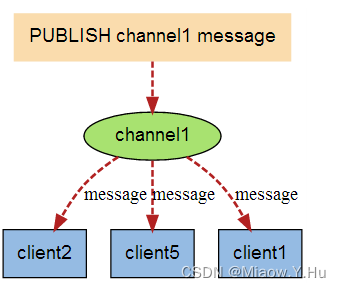
下边跟着我一起来实现一个Redis的发布订阅小案例吧:
案例实现
引入相关依赖
<dependency> <groupId>org.springframework.bootgroupId> <artifactId>spring-boot-starter-webartifactId> dependency> <dependency> <groupId>org.springframework.bootgroupId> <artifactId>spring-boot-starter-data-redisartifactId> dependency> <dependency> <groupId>org.apache.commonsgroupId> <artifactId>commons-pool2artifactId> dependency> <dependency> <groupId>org.springframework.bootgroupId> <artifactId>spring-boot-starter-actuatorartifactId> dependency> <dependency> <groupId>org.projectlombokgroupId> <artifactId>lombokartifactId> <scope>providedscope> dependency> <dependency> <groupId>org.springframework.bootgroupId> <artifactId>spring-boot-starter-testartifactId> <scope>testscope> dependency>- 1
- 2
- 3
- 4
- 5
- 6
- 7
- 8
- 9
- 10
- 11
- 12
- 13
- 14
- 15
- 16
- 17
- 18
- 19
- 20
- 21
- 22
- 23
- 24
- 25
- 26
- 27
- 28
- 29
- 30
- 31
之后在application.properties配置相关连接Redis的相关属性
spring.redis.host=localhost spring.redis.port=6379 spring.redis.lettuce.pool.max-idle=8 spring.redis.lettuce.pool.max-active=8 spring.redis.lettuce.pool.max-wait=-1ms spring.redis.lettuce.pool.min-idle=0 spring.redis.lettuce.shutdown-timeout=100ms server.port=7764- 1
- 2
- 3
- 4
- 5
- 6
- 7
- 8
- 9
- 10
发布类
接下来我们需要创建一个发布类,用于发布消息到Redis的指导的频道上,可以使用
RedisTemplate或者StringRedisTemplate来实现。import org.springframework.data.redis.core.StringRedisTemplate; import org.springframework.stereotype.Component; @Component public class RedisPublisher { private final StringRedisTemplate redisTemplate; public RedisPublisher(StringRedisTemplate redisTemplate) { this.redisTemplate = redisTemplate; } public void publish(String channel, String message) { redisTemplate.convertAndSend(channel, message); } }- 1
- 2
- 3
- 4
- 5
- 6
- 7
- 8
- 9
- 10
- 11
- 12
- 13
- 14
- 15
- 16
订阅消息类
订阅者类:创建一个订阅者类,用于订阅Redis的指定频道并处理接收到的消息。可以使用MessageListener或者ChannelTopic来实现。以下是一个示例:
import org.springframework.data.redis.connection.Message; import org.springframework.data.redis.connection.MessageListener; import org.springframework.stereotype.Component; @Component public class RedisSubscriber implements MessageListener { @Override public void onMessage(Message message, byte[] pattern) { String channel = new String(message.getChannel()); String messageBody = new String(message.getBody()); System.out.println("Received message: " + messageBody + " from channel: " + channel); // 处理接收到的消息 } }- 1
- 2
- 3
- 4
- 5
- 6
- 7
- 8
- 9
- 10
- 11
- 12
- 13
- 14
- 15
配置我们的发布订阅功能
配置发布订阅功能:在你的Spring Boot项目中,配置Redis的发布订阅功能。
import org.springframework.context.annotation.Bean; import org.springframework.context.annotation.Configuration; import org.springframework.data.redis.connection.RedisConnectionFactory; import org.springframework.data.redis.listener.ChannelTopic; import org.springframework.data.redis.listener.RedisMessageListenerContainer; import org.springframework.data.redis.listener.adapter.MessageListenerAdapter; @Configuration public class RedisConfig { @Bean public MessageListenerAdapter messageListenerAdapter(RedisSubscriber redisSubscriber) { return new MessageListenerAdapter(redisSubscriber); } @Bean public RedisMessageListenerContainer redisMessageListenerContainer( RedisConnectionFactory connectionFactory, MessageListenerAdapter messageListenerAdapter) { RedisMessageListenerContainer container = new RedisMessageListenerContainer(); container.setConnectionFactory(connectionFactory); container.addMessageListener(messageListenerAdapter, new ChannelTopic("miaow")); return container; } }- 1
- 2
- 3
- 4
- 5
- 6
- 7
- 8
- 9
- 10
- 11
- 12
- 13
- 14
- 15
- 16
- 17
- 18
- 19
- 20
- 21
- 22
- 23
- 24
- 25
在上面的示例中,我们创建了一个
RedisMessageListenerContainer来监听Redis的指定频道,使用MessageListenerAdapter来适配订阅者类。你需要将miaow替换为你实际使用的频道名称。使用发布者发布消息
使用发布者发布消息:在你的代码中,可以使用发布者类来发布消息到指定的频道。
import org.springframework.beans.factory.annotation.Autowired; import org.springframework.web.bind.annotation.PostMapping; import org.springframework.web.bind.annotation.RequestBody; import org.springframework.web.bind.annotation.RestController; @RestController public class PublishController { private final RedisPublisher redisPublisher; @Autowired public PublishController(RedisPublisher redisPublisher) { this.redisPublisher = redisPublisher; } @PostMapping("/publish") public void publishMessage(@RequestBody String message) { redisPublisher.publish("miaow", message); } }- 1
- 2
- 3
- 4
- 5
- 6
- 7
- 8
- 9
- 10
- 11
- 12
- 13
- 14
- 15
- 16
- 17
- 18
- 19
- 20
- 21
在上面的示例中,我们创建了一个
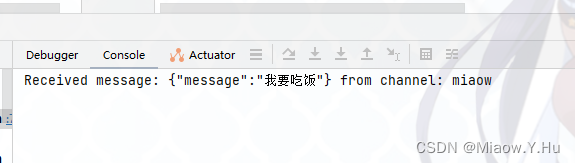
RESTful接口/publish,通过POST请求来发布消息到指定的频道。你需要将miaow替换为你实际使用的频道名称。这样,当你调用/publish接口时,消息将被发布到Redis的指定频道,并由订阅者类接收和处理。

-
-
相关阅读:
关于波兰式、逆波兰式
局域网如何进行内网连接和外网连接
【服务发现与配置】Consul特性及搭建
深度学习知识点:循环神经网络(RNN)、长短期记忆网络(LSTM)、门控循环单元(GRU)
疫情反复,如何轻松居家办公?——快解析内网穿透
mysql表中删除重复记录,只保留一条记录的操作
一本通1072;鸡尾酒疗法
Ubuntu系统下使用宝塔面板实现一键搭建Z-Blog个人博客的方法和流程
C++ 之map,set,为什么不用数组代替呢?
JS模块化——CommonJS AMD CMD UMD ES6 Module 比较
- 原文地址:https://blog.csdn.net/qq_45922256/article/details/134446979
