• 虚幻C++ day5


    角色状态的常见机制

    创建角色状态设置到UI上

    • 在MainPlayer.h中新建血量,最大血量,耐力,最大耐力,金币变量,作为角色的状态
    	//主角状态
    	UPROPERTY(EditDefaultsOnly, BlueprintReadOnly, Category = "Playe Stats")
    	float Health;
    	UPROPERTY(EditAnywhere, BlueprintReadOnly, Category = "Playe Stats")
    	float MaxHealth;
    	UPROPERTY(EditDefaultsOnly, BlueprintReadOnly, Category = "Playe Stats")
    	float Stamina;
    	UPROPERTY(EditAnywhere, BlueprintReadOnly, Category = "Playe Stats")
    	float  MaxStamina;
    	UPROPERTY(EditAnywhere, BlueprintReadOnly, Category = "Playe Stats")
    	int Coins;
    
    • 1
    • 2
    • 3
    • 4
    • 5
    • 6
    • 7
    • 8
    • 9
    • 10
    • 11
    //初始化角色状态
    MaxHealth = 100.f;
    Health = MaxHealth;
    MaxStamina = 200.f;
    Stamina = MaxStamina;
    Coins = 0;
    
    • 1
    • 2
    • 3
    • 4
    • 5
    • 6
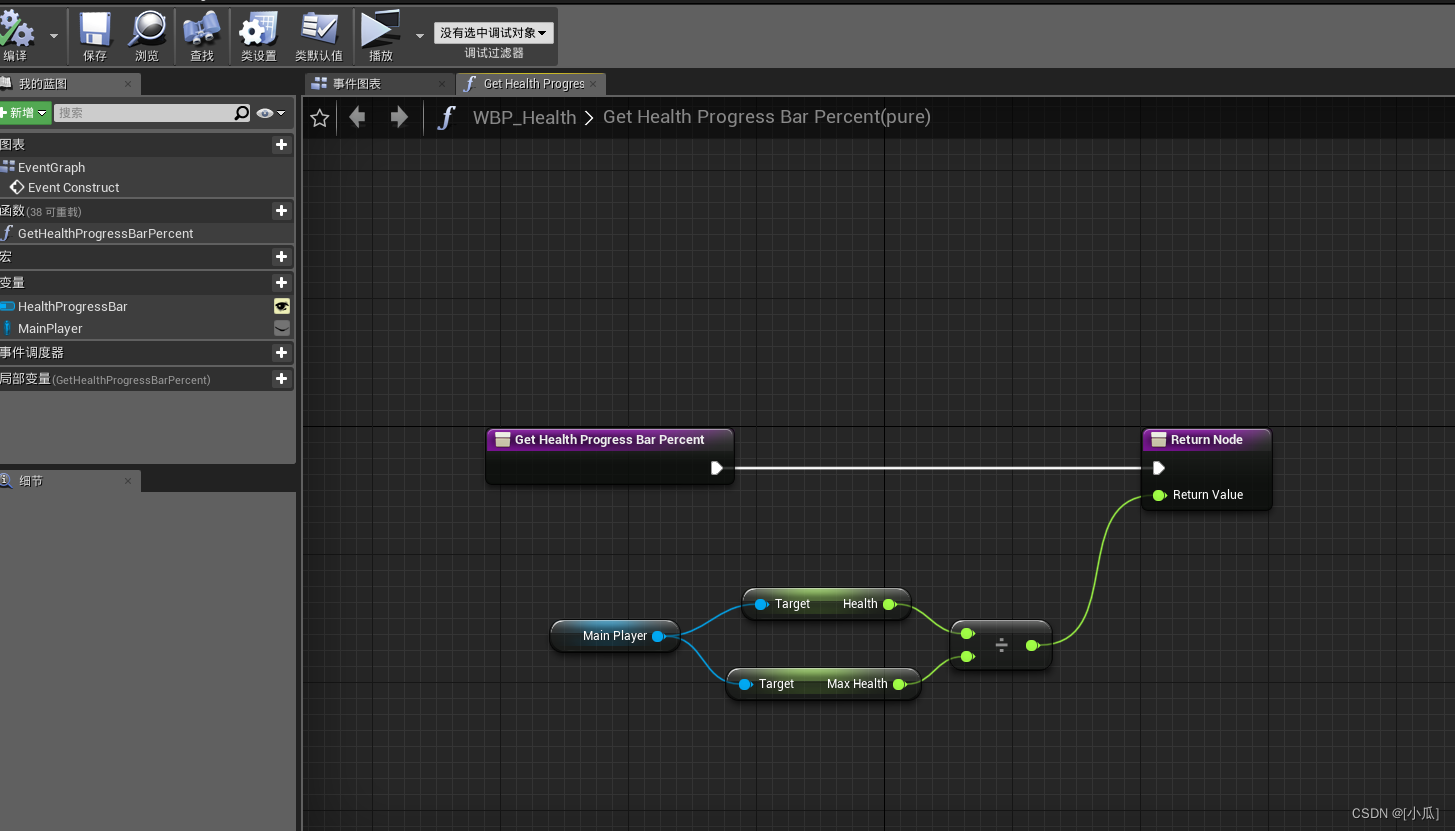
    • 然后我们需要去血量与耐力的UI蓝图中去实时更新present(这个是采用的比例)
    • 思路:因为这些UI都是用在MainPlayer中,我们在蓝图中获取MianPlayer的引用,然后实例化,这样我们每次用到这个UI的时候都会去实例化MainPlayer,然后present绑定个函数用来实时同步present值(状态值除以最大状态值)
      在这里插入图片描述
      在这里插入图片描述
      在这里插入图片描述
    • Stamina UI也是如此,运行结果
      在这里插入图片描述

    添加状态更新函数

    • 添加三个函数,用来改变血量、耐力、金币的值

    MainPlayer.h

    // Fill out your copyright notice in the Description page of Project Settings.
    
    #pragma once
    
    #include "CoreMinimal.h"
    #include "GameFramework/Character.h"
    #include "MainPlayer.generated.h"
    
    UCLASS()
    class UEGAME_API AMainPlayer : public ACharacter
    {
    	GENERATED_BODY()
    
    public:
    	// Sets default values for this character's properties
    	AMainPlayer();
    
    	//新建一个SpringArm
    	UPROPERTY(visibleAnywhere,BlueprintReadOnly)
    	class USpringArmComponent* SpringArm;
    	//新建一个Camera
    	UPROPERTY(visibleAnywhere, BlueprintReadOnly)
    	class UCameraComponent* FollowCamera;
    
    	
    	float BaseTurnRate;		//使用键盘X转向的速率
    	float BaseLookUpRate;	//使用键盘Y转向的速率
    
    	//主角状态
    	UPROPERTY(EditDefaultsOnly, BlueprintReadOnly, Category = "Playe State")
    	float Health;
    	UPROPERTY(EditAnywhere, BlueprintReadOnly, Category = "Playe State")
    	float MaxHealth;
    	UPROPERTY(EditDefaultsOnly, BlueprintReadOnly, Category = "Playe State")
    	float Stamina;
    	UPROPERTY(EditAnywhere, BlueprintReadOnly, Category = "Playe State")
    	float  MaxStamina;
    	UPROPERTY(EditAnywhere, BlueprintReadOnly, Category = "Playe State")
    	int Coins;


    protected:
    	// Called when the game starts or when spawned
    	virtual void BeginPlay() override;
    
    public:	
    	// Called every frame
    	virtual void Tick(float DeltaTime) override;
    
    	// Called to bind functionality to input
    	virtual void SetupPlayerInputComponent(class UInputComponent* PlayerInputComponent) override;
    
    	//重新Character类中的Jump方法
    	void Jump() override;
    
    	void MoveForward(float value);
    	void MoveRight(float value);
    
    	void Turn(float Value);
    	void LookUp(float Value);
    
    	void TurnRate(float Rate);
    	void LookUpRate(float Rate);
    
    	//改变状态
    	void AddHealth(float value);
    	void AddStamina(float value);
    	void AddCoin(float value);
    };
    
    • 1
    • 2
    • 3
    • 4
    • 5
    • 6
    • 7
    • 8
    • 9
    • 10
    • 11
    • 12
    • 13
    • 14
    • 15
    • 16
    • 17
    • 18
    • 19
    • 20
    • 21
    • 22
    • 23
    • 24
    • 25
    • 26
    • 27
    • 28
    • 29
    • 30
    • 31
    • 32
    • 33
    • 34
    • 35
    • 36
    • 37
    • 38
    • 39
    • 40
    • 41
    • 42
    • 43
    • 44
    • 45
    • 46
    • 47
    • 48
    • 49
    • 50
    • 51
    • 52
    • 53
    • 54
    • 55
    • 56
    • 57
    • 58
    • 59
    • 60
    • 61
    • 62
    • 63
    • 64
    • 65
    • 66
    • 67
    • 68
    • 69
    • 70

    MainPlayer.cpp

    // Fill out your copyright notice in the Description page of Project Settings.
    
    
    #include "MainPlayer.h"
    #include "GameFramework/SpringArmComponent.h"
    #include "Camera/CameraComponent.h"
    #include "Components/CapsuleComponent.h"
    #include "Components/InputComponent.h"
    #include "GameFramework/PlayerController.h"
    #include "GameFramework/CharacterMovementComponent.h"
    
    // Sets default values
    AMainPlayer::AMainPlayer()
    {
     	// Set this character to call Tick() every frame.  You can turn this off to improve performance if you don't need it.
    	PrimaryActorTick.bCanEverTick = true;
    
    	SpringArm = CreateDefaultSubobject<USpringArmComponent>(TEXT("SpringArm"));
    	SpringArm->SetupAttachment(GetRootComponent());
    	//设置SPringArm无碰撞臂长
    	SpringArm->TargetArmLength = 600.f;
    	SpringArm->bUsePawnControlRotation = true;//硬编码SpringArm继承controlller旋转为真
    
    	FollowCamera = CreateDefaultSubobject<UCameraComponent>(TEXT("FollowCamera"));
    	FollowCamera->SetupAttachment(SpringArm, NAME_None);
    	FollowCamera->bUsePawnControlRotation = false;//硬编码FollowCamera继承controlller旋转为假
    
    	//设置胶囊体的默认宽高
    	GetCapsuleComponent()->SetCapsuleSize(35.f, 100.f);
    
    	//对Character的Pawn进行硬编码
    	bUseControllerRotationPitch = false;
    	bUseControllerRotationYaw = false;
    	bUseControllerRotationRoll = false;
    
    	//硬编码orient Rotation to Movement,给个默认转向速率
    	GetCharacterMovement()->bOrientRotationToMovement = true;
    	GetCharacterMovement()->RotationRate = FRotator(0.f, 500.f, 0.f);
    
    	//设置跳跃初始值与在空中的坠落时横向运动控制量
    	GetCharacterMovement()->JumpZVelocity = 600.f;
    	GetCharacterMovement()->AirControl = 0.15f;
    
    	//给键盘控制转向的速率变量赋初值
    	BaseTurnRate = 21.f;
    	BaseLookUpRate = 21.f;
    
    	//初始化角色状态
    	MaxHealth = 100.f;
    	Health = MaxHealth;
    	MaxStamina = 200.f;
    	Stamina = MaxStamina;
    	Coins = 0;
    }
    
    // Called when the game starts or when spawned
    void AMainPlayer::BeginPlay()
    {
    	Super::BeginPlay();
    	
    }
    
    // Called every frame
    void AMainPlayer::Tick(float DeltaTime)
    {
    	Super::Tick(DeltaTime);
    
    }
    
    // Called to bind functionality to input
    void AMainPlayer::SetupPlayerInputComponent(UInputComponent* PlayerInputComponent)
    {
    	Super::SetupPlayerInputComponent(PlayerInputComponent);
    	//检查PlayerInputComponent指针,check函数只能在这使用
    	check(PlayerInputComponent);
    
    	//绑定跳跃轴映射事件
    	PlayerInputComponent->BindAction("Jump", IE_Pressed, this, &AMainPlayer::Jump);//按下空格
    	PlayerInputComponent->BindAction("Jump", IE_Released, this, &ACharacter::StopJumping);//抬起空格
    
    	//绑定移动轴映射事件
    	PlayerInputComponent->BindAxis("MoveForward", this, &AMainPlayer::MoveForward);
    	PlayerInputComponent->BindAxis("MoveRight", this, &AMainPlayer::MoveRight);
    
    	//绑定Controller控制器去管理视角旋转
    	PlayerInputComponent->BindAxis("Turn", this, &AMainPlayer::Turn);
    	PlayerInputComponent->BindAxis("LookUp", this, &AMainPlayer::LookUp);
    
    	//绑定键盘鼠标轴映射事件
    	PlayerInputComponent->BindAxis("TurnRate", this, &AMainPlayer::TurnRate);
    	PlayerInputComponent->BindAxis("LookUpRate", this, &AMainPlayer::LookUpRate);
    
    }
    
    void AMainPlayer::Jump()
    {
    	//继承父类的方法
    	Super::Jump();
    }
    
    void AMainPlayer::MoveForward(float value)
    {
    	if (Controller != nullptr && value != 0.f)
    	{
    		//获取到Control旋转
    		FRotator Rotation = Controller->GetControlRotation();
    		//转向只关注水平Yaw方向,因此置0防止影响
    		FRotator YowRotation = FRotator(0.0f, Rotation.Yaw, 0.0f);
    		//获取相机(鼠标控制器的朝向),并且朝这个轴的方向移动
    		FVector Direction = FRotationMatrix(YowRotation).GetUnitAxis(EAxis::X);
    		AddMovementInput(Direction, value);
    	}
    
    }
    
    void AMainPlayer::MoveRight(float value)
    {
    	if (Controller != nullptr && value != 0.f)
    	{
    		//获取到Controller旋转
    		FRotator Rotation = Controller->GetControlRotation();
    		//转向只关注水平Yaw方向,因此置0防止影响
    		FRotator YowRotation = FRotator(0.0f, Rotation.Yaw, 0.0f);
    		//获取相机(鼠标控制器的朝向),并且朝这个轴的方向移动
    		FVector Direction = FRotationMatrix(YowRotation).GetUnitAxis(EAxis::Y);
    		AddMovementInput(Direction, value);
    	}
    }
    
    void AMainPlayer::Turn(float Value)
    {
    	if (Value != 0.f)
    	{
    		AddControllerYawInput(Value);
    	}
    	
    }
    
    void AMainPlayer::LookUp(float Value)
    {
    	//UE_LOG(LogTemp, Warning, TEXT("%f"), GetControlRotation().Pitch);
    	// 
    	//控制视角
    	if (GetControlRotation().Pitch < 270.f && GetControlRotation().Pitch >180.f && Value > 0.f)
    	{
    		return;
    	}
    	else if (GetControlRotation().Pitch < 180.f && GetControlRotation().Pitch >45.f && Value < 0.f)
    	{
    		return;
    	}
    	AddControllerPitchInput(Value);
    }
    
    void AMainPlayer::TurnRate(float Rate)
    {
    	//要乘以一个DeltaTime这样就可以避免高帧底帧差值问题
    	float Value = Rate * BaseTurnRate * GetWorld()->GetDeltaSeconds();
    	if (Value != 0.f)
    	{
    		AddControllerYawInput(Value);
    	}
    }
    
    void AMainPlayer::LookUpRate(float Rate)
    {
    	//要乘以一个DeltaTime这样就可以避免高帧底帧差值问题
    	float Value = Rate * BaseLookUpRate * GetWorld()->GetDeltaSeconds();
    	//控制视角
    	if (GetControlRotation().Pitch < 270.f && GetControlRotation().Pitch >180.f && Value > 0.f)
    	{
    		return;
    	}
    	else if (GetControlRotation().Pitch < 180.f && GetControlRotation().Pitch >45.f && Value < 0.f)
    	{
    		return;
    	}
    	AddControllerPitchInput(Value);
    
    }
    
    void AMainPlayer::AddHealth(float value)
    {
    	Health = FMath::Clamp(Health + value, 0.f, MaxHealth);
    }
    
    void AMainPlayer::AddStamina(float value)
    {
    	Stamina = FMath::Clamp(Stamina + value, 0.f, MaxStamina);
    }
    
    void AMainPlayer::AddCoin(float value)
    {
    	Coins += value;
    }
    
    • 1
    • 2
    • 3
    • 4
    • 5
    • 6
    • 7
    • 8
    • 9
    • 10
    • 11
    • 12
    • 13
    • 14
    • 15
    • 16
    • 17
    • 18
    • 19
    • 20
    • 21
    • 22
    • 23
    • 24
    • 25
    • 26
    • 27
    • 28
    • 29
    • 30
    • 31
    • 32
    • 33
    • 34
    • 35
    • 36
    • 37
    • 38
    • 39
    • 40
    • 41
    • 42
    • 43
    • 44
    • 45
    • 46
    • 47
    • 48
    • 49
    • 50
    • 51
    • 52
    • 53
    • 54
    • 55
    • 56
    • 57
    • 58
    • 59
    • 60
    • 61
    • 62
    • 63
    • 64
    • 65
    • 66
    • 67
    • 68
    • 69
    • 70
    • 71
    • 72
    • 73
    • 74
    • 75
    • 76
    • 77
    • 78
    • 79
    • 80
    • 81
    • 82
    • 83
    • 84
    • 85
    • 86
    • 87
    • 88
    • 89
    • 90
    • 91
    • 92
    • 93
    • 94
    • 95
    • 96
    • 97
    • 98
    • 99
    • 100
    • 101
    • 102
    • 103
    • 104
    • 105
    • 106
    • 107
    • 108
    • 109
    • 110
    • 111
    • 112
    • 113
    • 114
    • 115
    • 116
    • 117
    • 118
    • 119
    • 120
    • 121
    • 122
    • 123
    • 124
    • 125
    • 126
    • 127
    • 128
    • 129
    • 130
    • 131
    • 132
    • 133
    • 134
    • 135
    • 136
    • 137
    • 138
    • 139
    • 140
    • 141
    • 142
    • 143
    • 144
    • 145
    • 146
    • 147
    • 148
    • 149
    • 150
    • 151
    • 152
    • 153
    • 154
    • 155
    • 156
    • 157
    • 158
    • 159
    • 160
    • 161
    • 162
    • 163
    • 164
    • 165
    • 166
    • 167
    • 168
    • 169
    • 170
    • 171
    • 172
    • 173
    • 174
    • 175
    • 176
    • 177
    • 178
    • 179
    • 180
    • 181
    • 182
    • 183
    • 184
    • 185
    • 186
    • 187
    • 188
    • 189
    • 190
    • 191
    • 192
    • 193
    • 194
    • 195

    创建可交互物体的基类

    • 需求:这个可交互物体,应该可以播放粒子特效,所以我们需要粒子系统,然后有静态网格表示这个物体,作为基类,我们可以把所有的要求都写入里面,然后到时候创建子类继承来重写需求
    • 定义一个球形的触发器组件,静态网格,粒子组件与粒子系统,声音资源,进行多播委托事件,虚写多播委托函数,方便到时候子类继承重写
    • 可以自定义一下这个物体的旋转和碰撞类别
    • #include "Components/SphereComponent.h":球形碰撞器的头文件
    • #include "Particles/ParticleSystemComponent.h":粒子系统的头文件

    InteroperableItem.h

    // Fill out your copyright notice in the Description page of Project Settings.
    
    #pragma once
    
    #include "CoreMinimal.h"
    #include "GameFramework/Actor.h"
    #include "InteroperableItem.generated.h"
    
    UCLASS()
    class UEGAME_API AInteroperableItem : public AActor
    {
    	GENERATED_BODY()
    	
    public:	
    	// Sets default values for this actor's properties
    	AInteroperableItem();
    
    	//球形触发器
    	UPROPERTY(VisibleAnywhere, BlueprintReadWrite)
    	class USphereComponent* TriggerVolume;
    
    	UPROPERTY(VisibleAnywhere, BlueprintReadWrite)
    	class UStaticMeshComponent* DisplayMesh;
    
    	//粒子组件
    	UPROPERTY(VisibleAnywhere, BlueprintReadWrite)
    	class UParticleSystemComponent* ParticleEffectsComponent;
    
    	//粒子资源
    	UPROPERTY(EditAnywhere, BlueprintReadWrite, Category = "Interoperable Item|Particles")
    	class UParticleSystem* Particle;
    
    	UPROPERTY(EditAnywhere, BlueprintReadWrite, Category = "Interoperable Item|Sounds")
    	class USoundCue* Sound;
    
    	UPROPERTY(EditAnywhere, BlueprintReadWrite, Category = "Interoperable Item|Properties")
    	bool bRotate;
    
    	UPROPERTY(EditAnywhere, BlueprintReadWrite, Category = "Interoperable Item|Properties")
    	float RotationRate;  
    protected:
    	// Called when the game starts or when spawned
    	virtual void BeginPlay() override;
    
    public:	
    	// Called every frame
    	virtual void Tick(float DeltaTime) override;
    
    	//自定义AddDynamic绑定的触发器函数
    	UFUNCTION()
    	virtual void OnOverlapBegin(UPrimitiveComponent* OverlappedComponent, AActor* OtherActor, UPrimitiveComponent* OtherComp, int32 OtherBodyIndex, bool bFromSweep, const FHitResult& SweepResult);
    	UFUNCTION()
    	virtual void OnOverlapEnd(UPrimitiveComponent* OverlappedComponent, AActor* OtherActor, UPrimitiveComponent* OtherComp, int32 OtherBodyIndex);
    	
    };
    
    • 1
    • 2
    • 3
    • 4
    • 5
    • 6
    • 7
    • 8
    • 9
    • 10
    • 11
    • 12
    • 13
    • 14
    • 15
    • 16
    • 17
    • 18
    • 19
    • 20
    • 21
    • 22
    • 23
    • 24
    • 25
    • 26
    • 27
    • 28
    • 29
    • 30
    • 31
    • 32
    • 33
    • 34
    • 35
    • 36
    • 37
    • 38
    • 39
    • 40
    • 41
    • 42
    • 43
    • 44
    • 45
    • 46
    • 47
    • 48
    • 49
    • 50
    • 51
    • 52
    • 53
    • 54
    • 55

    InteroperableItem.cpp

    // Fill out your copyright notice in the Description page of Project Settings.
    
    
    #include "InteroperableItem.h"
    #include "Components/SphereComponent.h"
    #include "Components/StaticMeshComponent.h"
    #include "Particles/ParticleSystemComponent.h"
    // Sets default values
    AInteroperableItem::AInteroperableItem()
    {
     	// Set this actor to call Tick() every frame.  You can turn this off to improve performance if you don't need it.
    	PrimaryActorTick.bCanEverTick = true;
    	TriggerVolume = CreateDefaultSubobject<USphereComponent>(TEXT("TriggerVolume"));
    	RootComponent = TriggerVolume;
    
    	//设置TriggerVolume碰撞的硬编码
    	TriggerVolume->SetCollisionEnabled(ECollisionEnabled::QueryOnly);//设置碰撞类型
    	TriggerVolume->SetCollisionObjectType(ECollisionChannel::ECC_WorldStatic);//设置对象移动时其应视为某种物体
    	TriggerVolume->SetCollisionResponseToAllChannels(ECollisionResponse::ECR_Ignore);//设置所有的碰撞响应为忽略
    	TriggerVolume->SetCollisionResponseToChannel(ECollisionChannel::ECC_Pawn, ECollisionResponse::ECR_Overlap);//设置Pawn碰撞响应为重叠
    
    
    	DisplayMesh = CreateDefaultSubobject<UStaticMeshComponent>(TEXT("DisplayMesh"));
    	DisplayMesh->SetupAttachment(GetRootComponent());
    
    	ParticleEffectsComponent = CreateDefaultSubobject<UParticleSystemComponent>(TEXT("ParticleEffects"));
    	ParticleEffectsComponent->SetupAttachment(GetRootComponent());
    	
    	bRotate = true;
    	RotationRate = 45.f;
    }
    
    // Called when the game starts or when spawned
    void AInteroperableItem::BeginPlay()
    {
    	Super::BeginPlay();
    	
    	TriggerVolume->OnComponentBeginOverlap.AddDynamic(this, &AInteroperableItem::OnOverlapBegin);
    	TriggerVolume->OnComponentEndOverlap.AddDynamic(this, &AInteroperableItem::OnOverlapEnd);
    
    }
    
    // Called every frame
    void AInteroperableItem::Tick(float DeltaTime)
    {
    	Super::Tick(DeltaTime);
    	if (bRotate)
    	{
    		FRotator rotator = GetActorRotation();
    		rotator.Yaw += RotationRate * DeltaTime;
    		SetActorRotation(rotator);
    	}
    }
    
    void AInteroperableItem::OnOverlapBegin(UPrimitiveComponent* OverlappedComponent, AActor* OtherActor, UPrimitiveComponent* OtherComp, int32 OtherBodyIndex, bool bFromSweep, const FHitResult& SweepResult)
    {
    }
    
    void AInteroperableItem::OnOverlapEnd(UPrimitiveComponent* OverlappedComponent, AActor* OtherActor, UPrimitiveComponent* OtherComp, int32 OtherBodyIndex)
    {
    }
    
    • 1
    • 2
    • 3
    • 4
    • 5
    • 6
    • 7
    • 8
    • 9
    • 10
    • 11
    • 12
    • 13
    • 14
    • 15
    • 16
    • 17
    • 18
    • 19
    • 20
    • 21
    • 22
    • 23
    • 24
    • 25
    • 26
    • 27
    • 28
    • 29
    • 30
    • 31
    • 32
    • 33
    • 34
    • 35
    • 36
    • 37
    • 38
    • 39
    • 40
    • 41
    • 42
    • 43
    • 44
    • 45
    • 46
    • 47
    • 48
    • 49
    • 50
    • 51
    • 52
    • 53
    • 54
    • 55
    • 56
    • 57
    • 58
    • 59
    • 60
    • 61

    创建可交互基类的子类爆炸物

    • 创建一个继承自Interoperable类的子类Explosive
    • 新建一个伤害值,重写OnOverlapBegin与OnOverlapEnd事件函数,在OnOverlapBegin中判断角色是否触发到炸弹,然后生成发射器播放粒子效果与声音,之后销毁
    AExplosiveItem::AExplosiveItem()
    {
    	Damage = 20.f;
    }
    void AExplosiveItem::OnOverlapBegin(UPrimitiveComponent* OverlappedComponent, AActor* OtherActor, UPrimitiveComponent* OtherComp, int32 OtherBodyIndex, bool bFromSweep, const FHitResult& SweepResult)
    {
    	Super::OnOverlapBegin(OverlappedComponent, OtherActor, OtherComp, OtherBodyIndex, bFromSweep, SweepResult);
    	
    	if (OtherActor)
    	{
    		AMainPlayer* Player = Cast<AMainPlayer>(OtherActor);
    		if (Player)
    		{
    			//防御性编程
    			if (Particle)
    			{
    				//生成发射器
    				UGameplayStatics::SpawnEmitterAtLocation(this, Particle, GetActorLocation(), FRotator(0.f), true);
    			}
    			if (Sound)
    			{
    				UGameplayStatics::PlaySound2D(this, Sound);
    			}
    			//销毁
    			Destroy();
    		}
    	}
    }
    
    • 1
    • 2
    • 3
    • 4
    • 5
    • 6
    • 7
    • 8
    • 9
    • 10
    • 11
    • 12
    • 13
    • 14
    • 15
    • 16
    • 17
    • 18
    • 19
    • 20
    • 21
    • 22
    • 23
    • 24
    • 25
    • 26
    • 27
    • 28
    • 运行结果
      在这里插入图片描述
      在这里插入图片描述

    爆炸物对玩家的伤害施加

    • 我们采用UE中内置的直接伤害附加的功能,在Explosive类中调用UGameplayStatics::ApplyDamage()函数传递伤害值,在MainPlayer类中重写TakeDamage方法,进行接收伤害并对玩家施加
    • UGameplayStatics::ApplyDamage():源码函数分析
    • 该函数接收五个参数:
      • DamagedActor: 受损的 actor。
      • BaseDamage: 基础损害值。
      • EventInstigator: 事件发起者,通常是施加损害的对象。
      • DamageCauser: 直接导致损害的 actor。
      • DamageTypeClass: 损害类型的类。
      • 该函数首先检查 DamagedActor是否存在以及 BaseDamage是否不为零。如果是这样,则继续执行;否则,返回零表示未造成任何损害。 接下来,设置损害事件 (FDamageEvent)并传入有效的损害类型类 (TSubclassOf 类型)。如果提供了 DamageTypeClass参数,则使用该类;否则,默认使用 UDamageType类。 最后,调用 DamagedActor 的 TakeDamage方法,将基础损害值(BaseDamage) 和损害事件 (DamageEvent)传入,并返回造成的总损害。 整个函数最终实现的功能是将基础损害值施加到指定的受损actor上,并返回造成的总损害。
    float UGameplayStatics::ApplyDamage(AActor* DamagedActor, float BaseDamage, AController* EventInstigator, AActor* DamageCauser, TSubclassOf<UDamageType> DamageTypeClass)
    {
    	if ( DamagedActor && (BaseDamage != 0.f) )
    	{
    		// make sure we have a good damage type
    		TSubclassOf<UDamageType> const ValidDamageTypeClass = DamageTypeClass ? DamageTypeClass : TSubclassOf<UDamageType>(UDamageType::StaticClass());
    		FDamageEvent DamageEvent(ValidDamageTypeClass);
    
    		return DamagedActor->TakeDamage(BaseDamage, DamageEvent, EventInstigator, DamageCauser);
    	}
    
    	return 0.f;
    }
    
    • 1
    • 2
    • 3
    • 4
    • 5
    • 6
    • 7
    • 8
    • 9
    • 10
    • 11
    • 12
    • 13
    • TakeDamage():源码分析
    • 该方法接收四个参数:
      • Damage: 损害值。
      • DamageEvent: 损害事件。
      • EventInstigator: 事件发起者。
      • DamageCauser: 直接导致损害的 actor。
      • 方法首先调用 ShouldTakeDamage 成员方法以确定 pawn 是否应该受到损害。如果返回 false,则方法直接返回零表示未造成任何损害。 然后,方法调用基类 Super::TakeDamage 方法来处理损害,并将传入的所有参数都传递给它。在此过程中,损害值会被修改以反映抗性等因素的影响。 最后,方法响应所受损害。如果 event instigator存在并且与 pawn的控制器不同,则更新最后一个击中者为event instigator。此外,无论是否存在event instigator 或 event instigator是否与pawn控制器相同,都会进行进一步处理,以确保 pawn在遭受损害后能够做出相应的反应(如播放动画或发出声音)。
    float APawn::TakeDamage(float Damage, FDamageEvent const& DamageEvent, AController* EventInstigator, AActor* DamageCauser)
    {
    	if (!ShouldTakeDamage(Damage, DamageEvent, EventInstigator, DamageCauser))
    	{
    		return 0.f;
    	}
    
    	// do not modify damage parameters after this
    	const float ActualDamage = Super::TakeDamage(Damage, DamageEvent, EventInstigator, DamageCauser);
    
    	// respond to the damage
    	if (ActualDamage != 0.f)
    	{
    		if ( EventInstigator && EventInstigator != Controller )
    		{
    			LastHitBy = EventInstigator;
    		}
    	}
    
    	return ActualDamage;
    }
    
    • 1
    • 2
    • 3
    • 4
    • 5
    • 6
    • 7
    • 8
    • 9
    • 10
    • 11
    • 12
    • 13
    • 14
    • 15
    • 16
    • 17
    • 18
    • 19
    • 20
    • 21
    • Explosive.cpp
    void AExplosiveItem::OnOverlapBegin(UPrimitiveComponent* OverlappedComponent, AActor* OtherActor, UPrimitiveComponent* OtherComp, int32 OtherBodyIndex, bool bFromSweep, const FHitResult& SweepResult)
    {
    	Super::OnOverlapBegin(OverlappedComponent, OtherActor, OtherComp, OtherBodyIndex, bFromSweep, SweepResult);
    	
    	if (OtherActor)
    	{
    		AMainPlayer* Player = Cast<AMainPlayer>(OtherActor);
    		if (Player)
    		{
    			//防御性编程
    			if (Particle)
    			{
    				//生成发射器
    				UGameplayStatics::SpawnEmitterAtLocation(this, Particle, GetActorLocation(), FRotator(0.f), true);
    			}
    			if (Sound)
    			{
    				UGameplayStatics::PlaySound2D(this, Sound);
    			}
    			
    			//传递伤害值
    			UGameplayStatics::ApplyDamage(OtherActor, Damage, nullptr, this, DamageTypeClass);
    
    			//销毁
    			Destroy();
    		}
    	}
    }
    
    • 1
    • 2
    • 3
    • 4
    • 5
    • 6
    • 7
    • 8
    • 9
    • 10
    • 11
    • 12
    • 13
    • 14
    • 15
    • 16
    • 17
    • 18
    • 19
    • 20
    • 21
    • 22
    • 23
    • 24
    • 25
    • 26
    • 27
    • 28
    • MainPlayer.h
    //重写TakeDamage方法
    float TakeDamage(float Damage, struct FDamageEvent const& DamageEvent, AController* EventInstigator, AActor* DamageCauser) override;
    
    • 1
    • 2
    • MainPlayer.cpp
    float AMainPlayer::TakeDamage(float Damage, FDamageEvent const& DamageEvent, AController* EventInstigator, AActor* DamageCauser)
    {
    	if (Health - Damage <= 0.f)
    	{
    		Health = FMath::Clamp(Health - Damage, 0.f, MaxHealth);
    		//TODO Die();
    	}
    	else
    	{
    		Health -= Damage;
    	}
    	return Health;
    }
    
    • 1
    • 2
    • 3
    • 4
    • 5
    • 6
    • 7
    • 8
    • 9
    • 10
    • 11
    • 12
    • 13
    • 在蓝图中选择伤害类型为直接伤害
      在这里插入图片描述

    创建可拾取道具的基类(基础自InteroperableItem)

    • 基本与Explosive子类差不多,只不过可拾取的基类目前只需要碰撞检测与一个提供拾取的共有接口OnPick(蓝图化),这样到时候需求就可以去蓝图中可视化操作

    PickItem.h

    // Fill out your copyright notice in the Description page of Project Settings.
    
    #pragma once
    
    #include "CoreMinimal.h"
    #include "GamePlay/InteroperableItem.h"
    #include "PickItem.generated.h"
    
    /**
     * 
     */
    UCLASS()
    class UEGAME_API APickItem : public AInteroperableItem
    {
    	GENERATED_BODY()
    
    public:
    	APickItem();
    public:
    	
    	void OnOverlapBegin(UPrimitiveComponent* OverlappedComponent, AActor* OtherActor, UPrimitiveComponent* OtherComp, int32 OtherBodyIndex, bool bFromSweep, const FHitResult& SweepResult) override;
    	void OnOverlapEnd(UPrimitiveComponent* OverlappedComponent, AActor* OtherActor, UPrimitiveComponent* OtherComp, int32 OtherBodyIndex) override;
    
    	UFUNCTION(BlueprintImplementEvent, Category = "Pick")
    	void OnPick(class AMainPlayer* Palyer);
    };
    
    
    • 1
    • 2
    • 3
    • 4
    • 5
    • 6
    • 7
    • 8
    • 9
    • 10
    • 11
    • 12
    • 13
    • 14
    • 15
    • 16
    • 17
    • 18
    • 19
    • 20
    • 21
    • 22
    • 23
    • 24
    • 25
    • 26
    • 27

    PickItem.cpp

    // Fill out your copyright notice in the Description page of Project Settings.
    
    
    #include "PickItem.h"
    #include "Kismet/GamePlayStatics.h"
    #include "Characters/Player/MainPlayer.h"
    #include "Sound/SoundCue.h"
    APickItem::APickItem()
    {
    	
    }
    
    void APickItem::OnOverlapBegin(UPrimitiveComponent* OverlappedComponent, AActor* OtherActor, UPrimitiveComponent* OtherComp, int32 OtherBodyIndex, bool bFromSweep, const FHitResult& SweepResult)
    {
    	if (OtherActor)
    	{
    		AMainPlayer* Player = Cast<AMainPlayer>(OtherActor);
    		if (Player)
    		{
    			UGameplayStatics::SpawnEmitterAtLocation(this, Particle, GetActorLocation(), FRotator(0.f), true);
    		}
    		if (Sound)
    		{
    			UGameplayStatics::PlaySound2D(this, Sound);
    		}
    		OnPick(Player);//交给蓝图可视化去处理
    		Destroy();
    	}
    }
    
    void APickItem::OnOverlapEnd(UPrimitiveComponent* OverlappedComponent, AActor* OtherActor, UPrimitiveComponent* OtherComp, int32 OtherBodyIndex)
    {
    
    }
    
    • 1
    • 2
    • 3
    • 4
    • 5
    • 6
    • 7
    • 8
    • 9
    • 10
    • 11
    • 12
    • 13
    • 14
    • 15
    • 16
    • 17
    • 18
    • 19
    • 20
    • 21
    • 22
    • 23
    • 24
    • 25
    • 26
    • 27
    • 28
    • 29
    • 30
    • 31
    • 32
    • 33
    • 34

    创建可拾取道具基类的子类(Blueprint)

    • 创建PickItem蓝图进行MainPlayer的函数调用即可
    • 注意将之前MainPlayer中AddHealth这些函数加上反射
    • MainPlayer.h中的
    	//改变状态
    	UFUNCTION(BlueprintCallable,Category="Player|State")
    	void AddHealth(float value);
    	UFUNCTION(BlueprintCallable, Category = "Player|State")
    	void AddStamina(float value);
    	UFUNCTION(BlueprintCallable, Category = "Player|State")
    	void AddCoin(float value);
    
    • 1
    • 2
    • 3
    • 4
    • 5
    • 6
    • 7
    • 蓝图调用C++编写好的逻辑即可,UI会实时检测更新
      在这里插入图片描述
    • 运行结果
      在这里插入图片描述

    冲刺行为需求

    • 思路1:当耐力值到达一个精疲力尽的状态时,就停止冲刺,所以我们需要在混合空间1D里面将Axis Setting最大速度值从600上升到900,添加9个关键帧将冲刺添加上去
      在这里插入图片描述
    • 思路2:新建四个变量来标识状态,耐力消耗速率,耐力的精疲力尽的状态,奔跑速度与冲刺速度
       //主角状态
    	UPROPERTY(EditDefaultsOnly, BlueprintReadOnly, Category = "Playe State")
    	float Health;
    	UPROPERTY(EditAnywhere, BlueprintReadOnly, Category = "Playe State")
    	float MaxHealth;
    	UPROPERTY(EditDefaultsOnly, BlueprintReadOnly, Category = "Playe State")
    	float Stamina;
    	UPROPERTY(EditAnywhere, BlueprintReadOnly, Category = "Playe State")
    	float MaxStamina;
    	UPROPERTY(EditAnywhere, BlueprintReadWrite, Category = "Playe State")
    	float StaminaConsumeRate;
    	UPROPERTY(EditAnywhere, BlueprintReadWrite, Category = "Playe State", meta = (ClampMin = 0, ClampMax = 1))
    	float ExhaustedStamina;
    	UPROPERTY(EditAnywhere, BlueprintReadOnly, Category = "Playe State")
    	int Coins;
    	UPROPERTY(EditAnywhere, BlueprintReadWrite, Category = "Player State")
    	float RunningSpeed;
    	UPROPERTY(EditAnywhere, BlueprintReadWrite, Category = "Player State")
    	float SprintSpeed;
    
    • 1
    • 2
    • 3
    • 4
    • 5
    • 6
    • 7
    • 8
    • 9
    • 10
    • 11
    • 12
    • 13
    • 14
    • 15
    • 16
    • 17
    • 18
    • 19
    	//初始化角色状态
    	MaxHealth = 100.f;
    	Health = MaxHealth;
    	MaxStamina = 200.f;
    	Stamina = MaxStamina;
    	StaminaConsumeRate = 20.f;
    	ExhaustedStamina = 0.167f;
    	Coins = 0;
    	RunningSpeed = 600.f;
    	SprintSpeed = 900.f;
    
    • 1
    • 2
    • 3
    • 4
    • 5
    • 6
    • 7
    • 8
    • 9
    • 10

    创建枚举类型进行标识

    • 创建枚举用来标识角色的状态
    • 枚举的声明规则
    • UENUM(BlueprintType):幻引擎中的一个宏,用于定义带有蓝图支持的枚举类型,使用此宏定义枚举时,它将在蓝图中可用
    • UMETA(DisplayName = "Normal"):是一个宏,用于设置枚举值的显示名称为 “Normal”。这是为了使枚举值在蓝图或编辑器界面中更加可读和直观。
    UENUM(BlueprintType)
    enum class 类名 : 变量类型
    {
    	变量 UMETA(DisplayName = "你调用时想要显示的名字"),
    	....
    	变量 UMETA(DisplayName = "你调用时想要显示的名字")
    }
    
    • 1
    • 2
    • 3
    • 4
    • 5
    • 6
    • 7
    • MainPlayer.h
    //声明移动状态枚举
    UENUM(BlueprintType)
    enum class EPlayerMovementStatus :uint8
    {
    	EPMS_Normal UMETA(DisplayName = "Normal"),
    	EPMS_Sprinting UMETA(DisplayName = "Sprinting"),
    	EPMS_Dead UMETA(DisplayName = "Dead")
    };
    
    UENUM(BlueprintType)
    enum class EPlayerStaminaStatus :uint8
    {
    	EPSS_Normal UMETA(DisplayName = "Normal"),
    	EPSS_Exhausted UMETA(DisplayName = "Exhausted"),
    	EPSS_ExhaustedRecovering UMETA(DisplayName = "ExhaustedRecovering")
    };
    
    // ```````````````````省略之前的
    UPROPERTY(VisibleAnywhere,BlueprintReadWrite,Category="Player State")
    EPlayerMovementStatus MovementStatus;
    UPROPERTY(VisibleAnywhere,BlueprintReadWrite,Category="Player State")
    EPlayerStaminaStatus StaminaStatus;
    
    • 1
    • 2
    • 3
    • 4
    • 5
    • 6
    • 7
    • 8
    • 9
    • 10
    • 11
    • 12
    • 13
    • 14
    • 15
    • 16
    • 17
    • 18
    • 19
    • 20
    • 21
    • 22
    • MainPlayer.cpp
    	//初始化角色状态
    // ```````````````````省略之前的
    	MovementStatus = EPlayerMovementStatus::EPMS_Normal;
    	StaminaStatus = EPlayerStaminaStatus::EPSS_Normal;
    
    • 1
    • 2
    • 3
    • 4

    使用标识位检测shift状态

    • 新建一个bool变量来监测shift是否按下的状态,新建两个函数用来绑定shift事件映射状态用来判断是否按下shift状态。
    • MainPlayer.h
    	bool bLeftShiftDown;
    //短小精悍
    FORCEINLINE void LeftShiftDown() { bLeftShiftDown = true; }
    FORCEINLINE void LeftShiftUp() { bLeftShiftDown = false; }
    
    • 1
    • 2
    • 3
    • 4
    • MainPlayer.cpp
    	//绑定跳跃轴映射事件
    	PlayerInputComponent->BindAction("Jump", IE_Pressed, this, &AMainPlayer::Jump);//按下空格
    	PlayerInputComponent->BindAction("Jump", IE_Released, this, &ACharacter::StopJumping);//抬起空格
    
    	PlayerInputComponent->BindAction("Sprint", IE_Pressed, this, &AMainPlayer::LeftShiftDown);//按下shift
    	PlayerInputComponent->BindAction("Sprint", IE_Released, this, &AMainPlayer::LeftShiftUp);//抬起shift
    
    • 1
    • 2
    • 3
    • 4
    • 5
    • 6

    冲刺逻辑编写

    • 思路划分:
      • 一、首先我们新建一个设置移动枚举状态的函数处理冲刺与不冲刺的时候character的速度,用于到时候逻辑编写时的状态更换
      • 二、然后我们在Tick中来设计耐力枚举切换的逻辑
      • 三、在EPSS_Normal中判断是否按下shift键,然后判断是否进入了精疲力尽区,逻辑(总耐力 -耐力消耗值 *DeltaTime<=最大耐力值 *耐力消耗速率),这个逻辑就是每帧判断当前的耐力是否到达的精疲力尽区,到达了精疲力尽区首先改变StaminaStatus状态为Exhausted没有进入精疲力尽区Stamina要减去每帧的耐力消耗值,这是必定的,然后移动状态转为Sprint,判断没有进入精疲力尽区,那就恢复Stamina值(可以与耐力消耗值一样),然后把移动状态恢复成Normal状态
      • 四、在EPSS_Exhausted中判断是否还按着shift键,然后判断是否耐力已经到0了如果耐力已经为0,那么我们需要内部编码把shift抬起,此时StaminaStatus状态转换为ExhaustedRecovering状态。然后设置移动状态为Normal如果耐力没有为0,就直接减去当前帧消耗的耐力,没有按着shift键,那就直接将StaminaStatus状态转换为ExhaustedRecovering状态,恢复Stamina值,然后把移动状态恢复成Normal状态
      • 五、在EPSS_ExhaustedRecovering中判断当Stamina值已经大于精疲力尽区时,逻辑((总耐力 +耐力消耗值 *DeltaTime>=最大耐力值 *耐力消耗速率),将StaminaStatus设置为Normal状态,然后Stamina要加上每帧的耐力消耗值,这是必定的,然后抬起shift与移动状态设置为Normal。
        在这里插入图片描述
    //一、首先我们新建一个设置```移动枚举状态的函数```处理冲刺与不冲刺的时候```character```的速度,用于到时候逻辑编写时的状态更换
    void SetMovementStatus(EPlayerMovementStatus Status);
    void AMainPlayer::SetMovementStatus(EPlayerMovementStatus Status)
    {
    	MovementStatus = Status;
    	//切换状态的时候改变移动速度
    	switch (MovementStatus)
    	{
    	case EPlayerMovementStatus::EPMS_Sprinting:
    		GetCharacterMovement()->MaxWalkSpeed = SprintSpeed;
    		break;
    	default:
    		GetCharacterMovement()->MaxWalkSpeed = RunningSpeed;
    		break;
    	}
    }
    //二、然后我们在```Tick```中来设计耐力枚举切换的逻辑
    // Called every frame
    void AMainPlayer::Tick(float DeltaTime)
    {
    	Super::Tick(DeltaTime);
    	switch (StaminaStatus)
    	{
    	case EPlayerStaminaStatus::EPSS_Normal:
    		//当Shift按下
    		if (bLeftShiftDown)
    		{
    			if (Stamina - StaminaConsumeRate * DeltaTime <= MaxStamina * ExhaustedStamina)
    			{
    				StaminaStatus = EPlayerStaminaStatus::EPSS_Exhausted;
    			}
    			//无论是不是精疲力尽状态都要减去当前帧冲刺消耗的耐力
    			Stamina -= StaminaConsumeRate * DeltaTime;
    			SetMovementStatus(EPlayerMovementStatus::EPMS_Sprinting);
    		}
    		else
    		{
    			//当Shift没有按下,恢复耐力
    			Stamina = FMath::Clamp(Stamina + StaminaConsumeRate * DeltaTime, 0.f, MaxStamina);
    			SetMovementStatus(EPlayerMovementStatus::EPMS_Normal);
    		}
    		break;
    	case EPlayerStaminaStatus::EPSS_Exhausted:
    		if (bLeftShiftDown)
    		{
    			//如果耐力已经为0
    			if (Stamina - StaminaConsumeRate * DeltaTime <= 0.f)
    			{
    				//么我们需要内部编码把shift抬起,此时StaminaStatus状态转换为ExhaustedRecovering状态,然后设置移动状态为Normal
    				LeftShiftUp();
    				StaminaStatus = EPlayerStaminaStatus::EPSS_ExhaustedRecovering;	
    				SetMovementStatus(EPlayerMovementStatus::EPMS_Normal);
    			}
    			else
    			{
    				Stamina -= StaminaConsumeRate * DeltaTime;
    			}
    		}
    		else
    		{
    			StaminaStatus = EPlayerStaminaStatus::EPSS_ExhaustedRecovering;
    			Stamina = FMath::Clamp(Stamina + StaminaConsumeRate * DeltaTime, 0.f, MaxStamina);
    			SetMovementStatus(EPlayerMovementStatus::EPMS_Normal);
    		}
    		break;
    	case EPlayerStaminaStatus::EPSS_ExhaustedRecovering:
    		//当恢复大于疲劳区时,StaminaStatus状态为Normal
    		if (Stamina + StaminaConsumeRate * DeltaTime >= MaxStamina * ExhaustedStamina)
    		{
    			StaminaStatus = EPlayerStaminaStatus::EPSS_Normal;
    		}
    		//这状态值肯定是加定了
    		Stamina += StaminaConsumeRate * DeltaTime;
    
    		//抬起shift
    		LeftShiftUp();
    		SetMovementStatus(EPlayerMovementStatus::EPMS_Normal);
    		break;
    	default:
    		break;
    	}
    }
    
    • 1
    • 2
    • 3
    • 4
    • 5
    • 6
    • 7
    • 8
    • 9
    • 10
    • 11
    • 12
    • 13
    • 14
    • 15
    • 16
    • 17
    • 18
    • 19
    • 20
    • 21
    • 22
    • 23
    • 24
    • 25
    • 26
    • 27
    • 28
    • 29
    • 30
    • 31
    • 32
    • 33
    • 34
    • 35
    • 36
    • 37
    • 38
    • 39
    • 40
    • 41
    • 42
    • 43
    • 44
    • 45
    • 46
    • 47
    • 48
    • 49
    • 50
    • 51
    • 52
    • 53
    • 54
    • 55
    • 56
    • 57
    • 58
    • 59
    • 60
    • 61
    • 62
    • 63
    • 64
    • 65
    • 66
    • 67
    • 68
    • 69
    • 70
    • 71
    • 72
    • 73
    • 74
    • 75
    • 76
    • 77
    • 78
    • 79
    • 80
    • 81
    • 82

    耐力消耗殆尽的变色UI

    • 添加一个Appearance的绑定,在蓝图中将编写的Enum进行判断状态然后切换相应颜色
      在这里插入图片描述
      在这里插入图片描述
    • 运行结果
      在这里插入图片描述

    冲刺转弯时角色抖动问题

    • 我们调整一下动画蓝图即可,设置一个区间,比如在0-100走路,500-600奔跑,700-900冲刺,这样设置区别可以避免插值
      在这里插入图片描述

    MainPlayer.h

    // Fill out your copyright notice in the Description page of Project Settings.
    
    #pragma once
    
    #include "CoreMinimal.h"
    #include "GameFramework/Character.h"
    #include "MainPlayer.generated.h"
    
    //声明移动状态枚举
    UENUM(BlueprintType)
    enum class EPlayerMovementStatus :uint8
    {
    	EPMS_Normal UMETA(DisplayName = "Normal"),
    	EPMS_Sprinting UMETA(DisplayName = "Sprinting"),
    	EPMS_Dead UMETA(DisplayName = "Dead")
    };
    
    UENUM(BlueprintType)
    enum class EPlayerStaminaStatus :uint8
    {
    	EPSS_Normal UMETA(DisplayName = "Normal"),
    	EPSS_Exhausted UMETA(DisplayName = "Exhausted"),
    	EPSS_ExhaustedRecovering UMETA(DisplayName = "ExhaustedRecovering")
    };
    
    UCLASS()
    class UEGAME_API AMainPlayer : public ACharacter
    {
    	GENERATED_BODY()
    
    public:
    	// Sets default values for this character's properties
    	AMainPlayer();
    
    	//新建一个SpringArm
    	UPROPERTY(visibleAnywhere,BlueprintReadOnly)
    	class USpringArmComponent* SpringArm;
    	//新建一个Camera
    	UPROPERTY(visibleAnywhere, BlueprintReadOnly)
    	class UCameraComponent* FollowCamera;
    
    	
    	float BaseTurnRate;		//使用键盘X转向的速率
    	float BaseLookUpRate;	//使用键盘Y转向的速率
    
    	//主角状态
    	UPROPERTY(EditDefaultsOnly, BlueprintReadOnly, Category = "Playe State")
    	float Health;
    	UPROPERTY(EditAnywhere, BlueprintReadOnly, Category = "Playe State")
    	float MaxHealth;
    	UPROPERTY(EditDefaultsOnly, BlueprintReadOnly, Category = "Playe State")
    	float Stamina;
    	UPROPERTY(EditAnywhere, BlueprintReadOnly, Category = "Playe State")
    	float MaxStamina;
    	UPROPERTY(EditAnywhere, BlueprintReadWrite, Category = "Playe State")
    	float StaminaConsumeRate;
    	UPROPERTY(EditAnywhere, BlueprintReadWrite, Category = "Playe State", meta = (ClampMin = 0, ClampMax = 1))
    	float ExhaustedStamina;
    	UPROPERTY(EditAnywhere, BlueprintReadOnly, Category = "Playe State")
    	int Coins;
    	UPROPERTY(EditAnywhere, BlueprintReadWrite, Category = "Player State")
    	float RunningSpeed;
    	UPROPERTY(EditAnywhere, BlueprintReadWrite, Category = "Player State")
    	float SprintSpeed;
    	UPROPERTY(VisibleAnywhere,BlueprintReadWrite,Category="Player State")
    	EPlayerMovementStatus MovementStatus;
    	UPROPERTY(VisibleAnywhere,BlueprintReadWrite,Category="Player State")
    	EPlayerStaminaStatus StaminaStatus;
    
    	bool bLeftShiftDown;
    
    protected:
    	// Called when the game starts or when spawned
    	virtual void BeginPlay() override;
    
    public:	
    	// Called every frame
    	virtual void Tick(float DeltaTime) override;
    
    	// Called to bind functionality to input
    	virtual void SetupPlayerInputComponent(class UInputComponent* PlayerInputComponent) override;
    
    	//重新Character类中的Jump方法
    	void Jump() override;
    
    	void MoveForward(float value);
    	void MoveRight(float value);
    
    	void Turn(float Value);
    	void LookUp(float Value);
    
    	void TurnRate(float Rate);
    	void LookUpRate(float Rate);
    
    	//改变状态
    	UFUNCTION(BlueprintCallable,Category="Player|State")
    	void AddHealth(float value);
    	UFUNCTION(BlueprintCallable, Category = "Player|State")
    	void AddStamina(float value);
    	UFUNCTION(BlueprintCallable, Category = "Player|State")
    	void AddCoin(float value);
    
    	//重写TakeDamage方法
    	float TakeDamage(float Damage, struct FDamageEvent const& DamageEvent, AController* EventInstigator, AActor* DamageCauser) override;
    
    	//短小精悍
    	FORCEINLINE void LeftShiftDown() { bLeftShiftDown = true; }
    	FORCEINLINE void LeftShiftUp() { bLeftShiftDown = false; }
    
    	void SetMovementStatus(EPlayerMovementStatus Status);
    };
    
    
    • 1
    • 2
    • 3
    • 4
    • 5
    • 6
    • 7
    • 8
    • 9
    • 10
    • 11
    • 12
    • 13
    • 14
    • 15
    • 16
    • 17
    • 18
    • 19
    • 20
    • 21
    • 22
    • 23
    • 24
    • 25
    • 26
    • 27
    • 28
    • 29
    • 30
    • 31
    • 32
    • 33
    • 34
    • 35
    • 36
    • 37
    • 38
    • 39
    • 40
    • 41
    • 42
    • 43
    • 44
    • 45
    • 46
    • 47
    • 48
    • 49
    • 50
    • 51
    • 52
    • 53
    • 54
    • 55
    • 56
    • 57
    • 58
    • 59
    • 60
    • 61
    • 62
    • 63
    • 64
    • 65
    • 66
    • 67
    • 68
    • 69
    • 70
    • 71
    • 72
    • 73
    • 74
    • 75
    • 76
    • 77
    • 78
    • 79
    • 80
    • 81
    • 82
    • 83
    • 84
    • 85
    • 86
    • 87
    • 88
    • 89
    • 90
    • 91
    • 92
    • 93
    • 94
    • 95
    • 96
    • 97
    • 98
    • 99
    • 100
    • 101
    • 102
    • 103
    • 104
    • 105
    • 106
    • 107
    • 108
    • 109
    • 110
    • 111
    • 112

    MainPlayer.cpp

    // Fill out your copyright notice in the Description page of Project Settings.
    
    
    #include "MainPlayer.h"
    #include "GameFramework/SpringArmComponent.h"
    #include "Camera/CameraComponent.h"
    #include "Components/CapsuleComponent.h"
    #include "Components/InputComponent.h"
    #include "GameFramework/PlayerController.h"
    #include "GameFramework/CharacterMovementComponent.h"
    
    // Sets default values
    AMainPlayer::AMainPlayer()
    {
     	// Set this character to call Tick() every frame.  You can turn this off to improve performance if you don't need it.
    	PrimaryActorTick.bCanEverTick = true;
    
    	SpringArm = CreateDefaultSubobject<USpringArmComponent>(TEXT("SpringArm"));
    	SpringArm->SetupAttachment(GetRootComponent());
    	//设置SPringArm无碰撞臂长
    	SpringArm->TargetArmLength = 600.f;
    	SpringArm->bUsePawnControlRotation = true;//硬编码SpringArm继承controlller旋转为真
    
    	FollowCamera = CreateDefaultSubobject<UCameraComponent>(TEXT("FollowCamera"));
    	FollowCamera->SetupAttachment(SpringArm, NAME_None);
    	FollowCamera->bUsePawnControlRotation = false;//硬编码FollowCamera继承controlller旋转为假
    
    	//设置胶囊体的默认宽高
    	GetCapsuleComponent()->SetCapsuleSize(35.f, 100.f);
    
    	//对Character的Pawn进行硬编码
    	bUseControllerRotationPitch = false;
    	bUseControllerRotationYaw = false;
    	bUseControllerRotationRoll = false;
    
    	//硬编码orient Rotation to Movement,给个默认转向速率
    	GetCharacterMovement()->bOrientRotationToMovement = true;
    	GetCharacterMovement()->RotationRate = FRotator(0.f, 500.f, 0.f);
    
    	//设置跳跃初始值与在空中的坠落时横向运动控制量
    	GetCharacterMovement()->JumpZVelocity = 600.f;
    	GetCharacterMovement()->AirControl = 0.15f;
    
    	//给键盘控制转向的速率变量赋初值
    	BaseTurnRate = 21.f;
    	BaseLookUpRate = 21.f;
    
    	//初始化角色状态
    	MaxHealth = 100.f;
    	Health = MaxHealth;
    	MaxStamina = 200.f;
    	Stamina = MaxStamina;
    	StaminaConsumeRate = 20.f;
    	ExhaustedStamina = 0.167f;
    	Coins = 0;
    	RunningSpeed = 600.f;
    	SprintSpeed = 900.f;
    	MovementStatus = EPlayerMovementStatus::EPMS_Normal;
    	StaminaStatus = EPlayerStaminaStatus::EPSS_Normal;
    
    	//默认没有按下shift
    	bLeftShiftDown = false;
    }
    
    // Called when the game starts or when spawned
    void AMainPlayer::BeginPlay()
    {
    	Super::BeginPlay();
    }
    
    // Called every frame
    void AMainPlayer::Tick(float DeltaTime)
    {
    	Super::Tick(DeltaTime);
    	switch (StaminaStatus)
    	{
    	case EPlayerStaminaStatus::EPSS_Normal:
    		//当Shift按下
    		if (bLeftShiftDown)
    		{
    			if (Stamina - StaminaConsumeRate * DeltaTime <= MaxStamina * ExhaustedStamina)
    			{
    				StaminaStatus = EPlayerStaminaStatus::EPSS_Exhausted;
    			}
    			//无论是不是精疲力尽状态都要减去当前帧冲刺消耗的耐力
    			Stamina -= StaminaConsumeRate * DeltaTime;
    			SetMovementStatus(EPlayerMovementStatus::EPMS_Sprinting);
    		}
    		else
    		{
    			//当Shift没有按下,恢复耐力
    			Stamina = FMath::Clamp(Stamina + StaminaConsumeRate * DeltaTime, 0.f, MaxStamina);
    			SetMovementStatus(EPlayerMovementStatus::EPMS_Normal);
    		}
    		break;
    	case EPlayerStaminaStatus::EPSS_Exhausted:
    		if (bLeftShiftDown)
    		{
    			//如果耐力已经为0
    			if (Stamina - StaminaConsumeRate * DeltaTime <= 0.f)
    			{
    				//么我们需要内部编码把shift抬起,此时StaminaStatus状态转换为ExhaustedRecovering状态,然后设置移动状态为Normal
    				LeftShiftUp();
    				StaminaStatus = EPlayerStaminaStatus::EPSS_ExhaustedRecovering;	
    				SetMovementStatus(EPlayerMovementStatus::EPMS_Normal);
    			}
    			else
    			{
    				Stamina -= StaminaConsumeRate * DeltaTime;
    			}
    		}
    		else
    		{
    			StaminaStatus = EPlayerStaminaStatus::EPSS_ExhaustedRecovering;
    			Stamina = FMath::Clamp(Stamina + StaminaConsumeRate * DeltaTime, 0.f, MaxStamina);
    			SetMovementStatus(EPlayerMovementStatus::EPMS_Normal);
    		}
    		break;
    	case EPlayerStaminaStatus::EPSS_ExhaustedRecovering:
    		//当恢复大于疲劳区时,StaminaStatus状态为Normal
    		if (Stamina + StaminaConsumeRate * DeltaTime >= MaxStamina * ExhaustedStamina)
    		{
    			StaminaStatus = EPlayerStaminaStatus::EPSS_Normal;
    		}
    		//这状态值肯定是加定了
    		Stamina += StaminaConsumeRate * DeltaTime;
    
    		//抬起shift
    		LeftShiftUp();
    		SetMovementStatus(EPlayerMovementStatus::EPMS_Normal);
    		break;
    	default:
    		break;
    	}
    }
    
    // Called to bind functionality to input
    void AMainPlayer::SetupPlayerInputComponent(UInputComponent* PlayerInputComponent)
    {
    	Super::SetupPlayerInputComponent(PlayerInputComponent);
    	//检查PlayerInputComponent指针,check函数只能在这使用
    	check(PlayerInputComponent);
    
    	//绑定跳跃轴映射事件
    	PlayerInputComponent->BindAction("Jump", IE_Pressed, this, &AMainPlayer::Jump);//按下空格
    	PlayerInputComponent->BindAction("Jump", IE_Released, this, &ACharacter::StopJumping);//抬起空格
    
    	PlayerInputComponent->BindAction("Sprint", IE_Pressed, this, &AMainPlayer::LeftShiftDown);//按下shift
    	PlayerInputComponent->BindAction("Sprint", IE_Released, this, &AMainPlayer::LeftShiftUp);//抬起shift
    
    
    	//绑定移动轴映射事件
    	PlayerInputComponent->BindAxis("MoveForward", this, &AMainPlayer::MoveForward);
    	PlayerInputComponent->BindAxis("MoveRight", this, &AMainPlayer::MoveRight);
    
    	//绑定Controller控制器去管理视角旋转
    	PlayerInputComponent->BindAxis("Turn", this, &AMainPlayer::Turn);
    	PlayerInputComponent->BindAxis("LookUp", this, &AMainPlayer::LookUp);
    
    	//绑定键盘鼠标轴映射事件
    	PlayerInputComponent->BindAxis("TurnRate", this, &AMainPlayer::TurnRate);
    	PlayerInputComponent->BindAxis("LookUpRate", this, &AMainPlayer::LookUpRate);
    
    }
    
    void AMainPlayer::Jump()
    {
    	//继承父类的方法
    	Super::Jump();
    }
    
    void AMainPlayer::MoveForward(float value)
    {
    	if (Controller != nullptr && value != 0.f)
    	{
    		//获取到Control旋转
    		FRotator Rotation = Controller->GetControlRotation();
    		//转向只关注水平Yaw方向,因此置0防止影响
    		FRotator YowRotation = FRotator(0.0f, Rotation.Yaw, 0.0f);
    		//获取相机(鼠标控制器的朝向),并且朝这个轴的方向移动
    		FVector Direction = FRotationMatrix(YowRotation).GetUnitAxis(EAxis::X);
    		AddMovementInput(Direction, value);
    	}
    
    }
    
    void AMainPlayer::MoveRight(float value)
    {
    	if (Controller != nullptr && value != 0.f)
    	{
    		//获取到Controller旋转
    		FRotator Rotation = Controller->GetControlRotation();
    		//转向只关注水平Yaw方向,因此置0防止影响
    		FRotator YowRotation = FRotator(0.0f, Rotation.Yaw, 0.0f);
    		//获取相机(鼠标控制器的朝向),并且朝这个轴的方向移动
    		FVector Direction = FRotationMatrix(YowRotation).GetUnitAxis(EAxis::Y);
    		AddMovementInput(Direction, value);
    	}
    }
    
    void AMainPlayer::Turn(float Value)
    {
    	if (Value != 0.f)
    	{
    		AddControllerYawInput(Value);
    	}
    	
    }
    
    void AMainPlayer::LookUp(float Value)
    {
    	//UE_LOG(LogTemp, Warning, TEXT("%f"), GetControlRotation().Pitch);
    
    	//控制视角
    	if (GetControlRotation().Pitch < 270.f && GetControlRotation().Pitch >180.f && Value > 0.f)
    	{
    		return;
    	}
    	else if (GetControlRotation().Pitch < 180.f && GetControlRotation().Pitch >45.f && Value < 0.f)
    	{
    		return;
    	}
    	AddControllerPitchInput(Value);
    }
    
    void AMainPlayer::TurnRate(float Rate)
    {
    	//要乘以一个DeltaTime这样就可以避免高帧底帧差值问题
    	float Value = Rate * BaseTurnRate * GetWorld()->GetDeltaSeconds();
    	if (Value != 0.f)
    	{
    		AddControllerYawInput(Value);
    	}
    }
    
    void AMainPlayer::LookUpRate(float Rate)
    {
    	//要乘以一个DeltaTime这样就可以避免高帧底帧差值问题
    	float Value = Rate * BaseLookUpRate * GetWorld()->GetDeltaSeconds();
    	//控制视角
    	if (GetControlRotation().Pitch < 270.f && GetControlRotation().Pitch >180.f && Value > 0.f)
    	{
    		return;
    	}
    	else if (GetControlRotation().Pitch < 180.f && GetControlRotation().Pitch >45.f && Value < 0.f)
    	{
    		return;
    	}
    	AddControllerPitchInput(Value);
    
    }
    
    void AMainPlayer::AddHealth(float value)
    {
    	Health = FMath::Clamp(Health + value, 0.f, MaxHealth);
    }
    
    void AMainPlayer::AddStamina(float value)
    {
    	Stamina = FMath::Clamp(Stamina + value, 0.f, MaxStamina);
    }
    
    void AMainPlayer::AddCoin(float value)
    {
    	Coins += value;
    }
    
    float AMainPlayer::TakeDamage(float Damage, FDamageEvent const& DamageEvent, AController* EventInstigator, AActor* DamageCauser)
    {
    	if (Health - Damage <= 0.f)
    	{
    		Health = FMath::Clamp(Health - Damage, 0.f, MaxHealth);
    		//TODO Die();
    	}
    	else
    	{
    		Health -= Damage;
    	}
    	return Health;
    }
    
    void AMainPlayer::SetMovementStatus(EPlayerMovementStatus Status)
    {
    	MovementStatus = Status;
    	//切换状态的时候改变移动速度
    	switch (MovementStatus)
    	{
    	case EPlayerMovementStatus::EPMS_Sprinting:
    		GetCharacterMovement()->MaxWalkSpeed = SprintSpeed;
    		break;
    	default:
    		GetCharacterMovement()->MaxWalkSpeed = RunningSpeed;
    		break;
    	}
    }
    
    • 1
    • 2
    • 3
    • 4
    • 5
    • 6
    • 7
    • 8
    • 9
    • 10
    • 11
    • 12
    • 13
    • 14
    • 15
    • 16
    • 17
    • 18
    • 19
    • 20
    • 21
    • 22
    • 23
    • 24
    • 25
    • 26
    • 27
    • 28
    • 29
    • 30
    • 31
    • 32
    • 33
    • 34
    • 35
    • 36
    • 37
    • 38
    • 39
    • 40
    • 41
    • 42
    • 43
    • 44
    • 45
    • 46
    • 47
    • 48
    • 49
    • 50
    • 51
    • 52
    • 53
    • 54
    • 55
    • 56
    • 57
    • 58
    • 59
    • 60
    • 61
    • 62
    • 63
    • 64
    • 65
    • 66
    • 67
    • 68
    • 69
    • 70
    • 71
    • 72
    • 73
    • 74
    • 75
    • 76
    • 77
    • 78
    • 79
    • 80
    • 81
    • 82
    • 83
    • 84
    • 85
    • 86
    • 87
    • 88
    • 89
    • 90
    • 91
    • 92
    • 93
    • 94
    • 95
    • 96
    • 97
    • 98
    • 99
    • 100
    • 101
    • 102
    • 103
    • 104
    • 105
    • 106
    • 107
    • 108
    • 109
    • 110
    • 111
    • 112
    • 113
    • 114
    • 115
    • 116
    • 117
    • 118
    • 119
    • 120
    • 121
    • 122
    • 123
    • 124
    • 125
    • 126
    • 127
    • 128
    • 129
    • 130
    • 131
    • 132
    • 133
    • 134
    • 135
    • 136
    • 137
    • 138
    • 139
    • 140
    • 141
    • 142
    • 143
    • 144
    • 145
    • 146
    • 147
    • 148
    • 149
    • 150
    • 151
    • 152
    • 153
    • 154
    • 155
    • 156
    • 157
    • 158
    • 159
    • 160
    • 161
    • 162
    • 163
    • 164
    • 165
    • 166
    • 167
    • 168
    • 169
    • 170
    • 171
    • 172
    • 173
    • 174
    • 175
    • 176
    • 177
    • 178
    • 179
    • 180
    • 181
    • 182
    • 183
    • 184
    • 185
    • 186
    • 187
    • 188
    • 189
    • 190
    • 191
    • 192
    • 193
    • 194
    • 195
    • 196
    • 197
    • 198
    • 199
    • 200
    • 201
    • 202
    • 203
    • 204
    • 205
    • 206
    • 207
    • 208
    • 209
    • 210
    • 211
    • 212
    • 213
    • 214
    • 215
    • 216
    • 217
    • 218
    • 219
    • 220
    • 221
    • 222
    • 223
    • 224
    • 225
    • 226
    • 227
    • 228
    • 229
    • 230
    • 231
    • 232
    • 233
    • 234
    • 235
    • 236
    • 237
    • 238
    • 239
    • 240
    • 241
    • 242
    • 243
    • 244
    • 245
    • 246
    • 247
    • 248
    • 249
    • 250
    • 251
    • 252
    • 253
    • 254
    • 255
    • 256
    • 257
    • 258
    • 259
    • 260
    • 261
    • 262
    • 263
    • 264
    • 265
    • 266
    • 267
    • 268
    • 269
    • 270
    • 271
    • 272
    • 273
    • 274
    • 275
    • 276
    • 277
    • 278
    • 279
    • 280
    • 281
    • 282
    • 283
    • 284
    • 285
    • 286
    • 287
    • 288
    • 289
    • 290
    • 291
    • 292
    • 293
    • 294
    • 295
  • 相关阅读:
    git使用X篇_SVN和GIT的版本控制区别及git等的使用方法
    jd-gui修改Jar的class文件并重新打包小技巧
    allegro中shape的一些基本操作(二)——铜皮添加网络、合并shape
    【srs】srs-gb28181 是独立分支
    九芯电子丨语音智能风扇,助您畅享智慧生活
    打开MySQL数据库
    c++取经之路(其八)——基础模板
    卡尔曼滤波分析
    axios和SpringMVC数据交互(一维二维数组,JSON/form形式,@RequestBody/@RequestParam)
    化妆品行业分销渠道管理系统加强企业渠道管控能力,赋能化妆品渠道数字化升级
  • 原文地址:https://blog.csdn.net/qq_44924388/article/details/134332307