-
【500强 Kubernetes 课程】第3章 运行docker容器
Stage 1 :docker hub 上 搜索 nginx 镜像
3、docker-compose 安装 nginx (推荐)
Stage 4:运行 docker-compose up -d 安装
一 - 三 ,docker基础操作见 第2章7节
四、docker部署web网站
1、安装 nginx (适合场景:学习 - 略)
docker用centos镜像创建容器,然后在容器中安装nginx
2、docker 安装 nginx
Stage 1 :docker hub 上 搜索 nginx 镜像
docker search nginx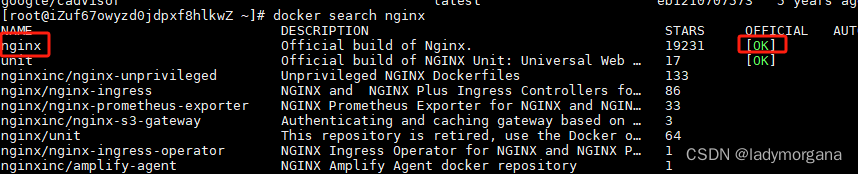
Stage 2:拉取官方镜像
docker pull nginx
Stage 3:创建Nginx 挂载目录
Nginx需要频繁的修改,所以将需要的文件挂载出来最合适
- // 先创建nginx目录(以下是示例路径)
- [root@192 ~]# mkdir nginx
- [root@192 ~]# cd nginx/
- // 创建配置文件挂载
- [root@192 nginx]# mkdir conf
- // 创建静态文件挂载
- [root@192 nginx]# mkdir html
- // 创建日志文件挂载
- [root@192 nginx]# mkdir log
- // 列出目录
- [root@192 nginx]# ls
- conf html log
Stage 4:创建容器 nginx
- // 列出镜像
- [root@192 nginx]# docker images
- // 启动容器 注意 -d 镜像名称:版本
- [root@192 nginx]# docker run -d docker.io/nginx:1.25
Stage 5:将所需文件在容器中复制出来
因为挂载时,如果宿主机挂载目录为空,则可能会将容器中挂载的目录给覆盖
- //将容器nginx.conf文件复制到宿主机
- [root@192 nginx]# docker cp 容器id:/etc/nginx/nginx.conf /root/nginx/conf/nginx.conf
- //将容器conf.d文件夹复制到宿主机
- [root@192 nginx]# docker cp 容器id:/etc/nginx/conf.d /root/nginx/conf/conf.d
- //将容器静态文件夹html复制到宿主机
- [root@192 html]# docker cp 容器id:/usr/share/nginx/html/ /root/nginx
Stage 6:停止容器,并删除
- // 停止容器,ce869a为容器id
- [root@192 html]# docker stop 容器id/容器名
- //删除容器
- [root@192 html]# docker rm 容器id/容器名
Stage 7:启动容器(挂载)
docker run -d -p 80:80 --name nginx --privileged --restart always -v /root/nginx/conf/nginx.conf:/etc/nginx/nginx.con -v /root/nginx/conf/conf.d:/etc/nginx/conf.d -v /root/nginx/html:/usr/share/nginx/html -v /root/nginx/log:/var/log/nginx docker.io/nginx:1.25
-d:后台运行
-p:将主机端口80和容器端口80绑定,
–name:容器命名
–privileged:容器获得对主机上设备的直接访问权限
–restart always:设置开机自动重启
-v:挂载目录,格式 主机目录 :容器目录Stage 8:测试访问

3、docker-compose 安装 nginx (推荐)
Stage 1:创建如下目录结构
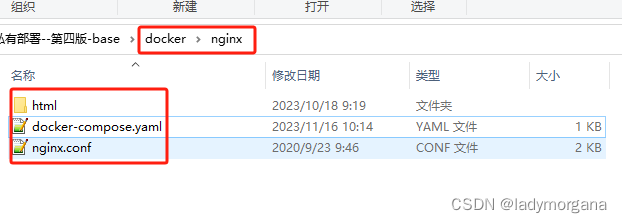
Stage 2:配置文件 - nginx.conf
- user root;
- worker_processes auto;
- pid /run/nginx.pid;
- events {
- worker_connections 768;
- # multi_accept on;
- }
- http {
- ##
- # Basic Settings
- ##
- sendfile on;
- tcp_nopush on;
- tcp_nodelay on;
- keepalive_timeout 65;
- types_hash_max_size 2048;
- # server_tokens off;
- # server_names_hash_bucket_size 64;
- # server_name_in_redirect off;
- include /etc/nginx/mime.types;
- default_type application/octet-stream;
- ##
- # SSL Settings
- ##
- ssl_protocols TLSv1 TLSv1.1 TLSv1.2; # Dropping SSLv3, ref: POODLE
- ssl_prefer_server_ciphers on;
- ##
- # Logging Settings
- ##
- access_log /var/log/nginx/access.log;
- error_log /var/log/nginx/error.log;
- ##
- # Gzip Settings
- ##
- gzip on;
- gzip_disable "msie6";
- include /etc/nginx/conf.d/*.conf;
- server {
- listen 8080;
- server_name 0.0.0.0;
- location / {
- root html/backstage/;
- try_files $uri /index.html;
- index index.html index.htm;
- }
- }
- }
Stage 3:docker-compose.yaml
- version: '3.1'
- services:
- nginx:
- restart: always
- container_name: nginx
- image: nginx:1.17.6
- ports:
- - 8082:8080
- - 8000:8000
- - 8081:8081
- volumes:
- - ./nginx/nginx.conf:/etc/nginx/nginx.conf
- - ./nginx/nginx-log:/var/log/nginx
- - ./nginx/html:/etc/nginx/html
- deploy:
- resources:
- limits:
- memory: 500M
- reservations:
- memory: 200M
Stage 4:运行 docker-compose up -d 安装
- # 进入目录下
- cd /mnt/docker/nginx
- # docker-compose 安装nginx
- docker-compose up -d
-
相关阅读:
RedisTemplate操作Redis
如何估算transformer模型的显存大小
解决Redis、MySQL缓存双写不一致问题
Python+AI智能编辑人脸
常用的Python技巧来提高代码的可读性案例
noexcept说明符/运算符
英文学术写作笔记1——伦理性(Ethics)描述
计算机毕业设计Python+Django的学生作业管理系统
8c sql手册 六
Python 进阶:函数装饰器
- 原文地址:https://blog.csdn.net/ladymorgana/article/details/134419207
