-
spring 整合 JUnit
大家好,本篇博客我们通过spring来整合JUnitt单元测试框架。
在之前篇章的测试方法中,几乎都能看到以下的两行代码:
ApplicationContext context = new ClassPathXmlApplicationContext("xxx.xml"); Xxxx xxx = context.getBean(Xxxx.class);- 1
- 2
这两行代码的作用是创建Spring容器,最终获取到对象,但是每次测试都需要重复编写。
针对上述问题,我们需要的是程序能自动帮我们创建容器。
我们都知道JUnit无法知晓我们是否使用了 Spring 框架,更不用说帮我们创建 Spring 容器了。
Spring提供了一个运行器,可以读取配置文件(或注解)来创建容器。
我们只需要告诉它配置文件位置就可以了。这样一来,我们通过Spring整合JUnit可以使程序创建spring容器了
1、整合JUnit5
1.1 搭建子模块
搭建spring-junit模块
1.2 引入依赖
<dependencies> <dependency> <groupId>org.springframeworkgroupId> <artifactId>spring-contextartifactId> <version>6.0.2version> dependency> <dependency> <groupId>org.springframeworkgroupId> <artifactId>spring-testartifactId> <version>6.0.2version> dependency> <dependency> <groupId>org.junit.jupitergroupId> <artifactId>junit-jupiter-apiartifactId> <version>5.9.0version> dependency> <dependency> <groupId>org.apache.logging.log4jgroupId> <artifactId>log4j-coreartifactId> <version>2.19.0version> dependency> <dependency> <groupId>org.apache.logging.log4jgroupId> <artifactId>log4j-slf4j2-implartifactId> <version>2.19.0version> dependency> dependencies>- 1
- 2
- 3
- 4
- 5
- 6
- 7
- 8
- 9
- 10
- 11
- 12
- 13
- 14
- 15
- 16
- 17
- 18
- 19
- 20
- 21
- 22
- 23
- 24
- 25
- 26
- 27
- 28
- 29
- 30
- 31
- 32
- 33
- 34
- 35
1.3 添加配置文件
beans.xml
<beans xmlns="http://www.springframework.org/schema/beans" xmlns:xsi="http://www.w3.org/2001/XMLSchema-instance" xmlns:context="http://www.springframework.org/schema/context" xsi:schemaLocation="http://www.springframework.org/schema/beans http://www.springframework.org/schema/beans/spring-beans.xsd http://www.springframework.org/schema/context http://www.springframework.org/schema/context/spring-context.xsd"> <context:component-scan base-package="com.jie.junit"/> beans>- 1
- 2
- 3
- 4
- 5
- 6
- 7
- 8
log4j2.xml
<configuration> <loggers> <root level="DEBUG"> <appender-ref ref="spring6log"/> <appender-ref ref="RollingFile"/> <appender-ref ref="log"/> root> loggers> <appenders> <console name="spring6log" target="SYSTEM_OUT"> <PatternLayout pattern="%d{yyyy-MM-dd HH:mm:ss SSS} [%t] %-3level %logger{1024} - %msg%n"/> console> <File name="log" fileName="E:/logs/test.log" append="false"> <PatternLayout pattern="%d{HH:mm:ss.SSS} %-5level %class{36} %L %M - %msg%xEx%n"/> File> <RollingFile name="RollingFile" fileName="E:/logs/app.log" filePattern="log/$${date:yyyy-MM}/app-%d{MM-dd-yyyy}-%i.log.gz"> <PatternLayout pattern="%d{yyyy-MM-dd 'at' HH:mm:ss z} %-5level %class{36} %L %M - %msg%xEx%n"/> <SizeBasedTriggeringPolicy size="50MB"/> <DefaultRolloverStrategy max="20"/> RollingFile> appenders> configuration>- 1
- 2
- 3
- 4
- 5
- 6
- 7
- 8
- 9
- 10
- 11
- 12
- 13
- 14
- 15
- 16
- 17
- 18
- 19
- 20
- 21
- 22
- 23
- 24
- 25
- 26
- 27
- 28
- 29
- 30
- 31
- 32
- 33
- 34
- 35
- 36
- 37
- 38
- 39
- 40
- 41
- 42
- 43
- 44
- 45
- 46
1.4 添加java 类
package com.jie.junit.model; import org.springframework.stereotype.Component; /** * 用户类 * * @author 阿杰 2416338031@qq.com * @version 1.0 * @date 2023/11/14 20:08 */ @Component public class User { public User() { System.out.println("run user"); } }- 1
- 2
- 3
- 4
- 5
- 6
- 7
- 8
- 9
- 10
- 11
- 12
- 13
- 14
- 15
- 16
- 17
- 18
1.5 测试
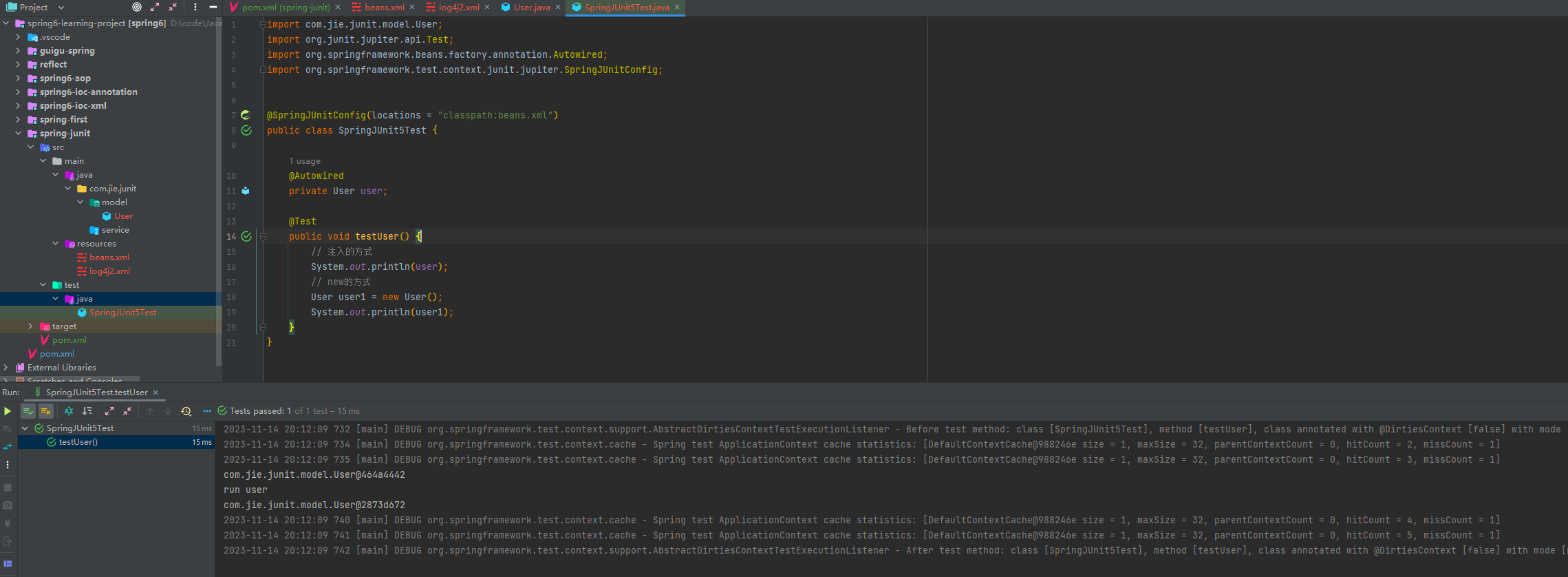
还有另一种方式

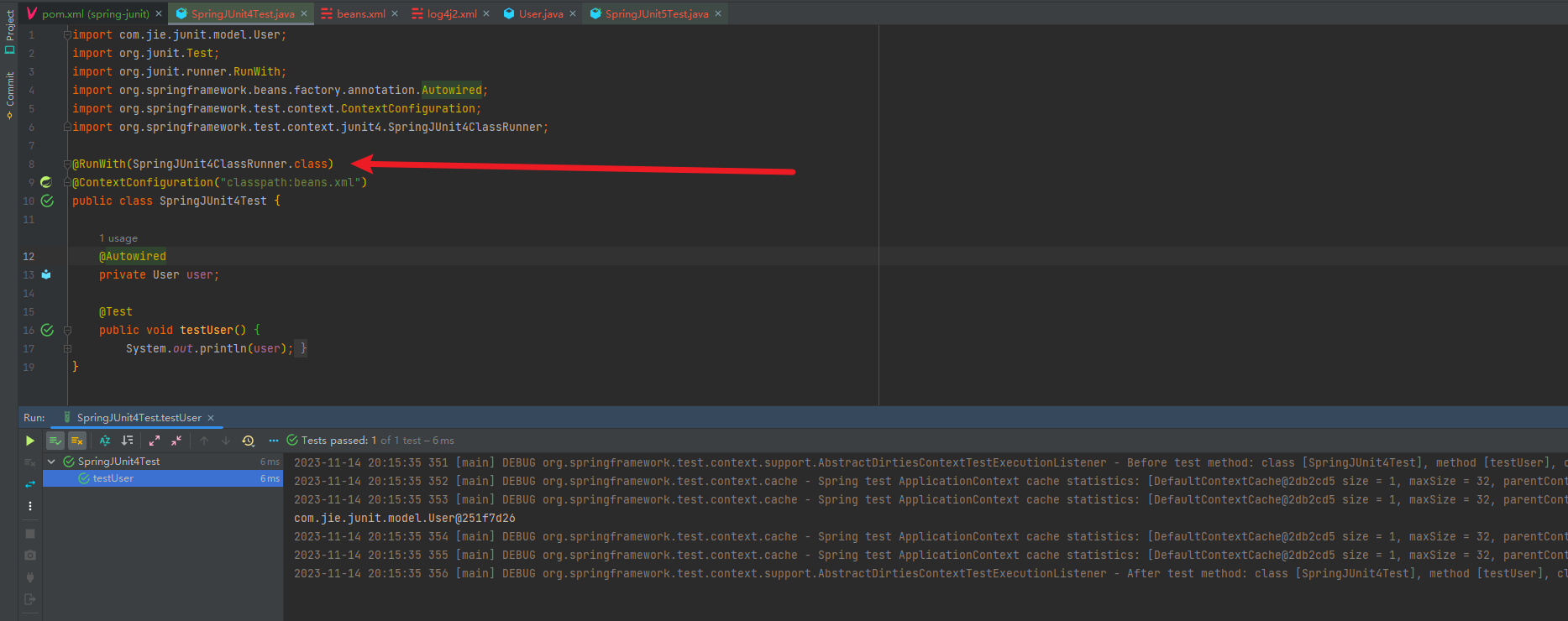
2、整合JUnit4
JUnit4在公司也会经常用到,在此也学习一下
2.1 添加依赖
<dependency> <groupId>junitgroupId> <artifactId>junitartifactId> <version>4.12version> dependency>- 1
- 2
- 3
- 4
- 5
- 6
2.2 测试
-
相关阅读:
Xilinx cache刷新使用的问题
Spring Security(5)
影视新闻查询易语言代码
TX Text Control .NET Server for ASP.NET 32.0 Crack
权限管理系统【SpringBoot + Vue + SpringSecurity】
酷开系统更多惊喜,尽享畅快观影之旅
大唐杯学习笔记:Day10
条码控件Aspose Barcode,满足您条码需求的终极解决方案
Mysql数据库大数据量的解决方案介绍(一、分库分表与读写分离)
微信店铺小程序开通的效果是什么
- 原文地址:https://blog.csdn.net/weixin_53041251/article/details/134407105
