-
Network(一)计算机网络介绍
一 计算机网络
1 概述
什么是计算机网络?
硬件方面:通过线缆将网络设备和计算机连接起来
软件方面:操作系统,应用软件,应用程序通过通信线路互连
实现资源共享、信息传递、增加可靠性、提高系统处理能力
2 网络与云计算

3 计算机网络发展阶段
60年代 分组交换 70-80年代 CP/IP 90代年后 Web技术 4 网络标准
标准化组织:ISO(国际标准化组织)
5 WAN与LAN
广域网 (Wide-Area Network)
- 范围:几十到几千千米
- 作用:用于连接远距离计算机网
- 典型应用:Internet
局域网 (Local-Area Network)
- 范围:1千米左右
- 作用:用于连接较短距离内计算机
- 典型应用:企业网,校园网
二 网络设备与拓扑
1 网络设备生产商
- 华为
- 思科

2 路由交换设备

3 网络拓扑结构
线缆连接计算机和网络设备的布局
星型
优点:易于实现、易于网络扩展、易于故障排查
缺点:可靠性低
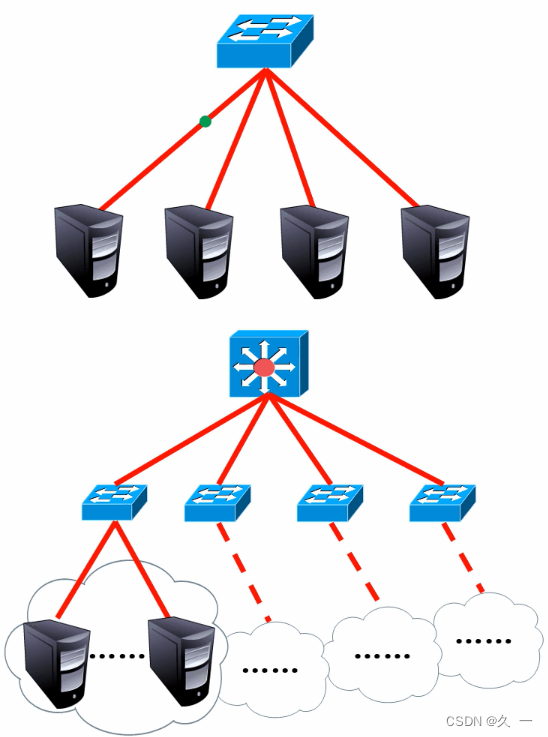
网状
优点:一个节点与其他多个节点相连,高可靠
缺点:组网成本高

三 OSI 参考模型
分层思想
- 将复杂的流程分解,复杂问题简单化
- 更容易发现问题并针对性的解决问题
0SI参考模型
国际标准化组织(ISO)于1984年颁布了开放系统互连(OSI)参考模型,从下往上依次是:物理层、数据链路层、网络层传输层、会话层、表示层和应用层
四 TCP/IP 模型
1 OSI模型和TCP/IP模型

2 TCP/IP协议族的组成

3 什么是协议
为了使数据可以在网络上从源传递到目的地,网络上所有设备需要“讲”相同的“语言
描述网络通信中“语言”规范的一组规则就是协议
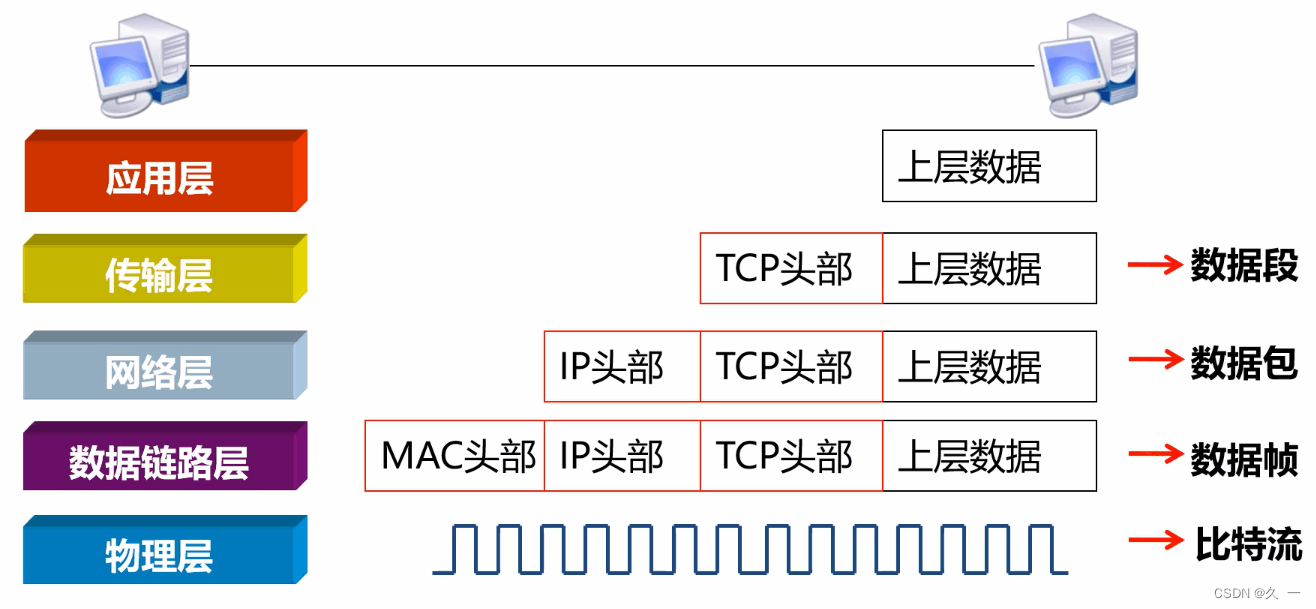
4 协议数据单元
5 设备与层的对应关系

五 交换机命令行
1 交换机命令行视图
- <Huawei> //用户视图
- <Huawei>system-view //进入系统视图
- [Huawei] //系统视图
- [Huawei]interface Ethernet0/0/1 //进入接口视图(1号接口)
- [Huawei-Ethernet0/0/1]quit //返回上一视图
- [Huawei]
- [Huawei]interface Ethernet0/0/1 //再次进入接口视图
- [Huawei-Ethernet0/0/1]return //直接返回用户视图,或使用快捷键ctrl+z
- <Huawei>
2 命令行的层级关系

3 访问及配置交换机
- 一:查看设备型号版本
- [Huawei]display version
- 二:修改交换机主机名
- <Huawei>system-view
- [Huawei]sysname sw1
- [sw1]
- [sw1]undo info-center enable //关闭日志信息提示
- 三:查看交换机配置
- [Huawei]display current-configuration //查看设备配置,按空格翻页,按回车换行,或用鼠标滚轮查看
- 四:使用账户和密码登录终端
- <Huawei>system-view
- [Huawei]aaa //进入账户管理视图
- [Huawei-aaa]local-user test01 password simple 123 //创建账户叫test01,配置明文方式密码123
- [Huawei-aaa]local-user test01 password cipher 123 //创建账户叫test01,如果该账户已经存在,则为修改配置,配置密文方式密码123
- [Huawei-aaa]quit
- [Huawei]user-interface console 0 //进入用户控制台接口
- [Huawei-ui-console0]authentication-mode aaa //激活配置
- 然后使用快捷键ctrl+] 退出系统,再回车重新登录,可以验证账户密码
- 五:保存配置
- <Huawei>save //保存配置
- The current configuration will be written to the device.
- Are you sure to continue?[Y/N]y //这里按y确认
- Info: Please input the file name ( *.cfg, *.zip ) [vrpcfg.zip]: //直接回车
- Mar 12 2019 19:12:18-08:00 Huawei %%01CFM/4/SAVE(l)[0]:The user chose Y when dec
- iding whether to save the configuration to the device.
- Now saving the current configuration to the slot 0.
- Save the configuration successfully. //看到successfully表示成功
- <Huawei>reboot //重启设备,如果有未保存的配置会先提示保存
- Info: The system is now comparing the configuration, please wait.
- Warning: All the configuration will be saved to the configuration file for the n
- ext startup:flash:/vrpcfg.zip, Continue?[Y/N]:y //提示是否保存,选择y
- Info: If want to reboot with saving diagnostic information, input 'N' and then e
- xecute 'reboot save diagnostic-information'.
- System will reboot! Continue?[Y/N]:y //是否重启,选择y
4 交换机工作原理
学习:MAC地址表是交换机通过学习接收的数据帧的源MAC地址来形成的
广播:如果目标地址在MAC地址表中没有,交换机就向除接收到该数据帧的接口外的其他所有接口广播该数据帧
转发:交换机根据MAC地址表单播转发数据帧
更新:交换机MAC地址表的老化时间是300秒,交换机如果发现一个帧的入接口和MAC地址表中源MAC地址的所在接口不同,交换机将MAC 地址重新学习到新的接口
-
相关阅读:
游戏行业如何应对网络攻击?
python 调用adb shell
传输层两大战将TCP、UDP的定位
OG-488 SE|198139-51-4|Oregon Green 488 Succinimidyl Ester
RabbitMQ 入门系列:10、扩展内容:延时队列:延时队列插件及其有限的适用场景(系列大结局)。
【JavaEE】CSS
学位英语短语
go热更新配置文件
android_build_error
springboot整合webSocket(看完即入门)
- 原文地址:https://blog.csdn.net/2301_79227925/article/details/134389640