-
Spring的注入
目录
(2)applicationContext.xml(Sring核心配置文件)
(2)applicationContext.xml(Spring核心配置文件)
一、Spring的概念
Spring是一个开源框架,为简化企业级开发而生。它以IOC(控制反转)和AOP(面向切面)为思想内核,提供了控制层SpringMVC、数据层SpringData、服务层事务管理等众多技术,并可以整合众多第三方框架。
Spring将很多复杂的代码变得优雅简洁,有效的降低代码的耦合度,极大的方便项目的后期维护、升级和扩展。
Spring官网地址:Spring | Home
这里的IOC控制反转的意思是:本来我们创建对象是需要自己创建的,使用new,但是这有很大的缺点的,如下:
(1)浪费资源:StudentService调用方法时即会创建一个对象,如果不断调用方法则会创建大量StudentDao对象。
(2)代码耦合度高:假设随着开发,我们创建了StudentDao另一个更加完善的实现类StudentDaoImpl2,如果在StudentService中想使用StudentDaoImpl2,则必须修改源码。
所以IOC其实就是我们将创建对象的权利交给框架,让框架帮我们创建对象
二、各种数据类型的注入
什么事注入呢,这里我们讲的注入其实就是在你创建一个对象后,你是不是要给他赋值呢,所以你可以简单地理解成,注入就是给创建的对象赋值。

(1)studentService
- package com.gq.pojo;
- import java.util.List;
- import java.util.Map;
- import java.util.Properties;
- import java.util.Set;
- public class StudentService {
- //数组练习
- private student[] arrayStudent;
- //list练习
- private List
studentList; - //set练习
- private Set
studentSet; - //Map练习
- private Map
- //Properties属性练习
- private Properties properties;
- //各种各样的输出方法来判断是哪种类别的
- public void arrayTest(){
- System.out.println("array练习");
- System.out.println(this.getArrayStudent());
- }
- public void ListTest(){
- System.out.println("List练习");
- System.out.println(this.getStudentList());
- }
- public void setTest(){
- System.out.println("Set练习");
- System.out.println(this.getStudentSet());
- }
- public void mapTest(){
- System.out.println("map练习");
- System.out.println(this.getStudentMap());
- }
- public void proTest(){
- System.out.println("properties练习");
- System.out.println(this.getProperties());
- }
- public student[] getArrayStudent() {
- return arrayStudent;
- }
- public void setArrayStudent(student[] arrayStudent) {
- this.arrayStudent = arrayStudent;
- }
- public List
getStudentList() { - return studentList;
- }
- public void setStudentList(List
studentList) { - this.studentList = studentList;
- }
- public Set
getStudentSet() { - return studentSet;
- }
- public void setStudentSet(Set
studentSet) { - this.studentSet = studentSet;
- }
- public Map
- return studentMap;
- }
- public void setStudentMap(Map
- this.studentMap = studentMap;
- }
- public Properties getProperties() {
- return properties;
- }
- public void setProperties(Properties properties) {
- this.properties = properties;
- }
- }
(2)applicationContext.xml(Sring核心配置文件)
- "1.0" encoding="UTF-8"?>
- <beans xmlns="http://www.springframework.org/schema/beans"
- xmlns:xsi="http://www.w3.org/2001/XMLSchema-instance"
- xsi:schemaLocation="http://www.springframework.org/schema/beans
- http://www.springframework.org/schema/beans/spring-beans.xsd">
- <bean name="student1" class="com.gq.pojo.student">
- <property name="id" value="1">property>
- <property name="name" value="zhansgan">property>
- bean>
- <bean name="student2" class="com.gq.pojo.student">
- <property name="name" value="lisi">property>
- <property name="id" value="2">property>
- bean>
- <bean name="StudentService" class="com.gq.pojo.StudentService">
- <property name="arrayStudent">
- <list>
- <ref bean="student1">ref>
- <ref bean="student2">ref>
- <bean class="com.gq.pojo.student">
- <property name="id" value="3">property>
- <property name="name" value="wangwu">property>
- bean>
- list>
- property>
- <property name="studentList">
- <list>
- <ref bean="student1"/>
- <ref bean="student2"/>
- <bean class="com.gq.pojo.student">
- <property name="name" value="uiui">property>
- <property name="id" value="11">property>
- bean>
- list>
- property>
- <property name="studentSet">
- <set>
- <ref bean="student1">ref>
- <ref bean="student2">ref>
- <bean class="com.gq.pojo.student">
- <property name="id" value="21">property>
- <property name="name" value="setset">property>
- bean>
- set>
- property>
- <property name="studentMap">
- <map>
- <entry key="map1" value-ref="student1">entry>
- <entry key="map2" value-ref="student2">entry>
- <entry key="map3">
- <bean class="com.gq.pojo.student">
- <property name="name" value="maptest">property>
- <property name="id" value="33">property>
- bean>
- entry>
- map>
- property>
- <property name="properties">
- <props>
- <prop key="prop1">i am 1prop>
- <prop key="prop2">i am 2prop>
- props>
- property>
- bean>
- beans>
(3)测试
- @Test
- public void t2(){
- ClassPathXmlApplicationContext context=new ClassPathXmlApplicationContext("applicationContext.xml");
- StudentService service=context.getBean("StudentService",StudentService.class);
- service.arrayTest();
- service.ListTest();
- service.mapTest();
- service.setTest();
- service.proTest();
- }
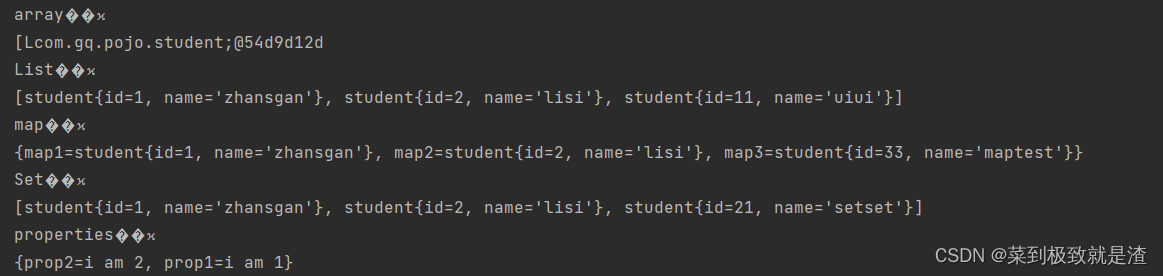
关于乱码问题,只需要将编码格修改成UTF-8就可以了,具体的修改我就不多说了,大家也可以自己查找资料,不是很难的。
三、注入null或者empty类型的数据
(1)UserService
- public class UserService {
- private List
list; - public void test(){
- System.out.println("i am listTest");
- }
- public UserService(List
list) { - this.list = list;
- }
- public UserService() {
- }
- public List
getList() { - return list;
- }
- public void setList(List
list) { - this.list = list;
- }
- }
(2)applicationContext.xml(Spring核心配置文件)
- <bean name="UserService" class="com.gq.pojo.UserService">
- <property name="list">
- <list>
- <value>i am first persionvalue>
- <value>value>
- <null>null>
- <value>i am last persionvalue>
- list>
- property>
- bean>
(3)测试
- @Test
- public void t3(){
- ClassPathXmlApplicationContext context=new ClassPathXmlApplicationContext("applicationContext.xml");
- UserService userService=context.getBean("UserService",UserService.class);
- List
list = userService.getList(); - System.out.println(list);
- }

-
相关阅读:
创建一个GO模块
无线蓝牙耳机什么牌子好?三百内最好的无线耳机推荐
运放:运放输入电压
MS17010(永恒之蓝)漏洞实战
java计算机毕业设计教学质量评价系统源程序+mysql+系统+lw文档+远程调试
[微前端]微前端的简单介绍
【Python脚本进阶】2.2、构建一个SSH僵尸网络(中):用Pxssh暴力破解SSH密码
问 ChatGPT 关于 GPT 的事情:数据准备篇
odoo13笔记点
【Unity编辑器扩展】| 顶部菜单栏扩展 MenuItem
- 原文地址:https://blog.csdn.net/gaoqiandr/article/details/134305220
