-
POI.5.2.4常用操作-数据导入导出常规操作
1、APACHE POI简介
Apache POI 简介是用Java编写的免费开源的跨平台的 Java API,Apache POI提供API给Java程式对Microsoft Office(Excel、WORD、PowerPoint、Visio等)格式档案读和写的功能。
1.1、其他操作Excel工具
Java Excel是一开放源码项目,通过它Java开发人员可以读取Excel文件的内容、创建新的Excel文件、更新已经存在的Excel文件。jxl 由于其小巧 易用的特点, 逐渐已经取代了 POI-excel的地位, 成为了越来越多的java开发人员生成excel文件的首选。
1.2、POI常用类
HSSF - 提供读写Microsoft Excel XLS格式档案的功能。
XSSF - 提供读写Microsoft Excel OOXML XLSX格式档案的功能。
HWPF - 提供读写Microsoft Word DOC97格式档案的功能。
XWPF - 提供读写Microsoft Word DOC2003格式档案的功能。
HSLF - 提供读写Microsoft PowerPoint格式档案的功能。
HDGF - 提供读Microsoft Visio格式档案的功能。
HPBF - 提供读Microsoft Publisher格式档案的功能。
HSMF - 提供读Microsoft Outlook格式档案的功能。2、POI常规操作
2.1、创建工程引入poi依赖包
- <dependency>
- <groupId>org.apache.poigroupId>
- <artifactId>poiartifactId>
- <version>5.2.4version>
- dependency>
- <dependency>
- <groupId>org.apache.poigroupId>
- <artifactId>poi-ooxmlartifactId>
- <version>5.2.4version>
- dependency>
2.2、创建工作簿和sheet页
2.2.1、测试代码
- @Test
- //在桌面创建一个Excel文档
- public void createWorkbookAndSheet() throws Exception{
- FileSystemView fsv= FileSystemView.getFileSystemView();
- //获取桌面位置
- String desktop= fsv.getHomeDirectory().getPath();
- System.out.println(desktop);
- String path=desktop+"//test.xlsx";
- //创建工作簿
- XSSFWorkbook workbook = new XSSFWorkbook();
- //在工作部中创建sheet页,并个体sheet起名字
- XSSFSheet firstSheet=workbook.createSheet("firstSheet");
- XSSFSheet secondSheet=workbook.createSheet("secondSheet");
- //设置激活的sheet页,也就是打开Excel默认展示的sheet页
- workbook.setActiveSheet(1);
- //创建输出流关联目标文件
- OutputStream out = new FileOutputStream(path);
- //创建文件
- workbook.write(out);
- out.flush();
- out.close();
- System.out.println("======工作簿创建成功======");
- }
2.2.2、测试效果
从图中可以看出,创建了test.xlsx工作簿,并且默认打开了secondSheet页

2.3、创建行列并添加值
2.3.1、测试代码
- //创建行和列
- @Test
- public void createRowAndCell() throws Exception{
- FileSystemView fsv= FileSystemView.getFileSystemView();
- //获取桌面位置
- String desktop= fsv.getHomeDirectory().getPath();
- System.out.println(desktop);
- String path=desktop+"//test.xlsx";
- //创建工作簿
- XSSFWorkbook workbook = new XSSFWorkbook();
- //在工作部中创建sheet页,并个体sheet起名字
- XSSFSheet firstSheet=workbook.createSheet("firstSheet");
- XSSFSheet secondSheet=workbook.createSheet("secondSheet");
- //设置激活的sheet页,也就是打开Excel默认展示的sheet页
- workbook.setActiveSheet(0);
- //------------------- 核心代码开始 -----------------------------
- //在sheet页中创建row和cell
- XSSFRow row0=firstSheet.createRow(0);//创建第一行
- //在行中创建列
- XSSFCell cell0=row0.createCell(0);//创建第一列
- XSSFCell cell1=row0.createCell(1);//创建第二列
- XSSFCell cell2=row0.createCell(2);//创建第三列
- XSSFCell cell3=row0.createCell(3);//创建第四列
- XSSFCell cell4=row0.createCell(4);//创建第五列
- //向列中添加数据
- cell0.setCellValue("编号");
- cell1.setCellValue("姓名");
- cell2.setCellValue("手机号码");
- cell3.setCellValue("出生年月");
- cell4.setCellValue("身份证");
- //------------------- 核心代码结束 -----------------------------
- //创建输出流关联目标文件
- OutputStream out = new FileOutputStream(path);
- //创建文件
- workbook.write(out);
- out.flush();
- out.close();
- System.out.println("======工作簿创建成功======");
- }
2.3.2、测试结果

2.4、修改单元格的宽度和高度
firstSheet.autoSizeColumn(0);//设置宽自适应
row.setHeightInPoints(30);//修改行高
2.4.1、测试代码
- //修改列宽
- @Test
- public void modifyColumnWith() throws Exception{
- //与之前代码相同,不叙述
- //设置列宽
- //firstSheet.autoSizeColumn(0);//设置宽自适应
- firstSheet.setColumnWidth(0,3500);//编号列宽
- firstSheet.setColumnWidth(1,3500);//姓名列宽
- firstSheet.setColumnWidth(2,5000);//手机号码列宽
- firstSheet.setColumnWidth(3,6000);//出生年月列宽
- firstSheet.setColumnWidth(4,6000);//身份证列宽
- //与之前代码相同,不叙述
- }
2.4.2、测试结果

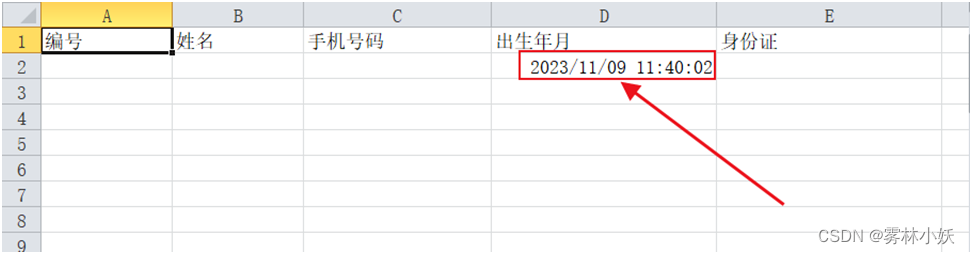
2.5、添加(Date)日期类型的数据
2.5.1、测试代码
- //创建第二行
- XSSFRow row1=firstSheet.createRow(1);
- //创建第四列,添加出生日期
- XSSFCell row1Cell3=row1.createCell(3);
- //创建列样式
- CellStyle cellStyle = workbook.createCellStyle();
- //创建格式助手
- CreationHelper createHelper = workbook.getCreationHelper();
- cellStyle.setDataFormat(
- createHelper.createDataFormat().getFormat("yyyy/mm/dd h:mm:ss"));
- row1Cell3.setCellValue(new Date());//设置出生年月为日期格式
- //设置出生日期单元格显示日期样式
- row1Cell3.setCellStyle(cellStyle);
2.5.2、测试结果
2.6、添加(Calendar)日期类型值
2.6.1、测试代码
- //创建第二行
- XSSFRow row1=firstSheet.createRow(1);
- //创建第四列,添加出生日期
- XSSFCell row1Cell3=row1.createCell(3);
- //创建列样式
- CellStyle cellStyle = workbook.createCellStyle();
- //创建格式助手
- CreationHelper createHelper = workbook.getCreationHelper();
- cellStyle.setDataFormat(
- createHelper.createDataFormat().getFormat("yyyy/mm/dd hh:mm:ss"));
- row1Cell3.setCellValue(Calendar.getInstance());//设置出生年月为日期格式
- //设置出生日期单元格显示日期样式
- row1Cell3.setCellStyle(cellStyle);
2.6.2、测试结果

2.7、修改单元格内容的位置
可以设置内容在单元格中的水平和垂直位置
2.7.1、测试代码
直接通过CellStyle设置,加入到单元格后会自动生效
- //创建列样式
- CellStyle cellStyle = workbook.createCellStyle();
- //水平位置
- cellStyle.setAlignment(HorizontalAlignment.CENTER);
- cellStyle.setVerticalAlignment(VerticalAlignment.BOTTOM);
2.7.2、测试效果

2.8、修改单元格的边框线
style.setBorderBottom(BorderStyle.THIN);//设置细线
style.setBottomBorderColor(IndexedColors.BLACK.getIndex());//黑色
style.setBorderLeft(BorderStyle.THIN);
style.setLeftBorderColor(IndexedColors.GREEN.getIndex());
style.setBorderRight(BorderStyle.THIN);
style.setRightBorderColor(IndexedColors.BLUE.getIndex());
style.setBorderTop(BorderStyle.MEDIUM_DASHED);
style.setTopBorderColor(IndexedColors.BLACK.getIndex());
cell.setCellStyle(样式);
2.8.1、测试代码
- //创建列样式
- CellStyle cellStyle = workbook.createCellStyle();
- //设置边框
- cellStyle.setBorderBottom(BorderStyle.THIN);
- cellStyle.setBottomBorderColor(IndexedColors.RED.getIndex());
2.8.2、测试效果

2.9、修改字体颜色、大小、斜体等
2.9.1、测试代码
- //创建字体类
- Font font = workbook.createFont();
- font.setColor(IndexedColors.RED.getIndex());
- font.setFontHeightInPoints((short)11);
- font.setItalic(true);//是否使用斜体
- font.setStrikeout(true);//是否使用删除线
- //创建列样式
- CellStyle cellStyle = workbook.createCellStyle();
- cellStyle.setFont(font);
2.9.2、测试结果

2.10、冻结行列
2.10.1、测试代码
效果:数据滚动的时候,行固定不定。
firstSheet.createFreezePane(5,1);2.10.2、测试效果

2.11、循环访问行和类并判断单元格格式
cellType._NONE:未知类型,仅限内部使用
cellType.NUMERIC:整数 小数 日期
cellType.STRING :字符串
cellType.BOOLEAN:布尔值
cellType.FORMULA 公式
cellType.BLANK 空单元格
cellType.ERROR:错误单元格
2.11.1、测试数据展示
测试数据中有:字符串/空值/时间/NUMERIC

2.11.2、测试代码
- @Test
- public void getExcelContent() throws Exception {
- FileSystemView fsv = FileSystemView.getFileSystemView();
- //获取桌面位置
- String desktop = fsv.getHomeDirectory().getPath();
- System.out.println(desktop);
- String path = desktop + "//test.xlsx";
- //创建输入流关联原文件
- InputStream is = new FileInputStream(path);
- //创建excel操作核心
- XSSFWorkbook workbook = new XSSFWorkbook(is);
- //通过book创建sheet页
- XSSFSheet firstSheet = workbook.getSheet("firstSheet");
- //获取末行数据,没有数据返回-1
- int rowNum = firstSheet.getLastRowNum();
- for (int i = 0; i <= rowNum; i++) {
- System.out.println("=====rownum=====" + rowNum);
- //获取sheet对应行,获取不到退出循环
- XSSFRow row = firstSheet.getRow(i);
- if (row == null) {
- break;
- }
- //获取列数
- int lastCellNum = row.getLastCellNum();
- System.out.println("====列数===="+lastCellNum);
- //遍历列
- for (int j = 0; j < lastCellNum; j++) {
- //System.out.print("==值=="+row.getCell(j).getNumericCellValue()+" ");
- if(row.getCell(j)!=null){
- CellType cellType = row.getCell(j).getCellType();
- //判断单元格是不是NUMERIC类型
- if (cellType.equals(CellType.NUMERIC)) {
- //判断单元格是不是日期类型
- if (DateUtil.isCellDateFormatted(row.getCell(j))) {
- System.out.print(row.getCell(j).getDateCellValue());;
- }else{
- //如果不是时间类型,就通过Numeric取值
- System.out.print(row.getCell(j).getNumericCellValue()+" ");
- }
- }else{
- System.out.print(row.getCell(j).getStringCellValue()+" ");
- }
- }else{
- System.out.print("空");
- }
- }
- System.out.println("");
- }
- }
2.11.3、测试效果

2.12、将集合数据导入到数据库中
2.12.1、创建Student对象
- @Data
- @AllArgsConstructor
- @NoArgsConstructor
- public class Student {
- private String stu_id;
- private String stu_name;
- private String stu_sex;
- private String stu_both;
- private String stu_addr;
- private String stu_pwd;
- }
2.12.2、测试代码
- //将集合数据存入到Excel中
- @Test
- public void getListForExcel() throws Exception{
- //创建模拟数据
- List
list=new ArrayList<>(); - Student stu1=new Student("1001","晓春1","男",new Date(),"安徽合肥","1001");
- Student stu2=new Student("1002","晓春2","男",new Date(),"安徽合肥","1002");
- Student stu3=new Student("1003","晓春3","男",new Date(),"安徽合肥","1003");
- Student stu4=new Student("1004","晓春4","男",new Date(),"安徽合肥","1004");
- list.add(stu1);
- list.add(stu2);
- list.add(stu3);
- list.add(stu4);
- FileSystemView fsv = FileSystemView.getFileSystemView();
- //获取桌面位置
- String desktop = fsv.getHomeDirectory().getPath();
- System.out.println(desktop);
- String path = desktop + "//test.xlsx";
- //创建输入流关联原文件
- InputStream is = new FileInputStream(path);
- //创建excel操作核心
- XSSFWorkbook workbook = new XSSFWorkbook(is);
- //通过book创建sheet页
- XSSFSheet firstSheet = workbook.getSheet("firstSheet");
- //添加表头信息
- String []tableHeaders={"编号","姓名","性别","年龄","地址","密码"};
- //创建第一行
- XSSFRow row0=firstSheet.createRow(0);
- //创建表头
- for (int i = 0; i < tableHeaders.length; i++) {
- //设置列宽
- firstSheet.setColumnWidth(i,5000);
- //创建列
- XSSFCell cell=row0.createCell(i);
- //设置列值
- cell.setCellValue(tableHeaders[i]);
- }
- //第一行为表头,所以数据从第二行开始
- for (int i = 1; i < list.size(); i++) {
- XSSFRow row= firstSheet.createRow(i);
- row.createCell(0).setCellValue(list.get(i).getStu_id());
- row.createCell(1).setCellValue(list.get(i).getStu_name());
- row.createCell(2).setCellValue(list.get(i).getStu_sex());
- //设置年龄是时间格式
- XSSFCell cell3=row.createCell(3);
- //创建列样式
- CellStyle cellStyle = workbook.createCellStyle();
- //创建格式助手
- CreationHelper createHelper = workbook.getCreationHelper();
- cellStyle.setDataFormat(
- createHelper.createDataFormat().getFormat("yyyy/mm/dd h:mm:ss"));
- cell3.setCellValue(list.get(i).getStu_both());//设置出生年月为日期格式
- //设置出生日期单元格显示日期样式
- cell3.setCellStyle(cellStyle);
- row.createCell(4).setCellValue(list.get(i).getStu_addr());
- row.createCell(5).setCellValue(list.get(i).getStu_pwd());
- }
- //将文件写入到指定的地点
- OutputStream os=new FileOutputStream(path);
- workbook.write(os);
- os.flush();
- os.close();
- }
2.12.3、测试结果

3、源码下载
源码下载:https://download.csdn.net/download/tangshiyilang/88520023
-
相关阅读:
spring boot + feign + Hystrix 整合 (亲测有效)
长安链源码学习v2.2.1--ioc机制(九)
基于mobileNet实现狗的品种分类(迁移学习)
基于Whisper+SparkAI+Pyttsx3实现全流程免费的语音交互
Spring Boot 系列 —— Spring Webflux
[PAT练级笔记] 65 Basic Level 1065 单身狗
VSCode 中优雅地编写 Markdown
【mcuclub】超声波测距模块HC-SR04
【快速上手系列】内网穿透(natapp)的快速上手和简单使用教程
游戏服务端配置“热更”及“秒启动”终极方案(golang/ygluu/卢益贵)
- 原文地址:https://blog.csdn.net/tangshiyilang/article/details/134320438
