• Linux/centos上如何配置管理Web服务器?


    1 Web简单了解

    • Web服务器称为WWW服务器,主要是提供上网功能;
    • 常见的Web服务器有:Microsoft IISIBM WebSphereApacheTomcat等;
    • 本文主要以Apache服务器为例了解一些Linux/centos上如何配置管理Web服务器。

    2 关于Apache

    • Apache是一种开源的Web服务器软件;
    • 具有跨平台特性,支持UnixLinuxBSD等操作系统;
    • 支持静态和动态内容;
    • 对于模块化支持;
    • 支持SSL和虚拟主机;
    • 具有完整的日志功能;
    • 支持用户认证机制等。

    3 如何安装Apache服务器?

    3.1 Apache服务安装

    • 先检查系统上是否已经安装了Apache服务,如下:
    rpm -qa | grep httpd
    
    • 1
    • 我的是已经安装了如下:
      在这里插入图片描述
    • 如果没有安装,可以使用以下命令安装:
    yum -y install httpd
    
    • 1

    3.2 httpd服务的基本操作

    • 查看httpd服务的运行状态:
    systemctl status httpd.service
    
    • 1
    • 如下显示,我的还没有启动:
      在这里插入图片描述
    • 启动httpd服务:
    systemctl start httpd.service
    
    • 1
    • 启动后如下显示:
    [root@localhost ~]# systemctl start httpd.service
    [root@localhost ~]# systemctl status httpd.service
    ● httpd.service - The Apache HTTP Server
       Loaded: loaded (/usr/lib/systemd/system/httpd.service; disabled; vendor preset: disabled)
       Active: active (running) since Wed 2023-11-08 17:53:21 CST; 2s ago
         Docs: man:httpd(8)
               man:apachectl(8)
     Main PID: 5953 (httpd)
       Status: "Processing requests..."
        Tasks: 9
       CGroup: /system.slice/httpd.service
               ├─5953 /usr/sbin/httpd -DFOREGROUND
               ├─5954 /usr/libexec/nss_pcache 6 off
               ├─5956 /usr/sbin/httpd -DFOREGROUND
               ├─5958 /usr/sbin/httpd -DFOREGROUND
               ├─5959 /usr/sbin/httpd -DFOREGROUND
               ├─5960 /usr/sbin/httpd -DFOREGROUND
               ├─5961 /usr/sbin/httpd -DFOREGROUND
               └─5962 /usr/sbin/httpd -DFOREGROUND
    
    Nov 08 17:53:20 localhost.localdomain systemd[1]: Starting The Apache HTTP Server...
    Nov 08 17:53:20 localhost.localdomain httpd[5953]: AH00558: httpd: Could not reliably determine the server's fully qualified domain na...message
    Nov 08 17:53:21 localhost.localdomain systemd[1]: Started The Apache HTTP Server.
    Hint: Some lines were ellipsized, use -l to show in full.
    
    • 1
    • 2
    • 3
    • 4
    • 5
    • 6
    • 7
    • 8
    • 9
    • 10
    • 11
    • 12
    • 13
    • 14
    • 15
    • 16
    • 17
    • 18
    • 19
    • 20
    • 21
    • 22
    • 23
    • 24
    • 停止httpd服务:
    systemctl stop httpd.service
    
    • 1
    • 重启httpd服务:
    systemctl restart httpd.service
    
    • 1
    • 设置开机自启动:
    systemctl enable httpd.service
    
    • 1
    • 查看设置自启动是否成功:
    systemctl list-unit-files | grep httpd
    
    • 1
    • 如下显示则为设置成功了:
      在这里插入图片描述

    4 如何配置Apache服务器?

    4.1 关于httpd.conf配置

    • Apache服务的配置文件为httpd.conf,文件在`/etc/httpd/conf/下:
      在这里插入图片描述
    • httpd.conf文件内容说明:
    内容说明
    #ServerRoot全局环境设置
    #Main serve rconfiguration主服务器设置
    虚拟主机设置

    4.2 常用指令

    指令说明示例
    ServerName设置Apache服务器的主机名和端口号ServerName www.noamanelson.com 80
    ServerRoot设置Apache服务器的根目录,包括conf、logs、modules等子目录ServerRoot /etc/httpd
    Listen设置Apache服务器的监听端口,默认监听80,一般在监听非80时会设置Listen 8088
    DocumentRoot设置Apache提供的HTML文档根目录 ,默认为/var/www/htmlDocumentRoot /www/myweb
    Directory指定Apache服务器根目录的访问权限和方式AllowOverride None Require all granted
    DirectoryIndex设置Apache服务器网站的主文件,通常为index.htmlDirectoryIndex index.html
    VirtualHost设置特定虚拟主机 DocumentRoot /www/myweb ServerName noamanelson.com
    ServerAdmin设置管理员邮箱ServerAdmin admin@noamanelson.com
    TimeOut设置接收和发送数据时的超时时间TimeOut 100
    ErrorLog指定Apache服务器使用的错误日志文件ErrorLog logs/error_log
    CustomLog指定Apache服务器使用的访问日志/
    Include其他配置文件/

    5 简单实例

    • 主要目标是配置个人Web站点;
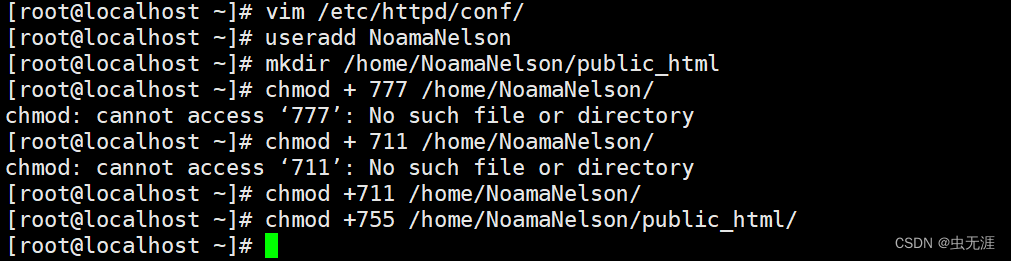
    • 建用户NoamaNelson,修改权限,并建立目录public_html:
      在这里插入图片描述
    useradd NoamaNelson
    mkdir /home/NoamaNelson/public_html
    chmod +711 /home/NoamaNelson/
    chmod +755 /home/NoamaNelson/public_html/
    
    • 1
    • 2
    • 3
    • 4
    • public_html下建立网页文件index,html:
    vim /home/NoamaNelson/public_html/index.html
    
    • 1
    Welcome everyone,
    This is my Web~~~
    
    • 1
    • 2
    • 配置/etc/httpd/conf.d/userdir.conf文件:
    <IfModule mod_userdir.c>
        #UserDir disabled
        UserDir public_html
    </IfModule>
    
    <Directory "/home/*/public_html">
        AllowOverride FileInfo AuthConfig Limit Indexes
        #Options MultiViews Indexes SymLinksIfOwnerMatch IncludesNoExec
        Options None
        Require method GET POST OPTIONS
    </Directory>
        Require method GET POST OPTIONS
    
    • 1
    • 2
    • 3
    • 4
    • 5
    • 6
    • 7
    • 8
    • 9
    • 10
    • 11
    • 12
    • 保存以上文件,重启服务器,关闭防火墙,将Selinux设置为Permissive
      在这里插入图片描述
    systemctl start httpd
    systemctl stop firewalld.service
    setenforce 0
    getenforce
    
    • 1
    • 2
    • 3
    • 4
    • 在浏览器中输入服务ip/ ~NoamaNelson/即可打开NoamaNelson的个人主页,比如我的是如下:
      在这里插入图片描述
    http://172.28.18.146/~NoamaNelson/
    
    • 1
  • 相关阅读:
    自动化测试的类型​以及自动化测试的几个误区!
    机器如何快速学习数据采集
    ansible-playbook之file模块
    企业数字化建设(一):典型的长期小事型大事
    K线学习002-早晨之星2
    Qt 自定义event
    TCP、UDP、ARP协议(持续更新)
    外卖小程序系统:数字化餐饮的编码之道
    生命周期详解
    VUE3子表格嵌套分页查询互相干扰的问题解决
  • 原文地址:https://blog.csdn.net/NoamaNelson/article/details/134294074