-
OpenGL_Learn08(坐标系统与3D空间)
目录
1. 概述
OpenGL希望在每次顶点着色器运行后,我们可见的所有顶点都为标准化设备坐标(Normalized Device Coordinate, NDC)。也就是说,每个顶点的x,y,z坐标都应该在-1.0到1.0之间,超出这个坐标范围的顶点都将不可见。我们通常会自己设定一个坐标的范围,之后再在顶点着色器中将这些坐标变换为标准化设备坐标。然后将这些标准化设备坐标传入光栅器(Rasterizer),将它们变换为屏幕上的二维坐标或像素。
- 局部空间(Local Space,或者称为物体空间(Object Space))
- 世界空间(World Space)
- 观察空间(View Space,或者称为视觉空间(Eye Space))
- 裁剪空间(Clip Space)
- 屏幕空间(Screen Space)
为了将坐标从一个坐标系变换到另一个坐标系,我们需要用到几个变换矩阵,最重要的几个分别是模型(Model)、观察(View)、投影(Projection)三个矩阵。我们的顶点坐标起始于局部空间(Local Space),在这里它称为局部坐标(Local Coordinate),它在之后会变为世界坐标(World Coordinate),观察坐标(View Coordinate),裁剪坐标(Clip Coordinate),并最后以屏幕坐标(Screen Coordinate)的形式结束。
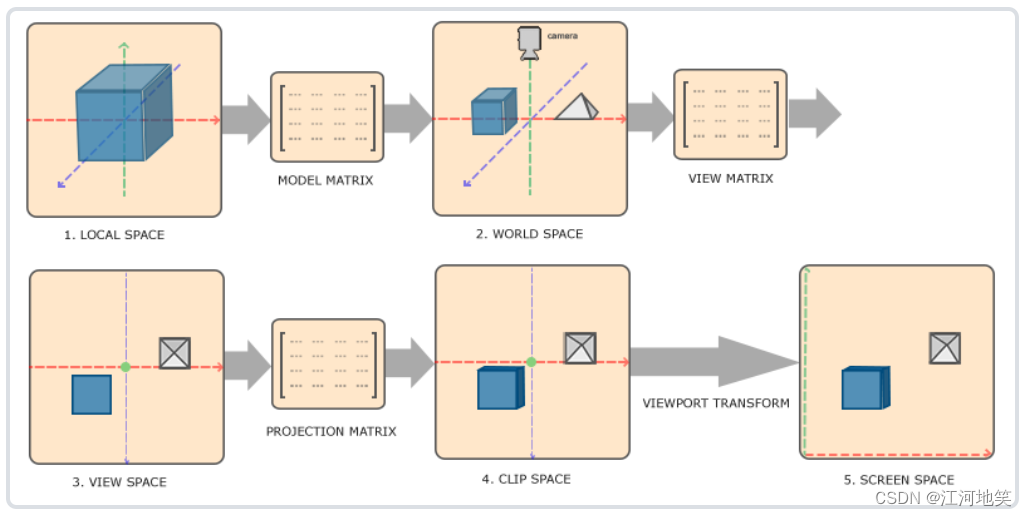
- 局部坐标是对象相对于局部原点的坐标,也是物体起始的坐标。
- 下一步是将局部坐标变换为世界空间坐标(平移+旋转),世界空间坐标是处于一个更大的空间范围的。这些坐标相对于世界的全局原点,它们会和其它物体一起相对于世界的原点进行摆放。
- 接下来我们将世界坐标变换为观察空间坐标,使得每个坐标都是从摄像机或者说观察者的角度进行观察的。
- 坐标到达观察空间之后,我们需要将其投影到裁剪坐标。裁剪坐标会被处理至-1.0到1.0的范围内,并判断哪些顶点将会出现在屏幕上。
- 最后,我们将裁剪坐标变换为屏幕坐标,我们将使用一个叫做视口变换(Viewport Transform)的过程。视口变换将位于-1.0到1.0范围的坐标变换到由glViewport函数所定义的坐标范围内。最后变换出来的坐标将会送到光栅器,将其转化为片段。
2. 局部空间
局部空间是指物体所在的坐标空间,即对象最开始所在的地方。想象你在一个建模软件(比如说Blender)中创建了一个立方体。你创建的立方体的原点有可能位于(0, 0, 0),即便它有可能最后在程序中处于完全不同的位置。甚至有可能你创建的所有模型都以(0, 0, 0)为初始位置。
我们一直使用的那个箱子的顶点是被设定在-0.5到0.5的坐标范围中,(0, 0)是它的原点。这些都是局部坐标。

3. 世界空间
是指顶点相对于世界的坐标,世界空间也有一个中心。
4. 观察空间
观察空间经常被人们称之OpenGL的摄像机(Camera)(所以有时也称为摄像机空间(Camera Space)或视觉空间(Eye Space))。
观察空间是将世界空间坐标转化为用户视野前方的坐标而产生的结果。因此观察空间就是从摄像机的视角所观察到的空间。而这通常是由一系列的位移和旋转的组合来完成,平移/旋转场景从而使得特定的对象被变换到摄像机的前方。这些组合在一起的变换通常存储在一个观察矩阵(View Matrix)里,它被用来将世界坐标变换到观察空间。
观察空间中,原点是摄像机位置,+x轴指向右方,+y轴指向上方,+z轴指向后方。需要注意的是摄像机的前方是-z轴,因为unity中观察空间使用的是右手坐标系,模型空间和世界空间使用的是左手坐标系,这个只需要记住就行了。

在观察变换的时候,是把世界空间作为观察空间的子空间来变换的,因此,我们可以把对摄像机的 变换想象为对世界空间的变换。根据上图,世界空间的原点从观察空间的原点出发进行了(-30, -180, 0)的旋转,然后又进行了(-0.5,-5,-8.5)的移动。由此我们可以构建变换矩阵以求出A点在观察空间中的坐标。
也就是比如观察原点是A(3,-1,9)(在世界中的坐标) ,世界空间原点是B(0,0,0) 。那么A=BM ,M为变换矩阵。此时模型都需要与M相乘,得到位于观察点A的所看的顶点坐标。
5. 剪裁空间
裁剪空间也称作齐次裁剪空间,把顶点从观察空间转换到裁剪空间中的矩阵叫做裁剪矩阵,也被称作投影矩阵。
我们最终在摄像机中可以看到的区域是由视锥体决定的,视锥体就是我们可以看到的部分在计算机中的几何抽象,视锥体的边界以外的部分不渲染。视锥体由六个平面包围而成,这些平面被称作裁剪平面。
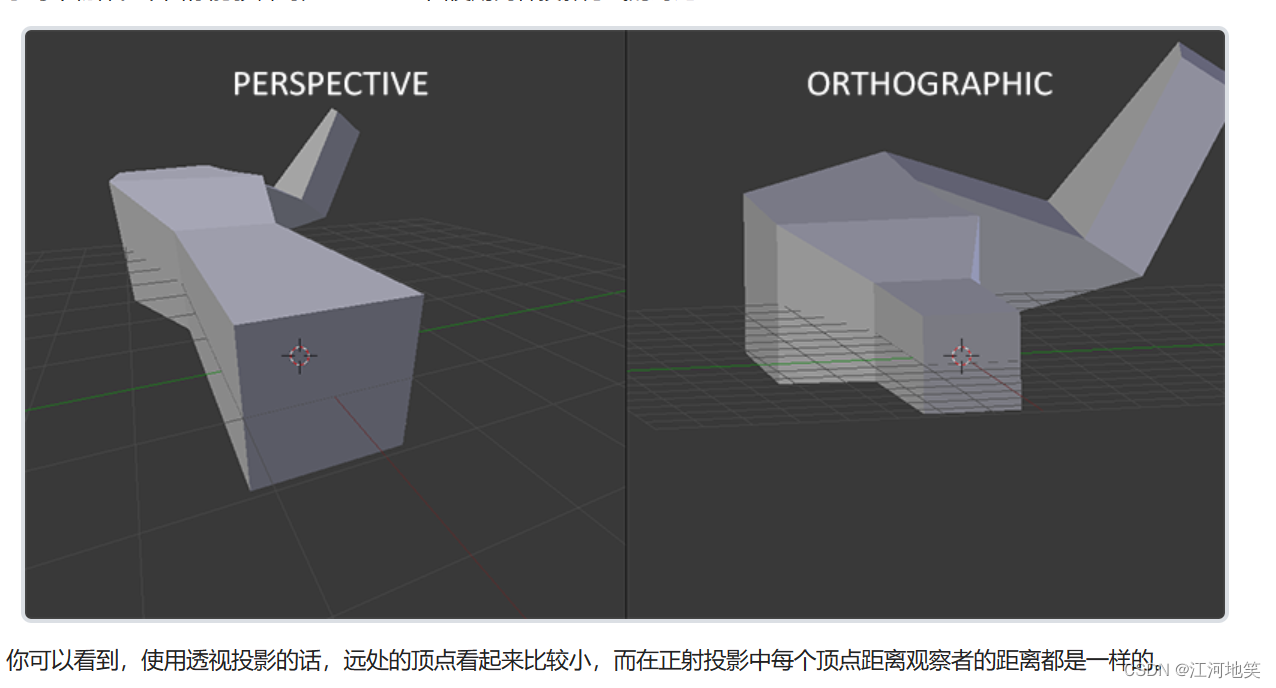
视锥体有两种投影类型:一种是正交投影(平行投影),一种是透视投影。
视锥体的六个平面当中,上下左右四个平面相当于望远镜的镜筒,而近裁剪平面和远裁剪平面则决定了你可以看到的最近和最远的距离 。

为了将顶点坐标从观察变换到裁剪空间,我们需要定义一个投影矩阵(Projection Matrix),它指定了一个范围的坐标,比如在每个维度上的-1000到1000。投影矩阵接着会将在这个指定的范围内的坐标变换为标准化设备坐标的范围(-1.0, 1.0)。所有在范围外的坐标不会被映射到在-1.0到1.0的范围之间,所以会被裁剪掉。在上面这个投影矩阵所指定的范围内,坐标(1250, 500, 750)将是不可见的,这是由于它的x坐标超出了范围,它被转化为一个大于1.0的标准化设备坐标,所以被裁剪掉了。
一旦所有顶点被变换到裁剪空间,最终的操作——透视除法(Perspective Division)将会执行,在这个过程中我们将位置向量的x,y,z分量分别除以向量的齐次w分量;透视除法是将4D裁剪空间坐标变换为3D标准化设备坐标的过程。这一步会在每一个顶点着色器运行的最后被自动执行。

上图所示,它的第一个参数定义了fov的值,它表示的是视野(Field of View),并且设置了观察空间的大小。如果想要一个真实的观察效果,它的值通常设置为45.0f,但想要一个末日风格的结果你可以将其设置一个更大的值。第二个参数设置了宽高比,由视口的宽除以高所得。第三和第四个参数设置了平截头体的近和远平面。我们通常设置近距离为0.1f,而远距离设为100.0f。所有在近平面和远平面内且处于平截头体内的顶点都会被渲染。
当你把透视矩阵的 near 值设置太大时(如10.0f),OpenGL会将靠近摄像机的坐标(在0.0f和10.0f之间)都裁剪掉,这会导致一个你在游戏中很熟悉的视觉效果:在太过靠近一个物体的时候你的视线会直接穿过去。
透视投影和正射投影的区别
6. 初入3D
在开始进行3D绘图时,我们首先创建一个模型矩阵。这个模型矩阵包含了位移、缩放与旋转操作,它们会被应用到所有物体的顶点上,以变换它们到全局的世界空间。让我们变换一下我们的平面,将其绕着x轴旋转,使它看起来像放在地上一样。这个模型矩阵看起来是这样的:
- glm::mat4 model;
- model = glm::rotate(model, glm::radians(-55.0f), glm::vec3(1.0f, 0.0f, 0.0f));
通过将顶点坐标乘以这个模型矩阵,我们将该顶点坐标变换到世界坐标。
texture.fs
- #version 330 core
- out vec4 FragColor;
- in vec3 ourColor;
- in vec2 TexCoord;
- uniform float mixValue;
- //texture sampler
- uniform sampler2D textureone;
- uniform sampler2D texturetwo;
- void main()
- {
- FragColor = mix(texture(textureone,TexCoord),texture(texturetwo,TexCoord),mixValue);
- }
texture.vs
- #version 330 core
- layout (location = 0) in vec3 aPos;
- layout (location = 1) in vec2 aTexCorrd;
- out vec2 TexCoord;
- uniform mat4 model;
- uniform mat4 view;
- uniform mat4 projection;
- void main()
- {
- gl_Position=projection*view*model*vec4(aPos,1.0);
- TexCoord=vec2(aTexCorrd.x,aTexCorrd.y);
- }
main.cpp
- #include
- #include
- #include
- #include "stb_image.h"
- #include
- #include "shader.h"
- #include
- #include
- #include
- void framebuffer_size_callback(GLFWwindow* window, int width, int height);
- void processInput(GLFWwindow* window);
- // settings
- const unsigned int SCR_WIDTH = 800;
- const unsigned int SCR_HEIGHT = 600;
- float mixValue = 0.2f;
- int main() {
- //1.初始化配置
- glfwInit();
- glfwWindowHint(GLFW_CONTEXT_VERSION_MAJOR, 3);
- glfwWindowHint(GLFW_CONTEXT_VERSION_MINOR, 3);
- glfwWindowHint(GLFW_OPENGL_PROFILE, GLFW_OPENGL_CORE_PROFILE);
- #ifdef __APPLE__
- glfwWindowHint(GLFW_OPENGL_FORWARD_COMPAT, GLFW_TRUE);
- #endif // __APPLE__
- //2.gltf 窗口创建
- GLFWwindow* window = glfwCreateWindow(SCR_WIDTH, SCR_HEIGHT, "LeranOpenGL", NULL, NULL);
- if (window == NULL) {
- std::cout << "Failed to create GLFW window" << std::endl;
- glfwTerminate();
- return -1;
- }
- glfwMakeContextCurrent(window);
- glfwSetFramebufferSizeCallback(window, framebuffer_size_callback);
- //3. 加载所有GL函数指针
- if (!gladLoadGLLoader((GLADloadproc)glfwGetProcAddress)) {
- std::cout << "Failed to initialize GLAD" << std::endl;
- return -1;
- }
- Shader ourShader("./texture.vs", "./texture.fs");
- //4. 设置顶点数据
- float vertices[] = {
- // positions // colors // texture coords
- 0.5f, 0.5f, 0.0f, 1.0f, 1.0f, // top right
- 0.5f, -0.5f, 0.0f, 1.0f, 0.0f, // bottom right
- -0.5f, -0.5f, 0.0f, 0.0f, 0.0f, // bottom left
- -0.5f, 0.5f, 0.0f, 0.0f, 1.0f // top left
- };
- unsigned int indices[] = {
- 0, 1, 3, // first triangle
- 1, 2, 3 // second triangle
- };
- unsigned int VBO, VAO, EBO;
- glGenVertexArrays(1, &VAO);
- glGenBuffers(1, &VBO);
- glGenBuffers(1,&EBO);//元素缓冲对象:Element Buffer Object,EBO
- glBindVertexArray(VAO);
- //复制顶点数组到缓冲区中供opengl使用
- glBindBuffer(GL_ARRAY_BUFFER, VBO);
- glBufferData(GL_ARRAY_BUFFER, sizeof(vertices), vertices, GL_STATIC_DRAW);
- glBindBuffer(GL_ELEMENT_ARRAY_BUFFER, EBO);
- glBufferData(GL_ELEMENT_ARRAY_BUFFER, sizeof(indices), indices, GL_STATIC_DRAW);
- //设置顶点属性指针
- glVertexAttribPointer(0, 3, GL_FLOAT, GL_FALSE, 5 * sizeof(float), (void*)0);
- glEnableVertexAttribArray(0);
- //设置纹理属性指针
- glVertexAttribPointer(1, 2, GL_FLOAT, GL_FALSE, 5 * sizeof(float), (void*)(3 * sizeof(float)));
- glEnableVertexAttribArray(1);
- //加载和创建纹理
- unsigned int textureone,texturetwo;
- glGenTextures(1, &textureone);
- glBindTexture(GL_TEXTURE_2D, textureone);
- //设置纹理环绕参数
- glTexParameteri(GL_TEXTURE_2D, GL_TEXTURE_WRAP_S, GL_REPEAT);
- glTexParameteri(GL_TEXTURE_2D, GL_TEXTURE_WRAP_T, GL_REPEAT);
- //设置纹理过滤参数
- glTexParameteri(GL_TEXTURE_2D, GL_TEXTURE_MIN_FILTER, GL_LINEAR);
- glTexParameteri(GL_TEXTURE_2D, GL_TEXTURE_MAG_FILTER, GL_LINEAR);
- //加载图像和生成mipmaps
- int width, height, nrChannels;
- stbi_set_flip_vertically_on_load(true);
- std::string filePath = R"(D:\CPlusProject\LearnOpenGL\DataSet\container.jpg)";
- unsigned char* data = stbi_load(filePath.c_str(), &width, &height, &nrChannels, 0);
- if (data) {
- glTexImage2D(GL_TEXTURE_2D, 0, GL_RGB, width, height, 0, GL_RGB, GL_UNSIGNED_BYTE, data);
- glGenerateMipmap(GL_TEXTURE_2D);
- }
- else {
- std::cout << "Failed to load texture" << std::endl;
- }
- stbi_image_free(data);
- glGenTextures(1, &texturetwo);
- glBindTexture(GL_TEXTURE_2D, texturetwo);
- //设置纹理环绕参数
- glTexParameteri(GL_TEXTURE_2D, GL_TEXTURE_WRAP_S, GL_REPEAT);
- glTexParameteri(GL_TEXTURE_2D, GL_TEXTURE_WRAP_T, GL_REPEAT);
- //设置纹理过滤参数
- glTexParameteri(GL_TEXTURE_2D, GL_TEXTURE_MIN_FILTER, GL_LINEAR);
- glTexParameteri(GL_TEXTURE_2D, GL_TEXTURE_MAG_FILTER, GL_LINEAR);
- //加载图像和生成mipmaps
- filePath = R"(D:\CPlusProject\LearnOpenGL\DataSet\awesomeface.png)";
- unsigned char* data2 = stbi_load(filePath.c_str(), &width, &height, &nrChannels, 0);
- if (data2) {
- glTexImage2D(GL_TEXTURE_2D, 0, GL_RGB, width, height, 0, GL_RGBA, GL_UNSIGNED_BYTE, data2);
- glGenerateMipmap(GL_TEXTURE_2D);
- }
- else {
- std::cout << "Failed to load texture" << std::endl;
- }
- stbi_image_free(data2);
- ourShader.use();
- glUniform1i(glGetUniformLocation(ourShader.ID, "textureone"), 0);//二选一
- ourShader.setInt("texturetwo", 1);//二选一
- //5. 循环渲染
- while (!glfwWindowShouldClose(window)) {
- processInput(window);
- // render
- glClearColor(0.2f, 0.3f, 0.3f, 1.0f);
- glClear(GL_COLOR_BUFFER_BIT);
- //绑定纹理
- glActiveTexture(GL_TEXTURE0);
- glBindTexture(GL_TEXTURE_2D, textureone);
- glActiveTexture(GL_TEXTURE1);
- glBindTexture(GL_TEXTURE_2D, texturetwo);
- ourShader.setFloat("mixValue", mixValue);
- // create transformations
- glm::mat4 model = glm::mat4(1.0f); // make sure to initialize matrix to identity matrix first
- glm::mat4 view = glm::mat4(1.0f);
- glm::mat4 projection = glm::mat4(1.0f);
- model = glm::rotate(model, glm::radians(-55.0f), glm::vec3(1.0f, 0.0f, 0.0f));
- //注意,我们将矩阵向我们要进行移动场景的反方向移动
- view = glm::translate(view, glm::vec3(0.0f, 0.0f, -3.0f));
- projection = glm::perspective(glm::radians(45.0f), (float)SCR_WIDTH / (float)SCR_HEIGHT, 0.1f, 100.0f);
- // retrieve the matrix uniform locations
- unsigned int modelLoc = glGetUniformLocation(ourShader.ID, "model");
- unsigned int viewLoc = glGetUniformLocation(ourShader.ID, "view");
- // pass them to the shaders (2 different ways)
- glUniformMatrix4fv(modelLoc, 1, GL_FALSE, glm::value_ptr(model));
- glUniformMatrix4fv(viewLoc, 1, GL_FALSE, &view[0][0]);
- glUniformMatrix4fv(glGetUniformLocation(ourShader.ID, "projection"), 1, GL_FALSE, &projection[0][0]);
- ourShader.use();
- glBindVertexArray(VAO);
- glDrawElements(GL_TRIANGLES,6,GL_UNSIGNED_INT,0);
- glfwSwapBuffers(window);
- glfwPollEvents();
- }
- glDeleteVertexArrays(1, &VAO);
- glDeleteBuffers(1, &VBO);
- glDeleteBuffers(1, &EBO);
- glfwTerminate();
- return 0;
- }
- // process all input: query GLFW whether relevant keys are pressed/released this frame and react accordingly
- // ---------------------------------------------------------------------------------------------------------
- void processInput(GLFWwindow* window)
- {
- if (glfwGetKey(window, GLFW_KEY_ESCAPE) == GLFW_PRESS)
- glfwSetWindowShouldClose(window, true);
- if (glfwGetKey(window, GLFW_KEY_UP) == GLFW_PRESS) {
- std::cout << "up" << std::endl;
- mixValue += 0.001f;
- if (mixValue >= 1.0f) {
- mixValue = 1.0f;
- }
- }
- if (glfwGetKey(window, GLFW_KEY_DOWN) == GLFW_PRESS)
- {
- std::cout << "down" << std::endl;
- mixValue -= 0.001f; // change this value accordingly (might be too slow or too fast based on system hardware)
- if (mixValue <= 0.0f)
- mixValue = 0.0f;
- }
- std::cout << "mixValue:" << mixValue <}// glfw: whenever the window size changed (by OS or user resize) this callback function executes// ---------------------------------------------------------------------------------------------void framebuffer_size_callback(GLFWwindow* window, int width, int height){// make sure the viewport matches the new window dimensions; note that width and// height will be significantly larger than specified on retina displays.glViewport(0, 0, width, height);}
我们的顶点坐标已经使用模型、观察和投影矩阵进行变换了,最终的物体应该会:
- 稍微向后倾斜至地板方向。
- 离我们有一些距离。
- 有透视效果(顶点越远,变得越小)。

7. 3D旋转
改一下模型随着时间旋转
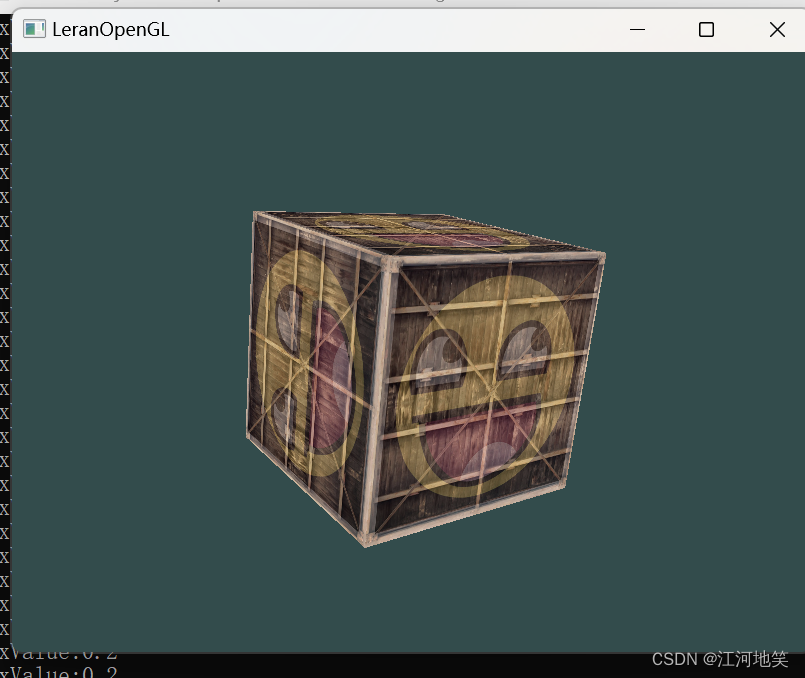
model = glm::rotate(model, (float)glfwGetTime() * glm::radians(50.0f), glm::vec3(0.5f, 1.0f, 0.0f));一个正方体6个面,一个面2个三角形,每个三角形3个顶点
glDrawArrays(GL_TRIANGLES, 0, 36);顶点数据
- //4. 设置顶点数据
- float vertices[] = {
- -0.5f, -0.5f, -0.5f, 0.0f, 0.0f,
- 0.5f, -0.5f, -0.5f, 1.0f, 0.0f,
- 0.5f, 0.5f, -0.5f, 1.0f, 1.0f,
- 0.5f, 0.5f, -0.5f, 1.0f, 1.0f,
- -0.5f, 0.5f, -0.5f, 0.0f, 1.0f,
- -0.5f, -0.5f, -0.5f, 0.0f, 0.0f,
- -0.5f, -0.5f, 0.5f, 0.0f, 0.0f,
- 0.5f, -0.5f, 0.5f, 1.0f, 0.0f,
- 0.5f, 0.5f, 0.5f, 1.0f, 1.0f,
- 0.5f, 0.5f, 0.5f, 1.0f, 1.0f,
- -0.5f, 0.5f, 0.5f, 0.0f, 1.0f,
- -0.5f, -0.5f, 0.5f, 0.0f, 0.0f,
- -0.5f, 0.5f, 0.5f, 1.0f, 0.0f,
- -0.5f, 0.5f, -0.5f, 1.0f, 1.0f,
- -0.5f, -0.5f, -0.5f, 0.0f, 1.0f,
- -0.5f, -0.5f, -0.5f, 0.0f, 1.0f,
- -0.5f, -0.5f, 0.5f, 0.0f, 0.0f,
- -0.5f, 0.5f, 0.5f, 1.0f, 0.0f,
- 0.5f, 0.5f, 0.5f, 1.0f, 0.0f,
- 0.5f, 0.5f, -0.5f, 1.0f, 1.0f,
- 0.5f, -0.5f, -0.5f, 0.0f, 1.0f,
- 0.5f, -0.5f, -0.5f, 0.0f, 1.0f,
- 0.5f, -0.5f, 0.5f, 0.0f, 0.0f,
- 0.5f, 0.5f, 0.5f, 1.0f, 0.0f,
- -0.5f, -0.5f, -0.5f, 0.0f, 1.0f,
- 0.5f, -0.5f, -0.5f, 1.0f, 1.0f,
- 0.5f, -0.5f, 0.5f, 1.0f, 0.0f,
- 0.5f, -0.5f, 0.5f, 1.0f, 0.0f,
- -0.5f, -0.5f, 0.5f, 0.0f, 0.0f,
- -0.5f, -0.5f, -0.5f, 0.0f, 1.0f,
- -0.5f, 0.5f, -0.5f, 0.0f, 1.0f,
- 0.5f, 0.5f, -0.5f, 1.0f, 1.0f,
- 0.5f, 0.5f, 0.5f, 1.0f, 0.0f,
- 0.5f, 0.5f, 0.5f, 1.0f, 0.0f,
- -0.5f, 0.5f, 0.5f, 0.0f, 0.0f,
- -0.5f, 0.5f, -0.5f, 0.0f, 1.0f
- };
OpenGL存储它的所有深度信息于一个Z缓冲(Z-buffer)中,也被称为深度缓冲(Depth Buffer)。GLFW会自动为你生成这样一个缓冲(就像它也有一个颜色缓冲来存储输出图像的颜色)。深度值存储在每个片段里面(作为片段的z值),当片段想要输出它的颜色时,OpenGL会将它的深度值和z缓冲进行比较,如果当前的片段在其它片段之后,它将会被丢弃,否则将会覆盖。这个过程称为深度测试(Depth Testing),它是由OpenGL自动完成的。
需要增加glEnable(GL_DEPTH_TEST);因为默认是关闭状态。
因为我们使用了深度测试,我们也想要在每次渲染迭代之前清除深度缓冲(否则前一帧的深度信息仍然保存在缓冲中)。就像清除颜色缓冲一样,我们可以通过在glClear函数中指定DEPTH_BUFFER_BIT位来清除深度缓冲:
glClear(GL_COLOR_BUFFER_BIT | GL_DEPTH_BUFFER_BIT);
8. 多个正方体
- #include
- #include
- #include
- #include "stb_image.h"
- #include
- #include "shader.h"
- #include
- #include
- #include
- void framebuffer_size_callback(GLFWwindow* window, int width, int height);
- void processInput(GLFWwindow* window);
- // settings
- const unsigned int SCR_WIDTH = 800;
- const unsigned int SCR_HEIGHT = 600;
- float mixValue = 0.2f;
- int main() {
- //1.初始化配置
- glfwInit();
- glfwWindowHint(GLFW_CONTEXT_VERSION_MAJOR, 3);
- glfwWindowHint(GLFW_CONTEXT_VERSION_MINOR, 3);
- glfwWindowHint(GLFW_OPENGL_PROFILE, GLFW_OPENGL_CORE_PROFILE);
- #ifdef __APPLE__
- glfwWindowHint(GLFW_OPENGL_FORWARD_COMPAT, GLFW_TRUE);
- #endif // __APPLE__
- //2.gltf 窗口创建
- GLFWwindow* window = glfwCreateWindow(SCR_WIDTH, SCR_HEIGHT, "LeranOpenGL", NULL, NULL);
- if (window == NULL) {
- std::cout << "Failed to create GLFW window" << std::endl;
- glfwTerminate();
- return -1;
- }
- glfwMakeContextCurrent(window);
- glfwSetFramebufferSizeCallback(window, framebuffer_size_callback);
- //3. 加载所有GL函数指针
- if (!gladLoadGLLoader((GLADloadproc)glfwGetProcAddress)) {
- std::cout << "Failed to initialize GLAD" << std::endl;
- return -1;
- }
- Shader ourShader("./texture.vs", "./texture.fs");
- //4. 设置顶点数据
- float vertices[] = {
- -0.5f, -0.5f, -0.5f, 0.0f, 0.0f,
- 0.5f, -0.5f, -0.5f, 1.0f, 0.0f,
- 0.5f, 0.5f, -0.5f, 1.0f, 1.0f,
- 0.5f, 0.5f, -0.5f, 1.0f, 1.0f,
- -0.5f, 0.5f, -0.5f, 0.0f, 1.0f,
- -0.5f, -0.5f, -0.5f, 0.0f, 0.0f,
- -0.5f, -0.5f, 0.5f, 0.0f, 0.0f,
- 0.5f, -0.5f, 0.5f, 1.0f, 0.0f,
- 0.5f, 0.5f, 0.5f, 1.0f, 1.0f,
- 0.5f, 0.5f, 0.5f, 1.0f, 1.0f,
- -0.5f, 0.5f, 0.5f, 0.0f, 1.0f,
- -0.5f, -0.5f, 0.5f, 0.0f, 0.0f,
- -0.5f, 0.5f, 0.5f, 1.0f, 0.0f,
- -0.5f, 0.5f, -0.5f, 1.0f, 1.0f,
- -0.5f, -0.5f, -0.5f, 0.0f, 1.0f,
- -0.5f, -0.5f, -0.5f, 0.0f, 1.0f,
- -0.5f, -0.5f, 0.5f, 0.0f, 0.0f,
- -0.5f, 0.5f, 0.5f, 1.0f, 0.0f,
- 0.5f, 0.5f, 0.5f, 1.0f, 0.0f,
- 0.5f, 0.5f, -0.5f, 1.0f, 1.0f,
- 0.5f, -0.5f, -0.5f, 0.0f, 1.0f,
- 0.5f, -0.5f, -0.5f, 0.0f, 1.0f,
- 0.5f, -0.5f, 0.5f, 0.0f, 0.0f,
- 0.5f, 0.5f, 0.5f, 1.0f, 0.0f,
- -0.5f, -0.5f, -0.5f, 0.0f, 1.0f,
- 0.5f, -0.5f, -0.5f, 1.0f, 1.0f,
- 0.5f, -0.5f, 0.5f, 1.0f, 0.0f,
- 0.5f, -0.5f, 0.5f, 1.0f, 0.0f,
- -0.5f, -0.5f, 0.5f, 0.0f, 0.0f,
- -0.5f, -0.5f, -0.5f, 0.0f, 1.0f,
- -0.5f, 0.5f, -0.5f, 0.0f, 1.0f,
- 0.5f, 0.5f, -0.5f, 1.0f, 1.0f,
- 0.5f, 0.5f, 0.5f, 1.0f, 0.0f,
- 0.5f, 0.5f, 0.5f, 1.0f, 0.0f,
- -0.5f, 0.5f, 0.5f, 0.0f, 0.0f,
- -0.5f, 0.5f, -0.5f, 0.0f, 1.0f
- };
- unsigned int indices[] = {
- 0, 1, 3, // first triangle
- 1, 2, 3 // second triangle
- };
- unsigned int VBO, VAO, EBO;
- glGenVertexArrays(1, &VAO);
- glGenBuffers(1, &VBO);
- glGenBuffers(1,&EBO);//元素缓冲对象:Element Buffer Object,EBO
- glBindVertexArray(VAO);
- //复制顶点数组到缓冲区中供opengl使用
- glBindBuffer(GL_ARRAY_BUFFER, VBO);
- glBufferData(GL_ARRAY_BUFFER, sizeof(vertices), vertices, GL_STATIC_DRAW);
- glBindBuffer(GL_ELEMENT_ARRAY_BUFFER, EBO);
- glBufferData(GL_ELEMENT_ARRAY_BUFFER, sizeof(indices), indices, GL_STATIC_DRAW);
- //设置顶点属性指针
- glVertexAttribPointer(0, 3, GL_FLOAT, GL_FALSE, 5 * sizeof(float), (void*)0);
- glEnableVertexAttribArray(0);
- //设置纹理属性指针
- glVertexAttribPointer(1, 2, GL_FLOAT, GL_FALSE, 5 * sizeof(float), (void*)(3 * sizeof(float)));
- glEnableVertexAttribArray(1);
- //加载和创建纹理
- unsigned int textureone,texturetwo;
- glGenTextures(1, &textureone);
- glBindTexture(GL_TEXTURE_2D, textureone);
- //设置纹理环绕参数
- glTexParameteri(GL_TEXTURE_2D, GL_TEXTURE_WRAP_S, GL_REPEAT);
- glTexParameteri(GL_TEXTURE_2D, GL_TEXTURE_WRAP_T, GL_REPEAT);
- //设置纹理过滤参数
- glTexParameteri(GL_TEXTURE_2D, GL_TEXTURE_MIN_FILTER, GL_LINEAR);
- glTexParameteri(GL_TEXTURE_2D, GL_TEXTURE_MAG_FILTER, GL_LINEAR);
- //加载图像和生成mipmaps
- int width, height, nrChannels;
- stbi_set_flip_vertically_on_load(true);
- std::string filePath = R"(D:\CPlusProject\LearnOpenGL\DataSet\container.jpg)";
- unsigned char* data = stbi_load(filePath.c_str(), &width, &height, &nrChannels, 0);
- if (data) {
- glTexImage2D(GL_TEXTURE_2D, 0, GL_RGB, width, height, 0, GL_RGB, GL_UNSIGNED_BYTE, data);
- glGenerateMipmap(GL_TEXTURE_2D);
- }
- else {
- std::cout << "Failed to load texture" << std::endl;
- }
- stbi_image_free(data);
- glGenTextures(1, &texturetwo);
- glBindTexture(GL_TEXTURE_2D, texturetwo);
- //设置纹理环绕参数
- glTexParameteri(GL_TEXTURE_2D, GL_TEXTURE_WRAP_S, GL_REPEAT);
- glTexParameteri(GL_TEXTURE_2D, GL_TEXTURE_WRAP_T, GL_REPEAT);
- //设置纹理过滤参数
- glTexParameteri(GL_TEXTURE_2D, GL_TEXTURE_MIN_FILTER, GL_LINEAR);
- glTexParameteri(GL_TEXTURE_2D, GL_TEXTURE_MAG_FILTER, GL_LINEAR);
- //加载图像和生成mipmaps
- filePath = R"(D:\CPlusProject\LearnOpenGL\DataSet\awesomeface.png)";
- unsigned char* data2 = stbi_load(filePath.c_str(), &width, &height, &nrChannels, 0);
- if (data2) {
- glTexImage2D(GL_TEXTURE_2D, 0, GL_RGB, width, height, 0, GL_RGBA, GL_UNSIGNED_BYTE, data2);
- glGenerateMipmap(GL_TEXTURE_2D);
- }
- else {
- std::cout << "Failed to load texture" << std::endl;
- }
- stbi_image_free(data2);
- ourShader.use();
- glUniform1i(glGetUniformLocation(ourShader.ID, "textureone"), 0);//二选一
- ourShader.setInt("texturetwo", 1);//二选一
- glm::vec3 cubePositions[] = {
- glm::vec3(0.0f, 0.0f, 0.0f),
- glm::vec3(2.0f, 5.0f, -15.0f),
- glm::vec3(-1.5f, -2.2f, -2.5f),
- glm::vec3(-3.8f, -2.0f, -12.3f),
- glm::vec3(2.4f, -0.4f, -3.5f),
- glm::vec3(-1.7f, 3.0f, -7.5f),
- glm::vec3(1.3f, -2.0f, -2.5f),
- glm::vec3(1.5f, 2.0f, -2.5f),
- glm::vec3(1.5f, 0.2f, -1.5f),
- glm::vec3(-1.3f, 1.0f, -1.5f)
- };
- //5. 循环渲染
- while (!glfwWindowShouldClose(window)) {
- processInput(window);
- glEnable(GL_DEPTH_TEST);
- // render
- glClearColor(0.2f, 0.3f, 0.3f, 1.0f);
- glClear(GL_COLOR_BUFFER_BIT | GL_DEPTH_BUFFER_BIT);
- //绑定纹理
- glActiveTexture(GL_TEXTURE0);
- glBindTexture(GL_TEXTURE_2D, textureone);
- glActiveTexture(GL_TEXTURE1);
- glBindTexture(GL_TEXTURE_2D, texturetwo);
- ourShader.setFloat("mixValue", mixValue);
- ourShader.use();
- // create transformations
- glm::mat4 view = glm::mat4(1.0f);
- glm::mat4 projection = glm::mat4(1.0f);
- //注意,我们将矩阵向我们要进行移动场景的反方向移动
- view = glm::translate(view, glm::vec3(0.0f, 0.0f, -3.0f));
- projection = glm::perspective(glm::radians(45.0f), (float)SCR_WIDTH / (float)SCR_HEIGHT, 0.1f, 100.0f);
- // retrieve the matrix uniform locations
- unsigned int viewLoc = glGetUniformLocation(ourShader.ID, "view");
- // pass them to the shaders (2 different ways)
- glUniformMatrix4fv(viewLoc, 1, GL_FALSE, &view[0][0]);
- glUniformMatrix4fv(glGetUniformLocation(ourShader.ID, "projection"), 1, GL_FALSE, &projection[0][0]);
- glBindVertexArray(VAO);
- for (unsigned int i = 0; i < 10; i++) {
- glm::mat4 model=glm::mat4(1.0f);
- model = glm::translate(model, cubePositions[i]);
- float angle = 20.0f * i;
- model = glm::rotate(model, glm::radians(angle), glm::vec3(1.0f, 0.3f, 0.5f));
- model = glm::rotate(model, (float)glfwGetTime() * glm::radians(50.0f), glm::vec3(0.5f, 1.0f, 0.0f));
- unsigned int modelLoc = glGetUniformLocation(ourShader.ID, "model");
- glUniformMatrix4fv(modelLoc, 1, GL_FALSE, glm::value_ptr(model));
- glDrawArrays(GL_TRIANGLES, 0, 36);
- }
- glfwSwapBuffers(window);
- glfwPollEvents();
- }
- glDeleteVertexArrays(1, &VAO);
- glDeleteBuffers(1, &VBO);
- glDeleteBuffers(1, &EBO);
- glfwTerminate();
- return 0;
- }
- // process all input: query GLFW whether relevant keys are pressed/released this frame and react accordingly
- // ---------------------------------------------------------------------------------------------------------
- void processInput(GLFWwindow* window)
- {
- if (glfwGetKey(window, GLFW_KEY_ESCAPE) == GLFW_PRESS)
- glfwSetWindowShouldClose(window, true);
- if (glfwGetKey(window, GLFW_KEY_UP) == GLFW_PRESS) {
- std::cout << "up" << std::endl;
- mixValue += 0.001f;
- if (mixValue >= 1.0f) {
- mixValue = 1.0f;
- }
- }
- if (glfwGetKey(window, GLFW_KEY_DOWN) == GLFW_PRESS)
- {
- std::cout << "down" << std::endl;
- mixValue -= 0.001f; // change this value accordingly (might be too slow or too fast based on system hardware)
- if (mixValue <= 0.0f)
- mixValue = 0.0f;
- }
- std::cout << "mixValue:" << mixValue <}// glfw: whenever the window size changed (by OS or user resize) this callback function executes// ---------------------------------------------------------------------------------------------void framebuffer_size_callback(GLFWwindow* window, int width, int height){// make sure the viewport matches the new window dimensions; note that width and// height will be significantly larger than specified on retina displays.glViewport(0, 0, width, height);}

9. 让可以被3整除的盒子是动的
1,3,6,9动,其他静止
- #include
- #include
- #include
- #include "stb_image.h"
- #include
- #include "shader.h"
- #include
- #include
- #include
- void framebuffer_size_callback(GLFWwindow* window, int width, int height);
- void processInput(GLFWwindow* window);
- // settings
- const unsigned int SCR_WIDTH = 800;
- const unsigned int SCR_HEIGHT = 600;
- float mixValue = 0.2f;
- int main() {
- //1.初始化配置
- glfwInit();
- glfwWindowHint(GLFW_CONTEXT_VERSION_MAJOR, 3);
- glfwWindowHint(GLFW_CONTEXT_VERSION_MINOR, 3);
- glfwWindowHint(GLFW_OPENGL_PROFILE, GLFW_OPENGL_CORE_PROFILE);
- #ifdef __APPLE__
- glfwWindowHint(GLFW_OPENGL_FORWARD_COMPAT, GLFW_TRUE);
- #endif // __APPLE__
- //2.gltf 窗口创建
- GLFWwindow* window = glfwCreateWindow(SCR_WIDTH, SCR_HEIGHT, "LeranOpenGL", NULL, NULL);
- if (window == NULL) {
- std::cout << "Failed to create GLFW window" << std::endl;
- glfwTerminate();
- return -1;
- }
- glfwMakeContextCurrent(window);
- glfwSetFramebufferSizeCallback(window, framebuffer_size_callback);
- //3. 加载所有GL函数指针
- if (!gladLoadGLLoader((GLADloadproc)glfwGetProcAddress)) {
- std::cout << "Failed to initialize GLAD" << std::endl;
- return -1;
- }
- Shader ourShader("./texture.vs", "./texture.fs");
- //4. 设置顶点数据
- float vertices[] = {
- -0.5f, -0.5f, -0.5f, 0.0f, 0.0f,
- 0.5f, -0.5f, -0.5f, 1.0f, 0.0f,
- 0.5f, 0.5f, -0.5f, 1.0f, 1.0f,
- 0.5f, 0.5f, -0.5f, 1.0f, 1.0f,
- -0.5f, 0.5f, -0.5f, 0.0f, 1.0f,
- -0.5f, -0.5f, -0.5f, 0.0f, 0.0f,
- -0.5f, -0.5f, 0.5f, 0.0f, 0.0f,
- 0.5f, -0.5f, 0.5f, 1.0f, 0.0f,
- 0.5f, 0.5f, 0.5f, 1.0f, 1.0f,
- 0.5f, 0.5f, 0.5f, 1.0f, 1.0f,
- -0.5f, 0.5f, 0.5f, 0.0f, 1.0f,
- -0.5f, -0.5f, 0.5f, 0.0f, 0.0f,
- -0.5f, 0.5f, 0.5f, 1.0f, 0.0f,
- -0.5f, 0.5f, -0.5f, 1.0f, 1.0f,
- -0.5f, -0.5f, -0.5f, 0.0f, 1.0f,
- -0.5f, -0.5f, -0.5f, 0.0f, 1.0f,
- -0.5f, -0.5f, 0.5f, 0.0f, 0.0f,
- -0.5f, 0.5f, 0.5f, 1.0f, 0.0f,
- 0.5f, 0.5f, 0.5f, 1.0f, 0.0f,
- 0.5f, 0.5f, -0.5f, 1.0f, 1.0f,
- 0.5f, -0.5f, -0.5f, 0.0f, 1.0f,
- 0.5f, -0.5f, -0.5f, 0.0f, 1.0f,
- 0.5f, -0.5f, 0.5f, 0.0f, 0.0f,
- 0.5f, 0.5f, 0.5f, 1.0f, 0.0f,
- -0.5f, -0.5f, -0.5f, 0.0f, 1.0f,
- 0.5f, -0.5f, -0.5f, 1.0f, 1.0f,
- 0.5f, -0.5f, 0.5f, 1.0f, 0.0f,
- 0.5f, -0.5f, 0.5f, 1.0f, 0.0f,
- -0.5f, -0.5f, 0.5f, 0.0f, 0.0f,
- -0.5f, -0.5f, -0.5f, 0.0f, 1.0f,
- -0.5f, 0.5f, -0.5f, 0.0f, 1.0f,
- 0.5f, 0.5f, -0.5f, 1.0f, 1.0f,
- 0.5f, 0.5f, 0.5f, 1.0f, 0.0f,
- 0.5f, 0.5f, 0.5f, 1.0f, 0.0f,
- -0.5f, 0.5f, 0.5f, 0.0f, 0.0f,
- -0.5f, 0.5f, -0.5f, 0.0f, 1.0f
- };
- unsigned int indices[] = {
- 0, 1, 3, // first triangle
- 1, 2, 3 // second triangle
- };
- unsigned int VBO, VAO, EBO;
- glGenVertexArrays(1, &VAO);
- glGenBuffers(1, &VBO);
- glGenBuffers(1,&EBO);//元素缓冲对象:Element Buffer Object,EBO
- glBindVertexArray(VAO);
- //复制顶点数组到缓冲区中供opengl使用
- glBindBuffer(GL_ARRAY_BUFFER, VBO);
- glBufferData(GL_ARRAY_BUFFER, sizeof(vertices), vertices, GL_STATIC_DRAW);
- glBindBuffer(GL_ELEMENT_ARRAY_BUFFER, EBO);
- glBufferData(GL_ELEMENT_ARRAY_BUFFER, sizeof(indices), indices, GL_STATIC_DRAW);
- //设置顶点属性指针
- glVertexAttribPointer(0, 3, GL_FLOAT, GL_FALSE, 5 * sizeof(float), (void*)0);
- glEnableVertexAttribArray(0);
- //设置纹理属性指针
- glVertexAttribPointer(1, 2, GL_FLOAT, GL_FALSE, 5 * sizeof(float), (void*)(3 * sizeof(float)));
- glEnableVertexAttribArray(1);
- //加载和创建纹理
- unsigned int textureone,texturetwo;
- glGenTextures(1, &textureone);
- glBindTexture(GL_TEXTURE_2D, textureone);
- //设置纹理环绕参数
- glTexParameteri(GL_TEXTURE_2D, GL_TEXTURE_WRAP_S, GL_REPEAT);
- glTexParameteri(GL_TEXTURE_2D, GL_TEXTURE_WRAP_T, GL_REPEAT);
- //设置纹理过滤参数
- glTexParameteri(GL_TEXTURE_2D, GL_TEXTURE_MIN_FILTER, GL_LINEAR);
- glTexParameteri(GL_TEXTURE_2D, GL_TEXTURE_MAG_FILTER, GL_LINEAR);
- //加载图像和生成mipmaps
- int width, height, nrChannels;
- stbi_set_flip_vertically_on_load(true);
- std::string filePath = R"(D:\CPlusProject\LearnOpenGL\DataSet\container.jpg)";
- unsigned char* data = stbi_load(filePath.c_str(), &width, &height, &nrChannels, 0);
- if (data) {
- glTexImage2D(GL_TEXTURE_2D, 0, GL_RGB, width, height, 0, GL_RGB, GL_UNSIGNED_BYTE, data);
- glGenerateMipmap(GL_TEXTURE_2D);
- }
- else {
- std::cout << "Failed to load texture" << std::endl;
- }
- stbi_image_free(data);
- glGenTextures(1, &texturetwo);
- glBindTexture(GL_TEXTURE_2D, texturetwo);
- //设置纹理环绕参数
- glTexParameteri(GL_TEXTURE_2D, GL_TEXTURE_WRAP_S, GL_REPEAT);
- glTexParameteri(GL_TEXTURE_2D, GL_TEXTURE_WRAP_T, GL_REPEAT);
- //设置纹理过滤参数
- glTexParameteri(GL_TEXTURE_2D, GL_TEXTURE_MIN_FILTER, GL_LINEAR);
- glTexParameteri(GL_TEXTURE_2D, GL_TEXTURE_MAG_FILTER, GL_LINEAR);
- //加载图像和生成mipmaps
- filePath = R"(D:\CPlusProject\LearnOpenGL\DataSet\awesomeface.png)";
- unsigned char* data2 = stbi_load(filePath.c_str(), &width, &height, &nrChannels, 0);
- if (data2) {
- glTexImage2D(GL_TEXTURE_2D, 0, GL_RGB, width, height, 0, GL_RGBA, GL_UNSIGNED_BYTE, data2);
- glGenerateMipmap(GL_TEXTURE_2D);
- }
- else {
- std::cout << "Failed to load texture" << std::endl;
- }
- stbi_image_free(data2);
- ourShader.use();
- glUniform1i(glGetUniformLocation(ourShader.ID, "textureone"), 0);//二选一
- ourShader.setInt("texturetwo", 1);//二选一
- glm::vec3 cubePositions[] = {
- glm::vec3(0.0f, 0.0f, 0.0f),
- glm::vec3(2.0f, 5.0f, -15.0f),
- glm::vec3(-1.5f, -2.2f, -2.5f),
- glm::vec3(-3.8f, -2.0f, -12.3f),
- glm::vec3(2.4f, -0.4f, -3.5f),
- glm::vec3(-1.7f, 3.0f, -7.5f),
- glm::vec3(1.3f, -2.0f, -2.5f),
- glm::vec3(1.5f, 2.0f, -2.5f),
- glm::vec3(1.5f, 0.2f, -1.5f),
- glm::vec3(-1.3f, 1.0f, -1.5f)
- };
- //5. 循环渲染
- while (!glfwWindowShouldClose(window)) {
- processInput(window);
- glEnable(GL_DEPTH_TEST);
- // render
- glClearColor(0.2f, 0.3f, 0.3f, 1.0f);
- glClear(GL_COLOR_BUFFER_BIT | GL_DEPTH_BUFFER_BIT);
- //绑定纹理
- glActiveTexture(GL_TEXTURE0);
- glBindTexture(GL_TEXTURE_2D, textureone);
- glActiveTexture(GL_TEXTURE1);
- glBindTexture(GL_TEXTURE_2D, texturetwo);
- ourShader.setFloat("mixValue", mixValue);
- ourShader.use();
- // create transformations
- glm::mat4 view = glm::mat4(1.0f);
- glm::mat4 projection = glm::mat4(1.0f);
- //注意,我们将矩阵向我们要进行移动场景的反方向移动
- view = glm::translate(view, glm::vec3(0.0f, 0.0f, -3.0f));
- projection = glm::perspective(glm::radians(45.0f), (float)SCR_WIDTH / (float)SCR_HEIGHT, 0.1f, 100.0f);
- // retrieve the matrix uniform locations
- unsigned int viewLoc = glGetUniformLocation(ourShader.ID, "view");
- // pass them to the shaders (2 different ways)
- glUniformMatrix4fv(viewLoc, 1, GL_FALSE, &view[0][0]);
- glUniformMatrix4fv(glGetUniformLocation(ourShader.ID, "projection"), 1, GL_FALSE, &projection[0][0]);
- glBindVertexArray(VAO);
- for (unsigned int i = 0; i < 10; i++) {
- glm::mat4 model=glm::mat4(1.0f);
- model = glm::translate(model, cubePositions[i]);
- float angle = 20.0f * i;
- model = glm::rotate(model, glm::radians(angle), glm::vec3(1.0f, 0.3f, 0.5f));
- if (i / 3 == 0) {
- model = glm::rotate(model, (float)glfwGetTime() * glm::radians(50.0f), glm::vec3(0.5f, 1.0f, 0.0f));
- }
- unsigned int modelLoc = glGetUniformLocation(ourShader.ID, "model");
- glUniformMatrix4fv(modelLoc, 1, GL_FALSE, glm::value_ptr(model));
- glDrawArrays(GL_TRIANGLES, 0, 36);
- }
- glfwSwapBuffers(window);
- glfwPollEvents();
- }
- glDeleteVertexArrays(1, &VAO);
- glDeleteBuffers(1, &VBO);
- glDeleteBuffers(1, &EBO);
- glfwTerminate();
- return 0;
- }
- // process all input: query GLFW whether relevant keys are pressed/released this frame and react accordingly
- // ---------------------------------------------------------------------------------------------------------
- void processInput(GLFWwindow* window)
- {
- if (glfwGetKey(window, GLFW_KEY_ESCAPE) == GLFW_PRESS)
- glfwSetWindowShouldClose(window, true);
- if (glfwGetKey(window, GLFW_KEY_UP) == GLFW_PRESS) {
- std::cout << "up" << std::endl;
- mixValue += 0.001f;
- if (mixValue >= 1.0f) {
- mixValue = 1.0f;
- }
- }
- if (glfwGetKey(window, GLFW_KEY_DOWN) == GLFW_PRESS)
- {
- std::cout << "down" << std::endl;
- mixValue -= 0.001f; // change this value accordingly (might be too slow or too fast based on system hardware)
- if (mixValue <= 0.0f)
- mixValue = 0.0f;
- }
- std::cout << "mixValue:" << mixValue <}// glfw: whenever the window size changed (by OS or user resize) this callback function executes// ---------------------------------------------------------------------------------------------void framebuffer_size_callback(GLFWwindow* window, int width, int height){// make sure the viewport matches the new window dimensions; note that width and// height will be significantly larger than specified on retina displays.glViewport(0, 0, width, height);}
9. 观察视角
改变view = glm::translate(view, glm::vec3(0.0f, 0.0f, -3.0f));
- for (unsigned int i = 0; i < 1; i++) {
- glm::mat4 model=glm::mat4(1.0f);
- model = glm::translate(model, cubePositions[i]);
- float angle = 20.0f * i;
- model = glm::rotate(model, glm::radians(angle), glm::vec3(1.0f, 0.3f, 0.5f));
- if (i / 3 == 0) {
- model = glm::rotate(model, (float)glfwGetTime() * glm::radians(50.0f), glm::vec3(0.5f, 1.0f, 0.0f));
- }
- unsigned int modelLoc = glGetUniformLocation(ourShader.ID, "model");
- glUniformMatrix4fv(modelLoc, 1, GL_FALSE, glm::value_ptr(model));
- glDrawArrays(GL_TRIANGLES, 0, 36);
- }

效果(1)glm::vec3(0.0f, 0.0f, -3.0f)

效果(2)glm::vec3(0.0f, 0.0f, -0.0f)

效果(3) glm::vec3(0.0f, 0.0f, 3.0f)
总结:在Z轴上,值越大离目标越近
接下来我们需要创建一个观察矩阵。我们想要在场景里面稍微往后移动,以使得物体变成可见的(当在世界空间时,我们位于原点(0,0,0))。要想在场景里面移动,先仔细想一想下面这个句子:
- 将摄像机向后移动,和将整个场景向前移动是一样的。
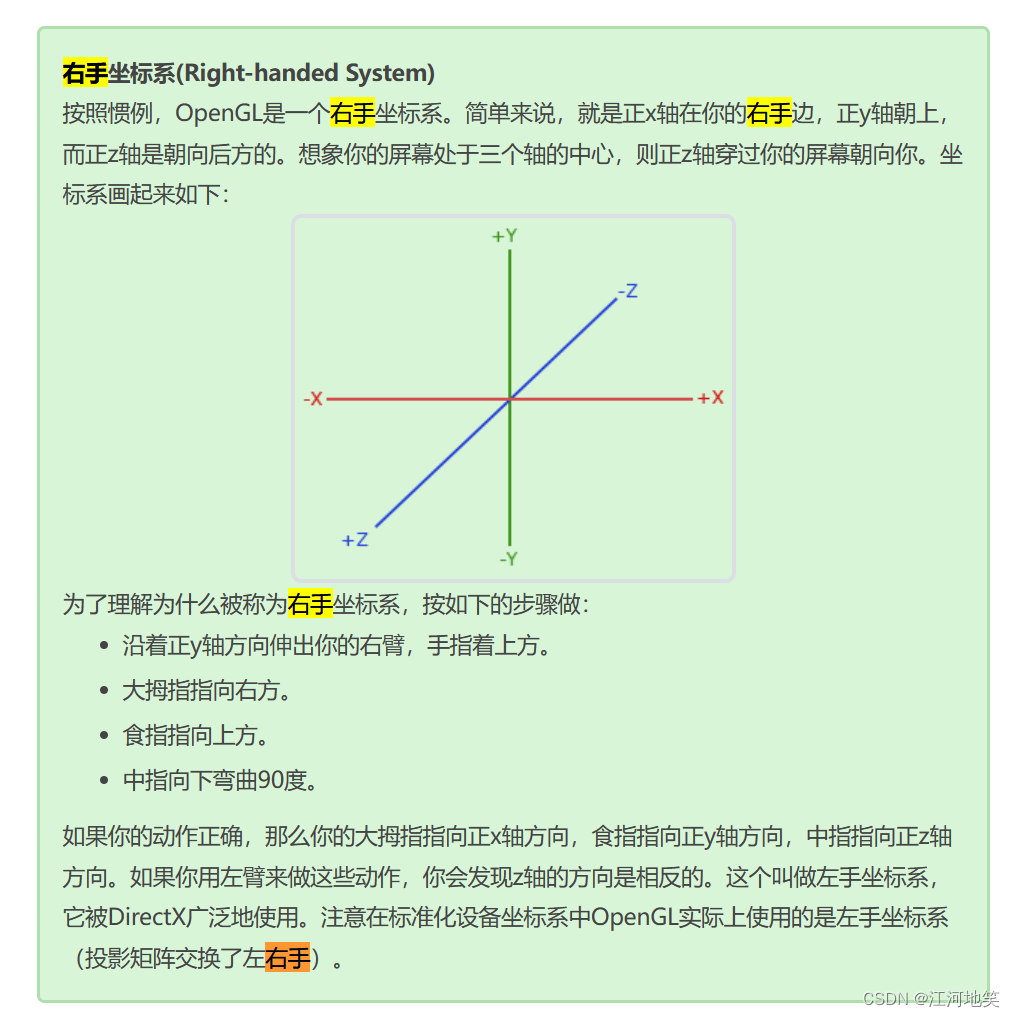
这正是观察矩阵所做的,我们以相反于摄像机移动的方向移动整个场景。因为我们想要往后移动,并且OpenGL是一个右手坐标系(Right-handed System),所以我们需要沿着z轴的正方向移动。我们会通过将场景沿着z轴负方向平移来实现。它会给我们一种我们在往后移动的感觉。(推导可知,z轴越小,越远离目标。z轴越大则靠近目标)
效果(4)glm::vec3(1.0f, 0.0f, -3.0f)

x轴正方向
效果(5)glm::vec3(0.0f, 1.0f, -3.0f)

y轴正方向
-
相关阅读:
数据结构-AVL树(平衡二叉树)
STM32物联网项目-高级定时器软件仿真输出互补PWM信号
python 军棋小游戏代码
OpenCV实战(32)——使用SVM和定向梯度直方图执行目标检测
手写一个Redux,深入理解其原理-面试进阶
Vue项目保持用户登录状态(localStorage + vuex 刷新页面后状态依然保持)
Nestjs中控制器和路由的配置使用
C++ 十进制与十六进制转换
解决nginx反向代理web service的soap:address location问题
feign调用失败 feign.RetryableException: xxx-service executing GET http://xxx/test
- 原文地址:https://blog.csdn.net/qq_59068750/article/details/134256402