-
Springboot---整合对象储存服务MinIO
OSS
「OSS」的英文全称是Object Storage Service,翻译成中文就是「对象存储服务」,官方一点解释就是对象存储是一种使用HTTP API存储和检索非结构化数据和元数据对象的工具。
白话文解释就是将系统所要用的文件上传到云硬盘上,该云硬盘提供了文件下载、上传等一列服务,这样的服务以及技术可以统称为OSS,业内提供OSS服务的厂商很多,知名常用且成规模的七牛云等。一般我们做网站还是服务都希望将文件放在一个指定的服务器,并且更好的管理,并且动静分离更好的提升软件性能我之间写过如何springboot整合七牛云,感兴趣的可以了解一下,但是由于七牛云需要自己购买他的服务器,对于学生做项目不友好,所以今天介绍的是开源可以自己搭建的oss服务
Minio
介绍:
MinIO 是在 GNU Affero 通用公共许可证 v3.0 下发布的高性能对象存储。 它是与 Amazon S3 云存储服务兼容的 API。 使用 MinIO 为机器学习、分析和应用程序数据工作负载构建高性能基础架构。Minio官网搭建(DOCKER)
docker的好处不用多说了,最主要的是服务的安装与卸载很方便,这里也提供docker的学习笔记,那么现在开始搭建
拉取镜像
使用之间可以先查看下各个版本
docker search minio- 1
一般选择star最多的版本
docker pull minion- 1
在虚拟机或者云服务创建一个文件夹,并且包含一个数据,一个配置文件目录做挂载
 运行
运行docker run -p 9001:9000 -p 9090:9090 --net=host --name minio -d --restart=always -e "MINIO_ACCESS_KEY=minioadmin" -e "MINIO_SECRET_KEY=minioadmin" -v /home/hadoop/minio/data:/data -v /home/hadoop/minio/config:/root/.minio minio/minio server /data --console-address ":9091" -address ":9001"- 1
访问虚拟机ip:服务端口
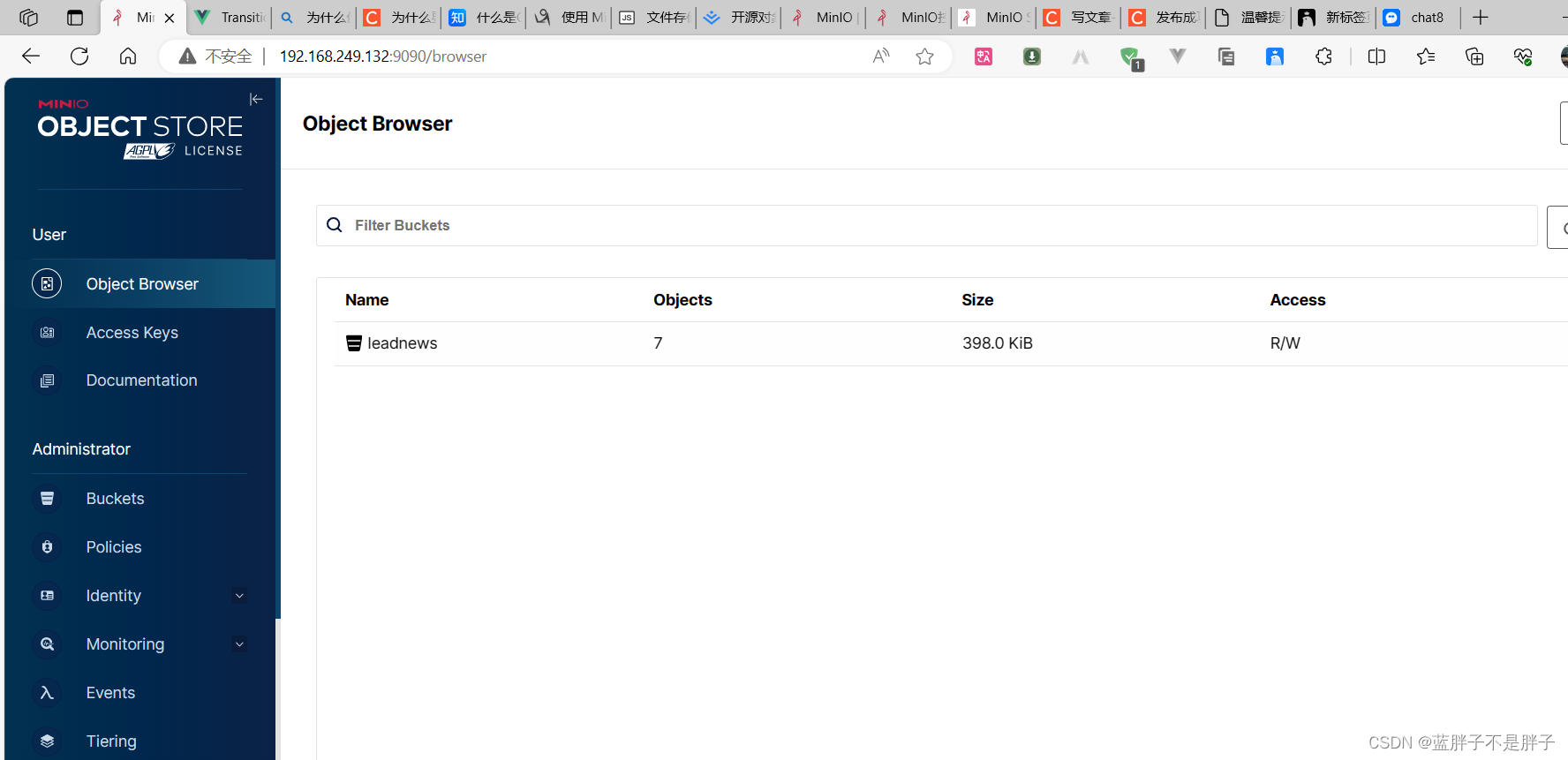
账号密码是配置文件中指定的- MINIO_ACCESS_KEY=minioadmin
- MINIO_SECRET_KEY=minioadmin
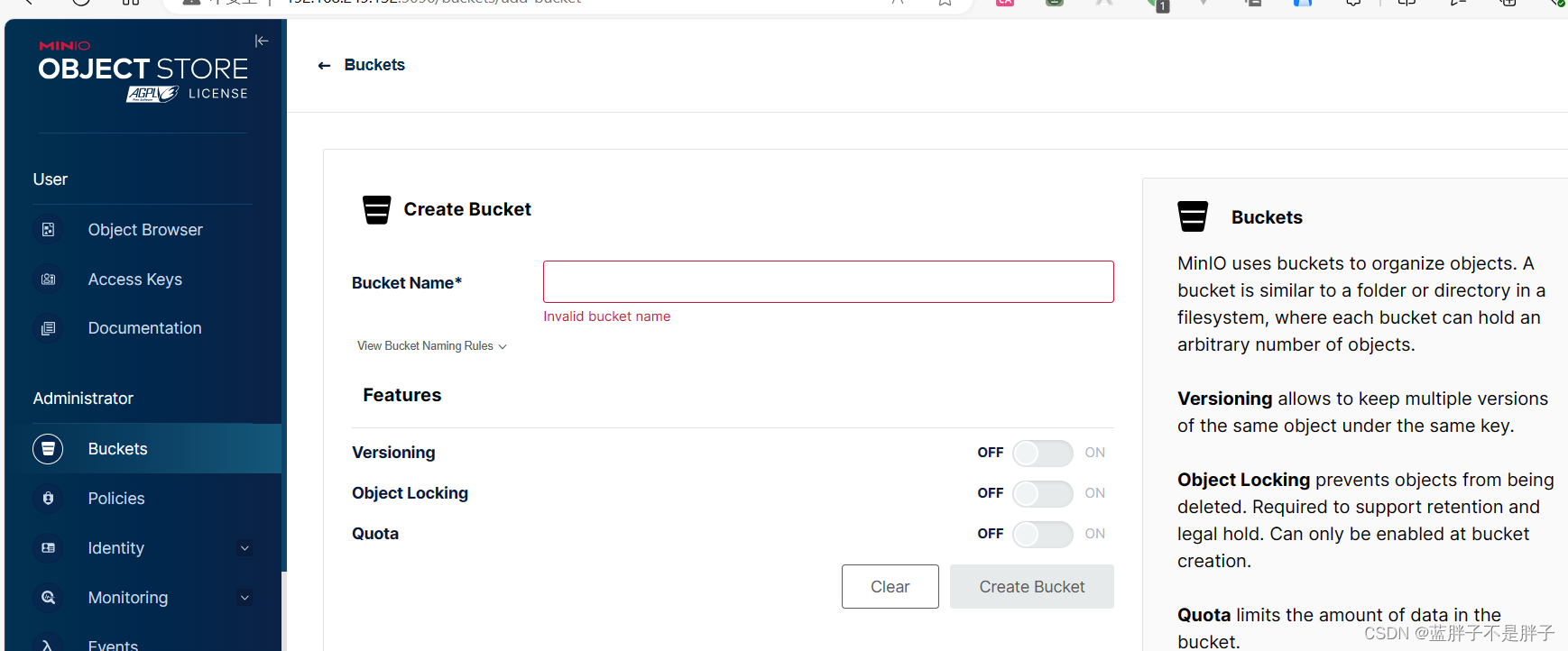
对象储存服务中,数据是按照bucket 桶来的,所以先新建一个桶
java测试上传文件
@Test @DisplayName("测试minio上传下载") public void testMn() throws ServerException, InsufficientDataException, ErrorResponseException, IOException, NoSuchAlgorithmException, InvalidKeyException, InvalidResponseException, XmlParserException, InternalException { client = MinioClient.builder().credentials("minioadmin", "minioadmin") .endpoint("http://192.168.249.132:9001").build(); FileInputStream inputStream; PutObjectArgs putObjectArgs; // 读取文件转换为输入流 inputStream = new FileInputStream("D:\\list.html"); // 上传一个对象 需要使用聚合对象包装在里面() putObjectArgs = PutObjectArgs.builder() .object("list.html")//文件名 .contentType("text/html")//文件类型 .bucket("leadnews")//区域名 .stream(inputStream, inputStream.available(), -1).build();//转换为流进行传输 client.putObject(putObjectArgs); }- 1
- 2
- 3
- 4
- 5
- 6
- 7
- 8
- 9
- 10
- 11
- 12
- 13
- 14
- 15
- 16
- 17
- 18
- 19
- 20
- 21
这样就可以实现上传了,现在进行封装,
便于使用
建立配置属性类便于动态注入数据@Data @ConfigurationProperties(prefix = "minio") // 文件上传 配置前缀file.oss public class MinIOConfigProperties implements Serializable { private String accessKey; private String secretKey; private String bucket; private String endpoint; private String readPath; }- 1
- 2
- 3
- 4
- 5
- 6
- 7
- 8
- 9
- 10
配置文件
minio: accessKey: minioadmin secretKey: minioadmin bucket: leadnews endpoint: http://192.168.249.132:9001 readPath: http://192.168.249.132:9001- 1
- 2
- 3
- 4
- 5
- 6
注入配置类实列化
@Data @Configuration @EnableConfigurationProperties({MinIOConfigProperties.class}) //当引入FileStorageService接口时 @ConditionalOnClass(FileStorageService.class) public class MinIOConfig { @Autowired private MinIOConfigProperties minIOConfigProperties; @Bean public MinioClient buildMinioClient() { return MinioClient .builder() .credentials(minIOConfigProperties.getAccessKey(), minIOConfigProperties.getSecretKey()) .endpoint(minIOConfigProperties.getEndpoint()) .build(); } }- 1
- 2
- 3
- 4
- 5
- 6
- 7
- 8
- 9
- 10
- 11
- 12
- 13
- 14
- 15
- 16
- 17
- 18
- 19
- 20
- 21
文件处理接口
public interface FileStorageService { /** * 上传图片文件 * @param prefix 文件前缀 * @param filename 文件名 * @param inputStream 文件流 * @return 文件全路径 */ public String uploadImgFile(String prefix, String filename,InputStream inputStream); /** * 上传html文件 * @param prefix 文件前缀 * @param filename 文件名 * @param inputStream 文件流 * @return 文件全路径 */ public String uploadHtmlFile(String prefix, String filename,InputStream inputStream); /** * 删除文件 * @param pathUrl 文件全路径 */ public void delete(String pathUrl); /** * 下载文件 * @param pathUrl 文件全路径 * @return * */ public byte[] downLoadFile(String pathUrl); }- 1
- 2
- 3
- 4
- 5
- 6
- 7
- 8
- 9
- 10
- 11
- 12
- 13
- 14
- 15
- 16
- 17
- 18
- 19
- 20
- 21
- 22
- 23
- 24
- 25
- 26
- 27
- 28
- 29
- 30
- 31
- 32
- 33
- 34
- 35
- 36
- 37
imp
@Slf4j @EnableConfigurationProperties(MinIOConfigProperties.class) @Import(MinIOConfig.class) public class MinIOFileStorageService implements FileStorageService { @Autowired private MinioClient minioClient; @Autowired private MinIOConfigProperties minIOConfigProperties; private final static String separator = "/"; /** * @param dirPath * @param filename yyyy/mm/dd/file.jpg * @return */ public String builderFilePath(String dirPath,String filename) { StringBuilder stringBuilder = new StringBuilder(50); if(!StringUtils.isEmpty(dirPath)){ stringBuilder.append(dirPath).append(separator); } SimpleDateFormat sdf = new SimpleDateFormat("yyyy/MM/dd"); String todayStr = sdf.format(new Date()); stringBuilder.append(todayStr).append(separator); stringBuilder.append(filename); return stringBuilder.toString(); } /** * 上传图片文件 * @param prefix 文件前缀 * @param filename 文件名 * @param inputStream 文件流 * @return 文件全路径 */ @Override public String uploadImgFile(String prefix, String filename,InputStream inputStream) { String filePath = builderFilePath(prefix, filename); try { PutObjectArgs putObjectArgs = PutObjectArgs.builder() .object(filePath) .contentType("image/jpg") .bucket(minIOConfigProperties.getBucket()).stream(inputStream,inputStream.available(),-1) .build(); minioClient.putObject(putObjectArgs); StringBuilder urlPath = new StringBuilder(minIOConfigProperties.getReadPath()); urlPath.append(separator+minIOConfigProperties.getBucket()); urlPath.append(separator); urlPath.append(filePath); return urlPath.toString(); }catch (Exception ex){ log.error("minio put file error.",ex); throw new RuntimeException("上传文件失败"); } } /** * 上传html文件 * @param prefix 文件前缀 * @param filename 文件名 * @param inputStream 文件流 * @return 文件全路径 */ @Override public String uploadHtmlFile(String prefix, String filename,InputStream inputStream) { String filePath = builderFilePath(prefix, filename); try { PutObjectArgs putObjectArgs = PutObjectArgs.builder() .object(filePath) .contentType("text/html") .bucket(minIOConfigProperties.getBucket()).stream(inputStream,inputStream.available(),-1) .build(); minioClient.putObject(putObjectArgs); StringBuilder urlPath = new StringBuilder(minIOConfigProperties.getReadPath()); urlPath.append(separator+minIOConfigProperties.getBucket()); urlPath.append(separator); urlPath.append(filePath); return urlPath.toString(); }catch (Exception ex){ log.error("minio put file error.",ex); ex.printStackTrace(); throw new RuntimeException("上传文件失败"); } } /** * 删除文件 * @param pathUrl 文件全路径 */ @Override public void delete(String pathUrl) { String key = pathUrl.replace(minIOConfigProperties.getEndpoint()+"/",""); int index = key.indexOf(separator); String bucket = key.substring(0,index); String filePath = key.substring(index+1); // 删除Objects RemoveObjectArgs removeObjectArgs = RemoveObjectArgs.builder().bucket(bucket).object(filePath).build(); try { minioClient.removeObject(removeObjectArgs); } catch (Exception e) { log.error("minio remove file error. pathUrl:{}",pathUrl); e.printStackTrace(); } } /** * 下载文件 * @param pathUrl 文件全路径 * @return 文件流 * */ @Override public byte[] downLoadFile(String pathUrl) { String key = pathUrl.replace(minIOConfigProperties.getEndpoint()+"/",""); int index = key.indexOf(separator); String bucket = key.substring(0,index); String filePath = key.substring(index+1); InputStream inputStream = null; try { inputStream = minioClient.getObject(GetObjectArgs.builder().bucket(minIOConfigProperties.getBucket()).object(filePath).build()); } catch (Exception e) { log.error("minio down file error. pathUrl:{}",pathUrl); e.printStackTrace(); } ByteArrayOutputStream byteArrayOutputStream = new ByteArrayOutputStream(); byte[] buff = new byte[100]; int rc = 0; while (true) { try { if (!((rc = inputStream.read(buff, 0, 100)) > 0)) break; } catch (IOException e) { e.printStackTrace(); } byteArrayOutputStream.write(buff, 0, rc); } return byteArrayOutputStream.toByteArray(); } }- 1
- 2
- 3
- 4
- 5
- 6
- 7
- 8
- 9
- 10
- 11
- 12
- 13
- 14
- 15
- 16
- 17
- 18
- 19
- 20
- 21
- 22
- 23
- 24
- 25
- 26
- 27
- 28
- 29
- 30
- 31
- 32
- 33
- 34
- 35
- 36
- 37
- 38
- 39
- 40
- 41
- 42
- 43
- 44
- 45
- 46
- 47
- 48
- 49
- 50
- 51
- 52
- 53
- 54
- 55
- 56
- 57
- 58
- 59
- 60
- 61
- 62
- 63
- 64
- 65
- 66
- 67
- 68
- 69
- 70
- 71
- 72
- 73
- 74
- 75
- 76
- 77
- 78
- 79
- 80
- 81
- 82
- 83
- 84
- 85
- 86
- 87
- 88
- 89
- 90
- 91
- 92
- 93
- 94
- 95
- 96
- 97
- 98
- 99
- 100
- 101
- 102
- 103
- 104
- 105
- 106
- 107
- 108
- 109
- 110
- 111
- 112
- 113
- 114
- 115
- 116
- 117
- 118
- 119
- 120
- 121
- 122
- 123
- 124
- 125
- 126
- 127
- 128
- 129
- 130
- 131
- 132
- 133
- 134
- 135
- 136
- 137
- 138
- 139
- 140
- 141
- 142
- 143
封装为模块
如果是springcloud分布式业务,文件处理可以封装为模块给其他模块使用
新建模块<modules> <module>heima-leadnews-basicmodule> <modules> <module>heima-file-startermodule> modules> modules>- 1
- 2
- 3
- 4
- 5
- 6
在项目新建模块,依赖如上配置yaml文件不写,因为是做成模块给其他模块使用的
在该模块的resource目录新建meta-inf元数据配置文件

内容org.springframework.boot.autoconfigure.EnableAutoConfiguration=\ com.heima.file.service.impl.MinIOFileStorageService- 1
- 2
这个配置的作用是为了将一个模块(或库)的功能引入到应用程序中,以便在应用程序的其他部分中可以使用这个模块提供的功能。这个模块可能包含一些服务、组件或类,你可以使用@Autowired等注解来注入它们,以便在应用程序中使用。
通常情况下,如果你没有一个显式的启动类(Spring Boot应用的入口类),或者你不想将这个模块的功能包含在应用程序的启动类中,你可以使用这种方式,通过spring.factories配置来自动启用这个模块。
这个模块的配置会在应用程序启动时被Spring Boot自动加载和初始化,从而使你可以在应用程序中使用它提供的功能,而不需要手动实例化或配置相关的Bean。这种方式可以使应用程序的模块化更好,遵循了依赖注入和解耦的原则。在需要使用的模块导入该模块即可
-
相关阅读:
Linux shell编程学习笔记5:变量命名规则、变量类型、使用变量时要注意的事项
家居服务小程序发展指南
Visual Studio 2022 编译新版 Mission Planner 地面站
【面试题】margin负值问题
计算机毕设 基于大数据的抖音短视频数据分析与可视化 - python 大数据 可视化
MySQL数据库————流程控制
【机器学习】聚类算法中的 K-means 算法及其原理
微调baichuan2-7b遇到的显存坑
C++ GDAL提取多时相遥感影像中像素随时间变化的数值数组
如何制作HTML网页设计【体育运动主题网站——中国篮球NBA】
- 原文地址:https://blog.csdn.net/qq_55272229/article/details/134300525
