-
SpringBoot使用Mybatis
SpringBoot使用Mybatis
Orm 框架的本质是简化编程中操作数据库的编码,发展到现在基本上就剩两家了,一个是宣称可以不用写一句
Sql 的 Hibernate,一个是可以灵活调试动态 Sql 的 Mybatis ,两者各有特点,在企业级系统开发中可以根据需求灵
活使用。发现一个有趣的现象:传统企业大都喜欢使用 Hibernate ,互联网行业通常使用 Mybatis 。
Hibernate 特点就是所有的 Sql 都用 Java 代码来生成,不用跳出程序去写(看) Sql ,有着编程的完整性,发展
到最顶端就是 Spring Data Jpa 这种模式了,基本上根据方法名就可以生成对应的 Sql 了。
Mybatis 初期使用比较麻烦,需要各种配置文件、实体类、Dao 层映射关联、还有一大推其它配置。当然 Mybatis
也发现了这种弊端,初期开发了generator
https://github.com/mybatis/generator可以根据表结果自动生产实体类、配置文件和 Dao 层代码,可以减轻一部分开发量;后期也进行了大量的优化可以使用注解了,自动管
理 Dao 层和配置文件等,发展到最顶端就是今天要讲的这种模式了,
mybatis-spring-boot-starter就是Spring Boot+ Mybatis 可以完全注解不用配置文件,也可以简单配置轻松上手。
现在想想 Spring Boot 就是牛逼呀,任何东西只要关联到 Spring Boot 都是化繁为简。
1、mybatis-spring-boot-starter
官方说明:
MyBatis Spring-Boot-Starter will help you use MyBatis with Spring Boot其实就是 Mybatis 看 Spring Boot 这么火热也开发出一套解决方案来凑凑热闹,但这一凑确实解决了很多问题,
使用起来确实顺畅了许多。
mybatis-spring-boot-starter主要有两种解决方案,一种是使用注解解决一切问题,一种是简化后的老传统。
当然任何模式都需要首先引入
mybatis-spring-boot-starter的 Pom 文件:<dependency> <groupId>org.mybatis.spring.bootgroupId> <artifactId>mybatis-spring-boot-starterartifactId> <version>2.0.0version> dependency>- 1
- 2
- 3
- 4
- 5
好了下来分别介绍两种开发模式。
2、无配置文件注解版
就是一切使用注解搞定。
2.1 pom依赖
<project xmlns="http://maven.apache.org/POM/4.0.0" xmlns:xsi="http://www.w3.org/2001/XMLSchema-instance" xsi:schemaLocation="http://maven.apache.org/POM/4.0.0 https://maven.apache.org/xsd/maven-4.0.0.xsd"> <modelVersion>4.0.0modelVersion> <parent> <groupId>org.springframework.bootgroupId> <artifactId>spring-boot-starter-parentartifactId> <version>2.1.0.RELEASEversion> <relativePath/> parent> <groupId>com.examplegroupId> <artifactId>spring-boot-mybatis-annotationartifactId> <version>0.0.1-SNAPSHOTversion> <name>spring-boot-mybatis-annotationname> <description>spring-boot-mybatis-annotationdescription> <properties> <project.build.sourceEncoding>UTF-8project.build.sourceEncoding> <java.version>1.8java.version> properties> <dependencies> <dependency> <groupId>org.springframework.bootgroupId> <artifactId>spring-boot-starter-webartifactId> dependency> <dependency> <groupId>org.mybatis.spring.bootgroupId> <artifactId>mybatis-spring-boot-starterartifactId> <version>2.0.0version> dependency> <dependency> <groupId>mysqlgroupId> <artifactId>mysql-connector-javaartifactId> dependency> <dependency> <groupId>org.springframework.bootgroupId> <artifactId>spring-boot-starter-testartifactId> <scope>testscope> dependency> dependencies> <build> <plugins> <plugin> <groupId>org.springframework.bootgroupId> <artifactId>spring-boot-maven-pluginartifactId> plugin> plugins> build> project>- 1
- 2
- 3
- 4
- 5
- 6
- 7
- 8
- 9
- 10
- 11
- 12
- 13
- 14
- 15
- 16
- 17
- 18
- 19
- 20
- 21
- 22
- 23
- 24
- 25
- 26
- 27
- 28
- 29
- 30
- 31
- 32
- 33
- 34
- 35
- 36
- 37
- 38
- 39
- 40
- 41
- 42
- 43
- 44
- 45
- 46
- 47
- 48
- 49
- 50
- 51
- 52
- 53
- 54
- 55
- 56
- 57
- 58
2.2 application.properties
mybatis.type-aliases-package=com.example.model spring.datasource.url=jdbc:mysql://localhost:3306/test_user?serverTimezone=UTC&useUnicode=true&characterEncoding=utf-8&useSSL=true spring.datasource.username=root spring.datasource.password=root spring.datasource.driver-class-name=com.mysql.cj.jdbc.Driver- 1
- 2
- 3
- 4
- 5
- 6
Spring Boot 会自动加载
spring.datasource.*相关配置,数据源就会自动注入到 sqlSessionFactory 中,sqlSessionFactory 会自动注入到 Mapper 中,对了,你一切都不用管了,直接拿起来使用就行了。
在启动类中添加对 mapper 包扫描
@MapperScanpackage com.example; import org.mybatis.spring.annotation.MapperScan; import org.springframework.boot.SpringApplication; import org.springframework.boot.autoconfigure.SpringBootApplication; @SpringBootApplication @MapperScan("com.example.mapper") public class SpringBootMybatisAnnotationApplication { public static void main(String[] args) { SpringApplication.run(SpringBootMybatisAnnotationApplication.class, args); } }- 1
- 2
- 3
- 4
- 5
- 6
- 7
- 8
- 9
- 10
- 11
- 12
- 13
- 14
- 15
或者直接在 Mapper 类上面添加注解
@Mapper,建议使用上面那种,不然每个 mapper 加个注解也挺麻烦的。2.3 开发 Mapper
第三步是最关键的一块, Sql 生产都在这里
package com.example.mapper; import com.example.enums.UserSexEnum; import com.example.model.User; import org.apache.ibatis.annotations.*; import org.springframework.stereotype.Component; import java.util.List; @Component public interface UserMapper { @Select("SELECT * FROM users") @Results({ @Result(property = "userSex", column = "user_sex", javaType = UserSexEnum.class), @Result(property = "nickName", column = "nick_name") }) List<User> getAll(); @Select("SELECT * FROM users WHERE id = #{id}") @Results({ @Result(property = "userSex", column = "user_sex", javaType = UserSexEnum.class), @Result(property = "nickName", column = "nick_name") }) User getOne(Long id); @Insert("INSERT INTO users(userName,passWord,user_sex) VALUES(#{userName}, #{passWord}, #{userSex})") void insert(User user); @Update("UPDATE users SET userName=#{userName},nick_name=#{nickName} WHERE id =#{id}") void update(User user); @Delete("DELETE FROM users WHERE id =#{id}") void delete(Long id); }- 1
- 2
- 3
- 4
- 5
- 6
- 7
- 8
- 9
- 10
- 11
- 12
- 13
- 14
- 15
- 16
- 17
- 18
- 19
- 20
- 21
- 22
- 23
- 24
- 25
- 26
- 27
- 28
- 29
- 30
- 31
- 32
- 33
- 34
- 35
- 36
package com.example.enums; public enum UserSexEnum { MAN, WOMAN }- 1
- 2
- 3
- 4
- 5
package com.example.model; import com.example.enums.UserSexEnum; import java.io.Serializable; public class User implements Serializable { private static final long serialVersionUID = 1L; private Long id; private String userName; private String passWord; private UserSexEnum userSex; private String nickName; public User() { super(); } public User(String userName, String passWord, UserSexEnum userSex) { super(); this.passWord = passWord; this.userName = userName; this.userSex = userSex; } public Long getId() { return id; } public void setId(Long id) { this.id = id; } public String getUserName() { return userName; } public void setUserName(String userName) { this.userName = userName; } public String getPassWord() { return passWord; } public void setPassWord(String passWord) { this.passWord = passWord; } public UserSexEnum getUserSex() { return userSex; } public void setUserSex(UserSexEnum userSex) { this.userSex = userSex; } public String getNickName() { return nickName; } public void setNickName(String nickName) { this.nickName = nickName; } @Override public String toString() { // TODO Auto-generated method stub return "userName " + this.userName + ", pasword " + this.passWord + ", sex " + userSex.name(); } }- 1
- 2
- 3
- 4
- 5
- 6
- 7
- 8
- 9
- 10
- 11
- 12
- 13
- 14
- 15
- 16
- 17
- 18
- 19
- 20
- 21
- 22
- 23
- 24
- 25
- 26
- 27
- 28
- 29
- 30
- 31
- 32
- 33
- 34
- 35
- 36
- 37
- 38
- 39
- 40
- 41
- 42
- 43
- 44
- 45
- 46
- 47
- 48
- 49
- 50
- 51
- 52
- 53
- 54
- 55
- 56
- 57
- 58
- 59
- 60
- 61
- 62
- 63
- 64
- 65
- 66
- 67
- 68
- 69
- 70
- 71
- 72
- 73
为了更接近生产我特地将 user_sex、nick_name 两个属性在数据库加了下划线和实体类属性名不一致,另外
user_sex 使用了枚举。
DROP TABLE IF EXISTS `users`; CREATE TABLE `users` ( `id` bigint(20) NOT NULL AUTO_INCREMENT COMMENT '主键id', `userName` varchar(32) DEFAULT NULL COMMENT '用户名', `passWord` varchar(32) DEFAULT NULL COMMENT '密码', `user_sex` varchar(32) DEFAULT NULL, `nick_name` varchar(32) DEFAULT NULL, PRIMARY KEY (`id`) ) ENGINE=InnoDB AUTO_INCREMENT=1 DEFAULT CHARSET=utf8;- 1
- 2
- 3
- 4
- 5
- 6
- 7
- 8
- 9
-
@Select是查询类的注解,所有的查询均使用这个 -
@Result修饰返回的结果集,关联实体类属性和数据库字段一一对应,如果实体类属性和数据库属性名保持一致,就不需要这个属性来修饰。
-
@Insert插入数据库使用,直接传入实体类会自动解析属性到对应的值 -
@Update负责修改,也可以直接传入对象 -
@delete负责删除
了解更多属性参考这里:
http://www.mybatis.org/mybatis-3/zh/java-api.html注意,使用#符号和$符号的不同:
// This example creates a prepared statement, something like select * from teacher where name = ?; @Select("Select * from teacher where name = #{name}") Teacher selectTeachForGivenName(@Param("name") String name); // This example creates n inlined statement, something like select * from teacher where name = 'someName'; @Select("Select * from teacher where name = '${name}'") Teacher selectTeachForGivenName(@Param("name") String name);- 1
- 2
- 3
- 4
- 5
- 6
- 7
2.4 控制器
package com.example.web; import com.example.mapper.UserMapper; import com.example.model.User; import org.springframework.beans.factory.annotation.Autowired; import org.springframework.web.bind.annotation.PathVariable; import org.springframework.web.bind.annotation.RequestMapping; import org.springframework.web.bind.annotation.RestController; import java.util.List; @RestController public class UserController { @Autowired private UserMapper userMapper; @RequestMapping("/getUsers") public List<User> getUsers() { List<User> users = userMapper.getAll(); return users; } @RequestMapping("/getUser") public User getUser(Long id) { User user = userMapper.getOne(id); return user; } @RequestMapping("/add") public void save(User user) { userMapper.insert(user); } @RequestMapping(value = "update") public void update(User user) { userMapper.update(user); } @RequestMapping(value = "/delete/{id}") public void delete(@PathVariable("id") Long id) { userMapper.delete(id); } }- 1
- 2
- 3
- 4
- 5
- 6
- 7
- 8
- 9
- 10
- 11
- 12
- 13
- 14
- 15
- 16
- 17
- 18
- 19
- 20
- 21
- 22
- 23
- 24
- 25
- 26
- 27
- 28
- 29
- 30
- 31
- 32
- 33
- 34
- 35
- 36
- 37
- 38
- 39
- 40
- 41
- 42
- 43
- 44
- 45
- 46
- 47
2.5 测试
上面三步就基本完成了相关 Mapper 层开发,使用的时候当作普通的类注入进入就可以了。
package com.example.mapper; import com.example.enums.UserSexEnum; import com.example.model.User; import org.junit.Assert; import org.junit.Test; import org.junit.runner.RunWith; import org.springframework.beans.factory.annotation.Autowired; import org.springframework.boot.test.context.SpringBootTest; import org.springframework.test.context.junit4.SpringRunner; import java.util.List; @RunWith(SpringRunner.class) @SpringBootTest public class UserMapperTest { @Autowired private UserMapper userMapper; @Test public void testInsert() throws Exception { userMapper.insert(new User("aa1", "a123456", UserSexEnum.MAN)); userMapper.insert(new User("bb1", "b123456", UserSexEnum.WOMAN)); userMapper.insert(new User("cc1", "b123456", UserSexEnum.WOMAN)); Assert.assertEquals(3, userMapper.getAll().size()); } @Test public void testQuery() throws Exception { List<User> users = userMapper.getAll(); System.out.println(users.toString()); } @Test public void testUpdate() throws Exception { User user = userMapper.getOne(1l); System.out.println(user.toString()); user.setNickName("neo"); userMapper.update(user); Assert.assertTrue(("neo".equals(userMapper.getOne(1l).getNickName()))); } }- 1
- 2
- 3
- 4
- 5
- 6
- 7
- 8
- 9
- 10
- 11
- 12
- 13
- 14
- 15
- 16
- 17
- 18
- 19
- 20
- 21
- 22
- 23
- 24
- 25
- 26
- 27
- 28
- 29
- 30
- 31
- 32
- 33
- 34
- 35
- 36
- 37
- 38
- 39
- 40
- 41
- 42
- 43
- 44
- 45
运行
testInsert():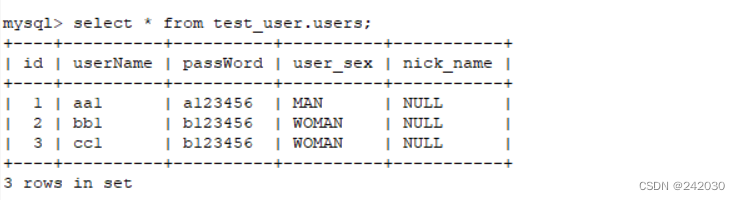
运行
testQuery():[userName aa1, pasword a123456, sex MAN, userName bb1, pasword b123456, sex WOMAN, userName cc1, pasword b123456, sex WOMAN]- 1
运行
testUpdate():
3、极简xml版本
极简 xml 版本保持映射文件的老传统,接口层只需要定义空方法,系统会自动根据方法名在映射文件中找对应的
Sql。
3.1 pom依赖
<project xmlns="http://maven.apache.org/POM/4.0.0" xmlns:xsi="http://www.w3.org/2001/XMLSchema-instance" xsi:schemaLocation="http://maven.apache.org/POM/4.0.0 https://maven.apache.org/xsd/maven-4.0.0.xsd"> <modelVersion>4.0.0modelVersion> <parent> <groupId>org.springframework.bootgroupId> <artifactId>spring-boot-starter-parentartifactId> <version>2.1.0.RELEASEversion> <relativePath/> parent> <groupId>com.examplegroupId> <artifactId>spring-boot-mybatis-xmlartifactId> <version>0.0.1-SNAPSHOTversion> <name>spring-boot-mybatis-xmlname> <description>spring-boot-mybatis-xmldescription> <properties> <project.build.sourceEncoding>UTF-8project.build.sourceEncoding> <java.version>1.8java.version> properties> <dependencies> <dependency> <groupId>org.springframework.bootgroupId> <artifactId>spring-boot-starter-webartifactId> dependency> <dependency> <groupId>org.mybatis.spring.bootgroupId> <artifactId>mybatis-spring-boot-starterartifactId> <version>2.0.0version> dependency> <dependency> <groupId>mysqlgroupId> <artifactId>mysql-connector-javaartifactId> dependency> <dependency> <groupId>org.springframework.bootgroupId> <artifactId>spring-boot-starter-testartifactId> <scope>testscope> dependency> dependencies> <build> <plugins> <plugin> <groupId>org.springframework.bootgroupId> <artifactId>spring-boot-maven-pluginartifactId> plugin> plugins> build> project>- 1
- 2
- 3
- 4
- 5
- 6
- 7
- 8
- 9
- 10
- 11
- 12
- 13
- 14
- 15
- 16
- 17
- 18
- 19
- 20
- 21
- 22
- 23
- 24
- 25
- 26
- 27
- 28
- 29
- 30
- 31
- 32
- 33
- 34
- 35
- 36
- 37
- 38
- 39
- 40
- 41
- 42
- 43
- 44
- 45
- 46
- 47
- 48
- 49
- 50
- 51
- 52
- 53
- 54
- 55
- 56
- 57
- 58
3.2 配置文件
pom 文件和上个版本一样,只是
application.properties新增以下配置mybatis.config-location=classpath:mybatis/mybatis-config.xml mybatis.mapper-locations=classpath:mybatis/mapper/*.xml mybatis.type-aliases-package=com.example.model spring.datasource.url=jdbc:mysql://localhost:3306/test_user?serverTimezone=UTC&useUnicode=true&characterEncoding=utf-8&useSSL=true spring.datasource.username=root spring.datasource.password=root spring.datasource.driver-class-name=com.mysql.cj.jdbc.Driver- 1
- 2
- 3
- 4
- 5
- 6
- 7
指定了 Mybatis 基础配置文件和实体类映射文件的地址。
mybatis-config.xml配置DOCTYPE configuration PUBLIC "-//mybatis.org//DTD Config 3.0//EN" "http://mybatis.org/dtd/mybatis-3-config.dtd"> <configuration> <typeAliases> <typeAlias alias="Integer" type="java.lang.Integer" /> <typeAlias alias="Long" type="java.lang.Long" /> <typeAlias alias="HashMap" type="java.util.HashMap" /> <typeAlias alias="LinkedHashMap" type="java.util.LinkedHashMap" /> <typeAlias alias="ArrayList" type="java.util.ArrayList" /> <typeAlias alias="LinkedList" type="java.util.LinkedList" /> typeAliases> configuration>- 1
- 2
- 3
- 4
- 5
- 6
- 7
- 8
- 9
- 10
- 11
- 12
这里也可以添加一些 Mybatis 基础的配置。
3.3 添加 User 的映射文件
UserMapper.xml文件DOCTYPE mapper PUBLIC "-//mybatis.org//DTD Mapper 3.0//EN" "http://mybatis.org/dtd/mybatis-3-mapper.dtd" > <mapper namespace="com.example.mapper.UserMapper" > <resultMap id="BaseResultMap" type="com.example.model.User" > <id column="id" property="id" jdbcType="BIGINT" /> <result column="userName" property="userName" jdbcType="VARCHAR" /> <result column="passWord" property="passWord" jdbcType="VARCHAR" /> <result column="user_sex" property="userSex" javaType="com.example.enums.UserSexEnum"/> <result column="nick_name" property="nickName" jdbcType="VARCHAR" /> resultMap> <sql id="Base_Column_List" > id, userName, passWord, user_sex, nick_name sql> <select id="getAll" resultMap="BaseResultMap" > SELECT <include refid="Base_Column_List" /> FROM users select> <select id="getOne" parameterType="java.lang.Long" resultMap="BaseResultMap" > SELECT <include refid="Base_Column_List" /> FROM users WHERE id = #{id} select> <insert id="insert" parameterType="com.example.model.User" > INSERT INTO users (userName,passWord,user_sex) VALUES (#{userName}, #{passWord}, #{userSex}) insert> <update id="update" parameterType="com.example.model.User" > UPDATE users SET <if test="userName != null">userName = #{userName},if> <if test="passWord != null">passWord = #{passWord},if> nick_name = #{nickName} WHERE id = #{id} update> <delete id="delete" parameterType="java.lang.Long" > DELETE FROM users WHERE id =#{id} delete> mapper>- 1
- 2
- 3
- 4
- 5
- 6
- 7
- 8
- 9
- 10
- 11
- 12
- 13
- 14
- 15
- 16
- 17
- 18
- 19
- 20
- 21
- 22
- 23
- 24
- 25
- 26
- 27
- 28
- 29
- 30
- 31
- 32
- 33
- 34
- 35
- 36
- 37
- 38
- 39
- 40
- 41
- 42
- 43
- 44
- 45
- 46
- 47
- 48
- 49
- 50
- 51
- 52
- 53
- 54
- 55
其实就是把上个版本中 Mapper 的 Sql 搬到了这里的 xml 中了
3.4 编写 Mapper 层的代码
package com.example.mapper; import com.example.model.User; import org.springframework.stereotype.Component; import java.util.List; @Component public interface UserMapper { List<User> getAll(); User getOne(Long id); void insert(User user); void update(User user); void delete(Long id); }- 1
- 2
- 3
- 4
- 5
- 6
- 7
- 8
- 9
- 10
- 11
- 12
- 13
- 14
- 15
- 16
- 17
- 18
- 19
- 20
- 21
对比上一步,这里只需要定义接口方法。
package com.example.enums; public enum UserSexEnum { MAN, WOMAN }- 1
- 2
- 3
- 4
- 5
package com.example.model; import com.example.enums.UserSexEnum; import java.io.Serializable; public class User implements Serializable { private static final long serialVersionUID = 1L; private Long id; private String userName; private String passWord; private UserSexEnum userSex; private String nickName; public User() { super(); } public User(String userName, String passWord, UserSexEnum userSex) { super(); this.passWord = passWord; this.userName = userName; this.userSex = userSex; } public Long getId() { return id; } public void setId(Long id) { this.id = id; } public String getUserName() { return userName; } public void setUserName(String userName) { this.userName = userName; } public String getPassWord() { return passWord; } public void setPassWord(String passWord) { this.passWord = passWord; } public UserSexEnum getUserSex() { return userSex; } public void setUserSex(UserSexEnum userSex) { this.userSex = userSex; } public String getNickName() { return nickName; } public void setNickName(String nickName) { this.nickName = nickName; } @Override public String toString() { return "userName " + this.userName + ", pasword " + this.passWord + "sex " + userSex.name(); } }- 1
- 2
- 3
- 4
- 5
- 6
- 7
- 8
- 9
- 10
- 11
- 12
- 13
- 14
- 15
- 16
- 17
- 18
- 19
- 20
- 21
- 22
- 23
- 24
- 25
- 26
- 27
- 28
- 29
- 30
- 31
- 32
- 33
- 34
- 35
- 36
- 37
- 38
- 39
- 40
- 41
- 42
- 43
- 44
- 45
- 46
- 47
- 48
- 49
- 50
- 51
- 52
- 53
- 54
- 55
- 56
- 57
- 58
- 59
- 60
- 61
- 62
- 63
- 64
- 65
- 66
- 67
- 68
- 69
- 70
- 71
- 72
3.5 控制器
package com.example.web; import com.example.mapper.UserMapper; import com.example.model.User; import org.springframework.beans.factory.annotation.Autowired; import org.springframework.web.bind.annotation.PathVariable; import org.springframework.web.bind.annotation.RequestMapping; import org.springframework.web.bind.annotation.RestController; import java.util.List; @RestController public class UserController { @Autowired private UserMapper userMapper; @RequestMapping("/getUsers") public List<User> getUsers() { List<User> users = userMapper.getAll(); return users; } @RequestMapping("/getUser") public User getUser(Long id) { User user = userMapper.getOne(id); return user; } @RequestMapping("/add") public void save(User user) { userMapper.insert(user); } @RequestMapping(value = "update") public void update(User user) { userMapper.update(user); } @RequestMapping(value = "/delete/{id}") public void delete(@PathVariable("id") Long id) { userMapper.delete(id); } }- 1
- 2
- 3
- 4
- 5
- 6
- 7
- 8
- 9
- 10
- 11
- 12
- 13
- 14
- 15
- 16
- 17
- 18
- 19
- 20
- 21
- 22
- 23
- 24
- 25
- 26
- 27
- 28
- 29
- 30
- 31
- 32
- 33
- 34
- 35
- 36
- 37
- 38
- 39
- 40
- 41
- 42
- 43
- 44
- 45
- 46
3.6 启动类
package com.example; import org.mybatis.spring.annotation.MapperScan; import org.springframework.boot.SpringApplication; import org.springframework.boot.autoconfigure.SpringBootApplication; @SpringBootApplication @MapperScan("com.example.mapper") public class SpringBootMybatisXmlApplication { public static void main(String[] args) { SpringApplication.run(SpringBootMybatisXmlApplication.class, args); } }- 1
- 2
- 3
- 4
- 5
- 6
- 7
- 8
- 9
- 10
- 11
- 12
- 13
- 14
3.7 测试
package com.example.mapper; import com.example.enums.UserSexEnum; import com.example.model.User; import org.junit.Assert; import org.junit.Test; import org.junit.runner.RunWith; import org.springframework.beans.factory.annotation.Autowired; import org.springframework.boot.test.context.SpringBootTest; import org.springframework.test.context.junit4.SpringRunner; import java.util.List; @RunWith(SpringRunner.class) @SpringBootTest public class UserMapperTest { @Autowired private UserMapper userMapper; @Test public void testInsert() throws Exception { userMapper.insert(new User("aa1", "a123456", UserSexEnum.MAN)); userMapper.insert(new User("bb1", "b123456", UserSexEnum.WOMAN)); userMapper.insert(new User("cc1", "b123456", UserSexEnum.WOMAN)); Assert.assertEquals(3, userMapper.getAll().size()); } @Test public void testQuery() throws Exception { List<User> users = userMapper.getAll(); System.out.println(users.toString()); } @Test public void testUpdate() throws Exception { User user = userMapper.getOne(1l); System.out.println(user.toString()); user.setNickName("neo"); userMapper.update(user); Assert.assertTrue(("neo".equals(userMapper.getOne(1l).getNickName()))); } }- 1
- 2
- 3
- 4
- 5
- 6
- 7
- 8
- 9
- 10
- 11
- 12
- 13
- 14
- 15
- 16
- 17
- 18
- 19
- 20
- 21
- 22
- 23
- 24
- 25
- 26
- 27
- 28
- 29
- 30
- 31
- 32
- 33
- 34
- 35
- 36
- 37
- 38
- 39
- 40
- 41
- 42
- 43
- 44
- 45
package com.example.web; import org.junit.Before; import org.junit.Test; import org.junit.runner.RunWith; import org.springframework.beans.factory.annotation.Autowired; import org.springframework.boot.test.context.SpringBootTest; import org.springframework.http.MediaType; import org.springframework.test.context.junit4.SpringRunner; import org.springframework.test.web.servlet.MockMvc; import org.springframework.test.web.servlet.request.MockMvcRequestBuilders; import org.springframework.test.web.servlet.setup.MockMvcBuilders; import org.springframework.web.context.WebApplicationContext; import static org.springframework.test.web.servlet.result.MockMvcResultHandlers.print; @RunWith(SpringRunner.class) @SpringBootTest public class UserControllerTest { @Autowired private WebApplicationContext wac; private MockMvc mockMvc; @Before public void setUp() throws Exception { mockMvc = MockMvcBuilders.webAppContextSetup(wac).build(); //初始化MockMvc对象 } @Test public void getUsers() throws Exception { mockMvc.perform(MockMvcRequestBuilders.post("/getUsers") .accept(MediaType.APPLICATION_JSON_UTF8)).andDo(print()); } }- 1
- 2
- 3
- 4
- 5
- 6
- 7
- 8
- 9
- 10
- 11
- 12
- 13
- 14
- 15
- 16
- 17
- 18
- 19
- 20
- 21
- 22
- 23
- 24
- 25
- 26
- 27
- 28
- 29
- 30
- 31
- 32
- 33
- 34
- 35
- 36
运行
getUsers():Body = [{"id":1,"userName":"aa1","passWord":"a123456","userSex":"MAN","nickName":"neo"},{"id":2,"userName":"bb1","passWord":"b123456","userSex":"WOMAN","nickName":null},{"id":3,"userName":"cc1","passWord":"b123456","userSex":"WOMAN","nickName":null}]- 1
4、如何选择
两种模式各有特点,注解版适合简单快速的模式,其实像现在流行的这种微服务模式,一个微服务就会对应一个自
已的数据库,多表连接查询的需求会大大的降低,会越来越适合这种模式。
老传统模式比适合大型项目,可以灵活的动态生成 Sql ,方便调整 Sql ,也有痛痛快快,洋洋洒洒的写 Sql 的感
觉。
-
相关阅读:
java计算机毕业设计基于springboot人职匹配推荐系统
netsh int ip 添加/删除 TCP 协议 excludedportrange 的方法
主程序PQX
【Golang】函数篇
springboot项目报错can not register RM,err:can not connect to services-server.
scrapy的selenium跑不起来
面试碰壁15次,作为一个26岁的测试工程师,感到未来迷茫...
EasyNLP 中文文图生成模型带你秒变艺术家
高阶数据结构---树状数组
VsCode 常见的配置、常用好用插件
- 原文地址:https://blog.csdn.net/qq_30614345/article/details/134297577
