-
css控制卡片内部的左右布局
先放效果图
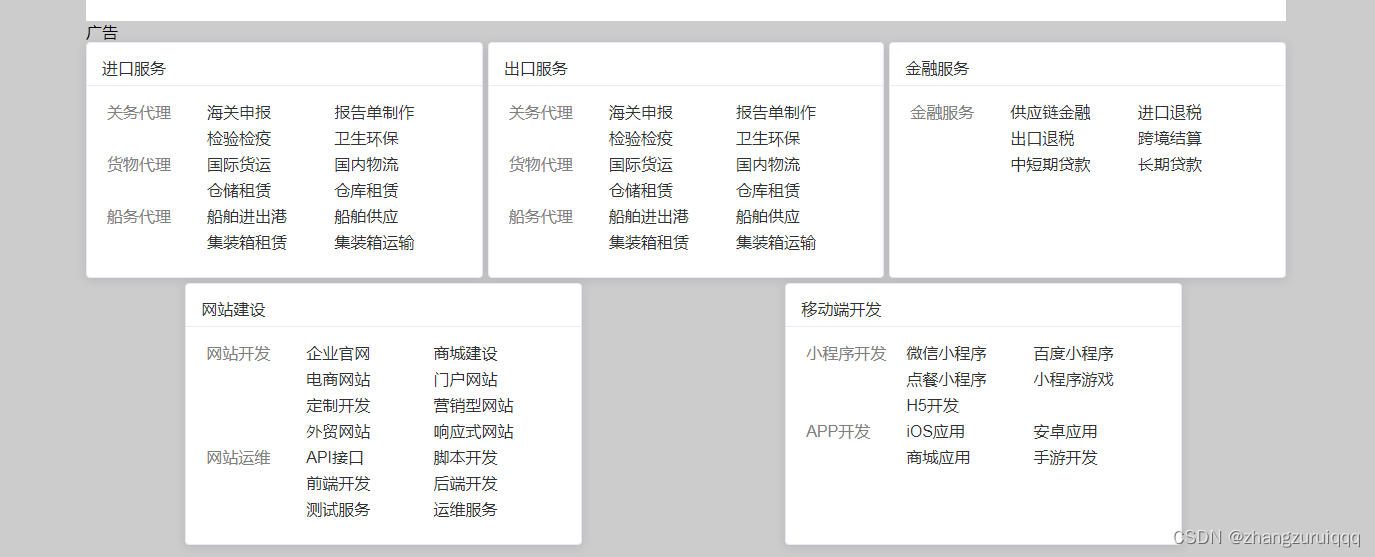
纯css样式 可以根据需求进行更改<template> <!-- 卡片盒子 --> <div class="card_box "> <el-card class="box-card w400" v-for="(item,index) in cardList" :key="index"> <div slot="header" class="clearfix"> <span>{{ item.title }}</span> </div> <div v-for="(value,ind) in item.data" :key="ind" class="card_left_right"> <div class="left"><div class="grey">{{ value.second }}</div></div> <div class="right"><div class="right_card" v-for="(val,i) in value.tit" :key="i">{{ val }}</div></div> </div> </el-card> </div> </template> <script> export default { name: "Index", data() { return { // 版本号 input3: null, cardList:[{title:'进口服务',data:[{second:'关务代理',tit:['海关申报','报告单制作','检验检疫','卫生环保']}, {second:'货物代理',tit:['国际货运','国内物流','仓储租赁','仓库租赁']}, {second:'船务代理',tit:['船舶进出港','船舶供应','集装箱租赁','集装箱运输']}]}, {title:'出口服务',data:[{second:'关务代理',tit:['海关申报','报告单制作','检验检疫','卫生环保']}, {second:'货物代理',tit:['国际货运','国内物流','仓储租赁','仓库租赁']}, {second:'船务代理',tit:['船舶进出港','船舶供应','集装箱租赁','集装箱运输']}]}, {title:'金融服务',data:[{second:'金融服务',tit:['供应链金融','进口退税','出口退税','跨境结算','中短期贷款','长期贷款']}]}, {title:'网站建设',data:[{second:'网站开发',tit:['企业官网','商城建设','电商网站','门户网站','定制开发','营销型网站','外贸网站','响应式网站']}, {second:'网站运维',tit:['API接口','脚本开发','前端开发','后端开发','测试服务','运维服务']}]}, {title:'移动端开发',data:[{second:'小程序开发',tit:['微信小程序','百度小程序','点餐小程序','小程序游戏','H5开发',]}, {second:'APP开发',tit:['iOS应用','安卓应用','商城应用','手游开发',]}]}, ] } }, methods: { }, }; </script> <style scoped lang="scss"> // 卡片盒子外层 .card_box{ width: 100%; display: flex; justify-content: space-around; // justify-content: flex-start;/* 替代space-between布局方式 */ flex-wrap: wrap; .box-card { flex: 1; /* 间隙为5px */ margin: 0 5px 5px 0; /* END */ /* 这里的10px = (分布个数3-1)*间隙5px, 可以根据实际的分布个数和间隙区调整 */ width: calc((100% - 10px) / 3); /* END */ /* 加入这两个后每个item的宽度就生效了 */ min-width: calc((100% - 10px) / 3); max-width: calc((100% - 10px) / 3); /* END */ } .box-card:nth-child(3n) { /* 去除第3n个的margin-right */ margin-right: 0; } } //卡片内部 .w400{ width: 300px; } .card_left_right{ display: flex; width: 100%; // flex-wrap: wrap; // justify-content: flex-start;/* 替代space-between布局方式 */ justify-content: space-between;/* 替代space-between布局方式 */ .left{ width: 100px; } .right{ flex:1; } .right_card{ display: inline-block; // /* 间隙为5px */ margin: 0 5px 5px 0; width: calc((100% - 10px) / 2); min-width: calc((100% - 10px) / 2); max-width: calc((100% - 10px) / 2); } .right_card:nth-child(2n) { /* 去除第2n个的margin-right */ margin-right: 0; } } </style>- 1
- 2
- 3
- 4
- 5
- 6
- 7
- 8
- 9
- 10
- 11
- 12
- 13
- 14
- 15
- 16
- 17
- 18
- 19
- 20
- 21
- 22
- 23
- 24
- 25
- 26
- 27
- 28
- 29
- 30
- 31
- 32
- 33
- 34
- 35
- 36
- 37
- 38
- 39
- 40
- 41
- 42
- 43
- 44
- 45
- 46
- 47
- 48
- 49
- 50
- 51
- 52
- 53
- 54
- 55
- 56
- 57
- 58
- 59
- 60
- 61
- 62
- 63
- 64
- 65
- 66
- 67
- 68
- 69
- 70
- 71
- 72
- 73
- 74
- 75
- 76
- 77
- 78
- 79
- 80
- 81
- 82
- 83
- 84
- 85
- 86
- 87
- 88
- 89
- 90
- 91
- 92
- 93
- 94
- 95
- 96
- 97
- 98
- 99
- 100
- 101
- 102
- 103
- 104
- 105
- 106
- 107
- 108
- 109
- 110
- 111
- 112
- 113
-
相关阅读:
Pandas数据清洗_Python数据分析与可视化
UniRx 入门
操作系统学习笔记_1 计算机系统的运行和结构
【可视化大屏设计学习1】正式开始建设可视化平台了,学习路径写下来!大家一起沟通呀!~
攻防世界web篇-cookie
【java_wxid项目】【第九章】【Apache Mybatis集成】
方法的重载
Jenkins中Node节点与构建任务
大流量、业务效率?从一个榜单开始
期末前端web大作业:用DIV+CSS技术设计的动漫网站——火影忍者6页 带报告
- 原文地址:https://blog.csdn.net/zhangzuruiqqq/article/details/134293801
