-
Spring Cloud之多级缓存
目录
资料下载:day04-多级缓存
下载完成后跟着案例导入说明去做
传统缓存
传统的缓存策略一般是请求到达Tomcat后,先查询Redis,如果未命中则查询数据库,存在下面的问题
- 请求要经过Tomcat处理,Tomcat的性能成为整个系统的瓶颈
- Redis缓存失效时,会对数据库产生冲击

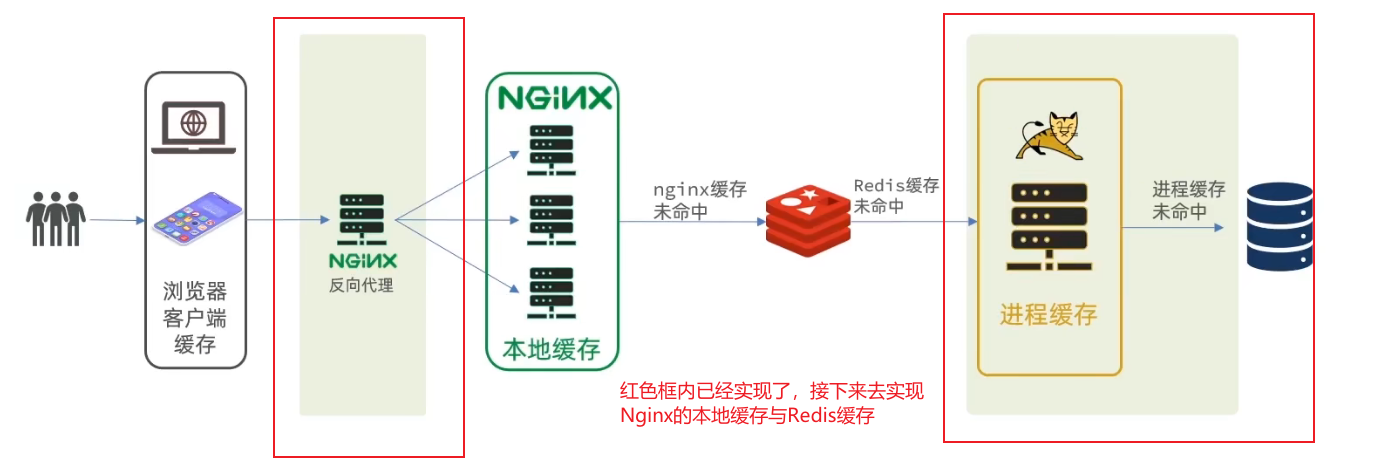
多级缓存

多级缓存主要压力在于nginx,在生产环境中,我们需要通过部署nginx本地缓存集群以及一个nginx反向代理到本地缓存
JVM进程缓存
缓存在日常开发中启动至关重要的作用,由于是存储在内存中,数据的读取速度是非常快的,能大量减少对数据库的访问,减少数据库的压力。我们把缓存分为两类:
- 分布式缓存,例如Redis:
- 优点:存储容量更大、可靠性更好、可以在集群间共享
- 缺点:访问缓存有网络开销
- 场景:缓存数据量较大、可靠性要求较高、需要在集群间共享
- 进程本地缓存,例如HashMap、GuavaCache
- 优点:读取本地内存,没有网络开销,速度更快
- 缺点:存储容量有限、可靠性较低、无法共享
- 场景:性能要求较高,缓存数据量较小
Caffeine
案例测试代码
- @Test
- void testBasicOps() {
- // 创建缓存对象
- Cache
- // 存数据
- cache.put("name", "张三");
- // 取数据,不存在则返回null
- String name = cache.getIfPresent("name");
- System.out.println("name = " + name);
- // 取数据,不存在则去数据库查询
- String defaultName = cache.get("defaultName", key -> {
- // 这里可以去数据库根据 key查询value
- return "李四";
- });
- System.out.println("defaultName = " + defaultName);
- }
运行结果如下

缓存驱逐策略
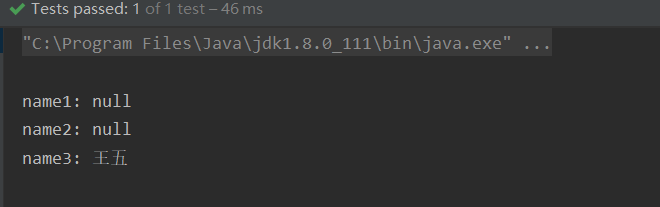
Caffeine提供了三种缓存驱逐策略:
- 基于容量:设置缓存的数量上限
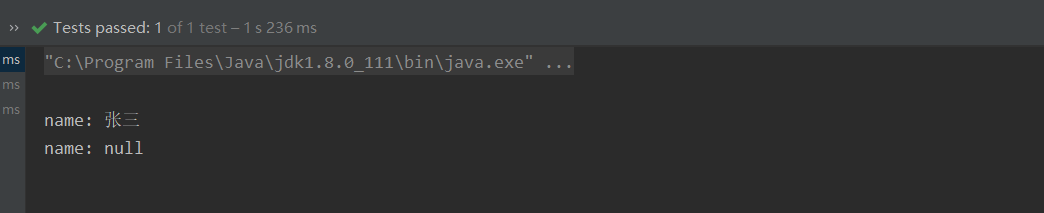
- 基于时间:设置缓存的有效时间
- 基于引用:设置缓存为软引用或弱引用,利用GC来回收缓存数据,性能较差。
默认情况下,当缓存数据过期时,并不会立即将其清理和驱逐,而是在一次读或写操作后,或是在空闲时间完成对失效数据的驱逐。
基于容量实现
- /*
- 基于大小设置驱逐策略:
- */
- @Test
- void testEvictByNum() throws InterruptedException {
- // 创建缓存对象
- Cache
- // 设置缓存大小上限为 1
- .maximumSize(1)
- .build();
- // 存数据
- cache.put("name1", "张三");
- cache.put("name2", "李四");
- cache.put("name3", "王五");
- // 延迟10ms,给清理线程一点时间
- Thread.sleep(10L);
- // 获取数据
- System.out.println("name1: " + cache.getIfPresent("name1"));
- System.out.println("name2: " + cache.getIfPresent("name2"));
- System.out.println("name3: " + cache.getIfPresent("name3"));
- }
运行结果如下
基于时间实现
- /*
- 基于时间设置驱逐策略:
- */
- @Test
- void testEvictByTime() throws InterruptedException {
- // 创建缓存对象
- Cache
- .expireAfterWrite(Duration.ofSeconds(1)) // 设置缓存有效期为 10 秒
- .build();
- // 存数据
- cache.put("name", "张三");
- // 获取数据
- System.out.println("name: " + cache.getIfPresent("name"));
- // 休眠一会儿
- Thread.sleep(1200L);
- System.out.println("name: " + cache.getIfPresent("name"));
- }
运行结果如下
实现进程缓存
利用Caffeine实现下列需求:
- 给根据id查询商品的业务添加缓存,缓存未命中时查询数据库
- 给根据id查询商品库存的业务添加缓存,缓存未命中时查询数据库
- 缓存初始大小为100
- 缓存上限为10000
添加缓存对象
- @Configuration
- public class CaffeineConfig {
- /**
- * 商品信息缓存
- * @return
- */
- @Bean
- public Cache
- return Caffeine.newBuilder()
- .initialCapacity(100)
- .maximumSize(10_000)
- .build();
- }
- /**
- * 商品库存缓存
- * @return
- */
- @Bean
- public Cache
- return Caffeine.newBuilder()
- .initialCapacity(100)
- .maximumSize(10_000)
- .build();
- }
- }
在ItemController中写入查询本地缓存的方法
- @Autowired
- private Cache
- @Autowired
- private Cache
- @GetMapping("/{id}")
- public Item findById(@PathVariable("id") Long id) {
- return itemCache.get(id, key -> {
- return itemService.query()
- .ne("status", 3).eq("id", key)
- .one();
- }
- );
- }
- @GetMapping("/stock/{id}")
- public ItemStock findStockById(@PathVariable("id") Long id) {
- return itemStockCache.get(id,key->{
- return stockService.getById(id);
- });
- }
修改完成后,访问localhost:8081/item/10001,观察控制台

存在一次数据库查询。后续再次查询相同id数据不会再次查询数据库。至此实现了JVM进程缓存。
常用Lua语法
Nginx与Redis的业务逻辑编写并不是通过Java语言,而是通过Lua。Lua是一种轻量小巧的脚本语言,用标准的C语言编写并以源代码形式开放,其设计目的是为了嵌入应用程序中,从而为应用程序提供灵活的扩展和定制功能。
入门案例,输出hello world
在linux中创建一个文本文件
- touch hello.lua
- # 进入vi模式
- vi hello.lua
- # 打印hello world。输入以下内容
- print("hello world")
- # 保存退出后,运行lua脚本
- lua hello.lua

或是直接输入命令启动lua控制台
lua
直接输入命令即可

数据类型
数据类型
描述
nil
表示一个无效值,类似于Java中的null,但在条件表达式中代表false
boolean
包含:true与false
number
表示双精度类型的实浮点数(简单来说,是数字都可以使用number表示)
string
字符串,由单引号或双引号来表示
function
由C或是Lua编写的函数
table
Lua中的表其实是一个“关联数组”,数组的索引可以是数字,字符串或表类型。在 Lua里,table的创建是通过“构造表达式”来完成,最简单构造表达式是{},用来创建一个空表。
变量声明
Lua声明变量的时候,并不需要指定数据类型
- -- local代表局部变量,不加修饰词,代表全局变量
- local str ='hello'
- local num =10
- local flag =true
- local arr ={'java','python'} --需要注意的是,访问数组元素时,下标是从1开始
- local table ={name='Jack',age=10} --类似于Java中的map类型,访问数据时是通过table['key']或是table.key
循环使用
- -- 声明数组
- local arr={'zhangsan','lisi','wangwu'}
- -- 进行循环操作
- for index,value in ipairs(arr) do
- print(index,value)
- end
- -- lua 脚本中,for循环从do开始end结束,数组解析使用ipairs
- -- 声明table
- local table={name='zhangsan',age=10}
- -- 进行循环操作
- for key,value in pairs(table) do
- print(key,value)
- end
- -- table解析使用pairs
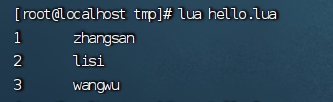
执行lua脚本

定义函数
- -- 声明数组
- local arr={'zhangsan','lisi','wangwu'}
- -- 定义函数
- local function printArr(arr)
- for index,value in ipairs(arr) do
- print(index,value)
- end
- end
- -- 执行函数
- printArr(arr)
执行lua脚本
条件控制
操作符
描述
实例
and
逻辑与操作符。若A为false,则返回A,否则返回B
(A and B)为false
or
逻辑或操作符。若A为true,则返回A,否则返回B
(A or B)为true
not
逻辑非操作符。与逻辑运算结果相反
not(A and B)为true
- -- 声明数组
- local table={name='zhangsan',sex='boy',age=15}
- -- 定义函数
- local function printTable(arr)
- if(not arr) then
- print('table中不存在该字段')
- return nil
- end
- print(arr)
- end
- -- 执行函数
- printTable(table.name)
- printTable(table.addr)
执行lua脚本

安装OpenResty
是基于Nginx的一个组件,主要作用是对Nginx编写业务逻辑
- yum install -y pcre-devel openssl-devel gcc --skip-broken
- yum-config-manager --add-repo https://openresty.org/package/centos/openresty.repo
- # 如果失败则先执行下面一条语句后再执行上面这条
- yum install -y yum-utils
- yum install -y openresty
- yum install -y openresty-opm
配置nginx的环境变量
- vi /etc/profile
- # 在最下面插入如下信息
- export NGINX_HOME=/usr/local/openresty/nginx
- export PATH=${NGINX_HOME}/sbin:$PATH
- # 保存后刷新配置
- source /etc/profile
修改/usr/local/openresty/nginx/conf/nginx.conf配置文件如下
- #user nobody;
- worker_processes 1;
- error_log logs/error.log;
- events {
- worker_connections 1024;
- }
- http {
- include mime.types;
- default_type application/octet-stream;
- sendfile on;
- keepalive_timeout 65;
- server {
- listen 8081;
- server_name localhost;
- location / {
- root html;
- index index.html index.htm;
- }
- error_page 500 502 503 504 /50x.html;
- location = /50x.html {
- root html;
- }
- }
- }
启动nginx
# 启动nginx
nginx
# 重新加载配置
nginx -s reload
# 停止
nginx -s stop
启动后,访问虚拟机的8081端口,如果正常跳转页面如下

实现Nginx业务逻辑编写
先分析请求转发流程。打开win系统上的nginx路由配置文件

接下来就需要对虚拟机中的nginx添加业务逻辑了
对虚拟机Nginx中的配置文件添加如下代码
- # 放入http模块下
- #lua 模块
- lua_package_path "/usr/local/openresty/lualib/?.lua;;";
- #c模块
- lua_package_cpath "/usr/local/openresty/lualib/?.so;;";
- # 放入server模块下
- location /api/item {
- # 响应类型为json
- default_type application/json;
- # 响应结果来源
- content_by_lua_file lua/item.lua;
- }
编写lua脚本
在nginx目录下创建lua文件夹,并创建lua脚本
- mkdir lua
- touch lua/item.lua
先使用假数据测试是否可以正常响应
ngx.say('{"id":10001,"name":"SALSA AIR","title":"RIMOWA 21寸托运箱拉杆箱 SALSA AIR系列果绿色 820.70.36.4","price":17900,"image":"https://m.360buyimg.com/mobilecms/s720x720_jfs/t6934/364/1195375010/84676/e9f2c55f/597ece38N0ddcbc77.jpg!q70.jpg.webp","category":"拉杆箱","brand":"RIMOWA","spec":"","status":1,"createTime":"2019-04-30T16:00:00.000+00:00","updateTime":"2019-04-30T16:00:00.000+00:00","stock":2999,"sold":31290}')访问localhost/item.html?id=10001。查看控制台是否正常响应。如果出现如下错误,去观察win系统下的nginx日志,我的打印了如下错误
2023/11/07 19:29:38 [error] 16784#2812: *34 connect() failed (10061: No connection could be made because the target machine actively refused it) while connecting to upstream, client: 127.0.0.1, server: localhost, request: "GET /api/item/10001 HTTP/1.1", upstream: "http://192.168.10.10:8081/api/item/10001", host: "localhost", referrer: "http://localhost/item.html?id=10001"

解决方法,打开任务管理器,将所有关于nginx的服务全部结束再次重启win系统下的nginx即可。如果不是此类错误,请查看linux系统下的错误日志。
请求参数解析
参数格式
参数实例
参数解析代码示例
路径占位符
/item/1001
拦截路径中:location ~ /item/(\d+){}
~:表示使用正则表达式
(\d+):表示至少有一位数字
Lua脚本中:local id = ngx.var[1]
匹配到的参数会存入ngx.var数组中,通过下标获取
请求头
id:1001
获取请求头,返回值是table类型
local headers = ngx.req.get_headers()
Get请求参数
?id=1001
获取GET请求参数,返回值是table类型
local getParams = ngx.req.get_uri_args()
Post表单参数
id=1001
读取请求体:ngx.req.read_body()
获取POST表单参数,返回值是table类型
local postParams = ngx.req.get_post_args()
JSON参数
{"id": 1001}
读取请求体:ngx.reg.read bodv()
获取body中的ison参数,返回值是string类型
local jsonBody = ngx.req.get_body_data()
修改linux中nginx的配置文件,实现参数解析
- location ~ /api/item/(\d+) {
- # 响应类型为json
- default_type application/json;
- # 响应结果来源
- content_by_lua_file lua/item.lua;
- }
修改lua脚本
- -- 获取参数
- local id = ngx.var[1]
- -- 返回结果
- ngx.say('{"id":'..id..',"name":"SALSA AIR","title":"RIMOWA 21寸托运箱拉杆箱 SALSA AIR系列果绿色 820.70.36.4","price":17900,"image":"https://m.360buyimg.com/mobilecms/s720x720_jfs/t6934/364/1195375010/84676/e9f2c55f/597ece38N0ddcbc77.jpg!q70.jpg.webp","category":"拉杆箱","brand":"RIMOWA","spec":"","status":1,"createTime":"2019-04-30T16:00:00.000+00:00","updateTime":"2019-04-30T16:00:00.000+00:00","stock":2999,"sold":31290}')
访问id为10002的参数,可以发现id随着参数改变,而不是伪数据了

实现lua访问tomcat
nginx提供了内部API用来发送http请求
- local resp = ngx.location.capture("/path",{
- method = ngx.HTTP_GET,-- 请求方式
- args = {a=1,b=2},-- get方式传参数
- body ="c=3&d=4" -- post方式传参数
- })
返回响应结果内容包括:
- resp.status:响应状态码
- resp.header:响应头,是一个table
- resp.body:响应体,就是响应数据
需要注意的是,/path不会指定IP地址和端口而是会被内部拦截,这个时候我们还需要编写一个路由器,发送到对应的服务器。修改linux中的nginx.conf文件添加如下配置
- location /item {
- proxy_pass http://192.168.10.11:8081;
- }
发起Http请求我们可以封装成一个方法,让其他请求发起时也可以调用,因此,我们可以在lualib文件夹下,创建lua脚本。
- -- 封装函数,发送http请求,并解析响应
- local function read_http(path, params)
- local resp = ngx.location.capture(path,{
- method = ngx.HTTP_GET,
- args = params,
- })
- if not resp then
- -- 记录错误信息,返回404
- ngx.log(ngx.ERR, "http not found, path: ", path , ", args: ", args)
- ngx.exit(404)
- end
- return resp.body
- end
- -- 将方法导出
- local _M = {
- read_http = read_http
- }
- return _M
修改item.lua脚本,不再返回伪数据,而是查询真实的数据
- -- 导入common函数库
- local common = require('common')
- local read_http = common.read_http
- -- 获取参数
- local id = ngx.var[1]
- -- 查询商品信息
- local itemJSON = read_http('/item/'..id,nil)
- -- 查询库存信息
- local stockJSON = read_http('/item/stock/'..id,nil)
- -- 返回结果
- ngx.say(itemJSON)
这里只返回了商品信息,接下来访问其他id的商品,查看是否可以查询出商品信息

JSON的序列化和反序列化
引入cjson模块,实现序列化与反序列化
- -- 导入common函数库
- local common = require('common')
- local cjson = require('cjson')
- local read_http = common.read_http
- -- 获取参数
- local id = ngx.var[1]
- -- 查询商品信息
- local itemJSON = read_http('/item/'..id,nil)
- -- 查询库存信息
- local stockJSON = read_http('/item/stock/'..id,nil)
- -- 反序列化JSON商品信息为table类型数据
- local item = cjson.decode(itemJSON)
- local stock = cjson.decode(stockJSON)
- -- 数据组合
- item.stock = stock.stock
- item.sold = stock.sold
- -- 序列化为JSON
- -- 返回结果
- ngx.say(cjson.encode(item))

Tomcat的集群负载均衡
这里我们访问的服务端口是写死的,但通常tomcat是一个集群,因此,我们需要修改我们linux的配置文件,配置tomcat集群
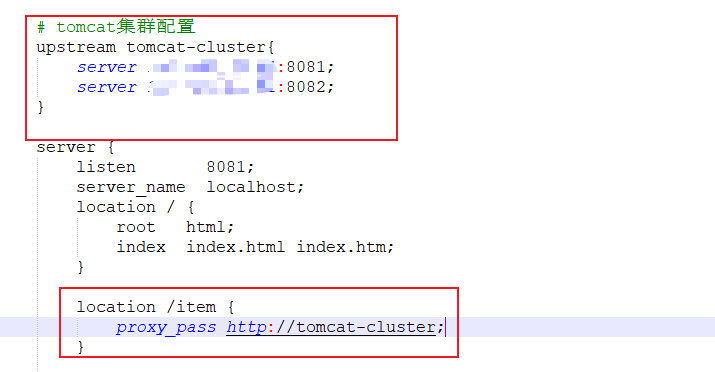
由于Tomcat的负载均衡策略为轮询,那么就会产生一个问题,tomcat集群的进程缓存是不共享的,也就是说,第一次访问8081生成的缓存,在第二次访问8082时,是不存在的,会在8082也生成一份相同的缓存。所以我们需要保证访问同一个id的请求,会被路由到存在缓存的那个tomcat服务器上。这就需要我们修改负载均衡算法。实际实现很简单,只需要在tomcat集群配置添加一行

实现原理是,nginx会对拦截到的请求进行hash算法,然后对集群数量进行取余。从而保证对同一个id的请求都会被路由到同一个tomcat服务器。
添加Redis缓存
本地缓存在访问进程缓存之间,应该先去查询Redis缓存,在添加Redis缓存时,又存在冷启动与缓存预热问题。
- 冷启动:服务刚刚启动时,Redis中并没有缓存,如果所有商品数据都在第一次查询时添加缓存,可能会给数据库带来较大压力。
- 缓存预热:在实际开发中,我们可以利用大数据统计用户访问的热点数据,在项目启动时将这些热点数据提前查询并保
启动Redis
在docker中输入如下命令
docker run --name redis -p 6379:6379 -d redis redis-server --appendonly yes启动成功后使用RESP连接redis

成功连接后,我们需要进行预热,我们的数据不多,将所有的数据全都缓存进去即可,编写一个初始化Handler
- @Component
- public class RedisHandler implements InitializingBean {
- @Autowired
- private StringRedisTemplate redisTemplate;
- @Autowired
- private ItemService itemService;
- @Autowired
- private ItemStockService itemStockService;
- private final static ObjectMapper MAPPER = new ObjectMapper();
- /**
- * Bean生命周期之生成Bean对象之后属性填充
- *
- * @throws Exception
- */
- @Override
- public void afterPropertiesSet() throws Exception {
- //将数据库中的数据进行填充
- //查询商品数据并填充
- List
- listItems = itemService.list();
- List
listStock = itemStockService.list(); - for (Item listItem : listItems) {
- String itemJson = MAPPER.writeValueAsString(listItem);
- redisTemplate.opsForValue().set("itemInfo:id:"+listItem.getId(),itemJson);
- }
- for (ItemStock itemStock : listStock) {
- String itemJson = MAPPER.writeValueAsString(itemStock);
- redisTemplate.opsForValue().set("itemStock:id:"+itemStock.getId(),itemJson);
- }
- }
- }
重启项目,我们就可以看到redis中已经存在了商品数据

查询Redis缓存
启动成功并添加数据后,我们接下来去实现本地缓存查询Redis缓存。这个时候我们还需要编写lua脚本
修改common.lua脚本
- -- 引入redis的函数库
- local redis = require('resty.redis')
- -- 初始化redis对象
- local red = redis:new()
- red:set_timeouts(1000,1000,1000)
- -- 关闭redis连接的工具方法,其实是放入连接池
- local function close_redis(red)
- local pool_max_idle_time = 10000 -- 连接的空闲时间,单位是毫秒
- local pool_size = 100 --连接池大小
- local ok, err = red:set_keepalive(pool_max_idle_time, pool_size)
- if not ok then
- ngx.log(ngx.ERR, "放入redis连接池失败: ", err)
- end
- end
- -- 查询redis的方法 ip和port是redis地址,key是查询的key
- local function read_redis(ip, port, key)
- -- 获取一个连接
- local ok, err = red:connect(ip, port)
- if not ok then
- ngx.log(ngx.ERR, "连接redis失败 : ", err)
- return nil
- end
- -- 查询redis
- local resp, err = red:get(key)
- -- 查询失败处理
- if not resp then
- ngx.log(ngx.ERR, "查询Redis失败: ", err, ", key = " , key)
- end
- --得到的数据为空处理
- if resp == ngx.null then
- resp = nil
- ngx.log(ngx.ERR, "查询Redis数据为空, key = ", key)
- end
- close_redis(red)
- return resp
- end
- local _M = {
- read_http = read_http,
- read_redis = read_redis
- }
修改item.lua脚本
- -- 导入common函数库
- local common = require('common')
- local cjson = require('cjson')
- local read_http = common.read_http
- local read_redis = common.read_redis
- -- 封装函数
- function read_data(key,path,params)
- --查询Redis
- local resp = read_redis('127.0.0.1',6379,key)
- if not resp then
- ngx.log("查询redis失败,key为:",key)
- resp = read_http(path,params)
- end
- return resp
- end
- -- 获取参数
- local id = ngx.var[1]
- -- 查询商品信息
- local itemJSON = read_data('itemInfo:id:'..id,'/item/'..id,nil)
- -- 查询库存信息
- local stockJSON = read_data('itemStock:id:'..id,'/item/stock/'..id,nil)
- -- 反序列化JSON商品信息为table类型数据
- local item = cjson.decode(itemJSON)
- local stock = cjson.decode(stockJSON)
- -- 数据组合
- item.stock = stock.stock
- item.sold = stock.sold
- -- 序列化为JSON
- -- 返回结果
- ngx.say(cjson.encode(item))
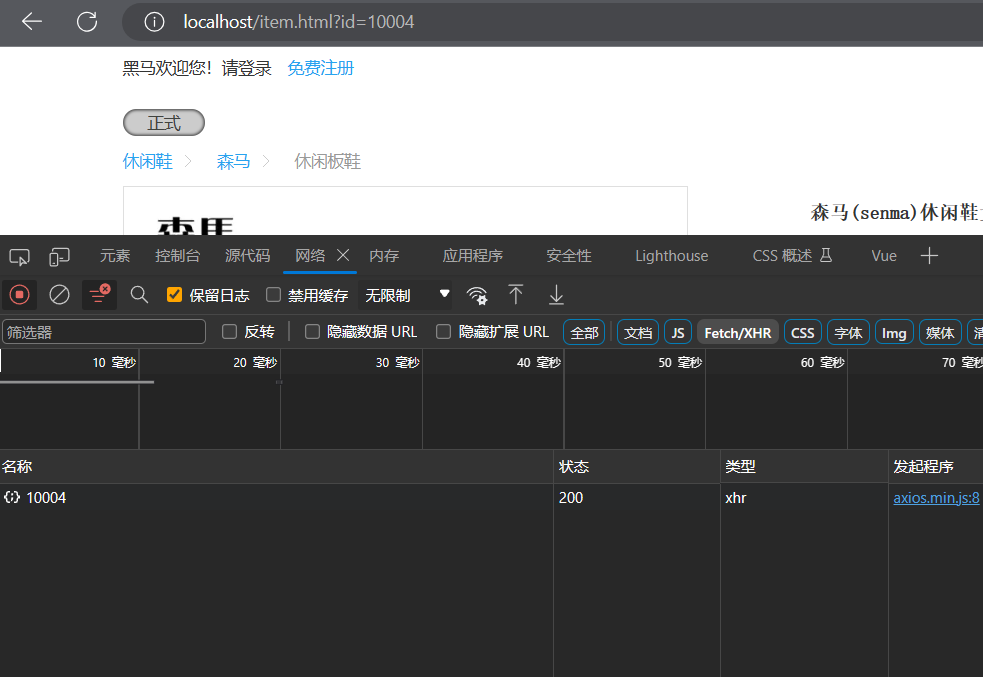
我们关闭tomcat服务,直接访问,测试是否是通过Redis获取到内容
Nginx本地缓存
接下来我们去实现在本地缓存中进行查询
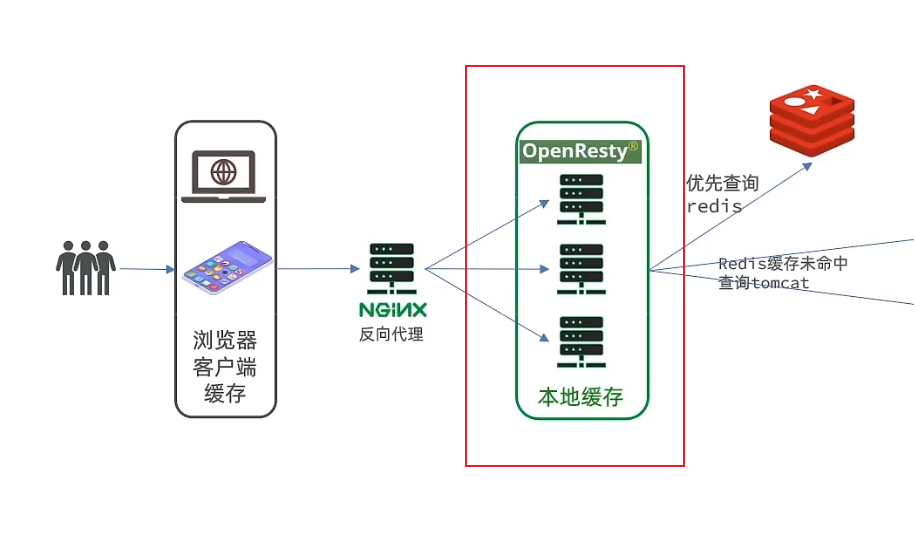
OpenResty为Nginx提供了shard dict的功能,可以在nginx的多的worker之间共享数据,实现缓存功能。
修改CentOS中的nginx.conf文件,开启该功能。
- #开启共享字典,名字叫item_cache,缓存大小150兆
- lua_shared_dict item_cache 150m;
接下来修改item.lua中的read_data代码,先进行本地查询
- -- 导入common函数库
- local common = require("common")
- local cjson = require('cjson')
- local read_http = common.read_http
- local read_redis = common.read_redis
- -- 获取本地缓存对象
- local item_cache = ngx.shared.item_cache
- -- 封装函数
- function read_data(key,expire,path,params)
- --先去查询本地缓存
- local val = item_cache:get(key)
- if not val then
- --查询Redis
- ngx.log(ngx.ERR,"本地缓存不存在,去查询redis")
- val = read_redis("127.0.0.1",6379,key)
- if not val then
- ngx.log(ngx.ERR,"查询redis失败,key为:",key)
- val = read_http(path,params)
- end
- end
- -- 将数据写入本地缓存,并设置过期时间
- item_cache:set(key,val,expire)
- return val
- end
- -- 获取参数
- local id = ngx.var[1]
- -- 查询商品信息
- local itemJSON = read_data("itemInfo:id:"..id,1800,'/item/'..id,nil)
- ngx.log(ngx.ERR,"itmeJson的信息为:",itemJSON)
- -- 查询库存信息
- local stockJSON = read_data("itemStock:id:"..id,60,'/item/stock/'..id,nil)
- -- 反序列化JSON商品信息为table类型数据
- local item = cjson.decode(itemJSON)
- local stock = cjson.decode(stockJSON)
- -- 数据组合
- item.stock = stock.stock
- item.sold = stock.sold
- -- 序列化为JSON
- -- 返回结果
- ngx.say(cjson.encode(item))
接下来进行页面访问。第一次访问结果如下,后续再次访问不会再打印日志。说明的确是走了本地缓存

缓存同步策略
缓存数据同步的常见方式有三种:
设置有效期:给缓存设置有效期,到期后自动删除。再次查询时更新
- 优势:简单、方便
- 缺点:时效性差,缓存过期之前可能不一致
- 场景:更新频率较低,时效性要求低的业务
同步双写:在修改数据库的同时,直接修改缓存
- 优势:时效性强,缓存与数据库强一致
- 缺点:有代码侵入,耦合度高;
- 场景:对一致性、时效性要求较高的缓存数据
异步通知:修改数据库时发送事件通知,相关服务监听到通知后修改缓存数据
- 优势:低耦合,可以同时通知多个缓存服务
- 缺点:时效性一般,可能存在中间不一致状态
- 场景:时效性要求一般,有多个服务需要同步
Canal
Canal,译意为水道/管道/沟渠,Canal是阿里巴巴旗下的一款开源项目,基于Java开发。基于数据库增量日志解析,提供增量数据订阅&消费。
Canal是基于MySQL的主从同步来实现的,MySQL主从同步的原理如下:
MySQL master将数据变更写入二进制日志( binary log),其中记录的数据叫做binary log events
MySQL slave将master的binary log events拷贝到它的中继日志(relay log)
MySQL slave重放relay log中事件,将数据变更反映它自己的数据。

Cansl将自己伪装成MySQL的一个节点,从而监听master的binary log变化。再将得到的变化信息传递到Canal的客户端,从而完成对其他数据库的同步。
安装和配置Canal
首先要进行文件配置。开启binlog功能
- # 进入MySQL的配置文件
- vi /tmp/mysql/conf/my.cnf
- # 添加如下内容
- # binary log存放位置
- log-bin=/var/lib/mysql/mysql-bin
- # 指定数据库名称
- binlog-do-db=heima
- # 添加完成后,重启Mysql
- docker restart mysql
设置用户权限。接下来添加一个仅用于数据同步的账户,出于安全考虑,这里仅提供对item这个库的操作权限。
- create user canal@'%' IDENTIFIED by 'canal';
- GRANT SELECT, REPLICATION SLAVE, REPLICATION CLIENT,SUPER ON *.* TO 'canal'@'%' identified by 'canal';
- FLUSH PRIVILEGES;
重启mysql容器即可
docker restart mysql
测试设置是否成功:在mysql控制台,或者Navicat中,输入命令:
show master status;

创建网络
我们需要创建一个网络,将MySQL、Canal、MQ放到同一个Docker网络中:
docker network create item
让mysql加入这个网络:
docker network connect item mysql
安装Canal。将资料中的Canal.tar加载到虚拟机中
通过命令导入:
docker load -i canal.tar
然后运行命令创建Canal容器:
- docker run -p 11111:11111 --name canal \
- -e canal.destinations=item \
- -e canal.instance.master.address=mysql:3306 \
- -e canal.instance.dbUsername=canal \
- -e canal.instance.dbPassword=canal \
- -e canal.instance.connectionCharset=UTF-8 \
- -e canal.instance.tsdb.enable=true \
- -e canal.instance.gtidon=false \
- -e canal.instance.filter.regex=item\\..* \
- --network item \
- -d canal/canal-server:v1.1.5
说明:
- -p 11111:11111:这是canal的默认监听端口
- -e canal.instance.master.address=mysql:3306:数据库地址和端口,如果不知道mysql容器地址,可以通过docker inspect 容器id来查看
- -e canal.instance.dbUsername=canal:数据库用户名
- -e canal.instance.dbPassword=canal :数据库密码
- -e canal.instance.filter.regex=:要监听的库名称
监听Canal
在项目中的pom文件中引入依赖
- <dependency>
- <groupId>top.javatoolgroupId>
- <artifactId>canal-spring-boot-starterartifactId>
- <version>1.2.1-RELEASEversion>
- dependency>
添加配置文件中的内容
- canal:
- destination: item #启动时指定的容器名称
- server: 192.168.116.131:11111 #canal地址
编写监听器
- @Component
- @CanalTable("tb_item")//需要监听哪个表
- public class ItemHandler implements EntryHandler
- {
- @Autowired
- private RedisHandler redisHandler;
- @Autowired
- private Cache
- @Override
- public void insert(Item item) {
- //更新redis数据库
- redisHandler.saveItem(item);
- //更新JVM缓存
- itemCache.put(item.getId(),item);
- }
- @Override
- public void update(Item before, Item after) {
- redisHandler.saveItem(after);
- itemCache.put(after.getId(),after);
- }
- @Override
- public void delete(Item item) {
- redisHandler.deleteById(item.getId());
- itemCache.invalidate(item.getId());
- }
- }
启动服务器,会发现控制台一直输出消息
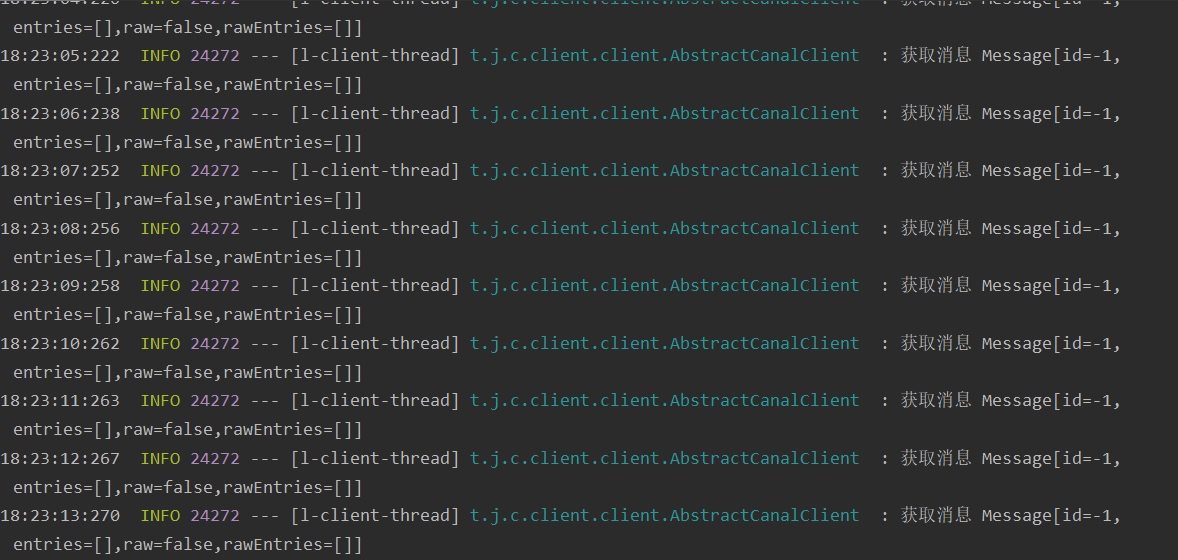
测试能否同步缓存修改,访问localhost:8081端口,对数据进行修改。控制台打印效果如下

访问商品商品页面,也能够发现修改的数据发生了改变,并且服务器没有输出任何查询数据库的日志。
多级缓存访问流程

-
相关阅读:
Django国际化与本地化指南
kubernetesl yaml deploy rancher server
python期末复习案例
Rust swap
【OpcUA开发笔记 3】Open62541证书登录方式
UE4 碰撞射线检测
yum小bug
云时代下,医药行业管理居然这么简单
Java 如何实现 List<String> 的深拷贝?
20240301-2-ZooKeeper面试题(二)
- 原文地址:https://blog.csdn.net/zmbwcx/article/details/134276244
