-
基于若依的ruoyi-nbcio流程管理系统仿钉钉流程json转bpmn的flowable的xml格式(简单支持发起人与审批人的流程)续
更多ruoyi-nbcio功能请看演示系统
gitee源代码地址
前后端代码: https://gitee.com/nbacheng/ruoyi-nbcio
演示地址:RuoYi-Nbcio后台管理系统
之前生产的xml,在bpmn设计里编辑有些内容不正确,包括审批人,关联表单等,所以这部分修正这些问题。
1、前端增加formKey
对于发起人节点,初始化时进行表单赋值
- initStartNodeData(){
- this.initInitiator()
- this.startForm.formOperates = this.initFormOperates(this.value)
- this.startForm.formKey = this.value.properties.formKey
- this.approverForm.formKey = this.value.properties.formKey
- },
同时对确认保存的时候,进行formKey的保存与更新
- /**
- * 开始节点确认保存
- */
- startNodeComfirm() {
- this.properties.initiator = this.initiator['dep&user']
- this.properties.formKey = this.startForm.formKey
- const formOperates = this.startForm.formOperates.map(t=>({formId: t.formId, formOperate: t.formOperate}))
- Object.assign(this.properties,this.startForm, {formOperates})
- this.$emit("confirm", this.properties, '所有人');
- this.visible = false;
- },
2、后端修改
对开始发起人节点进行修改,把发起人赋予的formKey写入到开始节点里,兼容现有的系统
- StartEvent createStartEvent(JSONObject flowNode) {
- String nodeType = flowNode.getString("type");
- StartEvent startEvent = new StartEvent();
- startEvent.setId(id("start"));
- if (Type.INITIATOR_TASK.isEqual(nodeType)) {
- JSONObject properties = flowNode.getJSONObject("properties");
- if(StringUtils.isNotEmpty(properties.getString("formKey"))) {
- startEvent.setFormKey(properties.getString("formKey"));
- }
- }
- return startEvent;
- }
同时对创建用户任务进行修改,修正之前的用户信息与formKey信息
- String createUserTask(JSONObject flowNode, String nodeType) {
- List
incoming = flowNode.getJSONArray("incoming").toJavaList(String.class); - // 自动生成id
- String id = id("userTask");
- if (incoming != null && !incoming.isEmpty()) {
- UserTask userTask = new UserTask();
- JSONObject properties = flowNode.getJSONObject("properties");
- userTask.setName(properties.getString("title"));
- userTask.setId(id);
- List
attributes = new ArrayList (); - if (Type.INITIATOR_TASK.isEqual(nodeType)) {
- ExtensionAttribute extAttribute = new ExtensionAttribute();
- extAttribute.setNamespace(ProcessConstants.NAMASPASE);
- extAttribute.setName("dataType");
- extAttribute.setValue("INITIATOR");
- attributes.add(extAttribute);
- userTask.addAttribute(extAttribute);
- //userTask.setFormKey(properties.getString("formKey"));
- userTask.setAssignee("${initiator}");
- } else if (Type.USER_TASK.isEqual(nodeType) || Type.APPROVER_TASK.isEqual(nodeType)) {
- JSONArray approvers = properties.getJSONArray("approvers");
- JSONObject approver = approvers.getJSONObject(0);
- ExtensionAttribute extDataTypeAttribute = new ExtensionAttribute();
- extDataTypeAttribute.setNamespace(ProcessConstants.NAMASPASE);
- extDataTypeAttribute.setName("dataType");
- extDataTypeAttribute.setValue("USERS");
- userTask.addAttribute(extDataTypeAttribute);
- ExtensionAttribute extTextAttribute = new ExtensionAttribute();
- extTextAttribute.setNamespace(ProcessConstants.NAMASPASE);
- extTextAttribute.setName("text");
- extTextAttribute.setValue(approver.getString("nickName"));
- userTask.addAttribute(extTextAttribute);
- userTask.setFormKey(properties.getString("formKey"));
- userTask.setAssignee(approver.getString("userName"));
- }
- ddProcess.addFlowElement(userTask);
- ddProcess.addFlowElement(connect(incoming.get(0), id));
- }
- return id;
- }
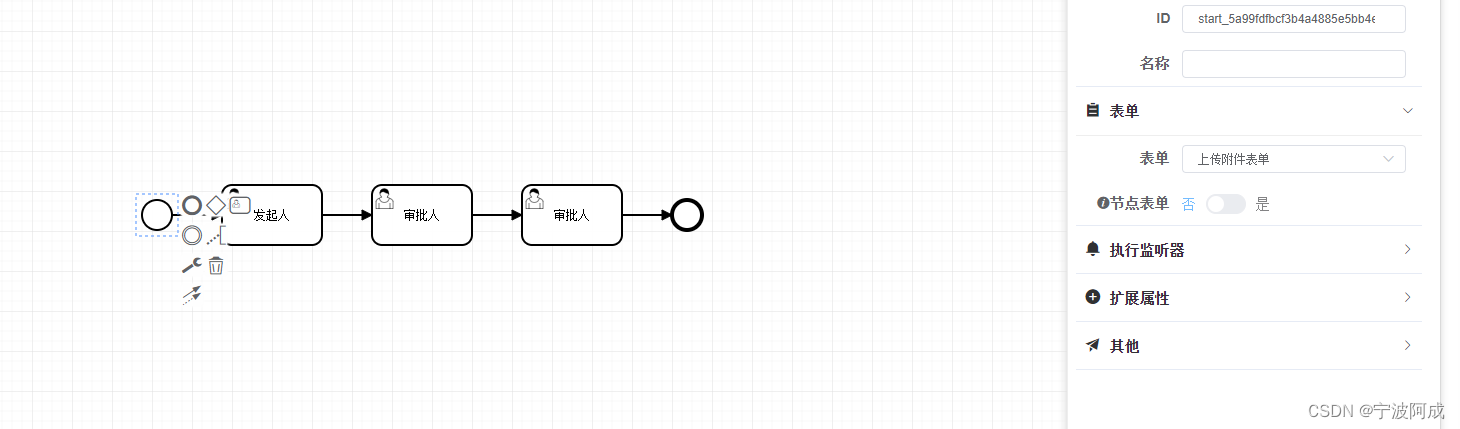
3、效果如下:


-
相关阅读:
《C++语言程序设计》大作业(三个模块)
推荐几款优秀的项目报表软件
复习单片机:矩阵按键(内含1 矩阵按键介绍+2 硬件设计+3 软件设计+4原始代码+5 实验现象)
flume的安装和配置
String的intern()方法详解
FCOS难点记录
git使用
真不戳,Java 协程终于来了
win10使用VMware启动虚拟机如CentOS7,外部机器蓝屏重启
MVC第三波书店缓存帮助类RedisHelper
- 原文地址:https://blog.csdn.net/qq_40032778/article/details/134267168