-
USB HID在系统下通信的一些总结
前言
这篇文章主要介绍在PC(上位机,Host)端,通过HID与硬件进行通信的一些总结,像很多同学肯定和我一样压根不想 去了解什么USB相关的资料,毕竟USB太复杂了,只想有个API给我们进行下数据就好了,像这里主要是我在进行hid通信的总结。
以下理解只是站在PC开发HID软件时的角度,所以讲述的一些USB知识不会很详细
USB 简单介绍
这里只是简单描述一下USB,如果感兴趣的同学可以去查看《从零开始学USB》,作者:to-run-away,这是介绍USB一个系类的文章,讲的特别详细。
USB传输类型
详细介绍请参考从零开始学USB(十三、USB的四种传输类型(2))
USB协议规定了4种传输类型:批量传输、等时传输、中断传输和控制传输,像HID主要使用中断传输和控制传输。
USB描述符
详细请参考
USB有好几种描述符
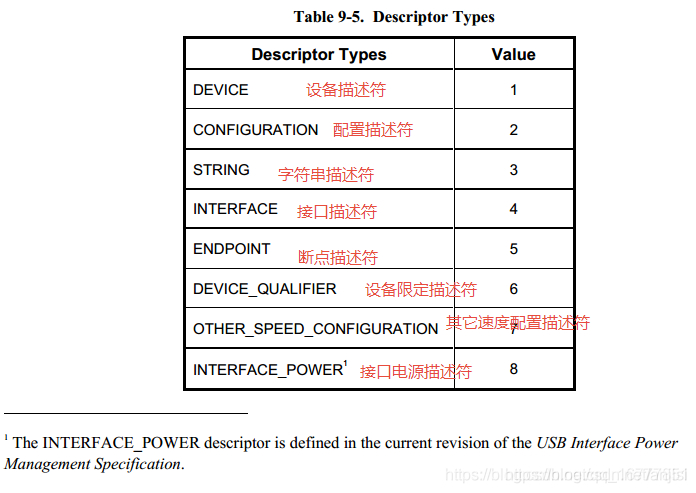 像我们只需要了解设备描述符,配置描述符,接口描述符,端点描述符,还有HID描述符就好了。
设备描述符
主要是描述USB设备的信息,比如VID,PID(VID是厂商向USB协会申请的一个ID,这个ID可以网上查的到的(查询链接),PID表示这款产品的ID,属于每个公司自己定义的。我们一般根据VID,PID去查找USB设备的)以及USB设备的名字,序列号,制造商这些。
BYTE blength; //设备描述符的字节数大小 BYTE bDescriptorType; //设备描述符类型编号 WORD bcdUSB; //USB版本号 BYTE bDeviceClass; //USB分配的设备类代码 BYTE bDeviceSubClass; //USB分配的子类代码 BYTE bDeviceProtocol; //USB分配的设备协议代码 BYTE bMaxPacketSize0; //端点0的最大包大小 WORD idVendor; //厂商编号 WORD idProduct; //产品编号 WORD bcdDevice; //设备版本 BYTE iManufacturer; //设备厂商字符串的索引 BYTE iProduct; //描述产品字符串的索引 BYTE iSerialNumber; //描述设备序列号字符串的索引 BYTE bNumConfigurations; //可能的配置数量- 1
- 2
- 3
- 4
- 5
- 6
- 7
- 8
- 9
- 10
- 11
- 12
- 13
- 14
配置描述符
主要描述有多少个接口。
BYTE bLength; //配置描述符的字节数大小 BYTE bDescriptorType; //配置描述符类型编号 WORD wTotalLength; //此配置返回的所有数据大小 BYTE bNumInterfaces; //此配置所支持的接口数量 BYTE bConfigurationValue; //Set_Configuration命令所需要的参数值 BYTE iConfiguration; //描述该配置的字符串的索引值 BYTE bmAttributes; //供电模式的选择 BYTE MaxPower; //设备从总线提取的最大电流- 1
- 2
- 3
- 4
- 5
- 6
- 7
- 8
接口描述符
主要描述这个接口下面有多个端点,以及这个接口做什么用的,比如这个接口是HID或者CDC,音频输入设备(UAC),视频输入设备(UVC)等。
端点描述符
主要描述这个端点最大一次可以传输多少数据,以及这个端点支持什么传输方式。在HID中支持控制传输和中断传输。
控制传输 主要用来获取USB信息,以及可以用来下命令去控制设备,读取时需要主动去读,USB设备无法主动给我们发送数据。
中断传输 如果端点是OUT的话,那么我们PC可以往USB设备被发送数据,USB设备无法主动向这个端点发送数据,如果是端点是IN的话,那么PC无法往这个端点发送数据,但是USB设备可以主动像里面发送数据。HID描述符
HID描述符特别复杂,想了解的大家可以去看这几篇文章USB HID设备报告描述符详解, USB HID报告描述符教程
HID描述符和端点一样也是在接口下面的,主要是描述PC和USB设备之间通信的数据是做什么用的,像我们只需要知道这几个东西Usage Page/Usage以及Report ID。
Usage Page/Usage可以理解为一个报表说明,里面会描述这个报表数据多长以及这些数据是干啥子用的,范围为0x00-0xFFFF,其中0x00-0xFEFF为预留的,用于描述一些标准规范的报表,比如鼠标指针,键盘按键值等,0xFF00-0xFFFF用于给开发商自定义使用,像在设备管理器中看到有设备名字为符合 HID 标准的供应商定义设备的表示为Usage Page为0xFF00-0xFFFF的HID报表。
Report ID 主要用户区分不同报表的,比如一个HID描述符里面可能有多个Usage Page/Usage,当PC和HID进行通信时,下的数据不知道对应哪个报表的,因此需要有个ID进行区分,这就是Report ID 。
比如有两个Usage Page,0xFF00,0xFF01,其中0xFF00描述数据用于设置灯光亮度,0xFF01描述数据用于设置音量大小,与0xFF00,0xFF01对应的ReportID分别为0x05,0x06,当我们发一段数据到设备,设备收到0x05开头的数据就知道是设置灯光亮度,收到0x06的数据是用来调节音量。
HID通信
HID通信我们使用 https://github.com/libusb/hidapi 这个开源库,这个支持跨平台,不建议去使用libusb去进行HID访问,太底层了,学习使用成本高。
在进行通信前,需要先和硬件了解USB HID设备的以下信息:- 需要控制的Usage Page/Usage 是多少。
- 需要数据的Report ID是多少(不存在的话默认为0)。
- Usage Page/Usage 一次支持写入多少字节的数据。
这些是通信的关键识别标志。
hidapi中有以下几个函数:
//写入数据到设备(支持控制传输以及中断传输),如果设备有ReportId,那么data首字节需要为此ID,如果没有,首字节默认需要为0 //返回写入的字节数,如果写入为-1说明写入失败 int HID_API_EXPORT HID_API_CALL hid_write(hid_device *dev, const unsigned char *data, size_t length); //从设备读取数据(只支持中断传输,这个数据是设备主动传给PC的),如果设备有ReportId,那么data首字节为此ID int HID_API_EXPORT HID_API_CALL hid_read_timeout(hid_device *dev, unsigned char *data, size_t length, int milliseconds); // int HID_API_EXPORT HID_API_CALL hid_send_feature_report(hid_device *dev, const unsigned char *data, size_t length); // int HID_API_EXPORT HID_API_CALL hid_get_feature_report(hid_device *dev, unsigned char *data, size_t length); //通过控制传输读取设备数据,如果设备有ReportId,那么data首字节需要为此ID,如果没有,首字节默认需要为0 //返回读取到的数据长度,小于0读取失败 int HID_API_EXPORT HID_API_CALL hid_get_input_report(hid_device *dev, unsigned char *data, size_t length);- 1
- 2
- 3
- 4
- 5
- 6
- 7
- 8
- 9
- 10
- 11
- 12
一般使用比较多的是hid_write,hid_read_timeout,hid_get_input_report,具体看设备端的定义。
HID通信
Windows下,Windows的hid驱动针对HID每个Usage Page/Usage都抽象出来了一个Path,如下图所示,因此我们想往某个Usage Page/Usage发送数据时,就需要去打开与之对应的HID对象,不然无法写入。

MAC端,MAC没有像Windows那样,只需要使用hidapi找到指定VID PID的设备,直接打开通信即可。打开设备
hidapi里面这个函数用于打开设备,在Mac端使用时没有问题,但是当存在多个Usage Page,在Windows端使用就会存在问题,他只会打开hid_enumerate扫描到的第一个Usage Page,比如存在0x01和0xFF00,当想打开0xFF00时,它只会打开0x01的。
HID_API_EXPORT hid_device *HID_API_CALL hid_open(unsigned short vendor_id, unsigned short product_id, const wchar_t *serial_number);- 1
因此建议将上面的函数改成如下所示,通过指定Usage Page进行打开
HID_API_EXPORT hid_device* HID_API_CALL hid_open2(unsigned short vendor_id, unsigned short product_id, unsigned short usage_page) { /* TODO: Merge this functions with the Linux version. This function should be platform independent. */ struct hid_device_info* devs, * cur_dev; const char* path_to_open = NULL; hid_device* handle = NULL; devs = hid_enumerate(vendor_id, product_id); cur_dev = devs; while (cur_dev) { if (cur_dev->vendor_id == vendor_id && cur_dev->product_id == product_id) { if (usage_page == cur_dev->usage_page) { path_to_open = cur_dev->path; break; } } cur_dev = cur_dev->next; } if (path_to_open) { /* Open the device */ handle = hid_open_path(path_to_open); } hid_free_enumeration(devs); return handle; }- 1
- 2
- 3
- 4
- 5
- 6
- 7
- 8
- 9
- 10
- 11
- 12
- 13
- 14
- 15
- 16
- 17
- 18
- 19
- 20
- 21
- 22
- 23
- 24
- 25
- 26
写入数据
/** @brief Write an Output report to a HID device. The first byte of @p data[] must contain the Report ID. For devices which only support a single report, this must be set to 0x0. The remaining bytes contain the report data. Since the Report ID is mandatory, calls to hid_write() will always contain one more byte than the report contains. For example, if a hid report is 16 bytes long, 17 bytes must be passed to hid_write(), the Report ID (or 0x0, for devices with a single report), followed by the report data (16 bytes). In this example, the length passed in would be 17. hid_write() will send the data on the first OUT endpoint, if one exists. If it does not, it will send the data through the Control Endpoint (Endpoint 0). @ingroup API @param dev A device handle returned from hid_open(). @param data The data to send, including the report number as the first byte. @param length The length in bytes of the data to send. @returns This function returns the actual number of bytes written and -1 on error. Call hid_error(dev) to get the failure reason. */ int HID_API_EXPORT HID_API_CALL hid_write(hid_device *dev, const unsigned char *data, size_t length);- 1
- 2
- 3
- 4
- 5
- 6
- 7
- 8
- 9
- 10
- 11
- 12
- 13
- 14
- 15
- 16
- 17
- 18
- 19
- 20
- 21
- 22
- 23
- 24
- 25
- 26
- 27
- 28
写入数据时,假如USB描述设置最大一次可以写入64字节,如果存在Report ID,那么第一个字节必须是Report ID,那么还可以写入63个字节的有效数据,一起64字节。如果不存在Report ID,那边第一个字节固件设置为0,后面还可能写64字节,一起写入65字节。(如果写入的数据不足建议补齐到64或者65)
例如:
//写入数据到Report ID 0x12 unsigned char data[64] = { 0 }; data[0] = 0x12; hid_write(pDevice, data, sizeof(data)); //没有Report ID unsigned char data[65] = { 0 }; data[0] = 0; data[1] = 0x80; hid_write(pDevice, data, sizeof(data));- 1
- 2
- 3
- 4
- 5
- 6
- 7
- 8
- 9
- 10
读取数据(控制传输)
/** @brief Get a input report from a HID device. Since version 0.10.0, @ref HID_API_VERSION >= HID_API_MAKE_VERSION(0, 10, 0) Set the first byte of @p data[] to the Report ID of the report to be read. Make sure to allow space for this extra byte in @p data[]. Upon return, the first byte will still contain the Report ID, and the report data will start in data[1]. @ingroup API @param dev A device handle returned from hid_open(). @param data A buffer to put the read data into, including the Report ID. Set the first byte of @p data[] to the Report ID of the report to be read, or set it to zero if your device does not use numbered reports. @param length The number of bytes to read, including an extra byte for the report ID. The buffer can be longer than the actual report. @returns This function returns the number of bytes read plus one for the report ID (which is still in the first byte), or -1 on error. Call hid_error(dev) to get the failure reason. */ int HID_API_EXPORT HID_API_CALL hid_get_input_report(hid_device *dev, unsigned char *data, size_t length);- 1
- 2
- 3
- 4
- 5
- 6
- 7
- 8
- 9
- 10
- 11
- 12
- 13
- 14
- 15
- 16
- 17
- 18
- 19
- 20
- 21
- 22
- 23
- 24
- 25
- 26
- 27
读取数据时,如果存在Report ID,那么第一个字节必须先填写Report ID,才能读取到指定Report ID的数据,如果没有第一个字节固定设置为0
例如://读取Report ID 0x12的数据 unsigned char data[64] = { 0 }; data[0] = 0x12; hid_get_input_report(pDevice, data, sizeof(data)); //没有Report ID unsigned char data[65] = { 0 }; data[0] = 0; hid_get_input_report(pDevice, data, sizeof(data));- 1
- 2
- 3
- 4
- 5
- 6
- 7
- 8
- 9
读取数据(中断传输)
/** @brief Read an Input report from a HID device with timeout. Input reports are returned to the host through the INTERRUPT IN endpoint. The first byte will contain the Report number if the device uses numbered reports. @ingroup API @param dev A device handle returned from hid_open(). @param data A buffer to put the read data into. @param length The number of bytes to read. For devices with multiple reports, make sure to read an extra byte for the report number. @param milliseconds timeout in milliseconds or -1 for blocking wait. @returns This function returns the actual number of bytes read and -1 on error. Call hid_error(dev) to get the failure reason. If no packet was available to be read within the timeout period, this function returns 0. */ int HID_API_EXPORT HID_API_CALL hid_read_timeout(hid_device *dev, unsigned char *data, size_t length, int milliseconds);- 1
- 2
- 3
- 4
- 5
- 6
- 7
- 8
- 9
- 10
- 11
- 12
- 13
- 14
- 15
- 16
- 17
- 18
- 19
- 20
- 21
- 22
读取数据时,如果存在Report ID,那么设备返回的数据第一个字节是Report ID。
中断传输设备主动给PC发送数据,因此如果设备发送过多,系统过有一个缓冲区进行缓冲,因此直接调用hid_read_timeout,可能可以连续调用hid_read_timeout读取多条数据,这是因为缓冲了多条数据在系统里面,如果全部读取完之后,设备也一直没有回复数据过来,再次调用会阻塞,超时时间通过milliseconds设置。
例如:unsigned char data[64] = { 0 }; data[0] = 0x12; hid_read_timeout(pDevice, data, sizeof(data));- 1
- 2
- 3
-
相关阅读:
深入了解JS中for...in和for...of的区别
MySQL8.0-分组函数ROLLUP的基本用法(GROUPING)
二十、商城 - 商家入驻审核-BCrypt 加密算法(8)
(八)Python类和对象
JavaSE---LinkedList与链表
Python安装
融合透镜成像反向学习的精英引导混沌萤火虫算法(Matlab)
无法查看 spring-boot-starter-parent的pom.xml
Matlab异常值处理
基于 Amazon EKS 搭建开源向量数据库 Milvus
- 原文地址:https://blog.csdn.net/anjisi/article/details/118875107
