• 红黑树


    在这里插入图片描述

    欢迎来到Cefler的博客😁
    🕌博客主页:那个传说中的man的主页
    🏠个人专栏:题目解析
    🌎推荐文章:题目大解析(3)

    在这里插入图片描述


    👉🏻红黑树概念与性质

    在这里插入图片描述

    概念 概念 概念

    红黑树,是一种二叉搜索树,但在每个结点上增加一个存储位表示结点的颜色,可以是Red或
    Black
    。 通过对任何一条从根到叶子的路径上各个结点着色方式的限制,红黑树确保没有一条路
    径会比其他路径长出俩倍
    ,因而是接近平衡的。

    性质 性质 性质

    1. 每个结点不是红色就是黑色
    2. 根节点是黑色的
    3. 如果一个节点是红色的,则它的两个孩子结点是黑色的 ✨
    4. 对于每个结点,从该结点到其所有后代叶结点的简单路径上,均包含相同数目的黑色结点
    5. 每个叶子结点都是黑色的(此处的叶子结点指的是空结点)

    ps:空节点是为了更好的判别路径

    判断红黑树思维逻辑顺序
    1.根节点必须为黑,红不接红
    2.所有路径上黑点数是否相同
    3.最长路径有没有大于两倍最小路径

    👉🏻红黑树插入

    若一开始红黑树为空,则第一次插入的节点必须为black

    若红黑树不为空,每次新插入节点,节点颜色初始默认为Red

    • 如果其双亲节点的颜色是黑色,没有违反红黑树任何性质,则不需要调整
    • 但当新插入节点的双亲节点颜色为红色时,就违反了性质三不能有连在一起的红色节点,此时需要对红黑树分情况来讨论

    🌈 情况讨论 情况讨论 情况讨论

    🫶🏻约定:cur为当前节点,p为父节点,g为祖父节点,u为叔叔节点

    一、情况1: cur为红,p为红,g为黑,u存在且为红
    解决方法将p,u改为黑,g改为红,g当成cur,若g不为根节点继续向上调整,否则g改为黑
    在这里插入图片描述
    在这里插入图片描述
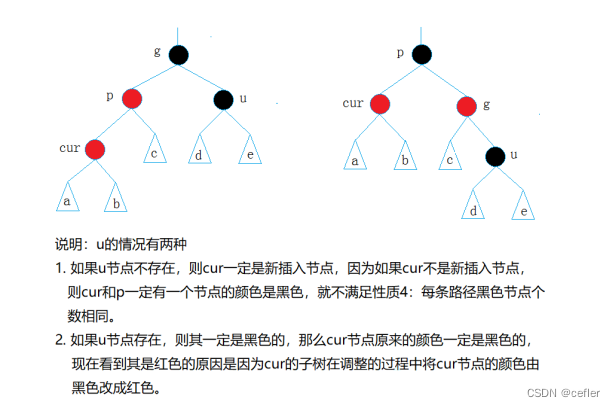
    二、情况2: cur为红,p为红,g为黑,u不存在/u存在且为黑

    在这里插入图片描述
    解决方法

    • p为g的左孩子,cur为p的左孩子,则对g进行右单旋转
    • p为g的右孩子,cur为p的右孩子,则对g进行左单旋转
      最后:p改为black,g改为Red;

    三、情况3: cur为红,p为红,g为黑,u不存在/u存在且为黑

    与情况2略有不同的就是

    • p为g的左孩子,cur为p的右孩子:则针对p做左单旋转,再对g做右单旋转
    • p为g的右孩子,cur为p的左孩子:则针对p做右单旋转,再对g做左单旋转;
      最后:cur改为black, g改为Red
      在这里插入图片描述

    ❤️🖤RBTree.h

    #pragma once
    #include
    using namespace std;
    enum Color
    {
    	RED,
    	BLACK
    };
    template <class K,class V>
    struct RBTreeNode
    {
    	RBTreeNode<K,V>* _parent;
    	RBTreeNode<K, V>* _left;
    	RBTreeNode<K, V>* _right;
    	pair<K,V> _kv;
    	Color _col;
    
    	//初始化列表
    	RBTreeNode(const pair<K, V>& kv)
    		:_parent(nullptr)
    		, _left(nullptr)
    		, _right(nullptr)
    		, _kv(kv)
    		, _col(RED)
    	{
    
    	}
    
    };
    template <class K, class V>
    class RBTree
    {
    	typedef RBTreeNode<K, V> Node;
    public:
    	bool Insert(const pair<K, V>& kv)
    	{
    		if (_root == nullptr)//第一次插入
    		{
    			_root = new Node(kv);//那就创建一个新节点
    			_root->_col = BLACK;//根节点必须为黑
    			return true;//插入成功
    		}
    		//如果不是第一次插入,则需要找到空节点插入
    		Node* parent = nullptr;
    		Node* cur = _root;
    		while (cur)
    		{
    			if (cur->_kv.first > kv.first)
    			{
    				parent = cur;
    				cur = cur->_left;
    			}
    			else if(cur->_kv.first <kv.first)
    			{
    				parent = cur;
    				cur = cur->_right;
    			}
    			else
    			{
    				return false;
    			}
    			
    		}
    		//找到后,创建新节点以供插入
    		cur = new Node(kv);
    		cur->_col = RED;//新节点必须为红
    		if (parent->_kv.first > cur->_kv.first)
    		{
    			parent->_left = cur;
    			cur->_parent = parent;
    		}
    		else
    		{
    			parent->_right = cur;
    			cur->_parent = parent;
    		}
    
    		//现在要对这个新插入的节点进行颜色检查和调整
    		//若父节点为空(即检查到了根)或者父节点此时为黑色,则不用调整;否则进行调整
    		//调整则按照我们的三情况
    		while (parent && parent->_col == RED)
    		{
    			Node* grandfather = parent->_parent;
    			
    			//这里我们必须要先分析p到底在g的左边还是右边
    			if (parent == grandfather->_left)//p在左边
    			{
    				//      g
    				//   p     u
    				//cur
    				Node* uncle = grandfather->_right;
    				if (uncle && uncle->_col == RED && parent->_col == RED && grandfather->_col == BLACK)//情况1:其实这里parent->_col == RED && grandfather->_col == BLACK就不用写了
    					//因为如果不符合这些要求,就不是红黑树前提了
    				{
    					//将p,u改为黑,g改为红,g当成cur,若g不为根节点继续向上调整,否则g改为黑
    					uncle->_col = parent->_col = BLACK;
    					grandfather->_col = RED;
    
    					cur = grandfather;
    					parent = cur->_parent;//继续向上调整
    				}
    				else
    				{
    					//情况2,3
    					if (cur == parent->_left)//情况2
    					{
    						//      g
    						//   p     u
    						//cur
    						//p为g的左孩子,cur为p的左孩子,则进行右单旋转;最后:p->black,g->red
    						RotateR(grandfather);
    						parent->_col = BLACK;
    						grandfather->_col = RED;
    
    					}
    					else//情况3
    					{
    						//      g
    						//   p     u
    						//    cur
    						//p为g的左孩子,cur为p的右孩子:则针对p做左单旋转,再对g做左单旋转;最后:cur改为black, g改为Red
    						RotateL(parent);
    						RotateR(grandfather);
    						cur->_col = BLACK;
    						grandfather->_col = RED;
    					}
    					break;//这时不用再向上调整直接退出即可(其实不break,此时的parent也已经不满足条件了)
    				}
    
    			}
    			else//p在右边
    			{
    				//      g
    				//   u     p
    				//          cur
    				Node* uncle = grandfather->_left;
    				if (uncle && uncle->_col == RED)//情况1
    				{
    					uncle->_col = parent->_col = BLACK;
    					grandfather->_col = RED;
    
    					cur = grandfather;//继续向上调整
    					parent = cur->_parent;//继续向上调整
    				}
    				else
    				{
    					//情况2,3
    					if (cur == parent->_right)//情况2
    					{
    						//      g
    						//   u     p
    						//          cur
    						RotateL(grandfather);
    						parent->_col = BLACK;
    						grandfather->_col = RED;
    
    					}
    					else//情况3
    					{
    						//      g
    						//   u     p
    						//      cur
    						//p为g的左孩子,cur为p的左孩子:则针对p做右单旋转,再对g做左单旋转;最后:cur改为black, g改为Red
    						RotateR(parent);
    						RotateL(grandfather);
    						cur->_col = BLACK;
    						grandfather->_col = RED;
    					}
    					break;
    				}
    			}
    		}
    		_root->_col = BLACK;//这一操作很妙,因为到最后肯定到了根节点,而根节点一定得为黑,所以直接将根节点改为黑就行
    		return true;
    	}
    	void RotateL(Node* parent)
    	{
    		Node* subR = parent->_right;
    		Node* subRL = subR->_left;
    
    		parent->_right = subRL;
    		subR->_left = parent;
    
    		Node* parentParent = parent->_parent;
    
    		parent->_parent = subR;
    		if (subRL)
    			subRL->_parent = parent;
    
    		if (_root == parent)
    		{
    			_root = subR;
    			subR->_parent = nullptr;
    		}
    		else
    		{
    			if (parentParent->_left == parent)
    			{
    				parentParent->_left = subR;
    			}
    			else
    			{
    				parentParent->_right = subR;
    			}
    
    			subR->_parent = parentParent;
    		}
    	}
    
    	void RotateR(Node* parent)
    	{
    		Node* subL = parent->_left;
    		Node* subLR = subL->_right;
    
    		parent->_left = subLR;
    		if (subLR)
    			subLR->_parent = parent;
    
    		Node* parentParent = parent->_parent;
    
    		subL->_right = parent;
    		parent->_parent = subL;
    
    		if (_root == parent)
    		{
    			_root = subL;
    			subL->_parent = nullptr;
    		}
    		else
    		{
    			if (parentParent->_left == parent)
    			{
    				parentParent->_left = subL;
    			}
    			else
    			{
    				parentParent->_right = subL;
    			}
    
    			subL->_parent = parentParent;
    		}
    	}
    
    	void InOrder()
    	{
    		_InOrder(_root);
    		cout << endl;
    	}
    
    	void _InOrder(Node* root)
    	{
    		if (root == nullptr)
    			return;
    
    		_InOrder(root->_left);
    		cout << root->_kv.first << " ";
    		_InOrder(root->_right);
    	}
    	bool Check(Node* root, int blacknum, const int refVal)
    	{
    		if (root == nullptr)//遇到空了此时对比一下这个路径的黑色节点数是否与refVal相等
    		{
    			//cout << balcknum << endl;
    			if (blacknum != refVal)
    			{
    				cout << "存在黑色节点数量不相等的路径" << endl;
    				return false;
    			}
    
    			return true;
    		}
    
    		if (root->_col == RED && root->_parent->_col == RED)
    		{
    			cout << "有连续的红色节点" << endl;
    
    			return false;
    		}
    
    		if (root->_col == BLACK)
    		{
    			++blacknum;
    		}
    
    		return Check(root->_left, blacknum, refVal)
    			&& Check(root->_right, blacknum, refVal);
    	}
    
    	bool IsBalance()
    	{
    		if (_root == nullptr)
    			return true;
    
    		if (_root->_col == RED)
    			return false;
    
    		//参考值
    		int refVal = 0;
    		Node* cur = _root;
    		while (cur)
    		{
    			if (cur->_col == BLACK)
    			{
    				++refVal;
    			}
    
    			cur = cur->_left;
    		}
    
    		int blacknum = 0;
    		return Check(_root, blacknum, refVal);
    	}
    private:
    	Node* _root = nullptr;
    };
    
    
    • 1
    • 2
    • 3
    • 4
    • 5
    • 6
    • 7
    • 8
    • 9
    • 10
    • 11
    • 12
    • 13
    • 14
    • 15
    • 16
    • 17
    • 18
    • 19
    • 20
    • 21
    • 22
    • 23
    • 24
    • 25
    • 26
    • 27
    • 28
    • 29
    • 30
    • 31
    • 32
    • 33
    • 34
    • 35
    • 36
    • 37
    • 38
    • 39
    • 40
    • 41
    • 42
    • 43
    • 44
    • 45
    • 46
    • 47
    • 48
    • 49
    • 50
    • 51
    • 52
    • 53
    • 54
    • 55
    • 56
    • 57
    • 58
    • 59
    • 60
    • 61
    • 62
    • 63
    • 64
    • 65
    • 66
    • 67
    • 68
    • 69
    • 70
    • 71
    • 72
    • 73
    • 74
    • 75
    • 76
    • 77
    • 78
    • 79
    • 80
    • 81
    • 82
    • 83
    • 84
    • 85
    • 86
    • 87
    • 88
    • 89
    • 90
    • 91
    • 92
    • 93
    • 94
    • 95
    • 96
    • 97
    • 98
    • 99
    • 100
    • 101
    • 102
    • 103
    • 104
    • 105
    • 106
    • 107
    • 108
    • 109
    • 110
    • 111
    • 112
    • 113
    • 114
    • 115
    • 116
    • 117
    • 118
    • 119
    • 120
    • 121
    • 122
    • 123
    • 124
    • 125
    • 126
    • 127
    • 128
    • 129
    • 130
    • 131
    • 132
    • 133
    • 134
    • 135
    • 136
    • 137
    • 138
    • 139
    • 140
    • 141
    • 142
    • 143
    • 144
    • 145
    • 146
    • 147
    • 148
    • 149
    • 150
    • 151
    • 152
    • 153
    • 154
    • 155
    • 156
    • 157
    • 158
    • 159
    • 160
    • 161
    • 162
    • 163
    • 164
    • 165
    • 166
    • 167
    • 168
    • 169
    • 170
    • 171
    • 172
    • 173
    • 174
    • 175
    • 176
    • 177
    • 178
    • 179
    • 180
    • 181
    • 182
    • 183
    • 184
    • 185
    • 186
    • 187
    • 188
    • 189
    • 190
    • 191
    • 192
    • 193
    • 194
    • 195
    • 196
    • 197
    • 198
    • 199
    • 200
    • 201
    • 202
    • 203
    • 204
    • 205
    • 206
    • 207
    • 208
    • 209
    • 210
    • 211
    • 212
    • 213
    • 214
    • 215
    • 216
    • 217
    • 218
    • 219
    • 220
    • 221
    • 222
    • 223
    • 224
    • 225
    • 226
    • 227
    • 228
    • 229
    • 230
    • 231
    • 232
    • 233
    • 234
    • 235
    • 236
    • 237
    • 238
    • 239
    • 240
    • 241
    • 242
    • 243
    • 244
    • 245
    • 246
    • 247
    • 248
    • 249
    • 250
    • 251
    • 252
    • 253
    • 254
    • 255
    • 256
    • 257
    • 258
    • 259
    • 260
    • 261
    • 262
    • 263
    • 264
    • 265
    • 266
    • 267
    • 268
    • 269
    • 270
    • 271
    • 272
    • 273
    • 274
    • 275
    • 276
    • 277
    • 278
    • 279
    • 280
    • 281
    • 282
    • 283
    • 284
    • 285
    • 286
    • 287
    • 288
    • 289
    • 290
    • 291
    • 292
    • 293
    • 294
    • 295
    • 296
    • 297
    • 298
    • 299
    • 300
    • 301
    • 302
    • 303
    • 304
    • 305
    • 306
    • 307
    • 308
    • 309
    • 310
    • 311
    • 312
    • 313
    • 314
    • 315
    • 316

    👉🏻map 和 set封装

    MyMap.h

    #pragma once
    #include"RBTreePro.h"
    namespace space
    {
    	template <class K,class V>
    	class map
    	{
    	public:
    		struct MapkeyofT
    		{
    			const K& operator()(const pair<K, V>& kv)
    			{
    				return kv.first;
    			}
    		};
    		//begin ,end,insert
    		// 对类模板取内嵌类型,加typename告诉编译器这里是类型;那不然编译器不知道内嵌类型到底是变量还是类型
    		typedef typename RBTree<K, pair<K, V>, MapkeyofT>::iterator iterator;
    		iterator begin()
    		{
    			return _t.begin();
    		}
    		iterator end()
    		{
    			return _t.end();
    		}
    		pair<iterator, bool> insert(const pair<K, V>& kv)
    		{
    			return _t.Insert(kv);
    		}
    	private:
    		RBTree<K, pair<K, V>, MapkeyofT> _t;
    	};
    	
    }
    
    • 1
    • 2
    • 3
    • 4
    • 5
    • 6
    • 7
    • 8
    • 9
    • 10
    • 11
    • 12
    • 13
    • 14
    • 15
    • 16
    • 17
    • 18
    • 19
    • 20
    • 21
    • 22
    • 23
    • 24
    • 25
    • 26
    • 27
    • 28
    • 29
    • 30
    • 31
    • 32
    • 33
    • 34
    • 35

    内嵌类型 内嵌类型 内嵌类型
    在C++中,内嵌类型通常是指将一个类型定义为另一个类或结构体的成员类型。通过在类或结构体内部定义其他类型,可以将其视为该类或结构体的一部分,并使用作用域运算符(::)来访问这些内嵌类型。

    因此,在C++中,内嵌类型提供了一种将复杂数据结构组织在一起的方式,使得代码更加清晰和模块化。

    MySet.h

    #pragma once
    #include "MySet.h"
    namespace space
    {
    	template <class K>
    	class set
    	{
    	public:
    		struct SetkeyofT
    		{
    			const K& operator()(const K& key)
    			{
    				return key;
    			}
    		};
    		typedef typename RBTree<K, K, SetkeyofT>::iterator iterator;
    		iterator begin()
    		{
    			return _t.begin();
    		}
    		iterator end()
    		{
    			return _t.end();
    		}
    		pair<iterator, bool> insert(const K& key)
    		{
    			return _t.Insert(key);
    		}
    	private:
    		RBTree<K, K, SetkeyofT> _t;
    	};
    	
    
    }
    
    • 1
    • 2
    • 3
    • 4
    • 5
    • 6
    • 7
    • 8
    • 9
    • 10
    • 11
    • 12
    • 13
    • 14
    • 15
    • 16
    • 17
    • 18
    • 19
    • 20
    • 21
    • 22
    • 23
    • 24
    • 25
    • 26
    • 27
    • 28
    • 29
    • 30
    • 31
    • 32
    • 33
    • 34

    RBTreePro.h

    #pragma once
    #include 
    using namespace std;
    enum Colour
    {
    	RED,
    	BLACK
    };
    template<class T>
    struct RBTreeNode
    {
    	RBTreeNode<T>* _left;
    	RBTreeNode<T>* _right;
    	RBTreeNode<T>* _parent;
    
    	T _data;
    
    	Colour _col;
    
    	RBTreeNode(const T& data)
    		:_left(nullptr)
    		, _right(nullptr)
    		, _parent(nullptr)
    		, _data(data)
    		, _col(RED)
    	{}
    };
    template <class T>
    struct _TreeIterator
    {
    	typedef RBTreeNode<T> Node;
    	typedef _TreeIterator<T> Self;
    	Node* _node;
    	_TreeIterator(Node* node)
    		:_node(node)
    	{
    
    	}
    	//实现*,->,==,!=
    	T& operator*()
    	{
    		return _node->_data;
    	}
    	T* operator->()
    	{
    		return &_node->_data;
    	}
    	bool operator!=(const Self& s)
    	{
    		return _node != s._node;
    	}
    
    	bool operator==(const Self& s)
    	{
    		return _node == s._node;
    	}
    	/*++it的核心,找中序的下一个
    		1.it指向的节点,右子树不为空,下一个就是右子树的最左节点
    		2.it指向的节点,右子树为空,说明it中的节点所在的子树访问完了,往上找孩子是父亲左的那个祖先*/
    	Self& operator++()
    	{
    		//看看右子树是否为空
    		if (_node->_right)
    		{
    			//右子树不为空,则去找右子树的最左节点
    			Node* cur = _node->_right;
    			while (cur->_left)
    			{
    				cur = cur->_left;
    			}
    			_node = cur;
    
    		}
    		else
    		{
    			//往上找孩子是父亲左的那个祖先
    			Node* cur = _node;
    			Node* parent = cur->_parent;
    			while (parent&&cur==parent->_right)//当parent为空时说明此时已经将根访问完了,即全部访问完了
    			{
    				cur = parent;
    				parent = cur->_parent;
    			}
    			_node = parent;
    		}
    
    		return *this;
    	}
    
    };
    // set->RBTree _t;
    // map->RBTree, MapKeyOfT> _t;
    
    template <class K, class T,class keyofT>
    class RBTree
    {
    	typedef RBTreeNode<T> Node;
    public:
    	typedef _TreeIterator<T> iterator;
    
    	iterator begin()
    	{
    		//找最左非空子树即可
    		Node* cur = _root;
    		while (cur && cur->_left)
    		{
    			cur = cur->_left;
    		}
    		return iterator(cur);
    	}
    	iterator end()
    	{
    		return iterator(nullptr);//_root->parent就是nullptr
    	}
    	pair<iterator,bool> Insert(const T& data)
    	{
    		if (_root == nullptr)//第一次插入
    		{
    			_root = new Node(data);//那就创建一个新节点
    			_root->_col = BLACK;//根节点必须为黑
    			return make_pair(iterator(_root), true);
    		}
    		//如果不是第一次插入,则需要找到空节点插入
    		Node* parent = nullptr;
    		Node* cur = _root;
    		keyofT kot;
    		while (cur)
    		{
    			if (kot(cur->_data)>kot(data))
    			{
    				parent = cur;
    				cur = cur->_left;
    			}
    			else if (kot(cur->_data) < kot(data))
    			{
    				parent = cur;
    				cur = cur->_right;
    			}
    			else
    			{
    				return make_pair(iterator(cur),false);
    			}
    
    		}
    		//找到后,创建新节点以供插入
    		cur = new Node(data);
    		Node* newnode = cur;
    		cur->_col = RED;//新节点必须为红
    		if (kot(parent->_data) > kot(data))
    		{
    			parent->_left = cur;
    			cur->_parent = parent;
    		}
    		else
    		{
    			parent->_right = cur;
    			cur->_parent = parent;
    		}
    
    		//现在要对这个新插入的节点进行颜色检查和调整
    		//若父节点为空(即检查到了根)或者父节点此时为黑色,则不用调整;否则进行调整
    		//调整则按照我们的三情况
    		while (parent && parent->_col == RED)
    		{
    			Node* grandfather = parent->_parent;
    
    			//这里我们必须要先分析p到底在g的左边还是右边
    			if (parent == grandfather->_left)//p在左边
    			{
    				//      g
    				//   p     u
    				//cur
    				Node* uncle = grandfather->_right;
    				if (uncle && uncle->_col == RED && parent->_col == RED && grandfather->_col == BLACK)//情况1:其实这里parent->_col == RED && grandfather->_col == BLACK就不用写了
    					//因为如果不符合这些要求,就不是红黑树前提了
    				{
    					//将p,u改为黑,g改为红,g当成cur,若g不为根节点继续向上调整,否则g改为黑
    					uncle->_col = parent->_col = BLACK;
    					grandfather->_col = RED;
    
    					cur = grandfather;
    					parent = cur->_parent;//继续向上调整
    				}
    				else
    				{
    					//情况2,3
    					if (cur == parent->_left)//情况2
    					{
    						//      g
    						//   p     u
    						//cur
    						//p为g的左孩子,cur为p的左孩子,则进行右单旋转;最后:p->black,g->red
    						RotateR(grandfather);
    						parent->_col = BLACK;
    						grandfather->_col = RED;
    
    					}
    					else//情况3
    					{
    						//      g
    						//   p     u
    						//    cur
    						//p为g的左孩子,cur为p的右孩子:则针对p做左单旋转,再对g做左单旋转;最后:cur改为black, g改为Red
    						RotateL(parent);
    						RotateR(grandfather);
    						cur->_col = BLACK;
    						grandfather->_col = RED;
    					}
    					break;//这时不用再向上调整直接退出即可(其实不break,此时的parent也已经不满足条件了)
    				}
    
    			}
    			else//p在右边
    			{
    				//      g
    				//   u     p
    				//          cur
    				Node* uncle = grandfather->_left;
    				if (uncle && uncle->_col == RED)//情况1
    				{
    					uncle->_col = parent->_col = BLACK;
    					grandfather->_col = RED;
    
    					cur = grandfather;//继续向上调整
    					parent = cur->_parent;//继续向上调整
    				}
    				else
    				{
    					//情况2,3
    					if (cur == parent->_right)//情况2
    					{
    						//      g
    						//   u     p
    						//          cur
    						RotateL(grandfather);
    						parent->_col = BLACK;
    						grandfather->_col = RED;
    
    					}
    					else//情况3
    					{
    						//      g
    						//   u     p
    						//      cur
    						//p为g的左孩子,cur为p的左孩子:则针对p做右单旋转,再对g做左单旋转;最后:cur改为black, g改为Red
    						RotateR(parent);
    						RotateL(grandfather);
    						cur->_col = BLACK;
    						grandfather->_col = RED;
    					}
    					break;
    				}
    			}
    		}
    		_root->_col = BLACK;//这一操作很妙,因为到最后肯定到了根节点,而根节点一定得为黑,所以直接将根节点改为黑就行
    		return make_pair(iterator(newnode),true);
    	}
    	void RotateL(Node* parent)
    	{
    		Node* subR = parent->_right;
    		Node* subRL = subR->_left;
    
    		parent->_right = subRL;
    		subR->_left = parent;
    
    		Node* parentParent = parent->_parent;
    
    		parent->_parent = subR;
    		if (subRL)
    			subRL->_parent = parent;
    
    		if (_root == parent)
    		{
    			_root = subR;
    			subR->_parent = nullptr;
    		}
    		else
    		{
    			if (parentParent->_left == parent)
    			{
    				parentParent->_left = subR;
    			}
    			else
    			{
    				parentParent->_right = subR;
    			}
    
    			subR->_parent = parentParent;
    		}
    	}
    
    	void RotateR(Node* parent)
    	{
    		Node* subL = parent->_left;
    		Node* subLR = subL->_right;
    
    		parent->_left = subLR;
    		if (subLR)
    			subLR->_parent = parent;
    
    		Node* parentParent = parent->_parent;
    
    		subL->_right = parent;
    		parent->_parent = subL;
    
    		if (_root == parent)
    		{
    			_root = subL;
    			subL->_parent = nullptr;
    		}
    		else
    		{
    			if (parentParent->_left == parent)
    			{
    				parentParent->_left = subL;
    			}
    			else
    			{
    				parentParent->_right = subL;
    			}
    
    			subL->_parent = parentParent;
    		}
    	}
    
    	void InOrder()
    	{
    		_InOrder(_root);
    		cout << endl;
    	}
    
    	void _InOrder(Node* root)
    	{
    		if (root == nullptr)
    			return;
    
    		_InOrder(root->_left);
    		cout << root->_kv.first << " ";
    		_InOrder(root->_right);
    	}
    	bool Check(Node* root, int blacknum, const int refVal)
    	{
    		if (root == nullptr)//遇到空了此时对比一下这个路径的黑色节点数是否与refVal相等
    		{
    			//cout << balcknum << endl;
    			if (blacknum != refVal)
    			{
    				cout << "存在黑色节点数量不相等的路径" << endl;
    				return false;
    			}
    
    			return true;
    		}
    
    		if (root->_col == RED && root->_parent->_col == RED)
    		{
    			cout << "有连续的红色节点" << endl;
    
    			return false;
    		}
    
    		if (root->_col == BLACK)
    		{
    			++blacknum;
    		}
    
    		return Check(root->_left, blacknum, refVal)
    			&& Check(root->_right, blacknum, refVal);
    	}
    
    	bool IsBalance()
    	{
    		if (_root == nullptr)
    			return true;
    
    		if (_root->_col == RED)
    			return false;
    
    		//参考值
    		int refVal = 0;
    		Node* cur = _root;
    		while (cur)
    		{
    			if (cur->_col == BLACK)
    			{
    				++refVal;
    			}
    
    			cur = cur->_left;
    		}
    
    		int blacknum = 0;
    		return Check(_root, blacknum, refVal);
    	}
    private:
    	Node* _root = nullptr;
    };
    
    
    • 1
    • 2
    • 3
    • 4
    • 5
    • 6
    • 7
    • 8
    • 9
    • 10
    • 11
    • 12
    • 13
    • 14
    • 15
    • 16
    • 17
    • 18
    • 19
    • 20
    • 21
    • 22
    • 23
    • 24
    • 25
    • 26
    • 27
    • 28
    • 29
    • 30
    • 31
    • 32
    • 33
    • 34
    • 35
    • 36
    • 37
    • 38
    • 39
    • 40
    • 41
    • 42
    • 43
    • 44
    • 45
    • 46
    • 47
    • 48
    • 49
    • 50
    • 51
    • 52
    • 53
    • 54
    • 55
    • 56
    • 57
    • 58
    • 59
    • 60
    • 61
    • 62
    • 63
    • 64
    • 65
    • 66
    • 67
    • 68
    • 69
    • 70
    • 71
    • 72
    • 73
    • 74
    • 75
    • 76
    • 77
    • 78
    • 79
    • 80
    • 81
    • 82
    • 83
    • 84
    • 85
    • 86
    • 87
    • 88
    • 89
    • 90
    • 91
    • 92
    • 93
    • 94
    • 95
    • 96
    • 97
    • 98
    • 99
    • 100
    • 101
    • 102
    • 103
    • 104
    • 105
    • 106
    • 107
    • 108
    • 109
    • 110
    • 111
    • 112
    • 113
    • 114
    • 115
    • 116
    • 117
    • 118
    • 119
    • 120
    • 121
    • 122
    • 123
    • 124
    • 125
    • 126
    • 127
    • 128
    • 129
    • 130
    • 131
    • 132
    • 133
    • 134
    • 135
    • 136
    • 137
    • 138
    • 139
    • 140
    • 141
    • 142
    • 143
    • 144
    • 145
    • 146
    • 147
    • 148
    • 149
    • 150
    • 151
    • 152
    • 153
    • 154
    • 155
    • 156
    • 157
    • 158
    • 159
    • 160
    • 161
    • 162
    • 163
    • 164
    • 165
    • 166
    • 167
    • 168
    • 169
    • 170
    • 171
    • 172
    • 173
    • 174
    • 175
    • 176
    • 177
    • 178
    • 179
    • 180
    • 181
    • 182
    • 183
    • 184
    • 185
    • 186
    • 187
    • 188
    • 189
    • 190
    • 191
    • 192
    • 193
    • 194
    • 195
    • 196
    • 197
    • 198
    • 199
    • 200
    • 201
    • 202
    • 203
    • 204
    • 205
    • 206
    • 207
    • 208
    • 209
    • 210
    • 211
    • 212
    • 213
    • 214
    • 215
    • 216
    • 217
    • 218
    • 219
    • 220
    • 221
    • 222
    • 223
    • 224
    • 225
    • 226
    • 227
    • 228
    • 229
    • 230
    • 231
    • 232
    • 233
    • 234
    • 235
    • 236
    • 237
    • 238
    • 239
    • 240
    • 241
    • 242
    • 243
    • 244
    • 245
    • 246
    • 247
    • 248
    • 249
    • 250
    • 251
    • 252
    • 253
    • 254
    • 255
    • 256
    • 257
    • 258
    • 259
    • 260
    • 261
    • 262
    • 263
    • 264
    • 265
    • 266
    • 267
    • 268
    • 269
    • 270
    • 271
    • 272
    • 273
    • 274
    • 275
    • 276
    • 277
    • 278
    • 279
    • 280
    • 281
    • 282
    • 283
    • 284
    • 285
    • 286
    • 287
    • 288
    • 289
    • 290
    • 291
    • 292
    • 293
    • 294
    • 295
    • 296
    • 297
    • 298
    • 299
    • 300
    • 301
    • 302
    • 303
    • 304
    • 305
    • 306
    • 307
    • 308
    • 309
    • 310
    • 311
    • 312
    • 313
    • 314
    • 315
    • 316
    • 317
    • 318
    • 319
    • 320
    • 321
    • 322
    • 323
    • 324
    • 325
    • 326
    • 327
    • 328
    • 329
    • 330
    • 331
    • 332
    • 333
    • 334
    • 335
    • 336
    • 337
    • 338
    • 339
    • 340
    • 341
    • 342
    • 343
    • 344
    • 345
    • 346
    • 347
    • 348
    • 349
    • 350
    • 351
    • 352
    • 353
    • 354
    • 355
    • 356
    • 357
    • 358
    • 359
    • 360
    • 361
    • 362
    • 363
    • 364
    • 365
    • 366
    • 367
    • 368
    • 369
    • 370
    • 371
    • 372
    • 373
    • 374
    • 375
    • 376
    • 377
    • 378
    • 379
    • 380
    • 381
    • 382
    • 383
    • 384
    • 385
    • 386
    • 387
    • 388
    • 389
    • 390
    • 391
    • 392
    • 393
    • 394
    • 395
    • 396
    • 397
    • 398

    👉🏻map和set封装增加const迭代器,解决set能修改和map的first能修改问题

    MyMap.h

    #pragma once
    #include"RBTreePro.h"
    namespace space
    {
    	template <class K,class V>
    	class map
    	{
    	public:
    		struct MapkeyofT
    		{
    			const K& operator()(const pair<K, V>& kv)
    			{
    				return kv.first;
    			}
    		};
    		//begin ,end,insert
    		// 对类模板取内嵌类型,加typename告诉编译器这里是类型;那不然编译器不知道内嵌类型到底是变量还是类型
    		typedef typename RBTree<K, pair<const K, V>, MapkeyofT>::iterator iterator;
    		typedef typename RBTree<K, pair<const K, V>, MapkeyofT>::const_iterator const_iterator;
    
    		iterator begin()
    		{
    			return _t.begin();
    		}
    		iterator end()
    		{
    			return _t.end();
    		}
    		pair<iterator, bool> insert(const pair<K, V>& kv)
    		{
    			return _t.Insert(kv);
    		}
    		V& operator[](const K& key)
    		{
    			pair<iterator, bool> ret = insert(make_pair(key, V()));
    			return ret.first->second;
    		}
    	private:
    		RBTree<K, pair<const K, V>, MapkeyofT> _t;//const修饰K,这样就可以保证K不能被修改,但V可以被修改
    	};
    	
    }
    
    • 1
    • 2
    • 3
    • 4
    • 5
    • 6
    • 7
    • 8
    • 9
    • 10
    • 11
    • 12
    • 13
    • 14
    • 15
    • 16
    • 17
    • 18
    • 19
    • 20
    • 21
    • 22
    • 23
    • 24
    • 25
    • 26
    • 27
    • 28
    • 29
    • 30
    • 31
    • 32
    • 33
    • 34
    • 35
    • 36
    • 37
    • 38
    • 39
    • 40
    • 41
    • 42

    MySet.h

    #pragma once
    #include "MySet.h"
    namespace space
    {
    	template <class K>
    	class set
    	{
    	public:
    		struct SetkeyofT
    		{
    			const K& operator()(const K& key)
    			{
    				return key;
    			}
    		};
    		//两个迭代器本质上都是const_iterator
    		typedef typename RBTree<K, K, SetkeyofT>::const_iterator iterator;
    		typedef typename RBTree<K, K, SetkeyofT>::const_iterator const_iterator;
    
    		iterator begin()const 
    		{
    			return _t.begin();
    		}
    		iterator end()const
    		{
    			return _t.end();
    		}
    		pair<iterator, bool> insert(const K& key)
    		{
    			return _t.Insert(key);
    		}
    	private:
    		RBTree<K, K, SetkeyofT> _t;
    	};
    	
    
    }
    
    • 1
    • 2
    • 3
    • 4
    • 5
    • 6
    • 7
    • 8
    • 9
    • 10
    • 11
    • 12
    • 13
    • 14
    • 15
    • 16
    • 17
    • 18
    • 19
    • 20
    • 21
    • 22
    • 23
    • 24
    • 25
    • 26
    • 27
    • 28
    • 29
    • 30
    • 31
    • 32
    • 33
    • 34
    • 35
    • 36
    • 37

    RBTreePro.h

    #pragma once
    #include 
    using namespace std;
    enum Colour
    {
    	RED,
    	BLACK
    };
    template<class T>
    struct RBTreeNode
    {
    	RBTreeNode<T>* _left;
    	RBTreeNode<T>* _right;
    	RBTreeNode<T>* _parent;
    
    	T _data;
    
    	Colour _col;
    
    	RBTreeNode(const T& data)
    		:_left(nullptr)
    		, _right(nullptr)
    		, _parent(nullptr)
    		, _data(data)
    		, _col(RED)
    	{}
    };
    template <class T,class Ref,class Ptr>
    struct _TreeIterator
    {
    	typedef RBTreeNode<T> Node;
    	typedef _TreeIterator<T,Ref,Ptr> Self;
    	Node* _node;
    	_TreeIterator(Node* node)
    		:_node(node)
    	{
    
    	}
    	//实现*,->,==,!=
    	Ref operator*()
    	{
    		return _node->_data;
    	}
    	Ptr operator->()
    	{
    		return &_node->_data;
    	}
    	bool operator!=(const Self& s)
    	{
    		return _node != s._node;
    	}
    
    	bool operator==(const Self& s)
    	{
    		return _node == s._node;
    	}
    	/*++it的核心,找中序的下一个
    		1.it指向的节点,右子树不为空,下一个就是右子树的最左节点
    		2.it指向的节点,右子树为空,说明it中的节点所在的子树访问完了,往上找孩子是父亲左的那个祖先*/
    	Self& operator++()
    	{
    		//看看右子树是否为空
    		if (_node->_right)
    		{
    			//右子树不为空,则去找右子树的最左节点
    			Node* cur = _node->_right;
    			while (cur->_left)
    			{
    				cur = cur->_left;
    			}
    			_node = cur;
    
    		}
    		else
    		{
    			//往上找孩子是父亲左的那个祖先
    			Node* cur = _node;
    			Node* parent = cur->_parent;
    			while (parent&&cur==parent->_right)//当parent为空时说明此时已经将根访问完了,即全部访问完了
    			{
    				cur = parent;
    				parent = cur->_parent;
    			}
    			_node = parent;
    		}
    
    		return *this;
    	}
    
    };
    // set->RBTree _t;
    // map->RBTree, MapKeyOfT> _t;
    
    template <class K, class T,class keyofT>
    class RBTree
    {
    	typedef RBTreeNode<T> Node;
    public:
    	typedef _TreeIterator<T,T&,T*> iterator;
    	typedef _TreeIterator<T, const T&, const T*> const_iterator;
    
    
    	iterator begin()
    	{
    		//找最左非空子树即可
    		Node* cur = _root;
    		while (cur && cur->_left)
    		{
    			cur = cur->_left;
    		}
    		return iterator(cur);
    	}
    	iterator end()
    	{
    		return iterator(nullptr);//_root->parent就是nullptr
    	}
    	//const迭代器
    	const_iterator begin()const
    	{
    		//找最左非空子树即可
    		Node* cur = _root;
    		while (cur && cur->_left)
    		{
    			cur = cur->_left;
    		}
    		return const_iterator(cur);
    	}
    	const_iterator end()const
    	{
    		return const_iterator(nullptr);//_root->parent就是nullptr
    	}
    	pair<Node*,bool> Insert(const T& data)
    	{
    		if (_root == nullptr)//第一次插入
    		{
    			_root = new Node(data);//那就创建一个新节点
    			_root->_col = BLACK;//根节点必须为黑
    			return make_pair(_root, true);
    		}
    		//如果不是第一次插入,则需要找到空节点插入
    		Node* parent = nullptr;
    		Node* cur = _root;
    		keyofT kot;
    		while (cur)
    		{
    			if (kot(cur->_data)>kot(data))
    			{
    				parent = cur;
    				cur = cur->_left;
    			}
    			else if (kot(cur->_data) < kot(data))
    			{
    				parent = cur;
    				cur = cur->_right;
    			}
    			else
    			{
    				return make_pair(cur,false);
    			}
    
    		}
    		//找到后,创建新节点以供插入
    		cur = new Node(data);
    		Node* newnode = cur;
    		cur->_col = RED;//新节点必须为红
    		if (kot(parent->_data) > kot(data))
    		{
    			parent->_left = cur;
    			cur->_parent = parent;
    		}
    		else
    		{
    			parent->_right = cur;
    			cur->_parent = parent;
    		}
    
    		//现在要对这个新插入的节点进行颜色检查和调整
    		//若父节点为空(即检查到了根)或者父节点此时为黑色,则不用调整;否则进行调整
    		//调整则按照我们的三情况
    		while (parent && parent->_col == RED)
    		{
    			Node* grandfather = parent->_parent;
    
    			//这里我们必须要先分析p到底在g的左边还是右边
    			if (parent == grandfather->_left)//p在左边
    			{
    				//      g
    				//   p     u
    				//cur
    				Node* uncle = grandfather->_right;
    				if (uncle && uncle->_col == RED && parent->_col == RED && grandfather->_col == BLACK)//情况1:其实这里parent->_col == RED && grandfather->_col == BLACK就不用写了
    					//因为如果不符合这些要求,就不是红黑树前提了
    				{
    					//将p,u改为黑,g改为红,g当成cur,若g不为根节点继续向上调整,否则g改为黑
    					uncle->_col = parent->_col = BLACK;
    					grandfather->_col = RED;
    
    					cur = grandfather;
    					parent = cur->_parent;//继续向上调整
    				}
    				else
    				{
    					//情况2,3
    					if (cur == parent->_left)//情况2
    					{
    						//      g
    						//   p     u
    						//cur
    						//p为g的左孩子,cur为p的左孩子,则进行右单旋转;最后:p->black,g->red
    						RotateR(grandfather);
    						parent->_col = BLACK;
    						grandfather->_col = RED;
    
    					}
    					else//情况3
    					{
    						//      g
    						//   p     u
    						//    cur
    						//p为g的左孩子,cur为p的右孩子:则针对p做左单旋转,再对g做左单旋转;最后:cur改为black, g改为Red
    						RotateL(parent);
    						RotateR(grandfather);
    						cur->_col = BLACK;
    						grandfather->_col = RED;
    					}
    					break;//这时不用再向上调整直接退出即可(其实不break,此时的parent也已经不满足条件了)
    				}
    
    			}
    			else//p在右边
    			{
    				//      g
    				//   u     p
    				//          cur
    				Node* uncle = grandfather->_left;
    				if (uncle && uncle->_col == RED)//情况1
    				{
    					uncle->_col = parent->_col = BLACK;
    					grandfather->_col = RED;
    
    					cur = grandfather;//继续向上调整
    					parent = cur->_parent;//继续向上调整
    				}
    				else
    				{
    					//情况2,3
    					if (cur == parent->_right)//情况2
    					{
    						//      g
    						//   u     p
    						//          cur
    						RotateL(grandfather);
    						parent->_col = BLACK;
    						grandfather->_col = RED;
    
    					}
    					else//情况3
    					{
    						//      g
    						//   u     p
    						//      cur
    						//p为g的左孩子,cur为p的左孩子:则针对p做右单旋转,再对g做左单旋转;最后:cur改为black, g改为Red
    						RotateR(parent);
    						RotateL(grandfather);
    						cur->_col = BLACK;
    						grandfather->_col = RED;
    					}
    					break;
    				}
    			}
    		}
    		_root->_col = BLACK;//这一操作很妙,因为到最后肯定到了根节点,而根节点一定得为黑,所以直接将根节点改为黑就行
    		return make_pair(newnode,true);
    	}
    	void RotateL(Node* parent)
    	{
    		Node* subR = parent->_right;
    		Node* subRL = subR->_left;
    
    		parent->_right = subRL;
    		subR->_left = parent;
    
    		Node* parentParent = parent->_parent;
    
    		parent->_parent = subR;
    		if (subRL)
    			subRL->_parent = parent;
    
    		if (_root == parent)
    		{
    			_root = subR;
    			subR->_parent = nullptr;
    		}
    		else
    		{
    			if (parentParent->_left == parent)
    			{
    				parentParent->_left = subR;
    			}
    			else
    			{
    				parentParent->_right = subR;
    			}
    
    			subR->_parent = parentParent;
    		}
    	}
    
    	void RotateR(Node* parent)
    	{
    		Node* subL = parent->_left;
    		Node* subLR = subL->_right;
    
    		parent->_left = subLR;
    		if (subLR)
    			subLR->_parent = parent;
    
    		Node* parentParent = parent->_parent;
    
    		subL->_right = parent;
    		parent->_parent = subL;
    
    		if (_root == parent)
    		{
    			_root = subL;
    			subL->_parent = nullptr;
    		}
    		else
    		{
    			if (parentParent->_left == parent)
    			{
    				parentParent->_left = subL;
    			}
    			else
    			{
    				parentParent->_right = subL;
    			}
    
    			subL->_parent = parentParent;
    		}
    	}
    
    	void InOrder()
    	{
    		_InOrder(_root);
    		cout << endl;
    	}
    
    	void _InOrder(Node* root)
    	{
    		if (root == nullptr)
    			return;
    
    		_InOrder(root->_left);
    		cout << root->_kv.first << " ";
    		_InOrder(root->_right);
    	}
    	bool Check(Node* root, int blacknum, const int refVal)
    	{
    		if (root == nullptr)//遇到空了此时对比一下这个路径的黑色节点数是否与refVal相等
    		{
    			//cout << balcknum << endl;
    			if (blacknum != refVal)
    			{
    				cout << "存在黑色节点数量不相等的路径" << endl;
    				return false;
    			}
    
    			return true;
    		}
    
    		if (root->_col == RED && root->_parent->_col == RED)
    		{
    			cout << "有连续的红色节点" << endl;
    
    			return false;
    		}
    
    		if (root->_col == BLACK)
    		{
    			++blacknum;
    		}
    
    		return Check(root->_left, blacknum, refVal)
    			&& Check(root->_right, blacknum, refVal);
    	}
    
    	bool IsBalance()
    	{
    		if (_root == nullptr)
    			return true;
    
    		if (_root->_col == RED)
    			return false;
    
    		//参考值
    		int refVal = 0;
    		Node* cur = _root;
    		while (cur)
    		{
    			if (cur->_col == BLACK)
    			{
    				++refVal;
    			}
    
    			cur = cur->_left;
    		}
    
    		int blacknum = 0;
    		return Check(_root, blacknum, refVal);
    	}
    private:
    	Node* _root = nullptr;
    };
    
    
    • 1
    • 2
    • 3
    • 4
    • 5
    • 6
    • 7
    • 8
    • 9
    • 10
    • 11
    • 12
    • 13
    • 14
    • 15
    • 16
    • 17
    • 18
    • 19
    • 20
    • 21
    • 22
    • 23
    • 24
    • 25
    • 26
    • 27
    • 28
    • 29
    • 30
    • 31
    • 32
    • 33
    • 34
    • 35
    • 36
    • 37
    • 38
    • 39
    • 40
    • 41
    • 42
    • 43
    • 44
    • 45
    • 46
    • 47
    • 48
    • 49
    • 50
    • 51
    • 52
    • 53
    • 54
    • 55
    • 56
    • 57
    • 58
    • 59
    • 60
    • 61
    • 62
    • 63
    • 64
    • 65
    • 66
    • 67
    • 68
    • 69
    • 70
    • 71
    • 72
    • 73
    • 74
    • 75
    • 76
    • 77
    • 78
    • 79
    • 80
    • 81
    • 82
    • 83
    • 84
    • 85
    • 86
    • 87
    • 88
    • 89
    • 90
    • 91
    • 92
    • 93
    • 94
    • 95
    • 96
    • 97
    • 98
    • 99
    • 100
    • 101
    • 102
    • 103
    • 104
    • 105
    • 106
    • 107
    • 108
    • 109
    • 110
    • 111
    • 112
    • 113
    • 114
    • 115
    • 116
    • 117
    • 118
    • 119
    • 120
    • 121
    • 122
    • 123
    • 124
    • 125
    • 126
    • 127
    • 128
    • 129
    • 130
    • 131
    • 132
    • 133
    • 134
    • 135
    • 136
    • 137
    • 138
    • 139
    • 140
    • 141
    • 142
    • 143
    • 144
    • 145
    • 146
    • 147
    • 148
    • 149
    • 150
    • 151
    • 152
    • 153
    • 154
    • 155
    • 156
    • 157
    • 158
    • 159
    • 160
    • 161
    • 162
    • 163
    • 164
    • 165
    • 166
    • 167
    • 168
    • 169
    • 170
    • 171
    • 172
    • 173
    • 174
    • 175
    • 176
    • 177
    • 178
    • 179
    • 180
    • 181
    • 182
    • 183
    • 184
    • 185
    • 186
    • 187
    • 188
    • 189
    • 190
    • 191
    • 192
    • 193
    • 194
    • 195
    • 196
    • 197
    • 198
    • 199
    • 200
    • 201
    • 202
    • 203
    • 204
    • 205
    • 206
    • 207
    • 208
    • 209
    • 210
    • 211
    • 212
    • 213
    • 214
    • 215
    • 216
    • 217
    • 218
    • 219
    • 220
    • 221
    • 222
    • 223
    • 224
    • 225
    • 226
    • 227
    • 228
    • 229
    • 230
    • 231
    • 232
    • 233
    • 234
    • 235
    • 236
    • 237
    • 238
    • 239
    • 240
    • 241
    • 242
    • 243
    • 244
    • 245
    • 246
    • 247
    • 248
    • 249
    • 250
    • 251
    • 252
    • 253
    • 254
    • 255
    • 256
    • 257
    • 258
    • 259
    • 260
    • 261
    • 262
    • 263
    • 264
    • 265
    • 266
    • 267
    • 268
    • 269
    • 270
    • 271
    • 272
    • 273
    • 274
    • 275
    • 276
    • 277
    • 278
    • 279
    • 280
    • 281
    • 282
    • 283
    • 284
    • 285
    • 286
    • 287
    • 288
    • 289
    • 290
    • 291
    • 292
    • 293
    • 294
    • 295
    • 296
    • 297
    • 298
    • 299
    • 300
    • 301
    • 302
    • 303
    • 304
    • 305
    • 306
    • 307
    • 308
    • 309
    • 310
    • 311
    • 312
    • 313
    • 314
    • 315
    • 316
    • 317
    • 318
    • 319
    • 320
    • 321
    • 322
    • 323
    • 324
    • 325
    • 326
    • 327
    • 328
    • 329
    • 330
    • 331
    • 332
    • 333
    • 334
    • 335
    • 336
    • 337
    • 338
    • 339
    • 340
    • 341
    • 342
    • 343
    • 344
    • 345
    • 346
    • 347
    • 348
    • 349
    • 350
    • 351
    • 352
    • 353
    • 354
    • 355
    • 356
    • 357
    • 358
    • 359
    • 360
    • 361
    • 362
    • 363
    • 364
    • 365
    • 366
    • 367
    • 368
    • 369
    • 370
    • 371
    • 372
    • 373
    • 374
    • 375
    • 376
    • 377
    • 378
    • 379
    • 380
    • 381
    • 382
    • 383
    • 384
    • 385
    • 386
    • 387
    • 388
    • 389
    • 390
    • 391
    • 392
    • 393
    • 394
    • 395
    • 396
    • 397
    • 398
    • 399
    • 400
    • 401
    • 402
    • 403
    • 404
    • 405
    • 406
    • 407
    • 408
    • 409
    • 410
    • 411
    • 412
    • 413
    • 414
    • 415

    在这里插入图片描述
    在这里插入图片描述

    在这里插入图片描述


    如上便是本期的所有内容了,如果喜欢并觉得有帮助的话,希望可以博个点赞+收藏+关注🌹🌹🌹❤️ 🧡 💛,学海无涯苦作舟,愿与君一起共勉成长

    在这里插入图片描述
    在这里插入图片描述

  • 相关阅读:
    Linux高性能服务器编程 学习笔记 第九章 IO复用
    WebGL学习(一)渲染关系
    【MySQL数据库笔记 - 进阶篇】(五)锁
    MySQL数据库的增删改查(进阶)
    Protocol Buffers详解
    Java实现飞机大战游戏
    低代码会使初级码农失业吗?
    【无人机】模拟一群配备向下摄像头的移动空中代理覆盖平面区域(Matlab代码实现)
    前端版心居中的终极解决方案
    Excel-VBA 快速上手(十一、字符串常用操作)
  • 原文地址:https://blog.csdn.net/cefler/article/details/134256657