-
Android 扩大View可点击区域范围
有时候会遇到这种需求:本身控件显示在很小的范围内,但是要求扩大可点击的区域。根据官方文档https://developer.android.com/develop/ui/views/touch-and-input/gestures/viewgroup?hl=zh-cn#delegate可以得知通过 TouchDelegate 类,让父视图能够将子视图的可触摸区域扩展到子视图的边界之外。当子节点必须很小但需要更大的触摸区域时,这非常有用。
给个例子:
布局文件activity_main.xml如下:设置的TextView对应的宽和高都只有10dp<RelativeLayout xmlns:android="http://schemas.android.com/apk/res/android" xmlns:app="http://schemas.android.com/apk/res-auto" xmlns:tools="http://schemas.android.com/tools" android:layout_width="match_parent" android:layout_height="match_parent" tools:context=".MainActivity"> <TextView android:id="@+id/tv_test" android:layout_width="10dp" android:layout_height="10dp" android:background="#e8e8e8" android:gravity="center" android:layout_centerInParent="true" android:text="Hello World" /> RelativeLayout>- 1
- 2
- 3
- 4
- 5
- 6
- 7
- 8
- 9
- 10
- 11
- 12
- 13
- 14
- 15
- 16
- 17
- 18
对面的activity文件如下:
扩大textView对应的上下左右点击区域为500
● int paddingLeft = 500;
● int paddingRight = 500;
● int paddingTop = 500;
● int paddingBottom = 500;package com.example.addview; import androidx.appcompat.app.AppCompatActivity; import android.graphics.Rect; import android.os.Bundle; import android.view.TouchDelegate; import android.view.View; import android.view.ViewTreeObserver; import android.widget.TextView; import android.widget.Toast; public class MainActivity extends AppCompatActivity { @Override protected void onCreate(Bundle savedInstanceState) { super.onCreate(savedInstanceState); setContentView(R.layout.activity_main); final TextView testTextView = (TextView) findViewById(R.id.tv_test); testTextView.setOnClickListener(new View.OnClickListener() { int cnt = 0; @Override public void onClick(View v) { cnt++; Toast.makeText(MainActivity.this, "you clicked me" + " " + cnt + " times", Toast.LENGTH_SHORT).show(); } }); final View parent = (View) testTextView.getParent(); int paddingLeft = 500; int paddingRight = 500; int paddingTop = 500; int paddingBottom = 500; testTextView.post(new Runnable() { @Override public void run() { Rect bounds = new Rect(); testTextView.getHitRect(bounds); bounds.left -= paddingLeft; bounds.top -= paddingTop; bounds.right += paddingRight; bounds.bottom += paddingBottom; TouchDelegate mTouchDelegate = new TouchDelegate(bounds,testTextView); //设置parent的TouchDelegate,parent执行TouchDelegate的onTouchEvent方法会去调用代理的TextView的dispatchTouchEvent方法 parent.setTouchDelegate(mTouchDelegate); } }); } }- 1
- 2
- 3
- 4
- 5
- 6
- 7
- 8
- 9
- 10
- 11
- 12
- 13
- 14
- 15
- 16
- 17
- 18
- 19
- 20
- 21
- 22
- 23
- 24
- 25
- 26
- 27
- 28
- 29
- 30
- 31
- 32
- 33
- 34
- 35
- 36
- 37
- 38
- 39
- 40
- 41
- 42
- 43
- 44
- 45
- 46
- 47
- 48
- 49
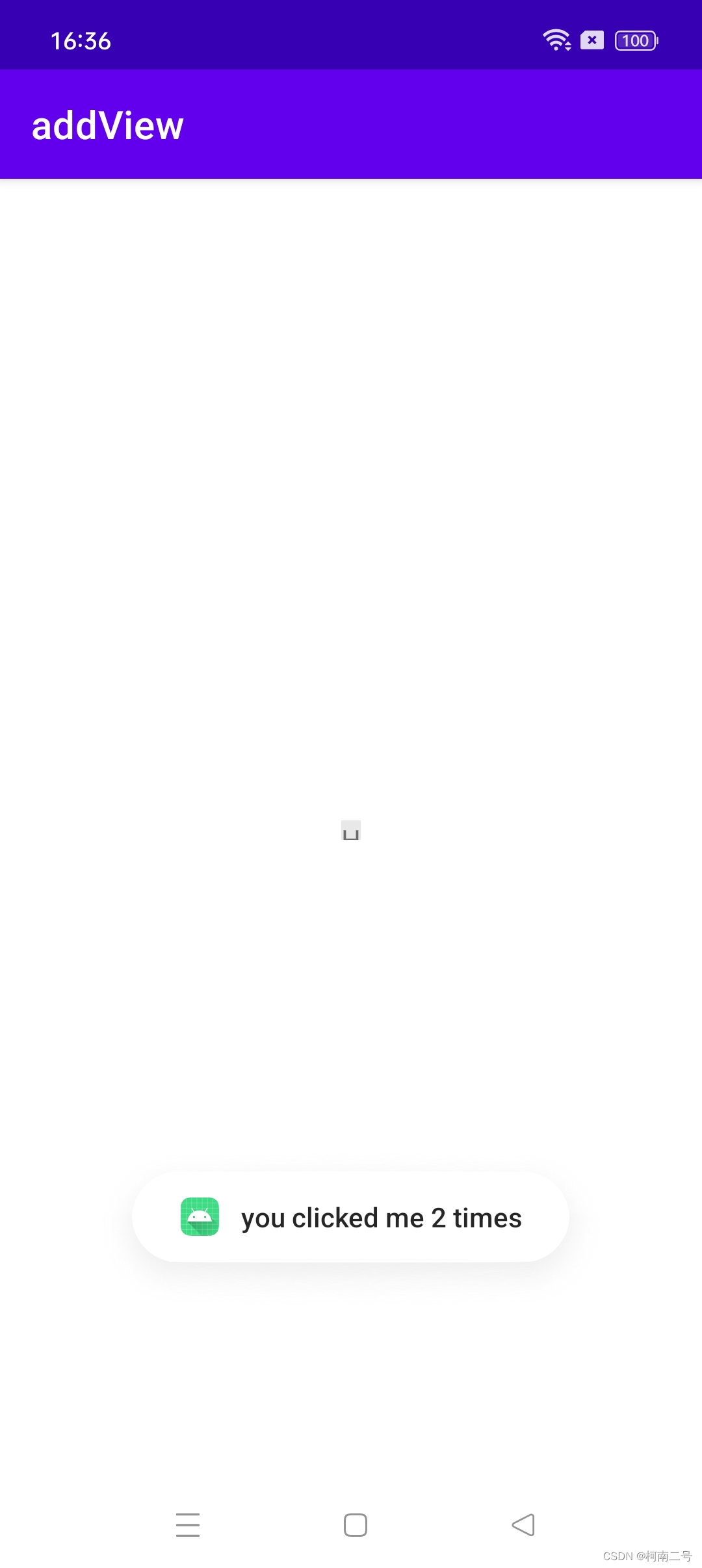
然后截图就可以看到点击不是该控件显示的空白区域,也可以响应到该view的click事件。
总结:
通过PaddingLeft来扩大Android控件可点击区域的步骤如下:
● 首先,在 xml 文件中添加你的控件,并设置它的 paddingLeft 属性值。这个值应该设置为你希望扩大的像素值。
● 使用 TouchDelegate 类来创建一个代理对象,然后将它与控件绑定。代理对象告诉 Android 系统点击事件的触发范围。
● 然后使用 View.post 方法将扩大控件的宽度和高度的代码放在消息队列中。那么为什么通过TouchDelegate类来创建的代理对象,与控件绑定以后可以扩大控件的宽度和高度呢?
从源码中可以看到如果设置了TouchDelegate,touchEvent会优先交给TouchDelegate来处理。public class TouchDelegate { /** * View that should receive forwarded touch events */ private View mDelegateView; /** * Bounds in local coordinates of the containing view that should be mapped to the delegate * view. This rect is used for initial hit testing. */ // 传入一个Rect对象 private Rect mBounds; /** * mBounds inflated to include some slop. This rect is to track whether the motion events * should be considered to be within the delegate view. */ private Rect mSlopBounds; /** * True if the delegate had been targeted on a down event (intersected mBounds). */ @UnsupportedAppUsage private boolean mDelegateTargeted; /** * The touchable region of the View extends above its actual extent. */ public static final int ABOVE = 1; /** * The touchable region of the View extends below its actual extent. */ public static final int BELOW = 2; /** * The touchable region of the View extends to the left of its actual extent. */ public static final int TO_LEFT = 4; /** * The touchable region of the View extends to the right of its actual extent. */ public static final int TO_RIGHT = 8; private int mSlop; /** * Touch delegate information for accessibility */ private TouchDelegateInfo mTouchDelegateInfo; /** * Constructor * * @param bounds Bounds in local coordinates of the containing view that should be mapped to * the delegate view * @param delegateView The view that should receive motion events */ public TouchDelegate(Rect bounds, View delegateView) { // 接收对应的view控件和扩大的区域 mBounds = bounds; mSlop = ViewConfiguration.get(delegateView.getContext()).getScaledTouchSlop(); mSlopBounds = new Rect(bounds); mSlopBounds.inset(-mSlop, -mSlop); mDelegateView = delegateView; } /** * Forward touch events to the delegate view if the event is within the bounds * specified in the constructor. * * @param event The touch event to forward * @return True if the event was consumed by the delegate, false otherwise. */ public boolean onTouchEvent(@NonNull MotionEvent event) { // 获取事件的坐标x,y int x = (int)event.getX(); int y = (int)event.getY(); boolean sendToDelegate = false; boolean hit = true; boolean handled = false; switch (event.getActionMasked()) { // 如果是ACTION_DOWN事件,判断事件的位置x,y是否落在扩大的区域mBounds内 case MotionEvent.ACTION_DOWN: mDelegateTargeted = mBounds.contains(x, y); sendToDelegate = mDelegateTargeted; break; case MotionEvent.ACTION_POINTER_DOWN: case MotionEvent.ACTION_POINTER_UP: case MotionEvent.ACTION_UP: case MotionEvent.ACTION_MOVE: sendToDelegate = mDelegateTargeted; if (sendToDelegate) { Rect slopBounds = mSlopBounds; if (!slopBounds.contains(x, y)) { hit = false; } } break; case MotionEvent.ACTION_CANCEL: sendToDelegate = mDelegateTargeted; mDelegateTargeted = false; break; } // 如果落在扩大的区域内 if (sendToDelegate) { if (hit) { // 设置该事件对应的触发位置 // Offset event coordinates to be inside the target view event.setLocation(mDelegateView.getWidth() / 2, mDelegateView.getHeight() / 2); } else { // Offset event coordinates to be outside the target view (in case it does // something like tracking pressed state) int slop = mSlop; event.setLocation(-(slop * 2), -(slop * 2)); } // 拦截点击事件 handled = mDelegateView.dispatchTouchEvent(event); } return handled; } ... }- 1
- 2
- 3
- 4
- 5
- 6
- 7
- 8
- 9
- 10
- 11
- 12
- 13
- 14
- 15
- 16
- 17
- 18
- 19
- 20
- 21
- 22
- 23
- 24
- 25
- 26
- 27
- 28
- 29
- 30
- 31
- 32
- 33
- 34
- 35
- 36
- 37
- 38
- 39
- 40
- 41
- 42
- 43
- 44
- 45
- 46
- 47
- 48
- 49
- 50
- 51
- 52
- 53
- 54
- 55
- 56
- 57
- 58
- 59
- 60
- 61
- 62
- 63
- 64
- 65
- 66
- 67
- 68
- 69
- 70
- 71
- 72
- 73
- 74
- 75
- 76
- 77
- 78
- 79
- 80
- 81
- 82
- 83
- 84
- 85
- 86
- 87
- 88
- 89
- 90
- 91
- 92
- 93
- 94
- 95
- 96
- 97
- 98
- 99
- 100
- 101
- 102
- 103
- 104
- 105
- 106
- 107
- 108
- 109
- 110
- 111
- 112
- 113
- 114
- 115
- 116
- 117
- 118
- 119
- 120
- 121
- 122
- 123
- 124
- 125
- 126
- 127
从源码中 可以看到,创建TouchDelegate 需要传入一个Rect(left,top,right,bottom) 和delegateView, onTouchEvent触发时,会通过这个Rect来判断点击事件是否落在区域内,如果是 则转发给代理view来处理该事件。
-
相关阅读:
CSO面对面|对话迷你世界,畅谈游戏行业的安全建设
CF1004F Sonya and Bitwise OR(线段树平衡复杂度+or 前缀性质)
大数据存储解决方案:HDFS与NoSQL数据库详解
FFmpeg入门详解之110:RTSP协议讲解
Zabbix 利用 Grafana 进行图形展示
ElasticSearch6.8.1 常见错误
树形DP()
mobaxterm使用
Golang中for循环使用
QRegExp(正则表达式)
- 原文地址:https://blog.csdn.net/qq_41688840/article/details/134250054
