-
【bug-maven】(一)java: 错误: 不支持发行版本 5 (二):java: 错误: 无效的源发行版:15
【bug-maven】(一)java: 错误: 不支持发行版本 5 (二):java: 错误: 无效的源发行版:15
(一)java: 错误: 不支持发行版本 5
报错截图:

出错原因:
打开Project Structure ,查询Modules的项目jdk版本,发现项目中所有的模块的都变成了5了。
解决方法:
修改Maven地址\conf\setting.xml中设置默认jdk版本
我是用的jdk版本是17,已jdk17为例,修改如下:
<profile> <id>developmentid> <activation> <jdk>17jdk> <activeByDefault>trueactiveByDefault> activation> <properties> <maven.compiler.source>17maven.compiler.source> <maven.compiler.target>17maven.compiler.target> <maven.compiler.compilerVersion>17maven.compiler.compilerVersion> properties> profile>- 1
- 2
- 3
- 4
- 5
- 6
- 7
- 8
- 9
- 10
- 11
- 12
附录jdk1.8默认设置:
<profile> <id>developmentid> <activation> <jdk>1.8jdk> <activeByDefault>trueactiveByDefault> activation> <properties> <maven.compiler.source>1.8maven.compiler.source> <maven.compiler.target>1.8maven.compiler.target> <maven.compiler.compilerVersion>1.8maven.compiler.compilerVersion> properties> profile>- 1
- 2
- 3
- 4
- 5
- 6
- 7
- 8
- 9
- 10
- 11
- 12
参考文章:java错误:不支持发行版本5
(二)java: 错误: 无效的源发行版:15
报错分析:
SpringBoot使用了3.0或者3.0以上,因为Spring官方发布从Spring6以及SprinBoot3.0开始最低支持JDK17,所以仅需将SpringBoot版本降低为3.0.0以下即可。
本人用的jdk1.8版本,下图是必要的编译环境一致性的设置
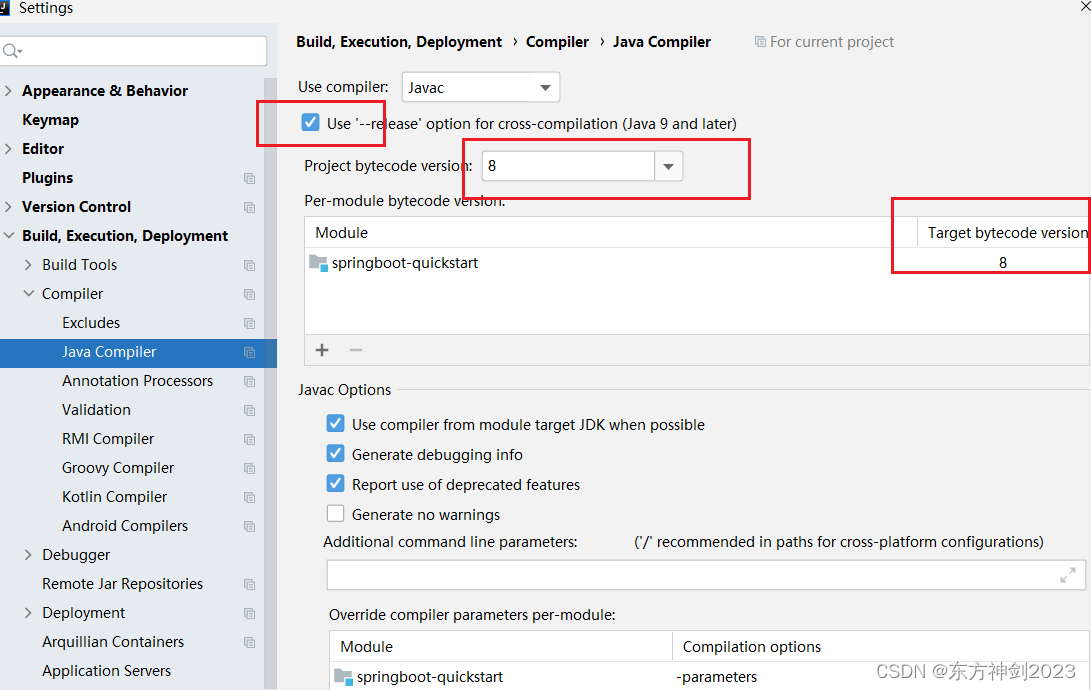
解决办法,示例:
<parent> <groupId>org.springframework.bootgroupId> <artifactId>spring-boot-starter-parentartifactId> <version>2.5.6version> <relativePath/> parent>- 1
- 2
- 3
- 4
- 5
- 6
-
相关阅读:
去除做题痕迹的软件有哪些?安利三款好用的
ubuntu系统安装与环境配置
Java skill - 自定义feign调用日志打印
【探花交友】用户登录、代码优化
尾矿库安全监测:仪器埋设与维护的关键要求
MRI多任务技术及应用
【12. 文件系统管理】
docker镜像构建
ios safari 浏览器跳转页面没有自适应
智能运维应用之道,告别企业数字化转型危机
- 原文地址:https://blog.csdn.net/qq_41562897/article/details/134233040