-
uni-app小程序使用vant
步骤一:安装 Vant Weapp
# 通过 npm 安装 npm i @vant/weapp -S --production # 通过 yarn 安装 yarn add @vant/weapp --production # 安装 0.x 版本 npm i vant-weapp -S --production- 1
- 2
- 3
- 4
- 5
- 6
- 7
- 8
- 9
步骤二:在根目录下创建“wxcomponents”文件夹
步骤三:找到依赖node_modules/@vant/weapp/dist,复制dist文件
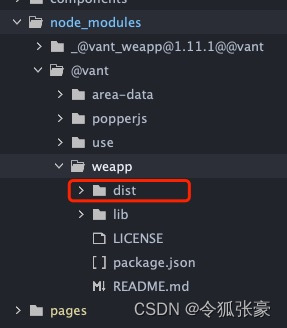
步骤四:把刚刚复制的dist文件粘贴到刚刚新建的“wxcomponents”文件下同时将dist改名为vant

步骤五:在“pages.json”/“globalStyle”里配置“usingComponents”
"globalStyle": { "navigationBarTextStyle": "black", "navigationBarTitleText": "uni-app", "navigationBarBackgroundColor": "#F8F8F8", "backgroundColor": "#F8F8F8", "usingComponents": { "van-action-sheet": "/wxcomponents/vant/action-sheet/index", "van-area": "/wxcomponents/vant/area/index", "van-button": "/wxcomponents/vant/button/index", "van-card": "/wxcomponents/vant/card/index", "van-cell": "/wxcomponents/vant/cell/index", "van-cell-group": "/wxcomponents/vant/cell-group/index", "van-checkbox": "/wxcomponents/vant/checkbox/index", "van-checkbox-group": "/wxcomponents/vant/checkbox-group/index", "van-col": "/wxcomponents/vant/col/index", "van-dialog": "/wxcomponents/vant/dialog/index", "van-field": "/wxcomponents/vant/field/index", "van-goods-action": "/wxcomponents/vant/goods-action/index", "van-goods-action-icon": "/wxcomponents/vant/goods-action-icon/index", "van-goods-action-button": "/wxcomponents/vant/goods-action-button/index", "van-icon": "/wxcomponents/vant/icon/index", "van-loading": "/wxcomponents/vant/loading/index", "van-nav-bar": "/wxcomponents/vant/nav-bar/index", "van-notice-bar": "/wxcomponents/vant/notice-bar/index", "van-notify": "/wxcomponents/vant/notify/index", "van-panel": "/wxcomponents/vant/panel/index", "van-popup": "/wxcomponents/vant/popup/index", "van-progress": "/wxcomponents/vant/progress/index", "van-radio": "/wxcomponents/vant/radio/index", "van-radio-group": "/wxcomponents/vant/radio-group/index", "van-row": "/wxcomponents/vant/row/index", "van-search": "/wxcomponents/vant/search/index", "van-slider": "/wxcomponents/vant/slider/index", "van-stepper": "/wxcomponents/vant/stepper/index", "van-steps": "/wxcomponents/vant/steps/index", "van-submit-bar": "/wxcomponents/vant/submit-bar/index", "van-swipe-cell": "/wxcomponents/vant/swipe-cell/index", "van-switch": "/wxcomponents/vant/switch/index", "van-tab": "/wxcomponents/vant/tab/index", "van-tabs": "/wxcomponents/vant/tabs/index", "van-tabbar": "/wxcomponents/vant/tabbar/index", "van-tabbar-item": "/wxcomponents/vant/tabbar-item/index", "van-tag": "/wxcomponents/vant/tag/index", "van-toast": "/wxcomponents/vant/toast/index", "van-transition": "/wxcomponents/vant/transition/index", "van-tree-select": "/wxcomponents/vant/tree-select/index", "van-datetime-picker": "/wxcomponents/vant/datetime-picker/index", "van-rate": "/wxcomponents/vant/rate/index", "van-collapse": "/wxcomponents/vant/collapse/index", "van-collapse-item": "/wxcomponents/vant/collapse-item/index", "van-picker": "/wxcomponents/vant/picker/index", "van-empty": "/wxcomponents/vant/empty/index" } },- 1
- 2
- 3
- 4
- 5
- 6
- 7
- 8
- 9
- 10
- 11
- 12
- 13
- 14
- 15
- 16
- 17
- 18
- 19
- 20
- 21
- 22
- 23
- 24
- 25
- 26
- 27
- 28
- 29
- 30
- 31
- 32
- 33
- 34
- 35
- 36
- 37
- 38
- 39
- 40
- 41
- 42
- 43
- 44
- 45
- 46
- 47
- 48
- 49
- 50
- 51
- 52
- 53
- 54
步骤六:使用
<van-button type="default">默认按钮</van-button> <van-button type="primary">主要按钮</van-button> <van-button type="info">信息按钮</van-button> <van-button type="warning">警告按钮</van-button> <van-button type="danger">危险按钮</van-button>- 1
- 2
- 3
- 4
- 5
end~~~
如有错误或观点不一致的请评论留言共同讨论,本人前端小白一枚,根据自己实际项目遇到的问题进行总结分享,谢谢大家的阅读!
-
相关阅读:
YAMLException : java.nio.charset.MalformedInputException : Input length = 1
Pyside6 QPushButton
Python语义分割与街景识别(2):环境搭建
个人信息保护法vs国家标准,37项标准为个人信息加道“安全锁”~(附整理文档及pdf下载)
阿龙的感悟
Mysql 性能优化就是这么简单,大佬带你深入浅出
Netty websocket配置wss
计算机网络 第一章 计算机网络体系结构
华为云云耀云服务器 L 实例评测:快速建站的新选择,初创企业和开发者的理想之选
五、伊森商城 前端基础-Vue v-text&v-html&v-bind&v-model p23
- 原文地址:https://blog.csdn.net/LingHuzh/article/details/134182077
