-
轻量级仿 Spring Boot=嵌入式 Tomcat+Spring MVC
啥?Spring Boot 不用?——对。就只是使用 Spring MVC + Embedded Tomcat,而不用 Boot。为啥?——因为 Boot 太重了:)
那是反智吗?Spring Boot 好好的就只是因为太重就不用?——稍安勿躁,这里并非说重新写代替 Spring 的轮子,而是继续使用原装的 Spring MVC,进而对其加强升级,——请听我跟你说, 优化后的 Spring MVC 几乎能做到 Spring Boot 的事情,是一个近乎 99% 完成度的平替,而且它更轻量级,何乐不为呢?Yes,让我们试试:Spring Framework without Spring Boot!
为了说明如何打造轻量级的 Spring Boot,本文分为“嵌入式 Tomcat”、“增强 Spring MVC”和“打包/部署”三个小节来介绍。
嵌入式 Tomcat
目的是通过执行
main()函数即可启动 Web 程序。在上一篇文章《嵌入式 Tomcat 调校》中已经讨论了如何制定化 Tomcat,但仍未与 Spring 结合。实际上,从 Spring MVC 时代起就支持通过 Java 注解来配置,代替古老的 XML 方式。笔者在两年之前的文章《Spring MVC 用起来还是很香的》已经介绍过。那时还未摆脱标准 Tomcat 的运行模式,而目前要做的,就是结合嵌入式 Tomcat 与 Spring MVC 两者。
因为是纯手动编码(Programmatically)达成的,所以要了解 Tomcat 加载的生命周期。当为
LifecycleState.STARTING_PREP之时,才能有关键的ServletContext ctx对象,以便 Spring 绑定。
完整代码在这里。调用例子
一般情况下,要指定的只有 Tomcat 端口和 Context 目录,甚至 Context 目录都可以不传。所以多数情况下你调用 EmbeddedTomcatStarter 的静态方法
start()即可。另外
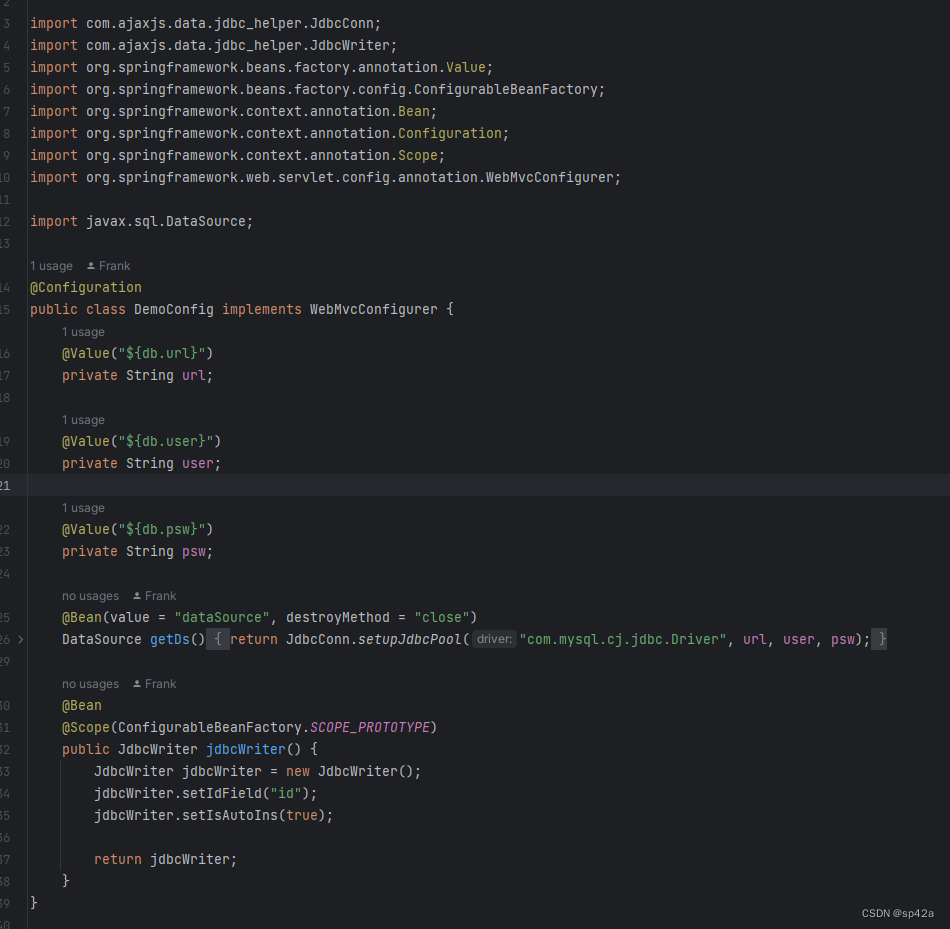
start()有 class… 的参数列表,它是个可变长度的数组,表示 Java 配置类,如下例的DemoApp.class、DemoConfig.class,第一个 class 是 main 函数的那个类,第二个、第三……第 n 个是带有@Configuration注解的配置类。import com.ajaxjs.data.sql_controller.ServiceBeanDefinitionRegistry; import com.ajaxjs.framework.spring.BaseWebMvcConfigure; import com.ajaxjs.framework.spring.EmbeddedTomcatStarter; import org.springframework.context.annotation.Bean; import org.springframework.context.annotation.ComponentScan; import org.springframework.context.annotation.Configuration; import org.springframework.web.servlet.config.annotation.EnableWebMvc; @Configuration @EnableWebMvc @ComponentScan("com.ajaxjs.demo") public class DemoApp extends BaseWebMvcConfigure { public static void main(String[] args) { EmbeddedTomcatStarter.start(8300, DemoApp.class, DemoConfig.class); } }- 1
- 2
- 3
- 4
- 5
- 6
- 7
- 8
- 9
- 10
- 11
- 12
- 13
- 14
- 15
- 16
配置类是这样的,与 Spring Boot 的无异,还是熟悉的配方。
增强 SpringMVC
YAML 配置
主流采用 YAML 作为配置文件,properties/xml 文件则不考虑了。在 Spring MVC 中支持 YAML 配置文件,首先引入 yaml 依赖。
<dependency> <groupId>org.yamlgroupId> <artifactId>snakeyamlartifactId> <version>1.33version> dependency>- 1
- 2
- 3
- 4
- 5
- 6
然后初始化加载 YAML。这是封装到框架里面的,位于
BaseWebMvcConfigure。

YAML 有个问题,就是没有直接提供静态方法的手段,于是重写PropertySourcesPlaceholderConfigurer.postProcessBeanFactory()方法,获取内部的 Key/Value 结构Properties localProperties,暴露出来给外界获取,传入 key 即可得到的配置 value。源码如下:package com.ajaxjs.framework.spring; import com.ajaxjs.util.convert.ConvertBasicValue; import org.springframework.beans.factory.config.ConfigurableListableBeanFactory; import org.springframework.context.support.PropertySourcesPlaceholderConfigurer; import java.io.IOException; import java.util.Properties; /** * PropertySourcesPlaceholderConfigurer 是一个由 Spring 提供的用于解析属性占位符的配置类, * 它没有提供直接获取私有属性 localProperties 的公开方法。但是,可以通过以下步骤获取 localProperties 的值 */ public class CustomPropertySources extends PropertySourcesPlaceholderConfigurer { private Properties localProperties; @Override public void postProcessBeanFactory(ConfigurableListableBeanFactory beanFactory) { super.postProcessBeanFactory(beanFactory); try { localProperties = mergeProperties(); } catch (IOException e) { throw new RuntimeException(e); } } public Properties getLocalProperties() { return localProperties; } /** * 获取配置值 * * @param key 配置 key * @return 配置值 */ public static String getConfig(String key) { CustomPropertySources bean = DiContextUtil.getBean(CustomPropertySources.class); assert bean != null; Object o = bean.getLocalProperties().get(key); if (o != null) return o.toString(); else { System.err.println("找不到 " + key + "配置"); return null; } } public static <T> T getConfig(String key, Class<T> clz) { String value = getConfig(key); return ConvertBasicValue.basicCast(value, clz); } }- 1
- 2
- 3
- 4
- 5
- 6
- 7
- 8
- 9
- 10
- 11
- 12
- 13
- 14
- 15
- 16
- 17
- 18
- 19
- 20
- 21
- 22
- 23
- 24
- 25
- 26
- 27
- 28
- 29
- 30
- 31
- 32
- 33
- 34
- 35
- 36
- 37
- 38
- 39
- 40
- 41
- 42
- 43
- 44
- 45
- 46
- 47
- 48
- 49
- 50
- 51
- 52
- 53
- 54
- 55
- 56
- 57
上述静态的方法就是获取配置的手段。
用户配置
用户来说,具体操作就是在 resources 目录下设置
application.yml文件。
其他
另外,这里有个大神开源的作品 spring-config-ext,也是在 MVC 中实现类似 Boot 的配置,号称“spring mvc config simple extension, make it have the same config abilities as spring boot does.”,大家有兴趣的可去看看。
运行 Web 页面
尽管打包为 JAR 包了,都是弄 API 接口了,也就没什么理由存放那些 Web 页面了。但某些情况下,作为一个前-前端人员,还是觉得有必要打开 JSP 渲染的,可以访问一下 html/css/js/jsp 资源。
按照 Servlet 3.0 规范,有一块地方是专门存放 html/css/js 甚至 JSP 的,即
META-INF\resources,在工程的资源目录下,即\src\main\resources\META-INF\resources。所以,以前是在src\main\webapp下面的所有文件,移动到\src\main\resources\META-INF\resources目录下。
新建一个 index.jsp 设置内容
<%=88888%>即可测试之。存在问题:这个不像以前在 Eclipse 下可以修改了 JSP 重新编译,在 IDEA 下没法那样子玩了,所以每次修改后要手动重启服务器,非常麻烦。如果有懂行的朋友知道怎么搞自动重启,请多告知!
单元测试
单元测试一般都有这两个类,一个是配置,一个是基类。
配置很简单,但是你要修改扫描的包名,
@ComponentScan那里的。package com.ajaxjs.iam.server; import org.springframework.context.annotation.ComponentScan; import org.springframework.context.annotation.Configuration; @Configuration @ComponentScan("com.ajaxjs.iam.server") public class TestConfig { }- 1
- 2
- 3
- 4
- 5
- 6
- 7
- 8
- 9
- 10
基类是个抽象类,主要是绑定配置类和数据库连接跟关闭,方便你不用每次都手动连接数据库。
package com.ajaxjs.iam.server; import com.ajaxjs.data.jdbc_helper.JdbcConn; import com.ajaxjs.framework.spring.filter.dbconnection.DataBaseConnection; import org.junit.After; import org.junit.Before; import org.junit.runner.RunWith; import org.springframework.test.context.ContextConfiguration; import org.springframework.test.context.junit4.SpringJUnit4ClassRunner; import org.springframework.test.context.web.WebAppConfiguration; @ContextConfiguration(classes = TestConfig.class) @RunWith(SpringJUnit4ClassRunner.class) @WebAppConfiguration public abstract class BaseTest { @Before public void initDb() { DataBaseConnection.initDb(); } @After public void closeDb() { JdbcConn.closeDb(); } }- 1
- 2
- 3
- 4
- 5
- 6
- 7
- 8
- 9
- 10
- 11
- 12
- 13
- 14
- 15
- 16
- 17
- 18
- 19
- 20
- 21
- 22
- 23
- 24
- 25
一个例子。

打包与部署
Profiles
在实际使用环境中,我们同一个应用环境可能需要在不同环境运行(开发、测试、生产等),每个环境的参数都有可能不同(连接参数、日志级别等),使用 profiles 可以将不同环境下的参数进行拆分,并指定加载。
我们希望打出哪个环境的包,就只需要包含这个环境的配置文件即可,不想包含其他环境的配置文件,这时候可以直接在 maven 中使用 profiles 和 resources 来配置,打包时使用
mvn package -P dev即可。IDEA 配置,在 src 目录下创建 profiles 目录,安排如下图的配置文件。

开始以为要 run 配置中加入--spring.profiles.active=dev参数,其实不用,还是在 IDEA 里面选 Maven Profile 打勾即可。
pom.xml 配置如下:
<profiles> <profile> <id>devid> <properties> <spring.profiles.active>devspring.profiles.active> properties> <activation> <activeByDefault>trueactiveByDefault> activation> profile> <profile> <id>testid> <properties> <spring.profiles.active>testspring.profiles.active> properties> profile> <profile> <id>prodid> <properties> <spring.profiles.active>prodspring.profiles.active> properties> profile> profiles> <build> <finalName>${project.name}finalName> <resources> <resource> <directory>${basedir}/src/profiles/${spring.profiles.active}directory> resource> <resource> <directory>${basedir}/src/main/resourcesdirectory> resource> resources> build>- 1
- 2
- 3
- 4
- 5
- 6
- 7
- 8
- 9
- 10
- 11
- 12
- 13
- 14
- 15
- 16
- 17
- 18
- 19
- 20
- 21
- 22
- 23
- 24
- 25
- 26
- 27
- 28
- 29
- 30
- 31
- 32
- 33
- 34
- 35
- 36
- 37
- 38
- 39
- 40
原理如下:
maven 在构建项目时,默认是把
main/resoures目录作为资源文件所在目录的,现在我们在main/conf目录下也存放了资源文件(即application.properites文件),因此需要告诉 maven 资源文件所在的目录有哪些,通过 build 元素中增加 resources 元素就可以达到这一目的。这里告诉 maven 有两个地方存在资源文件,一个是默认的 resources 目录,另一个是在src/main/conf/${env}目录下,而${env}引用的是上面 properties 元素中定义的 env 的值,而它的值引用的又是spring.profiles.active的值(其值为 dev、test 和 online 中的一个),因此,目录要么是src/main/conf/dev,要么是src/main/conf/test,要么是main/conf/online,这最终取决于参数spring.profiles.active的值。因此,根据参数spring.profiles.active的值的不同,在构建打包时最终会选择 dev、test 和 online 这三个目录中的一个中的application.properties打包到项目中来。依赖包拷贝到 lib 目录
默认依赖的包不会创建,一般要拷贝到 lib 目录。另外还有修改项目主类运行入口,
<plugins> <plugin> <groupId>org.apache.maven.pluginsgroupId> <artifactId>maven-jar-pluginartifactId> <version>3.3.0version> <configuration> <archive> <manifest> <addClasspath>trueaddClasspath> <classpathPrefix>lib/classpathPrefix> <mainClass>com.xxx.cc2.Cc2ApplicationmainClass> manifest> <manifestEntries> <Class-Path>lib/lbsalgo-1.0.jar lib/jts-1.0.jarClass-Path> manifestEntries> archive> configuration> plugin> <plugin> <groupId>org.apache.maven.pluginsgroupId> <artifactId>maven-dependency-pluginartifactId> <version>3.4.0version> <executions> <execution> <id>copy-dependenciesid> <phase>packagephase> <goals> <goal>copy-dependenciesgoal> goals> <configuration> <outputDirectory>${project.build.directory}/liboutputDirectory> <includeScope>runtimeincludeScope> configuration> execution> <execution> <id>copy-dependencies2id> <phase>packagephase> <goals> <goal>copy-dependenciesgoal> goals> <configuration> <outputDirectory>${project.build.directory}/liboutputDirectory> <includeScope>systemincludeScope> configuration> execution> executions> plugin> plugins>- 1
- 2
- 3
- 4
- 5
- 6
- 7
- 8
- 9
- 10
- 11
- 12
- 13
- 14
- 15
- 16
- 17
- 18
- 19
- 20
- 21
- 22
- 23
- 24
- 25
- 26
- 27
- 28
- 29
- 30
- 31
- 32
- 33
- 34
- 35
- 36
- 37
- 38
- 39
- 40
- 41
- 42
- 43
- 44
- 45
- 46
- 47
- 48
- 49
- 50
- 51
- 52
Fat JAR
将应用打成一个 Fat Jar 的方式,可以用 Spring 的:
<plugin> <groupId>org.springframework.bootgroupId> <artifactId>spring-boot-maven-pluginartifactId> <version>1.3.3.RELEASEversion> <configuration> <mainClass>com.demo.proj.MainmainClass> configuration> <executions> <execution> <phase>packagephase> <goals> <goal>repackagegoal> goals> execution> executions> plugin>- 1
- 2
- 3
- 4
- 5
- 6
- 7
- 8
- 9
- 10
- 11
- 12
- 13
- 14
- 15
- 16
小结
若说“轻量级”,Tomcat 并非最佳选择,且见:
Google将默认的应用引擎切换为Jetty? Google 应用系统引擎最初是以 Apache Tomcat 作为其 webserver/servlet 容器的,但最终将切换到 Jetty 上。为什么要做这样的改变?不是为了性能,而是轻量级!
Google选择Jetty的关键原因是它的体积和灵活性。在云计算里,体积的因素是很重要,如果你运行几万个Jetty的实例(Google
就是这样干的),每个 server 省1兆,那就会省10几个G的内存(或能够给其他应用提供更多的内存)。Jetty 被设计成了可插拔和可扩展的特性,这样Google就可以高度的自定义它。他们在其中替换了他们自己的 HTTP connector,Google认证,以及他们自己的session集群。
也真是奇怪,这个特性对于云计算来说是非常出色的,但同时也让Jetty非常适合嵌入小的设备中,例如手机和机顶盒。参考
-
相关阅读:
内容营销专家刘鑫炜:全网简单易上手的品牌打造法教程第二节
电脑出现找不到msvcp120.dll无法继续执行代码,不用担心多种方法帮你搞定
力扣题目训练(18)
Python 踩坑记 -- 调优
231n-图像线性分类
SpringBoot【原理分析、YAML文件、SpringBoot注册web组件】(二)-全面详解(学习总结---从入门到深化)
postgresql16-新特性
图计算中的世界观?推荐一本值得反复阅读的书籍
学习Cmake
linux中用date命令获取昨天、明天或多天前后的日期
- 原文地址:https://blog.csdn.net/zhangxin09/article/details/131678560
