-
01.5.Binding
参考JusterZhu视频和文档,ppt文档基本全抄
一、Binding-绑定项配置
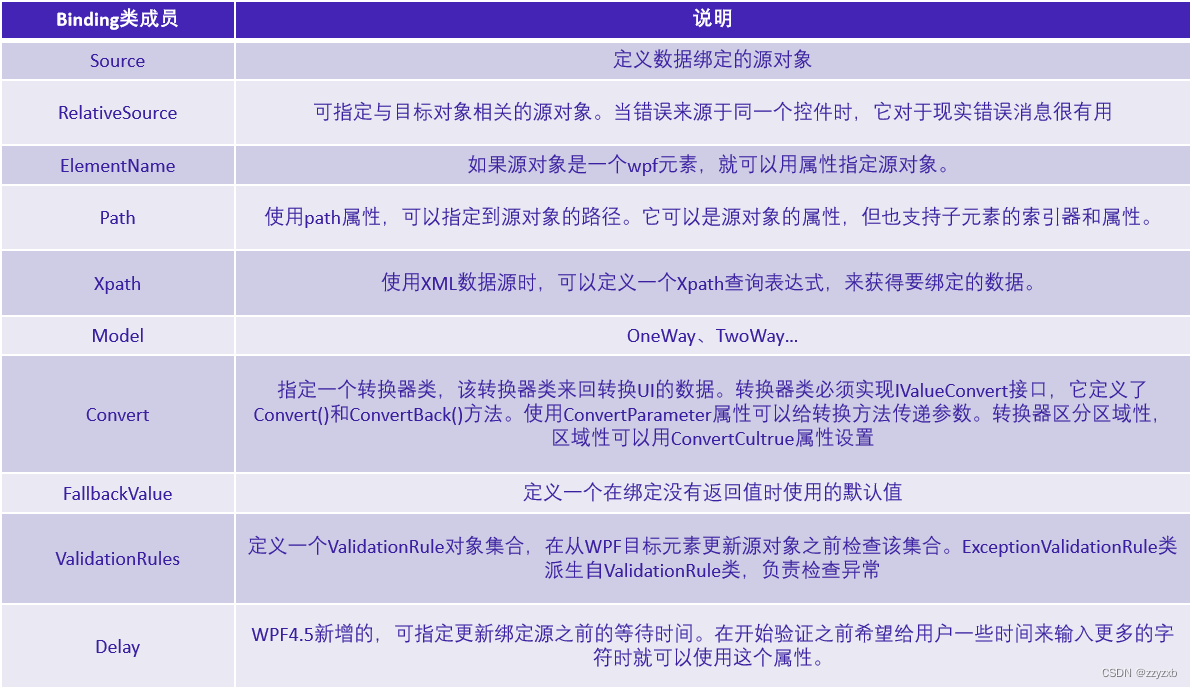
- 1
- 2
- 3
- 4
- 5
- 6
- 7
- 8
- 9
public enum UpdateSourceTrigger { Default, PropertyChanged, LostFocus, Explicit }- 1
- 2
- 3
- 4
- 5
- 6
- 7
这是一个名为
UpdateSourceTrigger的枚举类型,通常在WPF (Windows Presentation Foundation) 或其他 XAML (Extensible Application Markup Language) 基础的应用程序中使用。这个枚举用于指定数据绑定更新源(例如文本框中的数据)何时应该将其更改传递到数据绑定的目标(例如数据模型中的属性)。下面是枚举中各个成员的含义:-
Default:这表示数据绑定的更新源触发器将使用默认的行为。默认行为通常是取决于绑定的具体上下文,但通常等同于PropertyChanged。 -
PropertyChanged:当数据绑定的更新源的值更改时,立即将该更改传递到数据绑定的目标。这意味着每次源属性更改时都会触发数据绑定。 -
LostFocus:数据绑定的更新源在失去焦点时(通常是在用户在界面元素(如文本框)中输入数据后移出该元素)才将更改传递到数据绑定的目标。这允许用户在输入数据时进行编辑,并只在离开输入字段时触发绑定。 -
Explicit:数据绑定的更新源需要显式的触发才会将更改传递到数据绑定的目标。这通常需要编程方式触发数据绑定更新,而不是自动或基于用户输入触发。
这些不同的更新源触发器允许开发人员根据应用程序的需要来控制数据绑定的行为,以确保数据在界面元素和数据模型之间同步时满足特定的需求。
默认情况下,如果不明确指定数据绑定的更新源触发器(
UpdateSourceTrigger),那么在大多数情况下,WPF 和其他 XAML 框架将使用Default作为默认的更新源触发器。在许多常见情况下,
Default和PropertyChanged等效,这意味着当数据绑定的更新源的值更改时,将立即将更改传递到数据绑定的目标。因此,默认情况下,数据绑定通常会实时地反映源属性的更改。需要注意的是,实际的默认行为可能会根据具体的XAML框架、控件和绑定上下文而有所不同。因此,为了明确控制数据绑定的行为,有时建议显式指定所需的更新源触发器。
1.1 Binding - Command
1.带参命令绑定,并返回当前整个Employee对象 <Button Command="{Binding GetEmployeeCmd}" CommandParameter="{Binding}" /> 2.带参命令绑定,并返回挡墙对象中的某个属性。例:Employee对象中的Name属性 <Button Command=“{Binding GetEmployeeCmd}” CommandParameter=“{Binding Path=Name}" />- 1
- 2
- 3
- 4

3.当button作为ItemControl类型控件的子项时需绑定命令,会用到RelativeSource关键字辅助在资源中查找命令。 <Button Command=“{Binding Path=DataContext.GetEmployeeCmd, RelativeSource={RelativeSource AncestorLevel=1, AncestorType={x:Type ListBox}, Mode=FindAncestor}}” CommandParameter=“{Binding}” />- 1
- 2
- 3

1.2 Binding - string.Format
1.时间,例: 2021-05-09 00:00:00 <TextBox Text="{Binding DateTimeNow, StringFormat={}{0:yyyy-MM-dd HH:mm:ss}}" /> 2.占位符,例: 123.456 <TextBox Text="{Binding Price, StringFormat={}{0:####.##}}" /> 3.保留小数位 例: 28768234.9329 <TextBox Text="{Binding Total, StringFormat={}{0:F4}}" /> 4.多重绑定 例:姓名:juster zhu <TextBox.Text> <MultiBinding StringFormat="姓名:{0}{1}"> <Binding Path="FristName" /> <Binding Path="LastName" /> </MultiBinding> </TextBox.Text>- 1
- 2
- 3
- 4
- 5
- 6
- 7
- 8
- 9
- 10
- 11
- 12
- 13
- 14
- 15
- 16
代码示例
<!-- Part1.2 Binding-Command --> <ListBox ItemsSource="{Binding Employees}"> <ListBox.ItemContainerStyle> <Style TargetType="{x:Type ListBoxItem}"> <Style.Setters> <Setter Property="Template"> <Setter.Value> <ControlTemplate> <StackPanel Orientation="Horizontal"> <TextBlock Text="{Binding Path=Id}" /> <TextBlock Text="{Binding Path=Name}" /> <TextBlock Text="{Binding Path=Department}" /> <Button Width="100" Height="25" Command="{Binding Path=DataContext.GetEmployeeCmd, RelativeSource={RelativeSource AncestorLevel=1, AncestorType={x:Type ListBox}, Mode=FindAncestor}}" CommandParameter="{Binding .}" Content="Get" /> </StackPanel> </ControlTemplate> </Setter.Value> </Setter> </Style.Setters> </Style> </ListBox.ItemContainerStyle> </ListBox>- 1
- 2
- 3
- 4
- 5
- 6
- 7
- 8
- 9
- 10
- 11
- 12
- 13
- 14
- 15
- 16
- 17
- 18
- 19
- 20
- 21
- 22
- 23
- 24
- 25
- 26
二、MultiBinding
Binding是可用于数据绑定的类之一。BindingBase是所有绑定的抽象基类,有不同的具体实现方式。
除了Binding还有MultiBinding和PriorityBinding。 MultiBinding允许把一个wpf元素绑定到多个源上。
- 1
- 2
- 3
- 4
- 5
- 6
- 7
- 8
- 9
- 10
- 11
- 12
- 13
private PersonModel person; public PersonModel Person { get { return person; } set { person = value; OnPropertyChanged(nameof(Person)); } } Person = new PersonModel { FirstName = "zzy", LastName = "zxb" }; public class PersonModel { public string FirstName { get; set; } public string LastName { get; set; } }- 1
- 2
- 3
- 4
- 5
- 6
- 7
- 8
- 9
- 10
- 11
- 12
- 13
- 14
- 15
- 16
- 17
- 18
internal class TestMultiConvert : IMultiValueConverter { public object Convert(object[] values, Type targetType, object parameter, CultureInfo culture) { if (values.Count() == 0) return string.Empty; switch (parameter as string) { case "FirstLast": return $"{values[0]} {values[1]}"; case "LastFirst": return $"{values[1]} {values[0]}"; default: throw new ArgumentException($"invalid argument {parameter}"); } } public object[] ConvertBack(object value, Type[] targetTypes, object parameter, CultureInfo culture) { throw new NotImplementedException(); } }- 1
- 2
- 3
- 4
- 5
- 6
- 7
- 8
- 9
- 10
- 11
- 12
- 13
- 14
- 15
- 16
- 17
- 18
- 19
- 20
- 21
三、PriorityBinding
PriorityBinding非常便于绑定还不可用的数据。如果通过PriorityBinding需要一定的时间才能得到结果,就可以
通知用户的进度,让用户知道需要等待。

- 1
- 2
- 3
- 4
- 5
- 6
- 7
- 8
- 9
- 10
- 11
- 12
public class Data { private string processSomeData = "done"; public string ProcessSomeData { get { Task.Delay(3000).Wait(); return processSomeData; } } private string myData = "download data."; public string MyData { get { Task.Delay(1000).Wait(); return myData; } } private int age; public int Age { get { return age; } set { age = value; } } }- 1
- 2
- 3
- 4
- 5
- 6
- 7
- 8
- 9
- 10
- 11
- 12
- 13
- 14
- 15
- 16
- 17
- 18
- 19
- 20
- 21
- 22
- 23
- 24
- 25
- 26
- 27
- 28
- 29
- 30
- 31
- 32
- 33
- 34
- 35
-
相关阅读:
C语言初学者工具选择:vscode + MSYS2 + cmake 搭建 C环境
dubbo-admin配置及使用
Llama-2 推理和微调的硬件要求总结:RTX 3080 就可以微调最小模型
A. Three Doors
Games104现代游戏引擎入门-lecture20 现代游戏引擎架构:面向数据编程与任务系统
【Unity HDRP渲染管线下的WorleyUtilities文件,“Hash”函数】
通过 FileUploader 的初始化,了解 SAP UI5 应用的 StaticArea 初始化逻辑
Linux中固定ip端口和修改ip地址
Vue2.7 setup 中使用vue-router、vuex
redis发布订阅模式
- 原文地址:https://blog.csdn.net/zzyzxb/article/details/134029013