-
使用ruoyi框架遇到的问题修改记录
使用ruoyi框架遇到的问题修改记录
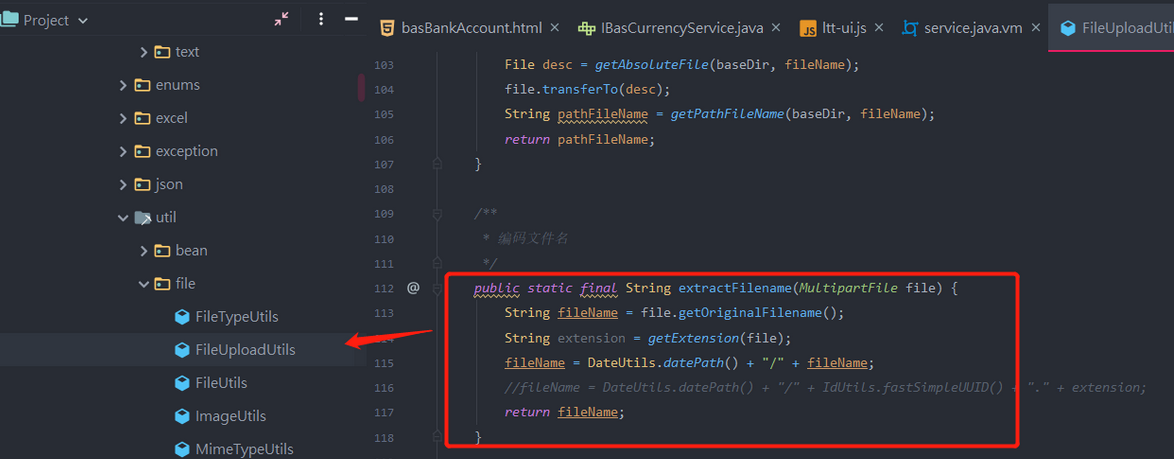
上传后文件名改变
上传时设置单多文件及其他选项
Html
<div class="form-group"> <label class="col-sm-3 control-label">附件 :label> <div class="col-sm-8"> <input type="hidden" name="attachment"> <div class="file-loading"> <input class="singleFile" name="file" type="file" id="attachment"> div> div> div>- 1
- 2
- 3
- 4
- 5
- 6
- 7
- 8
- 9
- 10
- 11
- 12
- 13
Js代码
// 单图上传 $(".singleFile").fileinput({ uploadUrl: ctx + 'common/upload', maxFileCount: 1, autoReplace: true }).on('fileuploaded', function (event, data, previewId, index) { var rsp = data.response; log.info("return url:" + rsp.url) log.info("reutrn fileName:" + rsp.fileName) $("input[name='" + event.currentTarget.id + "']").val(rsp.fileName) }).on('fileremoved', function (event, id, index) { $("input[name='" + event.currentTarget.id + "']").val('') }) // 多图上传 $(".multipleFile").fileinput({ uploadUrl: ctx + 'common/uploads', maxFileCount: 1, uploadAsync: false, autoReplace: true }).on('filebatchuploadsuccess', function (event, data, previewId, index) { //var rsp = data.data.name; var fileJson = data.response.data; var urlList = []; for (var i in fileJson) { console.log("return data.url:" + fileJson[i].url) console.log("reutrn data.name:" + fileJson[i].name) urlList.push(fileJson[i].name) urlList.join(",") } $("input[name='" + event.currentTarget.id + "']").val(data.response.data[0].name) }).on('fileremoved', function (event, id, index) { $("input[name='" + event.currentTarget.id + "']").val('') })- 1
- 2
- 3
- 4
- 5
- 6
- 7
- 8
- 9
- 10
- 11
- 12
- 13
- 14
- 15
- 16
- 17
- 18
- 19
- 20
- 21
- 22
- 23
- 24
- 25
- 26
- 27
- 28
- 29
- 30
- 31
- 32
- 33
- 34
附件显示文件名,点击下载
{ field: 'attachment', title: '附件', formatter: function (value, row, index) { var prefix = ctx + row.attachment; // 图片预览(注意:如存储在本地直接获取数据库路径,如有配置context-path需要使用ctx+路径) // 如:/profile/upload/2019/08/08/3b7a839aced67397bac694d77611ce72.png return $.table.downFile(value, row, index); } },- 1
- 2
- 3
- 4
- 5
- 6
- 7
- 8
- 9
- 10
// 文件下载 downFile: function (value, row, index) { const http = value.split('?')[0]; const dot = http.lastIndexOf("."); const ext = http.substr(dot + 1); let file = http.split('/'); let name = file[file.length - 1]; if ($.common.isNotEmpty(value)) { if(isAssetTypeAnImage(ext)) { let imgWtdth=0; let imgHeight=0; let img = new Image(); if(img.complete){ // 打印 imgWtdth=img.width; imgHeight=img.height; }else{ // 加载完成执行 img.onload = function(){ // 打印 imgWtdth=img.width; imgHeight=img.height; } } img.src = value; imgWtdth=img.width; imgHeight=img.height; if(browserRedirect()){ const w = document.documentElement.scrollWidth || document.body.scrollWidth; const h = document.documentElement.scrollHeight || document.body.scrollHeight; if(imgWtdth>w || imgHeight >h){ return $.table.imageView(value,h*0.8,imgWtdth*h/imgHeight*0.8); }else { return $.table.imageView(value); } }else { const w2 = document.body.clientWidth || document.documentElement.clientWidth; const h2= document.body.clientHeight || document.documentElement.clientHeight; // if(imgWtdth === 0 || imgHeight === 0 ){ // return $.table.imageView(value,h2*0.8,w2*0.8); // } if(imgWtdth>w2 || imgHeight >h2 || imgWtdth === 0 || imgHeight === 0){ return $.table.imageView(value,imgHeight*w2/imgWtdth*0.8,w2*0.8); }else { return $.table.imageView(value); } } }else{ return $.common.sprintf("%s",value,name,name); } } else { return $.common.nullToStr(value); } },- 1
- 2
- 3
- 4
- 5
- 6
- 7
- 8
- 9
- 10
- 11
- 12
- 13
- 14
- 15
- 16
- 17
- 18
- 19
- 20
- 21
- 22
- 23
- 24
- 25
- 26
- 27
- 28
- 29
- 30
- 31
- 32
- 33
- 34
- 35
- 36
- 37
- 38
- 39
- 40
- 41
- 42
- 43
- 44
- 45
- 46
- 47
- 48
- 49
- 50
- 51
- 52
- 53
- 54
- 55
- 56
- 57
- 58
//判断文件是否为图片 function isAssetTypeAnImage(ext) { return [ 'png', 'jpg', 'jpeg', 'bmp', 'gif', 'webp', 'psd', 'svg', 'tiff']. indexOf(ext.toLowerCase()) !== -1; } // 判断设备是移动还是pc function browserRedirect() { //document.writeln("您的浏览设备为:"+getDevice()); if(!window.navigator) { //alert("提示","当前设备:移动端APP") return false; } else{ if(/Mobile|Android|webOS|iPhone|iPad|Phone/i.test(navigator.userAgent)){ //alert("当前设备:移动端H5"); return false; } else{ // alert("当前设备:PC端"); return true; } } }- 1
- 2
- 3
- 4
- 5
- 6
- 7
- 8
- 9
- 10
- 11
- 12
- 13
- 14
- 15
- 16
- 17
- 18
- 19
- 20
- 21
- 22
- 23
- 24
- 25
附件直接显示图片

表格固定列

查询数据库作为下拉选项值

这自动生成代码,已经做了修改,可以获取 *****all();
字典使用

使用自动生成代码,添加使用的字典,手动修改代码或添加,请参考自动生成后代码
加入json递归注解,防止无限递归内存溢出
中文路径访问不到问题
\ruoyi-framework\src\main\java\com\ruoyi\framework\config\ShiroConfig.java import org.apache.shiro.web.filter.InvalidRequestFilter; import org.apache.shiro.web.filter.mgt.DefaultFilter; /** - Shiro过滤器配置 / @Bean public ShiroFilterFactoryBean shiroFilterFactoryBean(SecurityManager securityManager) { ...... //关闭 中文路径 校验 ckinder 上传和打开中文名字文件 InvalidRequestFilter invalidRequestFilter = new InvalidRequestFilter(); invalidRequestFilter.setBlockNonAscii(false); shiroFilterFactoryBean.getFilters().put(DefaultFilter.invalidRequest.name(), invalidRequestFilter); ...... }- 1
- 2
- 3
- 4
- 5
- 6
- 7
- 8
- 9
- 10
- 11
- 12
- 13
- 14
- 15
- 16
- 17
- 18
- 19
- 20
- 21
- 22

前端传过来的 id 后端接收到后加入了000,不对

解决方法:
在pom.xml 中加入
org.springframework spring-webmvc 5.3.9 compile然后,在E:\monitor\websit\ltt-websit\ruoyi-common\src\main\java\com\ruoyi\common\config
增加 WebConfiguration.java 文件,内容如下,就是将long转string
package com.ruoyi.common.config; import com.fasterxml.jackson.databind.ObjectMapper; import com.fasterxml.jackson.databind.module.SimpleModule; import com.fasterxml.jackson.databind.ser.std.ToStringSerializer; import org.springframework.context.annotation.Bean; import org.springframework.context.annotation.Configuration; import org.springframework.http.converter.HttpMessageConverter; import org.springframework.http.converter.json.MappingJackson2HttpMessageConverter; import org.springframework.web.servlet.config.annotation.WebMvcConfigurer; import java.util.List; /** * @description: WebConfiguration * @Author: llt * @date: Created in 2021/9/9 17:46 *@version: 0.1.0 * @modified By: */ @Configuration public class WebConfiguration implements WebMvcConfigurer { /** * 序列化json时,将所有的long变成string * 因为js中得数字类型不能包含所有的java long值 */ @Override public void configureMessageConverters(List- 1
- 2
- 3
- 4
- 5
- 6
- 7
- 8
- 9
- 10
- 11
- 12
- 13
- 14
- 15
- 16
- 17
- 18
- 19
- 20
- 21
- 22
- 23
- 24
- 25
- 26
- 27
- 28
- 29
- 30
- 31
- 32
- 33
- 34
- 35
- 36
- 37
- 38
-
相关阅读:
安装 Ubuntu 桌面服务与谷歌浏览器
Lombok常用方法及原理介绍
steam搬砖项目,csgo游戏搬砖熟练操作后,可以月入过万~
【人工智能】Anthropic发布强大的Claude3对齐GPT-4,大模型杂谈个人感想
建造者模式
Redis缓存的使用
基于web的电子图书管理系统
CORBA 架构体系指南(通用对象请求代理体系架构)
解决Visual Studio Code 控制台中文乱码问题
Error: `-4(%rdx,%ecx,4)‘ is not a valid base/index expression
- 原文地址:https://blog.csdn.net/a554521655/article/details/134021251
