• FFmpeg编译安装(windows环境)以及在vs2022中调用


    下载源码

    直接在官网下载压缩包
    这个应该是目前(2023/10/24)最新的一个版本。下载之后是这个样子:
    在这里插入图片描述
    我打算添加外部依赖x264,也直接去官网下载一个压缩包来。

    环境准备

    下载msys

    我这里选择用msys2+mingw的方式来编译源码。首先去msys官网下载一下exe文件。可以傻瓜式安装。默认是装到c盘目录下,可以直接修改c为D等。避免后续出现问题。我装到了E盘下
    在这里插入图片描述

    换源

    因为需要下载东西,所以换一下源。在这里:
    在这里插入图片描述=
    用记事本软件(比如vscode之类)打开这几个 .xxx32/64的文件,找到清华和中科大的源,移动到最上方即可
    在这里插入图片描述
    以某一个为例,大概就是在圈的地方找到这两个移动到箭头的位置。

    下载依赖

    接着就可以下载一些待会用到的依赖。打开msys中的这个终端,可以在开始菜单找到

    在这里插入图片描述
    先更新一下包

    pacman -Syu # 更新所有库
    
    • 1

    然后好像是会重启一下(忘了),再来一下这个

    pacman -Sy
    
    • 1

    接着就可以下载依赖

    pacman -S mingw-w64-x86_64-toolchain  # mingw64编译工具链,win下的gcc
    pacman -S base-devel    # 一些基本的编译工具
    pacman -S yasm nasm     # 汇编器
    pacman -S mingw-w64-x86_64-SDL2 # SDL2 是ffmpeg依赖的,因为没有它ffpaly不能用
    
    
    • 1
    • 2
    • 3
    • 4
    • 5

    补充一下,更新库时候直接enter全部更新,一路YYY同意。pacman的使用可自行查询,这里不再赘述。

    mingw下载成功之后终端输入命令查看验证一下:
    在这里插入图片描述
    接下来可以把mingw的bin目录配置到环境变量(自行操作),注意是msys文件夹里面的mingw,一开始应该是空的,在我们下载好上面的工具之后就会看到有东西。
    在这里插入图片描述

    源码位置

    搜寻n多个网上的教程之后,我选择这样安排
    在这里插入图片描述
    把ffmpeg和x264的源码解压到msys路径下的home路径下的名字为你的电脑用户名的看路径下,再新建俩空文件夹,用来安装ffmpeg和x264。如图所示,source文件夹是源码,install是准备安装的文件夹。

    开始编译

    编译x264

    可以看到上面图中有两个sh脚本文件,

    #!/bin/sh
    basepath=$(cd `dirname $0`;pwd)
    echo ${basepath}
    
    cd ${basepath}/x264-master-source   # 根据路径名称自行修改
    pwd
    
    ./configure --prefix=${basepath}/x264-master-install --enable-shared
    make -j10  这个数字是线程数,根据自己电脑自行选择
    make install
    
    
    • 1
    • 2
    • 3
    • 4
    • 5
    • 6
    • 7
    • 8
    • 9
    • 10
    • 11

    ./configure命令,它的参数会指导编译器应该如何编译代码。这里 --prefix 参数指定了编译好的库文件的安装路径,可以自己任意指定。 --enable-shared 代表编译动态库。如果你需要静态库,那么需要加入 -enable-static 参数。
    编写好脚本之后,用mingw64终端进入到这个目录下,可以通过以下命令执行

    ./build-x264.sh
    
    • 1

    成功之后便可以在我们设置的安装目录下看到编译好的文件
    在这里插入图片描述

    编译ffmpeg

    同样的,搞一个脚本文件

    #!/bin/sh
    basepath=$(cd `dirname $0`;pwd)
    echo ${basepath}
    
    cd ${basepath}/ffmpeg-6.0-source
    pwd
    
    export PKG_CONFIG_PATH=${PKG_CONFIG_PATH}:/E/msys64/home/luv_x/x264-master-install/lib/pkgconfig
    echo ${PKG_CONFIG_PATH}
    
    ./configure --prefix=${basepath}/ffmpeg-6.0-install \
    --enable-sdl2 --enable-nonfree --enable-muxer=mp4 --enable-debug \
    --enable-gpl --enable-libx264 \
    --disable-static --enable-shared \
    --extra-cflags=-I${basepath}/x264-master-install/include --extra-ldflags=-L${basepath}/x264-master-install/lib
    
    make -j16
    make install
    
    
    • 1
    • 2
    • 3
    • 4
    • 5
    • 6
    • 7
    • 8
    • 9
    • 10
    • 11
    • 12
    • 13
    • 14
    • 15
    • 16
    • 17
    • 18
    • 19

    因为要把x264搞进去,所以最后一行的的功能就事找到它。

    但不要急着执行脚本,6.0版本似乎有点小bug,需要替换掉一个源代码文件
    路径大概是这:

    msys64\home\luv_x\ffmpeg-6.0-source\libavcodec\x86\mathops.h

    就是这个.h文件,打开之后替换为下代码。如下:

    /*
     * simple math operations
     * Copyright (c) 2006 Michael Niedermayer  et al
     *
     * This file is part of FFmpeg.
     *
     * FFmpeg is free software; you can redistribute it and/or
     * modify it under the terms of the GNU Lesser General Public
     * License as published by the Free Software Foundation; either
     * version 2.1 of the License, or (at your option) any later version.
     *
     * FFmpeg is distributed in the hope that it will be useful,
     * but WITHOUT ANY WARRANTY; without even the implied warranty of
     * MERCHANTABILITY or FITNESS FOR A PARTICULAR PURPOSE.  See the GNU
     * Lesser General Public License for more details.
     *
     * You should have received a copy of the GNU Lesser General Public
     * License along with FFmpeg; if not, write to the Free Software
     * Foundation, Inc., 51 Franklin Street, Fifth Floor, Boston, MA 02110-1301 USA
     */
    
    #ifndef AVCODEC_X86_MATHOPS_H
    #define AVCODEC_X86_MATHOPS_H
    
    #include "config.h"
    
    #include "libavutil/common.h"
    #include "libavutil/x86/asm.h"
    
    #if HAVE_INLINE_ASM
    
    #if ARCH_X86_32
    
    #define MULL MULL
    static av_always_inline av_const int MULL(int a, int b, unsigned shift)
    {
        int rt, dummy;
        if (__builtin_constant_p(shift))
        __asm__ (
            "imull %3               \n\t"
            "shrdl %4, %%edx, %%eax \n\t"
            :"=a"(rt), "=d"(dummy)
            :"a"(a), "rm"(b), "i"(shift & 0x1F)
        );
        else
            __asm__ (
                "imull %3               \n\t"
                "shrdl %4, %%edx, %%eax \n\t"
                :"=a"(rt), "=d"(dummy)
                :"a"(a), "rm"(b), "c"((uint8_t)shift)
            );
        return rt;
    }
    
    #define MULH MULH
    static av_always_inline av_const int MULH(int a, int b)
    {
        int rt, dummy;
        __asm__ (
            "imull %3"
            :"=d"(rt), "=a"(dummy)
            :"a"(a), "rm"(b)
        );
        return rt;
    }
    
    #define MUL64 MUL64
    static av_always_inline av_const int64_t MUL64(int a, int b)
    {
        int64_t rt;
        __asm__ (
            "imull %2"
            :"=A"(rt)
            :"a"(a), "rm"(b)
        );
        return rt;
    }
    
    #endif /* ARCH_X86_32 */
    
    #if HAVE_I686
    /* median of 3 */
    #define mid_pred mid_pred
    static inline av_const int mid_pred(int a, int b, int c)
    {
        int i=b;
        __asm__ (
            "cmp    %2, %1 \n\t"
            "cmovg  %1, %0 \n\t"
            "cmovg  %2, %1 \n\t"
            "cmp    %3, %1 \n\t"
            "cmovl  %3, %1 \n\t"
            "cmp    %1, %0 \n\t"
            "cmovg  %1, %0 \n\t"
            :"+&r"(i), "+&r"(a)
            :"r"(b), "r"(c)
        );
        return i;
    }
    
    #if HAVE_6REGS
    #define COPY3_IF_LT(x, y, a, b, c, d)\
    __asm__ volatile(\
        "cmpl  %0, %3       \n\t"\
        "cmovl %3, %0       \n\t"\
        "cmovl %4, %1       \n\t"\
        "cmovl %5, %2       \n\t"\
        : "+&r" (x), "+&r" (a), "+r" (c)\
        : "r" (y), "r" (b), "r" (d)\
    );
    #endif /* HAVE_6REGS */
    
    #endif /* HAVE_I686 */
    
    #define MASK_ABS(mask, level)                   \
        __asm__ ("cdq                    \n\t"      \
                 "xorl %1, %0            \n\t"      \
                 "subl %1, %0            \n\t"      \
                 : "+a"(level), "=&d"(mask))
    
    // avoid +32 for shift optimization (gcc should do that ...)
    #define NEG_SSR32 NEG_SSR32
    static inline  int32_t NEG_SSR32( int32_t a, int8_t s){
        if (__builtin_constant_p(s))
        __asm__ ("sarl %1, %0\n\t"
             : "+r" (a)
             : "i" (-s & 0x1F)
        );
        else
            __asm__ ("sarl %1, %0\n\t"
                   : "+r" (a)
                   : "c" ((uint8_t)(-s))
            );
        return a;
    }
    
    #define NEG_USR32 NEG_USR32
    static inline uint32_t NEG_USR32(uint32_t a, int8_t s){
        if (__builtin_constant_p(s))
        __asm__ ("shrl %1, %0\n\t"
             : "+r" (a)
             : "i" (-s & 0x1F)
        );
        else
            __asm__ ("shrl %1, %0\n\t"
                   : "+r" (a)
                   : "c" ((uint8_t)(-s))
            );
        return a;
    }
    
    #endif /* HAVE_INLINE_ASM */
    #endif /* AVCODEC_X86_MATHOPS_H */
    
    
    • 1
    • 2
    • 3
    • 4
    • 5
    • 6
    • 7
    • 8
    • 9
    • 10
    • 11
    • 12
    • 13
    • 14
    • 15
    • 16
    • 17
    • 18
    • 19
    • 20
    • 21
    • 22
    • 23
    • 24
    • 25
    • 26
    • 27
    • 28
    • 29
    • 30
    • 31
    • 32
    • 33
    • 34
    • 35
    • 36
    • 37
    • 38
    • 39
    • 40
    • 41
    • 42
    • 43
    • 44
    • 45
    • 46
    • 47
    • 48
    • 49
    • 50
    • 51
    • 52
    • 53
    • 54
    • 55
    • 56
    • 57
    • 58
    • 59
    • 60
    • 61
    • 62
    • 63
    • 64
    • 65
    • 66
    • 67
    • 68
    • 69
    • 70
    • 71
    • 72
    • 73
    • 74
    • 75
    • 76
    • 77
    • 78
    • 79
    • 80
    • 81
    • 82
    • 83
    • 84
    • 85
    • 86
    • 87
    • 88
    • 89
    • 90
    • 91
    • 92
    • 93
    • 94
    • 95
    • 96
    • 97
    • 98
    • 99
    • 100
    • 101
    • 102
    • 103
    • 104
    • 105
    • 106
    • 107
    • 108
    • 109
    • 110
    • 111
    • 112
    • 113
    • 114
    • 115
    • 116
    • 117
    • 118
    • 119
    • 120
    • 121
    • 122
    • 123
    • 124
    • 125
    • 126
    • 127
    • 128
    • 129
    • 130
    • 131
    • 132
    • 133
    • 134
    • 135
    • 136
    • 137
    • 138
    • 139
    • 140
    • 141
    • 142
    • 143
    • 144
    • 145
    • 146
    • 147
    • 148
    • 149
    • 150
    • 151
    • 152
    • 153
    • 154

    这是从官网的github源码里嫖的,大致三个月前更新的,换成这个之后就可以安心编译了。可能编译时间比较久一些,也可以裁剪一些功能,小白就不多赘述了,可以自行查阅资料了解。
    成功后安装目录应该是这样的:
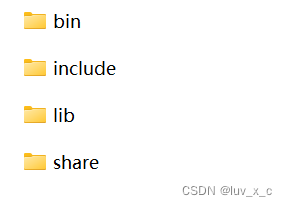
    在这里插入图片描述
    bin目录下有dll,lib,exe文件,include里是头文件,不知为什么lib里面没有库文件,我选择从bin目录下粘贴过去。
    还要从x264的bin目录粘到这边bin目录一个在这里插入图片描述
    ,然后在终端验证一下:
    在这里插入图片描述
    至此,编译安装工作就完成了,后续如果需要安装别的扩展格式,再配置编译就可以了。

    在VS2022写cpp调用ffmpeg

    新建一个空项目后,
    在这里插入图片描述

    点击上方菜单中的项目,然后属性
    在这里插入图片描述
    在这里插入图片描述
    然后在包含目录中添加ffmpeg安装目录下的include文件夹,库目录添加lib文件夹,接着添加依赖项
    在这里插入图片描述
    其实就是生成的lib文件名字,都加进去

    avcodec.lib
    avdevice.lib
    avfilter.lib
    avformat.lib
    avutil.lib
    postproc.lib
    swscale.lib
    swresample.lib
    
    • 1
    • 2
    • 3
    • 4
    • 5
    • 6
    • 7
    • 8

    然后点击确定,因为我新建的是cpp文件,所以要用extern添加头文件

    extern "C" {
    #include "libavcodec/avcodec.h"
    #include 
    }
    
    • 1
    • 2
    • 3
    • 4

    然后用这两行代码测试一下

    cout << avcodec_configuration() << endl;
    cout << "FFmpeg 版本 " << av_version_info() << endl;
    
    • 1
    • 2

    在这里插入图片描述
    运行结果出现我们的配置情况和版本信息,大功告成!

  • 相关阅读:
    Mac M2芯片安装Anaconda的版本不兼容的问题
    基于Echarts实现可视化数据大屏突发事件预警平台大数据投屏系统模板
    【毕业设计】单片机 火灾智能报警系统 - 嵌入式 物联网
    paddle dataset
    13.(vue3.x+vite)组件间通信方式之provide与inject
    linux 更换java 版本
    【GAMES202】A Glimpse of Industrial Solution—实时渲染中常用的工业界技术
    怎么写出美观,可读性高的代码?
    HiveSQL源码之语法词法编译文件解析一文详解
    window上Clion配置C++版本的opencv
  • 原文地址:https://blog.csdn.net/weixin_58320200/article/details/134010291