-
Day09字符流&缓冲流&序列化流&IO框架
字符流
FileReader(文件字符输入流)

使用文件字符输入流,有啥好处?
读取中文不会出现乱码问题
FileWriter(文件字符输出流)

利用字符流将一个文本文件复制到E:盘下,例如:D:/1.txt复制到E:/2.txt
请使用字符流:FileReader和FileWriter实现
- public class Test {
- public static void main(String[] args) throws IOException {
- try ( FileReader fr = new FileReader("D:/1.txt");
- FileWriter fw = new FileWriter("E:/2.txt")){
- char[] chars = new char[3];
- int len;
- while ((len = fr.read(chars)) != -1){
- fw.write(chars);
- }
- }catch (Exception e){
- System.out.println("哈哈哈");
- }
- }
- }
字节流、字符流的使用场景小结:
1.字节流适合做一切文件数据的拷贝(音视频,文本);字节流不适合读取中文内容输出。
2.字符流适合做文本文件的操作(读,写)。
缓冲流
字节缓冲流的作用
1.提高字节流读写数据的性能
2.字节缓冲输入流自带了8KB缓冲池;字节缓冲输出流也自带了8KB缓冲池。

- public class Demo1 {
- public static void main(String[] args) throws IOException {
- BufferedInputStream bi = new BufferedInputStream(
- new FileInputStream("E:\\QQmusic\\MV\\赵雷-少年锦时 (2015湘江音乐节)(高清).mp4"));
- BufferedOutputStream bo = new BufferedOutputStream(
- new FileOutputStream("E:\\QQmusic\\haha\\赵雷-少年锦时 (2015湘江音乐节)(高清).mp4"));
- byte[] a = new byte[1024 * 1024];
- int len;
- while ((len = bi.read(a)) != -1){
- bo.write(a,0,len);
- }
- bi.close();
- bo.close();
- }
- }
字符缓冲流

- public class Demo3 {
- public static void main(String[] args) throws IOException {
- BufferedReader br = new BufferedReader( new FileReader("E:/Code191Day/day09/b-3.txt"));
- BufferedWriter bw = new BufferedWriter(new FileWriter("E:/Code191Day/day09/b-4.txt"));
- String a;
- while ((a = br.readLine()) != null){
- bw.write(a);
- bw.newLine();
- }
- br.close();
- bw.close();
- }
- }
转换流
为了解决不同编码读取出现乱码问题
打印流
打印流可以实现更方便、更高效的打印数据出去,能实现打印啥出去就是啥出去。
数据流
允许把数据和其类型一并写出去。
序列化流
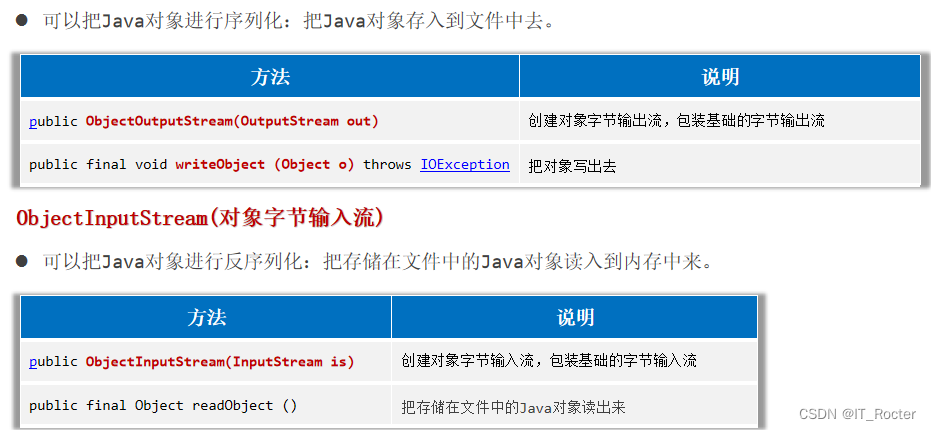
ObjectOutputStream(对象字节输出流)

- public class Demo1 {
- public static void main(String[] args) throws IOException, ClassNotFoundException {
- //0. 准备一个Student对象
- Student student = new Student("张三", 18);
- ObjectOutputStream oos = new ObjectOutputStream(new FileOutputStream("E:/Code191Day/day09/c-5.txt"));
- oos.writeObject(student);
- oos.close();
- ObjectInputStream ois = new ObjectInputStream(new FileInputStream("E:/Code191Day/day09/c-5.txt"));
- Student student1 = (Student)ois.readObject();
- System.out.println(student1.getAge());
- ois.close();
- }
- }
- //学生类
- class Student implements Serializable {
- private String name;
- private Integer age;
- public Student() {
- }
- public Student(String name, Integer age) {
- this.name = name;
- this.age = age;
- }
- public String getName() {
- return name;
- }
- public void setName(String name) {
- this.name = name;
- }
- public Integer getAge() {
- return age;
- }
- public void setAge(Integer age) {
- this.age = age;
- }
- @Override
- public String
- toString() {
- return "Student{" +
- "name='" + name + '\'' +
- ", age=" + age +
- '}';
- }
- }
如果一次要序列化多个对象咋整?

- public class Demo2 {
- public static void main(String[] args) throws IOException, ClassNotFoundException {
- //0. 准备一个Student对象的集合
- List
students = new ArrayList<>(); - students.add(new Student("张三", 18));
- students.add(new Student("李四", 19));
- students.add(new Student("王五", 20));
- //1. 序列化(f-1.txt)
- ObjectOutputStream oos = new ObjectOutputStream(new FileOutputStream("E:/Code191Day/day09/c-6.txt"));
- oos.writeObject(students);
- oos.close();
- //2. 反序列化(f-1.txt)
- ObjectInputStream ois = new ObjectInputStream(new FileInputStream("E:/Code191Day/day09/c-6.txt"));
- List
objects = (ArrayList)ois.readObject(); - objects.stream().forEach(System.out::println);
- ois.close();
- }
- }
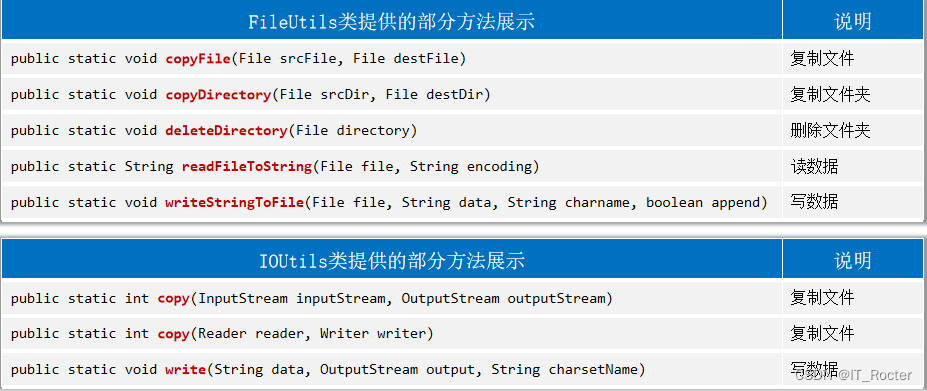
IO框架
-
相关阅读:
react实现todoList案例
宁波大学NBU计算机嵌入式系统期末考试题库(一)
[AIGC] Kafka解析:分区、消费者组与消费者的关系
【编程不良人】SpringSecurity实战学习笔记03---密码加密
设计模式之组合模式与观察者模式应用例题
java生成pdf表格并支持下载可选另存为
7-4 BCD解密 (10分)
软考中级(网络工程师考核要点)第一章 计算机网络系统(信道特性应用)第六期(4B/5B编码、数字调制技术和脉冲编码调制)
Go测试学习
实体行业数字化转型怎么做?线上线下相结合的新零售体系怎么做?
- 原文地址:https://blog.csdn.net/m0_60388241/article/details/134021201
