-
TouchGFX界面开发 | 图像控件应用示例
图像控件应用示例
TouchGFX中的图像会绘制关联图像文件中的像素数据。 使用图像文件前,必须将其导入到项目中。TouchGFX Designer内置了五种类型的图像部件:
- 固定图像:图像大小是由关联的图像文件定义的,不能在运行时改动。若要将图像显示为不同大小,需调整导入图像的大小
- 缩放图像:能够绘制缩放版位图的控件。只需更改控件的宽度/高度即可调整图像大小。缩放的质量取决于使用的渲染算法,渲染算法可动态更改
- 标题图像:显示平铺位图的简单控件。位图可与背景进行 Alpha 混合,并可包含透明区域
- 动画图像:能够使用一系列共用同一标识符的图像从头至尾运行动画。能够在停止或暂停之前运行一次动画或循环运行动画
- 纹理映射器:能够绘制转换后的图像,可以自由缩放并围绕可调原点旋转。视角印象也可通过应用虚拟相机来实现,其中视角的数量是可调的
本文以动画图像(animatedImage)为例,介绍TouchGFX图像控件的使用,将实现如下视频中的效果:
本文示例基于于STM32F429IGT6 + RGB (800 * 480)硬件平台,提前移植好了TouchGFX,并添加了触摸驱动。详细可参考 使用STM32CubeMX移植TouchGFX 和 添加触摸屏驱动 这两篇文章的介绍
一、TouchGFX Designer界面布局
打开Keil工程中,TouchGFX文件夹里的TouchGFX Designer软件
- 添加图片资源
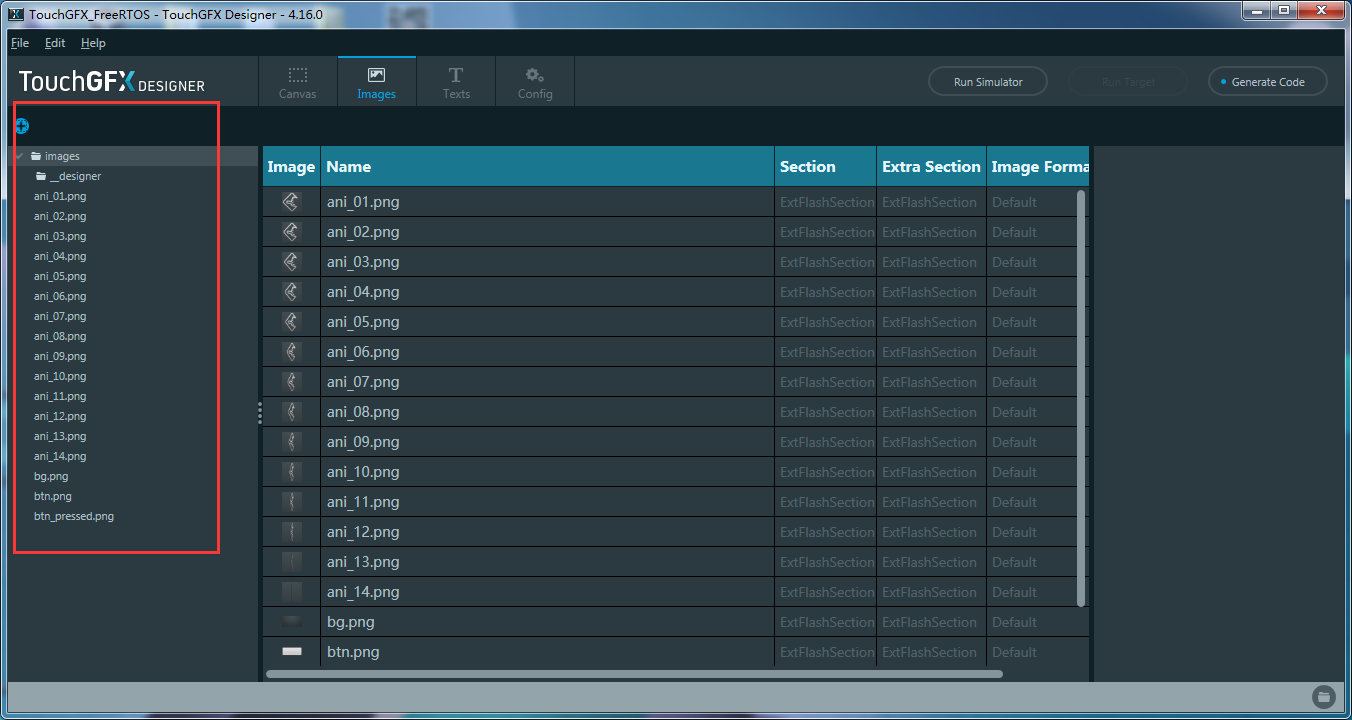
- 添加文本资源

- 添加背景图片、以及带标签的按钮,选择按钮标签的文本资源
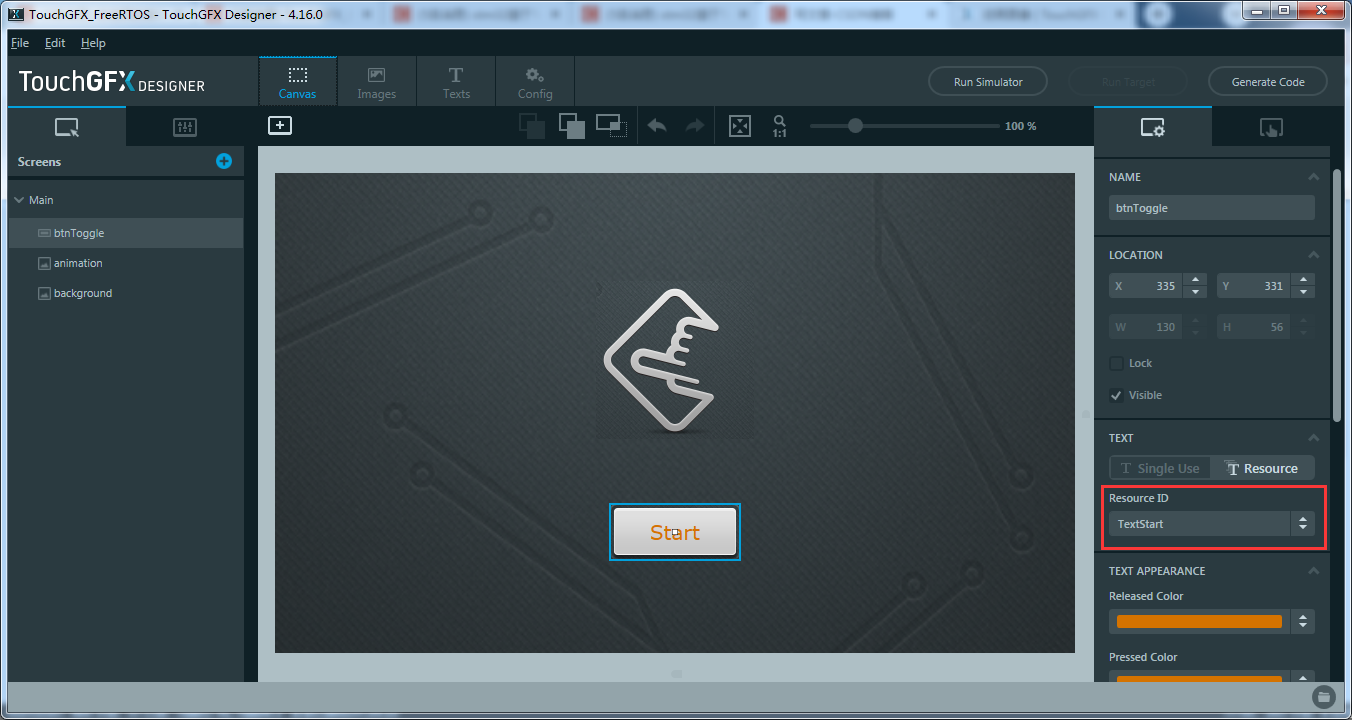
- 添加动画图片,给Animated控件指定动态图片的起始图片、以及下一张图片显示时间。注意图片的命名规则
所用图像必须使用标识符,例如img_01.png、img_02.png、img_03.png、img_04.png、img_05.png、img_06.png、img_07.png等
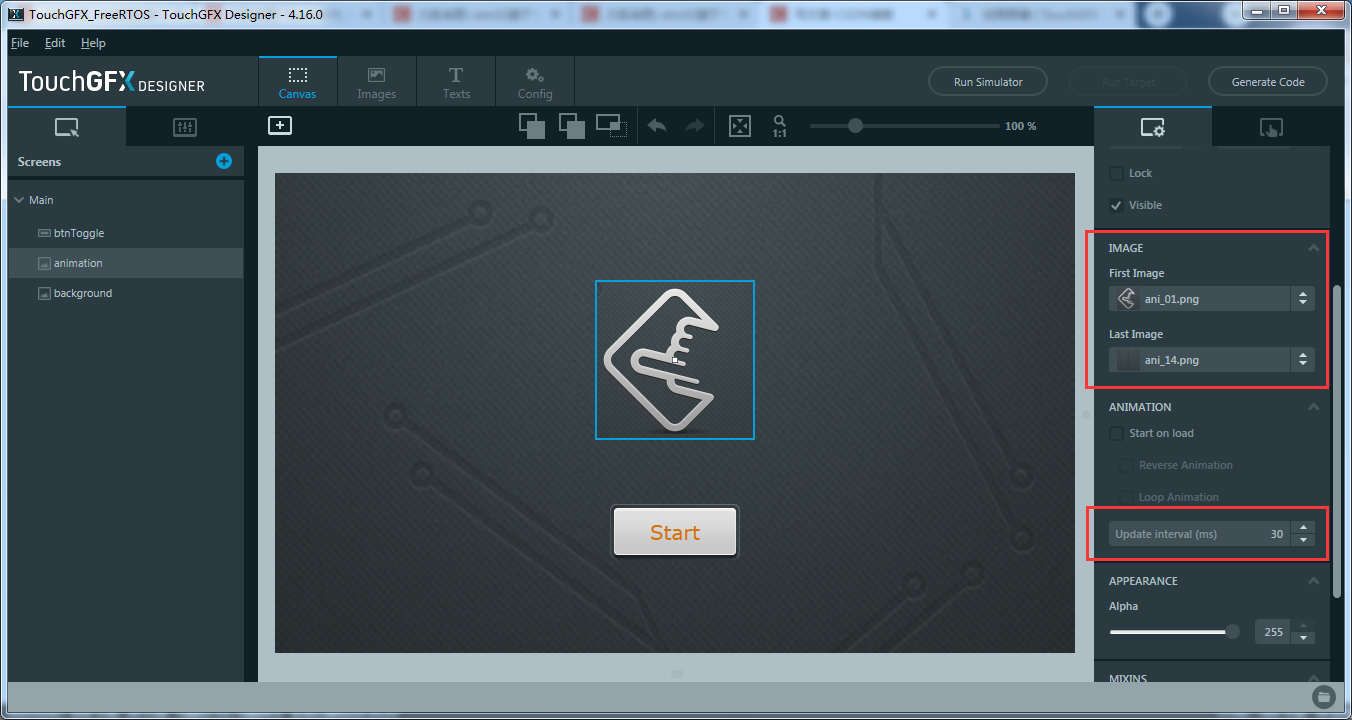
- 给button添加交互动作,使按钮被点击时直接执行C++代码,实现动画开关以及切换相应文本
if (animation.isAnimatedImageRunning()) { animation.pauseAnimation(); //暂停动画 btnToggle.setLabelText(TypedText(T_TEXTSTART)); //设置button的文本为start } else { animation.startAnimation(animation.isReverse(), false, true); //开始动画 btnToggle.setLabelText(TypedText(T_TEXTSTOP)); //设置button文本为stop }- 1
- 2
- 3
- 4
- 5
- 6
- 7
- 8
- 9
- 10

- 给动画图像添加交互,使动画在结束后直接执行C++代码,实现动画再启动
//animation.isReverse() 判断是否是暂停状态 animation.startAnimation(!animation.isReverse(), false, true);- 1
- 2

- 点击Generate Code生成TouchGFX代码
二、MKD-ARM Keil中添加用户代码
TouchGFX生成代码后,由于在TouchGFX Designer中添加交互动作时,选择的是直接执行C++代码,并已经输入了代码。因此在Keil中无需再添加代码,要执行的C++代码已经自动嵌入了TouchGFX自动生成的视图基类代码中
如下视图基类代码中,包含了如何创建动画图像,以及交互动作的C++函数
#include#include #include "BitmapDatabase.hpp" #include MainViewBase::MainViewBase() : buttonCallback(this, &MainViewBase::buttonCallbackHandler), animationEndedCallback(this, &MainViewBase::animationEndedCallbackHandler) { __background.setPosition(0, 0, 800, 480); __background.setColor(touchgfx::Color::getColorFrom24BitRGB(0, 0, 0)); background.setBitmap(touchgfx::Bitmap(BITMAP_BG_ID)); background.setPosition(0, 0, 800, 480); background.setScalingAlgorithm(touchgfx::ScalableImage::NEAREST_NEIGHBOR); btnToggle.setXY(335, 316); btnToggle.setBitmaps(touchgfx::Bitmap(BITMAP_BTN_ID), touchgfx::Bitmap(BITMAP_BTN_PRESSED_ID)); btnToggle.setLabelText(touchgfx::TypedText(T_TEXTSTART)); btnToggle.setLabelColor(touchgfx::Color::getColorFrom24BitRGB(255, 0, 0)); btnToggle.setLabelColorPressed(touchgfx::Color::getColorFrom24BitRGB(255, 0, 0)); btnToggle.setAction(buttonCallback); animation.setXY(321, 118); animation.setBitmaps(BITMAP_ANI_01_ID, BITMAP_ANI_09_ID); animation.setUpdateTicksInterval(2); animation.setDoneAction(animationEndedCallback); add(__background); add(background); add(btnToggle); add(animation); } void MainViewBase::setupScreen() { } void MainViewBase::buttonCallbackHandler(const touchgfx::AbstractButton& src) { if (&src == &btnToggle) { //buttonClicked //When btnToggle clicked execute C++ code //Execute C++ code if(animation.isAnimatedImageRunning()) { animation.pauseAnimation();//暂停动画 btnToggle.setLabelText(TypedText(T_TEXTSTART));//设置butto的文本为start } else { //开始动画 animation.startAnimation(animation.isReverse(), false, true); //设置button文本为stop btnToggle.setLabelText(TypedText(T_TEXTSTOP)); } } } void MainViewBase::animationEndedCallbackHandler(const touchgfx::AnimatedImage& src) { if (&src == &animation) { //animationEnded //When animation animation ended execute C++ code //Execute C++ code animation.startAnimation(!animation.isReverse(), false, true); } } - 1
- 2
- 3
- 4
- 5
- 6
- 7
- 8
- 9
- 10
- 11
- 12
- 13
- 14
- 15
- 16
- 17
- 18
- 19
- 20
- 21
- 22
- 23
- 24
- 25
- 26
- 27
- 28
- 29
- 30
- 31
- 32
- 33
- 34
- 35
- 36
- 37
- 38
- 39
- 40
- 41
- 42
- 43
- 44
- 45
- 46
- 47
- 48
- 49
- 50
- 51
- 52
- 53
- 54
- 55
- 56
- 57
- 58
- 59
- 60
- 61
- 62
- 63
- 64
- 65
- 66
- 67
- 68
- 69
- 70
- 71
- 72
- 73
三、下载测试
编译无误后,下载到开发板中,点击按钮会开始或停止显示动画效果
-
相关阅读:
stream流参数总结
proguard 混淆jar内容
随机过程理论知识(一)
PHP语言、B/S手术麻醉临床信息管理系统源码
FIORI:创建项目与部署
Linux网络配置详解
sql6(Leetcode1387使用唯一标识码替换员工ID)
Java练习题2022-3
普洛斯探索新型算力基础设施“智”冷之道,发布制冷系统预制集成技术白皮书
ggbio进行基因结构图的绘制
- 原文地址:https://blog.csdn.net/Chuangke_Andy/article/details/134023954