-
Android学习之路(21) 进程间通信-AIDL与Servce基本使用
Service 与 Thread 和 进程 之间的关系
- 进程:应用程序在内存中分配的空间。(正在运行中的程序)
- 线程:负责程序执行的单元,也称为执行路径。(需要线程来执行代码)。一个进程至少包含一条线程,如果一个进程中出现了条线程,此程序就为多线程程序。
- Service是一个组件:默认运行在Main线程(进程中)。和Thread没关系。如果Service在清单文件中用 android:process 属性另开进程运行此Service组件,就算Service被销毁进程也不会停止。
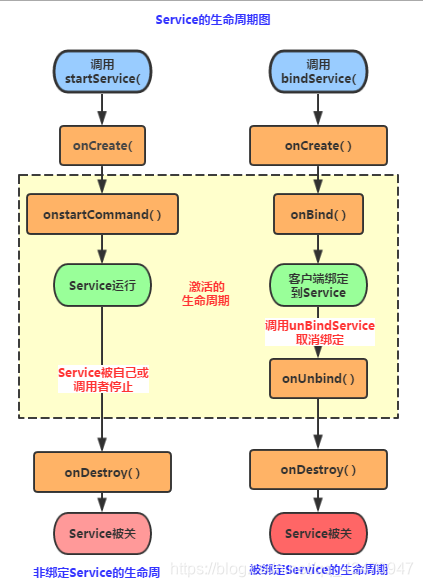
Service的生命周期图
!
|
【Android】跨进程通信——AIDL、之Service基本细节使用之:精通Service 与 Thread 和 进程 之间的关系
- 进程:应用程序在内存中分配的空间。(正在运行中的程序)
- 线程:负责程序执行的单元,也称为执行路径。(需要线程来执行代码)。一个进程至少包含一条线程,如果一个进程中出现了条线程,此程序就为多线程程序。
- Service是一个组件:默认运行在Main线程(进程中)。和Thread没关系。如果Service在清单文件中用 android:process 属性另开进程运行此Service组件,就算Service被销毁进程也不会停止。
Service的生命周期图

回调方法详解
- onCreate(),创建Service时调用,整个生命周期中只执行一次。
- onBind(),必须实现的方法,客户端调用bindService()时回调该方法,返回一个IBind对象,通过此对象与被绑定Service通信。此后如果再次使用bindService绑定Service,系统不会再调用onBind()方法,只会直接把IBinder对象传递给其他后来增加的客户端!
- onStartCommand(),早期版本是onStart()。客户端通过startService()时调用。可多次调用startService(),但不会创建新的Service对象,继续复用已创建的Service,会继续回调onStartCommand()方法。
- onUnbind(),当该Service上绑定的所有客户端都断开时会回调该方法!
- onDestroy(),服务被关闭前调用此方法。如调用stopService(),或者调用unbindService()。
三种服务的启动方式
- startService()启动Service
- 方法回调:onCreate() —> onStartCommand() —> 进入运行状态。
- 联系绑定:与调用者无联系,就算调用者结束了生命,只要不调用stopService()方法,Service还会继续运行。
- 结束方法:stopService()
- bindService()启动Service
- 方法回调:onCreate() —> onBind() —> 进入运行状态。
- 联系绑定:服务与调用者进行联系绑定。1. 如果调用者没有手动调用unbindService()关闭服务,当调用者销毁后,服务也会被销毁,并回调 onUnbind() —> onDestroy()。 2. 如果是多个客户端绑定同一个Service的话,当所有的客户端都和service解除绑定或销毁后,系统才会销毁service。
- 结束方法:unbindService()
- 注意:如果中途中通过startService() 方法启动服务,则服务不会和全部调用者进行联系绑定。
- startService()启动Service后,调用bindService()绑定Service
- 方法回调:onCreate() —> onStartCommand() —> onBind() —> 进入运行状态。
- 方法回调2:如果两条语句在一个方法内:onCreate() —> onBind() —> onStartCommand() —> 进入运行状态。
- 联系绑定:与调用者无联系,因为服务是通过startService()启动的。
- 结束方法:先unbindService()解绑,再调用stopService()关闭Service
不管哪种方法启动服务,都可以调用 stopService() 关闭服务。上面是按照规范关闭服务,当然你有需求的话。
清单文件声明 Service 组件及属性
android:exported 表示是否允许除了当前程序之外的其他程序访问这个服务 android:enabled 表示是否启用这个服务 android:permission 是权限声明 android:process 是否需要在单独的进程中运行,当设置为android:process=”:remote”时,代表Service在单独的进程中运行。注意“:”很重要,它的意思是指要在当前进程名称前面附加上当前的包名,所以“remote”和”:remote”不是同一个意思,前者的进程名称为:remote,而后者的进程名称为:App-packageName:remote。 android:isolatedProcess 设置 true 意味着,服务会在一个特殊的进程下运行,这个进程与系统其他进程分开且没有自己的权限。与其通信的唯一途径是通过服务的API(bind and start)。 - 1
- 2
- 3
- 4
- 5
- 6
- 7
- 8
Intent的显式与隐式启动
一、显示启动service
Intent intent = new Intent(this, MyService.class); startService(intent);- 1
- 2
二、隐式启动service
首先自定义意图过滤器:标签 intent-filter、Action
- 1
- 2
- 3
- 4
- 5
- 6
- 7
- 8
- 9
三、5.0后隐式启动 service
5.0 之前的隐式启动service
Intent intent = new Intent("com.bin.action.MyService"); startService(intent);- 1
- 2
5.0 之后的隐式启动service
Intent intent = new Intent("com.bin.action.MyService"); intent.setPackage(getPackageName()); //如果是另一个程序的service则指定它的包名 startService(intent);- 1
- 2
- 3
前台Service
原理:在服务里通过 startForeground() 方法启动一个通知 Notification,也可以使用兼容包里的 通知对象。
public void onCreate() { super.onCreate(); Notification.Builder localBuilder = new Notification.Builder(this); localBuilder.setSmallIcon(R.drawable.ic_launcher); localBuilder.setContentTitle("Service标题"); localBuilder.setContentText("正在运行..."); startForeground(1, localBuilder.getNotification()); }- 1
- 2
- 3
- 4
- 5
- 6
- 7
- 8
- 9
系统8.0、8.1的后台 Service 必须切换成前台服务
注意:调用startForegroundService()后5秒内没有调用startForeground(),会有ANR(Application Not Responding)
public class MyService extends Service { @Override public void onCreate() { super.onCreate(); // 调用startForegroundService()后5秒内没有调用startForeground(),会有ANR if (Build.VERSION.SDK_INT >= Build.VERSION_CODE.O) { Notification.Builder localBuilder = new Notification.Builder(this); localBuilder.setSmallIcon(R.drawable.ic_launcher); localBuilder.setContentTitle("Service标题"); localBuilder.setContentText("正在运行..."); startForeground(1, localBuilder.getNotification()); } } @Override public void onDestroy() { stopForeground(true); super.onDestroy(); } }- 1
- 2
- 3
- 4
- 5
- 6
- 7
- 8
- 9
- 10
- 11
- 12
- 13
- 14
- 15
- 16
- 17
- 18
- 19
- 20
- 21
- 22
版本兼容判断 启动Service(8.0、8.1启动Service方法用startForegroundService())
if (Build.VERSION.SDK_INT >= Build.VERSION_CODE.O) { startForegroundService(intent); } else { startService(intent); }- 1
- 2
- 3
- 4
- 5
使用 startForegroundService() 方法启动service,还需要添加权限:
- 1
跨进程通信
跨进程通信的场景有两种:
- 本地service跨进程通信:是和当前程序内的service进行通信
- 远程Service跨进程通信:是和其它程序内的service进行通信,已知方式:
- AIDL 接口描述文件方式
- 不用AIDL方式,使用 Binder 的 onTransact 方法
- 使用Messenger:Handler的方式
先来了解一下 :bindService()、ServiceConnection、Binder
1.1 bindService(Intent service, ServiceConnection conn, int flags)
- service : 通过该intent指定要启动的Service
- conn : ServiceConnection对象,用户监听访问者与Service间的连接情况,连接成功回调该对象中的onServiceConnected(ComponentName,IBinder)方法;如果Service所在的宿主由于异常终止或者其他原因终止,导致Service与访问者间断开,连接时调用onServiceDisconnected(CompanentName)方法,主动通过unbindService() 方法断开并不会调用上述方法!
- flags : 指定绑定时是否自动创建Service(如果Service还未创建),参数可以是 0 (不自动创建),BIND_AUTO_CREATE(自动创建)
1.2 ServiceConnection
private IBinder myService; private ServiceConnection con = new ServiceConnection(){ @Override public void onServiceConnected(ComponentName package, IBinder service) { myService = service; Toast.makeText(MyService.this, "连接成功", Toast.LENGTH_LONG).show(); } @Override public void onServiceDisconnected(ComponentName package) { myService = null; Toast.makeText(MyService.this, "连接断开", Toast.LENGTH_LONG).show(); } };- 1
- 2
- 3
- 4
- 5
- 6
- 7
- 8
- 9
- 10
- 11
- 12
- 13
- 14
- 15
- 16
- 17
- 18
1.3 返回的 Binder 对象
返回的对象不能为null,否则连接不成立。
2. 本地 Service 跨进程通信
服务端:
服务端需要写一个继承自 Binder 的类与服务通信。而这个类是你自定义的。
public class MyService extends Service { private MyBinder binder; @Override public IBinder onBinder(Intent intent) { if (binder == null) { binder = new MyBinder(); } return binder; } private class MyBinder extends Binder { // ...code // 返回此对象与Service进行通信 public void toast(Context context, String str) { Toast.mackText(context, str, Toast.LENGTH_LONG).show(); } } }- 1
- 2
- 3
- 4
- 5
- 6
- 7
- 8
- 9
- 10
- 11
- 12
- 13
- 14
- 15
- 16
- 17
- 18
- 19
- 20
- 21
- 22
- 23
- 24
然后在清单文件声明服务组件,并用 android:process 属性另开进程
- 1
- 2
- 3
客户端:
public class MainActivity extends Activity { private IBinder myService; private ServiceConnection con = new ServiceConnection() { @Override public void onServiceConnected(ComponentName package, IBinder service) { myService = service; Toast.makeText(MainActivity.this, "连接成功", Toast.LENGTH_LONG).show(); try { if (myService != null) { Toast.makeText(MainActivity.this, myService.toast(this, "myService 弹出我吧!"), Toast.LENGTH_LONG).show(); } else { Toast.makeText(MainActivity.this, "服务端未启动,或异常关闭", Toast.LENGTH_LONG).show(); } } catch (RemoteException e) {} } @Override public void onServiceDisconnected(ComponentName package) { myService = null; Toast.makeText(MainActivity.this, "连接断开", Toast.LENGTH_LONG).show(); } }; @Override protected void onCreate(Bundle savedInstanceState) { super.onCreate(savedInstanceState); setContentView(R.layout.main); bindService(new Intent(this, MyService.class), con, BIND_AUTO_CREATE); } }- 1
- 2
- 3
- 4
- 5
- 6
- 7
- 8
- 9
- 10
- 11
- 12
- 13
- 14
- 15
- 16
- 17
- 18
- 19
- 20
- 21
- 22
- 23
- 24
- 25
- 26
- 27
- 28
- 29
- 30
- 31
- 32
- 33
- 34
- 35
- 36
- 37
- 38
- 39
- 40
- 41
- 42
3. 远程 Service 跨进程通信
1. AIDL跨进程通信
编写 AIDL 的注意事项:
- 接口名词需要与aidl文件名相同。
- 接口和方法前面不要加访问权限修饰符:public ,private,protected等,也不能用static final。
- AIDL默认支持的类型包括Java基本类型,String,List,Map,CharSequence,除此之外的其他类型都 需要import声明,对于使用自定义类型作为参数或者返回值,自定义类型需要实现Parcelable接口。
- 自定义类型和AIDL生成的其它接口类型在aidl描述文件中,应该显式import,即便在该类和定义 的包在同一个包中。
- 常见坑:两个应用程序的AIDL描述文件所在的包,必须一样。
服务端:创建 AIDL 文件接口 :IPerson.aidl
package com.bin.aidl; interface IPerson { String getContent(int postion); }- 1
- 2
- 3
- 4
- 5
保存后会在 gen目录的包路径下 自动生成 IPerson.java (图片来源网络)

自定义Service类:
注意:这时候我们返回的 Binder 对象是继承自 AIDL接口的 内部类Stub,IPerson.java下的 Stub类
public static abstract class Stub extends android.os.Binder implements com.bin.aidl.IPerson public class AIDLService extends Service { private IBinder binder; @Override public IBinder onBind(Intent intent) { if (binder == null) { binder = new AIDLBinder(); } return binder; } private final class AIDLBinder extends Stub { @Override public String getContent(int postion) throws RemoteException { String result = null; switch (postion) { case 0: result = "我是0"; break; case 1: result = "我是1"; break; case 2: result = "我是2"; break; default: result = "我是默认"; break; } return result; } } }- 1
- 2
- 3
- 4
- 5
- 6
- 7
- 8
- 9
- 10
- 11
- 12
- 13
- 14
- 15
- 16
- 17
- 18
- 19
- 20
- 21
- 22
- 23
- 24
- 25
- 26
- 27
- 28
- 29
- 30
- 31
- 32
- 33
- 34
- 35
在AndroidManifest.xml文件中注册Service
注意:从一个进程启动另一个进程的 Service 要定义 意图过滤器
- 1
- 2
- 3
- 4
- 5
- 6
是 Intent默认添加的附加属性,所以加上。
服务端编写完毕
客户端:
首先把 服务端的AIDL文件复制过来,不能修改AIDL文件里的任何东西,包括 所在 package …
注意:AIDL存放的包路径必须与服务端一致
与服务端连接成功后,返回的Binder对象要强转为 AIDL 接口对象才能使用自定义方法:
// public static com.bin.aidl.IPerson asInterface(android.os.IBinder obj) IPerson.Stub.asInterface(service); public class MainActivity extends Activity { private IPerson iPerson; private ServiceConnection con = new ServiceConnection(){ @Override public void onServiceConnected(ComponentName package, IBinder service) { Toast.makeText(MainActivity.this, "连接成功", Toast.LENGTH_LONG).show(); iPerson = IPC.Stub.asInterface(service); try { Toast.makeText(MainActivity.this, iPerson.getContent(0), Toast.LENGTH_LONG).show(); } catch (RemoteException e) {} } @Override public void onServiceDisconnected(ComponentName package) { Toast.makeText(MainActivity.this, "断开连接", Toast.LENGTH_LONG).show(); iPerson = null; } }; @Override protected void onCreate(Bundle savedInstanceState) { super.onCreate(savedInstanceState); setContentView(R.layout.main); Intent service = new Intent("android.intent.action.AIDLService"); service.setPackage("com.bin.aidl"); bindService(service, con, BIND_AUTO_CREATE); } }- 1
- 2
- 3
- 4
- 5
- 6
- 7
- 8
- 9
- 10
- 11
- 12
- 13
- 14
- 15
- 16
- 17
- 18
- 19
- 20
- 21
- 22
- 23
- 24
- 25
- 26
- 27
- 28
- 29
- 30
- 31
- 32
- 33
- 34
- 35
- 36
- 37
- 38
- 39
- 40
- 41
2. 不用AIDL方式,使用 Binder 的 onTransact 方法
服务端:
public class IPCService extends Service { private static final String DESCRIPTOR = "IPCService"; private IBinder binder; @Override public IBinder onBind(Intent intent) { if (binder == null) { binder = new IPCBinder(); } return binder; } private final class IPCBinder extends Binder { @Override protected boolean onTransact(int code, Parcel data, Parcel reply, int flags) throws RemoteException { switch (code){ case 0x001: { //读取发送来的消息 data.enforceInterface(DESCRIPTOR); int postion = data.readInt(); //处理 String result = null; switch (postion) { case 0: result = "我是0"; break; case 1: result = "我是1"; break; case 2: result = "我是2"; break; default: result = "我是默认"; break; } //返回数据 reply.writeNoException(); reply.writeString(result); return true; } } return super.onTransact(code, data, reply, flags); } } }- 1
- 2
- 3
- 4
- 5
- 6
- 7
- 8
- 9
- 10
- 11
- 12
- 13
- 14
- 15
- 16
- 17
- 18
- 19
- 20
- 21
- 22
- 23
- 24
- 25
- 26
- 27
- 28
- 29
- 30
- 31
- 32
- 33
- 34
- 35
- 36
- 37
- 38
- 39
- 40
- 41
- 42
- 43
- 44
- 45
- 46
- 47
- 48
- 49
客户端:
public class MainActivity extends Activity { private IBinder iBinder; private ServiceConnection con = new ServiceConnection(){ @Override public void onServiceConnected(ComponentName package, IBinder service) { Toast.makeText(MainActivity.this, "连接成功", Toast.LENGTH_LONG).show(); iBinder = service; android.os.Parcel data = android.os.Parcel.obtain(); android.os.Parcel reply = android.os.Parcel.obtain(); String result = null; int postion = 1; try { //写入信息 data.writeInterfaceToken("IPCService"); data.writeInt(postion); //发送消息 mIBinder.transact(0x001, data, reply, 0); //读取返回信息 reply.readException(); result = reply.readString(); }catch (RemoteException e) { e.printStackTrace(); } finally { //释放资源 reply.recycle(); data.recycle(); } Toast.makeText(MainActivity.this, result, Toast.LENGTH_LONG).show(); } @Override public void onServiceDisconnected(ComponentName package) { Toast.makeText(MainActivity.this, "断开连接", Toast.LENGTH_LONG).show(); iBinder = null; } }; @Override protected void onCreate(Bundle savedInstanceState) { super.onCreate(savedInstanceState); setContentView(R.layout.main); Intent service = new Intent("android.intent.action.IPCService"); service.setPackage("com.bin.ipcservice"); bindService(service, con, BIND_AUTO_CREATE); } }- 1
- 2
- 3
- 4
- 5
- 6
- 7
- 8
- 9
- 10
- 11
- 12
- 13
- 14
- 15
- 16
- 17
- 18
- 19
- 20
- 21
- 22
- 23
- 24
- 25
- 26
- 27
- 28
- 29
- 30
- 31
- 32
- 33
- 34
- 35
- 36
- 37
- 38
- 39
- 40
- 41
- 42
- 43
- 44
- 45
- 46
- 47
- 48
- 49
- 50
- 51
- 52
- 53
- 54
3. 使用Messenger跨进程通信
- 服务端实现一个Handler,由其接受来自客户端的每个调用的回调
- 使用实现的Handler创建Messenger对象
- 通过Messenger得到一个IBinder对象,并将其通过onBind()返回给客户端
- 客户端使用 IBinder 将 Messenger(引用服务的 Handler)实例化,然后使用后者将 Message 对象发送给服务
- 服务端在其 Handler 中(具体地讲,是在 handleMessage() 方法中)接收每个 Message
服务端:
public class MessengerService extends Service { private final Messenger mMessenger = new Messenger(new ServiceHandler()); class ServiceHandler extends Handler { @Override public void handleMessage(Message msg) { String result = null; switch (msg.what) { case 0: result = "我是0"; break; case 1: result = "我是1"; break; case 2: result = "我是2"; break; default: result = "我是默认"; break; } Toast.makeText(MessengerService.this, result, Toast.LENGTH_LONG).show(); super.handleMessage(msg); } } @Nullable @Override public IBinder onBind(Intent intent) { //返回给客户端一个IBinder实例 return mMessenger.getBinder(); } }- 1
- 2
- 3
- 4
- 5
- 6
- 7
- 8
- 9
- 10
- 11
- 12
- 13
- 14
- 15
- 16
- 17
- 18
- 19
- 20
- 21
- 22
- 23
- 24
- 25
- 26
- 27
- 28
- 29
- 30
- 31
- 32
- 33
- 34
客户端:
public class MainActivity extends Activity { private Messenger mService; private ServiceConnection con = new ServiceConnection(){ @Override public void onServiceConnected(ComponentName package, IBinder service) { Toast.makeText(MainActivity.this, "连接成功", Toast.LENGTH_LONG).show(); //接收onBind()传回来的IBinder,并用它构造Messenger mService = new Messenger(service); //构造一个消息对象 Message msg = Message.obtain(null, 2, 0, 0); try { //把这个信息发送给服务端 mService.send(msg); } catch (RemoteException e) { e.printStackTrace(); } } @Override public void onServiceDisconnected(ComponentName package) { Toast.makeText(MainActivity.this, "断开连接", Toast.LENGTH_LONG).show(); mService = null; } }; @Override protected void onCreate(Bundle savedInstanceState) { super.onCreate(savedInstanceState); setContentView(R.layout.main); Intent service = new Intent("android.intent.action.MessengerService"); service.setPackage("com.bin.messengerservice"); bindService(service, con, BIND_AUTO_CREATE); } }- 1
- 2
- 3
- 4
- 5
- 6
- 7
- 8
- 9
- 10
- 11
- 12
- 13
- 14
- 15
- 16
- 17
- 18
- 19
- 20
- 21
- 22
- 23
- 24
- 25
- 26
- 27
- 28
- 29
- 30
- 31
- 32
- 33
- 34
- 35
- 36
- 37
- 38
- 39
- 40
- 41
- 42
双进程守护
原理:两个服务之间互相绑定,监听服务之间的 ServiceConnection 对象,重写 onServiceDisconnected() 方法 在对方异常断开连接时重启对方。服务1:
public class MyService1 extends Service { private MyBinder binder; private IBinder mService; private Intent intent; private ServiceConnection con = new ServiceConnection(){ @Override public void onServiceConnected(ComponentName package, IBinder service) { Toast.makeText(MyService1.this, "连接成功", Toast.LENGTH_LONG).show(); mService = service; } @Override public void onServiceDisconnected(ComponentName package) { Toast.makeText(MyService1.this, "连接断开", Toast.LENGTH_LONG).show(); mService = null; startService(intent); bindService(intent, con, 0); } }; @Override public void onCreate() { intent = new Intent(this, MyService2.class); startService(intent); bindService(intent, con, 0); super.onCreate(); } @Override public IBinder onBinder(Intent intent) { if (binder == null) { binder = new MyBinder(); } return binder; } private class MyBinder extends Binder { // TODO } }- 1
- 2
- 3
- 4
- 5
- 6
- 7
- 8
- 9
- 10
- 11
- 12
- 13
- 14
- 15
- 16
- 17
- 18
- 19
- 20
- 21
- 22
- 23
- 24
- 25
- 26
- 27
- 28
- 29
- 30
- 31
- 32
- 33
- 34
- 35
- 36
- 37
- 38
- 39
- 40
- 41
- 42
- 43
- 44
- 45
- 46
- 47
- 48
- 49
- 50
服务2:
public class MyService2 extends Service { private MyBinder binder; private IBinder mService; private Intent intent; private ServiceConnection con = new ServiceConnection(){ @Override public void onServiceConnected(ComponentName package, IBinder service) { Toast.makeText(MyService2.this, "连接成功", Toast.LENGTH_LONG).show(); mService = service; } @Override public void onServiceDisconnected(ComponentName package) { Toast.makeText(MyService2.this, "连接断开", Toast.LENGTH_LONG).show(); mService = null; startService(intent); bindService(intent, con, 0); } }; @Override public void onCreate() { intent = new Intent(this, MyService1.class); startService(intent); bindService(intent, con, 0); super.onCreate(); } @Override public IBinder onBinder(Intent intent) { if (binder == null) { binder = new MyBinder(); } return binder; } private class MyBinder extends Binder { // TODO } }- 1
- 2
- 3
- 4
- 5
- 6
- 7
- 8
- 9
- 10
- 11
- 12
- 13
- 14
- 15
- 16
- 17
- 18
- 19
- 20
- 21
- 22
- 23
- 24
- 25
- 26
- 27
- 28
- 29
- 30
- 31
- 32
- 33
- 34
- 35
- 36
- 37
- 38
- 39
- 40
- 41
- 42
- 43
- 44
- 45
- 46
- 47
- 48
- 49
- 50
启动服务的方式可以在 Activity 中,也可以用广播接收器,我这里就用活动来启动服务
public class MainActivity extends Activity { @Override protected void onCreate(Bundle savedInstanceState) { super.onCreate(savedInstanceState); setContentView(R.layout.main); Intent service = new Intent(this, MyService1.class); startService(service); } }- 1
- 2
- 3
- 4
- 5
- 6
- 7
- 8
- 9
- 10
- 11
- 12
- 13
记得在清单文件声明Service组件
- 1
- 2
- 3
注意:双进程守护只能防止第三方应用kill,并不能防止用户手动停止掉
回调方法详解
onCreate(),创建Service时调用,整个生命周期中只执行一次。
onBind(),必须实现的方法,客户端调用bindService()时回调该方法,返回一个IBind对象,通过此对象与被绑定Service通信。此后如果再次使用bindService绑定Service,系统不会再调用onBind()方法,只会直接把IBinder对象传递给其他后来增加的客户端!
onStartCommand(),早期版本是onStart()。客户端通过startService()时调用。可多次调用startService(),但不会创建新的Service对象,继续复用已创建的Service,会继续回调onStartCommand()方法。
onUnbind(),当该Service上绑定的所有客户端都断开时会回调该方法!
onDestroy(),服务被关闭前调用此方法。如调用stopService(),或者调用unbindService()。
三种服务的启动方式- startService()启动Service
方法回调:onCreate() —> onStartCommand() —> 进入运行状态。
联系绑定:与调用者无联系,就算调用者结束了生命,只要不调用stopService()方法,Service还会继续运行。
结束方法:stopService() - bindService()启动Service
方法回调:onCreate() —> onBind() —> 进入运行状态。
联系绑定:服务与调用者进行联系绑定。1. 如果调用者没有手动调用unbindService()关闭服务,当调用者销毁后,服务也会被销毁,并回调 onUnbind() —> onDestroy()。 2. 如果是多个客户端绑定同一个Service的话,当所有的客户端都和service解除绑定或销毁后,系统才会销毁service。
结束方法:unbindService()
注意:如果中途中通过startService() 方法启动服务,则服务不会和全部调用者进行联系绑定。 - startService()启动Service后,调用bindService()绑定Service
方法回调:onCreate() —> onStartCommand() —> onBind() —> 进入运行状态。
方法回调2:如果两条语句在一个方法内:onCreate() —> onBind() —> onStartCommand() —> 进入运行状态。
联系绑定:与调用者无联系,因为服务是通过startService()启动的。
结束方法:先unbindService()解绑,再调用stopService()关闭Service
不管哪种方法启动服务,都可以调用 stopService() 关闭服务。上面是按照规范关闭服务,当然你有需求的话。
清单文件声明 Service 组件及属性
android:exported 表示是否允许除了当前程序之外的其他程序访问这个服务
android:enabled 表示是否启用这个服务
android:permission 是权限声明
android:process 是否需要在单独的进程中运行,当设置为android:process=”:remote”时,代表Service在单独的进程中运行。注意“:”很重要,它的意思是指要在当前进程名称前面附加上当前的包名,所以“remote”和”:remote”不是同一个意思,前者的进程名称为:remote,而后者的进程名称为:App-packageName:remote。
android:isolatedProcess 设置 true 意味着,服务会在一个特殊的进程下运行,这个进程与系统其他进程分开且没有自己的权限。与其通信的唯一途径是通过服务的API(bind and start)。
Intent的显式与隐式启动
一、显示启动service
Intent intent = new Intent(this, MyService.class);
startService(intent);
二、隐式启动service
首先自定义意图过滤器:标签 intent-filter、Action
- 1
- 2
- 3
三、5.0后隐式启动 service
5.0 之前的隐式启动serviceIntent intent = new Intent(“com.bin.action.MyService”);
startService(intent);
5.0 之后的隐式启动serviceIntent intent = new Intent(“com.bin.action.MyService”);
intent.setPackage(getPackageName()); //如果是另一个程序的service则指定它的包名
startService(intent);
前台Service
原理:在服务里通过 startForeground() 方法启动一个通知 Notification,也可以使用兼容包里的 通知对象。public void onCreate()
{
super.onCreate();
Notification.Builder localBuilder = new Notification.Builder(this);
localBuilder.setSmallIcon(R.drawable.ic_launcher);
localBuilder.setContentTitle(“Service标题”);
localBuilder.setContentText(“正在运行…”);
startForeground(1, localBuilder.getNotification());
}
系统8.0、8.1的后台 Service 必须切换成前台服务
注意:调用startForegroundService()后5秒内没有调用startForeground(),会有ANRpublic class MyService extends Service {
@Override public void onCreate() { super.onCreate(); // 调用startForegroundService()后5秒内没有调用startForeground(),会有ANR if (Build.VERSION.SDK_INT >= Build.VERSION_CODE.O) { Notification.Builder localBuilder = new Notification.Builder(this); localBuilder.setSmallIcon(R.drawable.ic_launcher); localBuilder.setContentTitle("Service标题"); localBuilder.setContentText("正在运行..."); startForeground(1, localBuilder.getNotification()); } } @Override public void onDestroy() { stopForeground(true); super.onDestroy(); }- 1
- 2
- 3
- 4
- 5
- 6
- 7
- 8
- 9
- 10
- 11
- 12
- 13
- 14
- 15
- 16
- 17
- 18
- 19
}
版本兼容判断 启动Service(8.0、8.1启动Service方法用startForegroundService())
if (Build.VERSION.SDK_INT >= Build.VERSION_CODE.O) {
跨进程通信 跨进程通信的场景有两种:
startForegroundService(intent);
} else {
startService(intent);
}
使用 startForegroundService() 方法启动service,还需要添加权限:本地service跨进程通信:是和当前程序内的service进行通信
远程Service跨进程通信:是和其它程序内的service进行通信,已知方式:
1. AIDL 接口描述文件方式2. 不用AIDL方式,使用 Binder 的 onTransact 方法 3. 使用Messenger:Handler的方式- 1
- 2
- 3
先来了解一下 :bindService()、ServiceConnection、Binder
1.1 bindService(Intent service, ServiceConnection conn, int flags)
service : 通过该intent指定要启动的Service
conn : ServiceConnection对象,用户监听访问者与Service间的连接情况,连接成功回调该对象中的onServiceConnected(ComponentName,IBinder)方法;如果Service所在的宿主由于异常终止或者其他原因终止,导致Service与访问者间断开,连接时调用onServiceDisconnected(CompanentName)方法,主动通过unbindService() 方法断开并不会调用上述方法!
flags : 指定绑定时是否自动创建Service(如果Service还未创建),参数可以是 0 (不自动创建),BIND_AUTO_CREATE(自动创建)
1.2 ServiceConnection
private IBinder myService;private ServiceConnection con = new ServiceConnection(){
@Override public void onServiceConnected(ComponentName package, IBinder service) { myService = service; Toast.makeText(MyService.this, "连接成功", Toast.LENGTH_LONG).show(); } @Override public void onServiceDisconnected(ComponentName package) { myService = null; Toast.makeText(MyService.this, "连接断开", Toast.LENGTH_LONG).show(); }- 1
- 2
- 3
- 4
- 5
- 6
- 7
- 8
- 9
- 10
- 11
- 12
- 13
};
1.3 返回的 Binder 对象注意
返回的对象不能为null,否则连接不成立。- 本地 Service 跨进程通信
服务端:
服务端需要写一个继承自 Binder 的类与服务通信。而这个类是你自定义的。
public class MyService extends Service
{
private MyBinder binder;@Override public IBinder onBinder(Intent intent) { if (binder == null) { binder = new MyBinder(); } return binder; } private class MyBinder extends Binder { // ...code // 返回此对象与Service进行通信 public void toast(Context context, String str) { Toast.mackText(context, str, Toast.LENGTH_LONG).show(); } }- 1
- 2
- 3
- 4
- 5
- 6
- 7
- 8
- 9
- 10
- 11
- 12
- 13
- 14
- 15
- 16
- 17
- 18
}
然后在清单文件声明服务组件,并用 android:process 属性另开进程
客户端:public class MainActivity extends Activity
{private IBinder myService; private ServiceConnection con = new ServiceConnection() { @Override public void onServiceConnected(ComponentName package, IBinder service) { myService = service; Toast.makeText(MainActivity.this, "连接成功", Toast.LENGTH_LONG).show(); try { if (myService != null) { Toast.makeText(MainActivity.this, myService.toast(this, "myService 弹出我吧!"), Toast.LENGTH_LONG).show(); } else { Toast.makeText(MainActivity.this, "服务端未启动,或异常关闭", Toast.LENGTH_LONG).show(); } } catch (RemoteException e) {} } @Override public void onServiceDisconnected(ComponentName package) { myService = null; Toast.makeText(MainActivity.this, "连接断开", Toast.LENGTH_LONG).show(); } }; @Override protected void onCreate(Bundle savedInstanceState) { super.onCreate(savedInstanceState); setContentView(R.layout.main); bindService(new Intent(this, MyService.class), con, BIND_AUTO_CREATE); }- 1
- 2
- 3
- 4
- 5
- 6
- 7
- 8
- 9
- 10
- 11
- 12
- 13
- 14
- 15
- 16
- 17
- 18
- 19
- 20
- 21
- 22
- 23
- 24
- 25
- 26
- 27
- 28
- 29
- 30
- 31
- 32
- 33
- 34
- 35
- 36
- 37
- 38
}
- 远程 Service 跨进程通信
- AIDL跨进程通信
编写 AIDL 的注意事项:
接口名词需要与aidl文件名相同。
接口和方法前面不要加访问权限修饰符:public ,private,protected等,也不能用static final。
AIDL默认支持的类型包括Java基本类型,String,List,Map,CharSequence,除此之外的其他类型都 需要import声明,对于使用自定义类型作为参数或者返回值,自定义类型需要实现Parcelable接口。
自定义类型和AIDL生成的其它接口类型在aidl描述文件中,应该显式import,即便在该类和定义 的包在同一个包中。
常见坑:两个应用程序的AIDL描述文件所在的包,必须一样。
服务端:创建 AIDL 文件接口 :IPerson.aidlpackage com.bin.aidl;
interface IPerson {
String getContent(int postion);
}
保存后会在 gen目录的包路径下 自动生成 IPerson.java (图片来源网络)自定义Service类:
注意:这时候我们返回的 Binder 对象是继承自 AIDL接口的 内部类Stub,IPerson.java下的 Stub类
public static abstract class Stub extends android.os.Binder implements com.bin.aidl.IPerson
public class AIDLService extends Service {private IBinder binder; @Override public IBinder onBind(Intent intent) { if (binder == null) { binder = new AIDLBinder(); } return binder; } private final class AIDLBinder extends Stub { @Override public String getContent(int postion) throws RemoteException { String result = null; switch (postion) { case 0: result = "我是0"; break; case 1: result = "我是1"; break; case 2: result = "我是2"; break; default: result = "我是默认"; break; } return result; } }- 1
- 2
- 3
- 4
- 5
- 6
- 7
- 8
- 9
- 10
- 11
- 12
- 13
- 14
- 15
- 16
- 17
- 18
- 19
- 20
- 21
- 22
- 23
- 24
- 25
- 26
- 27
- 28
- 29
- 30
- 31
}
在AndroidManifest.xml文件中注册Service
注意:从一个进程启动另一个进程的 Service 要定义 意图过滤器
是 Intent默认添加的附加属性,所以加上。服务端编写完毕
客户端:
首先把 服务端的AIDL文件复制过来,不能修改AIDL文件里的任何东西,包括 所在 package …
注意:AIDL存放的包路径必须与服务端一致
与服务端连接成功后,返回的Binder对象要强转为 AIDL 接口对象才能使用自定义方法:
// public static com.bin.aidl.IPerson asInterface(android.os.IBinder obj)
IPerson.Stub.asInterface(service);
public class MainActivity extends Activity
{
private IPerson iPerson;
private ServiceConnection con = new ServiceConnection(){@Override public void onServiceConnected(ComponentName package, IBinder service) { Toast.makeText(MainActivity.this, "连接成功", Toast.LENGTH_LONG).show(); iPerson = IPC.Stub.asInterface(service); try { Toast.makeText(MainActivity.this, iPerson.getContent(0), Toast.LENGTH_LONG).show(); } catch (RemoteException e) {} } @Override public void onServiceDisconnected(ComponentName package) { Toast.makeText(MainActivity.this, "断开连接", Toast.LENGTH_LONG).show(); iPerson = null; } }; @Override protected void onCreate(Bundle savedInstanceState) { super.onCreate(savedInstanceState); setContentView(R.layout.main); Intent service = new Intent("android.intent.action.AIDLService"); service.setPackage("com.bin.aidl"); bindService(service, con, BIND_AUTO_CREATE); }- 1
- 2
- 3
- 4
- 5
- 6
- 7
- 8
- 9
- 10
- 11
- 12
- 13
- 14
- 15
- 16
- 17
- 18
- 19
- 20
- 21
- 22
- 23
- 24
- 25
- 26
- 27
- 28
- 29
- 30
- 31
}
- 不用AIDL方式,使用 Binder 的 onTransact 方法
服务端:
public class IPCService extends Service {
private static final String DESCRIPTOR = "IPCService"; private IBinder binder; @Override public IBinder onBind(Intent intent) { if (binder == null) { binder = new IPCBinder(); } return binder; } private final class IPCBinder extends Binder { @Override protected boolean onTransact(int code, Parcel data, Parcel reply, int flags) throws RemoteException { switch (code){ case 0x001: { //读取发送来的消息 data.enforceInterface(DESCRIPTOR); int postion = data.readInt(); //处理 String result = null; switch (postion) { case 0: result = "我是0"; break; case 1: result = "我是1"; break; case 2: result = "我是2"; break; default: result = "我是默认"; break; } //返回数据 reply.writeNoException(); reply.writeString(result); return true; } } return super.onTransact(code, data, reply, flags); } }- 1
- 2
- 3
- 4
- 5
- 6
- 7
- 8
- 9
- 10
- 11
- 12
- 13
- 14
- 15
- 16
- 17
- 18
- 19
- 20
- 21
- 22
- 23
- 24
- 25
- 26
- 27
- 28
- 29
- 30
- 31
- 32
- 33
- 34
- 35
- 36
- 37
- 38
- 39
- 40
- 41
- 42
- 43
- 44
- 45
- 46
}
客户端:
public class MainActivity extends Activity
{
private IBinder iBinder;
private ServiceConnection con = new ServiceConnection(){@Override public void onServiceConnected(ComponentName package, IBinder service) { Toast.makeText(MainActivity.this, "连接成功", Toast.LENGTH_LONG).show(); iBinder = service; android.os.Parcel data = android.os.Parcel.obtain(); android.os.Parcel reply = android.os.Parcel.obtain(); String result = null; int postion = 1; try { //写入信息 data.writeInterfaceToken("IPCService"); data.writeInt(postion); //发送消息 mIBinder.transact(0x001, data, reply, 0); //读取返回信息 reply.readException(); result = reply.readString(); }catch (RemoteException e) { e.printStackTrace(); } finally { //释放资源 reply.recycle(); data.recycle(); } Toast.makeText(MainActivity.this, result, Toast.LENGTH_LONG).show(); } @Override public void onServiceDisconnected(ComponentName package) { Toast.makeText(MainActivity.this, "断开连接", Toast.LENGTH_LONG).show(); iBinder = null; } }; @Override protected void onCreate(Bundle savedInstanceState) { super.onCreate(savedInstanceState); setContentView(R.layout.main); Intent service = new Intent("android.intent.action.IPCService"); service.setPackage("com.bin.ipcservice"); bindService(service, con, BIND_AUTO_CREATE); }- 1
- 2
- 3
- 4
- 5
- 6
- 7
- 8
- 9
- 10
- 11
- 12
- 13
- 14
- 15
- 16
- 17
- 18
- 19
- 20
- 21
- 22
- 23
- 24
- 25
- 26
- 27
- 28
- 29
- 30
- 31
- 32
- 33
- 34
- 35
- 36
- 37
- 38
- 39
- 40
- 41
- 42
- 43
- 44
- 45
- 46
- 47
}
- 使用Messenger跨进程通信
服务端实现一个Handler,由其接受来自客户端的每个调用的回调
使用实现的Handler创建Messenger对象
通过Messenger得到一个IBinder对象,并将其通过onBind()返回给客户端
客户端使用 IBinder 将 Messenger(引用服务的 Handler)实例化,然后使用后者将 Message 对象发送给服务
服务端在其 Handler 中(具体地讲,是在 handleMessage() 方法中)接收每个 Message
服务端:
public class MessengerService extends Service {
private final Messenger mMessenger = new Messenger(new ServiceHandler()); class ServiceHandler extends Handler { @Override public void handleMessage(Message msg) { String result = null; switch (msg.what) { case 0: result = "我是0"; break; case 1: result = "我是1"; break; case 2: result = "我是2"; break; default: result = "我是默认"; break; } Toast.makeText(MessengerService.this, result, Toast.LENGTH_LONG).show(); super.handleMessage(msg); } } @Nullable @Override public IBinder onBind(Intent intent) { //返回给客户端一个IBinder实例 return mMessenger.getBinder(); }- 1
- 2
- 3
- 4
- 5
- 6
- 7
- 8
- 9
- 10
- 11
- 12
- 13
- 14
- 15
- 16
- 17
- 18
- 19
- 20
- 21
- 22
- 23
- 24
- 25
- 26
- 27
- 28
- 29
- 30
- 31
}
客户端:
public class MainActivity extends Activity
{
private Messenger mService;
private ServiceConnection con = new ServiceConnection(){@Override public void onServiceConnected(ComponentName package, IBinder service) { Toast.makeText(MainActivity.this, "连接成功", Toast.LENGTH_LONG).show(); //接收onBind()传回来的IBinder,并用它构造Messenger mService = new Messenger(service); //构造一个消息对象 Message msg = Message.obtain(null, 2, 0, 0); try { //把这个信息发送给服务端 mService.send(msg); } catch (RemoteException e) { e.printStackTrace(); } } @Override public void onServiceDisconnected(ComponentName package) { Toast.makeText(MainActivity.this, "断开连接", Toast.LENGTH_LONG).show(); mService = null; } }; @Override protected void onCreate(Bundle savedInstanceState) { super.onCreate(savedInstanceState); setContentView(R.layout.main); Intent service = new Intent("android.intent.action.MessengerService"); service.setPackage("com.bin.messengerservice"); bindService(service, con, BIND_AUTO_CREATE); }- 1
- 2
- 3
- 4
- 5
- 6
- 7
- 8
- 9
- 10
- 11
- 12
- 13
- 14
- 15
- 16
- 17
- 18
- 19
- 20
- 21
- 22
- 23
- 24
- 25
- 26
- 27
- 28
- 29
- 30
- 31
- 32
- 33
- 34
- 35
}
双进程守护
原理:两个服务之间互相绑定,监听服务之间的 ServiceConnection 对象,重写 onServiceDisconnected() 方法 在对方异常断开连接时重启对方。服务1:
public class MyService1 extends Service
{
private MyBinder binder;
private IBinder mService;
private Intent intent;private ServiceConnection con = new ServiceConnection(){ @Override public void onServiceConnected(ComponentName package, IBinder service) { Toast.makeText(MyService1.this, "连接成功", Toast.LENGTH_LONG).show(); mService = service; } @Override public void onServiceDisconnected(ComponentName package) { Toast.makeText(MyService1.this, "连接断开", Toast.LENGTH_LONG).show(); mService = null; startService(intent); bindService(intent, con, 0); } }; @Override public void onCreate() { intent = new Intent(this, MyService2.class); startService(intent); bindService(intent, con, 0); super.onCreate(); } @Override public IBinder onBinder(Intent intent) { if (binder == null) { binder = new MyBinder(); } return binder; } private class MyBinder extends Binder { // TODO }- 1
- 2
- 3
- 4
- 5
- 6
- 7
- 8
- 9
- 10
- 11
- 12
- 13
- 14
- 15
- 16
- 17
- 18
- 19
- 20
- 21
- 22
- 23
- 24
- 25
- 26
- 27
- 28
- 29
- 30
- 31
- 32
- 33
- 34
- 35
- 36
- 37
- 38
- 39
- 40
- 41
- 42
}
服务2:
public class MyService2 extends Service
{
private MyBinder binder;
private IBinder mService;
private Intent intent;private ServiceConnection con = new ServiceConnection(){ @Override public void onServiceConnected(ComponentName package, IBinder service) { Toast.makeText(MyService2.this, "连接成功", Toast.LENGTH_LONG).show(); mService = service; } @Override public void onServiceDisconnected(ComponentName package) { Toast.makeText(MyService2.this, "连接断开", Toast.LENGTH_LONG).show(); mService = null; startService(intent); bindService(intent, con, 0); } }; @Override public void onCreate() { intent = new Intent(this, MyService1.class); startService(intent); bindService(intent, con, 0); super.onCreate(); } @Override public IBinder onBinder(Intent intent) { if (binder == null) { binder = new MyBinder(); } return binder; } private class MyBinder extends Binder { // TODO }- 1
- 2
- 3
- 4
- 5
- 6
- 7
- 8
- 9
- 10
- 11
- 12
- 13
- 14
- 15
- 16
- 17
- 18
- 19
- 20
- 21
- 22
- 23
- 24
- 25
- 26
- 27
- 28
- 29
- 30
- 31
- 32
- 33
- 34
- 35
- 36
- 37
- 38
- 39
- 40
- 41
- 42
}
启动服务的方式可以在 Activity 中,也可以用广播接收器,我这里就用活动来启动服务
public class MainActivity extends Activity
{
@Override
protected void onCreate(Bundle savedInstanceState)
{
super.onCreate(savedInstanceState);
setContentView(R.layout.main);Intent service = new Intent(this, MyService1.class); startService(service); }- 1
- 2
- 3
}
注意:双进程守护只能防止第三方应用kill,并不能防止用户手动停止掉
记得在清单文件声明Service组件 -
相关阅读:
ping命令的多种玩法,以前竟然只用它来测试网速!
利用Spire.Pdf实现PDF添加印章的操作
Dubbo源码(八) - 负载均衡
肝了一星期,终于把堆的创建、插入、删除和堆排序肝完了(超详细图文讲解)
4.2 抽象类
VUE框架
视频流远程控制启动教程
2-5基础配置-Win2003增加攻击面
LeetCode每日一题(920. Number of Music Playlists)
最高提升10倍性能!揭秘火山引擎ByteHouse查询优化器实现方案
- 原文地址:https://blog.csdn.net/qq_32907491/article/details/133965150