• 【rust/树莓派】使用rppal&embedded-graphics控制st7789 LCD屏幕


    说在前面

    • 树莓派版本:4b
    • LCD模块:ST7789V2 240*280 LCD
    • 树莓派系统:Linux raspberrypi 5.15.76-v8+ #1597 SMP aarch64 GNU/Linux
    • rust版本:rustc 1.73.0

    模块详情

    • 某雪的1.69inch LCD模块,包含杜邦线
      在这里插入图片描述

    准备工作

    • 树莓派相关见上篇文章
    • 安装rust
      这里直接在树莓派系统上安装的rust,未使用交叉编译等手段。

    开始

    • 相关依赖包
      [dependencies]
      rppal = { version = "0.15.0", features = ["hal"] }
      embedded-graphics = { version = "0.8.1", features = ["defmt"]}
      display-interface-spi = "0.4.1"
      mipidsi = "0.7.1"
      
      • 1
      • 2
      • 3
      • 4
      • 5
    • 代码
      use display_interface_spi::SPIInterfaceNoCS;
      use embedded_graphics::mono_font::ascii::FONT_10X20;
      use embedded_graphics::mono_font::MonoTextStyle;
      use embedded_graphics::pixelcolor::Rgb565;
      use embedded_graphics::prelude::{Point, RgbColor, DrawTarget};
      use embedded_graphics::text::Text;
      use embedded_graphics::Drawable;
      use mipidsi::Builder;
      use rppal::gpio::Gpio;
      use rppal::spi::Spi;
      use std::process::ExitCode;
      
      fn main() -> ExitCode {
          // GPIO
          let gpio = Gpio::new().unwrap();
          // reset
          let rst = gpio.get(27).unwrap().into_output();
          // backlight
          let mut backlight = gpio.get(18).unwrap().into_output();
          // data/commend
          let dc = gpio.get(25).unwrap().into_output();
      	// spi
          let spi = Spi::new(
              rppal::spi::Bus::Spi0,
              rppal::spi::SlaveSelect::Ss0,
              60_000_000,
              rppal::spi::Mode::Mode0,
          )
          .unwrap();
          let di = SPIInterfaceNoCS::new(spi, dc);
      
          let mut delay = rppal::hal::Delay::new();
          let mut display = Builder::st7789(di)
              .with_display_size(240, 280)
              .with_orientation(mipidsi::Orientation::Landscape(true))
              .with_invert_colors(mipidsi::ColorInversion::Inverted)
              .init(&mut delay, Some(rst))
              .unwrap();
      
          // Text
          let char_w = 10;
          let text = "Hello World ^_^;";
          let mut text_x = 120;
          let text_y = 280 / 2;
          let text_style = MonoTextStyle::new(&FONT_10X20, Rgb565::WHITE);
      
          // Alternating color
          let colors = [Rgb565::RED, Rgb565::GREEN, Rgb565::BLUE];
      
          // Clear the display initially
          display.clear(colors[0]).unwrap();
      
          // Turn on backlight
          backlight.set_high();
      
          let mut last = std::time::Instant::now();
          let mut counter = 0;
          loop {
              let elapsed = last.elapsed().as_secs_f64();
              if elapsed < 0.00125 {
                  continue;
              }
              last = std::time::Instant::now();
              counter += 1;
      
              // Fill the display with alternating colors every 8 frames
              display.clear(colors[(counter / 8) % colors.len()]).unwrap();
      
              // Draw text
              let right = Text::new(text, Point::new(text_x, text_y), text_style)
                  .draw(&mut display)
                  .unwrap();
              text_x = if right.x <= 0 { 240 } else { text_x - char_w };
          }
      
          // Turn off backlight and clear the display
          backlight.set_low();
          display.clear(Rgb565::BLACK).unwrap();
      
          ExitCode::SUCCESS
      }
      
      • 1
      • 2
      • 3
      • 4
      • 5
      • 6
      • 7
      • 8
      • 9
      • 10
      • 11
      • 12
      • 13
      • 14
      • 15
      • 16
      • 17
      • 18
      • 19
      • 20
      • 21
      • 22
      • 23
      • 24
      • 25
      • 26
      • 27
      • 28
      • 29
      • 30
      • 31
      • 32
      • 33
      • 34
      • 35
      • 36
      • 37
      • 38
      • 39
      • 40
      • 41
      • 42
      • 43
      • 44
      • 45
      • 46
      • 47
      • 48
      • 49
      • 50
      • 51
      • 52
      • 53
      • 54
      • 55
      • 56
      • 57
      • 58
      • 59
      • 60
      • 61
      • 62
      • 63
      • 64
      • 65
      • 66
      • 67
      • 68
      • 69
      • 70
      • 71
      • 72
      • 73
      • 74
      • 75
      • 76
      • 77
      • 78
      • 79
      • 80
      • 81

    运行

    cargo run
    
    • 1

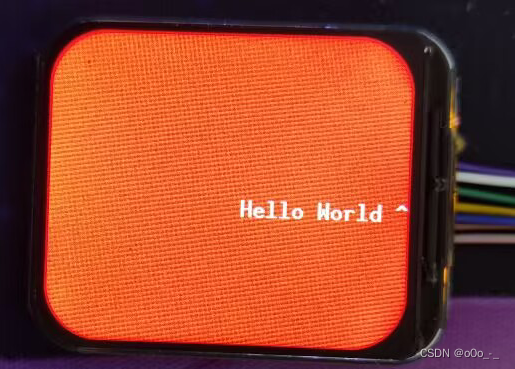
    结果

    在这里插入图片描述

  • 相关阅读:
    【排序算法】选择排序(C语言)
    JWT的基础介绍
    MFC扩展库BCGControlBar Pro v35.0新版亮点 - 工具栏、菜单全新升级
    Java并发编程之多线程实现方法
    很建议学习的Linux软件包管理— 软件包分类
    MySQL基本命令行的应用
    qt绘图事件
    Gartner最新报告,分析超大规模边缘解决方案
    手绘板的制作——画布移动(5)
    SVM学习笔记
  • 原文地址:https://blog.csdn.net/qq_33446100/article/details/133967478