-
08-React扩展
08-React扩展
1. setState的2种写法
案例:
export default class Demo extends Component { state = { count: 0 } add = () => { // 获取当前的值 const { count } = this.state // 更新状态 this.setState({ count: count + 1 }) console.log(count); } render() { const { count } = this.state return () } }当前求和为:{count}
- 1
- 2
- 3
- 4
- 5
- 6
- 7
- 8
- 9
- 10
- 11
- 12
- 13
- 14
- 15
- 16
- 17
- 18
- 19
- 20
- 21
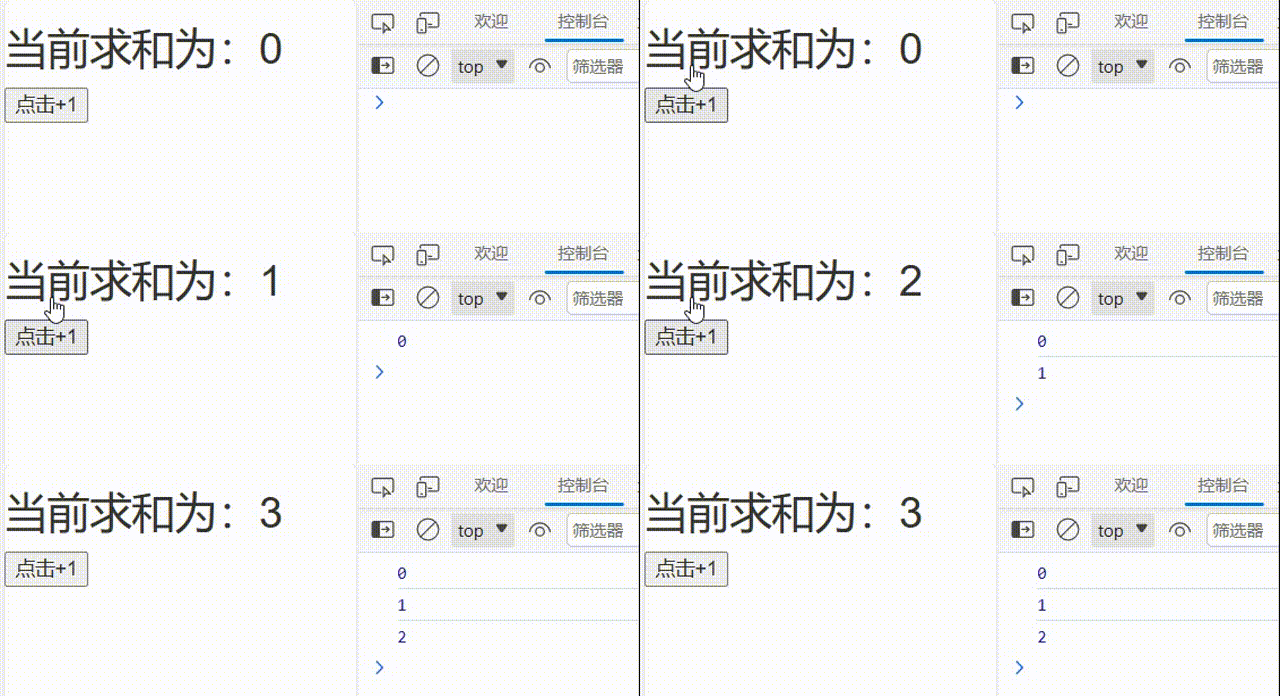
可以看到
setState更新视图是一个异步的动作,同步的输出事件只能获取更新前的状态。可知setState()是立即执行同步的,但是它引起的后续动作(react模版更新)是异步的,要等后续的进程执行完再更新视图。setStata函数可以传入两个参数,除了需要更新的state状态对象,还可以传入一个回调函数,这个回调函数是一个异步函数export default class Demo extends Component { state = { count: 0 } add = () => { // 获取当前的值 const { count } = this.state // 更新状态 this.setState({ count: count + 1 },() => { console.log(this.state.count) }) } render() { const { count } = this.state return () } }当前求和为:{count}
- 1
- 2
- 3
- 4
- 5
- 6
- 7
- 8
- 9
- 10
- 11
- 12
- 13
- 14
- 15
- 16
- 17
- 18
- 19
- 20
- 21
- 22

1).对象式的setState
setState(stateChange, [callback])- 1
-
stateChange为状态改变对象(该对象可以体现出状态的更改)this.setState({ count: count + 1 },() => {})- 1
-
callback是可选的回调函数, 它在状态更新完毕、界面也更新后(render调用后)才被调用this.setState({ count: count + 1 },() => { console.log(this.state.count) })- 1
- 2
- 3
2).函数式的setState
setState(updater, [callback])- 1
-
updater为返回stateChange对象的函数。this.setState(() => { return {count: this.state.count + 1} },() => {})- 1
- 2
- 3
-
updater可以接收到state和props。this.setState((state,props) => { console.log(state,props); return {count: state.count + 1} },() => {})- 1
- 2
- 3
- 4

-
callback是可选的回调函数, 它在状态更新、界面也更新后(render调用后)才被调用。this.setState((state,props) => { return {count: state.count + 1} },() => { console.log(state.count) })- 1
- 2
- 3
- 4
- 5
3).总结
-
对象式的setState是函数式的setState的简写方式(语法糖)
-
使用原则:
-
如果新状态不依赖于原状态 ===> 使用对象方式
this.setState({count:99})- 1
-
如果新状态依赖于原状态 ===> 使用函数方式
this.setState(state => ({ count: state.count + 1 }))- 1
-
如果需要在
setState()执行后获取最新的状态数据,要在第二个callback函数中读取
-
2. 路由组件的lazyLoad
在实际开发中,整个React应用会有许多的组件,一般情况下在运行React项目时,程序会将所有组件全部加载,这样还未用到的组件也被加载,这样会影响程序整体运行的速度
实验:
export default class Demo extends Component { render() { return () } }路由项目
About Home - 1
- 2
- 3
- 4
- 5
- 6
- 7
- 8
- 9
- 10
- 11
- 12
- 13
- 14
- 15
- 16
- 17
- 18
- 19
- 20
- 21
- 22
- 23
- 24
- 25
- 26
- 27
- 28
- 29

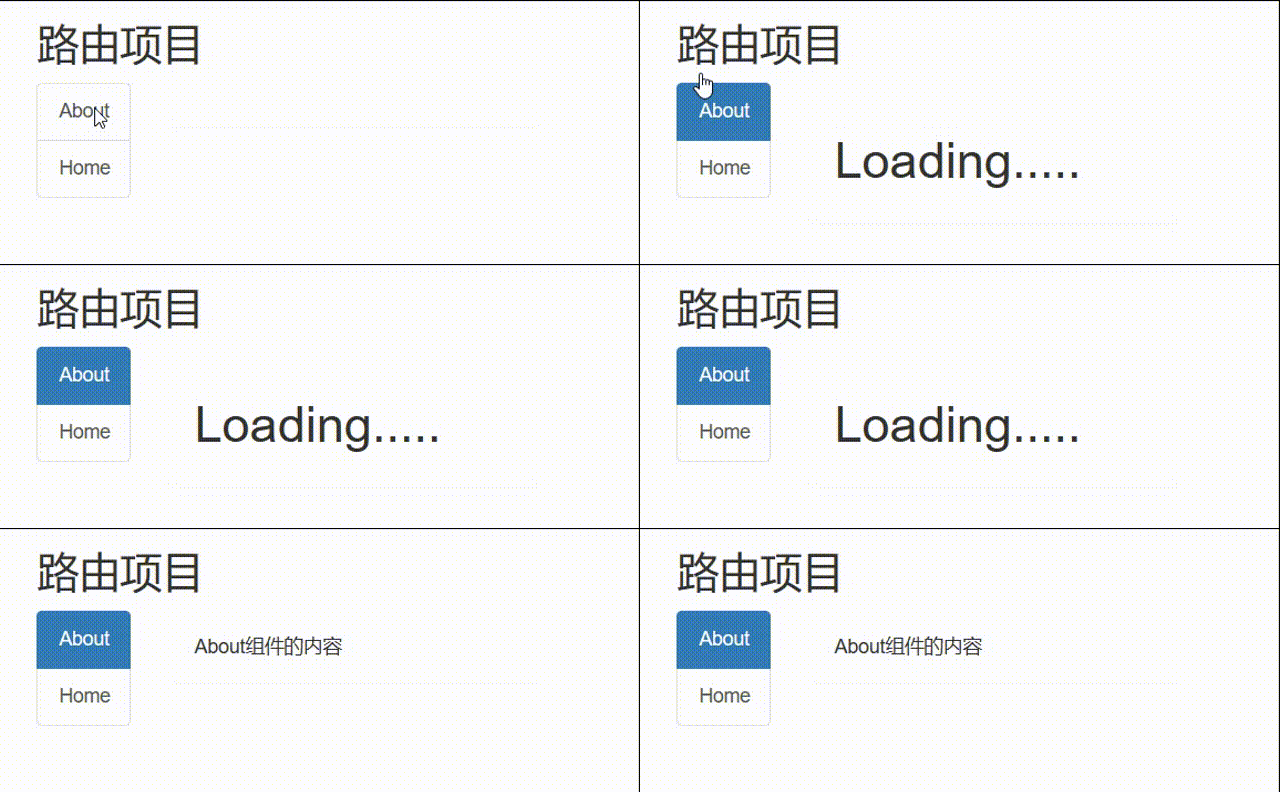
可以看出当点击每个组件的链接Tab时,程序并没有发送加载资源请求,说明一开始运行程序的时候,所有组件已经全部请求完毕了,为了减少资源的浪费和提升程序的性能,需要用到路由的懒加载。
1).lazy函数
通过React的
lazy函数配合import()函数动态加载路由组件 ===> 路由组件代码会被分开打包const Home=lazy(() => import('./Home')) const About=lazy(() => import('./About'))- 1
- 2
2).
组件 通过
Lazy使用export default class Demo extends Component { render() { return () } }路由项目
About Home - 1
- 2
- 3
- 4
- 5
- 6
- 7
- 8
- 9
- 10
- 11
- 12
- 13
- 14
- 15
- 16
- 17
- 18
- 19
- 20
- 21
- 22
- 23
- 24
- 25
- 26
- 27
- 28
- 29
- 30
- 31
还可以通过
loading界面,当网速慢或者其他原因导致组件加载请求慢时会有一个备用组件作为优先显示Loading.....}> - 1
- 2
- 3
- 4
3. Hooks
1). React Hook/Hooks是什么?
(1).
Hook是React 16.8.0版本增加的新特性/新语法
(2). 可以让你在函数组件中使用state以及其他的 React 特性2). 三个常用的Hook
a. State Hook
-
State Hook让函数组件也可以有state状态, 并进行状态数据的读写操作//类式组件 class Demo extends Component { state = { count: 0 } add = () => { this.setState(state => ({ count: state.count + 1 })) } render() { const { count } = this.state return () } }当前求和为:{count}
- 1
- 2
- 3
- 4
- 5
- 6
- 7
- 8
- 9
- 10
- 11
- 12
- 13
- 14
- 15
- 16
- 17
- 18
-
语法:
const [xxx, setXxx] = React.useState(initValue)- 1
-
useState()说明:
- 参数: 第一次初始化指定的值在内部作缓存
- 返回值: 包含2个元素的数组, 第1个为内部当前状态值, 第2个为更新状态值的函数
//函数式组件 function Demo() { const [count, setCount] = React.useState(0) function add() { setCount(count+1) } return () }当前求和为:{count}
- 1
- 2
- 3
- 4
- 5
- 6
- 7
- 8
- 9
- 10
- 11
- 12
- 13
setXxx()的2种写法:
-
setXxx(newValue): 参数为非函数值, 直接指定新的状态值, 内部用其覆盖原来的状态值 -
setXxx(value => newValue): 参数为函数, 接收原本的状态值, 返回新的状态值, 内部用其覆盖原来的状态值function add() { // 第一种写法 setCount(count+1) // 第二种写法 setCount(count => count + 1) }- 1
- 2
- 3
- 4
- 5
- 6
b. Effect Hook
-
Effect Hook可以让你在函数组件中执行副作用操作(用于模拟类组件中的生命周期钩子)// 类式组件写法 class Demo extends Component { state = { count: 0 } unmount = () => { createRoot(document.getElementById('root')).unmount(); } componentDidMount() { this.timer = setInterval(() => { this.setState(state => ({ count: state.count + 1 })) }, 1000) } componentWillUnmount() { clearInterval(this.timer) } render() { const { count } = this.state return () } }- 1
- 2
- 3
- 4
- 5
- 6
- 7
- 8
- 9
- 10
- 11
- 12
- 13
- 14
- 15
- 16
- 17
- 18
- 19
- 20
- 21
- 22
- 23
- 24
- 25

-
React中的副作用操作:
- 发
ajax请求数据获取 - 设置订阅 / 启动定时器
- 手动更改真实DOM
- 发
-
语法和说明:
useEffect(() => { // 在此可以执行任何带副作用操作 return () => {} }, [stateValue])- 1
- 2
- 3
- 4
//函数式组件 function Demo() { const [count, setCount] = React.useState(0) React.useEffect(() => { let timer = setInterval(() => { setCount(count => count + 1) }, 1000) return () => { clearInterval(timer) } }, []) function unmount() { createRoot(document.getElementById('root')).unmount(); } return () }当前求和为:{count}
- 1
- 2
- 3
- 4
- 5
- 6
- 7
- 8
- 9
- 10
- 11
- 12
- 13
- 14
- 15
- 16
- 17
- 18
- 19
- 20
- 21
分析:
-
使用
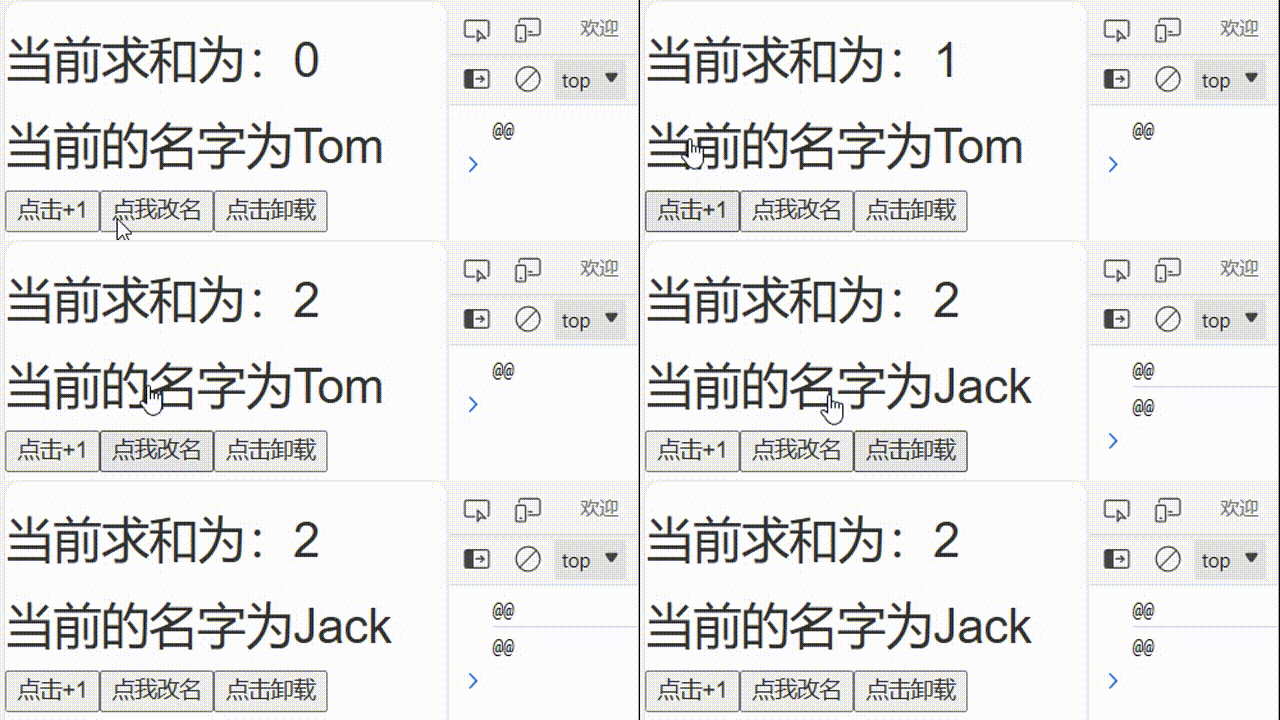
React.useEffect()时不写第二个参数,那么Effect Hook会监测所有状态值的变化function Demo() { const [count, setCount] = React.useState(0) const [name, setName] = React.useState('Tom') React.useEffect(() => { console.log('@@'); }) function add() { setCount(count => count + 1) } function changeName() { setName('Jack') } return () }当前求和为:{count}
当前的名字为{name}
- 1
- 2
- 3
- 4
- 5
- 6
- 7
- 8
- 9
- 10
- 11
- 12
- 13
- 14
- 15
- 16
- 17
- 18
- 19
- 20
- 21

-
使用
React.useEffect()时写一个空数组为参数,那么Effect Hook不会监测任何状态值的变化,回调函数只会在第一次render()后执行React.useEffect(() => { console.log('@@'); },[])- 1
- 2
- 3

-
使用
React.useEffect()时写值为指定状态值的非空数组作为第二个参数,那么Effect Hook只会监测指定状态值的变化React.useEffect(() => { console.log('@@'); },[name])- 1
- 2
- 3
-
React.useEffect()中的返回函数return在组件卸载前执行,一般在此做一些收尾工作, 比如清除定时器/取消订阅等,注意点:每次执行这里的更新该函数也会去执行一遍
React.useEffect(() => { let timer = setInterval(() => { setCount(count => count + 1) }, 1000) return () => { clearInterval(timer) } },[])- 1
- 2
- 3
- 4
- 5
- 6
- 7
- 8
-
可以把 useEffect Hook 看做如下三个函数的组合
- componentDidMount()
- componentDidUpdate()
- componentWillUnmount()
c. Ref Hook
-
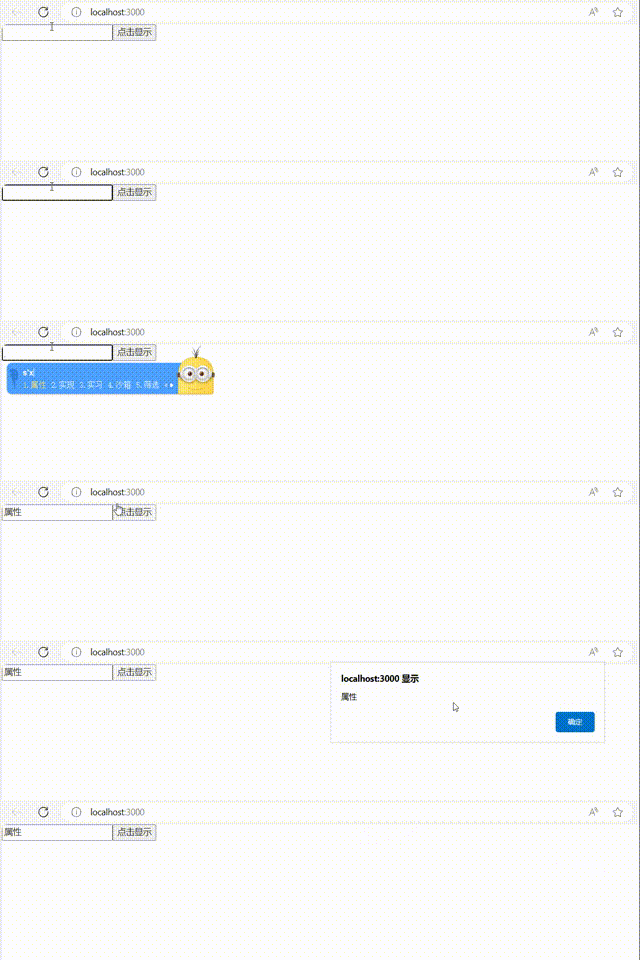
Ref Hook可以在函数组件中存储/查找组件内的标签或任意其它数据// 类式组件的写法 class Demo extends Component { myRef=React.createRef(); show=() => { alert(this.myRef.current.value) } render() { return () } }- 1
- 2
- 3
- 4
- 5
- 6
- 7
- 8
- 9
- 10
- 11
- 12
- 13
- 14
- 15
-
语法:
const refContainer = useRef()- 1
-
作用:保存标签对象,功能与
React.createRef()一样// 函数式组件的写法 function Demo() { const myRef=React.useRef() function show() { alert(myRef.current.value) } return () }- 1
- 2
- 3
- 4
- 5
- 6
- 7
- 8
- 9
- 10
- 11
- 12
- 13
4. Fragment
使用:
<> - 1
- 2
import React, { Component, Fragment } from 'react' export default class Demo extends Component { render() { return (- 1
- 2
- 3
- 4
- 5
- 6
- 7
- 8
- 9
- 10
- 11
import React, { Component, Fragment } from 'react' export default class Demo extends Component { render() { return ( <> ) } }- 1
- 2
- 3
- 4
- 5
- 6
- 7
- 8
- 9
- 10
- 11
作用
可以不用必须有一个真实的DOM根标签了
未使用
Fragment标签:
使用
Fragment标签:
5. Context
理解:
一种组件间通信方式, 常用于【祖组件】与【后代组件】间通信
使用:
需求:将A组件状态中的数据传递给C组件,不通过B组件的二次传递
export default class A extends Component { state = { username: 'tom', age: 18 } render() { const { username, age } = this.state return () } } class B extends Component { render() { return (我是A组件
我的用户名是:{username}
我的年龄是:{age}
) } } class C extends Component { render() { return (我是B组件
) } }我是C组件
我从A组件拿到的用户名是:???
我从A组件拿到的年龄时是:???
- 1
- 2
- 3
- 4
- 5
- 6
- 7
- 8
- 9
- 10
- 11
- 12
- 13
- 14
- 15
- 16
- 17
- 18
- 19
- 20
- 21
- 22
- 23
- 24
- 25
- 26
- 27
- 28
- 29
- 30
- 31
- 32
- 33
- 34
- 35
- 36
- 37
- 38
-
创建Context容器对象:
const XxxContext = React.createContext()- 1
// 创建context对象 const UserNameContext = React.createContext()- 1
- 2
-
渲染子组时,外面包裹
xxxContext.Provider, 通过value属性给后代组件传递数据:子组件 - 1
- 2
- 3
const { Provider } = UserNameContext export default class A extends Component { state = { username: 'tom', age: 18 } render() { const { username, age } = this.state return () } }我是A组件
我的用户名是:{username}
我的年龄是:{age}
{ username, age }}> - 1
- 2
- 3
- 4
- 5
- 6
- 7
- 8
- 9
- 10
- 11
- 12
- 13
- 14
- 15
- 16
- 17
- 18
- 19
- 20
-
后代组件读取数据:
第一种方式:仅适用于类组件
static contextType = xxxContext // 声明接收context this.context // 读取context中的value数据- 1
- 2
class C extends Component { // 声明接收context static contextType = UserNameContext render() { console.log(this); console.log(this.context); const {username,age}=this.context return () } }我是C组件
我从A组件拿到的用户名是:{username}
我从A组件拿到的年龄时是:{age}
- 1
- 2
- 3
- 4
- 5
- 6
- 7
- 8
- 9
- 10
- 11
- 12
- 13
- 14
- 15
- 16

第二种方式: 函数组件与类组件都可以
{ value => ( // value就是context中的value数据 //要显示的内容 ) } - 1
- 2
- 3
- 4
- 5
- 6
- 7
// 创建context对象 const UserNameContext = React.createContext() const { Provider, Consumer } = UserNameContext function C() { return () }我是C组件
{ value => { return ( ) } }我从A组件拿到的用户名是:{value.username}
我从A组件拿到的年龄时是:{value.age}
- 1
- 2
- 3
- 4
- 5
- 6
- 7
- 8
- 9
- 10
- 11
- 12
- 13
- 14
- 15
- 16
- 17
- 18
- 19
- 20
- 21
- 22
注意:
在应用开发中一般不用context, 一般都用它的封装react插件
6. 组件优化
Component的2个问题
-
只要执行
setState(),即使不改变状态数据, 组件也会重新render()==> 效率低export default class Parent extends Component { state = { carName: '奔驰' } changeName = () => { const { carName } = this.state this.setState({}) } render() { console.log('parent---render'); return () } }我是Parent组件
我的车的名字是:{this.state.carName}
- 1
- 2
- 3
- 4
- 5
- 6
- 7
- 8
- 9
- 10
- 11
- 12
- 13
- 14
- 15
- 16
- 17
- 18
- 19

-
只要当前组件重新
render(), 就会自动重新render子组件,纵使子组件没有用到父组件的任何数据 ==> 效率低
export default class Parent extends Component { state = { carName: '奔驰', stus:['小王','小李','小芳'] } changeName = () => { const { carName } = this.state this.setState({}) } render() { console.log('parent---render'); return () } } class Child extends Component { render() { console.log('child---render'); return (我是Parent组件
我的车的名字是:{this.state.carName}
) } }我是Child组件
我接受到的车的名字是:{this.props.carName}
- 1
- 2
- 3
- 4
- 5
- 6
- 7
- 8
- 9
- 10
- 11
- 12
- 13
- 14
- 15
- 16
- 17
- 18
- 19
- 20
- 21
- 22
- 23
- 24
- 25
- 26
- 27
- 28
- 29
- 30
- 31
- 32
- 33

效率高的做法
只有当组件的
state或props数据发生改变时才重新render()原因
Component中的shouldComponentUpdate()总是返回true解决
办法1:
-
重写
shouldComponentUpdate()方法 -
比较新旧
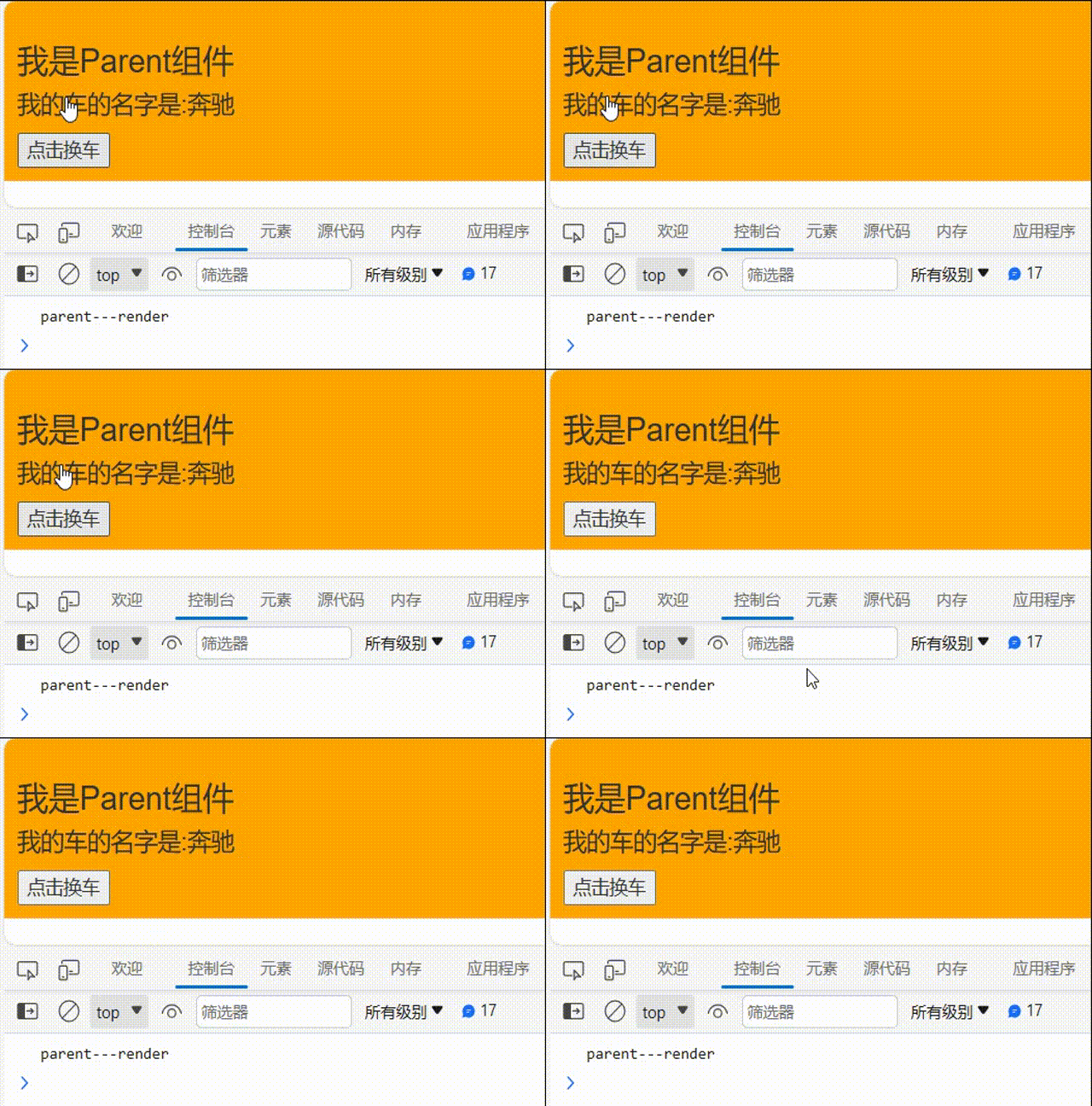
state或props数据, 如果有变化才返回true, 如果没有返回false// person组件 class Parent extends Component { state = { carName: '奔驰', } changeName = () => { const { carName } = this.state this.setState({}) } shouldComponentUpdate(nextProps,nextState){ return !this.state.carName===nextState.carName } render() { console.log('parent---render'); return () } }我是Parent组件
我的车的名字是:{this.state.carName}
- 1
- 2
- 3
- 4
- 5
- 6
- 7
- 8
- 9
- 10
- 11
- 12
- 13
- 14
- 15
- 16
- 17
- 18
- 19
- 20
- 21
- 22
- 23
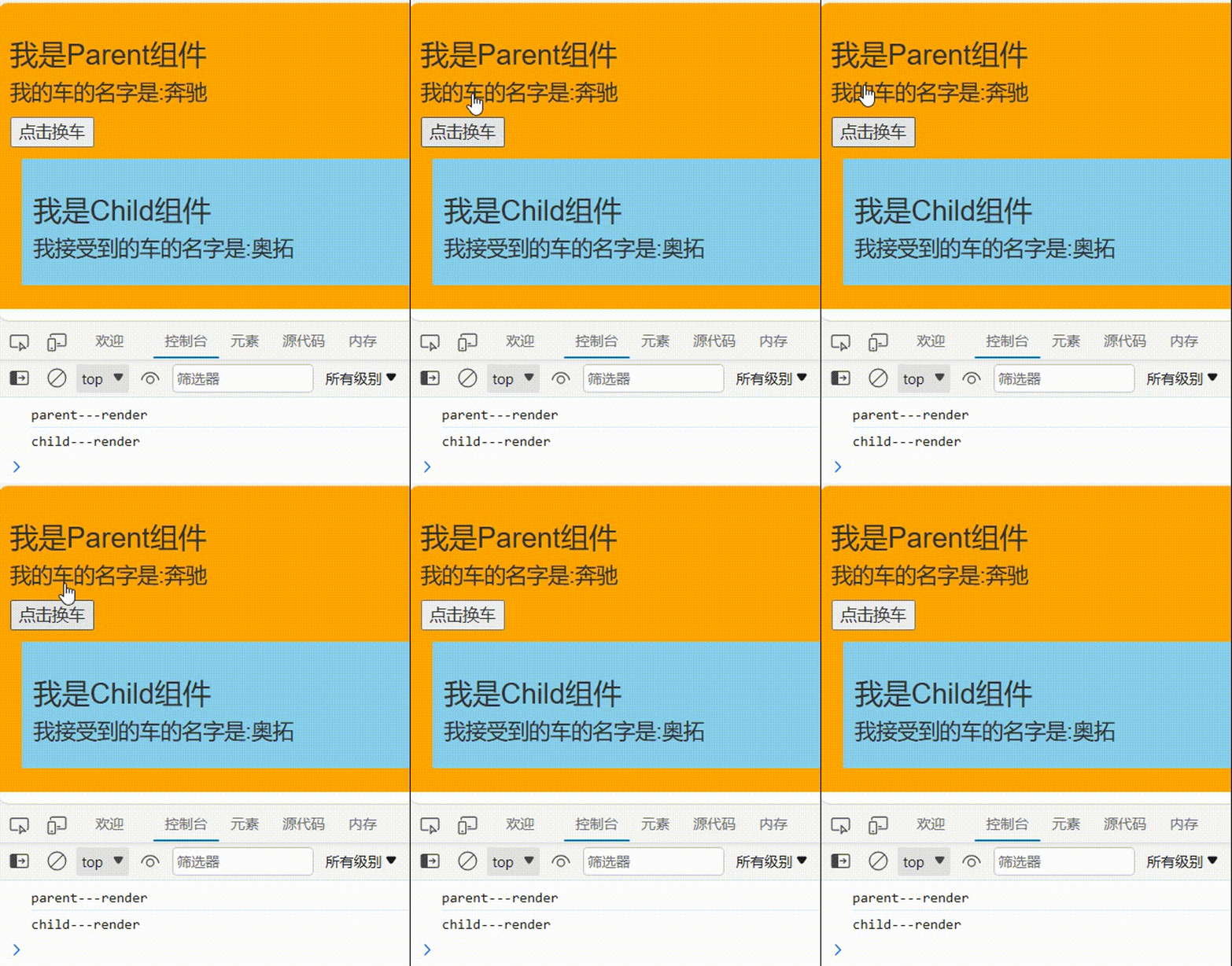
// Child组件 class Child extends Component { shouldComponentUpdate(nextProps,nextState){ return !this.props.carName===nextProps.carName } render() { console.log('child---render'); return () } }我是Child组件
我接受到的车的名字是:{this.props.carName}
- 1
- 2
- 3
- 4
- 5
- 6
- 7
- 8
- 9
- 10
- 11
- 12
- 13
- 14
- 15
办法2:
-
使用
PureComponentimport React, { PureComponent} from 'react'- 1
-
PureComponent重写了shouldComponentUpdate(), 只有state或props数据有变化才返回trueexport default class Parent extends PureComponent { state = { carName: '奔驰', } changeName = () => { const { carName } = this.state this.setState({}) } render() { console.log('parent---render'); return () } } class Child extends PureComponent { render() { console.log('child---render'); return (我是Parent组件
我的车的名字是:{this.state.carName}
) } }我是Child组件
我接受到的车的名字是:{this.props.carName}
- 1
- 2
- 3
- 4
- 5
- 6
- 7
- 8
- 9
- 10
- 11
- 12
- 13
- 14
- 15
- 16
- 17
- 18
- 19
- 20
- 21
- 22
- 23
- 24
- 25
- 26
- 27
- 28
- 29
- 30
- 31
- 32
-
注意:
-
只是进行
state和props数据的浅比较, 如果只是数据对象内部数据变了, 返回false -
不要直接修改
state数据, 而是要产生新数据export default class Parent extends PureComponent { state = { carName: '奔驰' } changeName = () => { const obj = this.state obj.carName = '迈巴赫' console.log(obj === this.state); this.setState(obj) } render() { console.log('parent---render'); return () } }我是Parent组件
我的车的名字是:{this.state.carName}
- 1
- 2
- 3
- 4
- 5
- 6
- 7
- 8
- 9
- 10
- 11
- 12
- 13
- 14
- 15
- 16
- 17
- 18
- 19
- 20
- 21
PureComponent的底层做了一个浅对比,不会管Obj里面的属性是否发生变化,只要Obj与this.state是同一个对象,就不会引起更新在之前更新数组类型的状态时说过不能通过使用
push、unshift等原生数组的方法改写数组来更新状态,需要返回一个新的数组进行更新export default class Parent extends PureComponent { state = { stus:['小王','小李','小芳'] } addStus=() => { const {stus}=this.state stus.unshift('小刘') this.setState({stus}) } render() { console.log('parent---render'); return () } }我是Parent组件
学生有{this.state.stus}
- 1
- 2
- 3
- 4
- 5
- 6
- 7
- 8
- 9
- 10
- 11
- 12
- 13
- 14
- 15
- 16
- 17
- 18
- 19
- 20
需要通过
[新增的数组元素,...原数组]的方式进行更新export default class Parent extends PureComponent { state = { stus:['小王','小李','小芳'] } addStus=() => { const {stus}=this.state this.setState({stus:['小刘',...stus]}) } render() { console.log('parent---render'); return () } }我是Parent组件
学生有{this.state.stus}
- 1
- 2
- 3
- 4
- 5
- 6
- 7
- 8
- 9
- 10
- 11
- 12
- 13
- 14
- 15
- 16
- 17
- 18
- 19

-
-
项目中一般使用
PureComponent来优化
7. render props
如何向组件内部动态传入带内容的结构(标签)?
Vue中:
使用slot技术, 也就是通过组件标签体传入结构
React中:
使用children props: 通过组件标签体传入结构
使用render props: 通过组件标签属性传入结构,而且可以携带数据,一般用render函数属性children props
之前说过标签体的内容是标签特殊的属性
children,可以通过this.props.children进行读取,所以可以将B组件作为A组件的标签体写入export default class Parent extends Component { render() { return ( ) } } class A extends Component { state={name:'tom'} render() { const {name}=this.state return () } } class B extends Component { render() { return (我是A组件
{this.props.children}) } }我是B组件
- 1
- 2
- 3
- 4
- 5
- 6
- 7
- 8
- 9
- 10
- 11
- 12
- 13
- 14
- 15
- 16
- 17
- 18
- 19
- 20
- 21
- 22
- 23
- 24
- 25
- 26
- 27
- 28
- 29
- 30
- 31

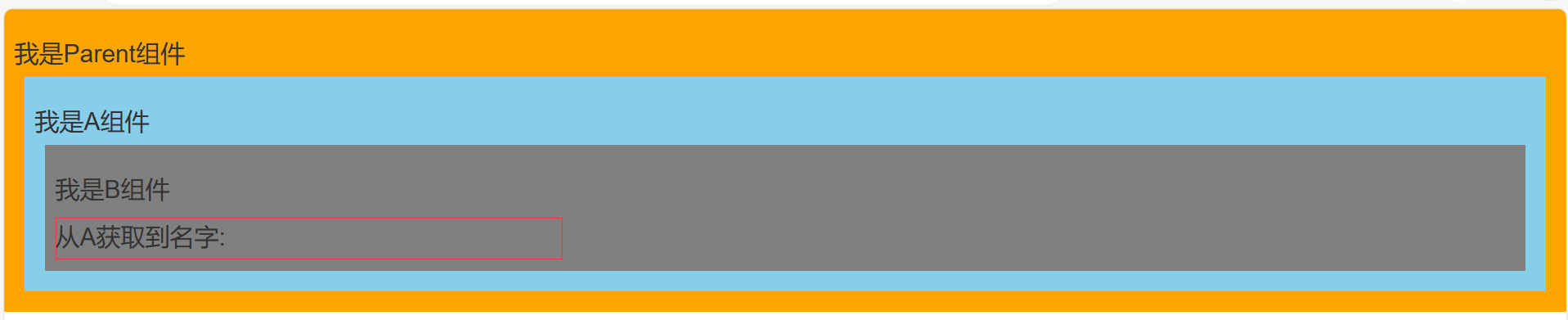
问题: 如果B组件需要A组件内的数据 ==> 做不到
export default class Parent extends Component { render() { return ( ) } } class A extends Component { state={name:'tom'} render() { const {name}=this.state return () } } class B extends Component { render() { return (我是A组件
{this.props.children}) } }我是B组件
从A获取到名字:{this.props.name}
- 1
- 2
- 3
- 4
- 5
- 6
- 7
- 8
- 9
- 10
- 11
- 12
- 13
- 14
- 15
- 16
- 17
- 18
- 19
- 20
- 21
- 22
- 23
- 24
- 25
- 26
- 27
- 28
- 29
- 30
- 31
- 32
render props
}> - 1
A组件:
{this.props.render(内部state数据)}
C组件: 读取A组件传入的数据显示{this.props.data}export default class Parent extends Component { render() { return () } } class A extends Component { state={name:'tom'} render() { const {name}=this.state return (我是Parent组件
}/>) } } class B extends Component { render() { return (我是A组件
{this.props.render(name)}) } }我是B组件
从A获取到名字:{this.props.name}
- 1
- 2
- 3
- 4
- 5
- 6
- 7
- 8
- 9
- 10
- 11
- 12
- 13
- 14
- 15
- 16
- 17
- 18
- 19
- 20
- 21
- 22
- 23
- 24
- 25
- 26
- 27
- 28
- 29
- 30
- 31
- 32

8. 错误边界
理解:
错误边界(Error boundary):用来捕获后代组件错误,渲染出备用页面
特点:
只能捕获后代组件生命周期产生的错误,不能捕获自己组件产生的错误和其他组件在合成事件、定时器中产生的错误
使用方式:
getDerivedStateFromError配合componentDidCatch// 生命周期函数,一旦后台组件报错,就会触发 static getDerivedStateFromError(error) { console.log(error); // 在render之前触发 // 返回新的state return { hasError: true, }; } componentDidCatch(error, info) { // 统计页面的错误。发送请求发送到后台去 console.log(error, info); }- 1
- 2
- 3
- 4
- 5
- 6
- 7
- 8
- 9
- 10
- 11
- 12
- 13
// Parent组件 export default class Parent extends Component { state={ hasError:''//用于标识子组件是否产生错误 } // 出错时的生命周期钩子 componentDidCatch(){ console.log('渲染组件出错'); } // 当Parent的子组件出现报错时候,会触发getDerivedStateFromError调用,并携带错误信息 static getDerivedStateFromError(error){ console.log(error); return {hasError:error} } render() { return () } }我是Parent组件
{this.state.hasError?网络出错
:} - 1
- 2
- 3
- 4
- 5
- 6
- 7
- 8
- 9
- 10
- 11
- 12
- 13
- 14
- 15
- 16
- 17
- 18
- 19
- 20
- 21
- 22
- 23
// Child组件 export default class Child extends Component { state={ /* users:[ {id:'1',name:'may',age:18}, {id:'2',name:'tom',age:21}, {id:'3',name:'jerry',age:19} ] */ // 错误原因: users:'' } render() { return () } }我是Child组件
-
{
this.state.users.map((userObj)=>{
return
- 名字{userObj.name}——年龄{userObj.age} }) }
- 1
- 2
- 3
- 4
- 5
- 6
- 7
- 8
- 9
- 10
- 11
- 12
- 13
- 14
- 15
- 16
- 17
- 18
- 19
- 20
- 21
- 22
- 23
- 24
- 25
- 26
- 27
- 28
9. 组件通信方式总结
组件间的关系:
- 父子组件
- 兄弟组件(非嵌套组件)
- 祖孙组件(跨级组件)
几种通信方式:
-
props:children props和render props - 消息订阅-发布:
pubs-sub、event等等 - 集中式管理:
redux、dva等等 -
conText:生产者-消费者模式
比较好的搭配方式:
- 父子组件:props
- 兄弟组件:消息订阅-发布、集中式管理
- 祖孙组件(跨级组件):消息订阅-发布、集中式管理、conText(开发用的少,封装插件用的多)
-
相关阅读:
Linux基本指令及周边(第一弹)
有关异常的处理、捕获、抛出、自定义
软件设计师2017上午题基础知识(易错整理)
adb 操作命令(adb调试QT项目使用到的命令)
Rust表示将创建官方规范,涉及编辑器、版本定义、语义界线等
【POJ No. 3134】幂运算 Power Calculus
金融数据分析(一)
Centos7下安装MySQL详细步骤
笔记 记录
16. 线性代数 - 矩阵的性质
- 原文地址:https://blog.csdn.net/m0_57262196/article/details/133967388
