-
2.1.C++项目:网络版五子棋对战之前置知识
一、Websocketpp
(一)Websocket介绍
WebSocket 是从 HTML5 开始支持的⼀种网页端和服务端保持长 连接的 消息推送机制。
- 传统的 web 程序都是属于 “一问一答” 的形式,即客户端给服务器发送了⼀个 HTTP 请求,服务器给客户端返回一个 HTTP 响应。这种情况下服务器是属于被动的一方,如果客户端不主动发起请求服务器就无法主动给客户端端响应
- 像网页即时聊天或者我们做的五子棋游戏这样的程序都是非常依赖 “消息推送” 的, 即需要服务器主动推动消息到客户端。如果只是使用原生的 HTTP 协议,要想实现消息推送⼀般需要通过 “轮询” 的方式实现, 而轮询的成本比较高并且也不能及时的获取到消息的响应。
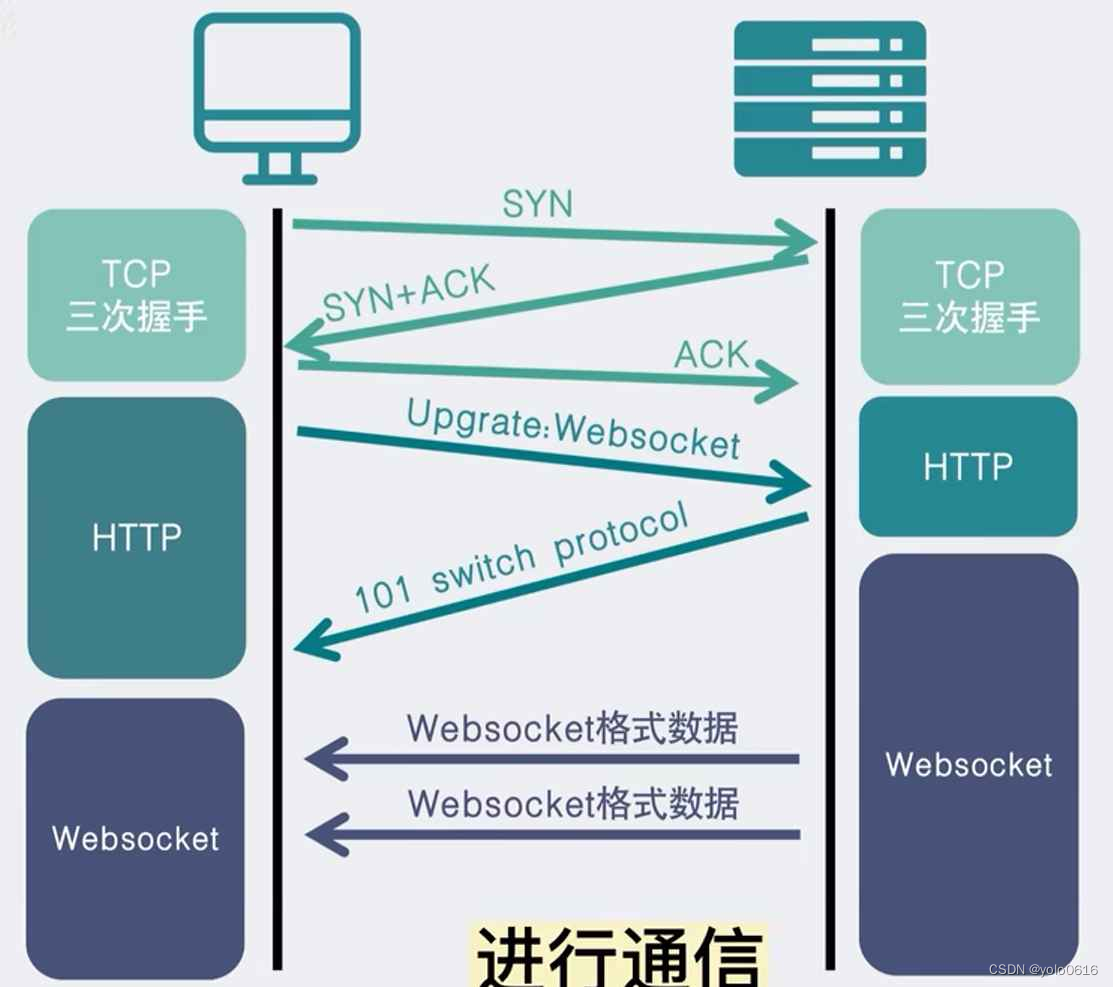
基于上述两个问题, 就产生了WebSocket协议。WebSocket 更接近于 TCP 这种级别的通信方式,一旦连接建立完成客户端或者服务器都可以主动的向对方发送数据。
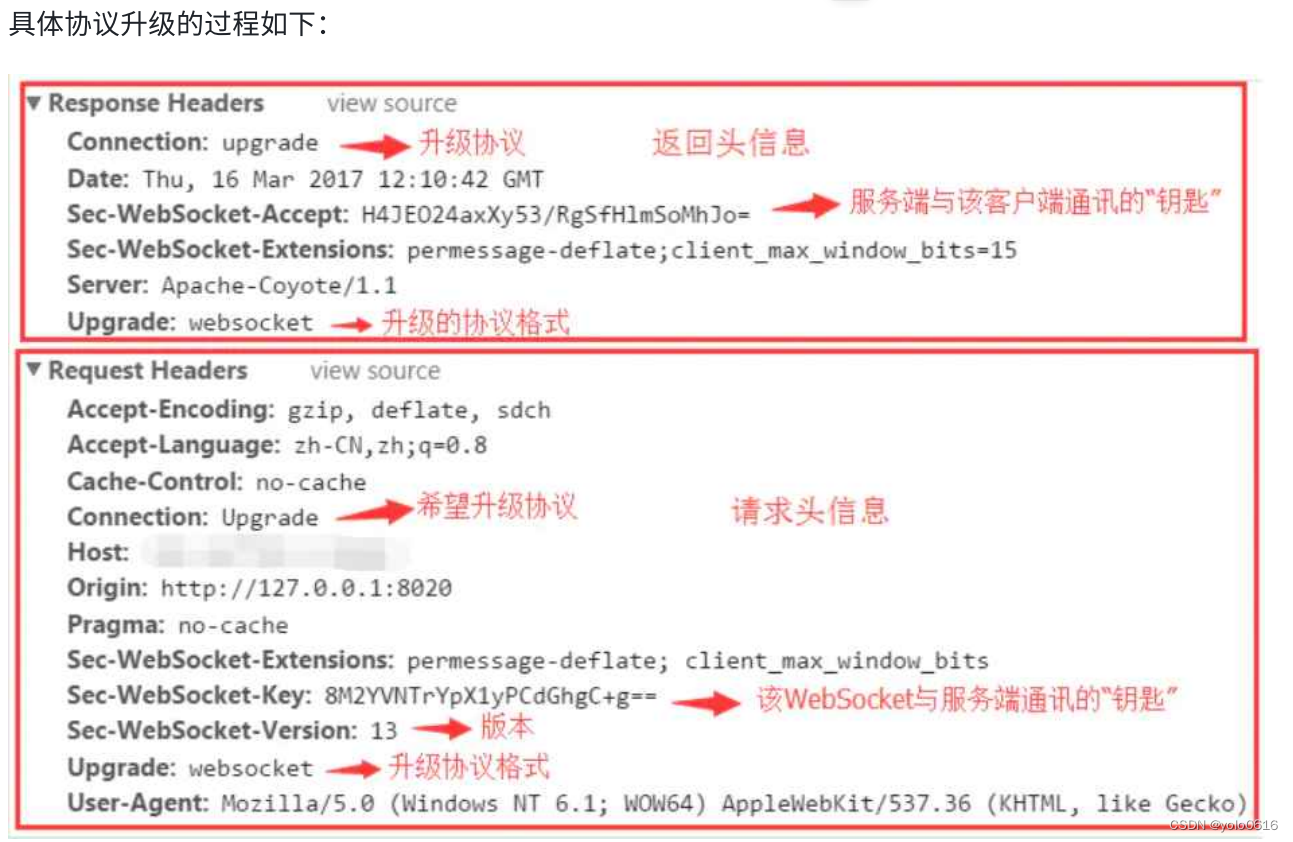
WebSocket 协议本质上是⼀个基于 TCP 的协议。为了建立一个 WebSocket 连接,客户端浏览器首先要向服务器发起⼀个 HTTP 请求,这个请求和通常的 HTTP 请求不同,包含了⼀些附加头信息,通过这个附加头信息完成握手过程并升级协议的过程。
(二)报文格式
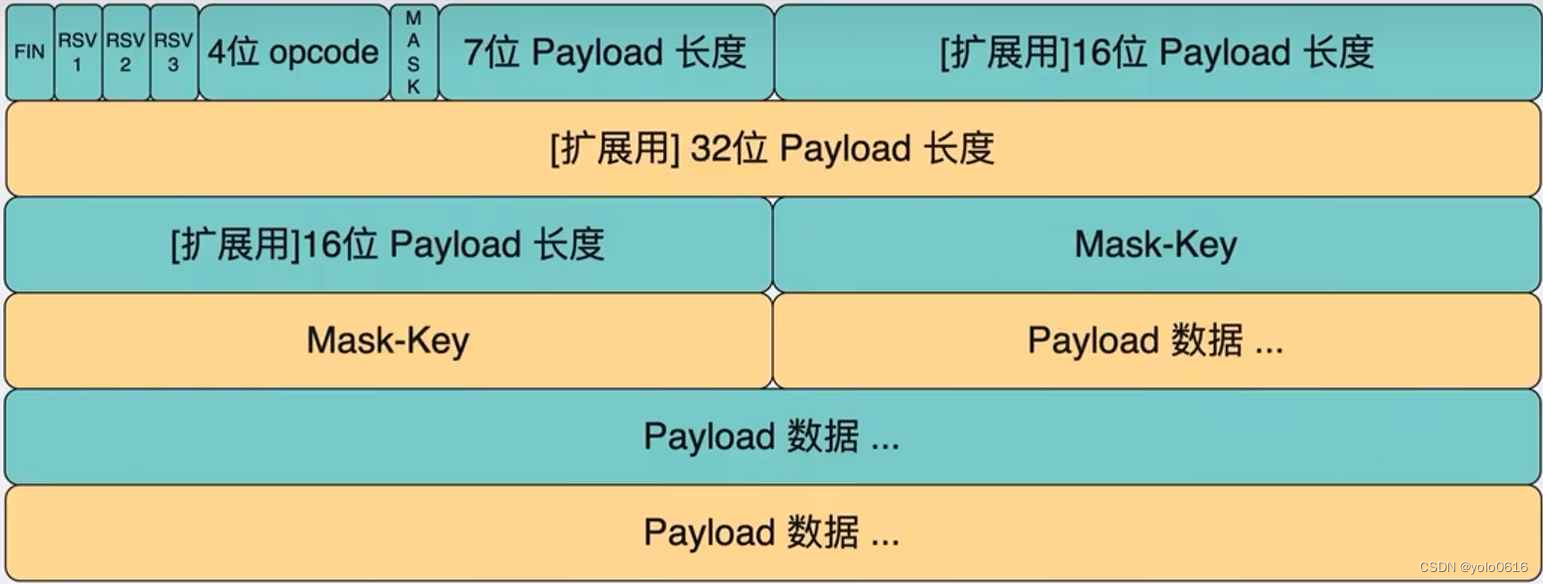
我们重点关注这几个字段:- FIN: WebSocket传输数据以消息为概念单位,一个消息有可能由⼀个或多个帧组成,FIN字段为1表示末尾帧。
- RSV1~3:保留字段,只在扩展时使⽤,若未启用扩展则应置1,若收到不全为0的数据帧,且未协商扩展则立即终止连接。
- opcode: 标志当前数据帧的类型
- 0x0: 表示这是个延续帧,当 opcode 为 0 表⽰本次数据传输采⽤了数据分片,当前收到的帧为其中⼀个分片
- 0x1: 表示这是文本帧
- 0x2: 表示这是⼆进制帧
- 0x3-0x7: 保留,暂未使用
- 0x8: 表示连接断开
- 0x9: 表示 ping 帧
- 0xa: 表示 pong 帧
- 0xb-0xf: 保留,暂未使⽤
- mask:表示Payload数据是否被编码,若为1则必有Mask-Key,用于解码Payload数据。仅客户端发送给服务端的消息需要设置。
- Payload length:数据载荷的长度,单位是字节, 有可能为7位、7+16位、7+64位。假设Payloadlength = x
- x为0~126:数据的长度为x字节
- x为126:后续2个字节代表⼀个16位的无符号整数,该无符号整数的值为数据的长度
- x为127:后续8个字节代表⼀个64位的无符号整数(最高位为0),该⽆符号整数的值为数据的长度
- Mask-Key:当mask为1时存在,长度为4字节,解码规则: DECODED[i] = ENCODED[i] ^ MASK[i% 4]
- Payload data: 报文携带的载荷数据
(三)Websocketpp介绍
WebSocketpp是⼀个跨平台的开源(BSD许可证)头部专用C++库,它实现了RFC6455(WebSocket协议)和RFC7692(WebSocketCompression Extensions)。它允许将WebSocket客户端和服务器功能集成到C++程序中。在最常见的配置中,全功能网络I/O由Asio网络库提供。
WebSocketpp的主要特性包括:- 事件驱动的接口
- 支持HTTP/HTTPS、WS/WSS、IPv6
- 灵活的依赖管理 — Boost库/C++11标准库
- 可移植性:Posix/Windows、32/64bit、Intel/ARM
- 线程安全
WebSocketpp同时支持HTTP和Websocket两种网络协议, 比较适用于我们本次的项目,所以我们选用该库作为项目的依赖库用来搭建HTTP和WebSocket服务器。
(四)Websocketpp使用
1.websocketpp常用接口介绍
namespace websocketpp { typedef lib::weak_ptr<void> connection_hdl; template <typename config> class endpoint : public config::socket_type { typedef lib::shared_ptr<lib::asio::steady_timer> timer_ptr; typedef typename connection_type::ptr connection_ptr; typedef typename connection_type::message_ptr message_ptr; typedef lib::function<void(connection_hdl)> open_handler; typedef lib::function<void(connection_hdl)> close_handler; typedef lib::function<void(connection_hdl)> http_handler; typedef lib::function<void(connection_hdl,message_ptr)> message_handler; /* websocketpp::log::alevel::none 禁⽌打印所有⽇志*/ void set_access_channels(log::level channels);/*设置⽇志打印等级*/ void clear_access_channels(log::level channels);/*清除指定等级的⽇志*/ /*设置指定事件的回调函数*/ void set_open_handler(open_handler h);/*websocket握⼿成功回调处理函数*/ void set_close_handler(close_handler h);/*websocket连接关闭回调处理函数*/ void set_message_handler(message_handler h);/*websocket消息回调处理函数*/ void set_http_handler(http_handler h);/*http请求回调处理函数*/ /*发送数据接⼝*/ void send(connection_hdl hdl, std::string& payload, frame::opcode::value op); void send(connection_hdl hdl, void* payload, size_t len, frame::opcode::value op); /*关闭连接接⼝*/ void close(connection_hdl hdl, close::status::value code, std::string& reason); /*获取connection_hdl 对应连接的connection_ptr*/ connection_ptr get_con_from_hdl(connection_hdl hdl); /*websocketpp基于asio框架实现,init_asio⽤于初始化asio框架中的io_service调度 器*/ void init_asio(); /*设置是否启⽤地址重⽤*/ void set_reuse_addr(bool value); /*设置endpoint的绑定监听端⼝*/ void listen(uint16_t port); /*对io_service对象的run接⼝封装,⽤于启动服务器*/ std::size_t run(); /*websocketpp提供的定时器,以毫秒为单位*/ timer_ptr set_timer(long duration, timer_handler callback); }; template <typename config> class server : public endpoint<connection<config>,config> { /*初始化并启动服务端监听连接的accept事件处理*/ void start_accept(); }; template <typename config> class connection : public config::transport_type::transport_con_type , public config::connection_base { /*发送数据接⼝*/ error_code send(std::string&payload, frame::opcode::value op=frame::opcode::text); /*获取http请求头部*/ std::string const & get_request_header(std::string const & key) /*获取请求正⽂*/ std::string const & get_request_body(); /*设置响应状态码*/ void set_status(http::status_code::value code); /*设置http响应正⽂*/ void set_body(std::string const & value); /*添加http响应头部字段*/ void append_header(std::string const & key, std::string const & val); /*获取http请求对象*/ request_type const & get_request(); /*获取connection_ptr 对应的 connection_hdl */ connection_hdl get_handle(); }; namespace http { 70 namespace parser { 71 class parser { 72 std::string const & get_header(std::string const & key) 73 } 74 class request : public parser { 75 /*获取请求⽅法*/ 76 std::string const & get_method() 77 /*获取请求uri接⼝*/ 78 std::string const & get_uri() 79 }; 80 }}; 81 82 namespace message_buffer { 83 /*获取websocket请求中的payload数据类型*/ 84 frame::opcode::value get_opcode(); 85 /*获取websocket中payload数据*/ 86 std::string const & get_payload(); 87 }; 88 89 namespace log { 90 struct alevel { 91 static level const none = 0x0; 92 static level const connect = 0x1; 93 static level const disconnect = 0x2; 94 static level const control = 0x4; static level const frame_header = 0x8; 96 static level const frame_payload = 0x10; 97 static level const message_header = 0x20; 98 static level const message_payload = 0x40; 99 static level const endpoint = 0x80; 100 static level const debug_handshake = 0x100; 101 static level const debug_close = 0x200; 102 static level const devel = 0x400; 103 static level const app = 0x800; 104 static level const http = 0x1000; 105 static level const fail = 0x2000; 106 static level const access_core = 0x00003003; 107 static level const all = 0xffffffff; 108 }; 109 } 110 111 namespace http { 112 namespace status_code { 113 enum value { 114 uninitialized = 0, 115 116 continue_code = 100, 117 switching_protocols = 101, 118 119 ok = 200, 120 created = 201, 121 accepted = 202, 122 non_authoritative_information = 203, 123 no_content = 204, 124 reset_content = 205, 125 partial_content = 206, 126 127 multiple_choices = 300, 128 moved_permanently = 301, 129 found = 302, 130 see_other = 303, 131 not_modified = 304, 132 use_proxy = 305, 133 temporary_redirect = 307, 134 135 bad_request = 400, 136 unauthorized = 401, 137 payment_required = 402, 138 forbidden = 403, 139 not_found = 404, 140 method_not_allowed = 405, 141 not_acceptable = 406, 142 proxy_authentication_required = 407, 143 request_timeout = 408, 144 conflict = 409, 145 gone = 410, 146 length_required = 411, 147 precondition_failed = 412, 148 request_entity_too_large = 413, 149 request_uri_too_long = 414, 150 unsupported_media_type = 415, 151 request_range_not_satisfiable = 416, 152 expectation_failed = 417, 153 im_a_teapot = 418, 154 upgrade_required = 426, 155 precondition_required = 428, 156 too_many_requests = 429, 157 request_header_fields_too_large = 431, 158 159 internal_server_error = 500, 160 not_implemented = 501, 161 bad_gateway = 502, 162 service_unavailable = 503, 163 gateway_timeout = 504, 164 http_version_not_supported = 505, 165 not_extended = 510, 166 network_authentication_required = 511 167 };}} 168 namespace frame { 169 namespace opcode { 170 enum value { 171 continuation = 0x0, 172 text = 0x1, 173 binary = 0x2, 174 rsv3 = 0x3, 175 rsv4 = 0x4, 176 rsv5 = 0x5, 177 rsv6 = 0x6, 178 rsv7 = 0x7, 179 close = 0x8, 180 ping = 0x9, 181 pong = 0xA, 182 control_rsvb = 0xB, 183 control_rsvc = 0xC, 184 control_rsvd = 0xD, 185 control_rsve = 0xE, 186 control_rsvf = 0xF, 187 };}} 188 }- 1
- 2
- 3
- 4
- 5
- 6
- 7
- 8
- 9
- 10
- 11
- 12
- 13
- 14
- 15
- 16
- 17
- 18
- 19
- 20
- 21
- 22
- 23
- 24
- 25
- 26
- 27
- 28
- 29
- 30
- 31
- 32
- 33
- 34
- 35
- 36
- 37
- 38
- 39
- 40
- 41
- 42
- 43
- 44
- 45
- 46
- 47
- 48
- 49
- 50
- 51
- 52
- 53
- 54
- 55
- 56
- 57
- 58
- 59
- 60
- 61
- 62
- 63
- 64
- 65
- 66
- 67
- 68
- 69
- 70
- 71
- 72
- 73
- 74
- 75
- 76
- 77
- 78
- 79
- 80
- 81
- 82
- 83
- 84
- 85
- 86
- 87
- 88
- 89
- 90
- 91
- 92
- 93
- 94
- 95
- 96
- 97
- 98
- 99
- 100
- 101
- 102
- 103
- 104
- 105
- 106
- 107
- 108
- 109
- 110
- 111
- 112
- 113
- 114
- 115
- 116
- 117
- 118
- 119
- 120
- 121
- 122
- 123
- 124
- 125
- 126
- 127
- 128
- 129
- 130
- 131
- 132
- 133
- 134
- 135
- 136
- 137
- 138
- 139
- 140
- 141
- 142
- 143
- 144
- 145
- 146
- 147
- 148
- 149
- 150
- 151
- 152
- 153
- 154
- 155
- 156
- 157
- 158
- 159
- 160
- 161
- 162
- 163
- 164
- 165
- 166
- 167
- 168
- 169
- 170
- 171
- 172
- 173
- 174
- 175
- 176
- 177
- 178
- 179
- 180
- 181
- 182
- 183
- 184
- 185
- 186
- 187
- 188
- 189
- 190
2. http/websocket服务器
使⽤Websocketpp实现⼀个简单的http和websocket服务器:
#include#include #include #include typedef websocketpp::server<websocketpp::config::asio> wsserver_t; void print(const std::string &str) { std::cout << str << std::endl; } void http_callback(wsserver_t *srv, websocketpp::connection_hdl hdl) { //给客户端返回一个hello world的页面 wsserver_t::connection_ptr conn = srv->get_con_from_hdl(hdl); std::cout << "body: " << conn->get_request_body() << std::endl; websocketpp::http::parser::request req = conn->get_request(); std::cout << "method: " << req.get_method() << std::endl;cmake --version std::cout << "uri: " << req.get_uri() << std::endl; std::string body = " Hello World
"; //conn->set_body(body); //conn->append_header("Content-Type", "text/html"); conn->set_body(conn->get_request_body()); conn->set_status(websocketpp::http::status_code::ok); wsserver_t::timer_ptr tp = srv->set_timer(5000, std::bind(print, "ive")); tp->cancel();//定时任务的取消,会导致定时任务立即被执行 } void wsopen_callback(wsserver_t *srv, websocketpp::connection_hdl hdl) { std::cout << "websocket握手成功!!\n"; } void wsclose_callback(wsserver_t *srv, websocketpp::connection_hdl hdl) { std::cout << "websocket连接断开!!\n"; } void wsmsg_callback(wsserver_t *srv, websocketpp::connection_hdl hdl, wsserver_t::message_ptr msg) { wsserver_t::connection_ptr conn = srv->get_con_from_hdl(hdl); std::cout << "wsmsg: " << msg->get_payload() << std::endl; std::string rsp = "client say: " + msg->get_payload(); conn->send(rsp, websocketpp::frame::opcode::text); } int main() { //1. 实例化server对象 wsserver_t wssrv; //2. 设置日志等级 wssrv.set_access_channels(websocketpp::log::alevel::none); //3. 初始化asio调度器 wssrv.init_asio(); wssrv.set_reuse_addr(true); //4. 设置回调函数 wssrv.set_http_handler(std::bind(http_callback, &wssrv, std::placeholders::_1)); wssrv.set_open_handler(std::bind(wsopen_callback, &wssrv, std::placeholders::_1)); wssrv.set_close_handler(std::bind(wsclose_callback, &wssrv, std::placeholders::_1)); wssrv.set_message_handler(std::bind(wsmsg_callback, &wssrv, std::placeholders::_1, std::placeholders::_2)); //5. 设置监听端口 wssrv.listen(8085); //6. 开始获取新连接 wssrv.start_accept(); //7. 启动服务器 wssrv.run(); return 0; }- 1
- 2
- 3
- 4
- 5
- 6
- 7
- 8
- 9
- 10
- 11
- 12
- 13
- 14
- 15
- 16
- 17
- 18
- 19
- 20
- 21
- 22
- 23
- 24
- 25
- 26
- 27
- 28
- 29
- 30
- 31
- 32
- 33
- 34
- 35
- 36
- 37
- 38
- 39
- 40
- 41
- 42
- 43
- 44
- 45
- 46
- 47
- 48
- 49
- 50
- 51
- 52
- 53
- 54
- 55
- 56
- 57
- 58
- 59
- 60
- 61
- 62
(五)JsonCpp使用
Json数据格式
Json 是⼀种数据交换格式,它采用完全独立于编程语言的文本格式来存储和表示数据。
例如: 我们想表示⼀个同学的学生信息:
C 表示:char *name = "xx"; int age = 18; float score[3] = {88.5, 99, 58};- 1
- 2
- 3
Json 表示:
{ "姓名" : "xx", "年龄" : 18, "成绩" : [88.5, 99, 58] } [ {"姓名":"⼩明", "年龄":18, "成绩":[23, 65, 78]}, {"姓名":"⼩红", "年龄":19, "成绩":[88, 95, 78]} ]- 1
- 2
- 3
- 4
- 5
- 6
- 7
- 8
- 9
Json 的数据类型包括对象,数组,字符串,数字等。
对象:使用花括号 {} 括起来的表示一个对象
• 数组:使用中括号 [] 括起来的表示一个数组
• 字符串:使用常规双引号 “” 括起来的表示一个字符串
• 数字:包括整形和浮点型,直接使用Jsoncpp 库主要是用于实现 Json 格式数据的序列化和反序列化,它实现了将多个数据对象组织成为 json 格式字符串,以及将 Json 格式字符串解析得到多个数据对象的功能。先看⼀下 Json 数据对象类的表示:
1 class Json::Value { 2 Value &operator=(const Value &other); //Value重载了[]和=,因此所有的赋值和获取 数据都可以通过 3 Value& operator[](const std::string& key);//简单的⽅式完成 val["name"] = "xx"; 4 Value& operator[](const char* key); 5 Value removeMember(const char* key);//移除元素 6 const Value& operator[](ArrayIndex index) const; //val["score"][0] 7 Value& append(const Value& value);//添加数组元素val["score"].append(88); 8 ArrayIndex size() const;//获取数组元素个数 val["score"].size(); 9 bool isNull(); //⽤于判断是否存在某个字段 10 std::string asString() const;//转string string name = val["name"].asString(); 11 const char* asCString() const;//转char* char *name = val["name"].asCString(); 12 Int asInt() const;//转int int age = val["age"].asInt(); 13 float asFloat() const;//转float float weight = val["weight"].asFloat(); 14 bool asBool() const;//转 bool bool ok = val["ok"].asBool(); 15 };- 1
- 2
- 3
- 4
- 5
- 6
- 7
- 8
- 9
- 10
- 11
- 12
- 13
- 14
- 15
- 16
- 17
- 18
- 19
- 20
Jsoncpp 库主要借助三个类以及其对应的少量成员函数完成序列化及反序列化
- 序列化接口
1 class JSON_API StreamWriter { 2 virtual int write(Value const& root, std::ostream* sout) = 0; 3 } 4 class JSON_API StreamWriterBuilder : public StreamWriter::Factory { 5 virtual StreamWriter* newStreamWriter() const; 6 }- 1
- 2
- 3
- 4
- 5
- 6
- 反序列化接口
1 class JSON_API CharReader { 2 virtual bool parse(char const* beginDoc, char const* endDoc, 3 Value* root, std::string* errs) = 0; 4 } 5 class JSON_API CharReaderBuilder : public CharReader::Factory { 6 virtual CharReader* newCharReader() const; 7 }- 1
- 2
- 3
- 4
- 5
- 6
- 7
- JsonCpp功能代码⽤例编写
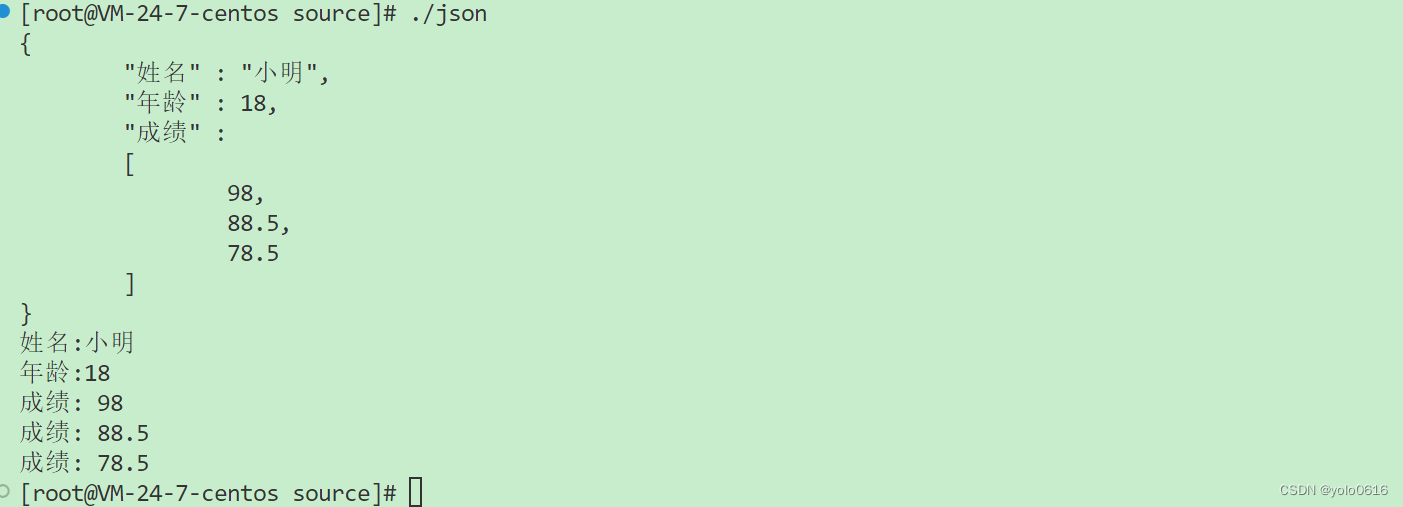
#include#include #include #include #include //使用jsoncpp库进行多个数据对象的序列化 std::string serialize() { //1. 将需要进行序列化的数据,存储在Json::Value 对象中 Json::Value root; root["姓名"] = "小明"; root["年龄"] = 18; root["成绩"].append(98); root["成绩"].append(88.5); root["成绩"].append(78.5); //2. 实例化一个StreamWriterBuilder工厂类对象 Json::StreamWriterBuilder swb; //3. 通过StreamWriterBuilder工厂类对象生产一个StreamWriter对象 Json::StreamWriter *sw = swb.newStreamWriter(); //4. 使用StreamWriter对象,对Json::Value中存储的数据进行序列化 std::stringstream ss; int ret = sw->write(root, &ss); if (ret != 0) { std::cout << "json serialize failed!!\n"; return ""; } std::cout << ss.str() << std::endl; delete sw; return ss.str(); } void unserialize(const std::string &str) { //1. 实例化一个CharReaderBuilder工厂类对象 Json::CharReaderBuilder crb; //2. 使用CharReaderBuilder工厂类生产一个CharReader对象 Json::CharReader *cr = crb.newCharReader(); //3. 定义一个Json::Value对象存储解析后的数据 Json::Value root; std::string err; //4. 使用CharReader对象进行json格式字符串str的反序列化 // parse(char *start, char *end, Json::Value *val, string *err); bool ret = cr->parse(str.c_str(), str.c_str() + str.size(), &root, &err); if (ret == false) { std::cout << "json unserialize failed: " << err << std::endl; return ; } //5. 逐个元素去访问Json::Value中的数据 std::cout << "姓名:" << root["姓名"].asString() << std::endl; std::cout << "年龄:" << root["年龄"].asInt() << std::endl; int sz = root["成绩"].size(); for (int i = 0; i < sz; i++) { std::cout << "成绩: " << root["成绩"][i].asFloat() << std::endl; } delete cr; } int main() { std::string str = serialize(); unserialize(str); return 0; } - 1
- 2
- 3
- 4
- 5
- 6
- 7
- 8
- 9
- 10
- 11
- 12
- 13
- 14
- 15
- 16
- 17
- 18
- 19
- 20
- 21
- 22
- 23
- 24
- 25
- 26
- 27
- 28
- 29
- 30
- 31
- 32
- 33
- 34
- 35
- 36
- 37
- 38
- 39
- 40
- 41
- 42
- 43
- 44
- 45
- 46
- 47
- 48
- 49
- 50
- 51
- 52
- 53
- 54
- 55
- 56
- 57
- 58
- 59
- 60
- 61
- 62
-
相关阅读:
交换机与路由器技术:标准ACL、扩展ACL和命名ACL
线扫相机DALSA软件开发套件有哪些
来聊聊阿里1688 /拼多多API接口接入| 让需求回到产品端
LVS+Keepalived高可用群集部署
LLM(四)| Chinese-LLaMA-Alpaca:包含中文 LLaMA 模型和经过指令微调的 Alpaca 大型模型
55_Pandas.DataFrame 转换为 JSON 字符串/文件并保存 (to_json)
文件服务器管理服务器怎么设置
Python(12)进程与线程
java本地开发上传图片可见两种处理办法
第07-5章 传输层详解
- 原文地址:https://blog.csdn.net/weixin_54447296/article/details/133966549