-
Transformers基本组件(一)快速入门Pipeline、Tokenizer、Model
Transformers基本组件(一)快速入门Pipeline、Tokenizer、Model
Hugging Face出品的Transformers工具包可以说是自然语言处理领域中当下最常用的包之一,实现了大量的主流预训练模型架构,并提供了对应的与训练好的模型文件。
借助Transformers工具包,可以非常方便的调用主流预训练模型解决实际的下游任务,如文本分类、文本匹配、命名实体识别、阅读理解、文本生成、文本摘要等。
Transformers环境可以参考:
AutoDL平台transformers环境搭建1、基础组件Pipeline
1.1 Pipeline简介
为了更加方便的使用预训练模型,Transformers提供了pipeline函数,该函数封装了
模型及对应的数据前处理与后处理工工作,无需我们关注内部细节,只需要指定pipeline的任务类型并输入对应的文本,即可得到我们想要的答案,做到了真正的开箱即用。目前,pipeline中支持的任务类型包括:
- 情感分析(sentiment-analysis):对给定的文本分析其情感极性
- 文本生成(text-generation):根据给定的文本进行生成
- 命名实体识别(ner):标记句子中的实体
- 阅读理解(question-answering):给定上下文与问题,从上下文中抽取答案
- 掩码填充(fill-mask):填充给定文本中的掩码词
- 文本摘要(summarization):生成一段长文本的摘要
- 机器翻译(translation):将文本翻译成另一种语言
- 特征提取(feature-extraction):生成给定文本的张量表示
1.2 Pipeline常见API
1.2.1 查看Pipeline支持的任务类型
from transformers.pipelines import SUPPORTED_TASKS import warnings warnings.filterwarnings("ignore")- 1
- 2
- 3
- 4
for index,(k, v) in enumerate(SUPPORTED_TASKS.items()): print(index + 1,'\t', k, '\t', v)- 1
- 2
# audio-classification是任务名 # 'impl':# 'tf': () 指没有用tf进行实现 # ''pt': ( 指的是模型以pytorch的实现类 # default表示默认的模型 # 'type': 'audio' 指的是任务类型 1 audio-classification {'impl': <class 'transformers.pipelines.audio_classification.AudioClassificationPipeline'>, 'tf': (), 'pt': (<class 'transformers.models.auto.modeling_auto.AutoModelForAudioClassification'>,), 'default': {'model': {'pt': ('superb/wav2vec2-base-superb-ks', '372e048')}}, 'type': 'audio'} 2 automatic-speech-recognition {'impl': <class 'transformers.pipelines.automatic_speech_recognition.AutomaticSpeechRecognitionPipeline'>, 'tf': (), 'pt': (<class 'transformers.models.auto.modeling_auto.AutoModelForCTC'>, <class 'transformers.models.auto.modeling_auto.AutoModelForSpeechSeq2Seq'>), 'default': {'model': {'pt': ('facebook/wav2vec2-base-960h', '55bb623')}}, 'type': 'multimodal'} 3 text-to-audio {'impl': <class 'transformers.pipelines.text_to_audio.TextToAudioPipeline'>, 'tf': (), 'pt': (<class 'transformers.models.auto.modeling_auto.AutoModelForTextToWaveform'>, <class 'transformers.models.auto.modeling_auto.AutoModelForTextToSpectrogram'>), 'default': {'model': {'pt': ('suno/bark-small', '645cfba')}}, 'type': 'text'} 4 feature-extraction {'impl': <class 'transformers.pipelines.feature_extraction.FeatureExtractionPipeline'>, 'tf': (), 'pt': (<class 'transformers.models.auto.modeling_auto.AutoModel'>,), 'default': {'model': {'pt': ('distilbert-base-cased', '935ac13'), 'tf': ('distilbert-base-cased', '935ac13')}}, 'type': 'multimodal'} 5 text-classification {'impl': <class 'transformers.pipelines.text_classification.TextClassificationPipeline'>, 'tf': (), 'pt': (<class 'transformers.models.auto.modeling_auto.AutoModelForSequenceClassification'>,), 'default': {'model': {'pt': ('distilbert-base-uncased-finetuned-sst-2-english', 'af0f99b'), 'tf': ('distilbert-base-uncased-finetuned-sst-2-english', 'af0f99b')}}, 'type': 'text'} 6 token-classification {'impl': <class 'transformers.pipelines.token_classification.TokenClassificationPipeline'>, 'tf': (), 'pt': (<class 'transformers.models.auto.modeling_auto.AutoModelForTokenClassification'>,), 'default': {'model': {'pt': ('dbmdz/bert-large-cased-finetuned-conll03-english', 'f2482bf'), 'tf': ('dbmdz/bert-large-cased-finetuned-conll03-english', 'f2482bf')}}, 'type': 'text'} 7 question-answering {'impl': <class 'transformers.pipelines.question_answering.QuestionAnsweringPipeline'>, 'tf': (), 'pt': (<class 'transformers.models.auto.modeling_auto.AutoModelForQuestionAnswering'>,), 'default': {'model': {'pt': ('distilbert-base-cased-distilled-squad', '626af31'), 'tf': ('distilbert-base-cased-distilled-squad', '626af31')}}, 'type': 'text'} 8 table-question-answering {'impl': <class 'transformers.pipelines.table_question_answering.TableQuestionAnsweringPipeline'>, 'pt': (<class 'transformers.models.auto.modeling_auto.AutoModelForTableQuestionAnswering'>,), 'tf': (), 'default': {'model': {'pt': ('google/tapas-base-finetuned-wtq', '69ceee2'), 'tf': ('google/tapas-base-finetuned-wtq', '69ceee2')}}, 'type': 'text'} 9 visual-question-answering {'impl': <class 'transformers.pipelines.visual_question_answering.VisualQuestionAnsweringPipeline'>, 'pt': (<class 'transformers.models.auto.modeling_auto.AutoModelForVisualQuestionAnswering'>,), 'tf': (), 'default': {'model': {'pt': ('dandelin/vilt-b32-finetuned-vqa', '4355f59')}}, 'type': 'multimodal'} 10 document-question-answering {'impl': <class 'transformers.pipelines.document_question_answering.DocumentQuestionAnsweringPipeline'>, 'pt': (<class 'transformers.models.auto.modeling_auto.AutoModelForDocumentQuestionAnswering'>,), 'tf': (), 'default': {'model': {'pt': ('impira/layoutlm-document-qa', '52e01b3')}}, 'type': 'multimodal'} ......- 1
- 2
- 3
- 4
- 5
- 6
- 7
- 8
- 9
- 10
- 11
- 12
- 13
- 14
- 15
- 16
- 17
- 18
1.2.2 Pipeline的创建与使用方式
1、根据任务类型直接创建Pipeline,默认都是英文的模型from transformers import pipeline # 注意:需要魔法流量才能下载相关模型 pipe = pipeline("text-classification") pipe("very good!")- 1
- 2
- 3
- 4
- 5
[{'label': 'POSITIVE', 'score': 0.9998525381088257}]- 1
2、指定任务类型,再指定模型,创建基于指定模型的Pipeline# pipe = pipeline("text-classification", model="uer/roberta-base-finetuned-dianping-chinese") # 模型地址 https://huggingface.co/models # 此模型下载地址:https://huggingface.co/uer/roberta-base-finetuned-dianping-chinese/tree/main # 这里因为网络问题,先离线下载【pytorch_model.bin、vocab.txt等文件】,然后加载 model_path = '/root/autodl-fs/models/roberta-base-finetuned-dianping-chinese' pipe = pipeline("text-classification", model=model_path) pipe("我觉得不太行!") # [{'label': 'negative (stars 1, 2 and 3)', 'score': 0.9735506772994995}]- 1
- 2
- 3
- 4
- 5
- 6
- 7
- 8
- 9
- 10
- 11
- 12
3、预先加载模型,再创建Pipeline# 这种方式,必须同时指定model和tokenizer from transformers import AutoModelForSequenceClassification from transformers import AutoTokenizer model = AutoModelForSequenceClassification.from_pretrained(model_path) tokenizer = AutoTokenizer.from_pretrained(model_path) pipe = pipeline("text-classification", model=model, tokenizer=tokenizer) pipe("我觉得不太行!") # [{'label': 'negative (stars 1, 2 and 3)', 'score': 0.9735506772994995}]- 1
- 2
- 3
- 4
- 5
- 6
- 7
- 8
- 9
- 10
1.2.3 使用GPU进行推理
# 默认是在cpu进行推理 print(pipe.model.device) # device(type='cpu') import torch import time times = [] for i in range(100): torch.cuda.synchronize() start = time.time() pipe("我觉得不太行!") torch.cuda.synchronize() end = time.time() times.append(end - start) print(sum(times) / 100)- 1
- 2
- 3
- 4
- 5
- 6
- 7
- 8
- 9
- 10
- 11
- 12
- 13
- 14
# 使用GPU进行推理 pipe = pipeline("text-classification", model=model_path, device=0) print(pipe.model.device) # device(type='cuda', index=0) import torch import time times = [] for i in range(100): torch.cuda.synchronize() start = time.time() pipe("我觉得不太行!") torch.cuda.synchronize() end = time.time() times.append(end - start) print(sum(times) / 100)- 1
- 2
- 3
- 4
- 5
- 6
- 7
- 8
- 9
- 10
- 11
- 12
- 13
- 14
- 15
1.2.4 确定Pipeline的参数
qa_pipe = pipeline("question-answering", model="uer/roberta-base-chinese-extractive-qa") qa_pipe #- 1
- 2
- 3
- 4
# 进入这个类可以查看相关参数 QuestionAnsweringPipeline- 1
- 2
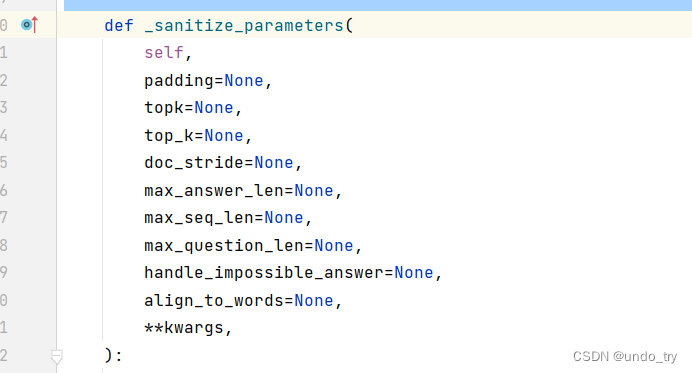
qa_pipe(question="中国的首都是哪里?", context="中国的首都是北京", max_answer_len=1) # {'score': 0.00228740437887609, 'start': 6, 'end': 7, 'answer': '北'}- 1
- 2
- 3
1.2.5 Pipeline背后的实现

from transformers import AutoTokenizer,AutoModelForSequenceClassification import torch # 1、词元化 tokenizer = AutoTokenizer.from_pretrained(model_path) model = AutoModelForSequenceClassification.from_pretrained(model_path) input_text = "我觉得不太行!" inputs = tokenizer(input_text, return_tensors="pt") inputs- 1
- 2
- 3
- 4
- 5
- 6
- 7
- 8
- 9
- 10
- 11
{'input_ids': tensor([[ 101, 2769, 6230, 2533, 679, 1922, 6121, 8013, 102]]), 'token_type_ids': tensor([[0, 0, 0, 0, 0, 0, 0, 0, 0]]), 'attention_mask': tensor([[1, 1, 1, 1, 1, 1, 1, 1, 1]])}- 1
# 2、加载模型,进行预测 res = model(**inputs) res- 1
- 2
- 3
SequenceClassifierOutput(loss=None, logits=tensor([[ 1.7376, -1.8681]], grad_fn=<AddmmBackward0>), hidden_states=None, attentions=None)- 1
logits = res.logits logits = torch.softmax(logits, dim=-1) logits- 1
- 2
- 3
tensor([[0.9736, 0.0264]], grad_fn=<SoftmaxBackward0>)- 1
# 3、标签映射 pred = torch.argmax(logits).item() result = model.config.id2label.get(pred) result- 1
- 2
- 3
- 4
'negative (stars 1, 2 and 3)'- 1
2、基础组件Tokenizer
2.1 Tokenizer简介
在使用神经网络处理自然语言处理任务时,我们首先需要对数据进行预处理,将数据从字符串转换为神经网络可以接受的格式,一般会分为如下几步:
(1)分词:使用分词器对文本数据进行分词(字、字词);
(2)构建词典:根据数据集分词的结果,构建词典映射(如果采用预训练词向量,词典映射要根据词向量文件进行处理);
(3)数据转换:根据构建好的词典,将分词处理后的数据做映射,将文本序列转换为数字序列;
(4)数据填充与截断:
在以batch输入到模型的方式中,需要对过短的数据进行填充,过长的数据进行截断,保证数据长度符合模型能接受的范围,同时batch内的数据维度大小一致。在以往的工作中,我们可能会使用不同的分词器,并自行实现构建词典与转换的工作。但是在transformers工具包中,无需再这般复杂,只需要借助Tokenizer模块便可以快速的实现上述全部工作,它的功能就是将文本转换为神经网络可以处理的数据。Tokenizer工具包无需额外安装,会随着transformers一起安装。
2.2 Tokenizer 基本使用
from transformers import AutoTokenizer import warnings warnings.filterwarnings("ignore") sen = "弱小的我也有大梦想!"- 1
- 2
- 3
- 4
- 5
- 6
- 7
2.2.1 模型的加载与保存
# 从HuggingFace加载,输入模型名称,即可加载对于的分词器 #tokenizer = AutoTokenizer.from_pretrained("uer/roberta-base-finetuned-dianping-chinese") # 这里同样选择离线加载 model_path = '/root/autodl-fs/models/roberta-base-finetuned-dianping-chinese' tokenizer = AutoTokenizer.from_pretrained(model_path) tokenizer- 1
- 2
- 3
- 4
- 5
- 6
- 7
BertTokenizerFast(name_or_path='/root/autodl-fs/models/roberta-base-finetuned-dianping-chinese', vocab_size=21128, model_max_length=1000000000000000019884624838656, is_fast=True, padding_side='right', truncation_side='right', special_tokens={'unk_token': '[UNK]', 'sep_token': '[SEP]', 'pad_token': '[PAD]', 'cls_token': '[CLS]', 'mask_token': '[MASK]'}, clean_up_tokenization_spaces=True), added_tokens_decoder={ 0: AddedToken("[PAD]", rstrip=False, lstrip=False, single_word=False, normalized=False, special=True), 100: AddedToken("[UNK]", rstrip=False, lstrip=False, single_word=False, normalized=False, special=True), 101: AddedToken("[CLS]", rstrip=False, lstrip=False, single_word=False, normalized=False, special=True), 102: AddedToken("[SEP]", rstrip=False, lstrip=False, single_word=False, normalized=False, special=True), 103: AddedToken("[MASK]", rstrip=False, lstrip=False, single_word=False, normalized=False, special=True), }- 1
- 2
- 3
- 4
- 5
- 6
- 7
- 8
# tokenizer 保存到本地 tokenizer.save_pretrained("./roberta_tokenizer")- 1
- 2
('./roberta_tokenizer\\tokenizer_config.json', './roberta_tokenizer\\special_tokens_map.json', './roberta_tokenizer\\vocab.txt', './roberta_tokenizer\\added_tokens.json', './roberta_tokenizer\\tokenizer.json')- 1
- 2
- 3
- 4
- 5
# 从本地加载tokenizer tokenizer = AutoTokenizer.from_pretrained("./roberta_tokenizer/") tokenizer- 1
- 2
- 3
2.2.2 句子分词
tokens = tokenizer.tokenize(sen) tokens- 1
- 2
['弱', '小', '的', '我', '也', '有', '大', '梦', '想', '!']- 1
2.2.3 查看词典
len(tokenizer.vocab) # 21128 tokenizer.vocab_size # 21128- 1
- 2
2.2.4 索引转换
# 将词序列转换为id序列 ids = tokenizer.convert_tokens_to_ids(tokens) ids- 1
- 2
- 3
[2483, 2207, 4638, 2769, 738, 3300, 1920, 3457, 2682, 106]- 1
# 将id序列转换为token序列 tokens = tokenizer.convert_ids_to_tokens(ids) tokens- 1
- 2
- 3
['弱', '小', '的', '我', '也', '有', '大', '梦', '想', '!']- 1
# 将token序列转换为string str_sen = tokenizer.convert_tokens_to_string(tokens) str_sen- 1
- 2
- 3
'弱 小 的 我 也 有 大 梦 想!'- 1
便捷实现方式# 将字符串转换为id序列,又称之为编码 ids = tokenizer.encode(sen, add_special_tokens=True) ids # [101, 2483, 2207, 4638, 2769, 738, 3300, 1920, 3457, 2682, 106, 102]- 1
- 2
- 3
- 4
# 将id序列转换为字符串,又称之为解码 str_sen = tokenizer.decode(ids, skip_special_tokens=False) str_sen # '[CLS] 弱 小 的 我 也 有 大 梦 想! [SEP]'- 1
- 2
- 3
- 4
2.2.5 填充与截断
# 填充 ids = tokenizer.encode(sen, padding="max_length", max_length=15) ids # [101, 2483, 2207, 4638, 2769, 738, 3300, 1920, 3457, 2682, 106, 102, 0, 0, 0]- 1
- 2
- 3
- 4
# 截断 ids = tokenizer.encode(sen, max_length=5, truncation=True) ids # [101, 2483, 2207, 4638, 102]- 1
- 2
- 3
- 4
2.2.6 其他输入部分
ids = tokenizer.encode(sen, padding="max_length", max_length=15) ids # [101, 2483, 2207, 4638, 2769, 738, 3300, 1920, 3457, 2682, 106, 102, 0, 0, 0]- 1
- 2
- 3
attention_mask = [1 if idx != 0 else 0 for idx in ids] token_type_ids = [0] * len(ids) ids, attention_mask, token_type_ids- 1
- 2
- 3
([101, 2483, 2207, 4638, 2769, 738, 3300, 1920, 3457, 2682, 106, 102, 0, 0, 0], [1, 1, 1, 1, 1, 1, 1, 1, 1, 1, 1, 1, 0, 0, 0], [0, 0, 0, 0, 0, 0, 0, 0, 0, 0, 0, 0, 0, 0, 0])- 1
- 2
- 3
2.2.7 快速调用方式
inputs = tokenizer.encode_plus(sen, padding="max_length", max_length=15) inputs- 1
- 2
{ 'input_ids': [101, 2483, 2207, 4638, 2769, 738, 3300, 1920, 3457, 2682, 106, 102, 0, 0, 0], 'token_type_ids': [0, 0, 0, 0, 0, 0, 0, 0, 0, 0, 0, 0, 0, 0, 0], 'attention_mask': [1, 1, 1, 1, 1, 1, 1, 1, 1, 1, 1, 1, 0, 0, 0] }- 1
- 2
- 3
- 4
- 5
inputs = tokenizer(sen, padding="max_length", max_length=15) inputs- 1
- 2
{ 'input_ids': [101, 2483, 2207, 4638, 2769, 738, 3300, 1920, 3457, 2682, 106, 102, 0, 0, 0], 'token_type_ids': [0, 0, 0, 0, 0, 0, 0, 0, 0, 0, 0, 0, 0, 0, 0], 'attention_mask': [1, 1, 1, 1, 1, 1, 1, 1, 1, 1, 1, 1, 0, 0, 0] }- 1
- 2
- 3
- 4
- 5
2.2.8 处理batch数据
sens = ["弱小的我也有大梦想", "有梦想谁都了不起", "追逐梦想的心,比梦想本身,更可贵"] res = tokenizer(sens) res- 1
- 2
- 3
- 4
- 5
{'input_ids': [[101, 2483, 2207, 4638, 2769, 738, 3300, 1920, 3457, 2682, 102], [101, 3300, 3457, 2682, 6443, 6963, 749, 679, 6629, 102], [101, 6841, 6852, 3457, 2682, 4638, 2552, 8024, 3683, 3457, 2682, 3315, 6716, 8024, 3291, 1377, 6586, 102]], 'token_type_ids': [[0, 0, 0, 0, 0, 0, 0, 0, 0, 0, 0], [0, 0, 0, 0, 0, 0, 0, 0, 0, 0], [0, 0, 0, 0, 0, 0, 0, 0, 0, 0, 0, 0, 0, 0, 0, 0, 0, 0]], 'attention_mask': [[1, 1, 1, 1, 1, 1, 1, 1, 1, 1, 1], [1, 1, 1, 1, 1, 1, 1, 1, 1, 1], [1, 1, 1, 1, 1, 1, 1, 1, 1, 1, 1, 1, 1, 1, 1, 1, 1, 1]]}- 1
时间对比
2.2.9 Fast / Slow Tokenizer
sen = "弱小的我也有大Dreaming!" fast_tokenizer = AutoTokenizer.from_pretrained(model_path) fast_tokenizer- 1
- 2
- 3
- 4
slow_tokenizer = AutoTokenizer.from_pretrained(model_path, use_fast=False) slow_tokenizer- 1
- 2
处理时间的差别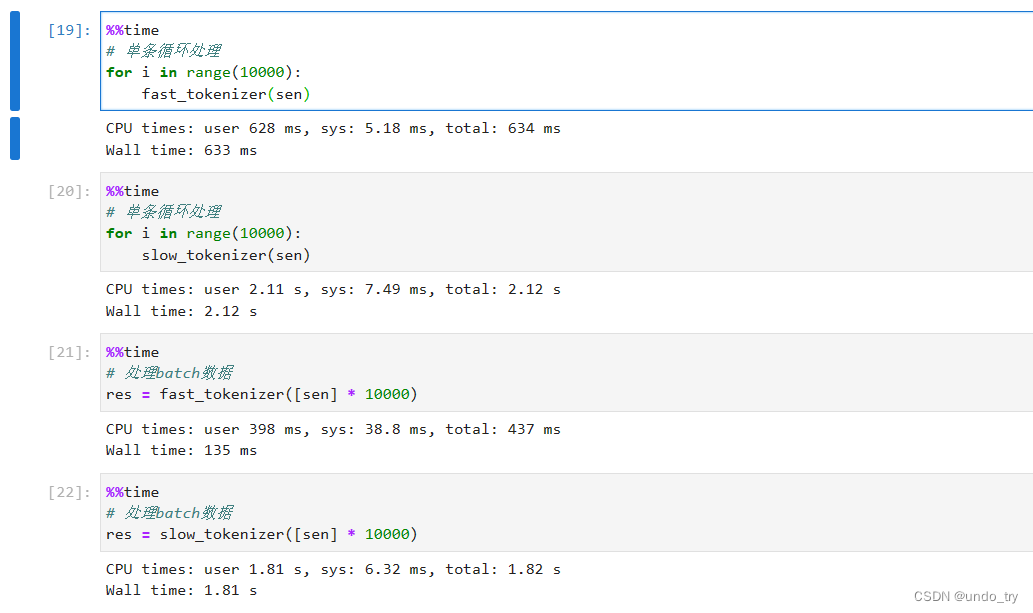
Fast Tokenizer特有的方法inputs = fast_tokenizer(sen, return_offsets_mapping=True) inputs- 1
- 2
{ 'input_ids': [101, 2483, 2207, 4638, 2769, 738, 3300, 1920, 10252, 8221, 106, 102], 'token_type_ids': [0, 0, 0, 0, 0, 0, 0, 0, 0, 0, 0, 0], 'attention_mask': [1, 1, 1, 1, 1, 1, 1, 1, 1, 1, 1, 1], # "弱小的我也有大Dreaming!" # Dreaming被分为两个词(7, 12), (12, 15) # 该字段中保存着每个token对应到原文中的起始与结束位置 'offset_mapping': [(0, 0), (0, 1), (1, 2), (2, 3), (3, 4), (4, 5), (5, 6), (6, 7), (7, 12), (12, 15), (15, 16), (0, 0)] }- 1
- 2
- 3
- 4
- 5
- 6
- 7
- 8
- 9
# word_ids方法,该方法会返回分词后token序列对应原始实际词的索引,特殊标记的值为None。 # Dreaming被分为两个词【7, 7】 inputs.word_ids()- 1
- 2
- 3
[None, 0, 1, 2, 3, 4, 5, 6, 7, 7, 8, None]- 1
2.2.10 特殊Tokenizer的加载
from transformers import AutoTokenizer # 需要设置trust_remote_code=True # 表示信任远程代码 tokenizer = AutoTokenizer.from_pretrained("THUDM/chatglm-6b", trust_remote_code=True) tokenizer- 1
- 2
- 3
- 4
- 5
- 6
tokenizer.save_pretrained("chatglm_tokenizer") # 需要设置trust_remote_code=True tokenizer = AutoTokenizer.from_pretrained("chatglm_tokenizer", trust_remote_code=True)- 1
- 2
- 3
- 4
3、基础组件Model
3.1 Model简介
常用的模型一般分为三种:自回归模型、自编码模型和序列到序列模型。
- 自回归模型采用经典的语言模型任务进行预训练,即给出上文,预测下文,对应原始Transformer模型的解码器部分,其中最经典的模型是GPT。由于自编码器只能看到上文而无法看到下文的特点,模型一般会用于文本生成的任务。
- 自编码模型则采用句子重建的任务进行预训练,即预先通过某种方式破坏句子,可能是掩码,可能是打乱顺序,希望模型将被破坏的部分还原,对应原始Transformer模型的编码器部分,其中最经典的模型是BERT。与自回归模型不同,模型既可以看到上文信息,也可以看到下文信息,由于这样的特点,自编码模型往往用于自然语言理解的任务,如文本分类、阅读理解等。(此外,这里需要注意,自编码模型和自回归模型的唯一区分其实是在于预训练时的任务,而不是模型结构。)
- 序列到序列模型则是同时使用了原始的编码器与解码器,最经典的模型便是T5。与经典的序列到序列模型类似,这种模型最自然的应用便是文本摘要、机器翻译等任务,事实上基本所有的NLP任务都可以通过序列到序列解决。
模型类型 常用预训练模型 适用任务 自回归模型 CTRL, GPT, GPT-2, Transformer XL 文本生成 自编码模型 ALBERT, BERT, DistilBERT, RoBERTa 文本分类、命名实体识别、阅读理解 序列到序列模型 BART, T5, Marian, mBART 文本摘要、机器翻译 3.2 Model基本使用
3.2.1 模型的加载
在线加载from transformers import AutoConfig, AutoModel, AutoTokenizer # 预训练模型的加载与Tokenizer类似,我们只需要指定想要加载的模型名称即可。 # 面对各种类型的模型,transformers也为我们提供了更加便捷的加载方式,我们无需指定具体的模型的类型,可以统一使用AutoModel进行加载。 # 首次加载的时候会进行模型文件的下载,下载后的文件会保存在~/.cache/huggingface/transformers文件夹中 # 注意:可能会因为网络问题,下载失败 # transformers的模型仓库中提供了丰富的模型,我们可以到模型仓库的网站中查看,直接搜索想要的模型。 model = AutoModel.from_pretrained("hfl/rbt3")- 1
- 2
- 3
- 4
- 5
- 6
- 7
- 8
离线下载# 可以使用下面命令进行下载 (只下载pytorch的权重文件) !git lfs clone "https://huggingface.co/hfl/rbt3" --include="*.bin" # 也可以去huggingface的官网手动点击下载 # https://huggingface.co/models- 1
- 2
- 3
- 4
- 5
离线加载# 如果在离线场景下,则需要将模型文件提前准备好,from_pretrained方法中指定本地模型存储的文件夹即可。 model_path = '/root/autodl-fs/models/rbt3' model = AutoModel.from_pretrained(model_path)- 1
- 2
- 3
- 4
查看模型参数# 通过AutoConfig可以查看模型参数 config = AutoConfig.from_pretrained(model_path) config- 1
- 2
- 3
BertConfig { "_name_or_path": "/root/autodl-fs/models/rbt3", "architectures": [ "BertForMaskedLM" ], "attention_probs_dropout_prob": 0.1, "classifier_dropout": null, "directionality": "bidi", "hidden_act": "gelu", "hidden_dropout_prob": 0.1, "hidden_size": 768, "initializer_range": 0.02, "intermediate_size": 3072, "layer_norm_eps": 1e-12, "max_position_embeddings": 512, "model_type": "bert", "num_attention_heads": 12, "num_hidden_layers": 3, "output_past": true, "pad_token_id": 0, "pooler_fc_size": 768, "pooler_num_attention_heads": 12, "pooler_num_fc_layers": 3, "pooler_size_per_head": 128, "pooler_type": "first_token_transform", "position_embedding_type": "absolute", "transformers_version": "4.28.1", "type_vocab_size": 2, "use_cache": true, "vocab_size": 21128 }- 1
- 2
- 3
- 4
- 5
- 6
- 7
- 8
- 9
- 10
- 11
- 12
- 13
- 14
- 15
- 16
- 17
- 18
- 19
- 20
- 21
- 22
- 23
- 24
- 25
- 26
- 27
- 28
- 29
- 30
- 31
3.2.2 模型的调用
sen = "弱小的我也有大梦想!" tokenizer = AutoTokenizer.from_pretrained(model_path) # 这里用到了Tokenizer的一个额外参数return_tensors,指定该参数的值,Tokenizer进行数据处理后将返回对应框架格式的数据,如pt对应pytorch,tf对应TensorFlow。 inputs = tokenizer(sen, return_tensors="pt") inputs- 1
- 2
- 3
- 4
- 5
- 6
{ 'input_ids': tensor([[ 101, 2483, 2207, 4638, 2769, 738, 3300, 1920, 3457, 2682, 8013, 102]]), 'token_type_ids': tensor([[0, 0, 0, 0, 0, 0, 0, 0, 0, 0, 0, 0]]), 'attention_mask': tensor([[1, 1, 1, 1, 1, 1, 1, 1, 1, 1, 1, 1]]) }- 1
- 2
- 3
- 4
- 5
-
Model Head 是连接在模型后的层,通常为1个或多个全连接层
-
Model Head 将模型的编码的表示结果进行映射,以解决不同类型的任务
不带Model Head的模型调用# 数据经过Tokenizer处理后可以便可以直接输入到模型中,得到模型编码 model = AutoModel.from_pretrained(model_path, output_attentions=True) output = model(**inputs) output- 1
- 2
- 3
- 4
- 5
BaseModelOutputWithPoolingAndCrossAttentions( last_hidden_state=tensor( [[[ 0.6804, 0.6664, 0.7170, ..., -0.4102, 0.7839, -0.0262], [-0.7378, -0.2748, 0.5034, ..., -0.1359, -0.4331, -0.5874], [-0.0212, 0.5642, 0.1032, ..., -0.3617, 0.4646, -0.4747], ..., [ 0.0853, 0.6679, -0.1757, ..., -0.0942, 0.4664, 0.2925], [ 0.3336, 0.3224, -0.3355, ..., -0.3262, 0.2532, -0.2507], [ 0.6761, 0.6688, 0.7154, ..., -0.4083, 0.7824, -0.0224]]], grad_fn=<NativeLayerNormBackward0>), pooler_output=tensor( [[-1.2646e-01, -9.8619e-01, -1.0000e+00, -9.8325e-01, 8.0238e-01, ..., 6.7307e-03, 9.9942e-01, -1.8233e-01]], grad_fn=<TanhBackward0>), hidden_states=None, past_key_values=None, attentions=(tensor( [[[[4.7840e-01, 3.7087e-04, 1.6194e-04, ..., 1.4241e-04, 4.1823e-04, 5.1813e-01], ... [7.1003e-02, 1.5132e-03, 7.3035e-04, ..., 2.2069e-02, 3.9020e-01, 5.0058e-01]]]], grad_fn=<SoftmaxBackward0>), tensor([[[[4.3653e-01, 1.2017e-02, 5.9486e-03, ..., 6.0889e-03, 6.2510e-02, 4.1911e-01], ..., [1.7047e-01, 3.6989e-02, 2.3646e-02, ..., 4.6833e-02, 2.5233e-01, 1.6721e-01]]]], grad_fn=<SoftmaxBackward0>)), cross_attentions=None)- 1
- 2
- 3
- 4
- 5
- 6
- 7
- 8
- 9
- 10
- 11
- 12
- 13
- 14
- 15
- 16
- 17
- 18
- 19
- 20
- 21
- 22
- 23
- 24
- 25
带Model Head的模型调用-
仅仅使用预训练模型本身,是无法对下游任务进行训练的。
-
想要实现对下游任务的训练,我们需要加载transformers包中的扩展模型(预训练模型+任务头模块)。
-
transformers包中提供了多种的任务头。
NLP任务 任务头 文本分类 SequenceClassification 文本匹配 SequenceClassification 阅读理解(抽取式问答) QuestionAnswering 掩码语言模型 MaskedLM 文本生成 CausalLM 命名实体识别 TokenClassification 文本摘要 Seq2SeqLM 机器翻译 Seq2SeqLM 生成式问答 Seq2SeqLM 在代码上,就是我们不再导入AutoModel,而是导入AutoModelFor+任务头名称。假设我们要做文本分类任务,那么则应该导入AutoModelForSequenceClassification。
这里需要注意,并不是每个模型都具备上述的全部任务头。预训练模型具体支持哪些任务头,需要到官网或者源码中进行查看。
from transformers import AutoModelForSequenceClassification clz_model = AutoModelForSequenceClassification.from_pretrained(model_path, num_labels=10) clz_model(**inputs)- 1
- 2
- 3
- 4
- 5
SequenceClassifierOutput( loss=None, logits=tensor([[-0.1776, 0.2208, -0.5060, -0.3938, -0.5837, 1.0171, -0.2616, 0.0495, 0.1728, 0.3047]], grad_fn=<AddmmBackward0>), hidden_states=None, attentions=None )- 1
- 2
- 3
- 4
- 5
- 6
- 7
- 8
3.3 利用Model进行情感分类
任务类型:文本分类
使用模型:hfl/rbt3
数据集地址:https://github.com/SophonPlus/ChineseNlpCorpus
3.1 加载数据
from transformers import AutoTokenizer, AutoModelForSequenceClassification from torch.utils.data import Dataset import pandas as pd import warnings warnings.filterwarnings("ignore") class MyDataset(Dataset): def __init__(self) -> None: super().__init__() self.data = pd.read_csv("./ChnSentiCorp_htl_all.csv") self.data = self.data.dropna() def __getitem__(self, index): return self.data.iloc[index]["review"], self.data.iloc[index]["label"] def __len__(self): return len(self.data)- 1
- 2
- 3
- 4
- 5
- 6
- 7
- 8
- 9
- 10
- 11
- 12
- 13
- 14
- 15
- 16
- 17
- 18
- 19
dataset = MyDataset() for i in range(5): print(dataset[i])- 1
- 2
- 3
('距离川沙公路较近,但是公交指示不对,如果是"蔡陆线"的话,会非常麻烦.建议用别的路线.房间较为简单.', 1) ('商务大床房,房间很大,床有2M宽,整体感觉经济实惠不错!', 1) ('早餐太差,无论去多少人,那边也不加食品的。酒店应该重视一下这个问题了。房间本身很好。', 1) ('宾馆在小街道上,不大好找,但还好北京热心同胞很多~宾馆设施跟介绍的差不多,房间很小,确实挺小,但加上低价位因素,还是无超所值的;环境不错,就在小胡同内,安静整洁,暖气好足-_-||。。。呵还有一大优势就是从宾馆出发,步行不到十分钟就可以到梅兰芳故居等等,京味小胡同,北海距离好近呢。总之,不错。推荐给节约消费的自助游朋友~比较划算,附近特色小吃很多~', 1) ('CBD中心,周围没什么店铺,说5星有点勉强.不知道为什么卫生间没有电吹风', 1)- 1
- 2
- 3
- 4
- 5
3.2 创建Dataloader
from torch.utils.data import random_split import torch from torch.utils.data import DataLoader # 划分训练集及验证集 trainset, validset = random_split(dataset, lengths=[0.9, 0.1]) # 离线加载模型 model_path = '/root/autodl-fs/models/rbt3' tokenizer = AutoTokenizer.from_pretrained(model_path) # 对一批数据进行词元化,并且填充到相同的长度 def collate_func(batch): texts, labels = [], [] for item in batch: texts.append(item[0]) labels.append(item[1]) inputs = tokenizer(texts, max_length=128, padding="max_length", truncation=True, return_tensors="pt") inputs["labels"] = torch.tensor(labels) return inputs trainloader = DataLoader(trainset, batch_size=32, shuffle=True, collate_fn=collate_func) validloader = DataLoader(validset, batch_size=64, shuffle=False, collate_fn=collate_func) next(enumerate(validloader))[1]- 1
- 2
- 3
- 4
- 5
- 6
- 7
- 8
- 9
- 10
- 11
- 12
- 13
- 14
- 15
- 16
- 17
- 18
- 19
- 20
- 21
- 22
- 23
- 24
- 25
{'input_ids': tensor([[ 101, 2769, 812, ..., 0, 0, 0], [ 101, 6983, 2421, ..., 0, 0, 0], [ 101, 6392, 3177, ..., 0, 0, 0], ..., [ 101, 3302, 1218, ..., 0, 0, 0], [ 101, 2600, 860, ..., 752, 2141, 102], [ 101, 1765, 4415, ..., 0, 0, 0]]), 'token_type_ids': tensor([[0, 0, 0, ..., 0, 0, 0], [0, 0, 0, ..., 0, 0, 0], [0, 0, 0, ..., 0, 0, 0], ..., [0, 0, 0, ..., 0, 0, 0], [0, 0, 0, ..., 0, 0, 0], ..., [0, 0, 0, ..., 0, 0, 0], [0, 0, 0, ..., 0, 0, 0], [0, 0, 0, ..., 0, 0, 0]]), 'attention_mask': tensor([[1, 1, 1, ..., 0, 0, 0], [1, 1, 1, ..., 0, 0, 0], [1, 1, 1, ..., 0, 0, 0], ..., [1, 1, 1, ..., 0, 0, 0], [1, 1, 1, ..., 1, 1, 1], [1, 1, 1, ..., 0, 0, 0]]), 'labels': tensor([1, 1, 0, 1, 1, 0, 1, 0, 0, 1, 1, 1, 1, 1, 1, 1, 1, 0, 1, 0, 1, 0, 1, 1, 1, 1, 1, 1, 0, 0, 0, 1, 1, 1, 1, 1, 0, 1, 1, 1, 1, 0, 1, 1, 1, 1, 1, 1, 1, 1, 1, 1, 0, 1, 1, 1, 1, 0, 1, 1, 1, 1, 1, 1])}- 1
- 2
- 3
- 4
- 5
- 6
- 7
- 8
- 9
- 10
- 11
- 12
- 13
- 14
- 15
- 16
- 17
- 18
- 19
- 20
- 21
- 22
- 23
- 24
- 25
- 26
- 27
3.3 创建模型及优化器
from torch.optim import Adam # 创建到Model Head的模型 model = AutoModelForSequenceClassification.from_pretrained(model_path) if torch.cuda.is_available(): model = model.cuda() # 创建优化器 optimizer = Adam(model.parameters(), lr=2e-5)- 1
- 2
- 3
- 4
- 5
- 6
- 7
- 8
- 9
- 10
3.4 训练及评估
# 自定义评估 评估指标accuracy def evaluate(): model.eval() acc_num = 0 with torch.inference_mode(): for batch in validloader: if torch.cuda.is_available(): batch = {k: v.cuda() for k, v in batch.items()} output = model(**batch) pred = torch.argmax(output.logits, dim=-1) acc_num += (pred.long() == batch["labels"].long()).float().sum() return acc_num / len(validset) # 自定义训练 def train(epoch=3, log_step=100): global_step = 0 for ep in range(epoch): model.train() for batch in trainloader: if torch.cuda.is_available(): batch = {k: v.cuda() for k, v in batch.items()} optimizer.zero_grad() output = model(**batch) output.loss.backward() optimizer.step() if global_step % log_step == 0: print(f"ep: {ep}, global_step: {global_step}, loss: {output.loss.item()}") global_step += 1 acc = evaluate() print(f"ep: {ep}, acc: {acc}")- 1
- 2
- 3
- 4
- 5
- 6
- 7
- 8
- 9
- 10
- 11
- 12
- 13
- 14
- 15
- 16
- 17
- 18
- 19
- 20
- 21
- 22
- 23
- 24
- 25
- 26
- 27
- 28
- 29
- 30
- 31
3.5 模型训练
train()- 1
ep: 0, global_step: 0, loss: 0.7741488814353943 ep: 0, global_step: 100, loss: 0.38942962884902954 ep: 0, global_step: 200, loss: 0.1997242420911789 ep: 0, acc: 0.8801546096801758 ep: 1, global_step: 300, loss: 0.16735711693763733 ep: 1, global_step: 400, loss: 0.39419108629226685 ep: 1, acc: 0.8969072103500366 ep: 2, global_step: 500, loss: 0.20464470982551575 ep: 2, global_step: 600, loss: 0.4124392569065094 ep: 2, acc: 0.8917525410652161- 1
- 2
- 3
- 4
- 5
- 6
- 7
- 8
- 9
- 10
- 11
- 12
- 13
3.6 模型预测
sen = "我觉得这家酒店不错,饭很好吃!" id2_label = {0: "差评!", 1: "好评!"} model.eval() with torch.inference_mode(): inputs = tokenizer(sen, return_tensors="pt") inputs = {k: v.cuda() for k, v in inputs.items()} logits = model(**inputs).logits pred = torch.argmax(logits, dim=-1) print(f"输入:{sen}\n模型预测结果:{id2_label.get(pred.item())}")- 1
- 2
- 3
- 4
- 5
- 6
- 7
- 8
- 9
输入:我觉得这家酒店不错,饭很好吃! 模型预测结果:好评!- 1
- 2
from transformers import pipeline # 使用pipeline进行预测 model.config.id2label = id2_label pipe = pipeline("text-classification", model=model, tokenizer=tokenizer, device=0) pipe('我这家饭店饭很贵,菜很贵,不喜欢吃')- 1
- 2
- 3
- 4
- 5
- 6
- 7
[{'label': '差评!', 'score': 0.5992199182510376}]- 1
这里我们自定义了dataset、评估函数及训练函数,接下来会通过组件(Datasets、Evaluate、Trainer)去训练模型。 -
相关阅读:
Spring
2023-06-07:Redis 持久化方式有哪些?以及有什么区别?
Docker 学习
【Spring Boot】详解restful api
Bash openldap同步AD组织数据
卷积神经网络
C++数据结构和算法 01
【css面试题】实现2栏布局 右侧自适应; 3栏布局 中间自适应
【开源】SpringBoot框架开发房屋出售出租系统
手把手带你玩转Spark机器学习-使用Spark构建回归模型
- 原文地址:https://blog.csdn.net/qq_44665283/article/details/133963667
