-
UniApp百度人脸识别插件YL-FaceDetect
插件地址:https://ext.dcloud.net.cn/plugin?id=15061
插件说明:
百度离线人脸识别,人脸收集,属性(性别年龄)识别等,目前只支持安卓端!
另:该插件支持的功能为属性识别,即当人脸出现在摄像头前时,会返回性别,年龄,活体得分,是否戴眼镜等信息,
不包含其它功能如:支付模式,闸机模式,考勤模式下的人脸认证。
人脸识别成功后保存人脸图片功能为预留功能,如有需请联系作者!
如有需其它识别功能,或更多定制化功能,请联系作者:QQ:453503875,微信同!


百度云官方地址:https://console.bce.baidu.com/
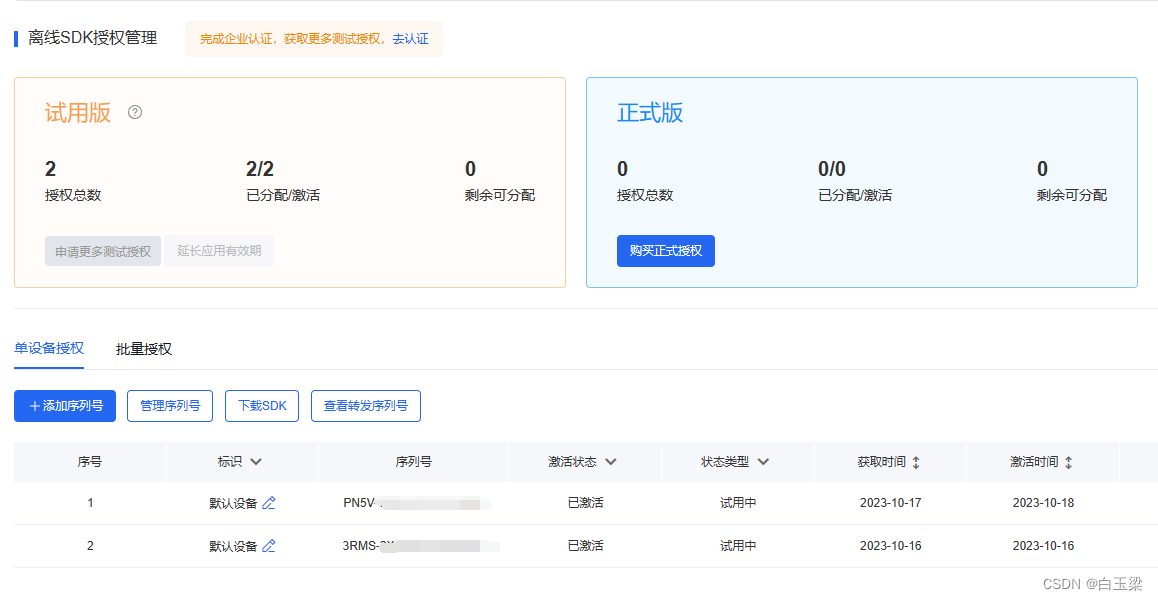
请申请离线识别SDK:
1.使用方法:
- 1.引入插件:
const fd = uni.requireNativePlugin("YL-FaceDetect");- 1
- 2.初始化(注意:需要自己在百度后台申请设备授权码,个人用户会有两个免费测试授权码),初始化成功后会直接启动摄像头进行识别,识别成功会持续返回识别结果
fd.init(this.inputValue, res => { this.content = JSON.stringify(res); });- 1
- 2
- 3
- 3.停止、销毁:
fd.destroy();- 1
注意:使用以上方式,可在vue中使用,但启动摄像头后不会显示摄像头预览画面,插件内部默认了为1像素,以满足大部分用户的无感知识别需求。
如果想显示预览画面,插件为你提供了view的方式,但必须使用nvue:
<yl-face-view ref="fd" style="width: 300;height: 600;">yl-face-view>- 1
- 2
- 3
然后使用ref初始化:
this.$refs.fd.init(this.inputValue, res => { this.content = JSON.stringify(res); });- 1
- 2
- 3
如果你想使用vue引入插件,并且要显示预览画面,或者有其它方面的需求,可联系本人!
代码示例:
<template> <div style="padding: 20rpx;"> <input placeholder="输入lisenseId" style="height: 100rpx;padding: 0 20rpx;border: 1px solid red;margin: 20rpx 0;" v-model="inputValue" /> <button type="primary" style="margin: 20rpx 0;" plain="true" @click="init()">开始识别button> <button type="primary" style="margin: 20rpx 0;" plain="true" @click="stop()">停止识别button> <view class="text" style="margin: 20rpx 0;"> <text>{{content}}text> view> div> template> <script> // 获取 module const fd = uni.requireNativePlugin("YL-FaceDetect"); export default { data() { return { inputValue: "", content: "" } }, mounted() { }, beforeDestroy() { this.stop(); }, methods: { init() { fd.init(this.inputValue, res => { this.content = JSON.stringify(res); }); }, stop() { fd.destroy(); } } } script> <style> .text { line-height: 1.5; text-align: justify; word-wrap: break-word; } style>- 1
- 2
- 3
- 4
- 5
- 6
- 7
- 8
- 9
- 10
- 11
- 12
- 13
- 14
- 15
- 16
- 17
- 18
- 19
- 20
- 21
- 22
- 23
- 24
- 25
- 26
- 27
- 28
- 29
- 30
- 31
- 32
- 33
- 34
- 35
- 36
- 37
- 38
- 39
- 40
- 41
- 42
- 43
- 44
- 45
- 46
- 47
- 48
- 49
- 50
- 51
- 52
- 53
- 54
- 55
-
相关阅读:
sql聚合函数
duplicate复制数据库单个数据文件复制失败报错rman-03009 ora-03113
模板学堂|DataEase协助电商企业开展用户运营
【示波器专题】用示波器进行频率测量精度为什么低于频率计
【数据结构】顺序表 详解(初始化、增、删、查、改)
FPGA时序约束02——不同时序路径的分析方法
SpringBoot+Vue+EasyExcel实现Excel的导入导出
RocketMQ NameServer源码剖析
(十一)数据结构-线索二叉树
【图神经网络论文整理】(八)—— Heterogeneous Graph Attention Network:HAN
- 原文地址:https://blog.csdn.net/baiyuliang2013/article/details/133959214
