-
微信小程序之后台首页交互
目录
一.与后台数据进行交互&request封装
后台准备
pom.xml文件编写
- "1.0" encoding="UTF-8"?>
- <project xmlns="http://maven.apache.org/POM/4.0.0" xmlns:xsi="http://www.w3.org/2001/XMLSchema-instance"
- xsi:schemaLocation="http://maven.apache.org/POM/4.0.0 https://maven.apache.org/xsd/maven-4.0.0.xsd">
- <modelVersion>4.0.0modelVersion>
- <parent>
- <groupId>org.springframework.bootgroupId>
- <artifactId>spring-boot-starter-parentartifactId>
- <version>2.6.2version>
- <relativePath/>
- parent>
- <groupId>com.zkinggroupId>
- <artifactId>minoaartifactId>
- <version>0.0.1-SNAPSHOTversion>
- <name>minoaname>
- <description>Demo project for Spring Bootdescription>
- <properties>
- <java.version>1.8java.version>
- <fastjson.version>1.2.70fastjson.version>
- <jackson.version>2.9.8jackson.version>
- properties>
- <dependencies>
- <dependency>
- <groupId>org.springframework.bootgroupId>
- <artifactId>spring-boot-starter-jdbcartifactId>
- dependency>
- <dependency>
- <groupId>org.springframework.bootgroupId>
- <artifactId>spring-boot-starter-webartifactId>
- dependency>
- <dependency>
- <groupId>org.mybatis.spring.bootgroupId>
- <artifactId>mybatis-spring-boot-starterartifactId>
- <version>2.2.1version>
- dependency>
- <dependency>
- <groupId>mysqlgroupId>
- <artifactId>mysql-connector-javaartifactId>
- <version>5.1.44version>
- <scope>runtimescope>
- dependency>
- <dependency>
- <groupId>org.projectlombokgroupId>
- <artifactId>lombokartifactId>
- <optional>trueoptional>
- dependency>
- <dependency>
- <groupId>com.alibabagroupId>
- <artifactId>fastjsonartifactId>
- <version>${fastjson.version}version>
- dependency>
- dependencies>
- <build>
- <plugins>
- <plugin>
- <groupId>org.springframework.bootgroupId>
- <artifactId>spring-boot-maven-pluginartifactId>
- <configuration>
- <excludes>
- <exclude>
- <groupId>org.projectlombokgroupId>
- <artifactId>lombokartifactId>
- exclude>
- excludes>
- configuration>
- plugin>
- <plugin>
- <groupId>org.mybatis.generatorgroupId>
- <artifactId>mybatis-generator-maven-pluginartifactId>
- <version>1.3.2version>
- <dependencies>
- <dependency>
- <groupId>mysqlgroupId>
- <artifactId>mysql-connector-javaartifactId>
- <version>${mysql.version}version>
- dependency>
- dependencies>
- <configuration>
- <overwrite>trueoverwrite>
- configuration>
- plugin>
- plugins>
- build>
- project>

建立数据请求地址类
- package com.zking.minoa.wxcontroller;
- import com.zking.minoa.mapper.InfoMapper;
- import com.zking.minoa.model.Info;
- import com.zking.minoa.util.ResponseUtil;
- import org.springframework.beans.factory.annotation.Autowired;
- import org.springframework.web.bind.annotation.RequestMapping;
- import org.springframework.web.bind.annotation.RestController;
- import java.util.HashMap;
- import java.util.List;
- import java.util.Map;
- /**
- * @Autho donkee
- * @Since 2022/6/29
- */
- @RestController
- @RequestMapping("/wx/home")
- public class WxHomeController {
- @Autowired
- private InfoMapper infoMapper;
- @RequestMapping("/index")
- public Object index(Info info) {
- List<Info> infoList = infoMapper.list(info);
- Map<Object, Object> data = new HashMap<Object, Object>();
- data.put("infoList",infoList);
- return ResponseUtil.ok(data);
- }
- }
定义接口类
- package com.zking.minoa;
- import org.mybatis.spring.annotation.MapperScan;
- import org.springframework.boot.SpringApplication;
- import org.springframework.boot.autoconfigure.SpringBootApplication;
- @MapperScan("com.zking.minoa.mapper") //指mapper接口所在包
- @SpringBootApplication
- public class MinoaApplication {
- public static void main(String[] args) {
- SpringApplication.run(MinoaApplication.class, args);
- }
- }
测试结果

前端
先关闭mock

先编写url地址
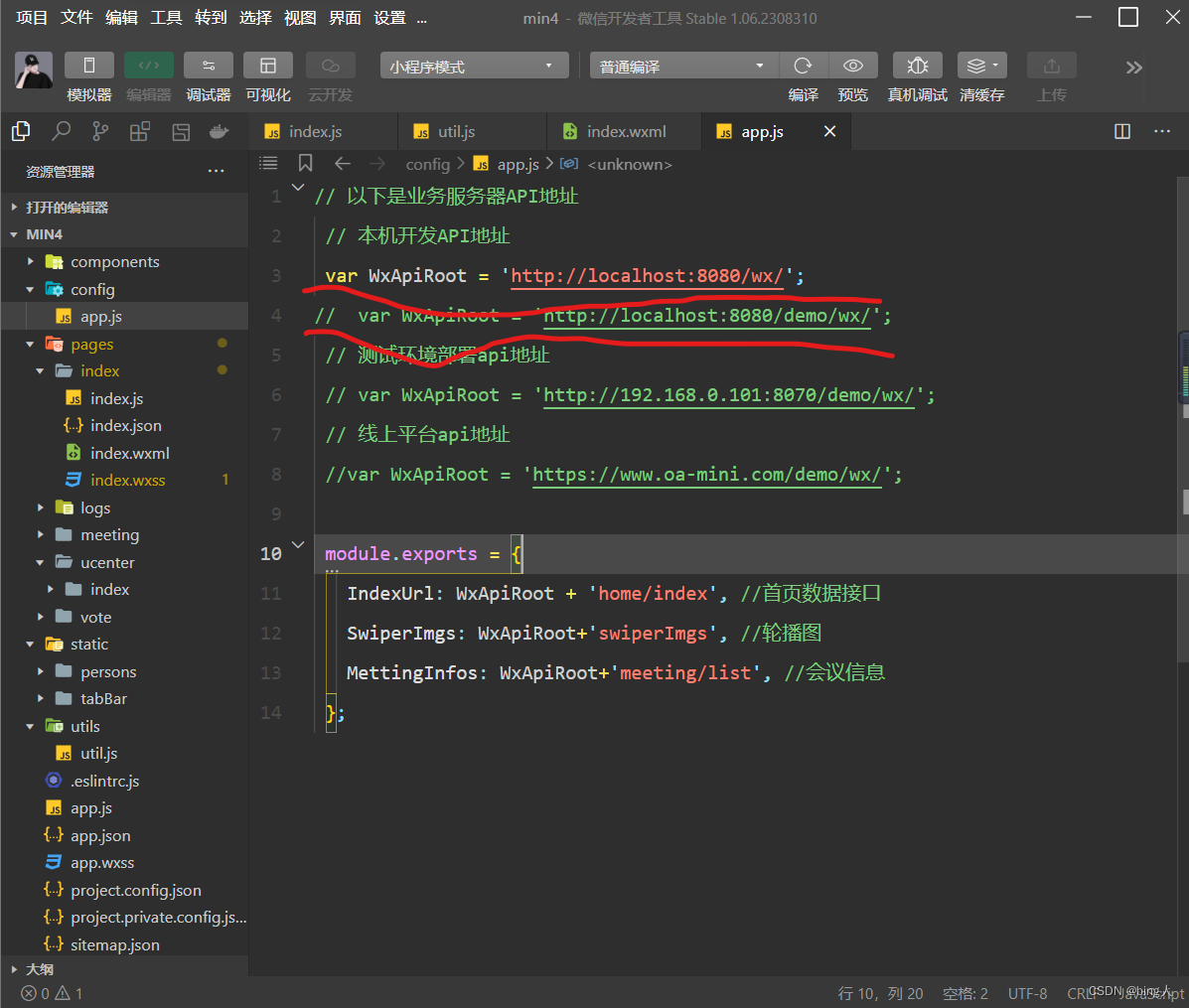
编写utils.js
- const formatTime = date => {
- const year = date.getFullYear()
- const month = date.getMonth() + 1
- const day = date.getDate()
- const hour = date.getHours()
- const minute = date.getMinutes()
- const second = date.getSeconds()
- return `${[year, month, day].map(formatNumber).join('/')} ${[hour, minute, second].map(formatNumber).join(':')}`
- }
- const formatNumber = n => {
- n = n.toString()
- return n[1] ? n : `0${n}`
- }
- /**
- * 封装微信的request请求
- */
- function request(url, data = {}, method = "GET") {
- return new Promise(function (resolve, reject) {
- wx.request({
- url: url,
- data: data,
- method: method,
- header: {
- 'Content-Type': 'application/json',
- },
- success: function (res) {
- if (res.statusCode == 200) {
- resolve(res.data);//会把进行中改变成已成功
- } else {
- reject(res.errMsg);//会把进行中改变成已失败
- }
- },
- fail: function (err) {
- reject(err)
- }
- })
- });
- }
- module.exports = {
- formatTime,request
- }
编写index.js
- // index.js
- // 获取应用实例
- const app = getApp()
- const api=require("../../config/app.js")
- const util=require("../../utils/util.js")
- Page({
- data: {
- imgSrcs:[
- {
- "img": "https://cdn-we-retail.ym.tencent.com/tsr/home/v2/banner1.png",
- "text": "1"
- },
- {
- "img": "https://cdn-we-retail.ym.tencent.com/tsr/home/v2/banner2.png",
- "text": "2"
- },
- {
- "img": "https://cdn-we-retail.ym.tencent.com/tsr/home/v2/banner3.png",
- "text": "3"
- },
- {
- "img": "https://cdn-we-retail.ym.tencent.com/tsr/home/v2/banner4.png",
- "text": "4"
- },
- {
- "img": "https://cdn-we-retail.ym.tencent.com/tsr/home/v2/banner5.png",
- "text": "5"
- },
- {
- "img": "https://cdn-we-retail.ym.tencent.com/tsr/home/v2/banner6.png",
- "text": "6"
- }
- ],
- lists:[
- ]
- },
- // 事件处理函数
- bindViewTap() {
- wx.navigateTo({
- url: '../logs/logs'
- })
- },
- loadMeetInfos(){
- util.request(api.IndexUrl).then(res=>{
- console.log(res);
- this.setData({
- lists:res.data.infoList
- })
- });
- // let that=this;
- // wx.request({
- // url: api.IndexUrl,
- // dataType: 'json',
- // success(res) {
- // console.log(res)
- // that.setData({
- // lists:res.data.data.infoList
- // })
- // }
- // })
- },
- loadSwiperImgs(){
- let that=this;
- // wx.request({
- // url: api.SwiperImgs,
- // dataType: 'json',
- // success(res) {
- // console.log(res)
- // that.setData({
- // imgSrcs:res.data.images
- // })
- // }
- // })
- },
- onLoad() {
- if (wx.getUserProfile) {
- this.setData({
- canIUseGetUserProfile: true
- })
- }
- this.loadSwiperImgs();
- this.loadMeetInfos();
- },
- getUserProfile(e) {
- // 推荐使用wx.getUserProfile获取用户信息,开发者每次通过该接口获取用户个人信息均需用户确认,开发者妥善保管用户快速填写的头像昵称,避免重复弹窗
- wx.getUserProfile({
- desc: '展示用户信息', // 声明获取用户个人信息后的用途,后续会展示在弹窗中,请谨慎填写
- success: (res) => {
- console.log(res)
- this.setData({
- userInfo: res.userInfo,
- hasUserInfo: true
- })
- }
- })
- },
- getUserInfo(e) {
- // 不推荐使用getUserInfo获取用户信息,预计自2021年4月13日起,getUserInfo将不再弹出弹窗,并直接返回匿名的用户个人信息
- console.log(e)
- this.setData({
- userInfo: e.detail.userInfo,
- hasUserInfo: true
- })
- }
- })
编写index.wxml

测试结果

二.wxs的介绍以及入门
WXS 代码可以编写在 wxml 文件中的
标签内,或以 .wxs 为后缀名的文件内。 模块
每一个 .wxs 文件和标签都是一个单独的模块。 每个模块都有自己独立的作用域。即在一个模块里面定义的变量与函数,默认为私有的,对其他模块不可见。
一个模块要想对外暴露其内部的私有变量与函数,只能通过 module.exports 实现。
.wxs 文件
在微信开发者工具里面,右键可以直接创建 .wxs 文件,在其中直接编写 WXS 脚本。
在utils里面建立一个文件夹,在文件夹建立wxs文件

wxs文件编写
- // /pages/comm.wxs
- function getStateName(state){
- if(state ==1){
- return "待审核"
- }else if(state ==2){
- return "审核通过"
- }else if(state ==3){
- return "审核不通过"
- }else if(state ==4){
- return "待开会议"
- }
- return "其他";
- }
- function getNum(canyuze,liexize,zhuchiren){
- var person = canyuze+ ","+liexize+","+zhuchiren;
- return person.split(",").length;
- }
- function formatDate(ts, option) {
- var date = getDate(ts)
- var year = date.getFullYear()
- var month = date.getMonth() + 1
- var day = date.getDate()
- var week = date.getDay()
- var hour = date.getHours()
- var minute = date.getMinutes()
- var second = date.getSeconds()
- //获取 年月日
- if (option == 'YY-MM-DD') return [year, month, day].map(formatNumber).join('-')
- //获取 年月
- if (option == 'YY-MM') return [year, month].map(formatNumber).join('-')
- //获取 年
- if (option == 'YY') return [year].map(formatNumber).toString()
- //获取 月
- if (option == 'MM') return [mont].map(formatNumber).toString()
- //获取 日
- if (option == 'DD') return [day].map(formatNumber).toString()
- //获取 年月日 周一 至 周日
- if (option == 'YY-MM-DD Week') return [year, month, day].map(formatNumber).join('-') + ' ' + getWeek(week)
- //获取 月日 周一 至 周日
- if (option == 'MM-DD Week') return [month, day].map(formatNumber).join('-') + ' ' + getWeek(week)
- //获取 周一 至 周日
- if (option == 'Week') return getWeek(week)
- //获取 时分秒
- if (option == 'hh-mm-ss') return [hour, minute, second].map(formatNumber).join(':')
- //获取 时分
- if (option == 'hh-mm') return [hour, minute].map(formatNumber).join(':')
- //获取 分秒
- if (option == 'mm-dd') return [minute, second].map(formatNumber).join(':')
- //获取 时
- if (option == 'hh') return [hour].map(formatNumber).toString()
- //获取 分
- if (option == 'mm') return [minute].map(formatNumber).toString()
- //获取 秒
- if (option == 'ss') return [second].map(formatNumber).toString()
- //默认 时分秒 年月日
- return [year, month, day].map(formatNumber).join('-') + ' ' + [hour, minute, second].map(formatNumber).join(':')
- }
- function formatNumber(n) {
- n = n.toString()
- return n[1] ? n : '0' + n
- }
- function getWeek(n) {
- switch(n) {
- case 1:
- return '星期一'
- case 2:
- return '星期二'
- case 3:
- return '星期三'
- case 4:
- return '星期四'
- case 5:
- return '星期五'
- case 6:
- return '星期六'
- case 7:
- return '星期日'
- }
- }
- module.exports = {
- getStateName: getStateName,
- getNum:getNum,
- formatDate:formatDate
- };
在index.wxml中编写数据显示
- <view>
- <swiper indicator-dots="true" autoplay="true" >
- <block wx:for="{{imgSrcs}}" wx:key="*text">
- <swiper-item>
- <image src=" {{item.img}}">image>
- swiper-item>
- block>
- swiper>
- view>
- <wxs src="/utils/comm.wxs" module="tools" />
- <view class="mobi-title">
- <text class="mobi-icon">text>
- <text>会议信息text>
- view>
- <block wx:for-items="{{lists}}" wx:for-item="item" wx:key="item.id">
- <view class="list" data-id="{{item.id}}">
- <view class="list-img">
- <image class="video-img" mode="scaleToFill" src="{{item.image !=null ? item.image : '/static/persons/2.jpg'}}">image>
- view>
- <view class="list-detail">
- <view class="list-title"><text>{{item.title}}text>view>
- <view class="list-tag">
- <view class="state">{{tools.getStateName(item.state)}}
- view>
- <view class="join"><text class="list-num">
- {{tools.getNum(item.canyuze,item.liexize,item.zhuchiren)}}text>人报名view>
- view>
- <view class="list-info"><text>{{item.location}}text>|<text>{{tools.formatDate(item.starttime)}}text>view>
- view>
- view>
- block>
- <view class="section bottom-line">
- <text>到底啦text>
- view>
测试结果

-
相关阅读:
c++ 组合模式示例
应用链的崛起将带来哪些风险与机遇?
vue存储和使用后端传递过来的token
Vue 中 KeepAlive 内置缓存使用
java中spark数据集字段下划线改成驼峰
【chat】 1:Ubuntu 20.04.3 编译安装moduo master分支
autox.js的三个版本universal、armeabi-v7a、arm64-v8a的区别
springboot admin自定义监控里的info信息
Java面试问题记录
TLSR8258应用笔记
- 原文地址:https://blog.csdn.net/2201_75455485/article/details/133955089
