-
vue 插槽 作用域插槽
vue 插槽 作用域插槽

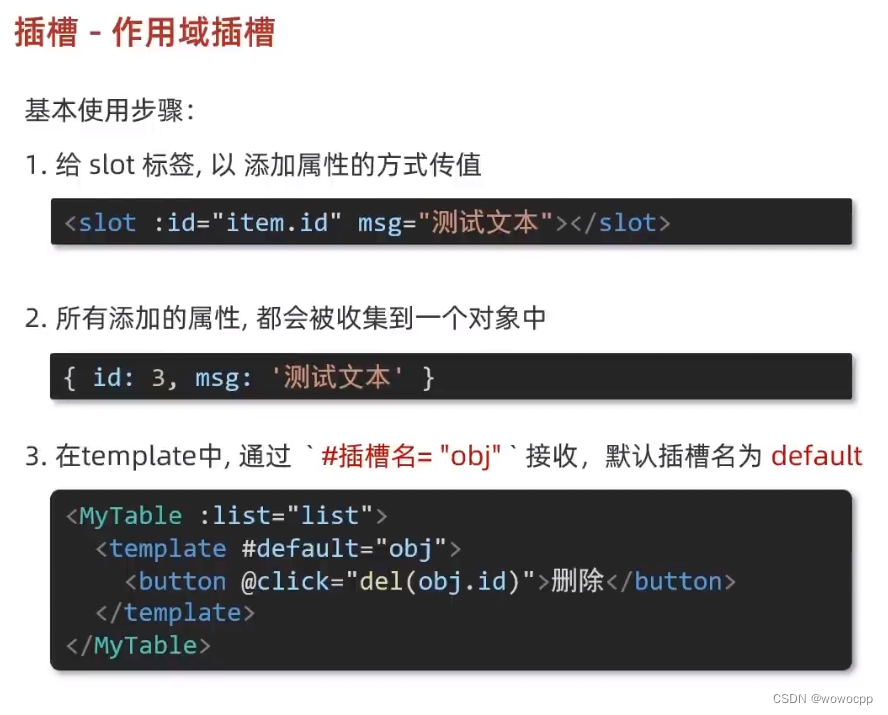
**创建 工程:
H:\java_work\java_springboot\vue_studyctrl按住不放 右键 悬着 powershell
H:\java_work\java_springboot\js_study\Vue2_3入门到实战-配套资料\01-随堂代码素材\day05\准备代码\10-插槽-作用域插槽
vue --version
vue create v-yu-slot-demo
cd v-yu-slot-demo
npm run serveApp.vue
<template> <div> <MyTable :data="list"> <template #default="obj"> <!-- {{ obj }} --> <button @click="del(obj.row.id)">删除</button> </template> </MyTable> <MyTable :data="list"> <template #default="{ row }"> <button @click="show(row)">查看</button> </template> </MyTable> </div> </template> <script> import MyTable from "./components/MyTable.vue"; export default { data() { return { list: [ { id: 1, name: "张小花", age: 18 }, { id: 2, name: "孙大明", age: 19 }, { id: 3, name: "刘德忠", age: 17 }, ], list2: [ { id: 1, name: "赵小云", age: 18 }, { id: 2, name: "刘蓓蓓", age: 19 }, { id: 3, name: "姜肖泰", age: 17 }, ], }; }, components: { MyTable, }, methods: { del(id) { console.log(id); this.list = this.list.filter((item) => item.id !== id); }, show(row) { console.log(row); alert(`姓名: ${row.name}; 年龄:${row.age}`); }, }, }; </script>- 1
- 2
- 3
- 4
- 5
- 6
- 7
- 8
- 9
- 10
- 11
- 12
- 13
- 14
- 15
- 16
- 17
- 18
- 19
- 20
- 21
- 22
- 23
- 24
- 25
- 26
- 27
- 28
- 29
- 30
- 31
- 32
- 33
- 34
- 35
- 36
- 37
- 38
- 39
- 40
- 41
- 42
- 43
- 44
- 45
- 46
- 47
- 48
- 49
- 50
MyTable.vue
<template> <table class="my-table"> <thead> <tr> <th>序号</th> <th>姓名</th> <th>年纪</th> <th>操作</th> </tr> </thead> <tbody> <tr v-for="(item, index) in data" :key="item.id"> <td>{{ index + 1 }}</td> <td>{{ item.name }}</td> <td>{{ item.age }}</td> <td> <slot :row="item" msg="测试文本"></slot> <!-- 2.将所有的属性 --> <!-- { row : {id: 2 ,name: '孙大明', age: 19}, msg: "测试文本" } --> </td> </tr> </tbody> </table> </template> <script> export default { props: { data: Array, }, }; </script> <style scoped> .my-table { width: 450px; text-align: center; border: 1px solid #ccc; font-size: 24px; margin: 30px auto; } .my-table thead { background-color: #1f74ff; color: #fff; } .my-table thead th { font-weight: normal; } .my-table thead tr { line-height: 40px; } .my-table th, .my-table td { border-bottom: 1px solid #ccc; border-right: 1px solid #ccc; } .my-table td:last-child { border-right: none; } .my-table tr:last-child td { border-bottom: none; } .my-table button { width: 65px; height: 35px; font-size: 18px; border: 1px solid #ccc; outline: none; border-radius: 3px; cursor: pointer; background-color: #ffffff; margin-left: 5px; } </style>- 1
- 2
- 3
- 4
- 5
- 6
- 7
- 8
- 9
- 10
- 11
- 12
- 13
- 14
- 15
- 16
- 17
- 18
- 19
- 20
- 21
- 22
- 23
- 24
- 25
- 26
- 27
- 28
- 29
- 30
- 31
- 32
- 33
- 34
- 35
- 36
- 37
- 38
- 39
- 40
- 41
- 42
- 43
- 44
- 45
- 46
- 47
- 48
- 49
- 50
- 51
- 52
- 53
- 54
- 55
- 56
- 57
- 58
- 59
- 60
- 61
- 62
- 63
- 64
- 65
- 66
- 67
- 68
- 69
- 70
- 71
- 72
- 73
- 74
- 75
- 76
- 77
- 78
- 79
- 80
-
相关阅读:
模板学堂丨Zabbix监控告警大屏
(杂谈)关于UIE的一点感想
gitlab与github 密钥冲突
MTK Logo 逆向解析之 bin 转 rawx
TinyOs操作系统---第7章 任务管理模式
Python基础知识|50道必备的Python面试题(建议收藏)
Android平台应用裁剪
发布:iNeuOS工业互联网操作系统 V5 Preview1 版本(自主可控)
Git 分支管理
【C++】侯捷:C++面向对象-笔记-01
- 原文地址:https://blog.csdn.net/wowocpp/article/details/133945986
