-
vue3+element-plus 高度封装搜索组件,支持多种类型
目录
一、应用场景
一般很多网站,有很多数据列表,基本都要做搜索的功能,如果涉及很多页面,很多列表,那么搜索组件,一般要求统一样式之类的,并且封装搜索组件主要目的是提高代码的可维护性、可复用性和可扩展性,毕竟系统越写越多,列表页越来越多,不得不封装了,比如你看我这参与的项目,就从一开始的十几个页面,变成现在路由表快1000行的大项目,引用搜索组件的地方也高达:

问癌,它说,封装搜索组件的意义:
-
代码复用性: 封装搜索组件允许你在多个页面或组件中重复使用相同的搜索功能。这减少了代码的冗余,提高了开发效率。
-
可维护性: 通过将搜索功能封装到一个独立的组件中,可以更容易地维护和更新搜索逻辑。如果需要对搜索功能进行修改或添加新的功能,你只需要更新搜索组件而不必修改每个使用它的页面或组件。
-
可扩展性: 封装的搜索组件通常可以轻松扩展以支持不同类型的搜索字段或过滤条件。这使得在不同页面或应用中实现不同的搜索需求变得更加容易。
-
统一风格和用户体验: 通过使用相同的搜索组件,你可以确保整个应用的搜索界面保持一致的风格和用户体验,提高了应用的整体质量。
-
降低开发成本: 封装搜索组件可以节省开发时间和开发资源。开发人员可以专注于构建具体的业务逻辑而不必重复编写搜索功能。
-
易于测试: 独立的搜索组件可以更容易地进行单元测试,确保搜索功能的稳定性和正确性。
-
降低错误率: 通过减少手动编码搜索功能的机会,封装搜索组件有助于减少潜在的错误和bug。
二、开发流程
首先要明白,封装搜索组件,组件里都有什么,我这里封装的组件支持:
1.输入框
2.单选/多选/多选搜索/多选的远程搜索
3.时间选择器
通过form表单进行上面的封装
如下:

实现的效果,大概如此:

因为要考虑布局,所以使用的是col来控制布局,基本上一行放3个搜索框,加一组按钮,按钮有常见的查询,重置,折叠/展开,以及最右侧的业务按钮,比如:导出

上面的例子里,有几种类型(下面详细流程里有大图):
1.医生信息:el-input 输入框
2.所属医院:多选,带搜索和远程搜索(是否可以搜索、可以远程搜索、远程搜索的接口、传参、选项列表、选项的配置、是否能全选等自定义功能)
3.患者id:输入框
4.患者状态:多选(单选、可清空)
5.创建时间:日期时间选择器 (显示默认时间:默认是最近7天、时间选择范围:如不能超过180天、在此日期之前的时间禁止选中)
接下来的开发过程都是以上面的图片为例子实现。
三、详细开发流程
这里根据上面的例子封装一个搜索组件:1.新建文件
(1)index.vue 需要引用搜索组件的页面
(2)src\components\searchOptionsBox.vue 这是外层的表单
(3)src\components\searchOptionItem.vue 这是单个组件的文件
2.开始步骤
先建一个空页面,随便写点东西,index.vue 里作为需要引入搜索组件的地方,先引入:
- import SearchOptionsBox from '@/components/searchOptionsBox.vue'
- 页面
- <el-row>
- <SearchOptionsBox />
- </el-row>
先考虑父组件,通常都是在父组件写查数据的操作,那么就需要拿到搜索的值,①输入文字,点击搜索后,进行查询,②点击重置,这些搜索的值都是空的,③再输入值,再搜索,那么再次搜索。
所以,父组件基本上,就需要给搜索组件传一些组件的配置和获取搜索的值的操作,至于其他的控制搜索组件的一些配置,那就另外加。
基础的是这些:
<SearchOptionsBox :search-options="searchOptions" @search="searchData" />特殊的配置如下:
- <SearchOptionsBox
- :search-options="searchOptions"
- :show-button="true"
- :btn-loading="btnLoading"
- button-name="导出"
- :buttons-span="7"
- @search="searchData"
- />
这些特殊的配置,分别是控制,是否显示按钮组最右边的按钮,以及按钮的名字,按钮组占据的宽度比例
3.详细代码
(1).index.vue
- const searchOptions = ref([
- {
- label: '医生信息',
- prop: 'doctor_info',
- inputType: 'String',
- optionType: 'input',
- placeHolder: '请输入医生信息'
- },
- {
- label: '所属医院',
- prop: 'hospital_id', //传array
- inputType: 'Array',
- optionType: 'select',
- multiple: true,
- isRemote: true, //远程搜索
- remoteSelectUrl: '/hospital-list',
- remoteParams: {
- disease_id: '...'
- },
- placeHolder: '请搜索或选择',
- selectOptions: [],
- selectLabel: 'center_name',
- selectValue: 'center_id'
- },
- {
- label: '患者id',
- prop: 'patient_id',
- inputType: 'String',
- optionType: 'input',
- placeHolder: '请输入患者id'
- },
- {
- label: '患者状态',
- prop: 'patient_status',
- inputType: 'Array',
- optionType: 'select',
- multiple: true,
- placeHolder: '请选择患者状态',
- selectOptions: [
- { label: '住院', value: 1 },
- { label: '出院', value: 2 },
- { label: '其他', value: 3 }
- ]
- },
- {
- label: '创建时间',
- prop: 'create_at',
- inputType: 'Array',
- optionType: 'datePicker',
- placeHolder: ''
- }
- ])
- let searchParams = reactive({})
- const searchData = (searchForm) => {
- params.page = 1
- searchParams = JSON.parse(JSON.stringify(searchForm)) ///深拷贝
- if (searchForm.patient_status) { //如果是get请求,为了业务就数组转存为string了
- searchParams.patient_status = JSON.stringify(searchParams.patient_status)
- }
- getDataList() //获取数据,searchParams是搜索的值
- }
- //在获取数据时,把传参拼接一下
- //let tempParams = { ...params, ...searchParams }
这个页面,主要定义一些搜索组件的配置,和搜索时的参数处理。
弊端是:会出现一些不必要的参数,比如一些没有值的参数也会传,当然可以清掉。
如果有导出功能,那么需要按照上面的特殊配置进行,同时,获取数据时,需要另外处理,如下:
- let searchParams = ref({})
- const searchData = (searchForm, download) => {
- params.page = 1
- searchParams.value = JSON.parse(JSON.stringify(searchForm))
- //post 接口可以直接传array,不用再次处理
- if (!download) {
- download = 0//或者false,这里我是以1代表true
- isSearch.value = true
- } else {
- isDownload.value = true
- }
- //获取数据时
- }
这里是详细的数据。
还有一个注意点,如果搜索组件的配置,有些比如多选组件,那么它的列表需要调接口才能拿到,要控制好页面加载的生命周期,一定要拿到数据再去加载搜索组件。
(2).搜索组件
首先,因为我懒得布局,所以就借用的form和col的布局方式,外层一个表单,每一个组件就是一个item,然后一个组件在col里用24布局,默认一个占6的大小,当然个别的可以调整,只要一行最大24就行,如此,一行也就能放3个组件一个按钮组,那么肯定要考虑折叠展开的逻辑,所以会有第二行,第三行,不过我的业务不涉及第三行,一般就两行。布局就大概这样。
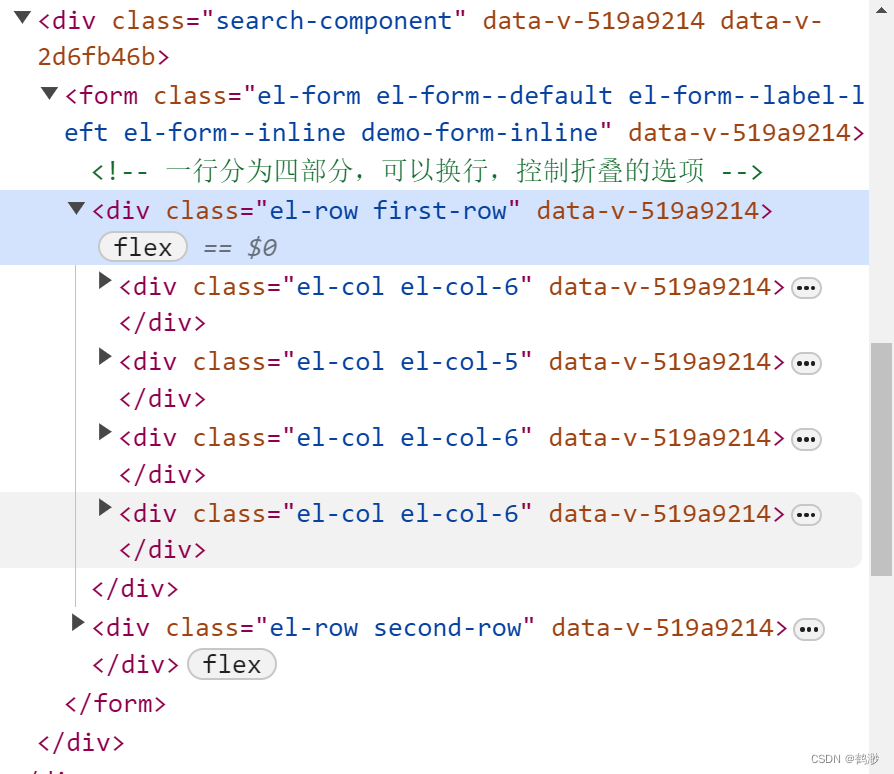
这个页面详细的代码如下:
- <div class="search-component">
- <el-form ref="searchFormRef" :inline="true" :model="searchForm" class="demo-form-inline" label-position="left">
- <el-row class="first-row">
- <el-col
- :span="option.span ? option.span : option.optionType == 'input' ? 6 : option.optionType == 'select' ? 5 : 7"
- v-for="(option, index) in firstFormOptions.splice(0, 3)"
- :key="index"
- >
- <el-form-item :label="option.label" :prop="option.prop" style="width: 100%; margin-right: 10px">
- <SearchOptionItem
- :placeHolder="option.placeHolder"
- :prop="option.prop"
- :inputType="option.inputType"
- :optionType="option.optionType"
- :isDefaultTime="option.isDefaultTime"
- :timeRangeDays="option.timeRangeDays"
- :disabledTime="option.disabledTime"
- :multiple="option.multiple"
- :disabled="option.disabled"
- :isRemote="option.isRemote"
- :remoteSelectUrl="option.remoteSelectUrl"
- :remoteParams="option.remoteParams"
- :searchField="option.searchField"
- :ifParamsChange="option.ifParamsChange"
- :nowRemoteParams="props.nowRemoteParams"
- :selectOptions="option.selectOptions"
- :selectAll="option.selectAll"
- :selectLabel="option.selectLabel"
- :selectValue="option.selectValue"
- :value="searchForm[option.prop]"
- @returnValue="getValue"
- style="margin-right: 10px"
- />
- el-form-item>
- el-col>
- <el-col :span="searchOptions.length == 2 ? 12 : props.buttonsSpan">
- <el-form-item style="width: 100%">
- <div class="button-container">
- <div>
- <el-button class="ml-1" type="primary" :icon="Search" @click="search">查询el-button>
- <el-button @click="resetForm(searchFormRef)">重置el-button>
- <el-button v-if="searchOptions.length > 3 && !isExpanded" link type="primary" @click="toggle">
- 展开
- <el-icon><ArrowDownBold />el-icon>
- el-button>
- <el-button v-else-if="searchOptions.length > 3" link type="primary" @click="toggle">
- 收起
- <el-icon><ArrowUpBold />el-icon>
- el-button>
- div>
- <el-button v-if="showButton" :loading="btnLoading" @click="clickButton" type="primary">
- {{ buttonName }}
- el-button>
- div>
- el-form-item>
- el-col>
- el-row>
- <el-row v-if="isExpanded && searchOptions.length > 3" class="second-row">
- <el-col
- :span="option.span || option.optionType == 'input' ? 6 : option.optionType == 'select' ? 5 : 7"
- v-for="(option, index) in secondFormOptions"
- :key="index"
- >
- <el-form-item :label="option.label" :prop="option.prop" style="width: 100%">
- <SearchOptionItem
- :placeHolder="option.placeHolder"
- :prop="option.prop"
- :inputType="option.inputType"
- :optionType="option.optionType"
- :isDefaultTime="option.isDefaultTime"
- :timeRangeDays="option.timeRangeDays"
- :disabledTime="option.disabledTime"
- :multiple="option.multiple"
- :disabled="option.disabled"
- :isRemote="option.isRemote"
- :remoteSelectUrl="option.remoteSelectUrl"
- :remoteParams="option.remoteParams"
- :searchField="option.searchField"
- :ifParamsChange="option.ifParamsChange"
- :nowRemoteParams="props.nowRemoteParams"
- :selectOptions="option.selectOptions"
- :selectAll="option.selectAll"
- :selectLabel="option.selectLabel"
- :selectValue="option.selectValue"
- :value="searchForm[option.prop]"
- @returnValue="getValue"
- style="margin-right: 10px"
- />
- el-form-item>
- el-col>
- el-row>
- el-form>
- div>
模块代码中,没有复杂的逻辑,都是给SearchOptionItem传一些数据的。
主要是SearchOptionItem需要的数据结构,都需要什么配置,需要在这个页面都传过去,就如上面index.vue里配置的那样。
js部分如下:
具体的逻辑都在上面,有注释,大部分是跟业务有关的
下面是我自定的样式,可以跳过。
- .search-component {
- width: 100%;
- .el-form--inline .el-form-item {
- margin-right: 10px;
- }
- :deep(.el-form-item__label) {
- font-weight: bold !important;
- }
- .first-row {
- display: flex;
- flex-direction: row;
- flex-wrap: nowrap;
- .el-col {
- height: 32px !important;
- }
- }
- .second-row {
- display: flex;
- flex-direction: row;
- flex-wrap: nowrap;
- margin-top: 10px;
- .el-col {
- height: 32px !important;
- }
- }
- .option-container {
- width: 25%;
- }
- .button-container {
- width: 100%;
- display: flex;
- justify-content: space-between;
- }
- .el-button + .el-button {
- margin-left: 10px;
- }
- }
- .select-item {
- .el-select .el-select-tags-wrapper.has-prefix {
- display: flex;
- max-width: 70% !important; //设置最大宽度 超出显示...
- flex-wrap: nowrap;
- }
- .el-tag.is-closable {
- // width: 45%;
- // max-width: 70px;
- }
- .el-select__tags .el-tag:last-child {
- // width: 45%;
- // max-width: 70px;
- }
- .el-tag__content {
- width: 100%;
- }
- .el-select .el-select__tags-text {
- max-width: 45px !important; //设置最大宽度 超出显示...
- display: inline-block;
- overflow: hidden;
- vertical-align: bottom;
- text-overflow: ellipsis;
- }
- .el-select__input {
- margin-left: 5px;
- }
- }
(3).单个搜索组件
页面是三个判断,就根据不同的类型,进行不同的配置,现在页面的类型还比较少,还不卡,后面越来越多,可能不友好吧。
- <div class="item-container">
- <div v-if="optionType == 'input'" class="input-item">
"optionType == 'datePicker'" class="date-picker-item">v-model="timeRange"type="datetimerange":shortcuts="shortcuts":disabled-date="disabledDate":default-time="defaultTime"placeholder="请选择日期"format="YYYY-MM-DD HH:mm:ss"range-separator="至"start-placeholder="开始日期"end-placeholder="结束日期"@change="chooseData"@clear="chooseData"style="width: 100%"/>"optionType == 'select'" class="select-item">v-model="inputValue":placeholder="placeHolder"style="width: 100%"clearable:filterable="isRemote":remote="isRemote":remote-method="selectRemoteMethod":loading="selectLoading":multiple="multiple":collapse-tags="multiple":disabled="disabled"@clear="returnValue"@change="returnValue"@visible-change="openChange">"selectAll" key="all" label="全选" value="all" /> v-for="item in newSelectOptions":key="item[props.selectValue]":label="item[props.selectLabel]":value="item[props.selectValue]"/>这里面绑定的值,value是从上个页面传来的,因为不能改,所以用新的值代替了。
-
