-
【三】kubernetes kuboard部署分布式系统
#服务器 #部署 #云原生 #k8s
本系列文章:
一、ubuntu20.04上搭建containerd版( 1.2.4 以上)k8s及kuboard V3
一、前言
接上文,我们已经部署了k8s集群,本文将讲解如何利用kuboard部署完整的微服务系统。具体包括docker私有仓库的搭建、工作负载的创建、配置中心、存储挂载、负载均衡等内容。
二、搭建docker私有仓库
- 选取任意有docker的主机搭建私有仓库 例如我选取200作为私仓
#拉取私有仓库的镜像 docker pull registry- 1
- 2
- 为docker registry增加用户密码
安装Apache的htpasswd工具。使用htpasswd生成密钥:
sudo apt-get install apache2-utils mkdir auth #"username"和"password"分别是你要设置的用户名和密码 htpasswd -Bc ./auth/htpasswd username #输入密码 password #再次确认密码 password- 1
- 2
- 3
- 4
- 5
- 6
- 7
- 8
- 保存为启动脚本,并执行
vim docker-registry-init.sh- 1
docker run -d \ -p 5000:5000 \ -v ./data:/var/lib/registry \ -v ./auth:/auth \ -e "REGISTRY_AUTH=htpasswd" \ -e "REGISTRY_AUTH_HTPASSWD_REALM=Registry Realm" \ -e "REGISTRY_AUTH_HTPASSWD_PATH=/auth/htpasswd" \ --restart=always \ registry- 1
- 2
- 3
- 4
- 5
- 6
- 7
- 8
- 9
chmod 777 docker-registry-init.sh ./docker-registry-init.sh- 1
- 2
- 允许不安全访问
先使用docker login 登录
docker login 192.168.16.200:5000- 1
docker login 之后,会在
/root/.docker/config.json中保存base64编码后的用户名和密码信息。执行
sudo cat /root/.docker/config.json打印文件内容,如下:{ "auths": { "192.168.16.200:5000": { "auth": "Y2p4OnJvb3Q=" } }- 1
- 2
- 3
- 4
- 5
- 6
- 7
允许不安全访问
vim /etc/docker/daemon.json { "registry-mirrors": ["https://your.mirror.aliyuncs.com"], "insecure-registries":["http://192.168.16.200:5000"]#允许不安全访问 }- 1
- 2
- 3
- 4
- 5
- 6
- 重启docker服务
systemctl restart docker- 1
5.拉取测试用例用到的镜像,并上传到私库
docker pull swr.cn-east-2.myhuaweicloud.com/kuboard-dependency/example-cloud-eureka:v1.0.0-alpha.1 docker pull swr.cn-east-2.myhuaweicloud.com/kuboard-dependency/example-db-example:v1.0.0-alpha.1 docker pull swr.cn-east-2.myhuaweicloud.com/kuboard-dependency/example-gateway-example:v1.0.0-alpha.1 docker pull swr.cn-east-2.myhuaweicloud.com/kuboard-dependency/example-svc-example:v1.0.0-alpha.1 docker pull swr.cn-east-2.myhuaweicloud.com/kuboard-dependency/example-web-example:v1.0.0-alpha.1 docker tag swr.cn-east-2.myhuaweicloud.com/kuboard-dependency/example-cloud-eureka:v1.0.0-alpha.1 192.168.16.200:5000/kuboard-dependency/example-cloud-eureka:v1.0.0-alpha.1 docker tag swr.cn-east-2.myhuaweicloud.com/kuboard-dependency/example-db-example:v1.0.0-alpha.1 192.168.16.200:5000/kuboard-dependency/example-db-example:v1.0.0-alpha.1 docker tag swr.cn-east-2.myhuaweicloud.com/kuboard-dependency/example-gateway-example:v1.0.0-alpha.1 192.168.16.200:5000/kuboard-dependency/example-gateway-example:v1.0.0-alpha.1 docker tag swr.cn-east-2.myhuaweicloud.com/kuboard-dependency/example-svc-example:v1.0.0-alpha.1 192.168.16.200:5000/kuboard-dependency/example-svc-example:v1.0.0-alpha.1 docker tag swr.cn-east-2.myhuaweicloud.com/kuboard-dependency/example-web-example:v1.0.0-alpha.1 192.168.16.200:5000/kuboard-dependency/example-web-example:v1.0.0-alpha.1 docker push 192.168.16.200:5000/kuboard-dependency/example-cloud-eureka:v1.0.0-alpha.1 docker push 192.168.16.200:5000/kuboard-dependency/example-db-example:v1.0.0-alpha.1 docker push 192.168.16.200:5000/kuboard-dependency/example-gateway-example:v1.0.0-alpha.1 docker push 192.168.16.200:5000/kuboard-dependency/example-svc-example:v1.0.0-alpha.1 docker push 192.168.16.200:5000/kuboard-dependency/example-web-example:v1.0.0-alpha.1- 1
- 2
- 3
- 4
- 5
- 6
- 7
- 8
- 9
- 10
- 11
- 12
- 13
- 14
- 15
- 16
- 17
- 18
6.查看是否上传成功
#docker push 192.168.16.200:5000/{hubname}/{docker_name}:{docker_version} curl -u username:password -XGET http://192.168.16.200:5000/v2/_catalog- 1
- 2
- 3
7.containerd中配置允许不安全访问
新版k8s使用containerd去拉取镜像,如果不在containerd中配置registry,k8s会默认使用https拉取镜像,就会出现以下错误:
Failed to pull image "192.168.16.200:5000/kuboard-dependency/example-gateway-example:v1.0.0-alpha.1": failed to pull and unpack image "192.168.16.200:5000/kuboard-dependency/example-gateway-example:v1.0.0-alpha.1": failed to resolve reference "192.168.16.200:5000/kuboard-dependency/example-gateway-example:v1.0.0-alpha.1": failed to do request: Head "https://192.168.16.200:5000/v2/kuboard-dependency/example-gateway-example/manifests/v1.0.0-alpha.1": http: server gave HTTP response to HTTPS client- 1
修改containerd的配置文件(注意!!每个节点上的containerd的配置都要修改)
vim /etc/containerd/config.toml- 1
[plugins."io.containerd.grpc.v1.cri".registry] config_path = "" [plugins."io.containerd.grpc.v1.cri".registry.auths] [plugins."io.containerd.grpc.v1.cri".registry.configs] [plugins."io.containerd.grpc.v1.cri".registry.configs."192.168.16.200:5000".tls] insecure_skip_verify = true [plugins."io.containerd.grpc.v1.cri".registry.headers] [plugins."io.containerd.grpc.v1.cri".registry.mirrors] [plugins."io.containerd.grpc.v1.cri".registry.mirrors."192.168.16.200:5000"] endpoint = ["http://192.168.16.200:5000"]- 1
- 2
- 3
- 4
- 5
- 6
- 7
- 8
- 9
- 10
- 11
- 12
- 13
- 14
- 15
- 16
sudo systemctl restart containerd- 1
三、系统搭建
本次实战准备了一个最简单的微服务 example 作为例子,该 example 只实现了对一张简单数据库表执行 CRUD 操作的功能,该 example 的部署架构如下图所示,源代码请参考 kuboard-example (opens new window),也可以直接通过 Kuboard 导入 example 微服务
架构如下:
![![[Pasted image 20230905210612.png]]](https://1000bd.com/contentImg/2024/03/10/184949556.png)
yaml 下载地址:
https://kuboard.cn/kuboard_example_v3_119.yaml
本文主要的目的是为了让读者能更好地熟悉kuboard中创建工作负载时需要填写的参数与yaml中的参数的映射关系,故不会对容器中所使用到的环境变量、环境变量的值进行详细的讲解。截图中填写的参数值均能从yaml中找到。
1、NFS部署
Kubernetes 对 Pod 进行调度时,以当时集群中各节点的可用资源作为主要依据,自动选择某一个可用的节点,并将 Pod 分配到该节点上。在这种情况下,Pod 中容器数据的持久化如果存储在所在节点的磁盘上,就会产生不可预知的问题,例如,当 Pod 出现故障,Kubernetes 重新调度之后,Pod 所在的新节点上,并不存在上一次 Pod 运行时所在节点上的数据。
为了使 Pod 在任何节点上都能够使用同一份持久化存储数据,我们需要使用网络存储的解决方案为 Pod 提供数据卷。常用的网络存储方案有:NFS/cephfs/glusterfs。
1)部署nfs server (192.168.16.200)
- 安装nfs服务
#安装nfs服务 sudo apt install nfs-kernel-server #创建共享目录 sudo mkdir -p /nfs-data- 1
- 2
- 3
- 4
- 编辑配置文件,添加共享目录
#设置共享目录 sudo vim /etc/exports #添加以下内容 /nfs-data *(rw,sync,no_subtree_check,no_root_squash)- 1
- 2
- 3
- 4
- 重启服务
sudo service nfs-kernel-server restart sudo service nfs-kernel-server status #校验配置 showmount -e- 1
- 2
- 3
- 4
- 创建测试文件
vim test.txt- 1
2)部署nfs client (全部节点)
#安装连接客户端 apt install nfs-common -y #挂载 mkdir /nfs-data mount 192.168.16.200:/nfs-data /nfs-data #查看测试文件是否存在 ls /nfs-data- 1
- 2
- 3
- 4
- 5
- 6
- 7
- 8
- 9
3)在Kuboard中创建 NFS 存储类
进入
集群管理—存储类,创建存储类,将nfs的信息填写到相应参数位置,点击确定。![![[../../../附件/Pasted image 20230925185516.png]]](https://1000bd.com/contentImg/2024/03/10/184948039.png)
点击
应用
nfs已添加

2、创建命名空间
点击
编辑命名空间

点击创建、填写命名空间,比如我这里就起名为example![![[Pasted image 20230904202145.png]]](https://1000bd.com/contentImg/2024/03/10/184949901.png)
3、添加docker密文
填写上面registry的账号密码
配置中心—密文—创建Secret
![![[../../../附件/Pasted image 20231010212924.png]]](https://1000bd.com/contentImg/2024/03/10/184949661.png)
命名为registry-200
4、创建工作负载(workload)
Kubernetes 中,与 Workload 相关的概念非常多,Kuboard 从微服务部署的实际需要出发,按照下图所示的方式理解这些相关概念:
![![[../../../附件/Pasted image 20230925211427.png]]](https://1000bd.com/contentImg/2024/03/10/184949925.png)
Kuboard 工作负载视图中,关联的 Kubernetes 中如下几个重要的概念:
- Label / Label Selector
- Workload Controller 工作负载控制器(Deployment / StatefulSet / DaemonSet)
- Volume 数据卷
- ImagePullSecrets (Docker 仓库用户名密码,用于访问私有 docker 镜像仓库)
- ServiceAccount
- Container 容器
- Service 访问方式
- Ingress 互联网入口
以上摘自:Kuboard控制台官网
1)部署中间件
- 基本信息填写

2.添加容器信息
添加工作容器![![[../../../附件/Pasted image 20231011170758.png]]](https://1000bd.com/contentImg/2024/03/10/184949722.png)
添加服务
添加应用路由![![[../../../附件/Pasted image 20231011170900.png]]](https://1000bd.com/contentImg/2024/03/10/184948361.png)
3.应用 并预览yaml
yaml:--- apiVersion: apps/v1 kind: StatefulSet metadata: annotations: k8s.kuboard.cn/displayName: 服务注册 k8s.kuboard.cn/ingress: 'true' k8s.kuboard.cn/service: ClusterIP k8s.kuboard.cn/workload: cloud-eureka labels: k8s.kuboard.cn/layer: cloud k8s.kuboard.cn/name: cloud-eureka name: cloud-eureka namespace: example resourceVersion: '274940' spec: persistentVolumeClaimRetentionPolicy: whenDeleted: Retain whenScaled: Retain podManagementPolicy: OrderedReady replicas: 1 revisionHistoryLimit: 10 selector: matchLabels: k8s.kuboard.cn/layer: cloud k8s.kuboard.cn/name: cloud-eureka serviceName: cloud-eureka template: metadata: creationTimestamp: null labels: k8s.kuboard.cn/layer: cloud k8s.kuboard.cn/name: cloud-eureka spec: containers: - env: - name: CLOUD_EUREKA_DEFAULT_ZONE value: 'http://cloud-eureka-0:9200/eureka' image: >- 192.168.16.200:5000/kuboard-dependency/example-cloud-eureka:v1.0.0-alpha.1 imagePullPolicy: IfNotPresent name: cloud-eureka resources: {} terminationMessagePath: /dev/termination-log terminationMessagePolicy: File dnsPolicy: ClusterFirst imagePullSecrets: - name: registry-200 restartPolicy: Always schedulerName: default-scheduler securityContext: {} terminationGracePeriodSeconds: 30 updateStrategy: rollingUpdate: partition: 0 type: RollingUpdate status: availableReplicas: 1 collisionCount: 0 currentReplicas: 1 currentRevision: cloud-eureka-66bd975b65 observedGeneration: 1 readyReplicas: 1 replicas: 1 updateRevision: cloud-eureka-66bd975b65 updatedReplicas: 1 --- apiVersion: v1 kind: Service metadata: annotations: {} labels: k8s.kuboard.cn/layer: cloud k8s.kuboard.cn/name: cloud-eureka name: cloud-eureka namespace: example resourceVersion: '274926' spec: clusterIP: 10.102.213.170 clusterIPs: - 10.102.213.170 internalTrafficPolicy: Cluster ipFamilies: - IPv4 ipFamilyPolicy: SingleStack ports: - name: mtfsyi port: 9200 protocol: TCP targetPort: 9200 selector: k8s.kuboard.cn/layer: cloud k8s.kuboard.cn/name: cloud-eureka sessionAffinity: None type: ClusterIP status: loadBalancer: {}- 1
- 2
- 3
- 4
- 5
- 6
- 7
- 8
- 9
- 10
- 11
- 12
- 13
- 14
- 15
- 16
- 17
- 18
- 19
- 20
- 21
- 22
- 23
- 24
- 25
- 26
- 27
- 28
- 29
- 30
- 31
- 32
- 33
- 34
- 35
- 36
- 37
- 38
- 39
- 40
- 41
- 42
- 43
- 44
- 45
- 46
- 47
- 48
- 49
- 50
- 51
- 52
- 53
- 54
- 55
- 56
- 57
- 58
- 59
- 60
- 61
- 62
- 63
- 64
- 65
- 66
- 67
- 68
- 69
- 70
- 71
- 72
- 73
- 74
- 75
- 76
- 77
- 78
- 79
- 80
- 81
- 82
- 83
- 84
- 85
- 86
- 87
- 88
- 89
- 90
- 91
- 92
- 93
- 94
- 95
- 96
- 97
- 98
- 99
- 100
2)部署API网关
- 基本信息填写

- 添加容器信息
添加工作容器![![[../../../附件/Pasted image 20230925212014.png]]](https://1000bd.com/contentImg/2024/03/10/184950027.png)
- 添加服务/应用路由
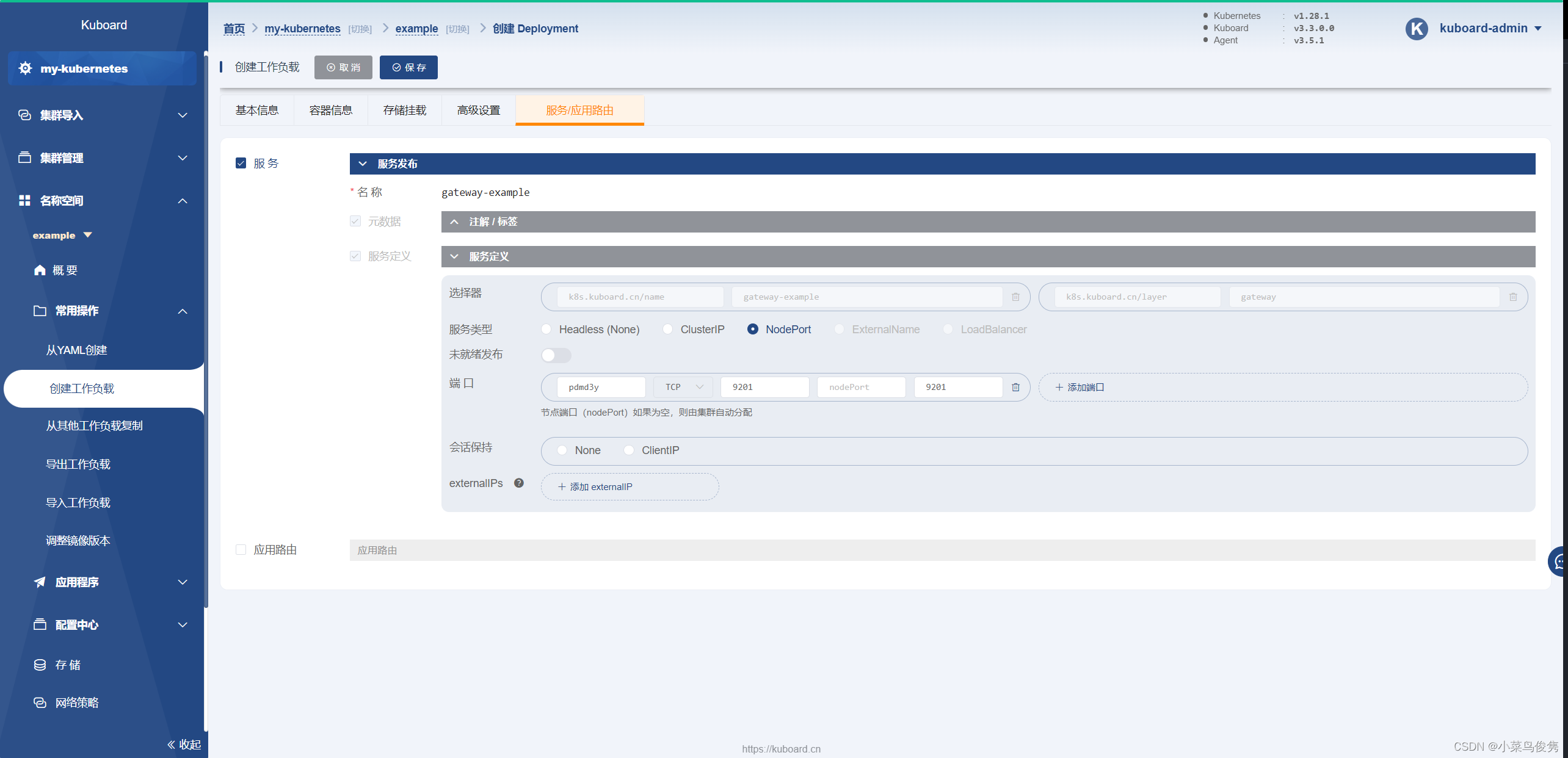
- 预览yaml
![![[../../../附件/Pasted image 20230925212421.png]]](https://1000bd.com/contentImg/2024/03/10/184948488.png)
yaml:
--- apiVersion: apps/v1 kind: Deployment metadata: annotations: {} labels: k8s.kuboard.cn/layer: gateway k8s.kuboard.cn/name: gateway-example name: gateway-example namespace: example resourceVersion: '214775' spec: progressDeadlineSeconds: 600 replicas: 1 revisionHistoryLimit: 10 selector: matchLabels: k8s.kuboard.cn/layer: gateway k8s.kuboard.cn/name: gateway-example strategy: rollingUpdate: maxSurge: 25% maxUnavailable: 25% type: RollingUpdate template: metadata: creationTimestamp: null labels: k8s.kuboard.cn/layer: gateway k8s.kuboard.cn/name: gateway-example spec: containers: - env: - name: CLOUD_EUREKA_DEFAULT_ZONE value: 'http://cloud-eureka:9200/eureka' - name: SPRING_PROFILES_ACTIVE value: example image: >- 192.168.16.200:5000/kuboard-dependency/example-gateway-example:v1.0.0-alpha.1 imagePullPolicy: Always name: gateway-example resources: {} terminationMessagePath: /dev/termination-log terminationMessagePolicy: File dnsPolicy: ClusterFirst imagePullSecrets: - name: registry-200 restartPolicy: Always schedulerName: default-scheduler securityContext: {} terminationGracePeriodSeconds: 30 status: conditions: - lastTransitionTime: '2023-09-26T03:13:54Z' lastUpdateTime: '2023-10-10T13:22:14Z' message: ReplicaSet "gateway-example-5bd6ccb5f8" has successfully progressed. reason: NewReplicaSetAvailable status: 'True' type: Progressing - lastTransitionTime: '2023-10-10T13:22:43Z' lastUpdateTime: '2023-10-10T13:22:43Z' message: Deployment does not have minimum availability. reason: MinimumReplicasUnavailable status: 'False' type: Available observedGeneration: 14 replicas: 1 unavailableReplicas: 1 updatedReplicas: 1 --- apiVersion: v1 kind: Service metadata: annotations: {} labels: k8s.kuboard.cn/layer: gateway k8s.kuboard.cn/name: gateway-example name: gateway-example namespace: example resourceVersion: '163120' spec: clusterIP: 10.105.223.231 clusterIPs: - 10.105.223.231 internalTrafficPolicy: Cluster ipFamilies: - IPv4 ipFamilyPolicy: SingleStack ports: - name: pdmd3y port: 9201 protocol: TCP targetPort: 9201 selector: k8s.kuboard.cn/layer: gateway k8s.kuboard.cn/name: gateway-example sessionAffinity: None type: ClusterIP status: loadBalancer: {}- 1
- 2
- 3
- 4
- 5
- 6
- 7
- 8
- 9
- 10
- 11
- 12
- 13
- 14
- 15
- 16
- 17
- 18
- 19
- 20
- 21
- 22
- 23
- 24
- 25
- 26
- 27
- 28
- 29
- 30
- 31
- 32
- 33
- 34
- 35
- 36
- 37
- 38
- 39
- 40
- 41
- 42
- 43
- 44
- 45
- 46
- 47
- 48
- 49
- 50
- 51
- 52
- 53
- 54
- 55
- 56
- 57
- 58
- 59
- 60
- 61
- 62
- 63
- 64
- 65
- 66
- 67
- 68
- 69
- 70
- 71
- 72
- 73
- 74
- 75
- 76
- 77
- 78
- 79
- 80
- 81
- 82
- 83
- 84
- 85
- 86
- 87
- 88
- 89
- 90
- 91
- 92
- 93
- 94
- 95
- 96
- 97
- 98
- 99
- 100
- 101
- 102
- 103
- 解决warning
1)使用configmap给容器挂载ca证书
参考:Managing Service Accounts | Kubernetes
![![[../../../附件/Pasted image 20231011115528.png]]](https://1000bd.com/contentImg/2024/03/10/184948394.png)
点击
编辑-存储挂载-配置字典
数据卷名称填写warning中的名称
configMap为kube-root-ca.crt
其他内容如图下所示:
![![[../../../附件/Pasted image 20231011120602.png]]](https://1000bd.com/contentImg/2024/03/10/184949938.png)
3) 部署持久层
-
基本信息填写
![![[../../../附件/Pasted image 20231011173810.png]]](https://1000bd.com/contentImg/2024/03/10/184950462.png)
-
添加容器信息
添加工作容器![![[../../../附件/Pasted image 20231011174437.png]]](https://1000bd.com/contentImg/2024/03/10/184949292.png)
添加存储挂载添加存储声明![![[../../../附件/Pasted image 20231011184705.png]]](https://1000bd.com/contentImg/2024/03/10/184949093.png)
添加存储挂载信息![![[../../../附件/Pasted image 20231011184854.png]]](https://1000bd.com/contentImg/2024/03/10/184949359.png)
这里的/var/lib/mysql是容器内的路径。
-
添加Service
![![[../../../附件/Pasted image 20231011174502.png]]](https://1000bd.com/contentImg/2024/03/10/184950117.png)
-
应用并预览yaml
yaml:
--- apiVersion: apps/v1 kind: Deployment metadata: annotations: k8s.kuboard.cn/displayName: db-example k8s.kuboard.cn/ingress: 'false' k8s.kuboard.cn/service: ClusterIP k8s.kuboard.cn/workload: db-example labels: k8s.kuboard.cn/layer: db k8s.kuboard.cn/name: db-example name: db-example namespace: example resourceVersion: '285120' spec: progressDeadlineSeconds: 600 replicas: 1 revisionHistoryLimit: 10 selector: matchLabels: k8s.kuboard.cn/layer: db k8s.kuboard.cn/name: db-example strategy: rollingUpdate: maxSurge: 25% maxUnavailable: 25% type: RollingUpdate template: metadata: creationTimestamp: null labels: k8s.kuboard.cn/layer: db k8s.kuboard.cn/name: db-example spec: containers: - image: >- 192.168.16.200:5000/kuboard-dependency/example-gateway-example:v1.0.0-alpha.1 imagePullPolicy: Always name: db-example resources: {} terminationMessagePath: /dev/termination-log terminationMessagePolicy: File volumeMounts: - mountPath: /var/lib/mysql name: db-example-storage subPath: mysql dnsPolicy: ClusterFirst imagePullSecrets: - name: registry-200 restartPolicy: Always schedulerName: default-scheduler securityContext: {} terminationGracePeriodSeconds: 30 volumes: - name: db-example-storage persistentVolumeClaim: claimName: db-example-storage status: availableReplicas: 1 conditions: - lastTransitionTime: '2023-10-11T09:45:54Z' lastUpdateTime: '2023-10-11T09:45:54Z' message: Deployment has minimum availability. reason: MinimumReplicasAvailable status: 'True' type: Available - lastTransitionTime: '2023-10-11T09:45:54Z' lastUpdateTime: '2023-10-11T10:45:32Z' message: ReplicaSet "db-example-d765d8978" has successfully progressed. reason: NewReplicaSetAvailable status: 'True' type: Progressing observedGeneration: 3 readyReplicas: 1 replicas: 1 updatedReplicas: 1 --- apiVersion: v1 kind: Service metadata: labels: k8s.kuboard.cn/layer: db k8s.kuboard.cn/name: db-example name: db-example namespace: example resourceVersion: '277172' spec: clusterIP: 10.98.171.57 clusterIPs: - 10.98.171.57 internalTrafficPolicy: Cluster ipFamilies: - IPv4 ipFamilyPolicy: SingleStack ports: - name: fp6ksw port: 3306 protocol: TCP targetPort: 3306 selector: k8s.kuboard.cn/layer: db k8s.kuboard.cn/name: db-example sessionAffinity: None type: ClusterIP status: loadBalancer: {}- 1
- 2
- 3
- 4
- 5
- 6
- 7
- 8
- 9
- 10
- 11
- 12
- 13
- 14
- 15
- 16
- 17
- 18
- 19
- 20
- 21
- 22
- 23
- 24
- 25
- 26
- 27
- 28
- 29
- 30
- 31
- 32
- 33
- 34
- 35
- 36
- 37
- 38
- 39
- 40
- 41
- 42
- 43
- 44
- 45
- 46
- 47
- 48
- 49
- 50
- 51
- 52
- 53
- 54
- 55
- 56
- 57
- 58
- 59
- 60
- 61
- 62
- 63
- 64
- 65
- 66
- 67
- 68
- 69
- 70
- 71
- 72
- 73
- 74
- 75
- 76
- 77
- 78
- 79
- 80
- 81
- 82
- 83
- 84
- 85
- 86
- 87
- 88
- 89
- 90
- 91
- 92
- 93
- 94
- 95
- 96
- 97
- 98
- 99
- 100
- 101
- 102
- 103
- 104
- 105
- 106
- 107
- 108
- 109
- 110
- 111
4)部署微服务层
- 基本信息填写
添加工作负载基本信息
![![[../../../附件/Pasted image 20231019153259.png]]](https://1000bd.com/contentImg/2024/03/10/184949563.png)
2.添加工作容器
![![[../../../附件/Pasted image 20231019153642.png]]](https://1000bd.com/contentImg/2024/03/10/184949338.png)
CLOUD_EUREKA_DEFAULT_ZONE和DB_EXAMPLE_URL中的cloud-eureka和db-example都是之前创建的Service的name属性,以实现pod之间的通信。3.应用并预览yaml
--- apiVersion: apps/v1 kind: Deployment metadata: annotations: k8s.kuboard.cn/displayName: svc-example k8s.kuboard.cn/ingress: 'false' k8s.kuboard.cn/service: none k8s.kuboard.cn/workload: svc-example labels: k8s.kuboard.cn/layer: svc k8s.kuboard.cn/name: svc-example name: svc-example namespace: example spec: replicas: 1 selector: matchLabels: k8s.kuboard.cn/layer: svc k8s.kuboard.cn/name: svc-example template: metadata: labels: k8s.kuboard.cn/layer: svc k8s.kuboard.cn/name: svc-example spec: containers: - env: - name: CLOUD_EUREKA_DEFAULT_ZONE value: 'http://cloud-eureka:9200/eureka' - name: DB_EXAMPLE_URL value: >- jdbc:mysql://db-example:3306/eip_db_example?characterEncoding=utf8&useSSL=false - name: DB_EXAMPLE_USERNAME value: eip_user - name: DB_EXAMPLE_PASSWORD value: 1qaz2wsx - name: snowflake.dataCenterId value: '1' - name: csp.sentinel.dashboard.server value: monitor-sentinel image: >- 192.168.16.200:5000/kuboard-dependency/example-svc-example:v1.0.0-alpha.1 name: svc-example imagePullSecrets: - name: registry-200 initContainers: []- 1
- 2
- 3
- 4
- 5
- 6
- 7
- 8
- 9
- 10
- 11
- 12
- 13
- 14
- 15
- 16
- 17
- 18
- 19
- 20
- 21
- 22
- 23
- 24
- 25
- 26
- 27
- 28
- 29
- 30
- 31
- 32
- 33
- 34
- 35
- 36
- 37
- 38
- 39
- 40
- 41
- 42
- 43
- 44
- 45
- 46
- 47
- 48
- 49
5)部署展示层
-
基本信息填写
添加工作负载基本信息
![![[../../../附件/Pasted image 20231019154343.png]]](https://1000bd.com/contentImg/2024/03/10/184948889.png)
-
添加工作容器信息
![![[../../../附件/Pasted image 20231019160140.png]]](https://1000bd.com/contentImg/2024/03/10/184948575.png)
-
添加服务与路由
服务配置
![![[../../../附件/Pasted image 20231019163408.png]]](https://1000bd.com/contentImg/2024/03/10/184950551.png)
路由配置![![[../../../附件/Pasted image 20231019161421.png]]](https://img-blog.csdnimg.cn/47b90264996e47f7b6fb12ad08703bb1.png)
4.应用并预览yaml
--- apiVersion: apps/v1 kind: Deployment metadata: annotations: k8s.kuboard.cn/displayName: '' k8s.kuboard.cn/ingress: 'true' k8s.kuboard.cn/service: ClusterIP k8s.kuboard.cn/workload: web-example labels: k8s.kuboard.cn/layer: web k8s.kuboard.cn/name: web-example name: web-example namespace: example resourceVersion: '331193' spec: replicas: 1 selector: matchLabels: k8s.kuboard.cn/layer: web k8s.kuboard.cn/name: web-example template: metadata: labels: k8s.kuboard.cn/layer: web k8s.kuboard.cn/name: web-example spec: containers: - args: [] command: - nginx - '-g' - daemon off; image: >- 192.168.16.200:5000/kuboard-dependency/example-web-example:v1.0.0-alpha.1 imagePullPolicy: Always name: web-example imagePullSecrets: - name: registry-200 initContainers: [] --- apiVersion: v1 kind: Service metadata: annotations: {} labels: k8s.kuboard.cn/layer: web k8s.kuboard.cn/name: web-example name: web-example namespace: example spec: ports: - name: mawfrp nodePort: 30090 port: 80 protocol: TCP targetPort: 80 selector: k8s.kuboard.cn/layer: web k8s.kuboard.cn/name: web-example type: NodePort --- apiVersion: networking.k8s.io/v1 kind: Ingress metadata: annotations: k8s.kuboard.cn/displayName: we-example k8s.kuboard.cn/workload: web-example labels: k8s.kuboard.cn/layer: web k8s.kuboard.cn/name: web-example name: web-example namespace: example resourceVersion: '270483' spec: rules: - host: web-example.example.demo.kuboard.cn http: paths: - backend: service: name: web-example port: name: mawfrp path: / pathType: Prefix status: loadBalancer: {}- 1
- 2
- 3
- 4
- 5
- 6
- 7
- 8
- 9
- 10
- 11
- 12
- 13
- 14
- 15
- 16
- 17
- 18
- 19
- 20
- 21
- 22
- 23
- 24
- 25
- 26
- 27
- 28
- 29
- 30
- 31
- 32
- 33
- 34
- 35
- 36
- 37
- 38
- 39
- 40
- 41
- 42
- 43
- 44
- 45
- 46
- 47
- 48
- 49
- 50
- 51
- 52
- 53
- 54
- 55
- 56
- 57
- 58
- 59
- 60
- 61
- 62
- 63
- 64
- 65
- 66
- 67
- 68
- 69
- 70
- 71
- 72
- 73
- 74
- 75
- 76
- 77
- 78
- 79
- 80
- 81
- 82
- 83
- 84
- 85
- 86
- 87
- 88
- 89
- 90
- 91
5、验证web-example部署情况
在浏览器地址栏中输入
http://任意节点IP:30090,将打开如下页面:![![[../../../附件/Pasted image 20231019170245.png]]](https://1000bd.com/contentImg/2024/03/10/184949826.png)
点击
创建
![![[../../../附件/Pasted image 20231019170329.png]]](https://1000bd.com/contentImg/2024/03/10/184949642.png)
可以看到已经新增一条条目
![![[../../../附件/Pasted image 20231019170421.png]]](https://1000bd.com/contentImg/2024/03/10/184948263.png)
🎉🎉🎉
-
相关阅读:
flinkcdc同步mongo数据到clickhouse
[架构之路-247]:目标系统 - 设计方法 - 软件工程 - 结构化方法的基本思想、本质、特点以及在软件开发、在生活中的应用
IB 课程体系中批判性思维培养的建构与启示
线程间通信 - 多线程编程(一)
JMeter 源码解读 - HashTree
快速看懂(找到)VUE框架的管理系统代码
PNAS:alpha频率经颅电刺激调控大脑默认网络
数据结构--并查集
直播案例剖析:手机降频对直播声音体验的影响
redux connect组件在手工传入参数时报错
- 原文地址:https://blog.csdn.net/qq_42795049/article/details/133930885
