-
cppcheck新手指引
一、简介
cppcheck 是一个开源的静态代码分析工具,用于检查 C 和 C++ 代码中的潜在问题和错误。
官网:Cppcheck - A tool for static C/C++ code analysis功能
-
静态代码分析:cppcheck 可以在不编译代码的情况下进行静态代码分析,通过解析源代码来检测问题。
-
错误检测:它可以检测到常见的编程错误,如空指针解引用、内存泄漏、未初始化的变量、数组越界访问等。
-
代码规范检查:cppcheck 可以检查代码是否符合特定的编码规范,如命名约定、代码风格等。
-
性能优化建议:它可以提供一些性能优化的建议,如减少不必要的计算、减少内存分配等。
-
跨平台支持:cppcheck 可以在多个操作系统上运行,并支持多种编译器。
原理
-
语法解析:cppcheck 使用自定义的 C/C++ 解析器解析源代码,能够理解C和C++语言的语法和结构,构建抽象语法树(AST)。它是一个独立的工具,可以直接运行并分析C和C++代码。
-
数据流分析:通过数据流分析来跟踪变量和表达式的值,以检测潜在的错误和问题。数据流分析是一种静态分析技术,它模拟代码的执行路径并跟踪变量的值在程序中的传递方式。 数据流分析在cppcheck中是一项核心技术,它帮助开发人员发现代码中的潜在问题,提高代码的质量和可靠性。cppcheck的数据流分析引擎经过优化,可以有效地处理大型代码库,并提供准确的分析结果。
-
检查规则:cppcheck 使用一系列检查规则来检测代码中的问题。这些规则可以根据需要进行配置和自定义。
-
报告生成:分析完成后,cppcheck 会生成报告,其中包含检测到的问题、建议的修复和其他相关信息。
特征
-
快速:cppcheck 的分析速度相对较快,它不依赖编译。
-
可定制性:允许用户根据需要选择检查规则和调整分析行为。
-
跨平台:cppcheck 支持多个操作系统,包括 Windows、Linux 和 macOS。
二、安装
Windows
安装包:https://github.com/danmar/cppcheck/releases/download/2.12.0/cppcheck-2.12.0-x64-Setup.msi
安装界面:


安装完成后,需要将cppcheck安装目录添加到环境变量中:

安装检查:

vscode中可以安装插件直接使用cppcheck:
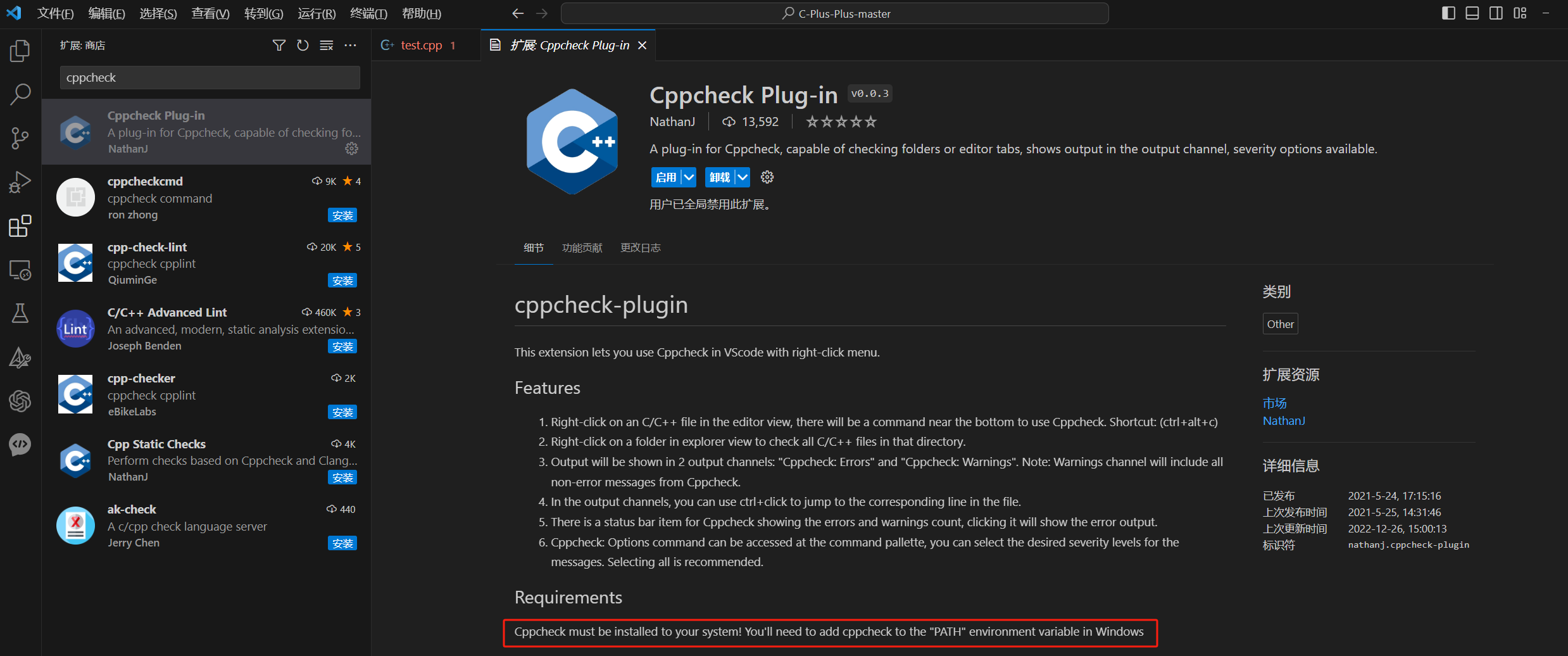
Linux
Source Code:https://github.com/danmar/cppcheck/archive/2.12.0.tar.gz
# 先读readme,安装可选cmake、qmake、clang... tar xvzf cppcheck-2.9.tar.gz cd cppcheck-2.9 mkdir build cd build cmake .. cmake -build . make install cmake --version- 1
- 2
- 3
- 4
- 5
- 6
- 7
- 8
- 9
- 10
三、使用
1、Manual
http://cppcheck.net/manual.pdf
2、Windows gui
打开cppcheck,点击文件——>打开项目文件,将后缀限制取消,选择需要检测的cpp文件:

检测结果:
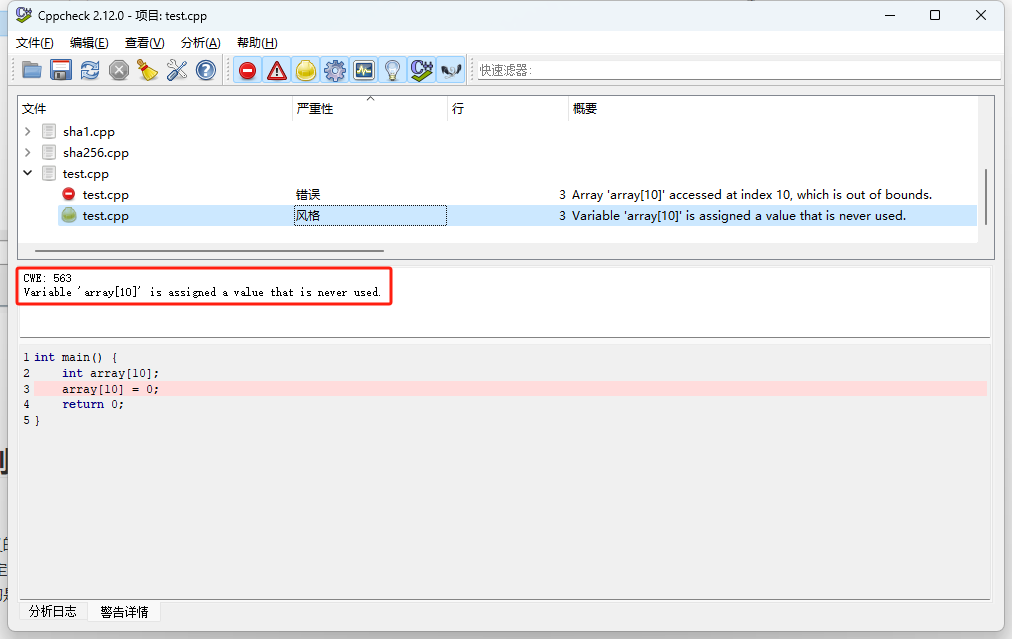
3、Windows Cli、Linux
4、vscode
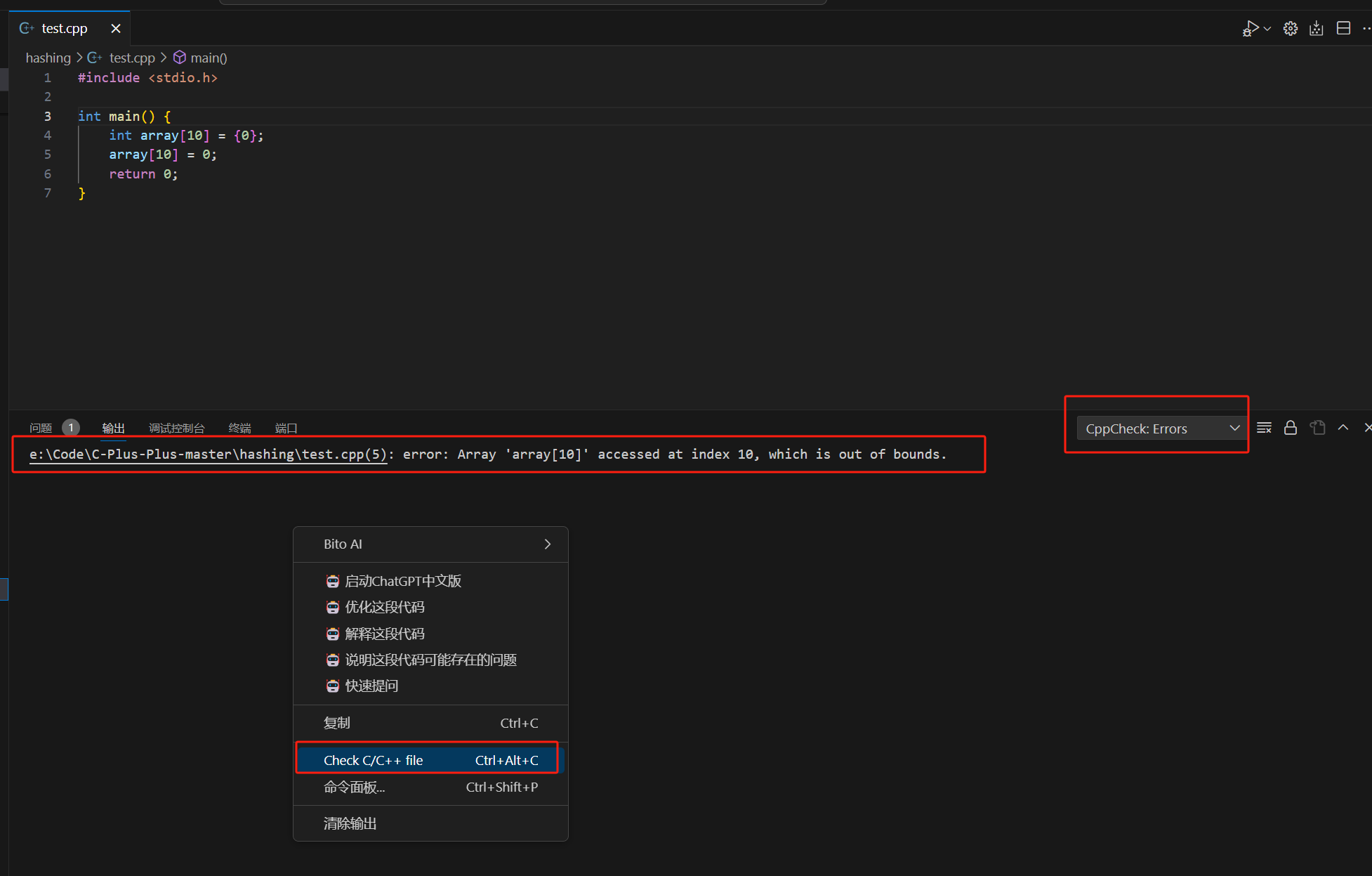
5、严重等级
cppcheck 检查出的问题可以被分为以下几个严重等级:
- error:表示代码中存在严重的错误,必须修复才能使代码正常工作。
- warning:表示代码中存在潜在的问题,可能会导致程序出现错误或异常行为。
- style:表示代码中存在一些不规范的写法或风格,不影响程序的正确性,但可能会降低代码的可读性和可维护性。
- performance:表示代码中存在一些性能问题,可能会导致程序运行缓慢或消耗过多的资源。
- portability:表示代码中存在一些与平台相关的问题,可能会导致程序在不同的操作系统或编译器上出现不同的行为。
- information:表示代码中存在一些有用的信息,例如未使用的变量或函数等。
6、常用示例
# 1. 检查指定文件: cppcheck myfile.cpp # 2. 检查指定目录下的所有文件: cppcheck mydirectory/ # 3. 显示所有警告: cppcheck --enable=all myfile.cpp # 4. 显示特定类型的警告(例如错误和性能问题): cppcheck --enable=error,performance myfile.cpp # 5. 输出结果到文件: cppcheck --output-file=result.txt myfile.cpp # 6. 忽略特定的警告: cppcheck --suppress=unusedFunction myfile.cpp # 7. 检查C++11标准的代码: cppcheck --std=c++11 myfile.cpp- 1
- 2
- 3
- 4
- 5
- 6
- 7
- 8
- 9
- 10
- 11
- 12
- 13
- 14
7、Suppressions
忽略特定警告或者错误。
--suppress=<spec> Suppress warnings that match <spec>. The format of <spec> is: [error id]:[filename]:[line] The [filename] and [line] are optional. If [error id] is a wildcard '*', all error ids match. # 查看所有的error id cppcheck --errorlist <error id="memleak" severity="error" msg="Memory leak: varname" verbose="Memory leak: varname" cwe="401"> <symbol>varname</symbol> </error> # 通用弱点枚举(Common Weakness Enumeration,CWE),CWE是一种用于标识和分类常见软件安全弱点和漏洞的标准化列表。 # 常见的error id # uninitvar :未初始化的变量 # arrayIndexOutOfBounds :数组越界访问 # nullPointer :空指针引用 # invalidFunctionPointer :无效的函数指针 # memoryLeak :内存泄漏 # unusedFunction :未使用的函数 # redundantAssignment :多余的赋值操作 # uninitMemberVar :未初始化的类成员变量 # uninitStructMember :未初始化的结构体成员 # invalidIterator :无效的迭代器使用 # resourceLeak :资源泄漏 # 忽略未初始化的变量警告 cppcheck --suppress=uninitvar myfile.cpp # 可以通过--enable参数来启用或禁用检查器列表 --enable=<id> Enable additional checks. The available ids are: * all Enable all checks. It is recommended to only use --enable=all when the whole program is scanned, because this enables unusedFunction. * warning Enable warning messages * style Enable all coding style checks. All messages with the severities 'style', 'warning', 'performance' and 'portability' are enabled. * performance Enable performance messages * portability Enable portability messages * information Enable information messages * unusedFunction Check for unused functions. It is recommended to only enable this when the whole program is scanned. * missingInclude Warn if there are missing includes. Several ids can be given if you separate them with commas. See also --std- 1
- 2
- 3
- 4
- 5
- 6
- 7
- 8
- 9
- 10
- 11
- 12
- 13
- 14
- 15
- 16
- 17
- 18
- 19
- 20
- 21
- 22
- 23
- 24
- 25
- 26
- 27
- 28
- 29
- 30
- 31
- 32
- 33
- 34
- 35
- 36
- 37
- 38
- 39
- 40
- 41
- 42
- 43
- 44
- 45
- 46
- 47
- 48
- 49
- 50
- 51
- 52
- 53
- 54
- 55
- 56
- 57
8、html报告
Linux cppcheck安装目录中的
htmlreport/cppcheck-htmlreport是一个python脚本,能够生成html报告,但是依赖pygments包。[root@kl127] htmlreport/cppcheck-htmlreport -h The output screen says: Usage: cppcheck-htmlreport [options] Options: -h, --help show this help message and exit --file=FILE The cppcheck xml output file to read defects from. Default is reading from stdin. --report-dir=REPORT_DIR The directory where the html report content is written. --source-dir=SOURCE_DIR Base directory where source code files can be found. Example usage: ./cppcheck gui/test.cpp --xml 2> err.xml htmlreport/cppcheck-htmlreport --file=err.xml --report-dir=test1 --source-dir=.- 1
- 2
- 3
- 4
- 5
- 6
- 7
- 8
- 9
- 10
- 11
- 12
- 13
- 14
- 15
- 16
四、用户是否可以编写检查规则?
可以。
cppcheck的配置文件(.cfg文件)允许用户定义自定义的检查规则和配置选项。用户可以使用正则表达式和其他匹配模式来定义自己的规则,并指定需要检查的代码模式或特定的代码结构。 用户可以在配置文件中指定自定义规则的名称、匹配模式和相关的警告信息。通过在配置文件中添加自定义规则,用户可以根据项目的特定需求添加额外的检查和规则。官方参考文档:Cppcheck .cfg format (sourceforge.io)
示例:
#includevoid Nothing(void *arg1, void *arg2) { printf("Do nothing\n"); } int main() { Nothing(NULL, NULL); printf("hello world\n"); return 0; } - 1
- 2
- 3
- 4
- 5
- 6
- 7
- 8
- 9
- 10
- 11
- 12
- 13
- 14
<def> <function name="Nothing"> <arg nr="1"> <not-null/> arg> <arg nr="2"/> function > def>- 1
- 2
- 3
- 4
- 5
- 6
- 7
- 8
- 9
- 10
在上面的示例中,我们定义了一个规则。检测调用
Nothing函数的第一个参数是否为空,如果为空,就出错。
同时,cppckech gui中也能编辑
.cfg文件,查看——>库编辑器——>打开——>编辑:
五、Cppcheck Premium
Cppcheck的付费版本,可提供以下一些增强功能:
-
提供更多的检查规则。
-
提供更多的定制选项,允许用户根据自己的需求和项目要求进行更精细的配置。
-
具有更高级的性能优化,可以更快速地分析大型代码库。
-
-
相关阅读:
设计思维|如何构建价值导向的设计思维?
如何在Android应用程序中实现高效的图片加载和缓存机制。
【编程之路】Python编程进阶
1-丁基咪唑四氟硼酸盐([HC4im]BF4)|1-丁基-3-甲基咪唑四氟硼酸盐(BMI-BF4)|1-甲基3-丁基咪唑六氟磷酸盐([C4mim]PF6)
论文解读(AGCN)《 Attention-driven Graph Clustering Network》
IBM Spectrum LSF 重要的目录和配置文件
防止砍单、封号:亚马逊、沃尔玛测评方案优化建议
最强开源大模型面世:阿里发布Qwen2
【Spring Cloud】网关Gateway的请求过滤工厂RequestRateLimiterGatewayFilterFactory
Android NDK之使用 arm-v7a 汇编实现两数之和
- 原文地址:https://blog.csdn.net/I_just_smile/article/details/133925317
