-
java学生通讯录管理系统
设计要求
本课程设计,涉及输入输出、GUI设计、数据库操作等本课程重要概念和编程技能,全面巩固和加深学生对java程序设计的相关概念的理解,全面强化java编程技能,培养学生综合运用所学知识和技能分析问题和解决问题的能力。培养学生的团队精神和协作能力。
课程设计内容要求:一、数据库设计:
创建库mydb(在mysql中进行)
数据表设计:1. 学生通讯信息表
employee:no, name, sex, class, phone,email
二、功能设计:
- 功能模块选择菜单
- 用户登录
3.录入模块:
学生信息表按相应id录入。 - 数据的插入、修改、删除
三、界面设计:
1.用户登录
2.主窗体四、设计要求:
- 采用GUI编程
2.画出功能模块图
3.Java GUI编程实现,要求: - 各功能模块功能清晰、单一。
- 各功能模块命名规范
- 界面友好
- 代码注释完整,准确。
一、功能介绍
该系统主要是用于管理学生基本通讯信息,主要功能包括两方面的:
1.管理学生信息,其中包括添加,删除,修改等操作。
2.查询信息,其中查询学生电话、邮件等信息。二、设计过程
1.登录界面denglu.java
登录时,输入账号密码未填写、输入错误账号密码都会提出错误提示框。在填写正确账号和密码后,会提示正确并跳转到主窗体。
package 课程设计;import java.awt.BorderLayout; import java.awt.EventQueue; import javax.swing.JFrame; import javax.swing.JPanel; import javax.swing.border.EmptyBorder; import javax.swing.JLabel; import javax.swing.JOptionPane; import javax.swing.JTextField; import javax.swing.JPasswordField; import javax.swing.JButton; import java.awt.event.ActionListener; import java.awt.event.ActionEvent; public class denglu extends JFrame { private JPanel contentPane; private JTextField textField; private JPasswordField passwordField; /** * Launch the application. */ public static void main(String[] args) { EventQueue.invokeLater(new Runnable() { public void run() { try { denglu frame = new denglu(); frame.setVisible(true); } catch (Exception e) { e.printStackTrace(); } } }); } /** * Create the frame. */ public denglu() { setTitle("登录界面\r\n"); setDefaultCloseOperation(JFrame.EXIT_ON_CLOSE); setBounds(100, 100, 450, 300); contentPane = new JPanel(); contentPane.setBorder(new EmptyBorder(5, 5, 5, 5)); setContentPane(contentPane); contentPane.setLayout(null); JLabel lblNewLabel = new JLabel("账号:"); lblNewLabel.setBounds(33, 27, 68, 18); contentPane.add(lblNewLabel); JLabel lblNewLabel_1 = new JLabel("密码:"); lblNewLabel_1.setBounds(33, 71, 68, 18); contentPane.add(lblNewLabel_1); textField = new JTextField(); textField.setBounds(115, 24, 196, 24); contentPane.add(textField); textField.setColumns(10); passwordField = new JPasswordField(); passwordField.setBounds(115, 68, 196, 24); contentPane.add(passwordField); JButton btnNewButton = new JButton("登录"); btnNewButton.addActionListener(new ActionListener() { public void actionPerformed(ActionEvent arg0) { if ((textField.getText().equals("admin")==false)||(passwordField.getText().equals("1234")==false)) { JOptionPane.showMessageDialog(null, "账号或者密码错误,请重新输入"); textField.setText(""); passwordField.setText(""); } else{ JOptionPane.showMessageDialog(null, "正确" ); new zhuchuangti().setVisible(true); dispose(); } } }); btnNewButton.setBounds(33, 126, 113, 27); contentPane.add(btnNewButton); JButton btnNewButton_1 = new JButton("退出"); btnNewButton_1.addActionListener(new ActionListener() { public void actionPerformed(ActionEvent e) { System.exit(0); } }); btnNewButton_1.setBounds(198, 126, 113, 27); contentPane.add(btnNewButton_1); } }- 1
- 2
- 3
- 4
- 5
- 6
- 7
- 8
- 9
- 10
- 11
- 12
- 13
- 14
- 15
- 16
- 17
- 18
- 19
- 20
- 21
- 22
- 23
- 24
- 25
- 26
- 27
- 28
- 29
- 30
- 31
- 32
- 33
- 34
- 35
- 36
- 37
- 38
- 39
- 40
- 41
- 42
- 43
- 44
- 45
- 46
- 47
- 48
- 49
- 50
- 51
- 52
- 53
- 54
- 55
- 56
- 57
- 58
- 59
- 60
- 61
- 62
- 63
- 64
- 65
- 66
- 67
- 68
- 69
- 70
- 71
- 72
- 73
- 74
- 75
- 76
- 77
- 78
- 79
- 80
- 81
- 82
- 83
- 84
- 85
- 86
- 87
- 88
- 89
- 90
- 91
- 92
- 93
- 94
- 95
- 96
2. 学生通讯录界面zhuchuangti.Java
学生通讯录有学号、姓名、班级、性别、邮箱、电话号码
package 课程设计;import javax.activation.DataSource; import javax.naming.spi.DirStateFactory.Result; import javax.swing.*; import com.mysql.cj.jdbc.AbandonedConnectionCleanupThread; import java.awt.*; import java.awt.event.ActionListener; import java.awt.event.ActionEvent; import java.sql.*; /** * This code was edited or generated using CloudGarden's Jigloo * SWT/Swing GUI Builder, which is free for non-commercial * use. If Jigloo is being used commercially (ie, by a corporation, * company or business for any purpose whatever) then you * should purchase a license for each developer using Jigloo. * Please visit www.cloudgarden.com for details. * Use of Jigloo implies acceptance of these licensing terms. * A COMMERCIAL LICENSE HAS NOT BEEN PURCHASED FOR * THIS MACHINE, SO JIGLOO OR THIS CODE CANNOT BE USED * LEGALLY FOR ANY CORPORATE OR COMMERCIAL PURPOSE. */ public class zhuchuangti extends JFrame { public zhuchuangti() { } private JTextArea jTextArea1; private JLabel jLabel1; private JTextField jTextField1; private JLabel jLabel2; private JLabel jLabel3; private JLabel jLabel4; private JLabel jLabel5; private JLabel jLabel6; private JScrollPane jScrollPane1; private JButton jButton6; private JButton jButton5; private JButton jButton4; private JButton jButton3; private JButton jButton1; private JButton jButton2; private JTextField jTextField6; private JTextField jTextField5; private JTextField jTextField4; private JTextField jTextField3; private JTextField jTextField2; public static final String url = "jdbc:mysql://localhost:3306/mydb?useSSL=FALSE&serverTimezone=GMT"; public static final String name = "com.mysql.cj.jdbc.Driver"; public static final String user = "root"; public static final String password = "12345"; { this.setBounds(100,100,771,400); this.setTitle("学生通讯录管理系统"); Container s= getContentPane(); s.setBounds(-8, -30, 558, 362); { jScrollPane1 = new JScrollPane(); s.add(jScrollPane1); jScrollPane1.setBounds(12, 12,720, 120); { jTextArea1 = new JTextArea(); jScrollPane1.setViewportView(jTextArea1); jTextArea1.setBounds(12, 12, 460, 120); } } { jLabel1 = new JLabel(); s.add(jLabel1); jLabel1.setText("\u5b66 \u53f7\uff1a"); jLabel1.setBounds(12, 146, 48, 18); } { jTextField1 = new JTextField(); s.add(jTextField1); jTextField1.setBounds(60, 144, 78, 24); } { jTextField2 = new JTextField(); s.add(jTextField2); jTextField2.setBounds(226, 144, 78, 24); } { jLabel2 = new JLabel(); s.add(jLabel2); jLabel2.setText("\u59d3\u540d\uff1a"); jLabel2.setBounds(187, 146, 39, 18); } { jTextField3 = new JTextField(); s.add(jTextField3); jTextField3.setBounds(394, 144, 78, 24); } { jLabel3 = new JLabel(); s.add(jLabel3); jLabel3.setText("\u6027\u522b\uff1a"); jLabel3.setBounds(355, 145, 39, 18); } { jLabel4 = new JLabel(); s.add(jLabel4); jLabel4.setText("班级:"); jLabel4.setBounds(12, 180, 54, 17); } { jTextField4 = new JTextField(); s.add(jTextField4); jTextField4.setBounds(60, 180, 78, 24); } { jLabel5 = new JLabel(); s.add(jLabel5); jLabel5.setText("电话:"); jLabel5.setBounds(185, 180, 43, 17); } { jTextField5 = new JTextField(); s.add(jTextField5); jTextField5.setBounds(226, 180, 78, 24); } { jLabel6 = new JLabel(); s.add(jLabel6); jLabel6.setText("邮箱:"); jLabel6.setBounds(355, 180, 43, 17); } { jTextField6 = new JTextField(); s.add(jTextField6); jTextField6.setBounds(394, 180, 78, 24); } { jButton1 = new JButton(); s.add(jButton1); jButton1.setText("显示学生信息"); jButton1.setBounds(12, 221, 135, 24); jButton1.addActionListener(new ActionListener() { public void actionPerformed(ActionEvent evt) { System.out.println("jButton1.actionPerformed, event="+evt); //TODO add your code for jButton1.actionPerformed try { Class.forName(name); System.out.println("驱动加载成功"); } catch (ClassNotFoundException e) { // TODO: handle exception System.out.println("SQLException:"+e.getMessage()); } try { Connection con=DriverManager.getConnection(url,user,password); Statement stmt=con.createStatement(); ResultSet rs=stmt.executeQuery("select * from employee"); jTextArea1.setText(null); while(rs.next()){ jTextArea1.append("学号:"+rs.getString("no")+"\t"); jTextArea1.append("姓名:"+rs.getString("name")+"\t"); jTextArea1.append("性别:"+rs.getString("sex")+"\t"); jTextArea1.append("班级:"+rs.getString("class")+"\t"); jTextArea1.append("电话:"+rs.getString("phone")+"\t"); jTextArea1.append("邮箱:"+rs.getString("mail")+"\n"); } con.close(); rs.close(); stmt.close(); } catch (Exception e) { // TODO: handle exception } } }); } { jButton2 = new JButton(); s.add(jButton2); jButton2.setText("查询学生信息"); jButton2.setBounds(168, 221, 131, 24); jButton2.addActionListener(new ActionListener() { public void actionPerformed(ActionEvent evt) { System.out.println("jButton2.actionPerformed, event="+evt); //TODO add your code for jButton2.actionPerformed try { Class.forName(name); System.out.println("驱动加载成功"); } catch (ClassNotFoundException e) { // TODO: handle exception System.out.println("SQLException:"+e.getMessage()); } try { Connection con=DriverManager.getConnection(url,user,password); Statement stmt=con.createStatement(); String sqlstr="select * from employee where no='"+jTextField1.getText()+"'"; ResultSet rs=stmt.executeQuery(sqlstr); while(rs.next()){ jTextArea1.setText(null); jTextArea1.append("学号:"+rs.getString("no")+"\t"); jTextArea1.append("姓名:"+rs.getString("name")+"\t"); jTextArea1.append("性别:"+rs.getString("sex")+"\t"); jTextArea1.append("班级:"+rs.getString("class")+"\t"); jTextArea1.append("电话:"+rs.getString("phone")+"\t"); jTextArea1.append("邮箱:"+rs.getString("mail")+"\n"); } stmt.executeUpdate(sqlstr); con.close(); rs.close(); stmt.close(); } catch (Exception e) { jTextField1.setText(""); jTextField2.setText(""); jTextField3.setText(""); jTextField4.setText(""); jTextField5.setText(""); jTextField6.setText(""); // TODO: handle exception } } }); } { jButton3 = new JButton(); s.add(jButton3); jButton3.setText("插入学生信息"); jButton3.setBounds(321, 221, 140, 24); jButton3.addActionListener(new ActionListener() { public void actionPerformed(ActionEvent evt) { System.out.println("jButton3.actionPerformed, event="+evt); //TODO add your code for jButton3.actionPerformed try { Class.forName(name); System.out.println("驱动加载成功"); } catch (ClassNotFoundException e) { // TODO: handle exception System.out.println("SQLException:"+e.getMessage()); } try { Connection con=DriverManager.getConnection(url,user,password); Statement stmt=con.createStatement(); String sqlstr="insert into employee values('"+jTextField1.getText()+"','"+jTextField2.getText()+"','"+jTextField3.getText()+"','"+jTextField4.getText()+"','"+jTextField5.getText()+"','"+jTextField6.getText()+"')"; stmt.executeUpdate(sqlstr); con.close(); stmt.close(); jTextField1.setText(""); jTextField2.setText(""); jTextField3.setText(""); jTextField4.setText(""); jTextField5.setText(""); jTextField6.setText(""); } catch (Exception e) { // TODO: handle exception } } }); } { jButton4 = new JButton(); s.add(jButton4); jButton4.setText("修改学生信息"); jButton4.setBounds(12, 260, 135, 24); jButton4.addActionListener(new ActionListener() { public void actionPerformed(ActionEvent evt) { System.out.println("jButton4.actionPerformed, event="+evt); //TODO add your code for jButton4.actionPerformed try { Class.forName(name); System.out.println("驱动加载成功"); } catch (ClassNotFoundException e) { // TODO: handle exception System.out.println("SQLException:"+e.getMessage()); } try { Connection con=DriverManager.getConnection(url,user,password); Statement stmt=con.createStatement(); String sqlstr="update employee set " + "name='"+jTextField2.getText()+"'" + ",sex='"+jTextField3.getText()+"'" + ",class='"+jTextField4.getText()+"'" + ",phone='"+jTextField5.getText()+"'" + ",mail='"+jTextField6.getText()+"'" + "where no='"+jTextField1.getText()+"'"; stmt.executeUpdate(sqlstr); con.close(); stmt.close(); jTextField1.setText(""); jTextField2.setText(""); jTextField3.setText(""); jTextField4.setText(""); jTextField5.setText(""); jTextField6.setText(""); } catch (Exception e) { // TODO: handle exception } } }); } { jButton5 = new JButton(); s.add(jButton5); jButton5.setText("删除学生信息"); jButton5.setBounds(167, 260, 132, 24); jButton5.addActionListener(new ActionListener() { public void actionPerformed(ActionEvent evt) { System.out.println("jButton5.actionPerformed, event="+evt); //TODO add your code for jButton5.actionPerformed try { Class.forName(name); System.out.println("驱动加载成功"); } catch (ClassNotFoundException e) { // TODO: handle exception System.out.println("SQLException:"+e.getMessage()); } try { Connection con=DriverManager.getConnection(url,user,password); Statement stmt=con.createStatement(); String sqlstr="delete from employee where no='"+jTextField1.getText()+"'"; stmt.executeUpdate(sqlstr); con.close(); stmt.close(); jTextField1.setText(""); jTextField2.setText(""); jTextField3.setText(""); jTextField4.setText(""); jTextField5.setText(""); jTextField6.setText(""); } catch (Exception e) { // TODO: handle exception } } }); } { jButton6 = new JButton(); s.add(jButton6); jButton6.setText("\u9000\u51fa"); jButton6.setBounds(321, 260, 140, 24); jButton6.addActionListener(new ActionListener() { public void actionPerformed(ActionEvent evt) { System.out.println("jButton6.actionPerformed, event="+evt); //TODO add your code for jButton6.actionPerformed System.exit(0); } }); } { getContentPane().setLayout(null); this.setAlwaysOnTop(false); } } }- 1
- 2
- 3
- 4
- 5
- 6
- 7
- 8
- 9
- 10
- 11
- 12
- 13
- 14
- 15
- 16
- 17
- 18
- 19
- 20
- 21
- 22
- 23
- 24
- 25
- 26
- 27
- 28
- 29
- 30
- 31
- 32
- 33
- 34
- 35
- 36
- 37
- 38
- 39
- 40
- 41
- 42
- 43
- 44
- 45
- 46
- 47
- 48
- 49
- 50
- 51
- 52
- 53
- 54
- 55
- 56
- 57
- 58
- 59
- 60
- 61
- 62
- 63
- 64
- 65
- 66
- 67
- 68
- 69
- 70
- 71
- 72
- 73
- 74
- 75
- 76
- 77
- 78
- 79
- 80
- 81
- 82
- 83
- 84
- 85
- 86
- 87
- 88
- 89
- 90
- 91
- 92
- 93
- 94
- 95
- 96
- 97
- 98
- 99
- 100
- 101
- 102
- 103
- 104
- 105
- 106
- 107
- 108
- 109
- 110
- 111
- 112
- 113
- 114
- 115
- 116
- 117
- 118
- 119
- 120
- 121
- 122
- 123
- 124
- 125
- 126
- 127
- 128
- 129
- 130
- 131
- 132
- 133
- 134
- 135
- 136
- 137
- 138
- 139
- 140
- 141
- 142
- 143
- 144
- 145
- 146
- 147
- 148
- 149
- 150
- 151
- 152
- 153
- 154
- 155
- 156
- 157
- 158
- 159
- 160
- 161
- 162
- 163
- 164
- 165
- 166
- 167
- 168
- 169
- 170
- 171
- 172
- 173
- 174
- 175
- 176
- 177
- 178
- 179
- 180
- 181
- 182
- 183
- 184
- 185
- 186
- 187
- 188
- 189
- 190
- 191
- 192
- 193
- 194
- 195
- 196
- 197
- 198
- 199
- 200
- 201
- 202
- 203
- 204
- 205
- 206
- 207
- 208
- 209
- 210
- 211
- 212
- 213
- 214
- 215
- 216
- 217
- 218
- 219
- 220
- 221
- 222
- 223
- 224
- 225
- 226
- 227
- 228
- 229
- 230
- 231
- 232
- 233
- 234
- 235
- 236
- 237
- 238
- 239
- 240
- 241
- 242
- 243
- 244
- 245
- 246
- 247
- 248
- 249
- 250
- 251
- 252
- 253
- 254
- 255
- 256
- 257
- 258
- 259
- 260
- 261
- 262
- 263
- 264
- 265
- 266
- 267
- 268
- 269
- 270
- 271
- 272
- 273
- 274
- 275
- 276
- 277
- 278
- 279
- 280
- 281
- 282
- 283
- 284
- 285
- 286
- 287
- 288
- 289
- 290
- 291
- 292
- 293
- 294
- 295
- 296
- 297
- 298
- 299
- 300
- 301
- 302
- 303
- 304
- 305
- 306
- 307
- 308
- 309
- 310
- 311
- 312
- 313
- 314
- 315
- 316
- 317
- 318
- 319
- 320
- 321
- 322
- 323
- 324
- 325
- 326
- 327
- 328
- 329
- 330
- 331
- 332
- 333
- 334
- 335
- 336
- 337
- 338
- 339
- 340
- 341
- 342
- 343
- 344
- 345
- 346
- 347
- 348
- 349
- 350
- 351
- 352
- 353
- 354
- 355
- 356
- 357
三、界面展示
1登录:

2显示学生信息:

3查询学生信息:
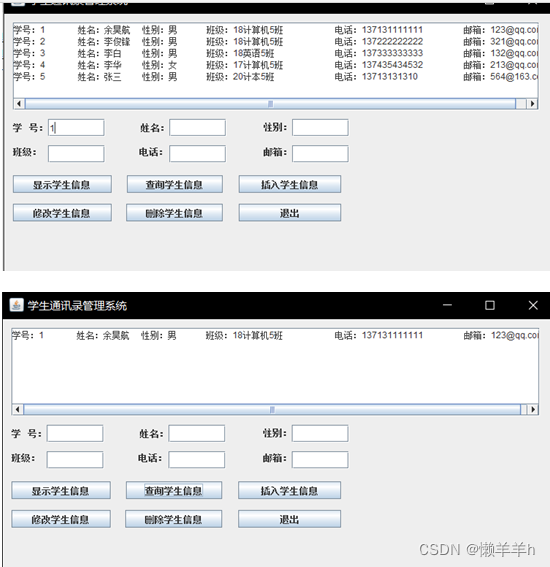
4添加学生信息:

5修改学生信息:

6删除学生信息:

四、联系与交流
q:969060742 完整文档、代码、sql、程序资源- 1
-
相关阅读:
GIT代码迁移和仓库镜像
学习Python可以做什么工作?选什么方向?
9个 强化学习现实生活中的应用
如何使用Vue CLI进行预渲染
1064 Complete Binary Search Tree
Linux Harbor 镜像存储路径和迁移方式
HTML5+CSS3+JavaScript 实现按键令小女孩移动,改变动画效果
Moonbeam通过新的LayerZero部署扩展跨链能力
数据结构题型11-顺序队列
VScdoe将字体修改为宋体
- 原文地址:https://blog.csdn.net/m0_58065010/article/details/133917595
