-
Flutter——最详细(CustomScrollView)使用教程
CustomScrollView简介
创建一个 [ScrollView],该视图使用薄片创建自定义滚动效果。
[SliverList],这是一个显示线性子项列表的银子列表。
[SliverFixedExtentList],这是一种更高效的薄片,它显示沿滚动轴具有相同范围的子级的线性列表。
[SliverGrid],这是一个显示子项 2D 数组的薄片。
[SliverPadding],这是一个在另一个薄片周围添加空白空间的薄片。
[SliverAppBar],这是一个显示标题的条形,该标题可以在滚动视图滚动时展开和浮动。[ScrollNotification]
和 [NotificationListener],可用于在不使用 [ScrollController] 的情况下监视滚动位置。[索引语义]
,它允许使用滚动公告的索引来批注子列表。使用场景:
当列表高度超出屏幕,则需要使用该组件,进而实现布局上下滑动。
我们需要注意的是 slivers 这个数组必须使用带Sliver开头的组件。属性 作用 scrollDirection 滑动方向 reverse 数据列表反向显示 controller 滑动列表参数配置 primary 自行查看 physics 滑动到底部之后的滑动动画 scrollBehavior 自行查看 shrinkWrap 确定滚动视图的高度 cacheExtent 设置缓存范围 semanticChildCount 设置子视图的个数 keyboardDismissBehavior 键盘关闭模式 clipBehavior 布局裁剪模式 slivers 它是数组格式,填充Widget SliverPadding组件:相当于一个Padding组件,设置内边距;
SliverPadding( padding: EdgeInsets.all(20.w), sliver: SliverToBoxAdapter( child: Container( color: Colors.black54, child: Text("SliverToBoxAdapter"), ), ), )- 1
- 2
- 3
- 4
- 5
- 6
- 7
- 8
- 9
绿色外部红色内部则是设置的padding间距

SliverToBoxAdapter组件:相当于一个Container布局容器;
SliverToBoxAdapter( child: Container( color: Colors.black54, child: Text("SliverToBoxAdapter"), ), )- 1
- 2
- 3
- 4
- 5
- 6
SliverGrid组件:相当于一个GridView网格布局容器;
分为:SliverGrid.extent()、SliverGrid.count()、 SliverGrid.builder()、这几个属性可以自行去源码查看SliverGrid.builder( gridDelegate: SliverGridDelegateWithFixedCrossAxisCount( crossAxisCount: 3, childAspectRatio: 1, ), itemCount: data.length, itemBuilder: (BuildContext context, int index) { var item = data[index]; return Card( elevation: 1, clipBehavior: Clip.hardEdge, child: Text( item.toString(), style: TextStyle( color: Colors.blueAccent, fontSize: 26, ), ), ); }, )- 1
- 2
- 3
- 4
- 5
- 6
- 7
- 8
- 9
- 10
- 11
- 12
- 13
- 14
- 15
- 16
- 17
- 18
- 19
- 20
- 21
绿色部分是 SliverGrid组件实现

SliverList组件:相当于一个ListView网格布局容器;
分为:SliverList.separated()、SliverList.list()、 SliverList.builder()、这几个属性可以自行去源码查看SliverList( delegate: SliverChildBuilderDelegate( (BuildContext context, int index) { return ListTile( title: Text('SliverList Item $index'), ); }, childCount: 10, // 列表项的个数 ), ),- 1
- 2
- 3
- 4
- 5
- 6
- 7
- 8
- 9
- 10

SliverFixedExtentList组件:相当于一个ListView网格布局容器;多了一个itemExtent固定item高度属性。可以提高滑动效率。
分为:SliverFixedExtentList.list()、 SliverFixedExtentList.builder()、这几个属性可以自行去源码查看SliverFixedExtentList( itemExtent: 50, // 列表项的高度 delegate: SliverChildBuilderDelegate( (BuildContext context, int index) { return ListTile( title: Text('FixedExtent Item $index'), ); }, childCount: 10, // 列表项的个数 ), ),- 1
- 2
- 3
- 4
- 5
- 6
- 7
- 8
- 9
- 10
- 11

SliverAppBar组件:相当于一个AppBar容器;
- title:指定应用栏的标题部分。 floating:当向上滚动时,设置为true会将应用栏固定在屏幕顶部。默认值为false。
- pinned:设置为true时,应用栏始终可见,无论向上滚动多少。默认值为false。
- expandedHeight:设置应用栏展开的高度。
- flexibleSpace:可以将FlexibleSpaceBar作为应用栏的子项,以添加背景图像、渐变效果等。

SliverAppBar、SliverPersistentHeader、SliverFixedExtentList三个组件同时使用;
SliverPersistentHeader( delegate: MyPersistentHeaderDelegate(), // 委托对象,控制头部视图的行为和外观 pinned: true, // 是否始终显示头部视图,无论向上滚动多少 ), SliverFixedExtentList(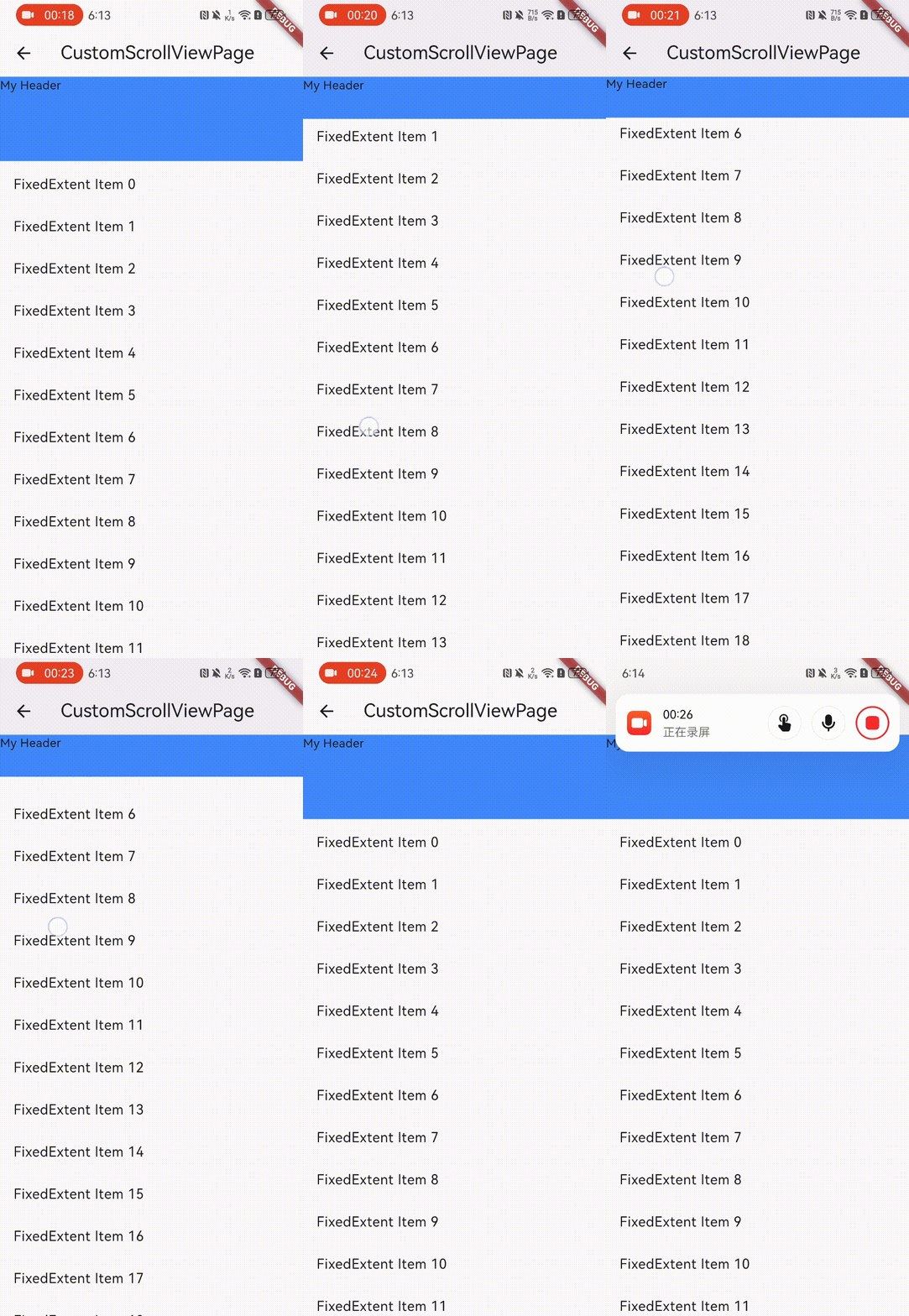 itemExtent: 50, // 列表项的高度 delegate: SliverChildBuilderDelegate( (BuildContext context, int index) { return ListTile( title: Text('FixedExtent Item $index'), ); }, childCount: 20, // 列表项的个数 ), ),- 1
- 2
- 3
- 4
- 5
- 6
- 7
- 8
- 9
- 10
- 11
- 12
- 13
- 14
- 15
- 16

SliverAppBar( title: Text( 'My App', style: TextStyle(color: Colors.red), ), floating: true, // 当向上滚动时,是否将应用栏固定在屏幕顶部 pinned: true, // 是否始终显示应用栏,无论向上滚动多少 expandedHeight: 100, // 展开的高度 flexibleSpace: FlexibleSpaceBar( background: Image.asset('assets/googleplay.png', fit: BoxFit.cover), ), ), SliverPersistentHeader( delegate: MyPersistentHeaderDelegate(), // 委托对象,控制头部视图的行为和外观 pinned: true, // 是否始终显示头部视图,无论向上滚动多少 ), SliverFixedExtentList( itemExtent: 50, // 列表项的高度 delegate: SliverChildBuilderDelegate( (BuildContext context, int index) { return ListTile( title: Text('FixedExtent Item $index'), ); }, childCount: 20, // 列表项的个数 ), ),- 1
- 2
- 3
- 4
- 5
- 6
- 7
- 8
- 9
- 10
- 11
- 12
- 13
- 14
- 15
- 16
- 17
- 18
- 19
- 20
- 21
- 22
- 23
- 24
- 25
- 26
- 27
- 28
- 29
- 30
- 31

SliverOpacity 对应组件:Opacity
SliverAnimatedOpacity 对应组件: AnimatedOpacity
SliverFadeTransition 对应组件:FadeTransition
SliverIgnorePointer 对应组件:IgnorePointer
SliverLayoutBuilder 对应组件:LayoutBuilder
SliverOffstage 对应组件:Offstage
SliverPadding 对应组件:Padding
SliverReorderableList 对应组件:ReorderableList
SliverSafeArea 对应组件:SafeArea
SliverVisibility 对应组件:Visibility
这些具体使用请看源码自行了解;项目地址
-
相关阅读:
Keil | 固件包安装,解决Error: Flash Download failed - “Cortex-M7“问题
通过20天预测7天
java毕业设计选题基于SpringBoot项目源码体育用品购物商城-协同过滤推荐算法
【免杀前置课——Windows编程】七、资源操作(图标资源添加、实现菜单窗口、实现右键下拉菜单、实现对话框资源添加)(附代码)
STC单片机15——MPU6050六轴数据融合,互补滤波,时间常数可调,可稳定运行,串口显示角度值
免费GPU:九天•毕昇平台使用教程
一个集成的BurpSuite漏洞探测插件1.1
基于C语言实现朴树算法树链的路径问题
Vue 监听store数据变化
数据结构 ----- 堆排序
- 原文地址:https://blog.csdn.net/u013290250/article/details/133906355