-
会议OA小程序【首页布局】
目录
一. Flex布局介绍
布局的传统解决方案,基于盒状模型,依赖 display属性 + position属性 + float属性。
2009年,W3C提出了一种新的方案—-Flex布局,可以简便、完整、响应式地实现各种页面布局。目前,它已经得到了所有浏览器的支持,这意味着,现在就能很安全地使用这项功能。
1.1 什么是Flex布局
Flex是Flexible Box的缩写,意为”弹性布局”,用来为盒状模型提供最大的灵活性。
任何一个容器都可以指定为Flex布局。
- .box{
- display: flex;
- }
行内元素也可以使用Flex布局。
- .box{
- display: inline-flex;
- }
Webkit内核的浏览器,必须加上-webkit前缀。
- .box{
- display: -webkit-flex; /* Safari */
- display: flex;
- }
注意,设为Flex布局以后,子元素的float、clear和vertical-align属性将失效。
1.2 基本概念
采用Flex布局的元素,称为Flex容器(flex container),简称”容器”。它的所有子元素自动成为容器成员,称为Flex项目(flex item),简称”项目”。
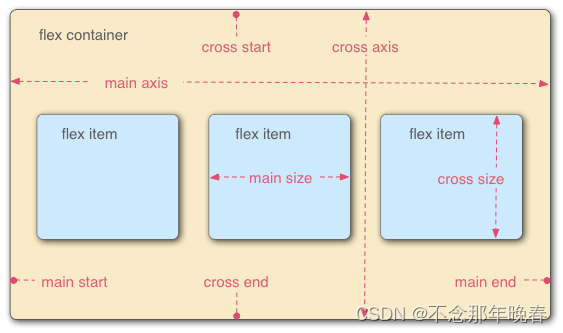
容器默认存在两根轴:水平的主轴(main axis)和垂直的交叉轴(cross axis)。主轴的开始位置(与边框的交叉点)叫做main start,结束位置叫做main end;交叉轴的开始位置叫做cross start,结束位置叫做cross end。
项目默认沿主轴排列。单个项目占据的主轴空间叫做main size,占据的交叉轴空间叫做cross size。
1.3 Flex属性
-
flex-direction 主轴的方向(即项目的排列方向) 默认为row
-
flex-wrap 如果一条轴线排不下,如何换行。默认nowrap,不换行
-
flex-flow 是flex-direction属性和flex-wrap属性的简写形式
-
justify-content 定义了项目在主轴上的对齐方式
-
align-items 定义项目在交叉轴上如何对齐
-
align-content 属性定义了多根轴线的对齐方式
详细内容请查看 Flex布局语法教程
二. 会议OA首页轮播图的实现
配置
- config/api.js
- // 以下是业务服务器API地址
- // 本机开发API地址
- var WxApiRoot = 'http://localhost:8080/demo/wx/';
- // 测试环境部署api地址
- // var WxApiRoot = 'http://192.168.0.101:8070/demo/wx/';
- // 线上平台api地址
- //var WxApiRoot = 'https://www.oa-mini.com/demo/wx/';
- module.exports = {
- IndexUrl: WxApiRoot + 'home/index', //首页数据接口
- SwiperImgs: WxApiRoot+'swiperImgs', //轮播图
- MettingInfos: WxApiRoot+'meeting/list', //会议信息
- };
Mock工具
由于这里我还没有将小程序与后台数据进行交互,所以使用mock模拟数据
-
imgSrcs
- {
- "data": {
- "images":[
- {
- "img": "https://cdn-we-retail.ym.tencent.com/tsr/home/v2/banner1.png",
- "text": "1"
- },
- {
- "img": "https://cdn-we-retail.ym.tencent.com/tsr/home/v2/banner2.png",
- "text": "2"
- },
- {
- "img": "https://cdn-we-retail.ym.tencent.com/tsr/home/v2/banner3.png",
- "text": "3"
- },
- {
- "img": "https://cdn-we-retail.ym.tencent.com/tsr/home/v2/banner4.png",
- "text": "4"
- },
- {
- "img": "https://cdn-we-retail.ym.tencent.com/tsr/home/v2/banner5.png",
- "text": "5"
- },
- {
- "img": "https://cdn-we-retail.ym.tencent.com/tsr/home/v2/banner6.png",
- "text": "6"
- }
- ]
- },
- "statusCode": "200",
- "header": {
- "content-type":"applicaiton/json;charset=utf-8"
- }
- }

swiper
- index.wxml
- <!--index.wxml-->
- <view>
- <swiper indicator-dots="true"
- autoplay="true">
- <block wx:for="{{imgSrcs}}" wx:key="*text">
- <swiper-item>
- <image src="{{item.img}}"/>
- </swiper-item>
- </block>
- </swiper>
- </view>
- index.js
- // index.js
- // 获取应用实例
- const app = getApp()
- const api = require("../../config/api.js")
- Page({
- data: {
- imgSrcs:[]
- },
- // 事件处理函数
- bindViewTap() {
- wx.navigateTo({
- url: '../logs/logs'
- })
- },
- loadSwiperImgs(){
- let that=this;
- wx.request({
- url: api.SwiperImgs,
- dataType: 'json',
- success(res) {
- console.log(res)
- that.setData({
- imgSrcs:res.data.images
- })
- }
- })
- },
- onLoad() {
- if (wx.getUserProfile) {
- this.setData({
- canIUseGetUserProfile: true
- })
- }
- this.loadSwiperImgs();
- },
- getUserProfile(e) {
- // 推荐使用wx.getUserProfile获取用户信息,开发者每次通过该接口获取用户个人信息均需用户确认,开发者妥善保管用户快速填写的头像昵称,避免重复弹窗
- wx.getUserProfile({
- desc: '展示用户信息', // 声明获取用户个人信息后的用途,后续会展示在弹窗中,请谨慎填写
- success: (res) => {
- console.log(res)
- this.setData({
- userInfo: res.userInfo,
- hasUserInfo: true
- })
- }
- })
- },
- getUserInfo(e) {
- // 不推荐使用getUserInfo获取用户信息,预计自2021年4月13日起,getUserInfo将不再弹出弹窗,并直接返回匿名的用户个人信息
- console.log(e)
- this.setData({
- userInfo: e.detail.userInfo,
- hasUserInfo: true
- })
- }
- })
效果展示

三. 会议OA首页会议信息布局
- // index.js
- // 获取应用实例
- const app = getApp()
- const api = require("../../config/api.js")
- Page({
- data: {
- imgSrcs:[
- {
- "img": "https://cdn-we-retail.ym.tencent.com/tsr/home/v2/banner1.png",
- "text": "1"
- },
- {
- "img": "https://cdn-we-retail.ym.tencent.com/tsr/home/v2/banner2.png",
- "text": "2"
- },
- {
- "img": "https://cdn-we-retail.ym.tencent.com/tsr/home/v2/banner3.png",
- "text": "3"
- },
- {
- "img": "https://cdn-we-retail.ym.tencent.com/tsr/home/v2/banner4.png",
- "text": "4"
- },
- {
- "img": "https://cdn-we-retail.ym.tencent.com/tsr/home/v2/banner5.png",
- "text": "5"
- },
- {
- "img": "https://cdn-we-retail.ym.tencent.com/tsr/home/v2/banner6.png",
- "text": "6"
- }
- ],
- lists:[
- {
- "id": "1",
- "image": "/static/persons/1.jpg",
- "title": "对话产品总监 | 深圳·北京PM大会 【深度对话小米/京东/等产品总监】",
- "num":"304",
- "state":"进行中",
- "starttime": "2022-03-13 00:00:00",
- "location": "深圳市·南山区"
- },
- {
- "id": "1",
- "image": "/static/persons/2.jpg",
- "title": "AI WORLD 2016世界人工智能大会",
- "num":"380",
- "state":"已结束",
- "starttime": "2022-03-15 00:00:00",
- "location": "北京市·朝阳区"
- },
- {
- "id": "1",
- "image": "/static/persons/3.jpg",
- "title": "H100太空商业大会",
- "num":"500",
- "state":"进行中",
- "starttime": "2022-03-13 00:00:00",
- "location": "大连市"
- },
- {
- "id": "1",
- "image": "/static/persons/4.jpg",
- "title": "报名年度盛事,大咖云集!2016凤凰国际论坛邀您“与世界对话”",
- "num":"150",
- "state":"已结束",
- "starttime": "2022-03-13 00:00:00",
- "location": "北京市·朝阳区"
- },
- {
- "id": "1",
- "image": "/static/persons/5.jpg",
- "title": "新质生活 · 品质时代 2016消费升级创新大会",
- "num":"217",
- "state":"进行中",
- "starttime": "2022-03-13 00:00:00",
- "location": "北京市·朝阳区"
- }
- ]
- },
- // 事件处理函数
- bindViewTap() {
- wx.navigateTo({
- url: '../logs/logs'
- })
- },
- loadSwiperImgs(){
- let that=this;
- wx.request({
- url: api.SwiperImgs,
- dataType: 'json',
- success(res) {
- console.log(res)
- that.setData({
- imgSrcs:res.data.images
- })
- }
- })
- },
- onLoad() {
- if (wx.getUserProfile) {
- this.setData({
- canIUseGetUserProfile: true
- })
- }
- this.loadSwiperImgs();
- },
- getUserProfile(e) {
- // 推荐使用wx.getUserProfile获取用户信息,开发者每次通过该接口获取用户个人信息均需用户确认,开发者妥善保管用户快速填写的头像昵称,避免重复弹窗
- wx.getUserProfile({
- desc: '展示用户信息', // 声明获取用户个人信息后的用途,后续会展示在弹窗中,请谨慎填写
- success: (res) => {
- console.log(res)
- this.setData({
- userInfo: res.userInfo,
- hasUserInfo: true
- })
- }
- })
- },
- getUserInfo(e) {
- // 不推荐使用getUserInfo获取用户信息,预计自2021年4月13日起,getUserInfo将不再弹出弹窗,并直接返回匿名的用户个人信息
- console.log(e)
- this.setData({
- userInfo: e.detail.userInfo,
- hasUserInfo: true
- })
- }
- })
- <!--index.wxml-->
- <view>
- <swiper indicator-dots="true"
- autoplay="true">
- <block wx:for="{{imgSrcs}}" wx:key="*text">
- <swiper-item>
- <image src="{{item.img}}"/>
- </swiper-item>
- </block>
- </swiper>
- </view>
- <view class="mobi-title">
- <text class="mobi-icon"></text>
- <text>会议信息</text>
- </view>
- <block wx:for-items="{{lists}}" wx:for-item="item" wx:key="item.id">
- <view class="list" data-id="{{item.id}}">
- <view class="list-img">
- <image class="video-img" mode="scaleToFill" src="{{item.image}}"></image>
- </view>
- <view class="list-detail">
- <view class="list-title"><text>{{item.title}}</text></view>
- <view class="list-tag">
- <view class="state">{{item.state}}</view>
- <view class="join"><text class="list-num">{{item.num}}</text>人报名</view>
- </view>
- <view class="list-info"><text>{{item.location}}</text>|<text>{{item.starttime}}</text></view>
- </view>
- </view>
- </block>
- <view class="section bottom-line">
- <text>到底啦</text>
- </view>
- /**index.wxss**/
- .mobi-title {
- font-size: 12pt;
- color: #777;
- line-height: 110%;
- font-weight: bold;
- width: 100%;
- padding: 15rpx;
- background-color: #f3f3f3;
- }
- .mobi-icon {
- padding: 0rpx 3rpx;
- border-radius: 3rpx;
- background-color: #ff7777;
- position: relative;
- margin-right: 10rpx;
- }
- /*list*/
- .list {
- display: flex;
- flex-direction: row;
- width: 100%;
- padding: 0 20rpx 0 0;
- border-top: 1px solid #eeeeee;
- background-color: #fff;
- margin-bottom: 5rpx;
- /* border-radius: 20rpx;
- box-shadow: 0px 0px 10px 6px rgba(0,0,0,0.1); */
- }
- .list-img {
- display: flex;
- margin: 10rpx 10rpx;
- width: 150rpx;
- height: 220rpx;
- justify-content: center;
- align-items: center;
- }
- .list-img .video-img {
- width: 120rpx;
- height: 120rpx;
- }
- .list-detail {
- margin: 10rpx 10rpx;
- display: flex;
- flex-direction: column;
- width: 600rpx;
- height: 220rpx;
- }
- .list-title text {
- font-size: 11pt;
- color: #333;
- font-weight: bold;
- }
- .list-detail .list-tag {
- display: flex;
- height: 70rpx;
- }
- .list-tag .state {
- font-size: 9pt;
- color: #81aaf7;
- width: 120rpx;
- border: 1px solid #93b9ff;
- border-radius: 2px;
- margin: 10rpx 0rpx;
- display: flex;
- justify-content: center;
- align-items: center;
- }
- .list-tag .join {
- font-size: 11pt;
- color: #bbb;
- margin-left: 20rpx;
- display: flex;
- justify-content: center;
- align-items: center;
- }
- .list-tag .list-num {
- font-size: 11pt;
- color: #ff6666;
- }
- .list-info {
- font-size: 9pt;
- color: #bbb;
- margin-top: 20rpx;
- }
- .bottom-line{
- display: flex;
- height: 60rpx;
- justify-content: center;
- align-items: center;
- background-color: #f3f3f3;
- }
- .bottom-line text{
- font-size: 9pt;
- color: #666;
- }
首页整体效果展示

-
相关阅读:
【vue】如何打开别人编译后的vue项目
面试系列 - Redis持久化机制详解
Elasticsearch 搜索入门技术之一
K8s使用RDMA进行高速通信
JVM 虚拟机系列:架构(二)一图看懂虚拟机架构:JNI
Qt技巧--添加C++11支持
Spark java.io.NotSerializableException
数据湖:分布式开源处理引擎Spark
ES6 类的扩展
dubbo 接口的测试方法汇总
- 原文地址:https://blog.csdn.net/lijie1025/article/details/133882831
