-
[SQL | MyBatis] MyBatis 简介
目录
一、MyBatis 简介
1、MyBatis 简介
- MyBatis 是一款优秀的持久层框架,它支持自定义 SQL、存储过程以及高级映射。MyBatis 免除了几乎所有的 JDBC 代码以及设置参数和获取结果集的工作。
- MyBatis 可以通过简单的 XML 或注解来配置和映射原始类型、接口和 Java POJO(Plain Old Java Objects,普通老式 Java 对象)为数据库中的记录。
2、工作流程
(1)每个基于 MyBatis 的应用都是以一个 SqlSessionFactory 的实例为核心的:
- SqlSessionFactory 的实例可以通过 SqlSessionFactoryBuilder 获得;
- 而 SqlSessionFactoryBuilder 则可以从 XML 配置文件或一个预先配置的 Configuration 实例来构建出 SqlSessionFactory 实例;(即 xml 方式、注解方式)
(2)SqlSessionFactory 顾名思义,我们可以从中获得 SqlSession 的实例
- SqlSession 提供了在数据库执行 SQL 命令所需的所有方法;(如:selectList、selectOne)
- 通过 SqlSession 实例来执行已映射的 SQL 语句;(根据对应 namespace + id 执行自定义的 SQL 语句)
(3)释放资源
- SqlSession.close();
整个流程大致为:

二、入门案例
显然重点在于 MyBatis 的配置文件,以及执行相应方法所需要的 mapper 映射文件。下面通过 1 个示例来说明。
1、准备工作
(1)引入相关依赖
- 这里使用的数据库是 PostgreSQL,可以根据自己的数据库更改。
- <dependencies>
- <dependency>
- <groupId>org.mybatisgroupId>
- <artifactId>mybatisartifactId>
- <version>3.5.10version>
- dependency>
- <dependency>
- <groupId>junitgroupId>
- <artifactId>junitartifactId>
- <version>4.12version>
- <scope>testscope>
- dependency>
- <dependency>
- <groupId>org.postgresqlgroupId>
- <artifactId>postgresqlartifactId>
- <version>42.6.0version>
- dependency>
- dependencies>
(2)创建一个 Pojo 实体类
- 构造函数、toString 等等方法自行添加。
- package com.demo.pojo;
- public class User {
- private Integer id;
- private String username;
- private String password;
- private Integer gender;
- private String address;
- }
(3)创建对应的 user 表格

2、示例
我们按照前面的大致流程完成示例。
(1)mybatis-config.xml
- 文件命名任意,在 resource 目录下创建:/mybatis-config.xml;
- 首先需要配置数据库信息,其次需要链接 mapper 映射文件;
- "1.0" encoding="UTF-8" ?>
- configuration
- PUBLIC "-//mybatis.org//DTD Config 3.0//EN"
- "http://mybatis.org/dtd/mybatis-3-config.dtd">
- <configuration>
- <environments default="development">
- <environment id="development">
- <transactionManager type="JDBC"/>
- <dataSource type="POOLED">
- <property name="driver" value="org.postgresql.Driver"/>
- <property name="url" value="jdbc:postgresql://localhost:5432/MyDatabase"/>
- <property name="username" value="postgres"/>
- <property name="password" value="123456"/>
- dataSource>
- environment>
- environments>
- <mappers>
- <mapper resource="mapper/UserMapper.xml"/>
- mappers>
- configuration>
(2)UserMapper.xml
- 在 resource 目录下创建:/mapper/mybatis-config.xml;
- namespace:命名空间,一般可以随便写,示例一和示例二有所不同;
- id:作为当前编写语句的标识符,通常与 namespace 连用;
- resultType:顾名思义,返回类型;
- "1.0" encoding="UTF-8" ?>
- mapper
- PUBLIC "-//mybatis.org//DTD Mapper 3.0//EN"
- "https://mybatis.org/dtd/mybatis-3-mapper.dtd">
- <mapper namespace="MyUser">
- <select id="selectAll" resultType="com.demo.pojo.User">
- select * from "MyUser";
- select>
- mapper>
(3)Java 代码
- @Test
- public void test1() throws IOException {
- // 1.加载核心配置文件,获取 sqlSessionFactory 对象
- String resource = "mybatis-config.xml";
- InputStream inputStream = Resources.getResourceAsStream(resource);
- SqlSessionFactory sqlSessionFactory = new SqlSessionFactoryBuilder().build(inputStream);
- // 2.获取 sqlSession 对象,用来执行sql语句
- SqlSession sqlSession = sqlSessionFactory.openSession();
- // 3.执行 sql
- List
userList = sqlSession.selectList("MyUser.selectAll"); - System.out.println(userList);
- // 4.释放资源
- sqlSession.close();
- }
三、Mapper 代理开发
1、问题简介
我们会发现上面的示例有一个大问题:当我们使用 sqlSession 对象调用指定的 SQL 语句时,传入了一个字符串常量 "MyUser.selectAll"。

这种硬编码的问题显然不利于后期的维护,并且在编写的时候也需要来回查找对应的 SQL 语句的 id。
而我们的 Mapper 代理开发的目的:
- 解决原生方式中的硬编码问题;
- 简化后期执行的 SQL;
2、工作流程
- 处理哪个 Pojo 实体类,我们就可以创建对应的 mapper 代理对象,mapper 代理对象就是一个接口;

- 使用 sqlSession 获取指定的 mapper 代理对象(通过 class),然后使用 mapper 执行目标 SQL 语句的方法;

- 目标方法的方法名,与我们在 xml 文件中设置的 id 值一致;

3、注意事项
- 使用 mapper 代理对象,需要 mapper 接口和相同文件名的 xml 在同一个目录下,因此在 resources 目录下创建软件包;(若 resource 没有软件包选项,则用 com/demo/mapper 来创建目录,或者将 resources 标记为源代码根目录)

- mapper 配置文件的 namespace 需要改成 mapper 代理对象的类路径;

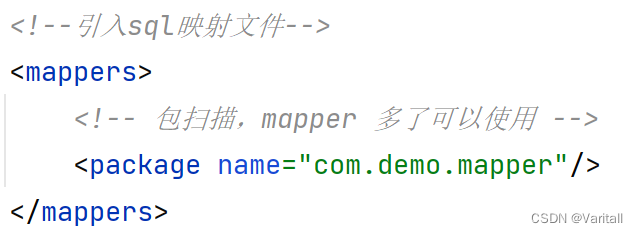
- 由于以后很肯能会有大量的 Pojo 实体类需要用到 Mapper,因此可以在 mybatis-config.xml 中使用包扫描;
4、测试
(1)Java 代码
- @Test
- public void test2() throws IOException {
- String resource = "mybatis-config.xml";
- InputStream inputStream = Resources.getResourceAsStream(resource);
- SqlSessionFactory sqlSessionFactory = new SqlSessionFactoryBuilder().build(inputStream);
- SqlSession sqlSession = sqlSessionFactory.openSession();
- // mapper 代理对象,需要 mapper 接口 和 xml 在同一个目录下,因此在 resources 目录下创建软件包
- // 没有软件包选项,则用 com/demo/mapper 来创建目录,或者将 resources 标记为源代码目录
- UserMapper userMapper = sqlSession.getMapper(UserMapper.class);
- List
userList = userMapper.selectAll(); - System.out.println(userList);
- sqlSession.close();
- }
(2)Mapper 接口类
- package com.demo.mapper;
- import com.demo.pojo.User;
- import java.util.List;
- public interface UserMapper {
- List
selectAll(); - }
(3)mybatis-config.xml
- "1.0" encoding="UTF-8" ?>
- configuration
- PUBLIC "-//mybatis.org//DTD Config 3.0//EN"
- "http://mybatis.org/dtd/mybatis-3-config.dtd">
- <configuration>
- <environments default="development">
- <environment id="development">
- <transactionManager type="JDBC"/>
- <dataSource type="POOLED">
- <property name="driver" value="org.postgresql.Driver"/>
- <property name="url" value="jdbc:postgresql://localhost:5432/MyDatabase"/>
- <property name="username" value="postgres"/>
- <property name="password" value="123456"/>
- dataSource>
- environment>
- environments>
- <mappers>
- <mapper resource="com/demo/mapper/UserMapper.xml"/>
- mappers>
- configuration>
(4)UserMapper.xml
- "1.0" encoding="UTF-8" ?>
- mapper
- PUBLIC "-//mybatis.org//DTD Mapper 3.0//EN"
- "https://mybatis.org/dtd/mybatis-3-mapper.dtd">
- <mapper namespace="com.demo.mapper.UserMapper">
- <select id="selectAll" resultType="com.demo.pojo.User">
- select * from "MyUser";
- select>
- mapper>
四、核心配置文件 mybatis-config.xml
详情可以参考:https://mybatis.org/mybatis-3/zh/configuration.html
下面举两个例子。
1、environment
用来配置数据源,因此可以在 中配置多个数据源。通过 default 属性值,可以动态地切换数据源。 (1)
事务管理方式。这个默认写 JDBC 即可,后期开发使用的是 Spring 的事务管理方式。
(2)
数据源信息。后期开发也是使用 Spring 来配置数据源,默认写上 POOLED 即可。
2、typeAilases
我们在 UserMapper.xml 中,需要为返回类型写上类的全路径,有一点麻烦。
使用 typeAilases 可以为 POJO 类配置一个别名,设置好包的路径后,它们的别名默认就是不区分大小写的类名。

五、基于 xml 的查询操作
1、准备环境
(1)创建表 brand

(2)创建实体类 Brand
- package com.demo.pojo;
- public class Brand {
- private Integer id;
- private String brandName;
- private String companyName;
- private Integer order;
- private String description;
- private Integer status;
- }
(3)安装 MyBatisX 插件

当我们在 mapper 接口中写上相应的 SQL 语句的方法名时,如果已经有很多方法了,那么对比起来就很麻烦,使用 MyBatisX 可以帮助我们快速定位。

- 蓝色头顶:代表 mapper 的接口;
- 红色头顶:代表 SQL 的映射文件;
- 点击红鸟或者蓝鸟,可以在 mapper 接口和 SQL 映射文件之间进行切换;
并且 MyBatisX 还能自动生成方法所对应的 SQL 的 id;

2、
映射列名 有的人习惯在创建数据库表的时候,列名使用 _ 下划线,这样就会导致 MyBatis 无法将数据注入到 POJO 实例中。
而如果给每个带有 _ 下划线的列名都取别名,写起来又非常麻烦,所以 MyBatis 提供了一个
标签,用来将表的列名与 POJO 实体类的属性名做一一对应: - <resultMap id="brandResultMap" type="com.demo.pojo.Brand">
- <result column="brand_name" property="brandName"/>
- <result column="company_name" property="companyName"/>
- resultMap>
- <select id="selectAll" resultMap="brandResultMap">
- select * from "MyBrand";
- select>
需要注意的是:。
3、根据 id 查询( #{ id } )
显然根据 id 查询时,我们需要传入一个 Integer 类型的参数:
- 接口添加参数:

- 映射文件添加 #{id}:

MyBatis 会根据参数名与 #{ } 内的名做比较来进行注入。
(1)${} 与 #{}
除了 #{ } 这种写法,还可以用 ${ } 这种写法,它们的区别在于:
- #{ }:会先将 #{ } 替换成 ?,然后再将传入的参数赋值给 ?;
- ${ }:直接将传入的参数替换掉 ${ };
一般情况下,我们都推荐使用 #{ },因为 #{ } 将 #{ } 替换成 ?,是为了防止 SQL 注入,而 ${ } 就不能防止 SQL 注入。
(2)特殊字符
假如我们写出如下 SQL 语句:

显然,< 会被识别为一个标签的开始,所以我们可以做如下措施:
- 转义字符:

- CDATA 区:

4、参数传递的 6 种方式
当我们希望接收如下两个参数来做查询。

(1)@Param(value)

- @Param 的 value 属性,用来将其标注的参数,按照 value 的属性值找到相同的 #{ value } 来进行注入。
- 比如 value = "brandName",就可以注入到 #{ brandName} 中。
(2)POJO 实体类
- 如果传递的参数都属于同一个 POJO 实体类,那么就可以用一个实体类的参数来接收他们。
- 这就要求 #{ } 占位符内的名称,跟 POJO 实体类的属性名一致。
(3)Map
- Map 的要求就很明显了,要求 key 的值,与 #{ } 内的名称一致。
(4)Collection
- 封装为 Map 集合,通过 #{ arg0 } 或 #{ collection } 获取
- 可以使用 @Param 注解,替换 Map 中默认的 arg 键名。
(5)List
- 封装为 Map 集合,通过 #{ arg0 } 或 #{ collection } 或 #{ list } 获取
- 可以使用 @Param 注解,替换 Map 中默认的 arg 键名。
(6)Array
- 封装为 Map 集合,通过 #{ arg0 } 或 #{ array } 获取
- 可以使用 @Param 注解,替换 Map 中默认的 arg 键名。
(7)Java 测试代码
- @Test
- public void testSelectByCondition() throws IOException {
- // 模拟从 web 接收参数
- Integer status = 0;
- String companyName = "华为";
- // 处理参数(模糊查询)
- companyName = "%" + companyName + "%";
- // 封装 Brand 对象
- Brand brand = new Brand();
- brand.setStatus(status);
- brand.setCompanyName(companyName);
- // 设置 map 对象
- Map
- map.put("status", status);
- map.put("companyName", companyName);
- String resource = "mybatis-config.xml";
- InputStream inputStream = Resources.getResourceAsStream(resource);
- SqlSessionFactory sqlSessionFactory = new SqlSessionFactoryBuilder().build(inputStream);
- SqlSession sqlSession = sqlSessionFactory.openSession();
- BrandMapper brandMapper = sqlSession.getMapper(BrandMapper.class);
- List
brandList1 = brandMapper.selectByConditions1(status, companyName); - List
brandList2 = brandMapper.selectByConditions2(brand); - List
brandList3 = brandMapper.selectByConditions3(map); - System.out.println("第一种:" + brandList1);
- System.out.println("第二种:" + brandList2);
- System.out.println("第三种:" + brandList3);
- sqlSession.close();
- }
(5)Mapper 配置文件
- <select id="selectByConditions1" resultType="com.demo.pojo.Brand">
- select * from "MyBrand" where
- status = #{ status } and
- "companyName" like #{ companyName }
- select>
- <select id="selectByConditions2" resultType="com.demo.pojo.Brand">
- select * from "MyBrand" where
- status = #{ status } and
- "companyName" like #{ companyName }
- select>
- <select id="selectByConditions3" resultType="com.demo.pojo.Brand">
- select * from "MyBrand" where
- status = #{ status } and
- "companyName" like #{ companyName }
- select>
(6)输出结果
6、动态查询
上面的例子其实有 Bug,因为用户在操作的时候,有可能只希望用一个 companyName 来查询目标数据。也就是说,我们需要对原有 SQL 语句做动态修改,没有传递过来的参数就不用。
动态 SQL 是 MyBatis 的强大特性之一。如果你使用过 JDBC 或其它类似的框架,你应该能理解根据不同条件拼接 SQL 语句有多痛苦,例如拼接时要确保不能忘记添加必要的空格,还要注意去掉列表最后一个列名的逗号。利用动态 SQL,可以彻底摆脱这种痛苦。
下面通过几个标签完成动态查询:
and
(1)
的多条件动态查询 test 属性值就是我们要做的逻辑判断。
- 使用
时,由于 and 关键字不好控制,所以一般都加上一个恒等式:1 = 1。
- <select id="selectByDynamic" resultType="com.demo.pojo.Brand">
- select *
- from "MyBrand"
- where 1 = 1
- <if test="status != null">
- and status = #{ status }
- if>
- <if test="companyName != null and companyName != ''">
- and "companyName" like #{ companyName }
- if>
- select>
- 或者使用
标签,会根据判断结果来连接(也就是 and)对应的语句。
- <select id="selectByDynamic" resultType="com.demo.pojo.Brand">
- select *
- from "MyBrand"
- <where>
- <if test="status != null">
- status = #{ status }
- if>
- <if test="companyName != null and companyName != ''">
- "companyName" like #{ companyName }
- if>
- where>
- select>
(2)
的单条件动态查询 有些情况下只允许根据一个的条件进行查询,但是条件可以更改。
- 如果用户只输入一个参数,所以可以不用
。 可以用来防止用户一个都不输入。 - 如果用户真的一个都不输入,可以用
,这样可以省略 。
- <select id="selectByDynamic" resultType="com.demo.pojo.Brand">
- select *
- from "MyBrand"
- where
- <choose>
- <when test="status != null">
- status = #{ status }
- when>
- <when test="companyName != null and companyName != ''">
- "companyName" like #{ companyName }
- when>
- <otherwise>
- 1 = 1
- otherwise>
- choose>
- select>
六、基于 xml 的添加操作
1、添加数据
(1)接口

(2)Mapper 映射
- <insert id="addBrand">
- insert into "MyBrand"("brandName", "companyName", "order", description, status)
- values(#{brandName}, #{companyName}, #{order}, #{description}, #{status});
- insert>
(3)Java 测试代码
- @Test
- public void testAddBrand() throws IOException {
- String resource = "mybatis-config.xml";
- InputStream inputStream = Resources.getResourceAsStream(resource);
- SqlSessionFactory sqlSessionFactory = new SqlSessionFactoryBuilder().build(inputStream);
- SqlSession sqlSession = sqlSessionFactory.openSession();
- BrandMapper brandMapper = sqlSession.getMapper(BrandMapper.class);
- Brand brand = new Brand(null, "iphone", "Apple", 99, "iphone 8", 1);
- brandMapper.addBrand(brand);
- List
brandList = brandMapper.selectAll(); - System.out.println(brandList);
- // 提交事务
- sqlSession.commit();
- sqlSession.close();
- }
2、事务提交
在刚才添加数据的例子中,我们发现多写了一句 sqlSession.commit(),用于将 SQL 语句的操作提交。如果不写,就会发现我们插入的数据没有添加到数据库。
(1)事务提交的设置方法
- sqlSession.commit():手动提交事务;
- sqlSessionFactory.openSession(true):在获取 sqlSession 的时候可以设置是否自动提交(默认false,即开启事务)
3、主键返回
有时在数据添加成功后,需要获取插入数据库的主键的值,比如 id。
因为数据刚刚添加完成,我们并不知道它的 id 值,但是此时我们马上要用到 id 作为另一个表的外键,那么就需要返回主键值。
(1)解决方法
在相应的
标签中,添加 useGeneratedKeys 和 KeyProperty 属性即可: - useGeneratedKeys:设置为 true;
- KeyProperty:设置为需要返回的列;
(2)示例
- 插入一个新的 brand,然后获取其 id,再次做查询验证 id。
(2-1)Mapper 映射
- <insert id="addBrandBackId" useGeneratedKeys="true" keyProperty="id">
- insert into "MyBrand"("brandName", "companyName", "order", description, status)
- values(#{brandName}, #{companyName}, #{order}, #{description}, #{status});
- insert>
(2-2)Java 测试代码
- @Test
- public void testAddBrand() throws IOException {
- String resource = "mybatis-config.xml";
- InputStream inputStream = Resources.getResourceAsStream(resource);
- SqlSessionFactory sqlSessionFactory = new SqlSessionFactoryBuilder().build(inputStream);
- SqlSession sqlSession = sqlSessionFactory.openSession();
- BrandMapper brandMapper = sqlSession.getMapper(BrandMapper.class);
- Brand brand = new Brand(null, "iphone", "Apple", 99, "iphone 8", 1);
- brandMapper.addBrandBackId(brand);
- Integer id = brand.getId();
- System.out.println(id);
- Brand tmp = brandMapper.selectById(id);
- System.out.println(tmp);
- // 提交事务
- sqlSession.commit();
- sqlSession.close();
- }
(3)输出结果

七、基于 xml 的修改操作
1、修改全部字段
传入一个 POJO 实体类,做对应的 update 操作即可。
(1)接口

(2)Mapper 映射
- <update id="update">
- update "MyBrand"
- set
- "brandName" = #{ brandName },
- "companyName" = #{ companyName },
- "order" = #{ order},
- description = #{ description },
- status = #{ status }
- where id = #{ id };
- update>
(3)Java 测试代码
- @Test
- public void testUpdate() throws IOException {
- String resource = "mybatis-config.xml";
- InputStream inputStream = Resources.getResourceAsStream(resource);
- SqlSessionFactory sqlSessionFactory = new SqlSessionFactoryBuilder().build(inputStream);
- SqlSession sqlSession = sqlSessionFactory.openSession();
- BrandMapper brandMapper = sqlSession.getMapper(BrandMapper.class);
- int count = brandMapper.update(new Brand(9, "Iphone", "Apple", 66, "iphone 18", 1));
- System.out.println(count);
- sqlSession.commit();
- sqlSession.close();
- }
2、修改动态字段
比如 User 对象,密码的修改和其他的内容的修改一般是不会放在一起的,修改密码时只需要修改 password,其他内容不用修改。
使用
标签就可以实现动态: - 当 update 语句中没有使用 if 标签时,如果有一个参数为 null,都会导致错误。
- 当在 update 语句中使用 if 标签时,如果前面的 if 没有执行,则会导致逗号多余错误。
- 使用
标签将动态的配置 SET 关键字,并剔除追加到条件末尾的任何不相关的逗号。 - 使用 if+set 标签修改后,如果某项为 null 则不进行更新,而是保持数据库原值。
- <update id="update">
- update "MyBrand"
- <set>
- <if test="brandName != null">
- "brandName" = #{ brandName },
- if>
- <if test="companyName != null">
- "companyName" = #{ companyName },
- if>
- <if test="order != null">
- "order" = #{ order },
- if>
- <if test="description != null">
- description = #{ description },
- if>
- <if test="status != null">
- status = #{ status },
- if>
- set>
- where id = #{ id };
- update>
八、基于 xml 的删除操作
1、根据 id 删除
(1)Mapper 映射文件
- <delete id="deleteById">
- delete from "MyBrand" where id = #{ id };
- delete>
(2)Java 测试代码
- @Test
- public void testDeleteById() throws IOException {
- String resource = "mybatis-config.xml";
- InputStream inputStream = Resources.getResourceAsStream(resource);
- SqlSessionFactory sqlSessionFactory = new SqlSessionFactoryBuilder().build(inputStream);
- SqlSession sqlSession = sqlSessionFactory.openSession();
- BrandMapper brandMapper = sqlSession.getMapper(BrandMapper.class);
- int count = brandMapper.deleteById(9);
- sqlSession.commit();
- sqlSession.close();
- }
2、批量删除
批量(多选)删除是我们经常遇到的需求。
实现方法就是将多个 id 封装成 id 数组,SQL 语句中用 ?占位符来接收所有的 id 值。
但是现在问题就在于,我们不能确定有多少个 id,也就是不能确定有多少个 ?占位符。
(1)foreach
为了解决 in 语句的问题,MyBatis 提供了一个 foreach 标签,可以对一个集合进行遍历:
- collection:表示传入的集合;
- item:遍历的每一个元素;
- seperator:元素之间的分隔符;
- open/close:指定开闭匹配的字符串;
其中 collection 需要特别注意,MyBatis 会将集合对象封装到一个 Map 对象,通过 key 来获取我们传入的集合。
key 的值:数组则写 array,List 实例则写 list,也可以用 @Param 起别名。
(2)示例
(2-1)Mapper 映射文件
- <delete id="deleteByIds">
- delete from "MyBrand" where id in
- <foreach collection="array" item="id" separator="," open="(" close=")">
- #{ id }
- foreach>
- delete>
九、注解开发
MyBatis 中并不一定使用完全注解开发,通常:
- 注解完成简单功能;
- 配置文件完成复杂功能;
1、简单的增删改查
(1)Mapper 映射接口
- @Select("select * from \"MyBrand\"")
- List
selectAll(); - @Insert("insert into \"MyBrand\"(\"brandName\", \"companyName\", \"order\", description, status)\n" +
- " values(#{brandName}, #{companyName}, #{order}, #{description}, #{status});")
- void addBrand(Brand brand);
- @Update("update \"MyBrand\" set status = #{ status }")
- int update(Brand brand);
- @Delete("delete from \"MyBrand\" where id = #{ id };")
- int deleteById(Integer id);
(2)Java 测试代码
- @Test
- public void testAnnotation() throws IOException {
- String resource = "mybatis-config.xml";
- InputStream inputStream = Resources.getResourceAsStream(resource);
- SqlSessionFactory sqlSessionFactory = new SqlSessionFactoryBuilder().build(inputStream);
- SqlSession sqlSession = sqlSessionFactory.openSession();
- BrandMapper brandMapper = sqlSession.getMapper(BrandMapper.class);
- // 增
- brandMapper.addBrand(new Brand(null, "iphone", "Apple", 55, "Iphone x", 0));
- // 删
- brandMapper.deleteById(2);
- // 改
- brandMapper.update(new Brand(1, "No.1", "华为No.1", 66, "遥遥领先2.0",0));
- // 查
- List
brandList = brandMapper.selectAll(); - System.out.println(brandList);
- sqlSession.commit();
- sqlSession.close();
- }
(3)输出结果
- 运行前:
- 运行后:

-
相关阅读:
asp.net实验管理系统VS开发sqlserver数据库web结构c#编程web网页设计
安装第三方包报错 error: Microsoft Visual C++ 14.0 or greater is required——解决办法
linux 直接部署 java8
jQuery中ajax的使用
单机、集群和分布式
基于SpringBoot+Vue的在线外卖管理系统
Linux ARM平台开发系列讲解(入门篇) 1.6.3 NVIDIA AGX Xavier刷机方法
Stm32_标准库_10_TIM_显示时间&日期
ndoe.js、npm相关笔记
机器学习-8-超参数寻优的常用算法
- 原文地址:https://blog.csdn.net/joyride_run/article/details/133862306
