-
凉鞋的 Unity 笔记 201. 第三轮循环:引入变量
201. 第三轮循环:引入变量
在这一篇,我们进行第三轮 编辑-测试 循环。
在之前我们编写了 输出 Hello Unity 的脚本,如下:
using System.Collections; using System.Collections.Generic; using UnityEngine; public class FirstGameObject : MonoBehaviour { // Start is called before the first frame update void Start() { print("Hello Unity"); // + } // Update is called once per frame void Update() { } }- 1
- 2
- 3
- 4
- 5
- 6
- 7
- 8
- 9
- 10
- 11
- 12
- 13
- 14
- 15
- 16
- 17
- 18
- 19
如果我们要输出 10 次 Hello Unity 该怎么办呢?
答案很简单,就是复制十行 print(“Hello Unity”),代码如下:
using System.Collections; using System.Collections.Generic; using UnityEngine; public class FirstGameObject : MonoBehaviour { // Start is called before the first frame update void Start() { print("Hello Unity"); print("Hello Unity"); print("Hello Unity"); print("Hello Unity"); print("Hello Unity"); print("Hello Unity"); print("Hello Unity"); print("Hello Unity"); print("Hello Unity"); print("Hello Unity"); } // Update is called once per frame void Update() { } }- 1
- 2
- 3
- 4
- 5
- 6
- 7
- 8
- 9
- 10
- 11
- 12
- 13
- 14
- 15
- 16
- 17
- 18
- 19
- 20
- 21
- 22
- 23
- 24
- 25
- 26
- 27
这样当我们运行场景后,结果如下:
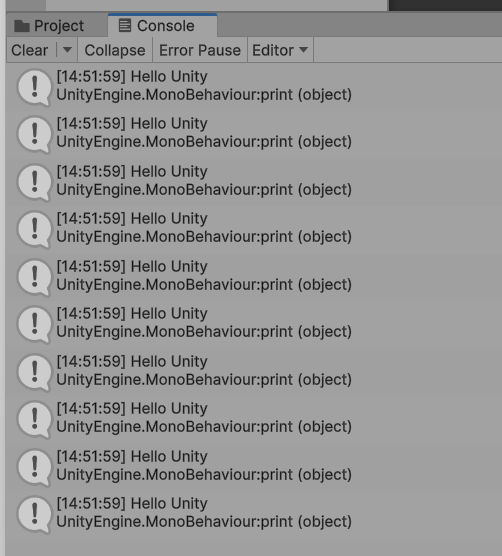
总共输出了十次 Hello Unity。
此时我突然想要把输出十次 Hello Unity 改成输出十次 Hello C#。
那么最简单的方式,就是直接修改代码,如下:
using System.Collections; using System.Collections.Generic; using UnityEngine; public class FirstGameObject : MonoBehaviour { // Start is called before the first frame update void Start() { print("Hello C#"); print("Hello C#"); print("Hello C#"); print("Hello C#"); print("Hello C#"); print("Hello C#"); print("Hello C#"); print("Hello C#"); print("Hello C#"); print("Hello C#"); } // Update is called once per frame void Update() { } }- 1
- 2
- 3
- 4
- 5
- 6
- 7
- 8
- 9
- 10
- 11
- 12
- 13
- 14
- 15
- 16
- 17
- 18
- 19
- 20
- 21
- 22
- 23
- 24
- 25
- 26
- 27
- 28
运行之后,结果如下:
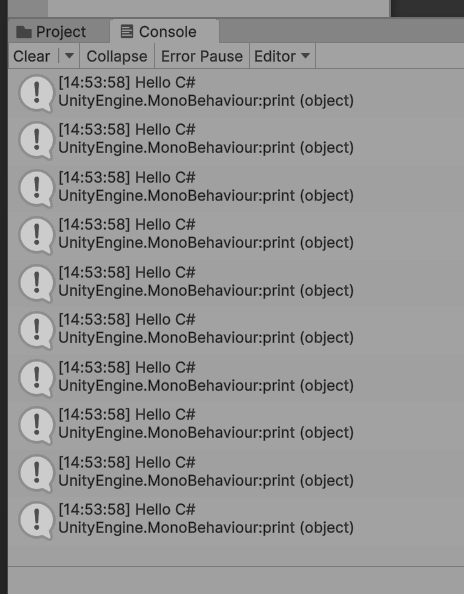
但是这样太不优雅了,我们需要复制粘贴十次,如果我们有 100 个甚至 1000 个 Hello Unity,那么我们可能需要复制粘贴很多次,或者使用代码编辑器所提供的查找/替换功能完成。
比较优雅的方式就是引入一个变量,代码如下所示:
using System.Collections; using System.Collections.Generic; using UnityEngine; public class FirstGameObject : MonoBehaviour { // Start is called before the first frame update void Start() { var textToPrint = "Hello C#"; print(textToPrint); print(textToPrint); print(textToPrint); print(textToPrint); print(textToPrint); print(textToPrint); print(textToPrint); print(textToPrint); print(textToPrint); print(textToPrint); } // Update is called once per frame void Update() { } }- 1
- 2
- 3
- 4
- 5
- 6
- 7
- 8
- 9
- 10
- 11
- 12
- 13
- 14
- 15
- 16
- 17
- 18
- 19
- 20
- 21
- 22
- 23
- 24
- 25
- 26
- 27
- 28
- 29
- 30
- 31
这样当我们想要输出十次 Hello World 那么我们只需要修改变量的值即可,如下所示:
using System.Collections; using System.Collections.Generic; using UnityEngine; public class FirstGameObject : MonoBehaviour { // Start is called before the first frame update void Start() { var textToPrint = "Hello World"; print(textToPrint); print(textToPrint); print(textToPrint); print(textToPrint); print(textToPrint); print(textToPrint); print(textToPrint); print(textToPrint); print(textToPrint); print(textToPrint); } // Update is called once per frame void Update() { } }- 1
- 2
- 3
- 4
- 5
- 6
- 7
- 8
- 9
- 10
- 11
- 12
- 13
- 14
- 15
- 16
- 17
- 18
- 19
- 20
- 21
- 22
- 23
- 24
- 25
- 26
- 27
- 28
- 29
- 30
这样非常优雅。
我们在代码中新引入的 textToPrint 叫做变量。
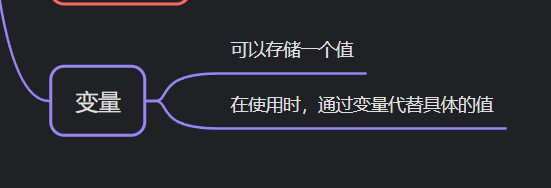
变量可以存储一个值,然后再接下来可以通过这个变量来代替具体的值。
比如 textToPrint 是 “Hello World”,那么接下来的每一句 print(textToPrint) 其实都是 print(“Hello World”)。
变量给编程带来了巨大的便利。
当然,变量是每一个程序语言都有的,而每一个游戏引擎不管是提供专业脚本支持还是可视化脚本支持都会提供变量的使用,所以变量也是通识部分的内容,再接下来的篇幅里,笔者会好好介绍变量,以及 C# 中的变量使用。
这一篇内容就这些,我们下一篇再见,拜拜。
知识地图
转载请注明 凉鞋的笔记 -
相关阅读:
【区分vue2和vue3下的element UI Message 消息提示组件,分别详细介绍属性,事件,方法如何使用,并举例】
[ruby on rails]rack-cors, rack-attack
Hyperledger Fabric 智能合约开发及 fabric-sdk-go/fabric-gateway 使用示例
AVR单片机开发11——1602液晶屏幕
乘方【NOIP 2022 普及组】
RSA网络安全密码学?
Spring Cloud Alibaba —— 服务注册与配置中心
【信号处理】基于扩展卡尔曼滤波器和无迹卡尔曼滤波器的窄带信号时变频率估计(Matlab代码实现)
STM32 定时器1应用+PWM输入捕获输出设置
“蔚来杯“2022牛客暑期多校训练营5 F: A Stack of CDs
- 原文地址:https://blog.csdn.net/u010125551/article/details/133890389