-
NIO教程
一,概述
原本的java是基于同步阻塞式的i/o通信(bio) 性能低下,所以出现了nio这种非阻塞式的
二,Java 的I/O演进之路
2.1 i/o模型基本说明
i/o模型:就是用什么样的通道或者说通信模式和架构进行数据的传输和接收,很大程度上决定了程序通信的性能,java支持的3种网络编程的io模型:BIO,NIO,AIO
2.2 I/O模型
BIO
一个连接是一个线程

NIO
同步非阻塞的,客户端发送的连接请求都会注册到多路复用器上,多路复用器查询到连接有i/o请求就会进行处理

AIO
异步非阻塞
2.3 BIO,NIO,AIO 使用场景分析
- bio适合连接数目小的且固定的架构
- nio适合连接数目多且连接比较短的架构(聊天)
- AIO方式使用于连接数目多且连接比较长(重操作)的架构,比如相册服务器,充
四 ,NIO
4.1 NIO 基本介绍
- 面向缓冲区基于通道的
- 在java.nio包下以及子包下
- 有三大核心 **Channel(通道),Buffer(缓冲区),Selector(选择器)
- 如果通道里面没有数据就会去做其他事情不会去等待
4.2 NIO 和 BIO 比较
- BIO 以流的方式,NIO 以块的方式,效率更高
- NIO是非阻塞的
- BIO 是基于字节流和字符流进行操作,而NIO是基于Channel(通道)和Buffer(缓冲区)进行操作,数据总是由缓冲区写入通道或者从通道读入缓冲区,选择器用于监听

4.3 NIO 三大核心原理
三大核心分别为 Channel(通道) , Buffer(缓冲区),Selector(选择器)
Buffer缓冲区
Channel(通道)
通道可以非阻塞读取和写入通道,通道可以支持读取或写入缓冲区,也支持异步地读写,而流是单向的Selector(选择器)
可以检测多个通道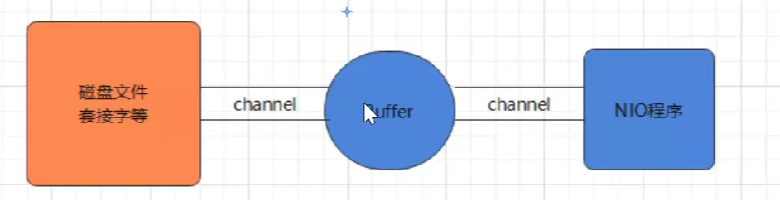
程序切换到哪个channel是由事件决定的4.4 缓冲区(Buffer)
一个容器,由java.nio包定义,所有缓冲区都是Buffer抽象类的子类,

Buffer类与其子类
- ByteBuffer
- CharBuffer
- ShortBuffer
- IntBuffer
- LongBuffer
- FloatBuffer
- DoubleBuffer
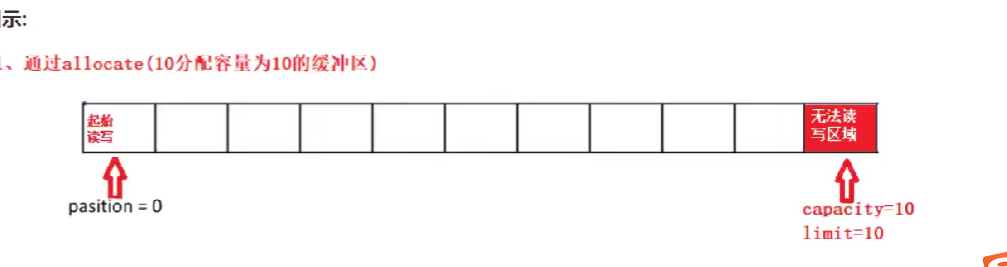
static xxxBuffer allocate(int capacity): 创建一个容量为capicity的 buffer对象
buffer.wrap()数据已知
ByteBuffer.allocate()构建ByteBuffer对象,参数实际上是指底层的字节数组的容量缓冲区的基本属性
- 容量 创建后不能改变
- 限制 (limit) limit后面不能读写,不能为负,不能大于其容量,写入模式,限制等于buffer的容量,读取模式下,limit等与写入的数据量
- 位置(position): 下一个读取或写入的数据的索引,索引库的位置不能为负,并且不能大于其限制
- 标记(mark)与重置(reset):标记是一个索引,通过Buffer中的mark() 方法指定Buffer中一个特定的position,之后通过调用reset()方法恢复到这个position
标记、位置、限制、容量遵守以下不变式: 0<=mark <= position <= limit <= capacity

Buffer常见方法
Buffer clear() 洁空缓冲区并返回对缓冲区的引用(只是把position变为0位置) Buffer flip(为将缓冲区的界限设置为当前位置,并将当前位置设值为0 使用wrap() 类java.nio.IntBuffer中的方法,可以将int数组包装到缓冲区中。此方法需要一个参数,即将数组包装到缓冲区中,并返回创建的新缓冲区。如果返回的缓冲区被修改,则数组的内容也将被修改,反之亦然。 int capacity(返回 Buffer 的capacity大小 boolean hasRemaining(判断缓区中是否还有元素 int limit()返同Buffer的界限(limit)的位置 Buffer limit(int n)将设置缓冲区界限为n,并返回一个具有新limit 的缓冲区对象 Buffer mark()对缓冲区设置标记 int position()返回缓冲区的当前位置position Buffer position(int n)将设置缓冲区的当前位置为n ,并返回修改后的 Buffer对象 int remaining()返回position和 limit 之间的元素个数 Buffer reset()将位置position转到以前设置的 mark所在的位置 Buffer rewind()将位置设为为节、取消设置的mark- 1
- 2
- 3
- 4
- 5
- 6
- 7
- 8
- 9
- 10
- 11
- 12
- 13
Buffer所有子类提供了两个用于数据操作的方法: get()put()方法取获取Buffer中的数据 get():读取单个字节 get(byte[] dst):批量读取多个字节到dst中 get(int index):读取指定索引位置的字节(不会移动position) 放到入数据到 Buffer 中十 put (byte b):将给定单个字节写入缓冲区的当前位置 put(byte[] src);将 src中的字节写入缓冲区的当前位置 put(int index,byte b):将指定字节写入缓冲区的索引位置(不会移动 position)- 1
- 2
- 3
- 4
- 5
- 6
- 7
- 8
- 9
缓冲区的数据操作
public class BufferTest { @Test public void test01(){ //1.分配一个缓冲区,容量设置10 ByteBuffer buffer = ByteBuffer.allocate(10); System.out.println(buffer.position()); System.out.println(buffer.limit()); System.out.println(buffer.capacity()); System.out.println("---------------------"); //2.添加数据 String name = "itheima"; buffer.put(name.getBytes(StandardCharsets.UTF_8)); System.out.println(buffer.position()); System.out.println(buffer.limit()); System.out.println(buffer.capacity()); System.out.println("---------------------"); buffer.flip(); //为将缓冲区的界限设置为当前位置,并将当前位置设值为0 System.out.println(buffer.position()); System.out.println(buffer.limit()); System.out.println(buffer.capacity()); System.out.println("---------------------"); //4,. get数据的读取 char b = (char)buffer.get(); System.out.println(b); System.out.println(buffer.position()); System.out.println(buffer.limit()); System.out.println(buffer.capacity()); } }- 1
- 2
- 3
- 4
- 5
- 6
- 7
- 8
- 9
- 10
- 11
- 12
- 13
- 14
- 15
- 16
- 17
- 18
- 19
- 20
- 21
- 22
- 23
- 24
- 25
- 26
- 27
- 28
- 29
- 30
- 31
- 32
0 10 10 --------------------- 7 10 10 --------------------- 0 7 10 --------------------- i 1 7 10- 1
- 2
- 3
- 4
- 5
- 6
- 7
- 8
- 9
- 10
- 11
- 12
- 13
- 14
- 15
- 16
直接与非直接缓冲区
什么是直接内存与非直接内存根据官方文档的描述:
byte byffer可以是两种类型,一种是基于直接内存(也就是非堆内存)﹔另一种是非直接内存(也就是堆内存)。对于直接内存来说,JVM将会在IO操作上具有更高的性能,因为它直接作用于本地系统的IO操作。而非直接内存,也就是堆内存中的数据,如果要作IO操作,会先从本进程内存复制到直接内存,再利用本地IO处理。
从数据流的角度,非直接内存是下面这样的作用链:
本地IO-->直接内存-->非直接内存--→>直按内存-->本地IO而直接内存是:
本地IO-->直接内存-->本地IO
很明显,在做IO处理时,比如网络发送大量数据时,直接内存会具有更高的效率。直接内存使用allocateDirect创建,但是它比申请普通的堆内存需要耗费更高的性能。不过,这部分的数据是在IVM之外的,因此它不会占用应用的内存。所以呢,当你有很大的数据要缓存,并且它的生命周期又很长,那么就比较适合使用直接内存。只是一般来说,如果不是能带来很明显的性能提升,还是推荐直接使用堆内存。字节缓冲区是直接缓冲区还是非直接缓冲区可通过调用其isDirect()方法来确定。4.5 NIO核心二:通道(Channel)通道Channe概述
通道(Channel):由java.nio.channels包定义的, Channel表示I0源与目标打开的连接。Channel类似于传统的“流"。只不过Channel本身不能直接访问数据,channel只能与Buffer进行交互。
1、NIO的通道类似于流,但有些区别如下:- 通道可以同时进行读写,而流只能读或者只能写
- 通道可以实现异步读写数据
- 通道可以从缓冲读数据,也可以写数据到缓冲:
2、Bl0中的stream是单向的,例如FilelnputStream对象只能进行读取数据的操作,而NIO中的通道(Channel)是双向的,可以读操作,也可以写操作。
3、Channel在NIO中是一个接口
public interface channe1 extends closeable{}
常用的Channel实现类 - FileChannel:用于读取、写入、映射和操作文件的通道。
- DatagramChannel:通过UDP读写网络中的数据通道。
- SocketChannel:通过TCP读写网络中的数据。
- ServerSocketChannel:可以监听新进来的TCP 连接,对每一个新进来的连接都会创建一个SocketChannel。【ServerSocketChanne类似ServerSocket , SocketChannel类似Socket】
FileChannel 类
获取通道的一种方式是对支持通道的对象调用getChannel() 方法。支持通道的类如下:
- FileInputStream
- FileOutputStream
- RandomAccessFile
- DatagramSocket
- Socket
- ServerSocket 获取通道的其他方式是使用 Files 类的静态方法 newByteChannel() 获取字节通道。或者通过通道的静态方法 open() 打开并返回指定通道
FileChannel的常用方法
int read(ByteBuffer dst) 从 从 Channel 到 中读取数据到 ByteBuffer
long read(ByteBuffer[] dsts) 将 将 Channel 到 中的数据“分散”到 ByteBuffer[]
int write(ByteBuffer src) 将 将 ByteBuffer 到 中的数据写入到 Channel
long write(ByteBuffer[] srcs) 将 将 ByteBuffer[] 到 中的数据“聚集”到 Channel
long position() 返回此通道的文件位置
FileChannel position(long p) 设置此通道的文件位置
long size() 返回此通道的文件的当前大小
FileChannel truncate(long s) 将此通道的文件截取为给定大小
void force(boolean metaData) 强制将所有对此通道的文件更新写入到存储设备中案例1-本地文件写数据
需求:使用前面学习后的 ByteBuffer(缓冲) 和 FileChannel(通道), 将 “hello,黑马Java程序员!” 写入到 data.txt 中.
package com.itheima; import org.junit.Test; import java.io.FileNotFoundException; import java.io.FileOutputStream; import java.io.OutputStream; import java.nio.ByteBuffer; import java.nio.channels.FileChannel; public class ChannelTest { @Test public void write(){ try { // 1、字节输出流通向目标文件 FileOutputStream fos = new FileOutputStream("data01.txt"); // 2、得到字节输出流对应的通道Channel FileChannel channel = fos.getChannel(); // 3、分配缓冲区 ByteBuffer buffer = ByteBuffer.allocate(1024); buffer.put("hello,黑马Java程序员!".getBytes()); // 4、把缓冲区切换成写出模式 buffer.flip(); channel.write(buffer); channel.close(); System.out.println("写数据到文件中!"); } catch (Exception e) { e.printStackTrace(); } } }- 1
- 2
- 3
- 4
- 5
- 6
- 7
- 8
- 9
- 10
- 11
- 12
- 13
- 14
- 15
- 16
- 17
- 18
- 19
- 20
- 21
- 22
- 23
- 24
- 25
- 26
- 27
- 28
- 29
- 30
- 31
- 32
案例2-本地文件读数据
需求:使用前面学习后的 ByteBuffer(缓冲) 和 FileChannel(通道), 将 data01.txt 中的数据读入到程序,并显示在控制台屏幕
public class ChannelTest { @Test public void read() throws Exception { // 1、定义一个文件字节输入流与源文件接通 FileInputStream is = new FileInputStream("data01.txt"); // 2、需要得到文件字节输入流的文件通道 FileChannel channel = is.getChannel(); // 3、定义一个缓冲区 ByteBuffer buffer = ByteBuffer.allocate(1024); // 4、读取数据到缓冲区 channel.read(buffer); buffer.flip(); // 5、读取出缓冲区中的数据并输出即可 String rs = new String(buffer.array(),0,buffer.remaining()); System.out.println(rs); }- 1
- 2
- 3
- 4
- 5
- 6
- 7
- 8
- 9
- 10
- 11
- 12
- 13
- 14
- 15
- 16
- 17
- 18
案例3-使用Buffer完成文件复制
使用 FileChannel(通道) ,完成文件的拷贝。
@Test public void copy() throws Exception { // 源文件 File srcFile = new File("C:\\Users\\dlei\\Desktop\\BIO,NIO,AIO\\文件\\壁纸.jpg"); File destFile = new File("C:\\Users\\dlei\\Desktop\\BIO,NIO,AIO\\文件\\壁纸new.jpg"); // 得到一个字节字节输入流 FileInputStream fis = new FileInputStream(srcFile); // 得到一个字节输出流 FileOutputStream fos = new FileOutputStream(destFile); // 得到的是文件通道 FileChannel isChannel = fis.getChannel(); FileChannel osChannel = fos.getChannel(); // 分配缓冲区 ByteBuffer buffer = ByteBuffer.allocate(1024); while(true){ // 必须先清空缓冲然后再写入数据到缓冲区 buffer.clear(); // 开始读取一次数据 int flag = isChannel.read(buffer); if(flag == -1){ break; } // 已经读取了数据 ,把缓冲区的模式切换成可读模式 buffer.flip(); // 把数据写出到 osChannel.write(buffer); } isChannel.close(); osChannel.close(); System.out.println("复制完成!"); }- 1
- 2
- 3
- 4
- 5
- 6
- 7
- 8
- 9
- 10
- 11
- 12
- 13
- 14
- 15
- 16
- 17
- 18
- 19
- 20
- 21
- 22
- 23
- 24
- 25
- 26
- 27
- 28
- 29
- 30
- 31
案例4-分散 (Scatter) 和聚集 (Gather)
分散读取(Scatter ):是指把Channel通道的数据读入到多个缓冲区中去
聚集写入(Gathering )是指将多个 Buffer 中的数据“聚集”到 Channel。
//分散和聚集 @Test public void test() throws IOException{ RandomAccessFile raf1 = new RandomAccessFile("1.txt", "rw"); //1. 获取通道 FileChannel channel1 = raf1.getChannel(); //2. 分配指定大小的缓冲区 ByteBuffer buf1 = ByteBuffer.allocate(100); ByteBuffer buf2 = ByteBuffer.allocate(1024); //3. 分散读取 ByteBuffer[] bufs = {buf1, buf2}; channel1.read(bufs); for (ByteBuffer byteBuffer : bufs) { byteBuffer.flip(); } System.out.println(new String(bufs[0].array(), 0, bufs[0].limit())); System.out.println("-----------------"); System.out.println(new String(bufs[1].array(), 0, bufs[1].limit())); //4. 聚集写入 RandomAccessFile raf2 = new RandomAccessFile("2.txt", "rw"); FileChannel channel2 = raf2.getChannel(); channel2.write(bufs); }- 1
- 2
- 3
- 4
- 5
- 6
- 7
- 8
- 9
- 10
- 11
- 12
- 13
- 14
- 15
- 16
- 17
- 18
- 19
- 20
- 21
- 22
- 23
- 24
- 25
- 26
- 27
- 28
- 29
案例5-transferFrom()
从目标通道中去复制原通道数据
@Test public void test02() throws Exception { // 1、字节输入管道 FileInputStream is = new FileInputStream("data01.txt"); FileChannel isChannel = is.getChannel(); // 2、字节输出流管道 FileOutputStream fos = new FileOutputStream("data03.txt"); FileChannel osChannel = fos.getChannel(); // 3、复制 osChannel.transferFrom(isChannel,isChannel.position(),isChannel.size()); isChannel.close(); osChannel.close(); }- 1
- 2
- 3
- 4
- 5
- 6
- 7
- 8
- 9
- 10
- 11
- 12
- 13
案例6-transferTo()
把原通道数据复制到目标通道
@Test public void test02() throws Exception { // 1、字节输入管道 FileInputStream is = new FileInputStream("data01.txt"); FileChannel isChannel = is.getChannel(); // 2、字节输出流管道 FileOutputStream fos = new FileOutputStream("data04.txt"); FileChannel osChannel = fos.getChannel(); // 3、复制 isChannel.transferTo(isChannel.position() , isChannel.size() , osChannel); isChannel.close(); osChannel.close(); }- 1
- 2
- 3
- 4
- 5
- 6
- 7
- 8
- 9
- 10
- 11
- 12
- 13
4.6 NIO核心三:选择器(Selector)
选择器(Selector)概述
选择器(Selector) 是 SelectableChannle 对象的多路复用器,Selector 可以同时监控多个 SelectableChannel 的 IO 状况,也就是说,利用 Selector可使一个单独的线程管理多个 Channel。Selector 是非阻塞 IO 的核心
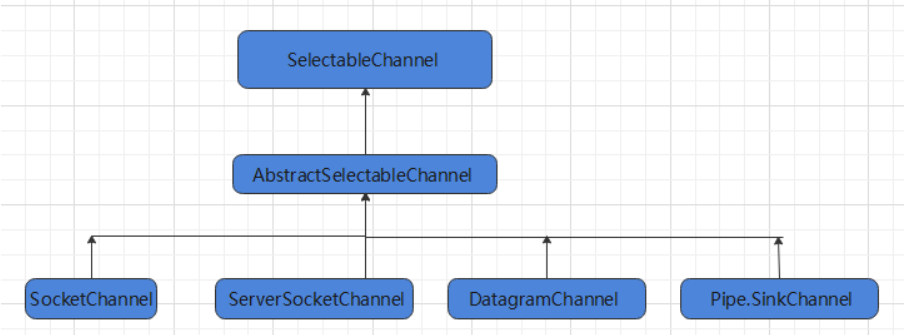
- Java 的 NIO,用非阻塞的 IO 方式。可以用一个线程,处理多个的客户端连接,就会使用到 Selector(选择器)
- Selector 能够检测多个注册的通道上是否有事件发生(注意:多个 Channel 以事件的方式可以注册到同一个
Selector),如果有事件发生,便获取事件然后针对每个事件进行相应的处理。这样就可以只用一个单线程去管
理多个通道,也就是管理多个连接和请求。 - 只有在 连接/通道 真正有读写事件发生时,才会进行读写,就大大地减少了系统开销,并且不必为每个连接都
创建一个线程,不用去维护多个线程 - 避免了多线程之间的上下文切换导致的开销
选择 器(Selector)的应用
创建 Selector :通过调用 Selector.open() 方法创建一个 Selector。
Selector selector = Selector.open();- 1
向选择器注册通道:SelectableChannel.register(Selector sel, int ops)
//1. 获取通道 ServerSocketChannel ssChannel = ServerSocketChannel.open(); //2. 切换非阻塞模式 ssChannel.configureBlocking(false); //3. 绑定连接 ssChannel.bind(new InetSocketAddress(9898)); //4. 获取选择器 Selector selector = Selector.open(); //5. 将通道注册到选择器上, 并且指定“监听接收事件” ssChannel.register(selector, SelectionKey.OP_ACCEPT);- 1
- 2
- 3
- 4
- 5
- 6
- 7
- 8
- 9
- 10
当调用 register(Selector sel, int ops) 将通道注册选择器时,选择器对通道的监听事件,需要通过第二个参数 ops 指定。可以监听的事件类型(用 可使用 SelectionKey 的四个常量 表示):
- 读 : SelectionKey.OP_READ (1)
- 写 : SelectionKey.OP_WRITE (4)
- 连接 : SelectionKey.OP_CONNECT (8)
- 接收 : SelectionKey.OP_ACCEPT (16)
- 若注册时不止监听一个事件,则可以使用“位或”操作符连接。
int interestSet = SelectionKey.OP_READ|SelectionKey.OP_WRITE- 1
4.7 NIO非阻塞式网络通信原理分析
Selector 示意图和特点说明
Selector可以实现: 一个 I/O 线程可以并发处理 N 个客户端连接和读写操作,这从根本上解决了传统同步阻塞 I/O 一连接一线程模型,架构的性能、弹性伸缩能力和可靠性都得到了极大的提升。

服务端流程
-
1、当客户端连接服务端时,服务端会通过 ServerSocketChannel 得到 SocketChannel:1. 获取通道
ServerSocketChannel ssChannel = ServerSocketChannel.open();- 1
-
2、切换非阻塞模式
ssChannel.configureBlocking(false);- 1
-
3、绑定连接
ssChannel.bind(new InetSocketAddress(9999));- 1
-
4、 获取选择器
Selector selector = Selector.open();- 1
-
5、 将通道注册到选择器上, 并且指定“监听接收事件”
ssChannel.register(selector, SelectionKey.OP_ACCEPT);- 1
-
- 轮询式的获取选择器上已经“准备就绪”的事件
//轮询式的获取选择器上已经“准备就绪”的事件 while (selector.select() > 0) { System.out.println("轮一轮"); //7. 获取当前选择器中所有注册的“选择键(已就绪的监听事件)” Iterator<SelectionKey> it = selector.selectedKeys().iterator(); while (it.hasNext()) { //8. 获取准备“就绪”的是事件 SelectionKey sk = it.next(); //9. 判断具体是什么事件准备就绪 if (sk.isAcceptable()) { //10. 若“接收就绪”,获取客户端连接 SocketChannel sChannel = ssChannel.accept(); //11. 切换非阻塞模式 sChannel.configureBlocking(false); //12. 将该通道注册到选择器上 sChannel.register(selector, SelectionKey.OP_READ); } else if (sk.isReadable()) { //13. 获取当前选择器上“读就绪”状态的通道 SocketChannel sChannel = (SocketChannel) sk.channel(); //14. 读取数据 ByteBuffer buf = ByteBuffer.allocate(1024); int len = 0; while ((len = sChannel.read(buf)) > 0) { buf.flip(); System.out.println(new String(buf.array(), 0, len)); buf.clear(); } } //15. 取消选择键 SelectionKey it.remove(); } } }- 1
- 2
- 3
- 4
- 5
- 6
- 7
- 8
- 9
- 10
- 11
- 12
- 13
- 14
- 15
- 16
- 17
- 18
- 19
- 20
- 21
- 22
- 23
- 24
- 25
- 26
- 27
- 28
- 29
- 30
- 31
- 32
- 33
客户端流程
-
-
获取通道
SocketChannel sChannel = SocketChannel.open(new InetSocketAddress("127.0.0.1", 9999));- 1
-
-
-
切换非阻塞模式
sChannel.configureBlocking(false);- 1
-
-
- 分配指定大小的缓冲区
ByteBuffer buf = ByteBuffer.allocate(1024);- 1
-
- 发送数据给服务端
Scanner scan = new Scanner(System.in); while(scan.hasNext()){ String str = scan.nextLine(); buf.put((new SimpleDateFormat("yyyy/MM/dd HH:mm:ss").format(System.currentTimeMillis()) + "\n" + str).getBytes()); buf.flip(); sChannel.write(buf); buf.clear(); } //关闭通道 sChannel.close();- 1
- 2
- 3
- 4
- 5
- 6
- 7
- 8
- 9
- 10
- 11
4.8 NIO非阻塞式网络通信入门案例
需求:服务端接收客户端的连接请求,并接收多个客户端发送过来的事件。
代码案例
/** 客户端 */ public class Client { public static void main(String[] args) throws Exception { //1. 获取通道 SocketChannel sChannel = SocketChannel.open(new InetSocketAddress("127.0.0.1", 9999)); //2. 切换非阻塞模式 sChannel.configureBlocking(false); //3. 分配指定大小的缓冲区 ByteBuffer buf = ByteBuffer.allocate(1024); //4. 发送数据给服务端 Scanner scan = new Scanner(System.in); while(scan.hasNext()){ String str = scan.nextLine(); buf.put((new SimpleDateFormat("yyyy/MM/dd HH:mm:ss").format(System.currentTimeMillis()) + "\n" + str).getBytes()); buf.flip(); sChannel.write(buf); buf.clear(); } //5. 关闭通道 sChannel.close(); } } /** 服务端 */ public class Server { public static void main(String[] args) throws IOException { //1. 获取通道 ServerSocketChannel ssChannel = ServerSocketChannel.open(); //2. 切换非阻塞模式 ssChannel.configureBlocking(false); //3. 绑定连接 ssChannel.bind(new InetSocketAddress(9999)); //4. 获取选择器 Selector selector = Selector.open(); //5. 将通道注册到选择器上, 并且指定“监听接收事件” ssChannel.register(selector, SelectionKey.OP_ACCEPT); //6. 轮询式的获取选择器上已经“准备就绪”的事件 while (selector.select() > 0) { System.out.println("轮一轮"); //7. 获取当前选择器中所有注册的“选择键(已就绪的监听事件)” Iterator<SelectionKey> it = selector.selectedKeys().iterator(); while (it.hasNext()) { //8. 获取准备“就绪”的是事件 SelectionKey sk = it.next(); //9. 判断具体是什么事件准备就绪 if (sk.isAcceptable()) { //10. 若“接收就绪”,获取客户端连接 SocketChannel sChannel = ssChannel.accept(); //11. 切换非阻塞模式 sChannel.configureBlocking(false); //12. 将该通道注册到选择器上 sChannel.register(selector, SelectionKey.OP_READ); } else if (sk.isReadable()) { //13. 获取当前选择器上“读就绪”状态的通道 SocketChannel sChannel = (SocketChannel) sk.channel(); //14. 读取数据 ByteBuffer buf = ByteBuffer.allocate(1024); int len = 0; while ((len = sChannel.read(buf)) > 0) { buf.flip(); System.out.println(new String(buf.array(), 0, len)); buf.clear(); } } //15. 取消选择键 SelectionKey it.remove(); } } } }- 1
- 2
- 3
- 4
- 5
- 6
- 7
- 8
- 9
- 10
- 11
- 12
- 13
- 14
- 15
- 16
- 17
- 18
- 19
- 20
- 21
- 22
- 23
- 24
- 25
- 26
- 27
- 28
- 29
- 30
- 31
- 32
- 33
- 34
- 35
- 36
- 37
- 38
- 39
- 40
- 41
- 42
- 43
- 44
- 45
- 46
- 47
- 48
- 49
- 50
- 51
- 52
- 53
- 54
- 55
- 56
- 57
- 58
- 59
- 60
- 61
- 62
- 63
- 64
- 65
- 66
- 67
- 68
- 69
- 70
- 71
- 72
- 73
- 74
- 75
- 76
- 77
4.9 NIO 网络编程应用实例-群聊系统
目标
需求:进一步理解 NIO 非阻塞网络编程机制,实现多人群聊
- 编写一个 NIO 群聊系统,实现客户端与客户端的通信需求(非阻塞)
- 服务器端:可以监测用户上线,离线,并实现消息转发功能
- 客户端:通过 channel 可以无阻塞发送消息给其它所有客户端用户,同时可以接受其它客户端用户通过服务端转发来的消息
服务端代码实现
public class Server { //定义属性 private Selector selector; private ServerSocketChannel ssChannel; private static final int PORT = 9999; //构造器 //初始化工作 public Server() { try { // 1、获取通道 ssChannel = ServerSocketChannel.open(); // 2、切换为非阻塞模式 ssChannel.configureBlocking(false); // 3、绑定连接的端口 ssChannel.bind(new InetSocketAddress(PORT)); // 4、获取选择器Selector selector = Selector.open(); // 5、将通道都注册到选择器上去,并且开始指定监听接收事件 ssChannel.register(selector , SelectionKey.OP_ACCEPT); }catch (IOException e) { e.printStackTrace(); } } //监听 public void listen() { System.out.println("监听线程: " + Thread.currentThread().getName()); try { while (selector.select() > 0){ System.out.println("开始一轮事件处理~~~"); // 7、获取选择器中的所有注册的通道中已经就绪好的事件 Iterator<SelectionKey> it = selector.selectedKeys().iterator(); // 8、开始遍历这些准备好的事件 while (it.hasNext()){ // 提取当前这个事件 SelectionKey sk = it.next(); // 9、判断这个事件具体是什么 if(sk.isAcceptable()){ // 10、直接获取当前接入的客户端通道 SocketChannel schannel = ssChannel.accept(); // 11 、切换成非阻塞模式 schannel.configureBlocking(false); // 12、将本客户端通道注册到选择器 System.out.println(schannel.getRemoteAddress() + " 上线 "); schannel.register(selector , SelectionKey.OP_READ); //提示 }else if(sk.isReadable()){ //处理读 (专门写方法..) readData(sk); } it.remove(); // 处理完毕之后需要移除当前事件 } } }catch (Exception e) { e.printStackTrace(); }finally { //发生异常处理.... } } //读取客户端消息 private void readData(SelectionKey key) { //取到关联的channle SocketChannel channel = null; try { //得到channel channel = (SocketChannel) key.channel(); //创建buffer ByteBuffer buffer = ByteBuffer.allocate(1024); int count = channel.read(buffer); //根据count的值做处理 if(count > 0) { //把缓存区的数据转成字符串 String msg = new String(buffer.array()); //输出该消息 System.out.println("form 客户端: " + msg); //向其它的客户端转发消息(去掉自己), 专门写一个方法来处理 sendInfoToOtherClients(msg, channel); } }catch (IOException e) { try { System.out.println(channel.getRemoteAddress() + " 离线了.."); e.printStackTrace(); //取消注册 key.cancel(); //关闭通道 channel.close(); }catch (IOException e2) { e2.printStackTrace();; } } } //转发消息给其它客户(通道) private void sendInfoToOtherClients(String msg, SocketChannel self ) throws IOException{ System.out.println("服务器转发消息中..."); System.out.println("服务器转发数据给客户端线程: " + Thread.currentThread().getName()); //遍历 所有注册到selector 上的 SocketChannel,并排除 self for(SelectionKey key: selector.keys()) { //通过 key 取出对应的 SocketChannel Channel targetChannel = key.channel(); //排除自己 if(targetChannel instanceof SocketChannel && targetChannel != self) { //转型 SocketChannel dest = (SocketChannel)targetChannel; //将msg 存储到buffer ByteBuffer buffer = ByteBuffer.wrap(msg.getBytes()); //将buffer 的数据写入 通道 dest.write(buffer); } } } public static void main(String[] args) { //创建服务器对象 Server groupChatServer = new Server(); groupChatServer.listen(); } }- 1
- 2
- 3
- 4
- 5
- 6
- 7
- 8
- 9
- 10
- 11
- 12
- 13
- 14
- 15
- 16
- 17
- 18
- 19
- 20
- 21
- 22
- 23
- 24
- 25
- 26
- 27
- 28
- 29
- 30
- 31
- 32
- 33
- 34
- 35
- 36
- 37
- 38
- 39
- 40
- 41
- 42
- 43
- 44
- 45
- 46
- 47
- 48
- 49
- 50
- 51
- 52
- 53
- 54
- 55
- 56
- 57
- 58
- 59
- 60
- 61
- 62
- 63
- 64
- 65
- 66
- 67
- 68
- 69
- 70
- 71
- 72
- 73
- 74
- 75
- 76
- 77
- 78
- 79
- 80
- 81
- 82
- 83
- 84
- 85
- 86
- 87
- 88
- 89
- 90
- 91
- 92
- 93
- 94
- 95
- 96
- 97
- 98
- 99
- 100
- 101
- 102
- 103
- 104
- 105
- 106
- 107
- 108
- 109
- 110
- 111
- 112
- 113
- 114
- 115
- 116
- 117
- 118
- 119
- 120
客户端代码实现
package com.itheima.chat; import java.io.IOException; import java.net.InetSocketAddress; import java.nio.ByteBuffer; import java.nio.channels.SelectionKey; import java.nio.channels.Selector; import java.nio.channels.SocketChannel; import java.util.Iterator; import java.util.Scanner; public class Client { //定义相关的属性 private final String HOST = "127.0.0.1"; // 服务器的ip private final int PORT = 9999; //服务器端口 private Selector selector; private SocketChannel socketChannel; private String username; //构造器, 完成初始化工作 public Client() throws IOException { selector = Selector.open(); //连接服务器 socketChannel = socketChannel.open(new InetSocketAddress("127.0.0.1", PORT)); //设置非阻塞 socketChannel.configureBlocking(false); //将channel 注册到selector socketChannel.register(selector, SelectionKey.OP_READ); //得到username username = socketChannel.getLocalAddress().toString().substring(1); System.out.println(username + " is ok..."); } //向服务器发送消息 public void sendInfo(String info) { info = username + " 说:" + info; try { socketChannel.write(ByteBuffer.wrap(info.getBytes())); }catch (IOException e) { e.printStackTrace(); } } //读取从服务器端回复的消息 public void readInfo() { try { int readChannels = selector.select(); if(readChannels > 0) {//有可以用的通道 Iterator<SelectionKey> iterator = selector.selectedKeys().iterator(); while (iterator.hasNext()) { SelectionKey key = iterator.next(); if(key.isReadable()) { //得到相关的通道 SocketChannel sc = (SocketChannel) key.channel(); //得到一个Buffer ByteBuffer buffer = ByteBuffer.allocate(1024); //读取 sc.read(buffer); //把读到的缓冲区的数据转成字符串 String msg = new String(buffer.array()); System.out.println(msg.trim()); } } iterator.remove(); //删除当前的selectionKey, 防止重复操作 } else { //System.out.println("没有可以用的通道..."); } }catch (Exception e) { e.printStackTrace(); } } public static void main(String[] args) throws Exception { //启动我们客户端 Client chatClient = new Client(); //启动一个线程, 每个3秒,读取从服务器发送数据 new Thread() { public void run() { while (true) { chatClient.readInfo(); try { Thread.currentThread().sleep(3000); }catch (InterruptedException e) { e.printStackTrace(); } } } }.start(); //发送数据给服务器端 Scanner scanner = new Scanner(System.in); while (scanner.hasNextLine()) { String s = scanner.nextLine(); chatClient.sendInfo(s); } } }- 1
- 2
- 3
- 4
- 5
- 6
- 7
- 8
- 9
- 10
- 11
- 12
- 13
- 14
- 15
- 16
- 17
- 18
- 19
- 20
- 21
- 22
- 23
- 24
- 25
- 26
- 27
- 28
- 29
- 30
- 31
- 32
- 33
- 34
- 35
- 36
- 37
- 38
- 39
- 40
- 41
- 42
- 43
- 44
- 45
- 46
- 47
- 48
- 49
- 50
- 51
- 52
- 53
- 54
- 55
- 56
- 57
- 58
- 59
- 60
- 61
- 62
- 63
- 64
- 65
- 66
- 67
- 68
- 69
- 70
- 71
- 72
- 73
- 74
- 75
- 76
- 77
- 78
- 79
- 80
- 81
- 82
- 83
- 84
- 85
- 86
- 87
- 88
- 89
- 90
- 91
- 92
- 93
- 94
- 95
- 96
- 97
- 98
- 99
- 100
- 101
- 102
- 103
- 104
- 105
- 106
小结
第五章 JAVA AIO深入剖析
5.1 AIO编程
- Java AIO(NIO.2) : 异步非阻塞,服务器实现模式为一个有效请求一个线程,客户端的I/O请求都是由OS先完成了再通知服务器应用去启动线程进行处理。
AIO
异步非阻塞,基于NIO的,可以称之为NIO2.0
BIO NIO AIO
Socket SocketChannel AsynchronousSocketChannel
ServerSocket ServerSocketChannel AsynchronousServerSocketChannel与NIO不同,当进行读写操作时,只须直接调用API的read或write方法即可, 这两种方法均为异步的,对于读操作而言,当有流可读取时,操作系统会将可读的流传入read方法的缓冲区,对于写操作而言,当操作系统将write方法传递的流写入完毕时,操作系统主动通知应用程序
即可以理解为,read/write方法都是异步的,完成后会主动调用回调函数。在JDK1.7中,这部分内容被称作NIO.2,主要在Java.nio.channels包下增加了下面四个异步通道:
AsynchronousSocketChannel AsynchronousServerSocketChannel AsynchronousFileChannel AsynchronousDatagramChannel- 1
- 2
- 3
- 4
第六章 BIO,NIO,AIO课程总结
BIO、NIO、AIO:
-
Java BIO : 同步并阻塞,服务器实现模式为一个连接一个线程,即客户端有连接请求时服务器端就需要启动一个线程进行处理,如果这个连接不做任何事情会造成不必要的线程开销,当然可以通过线程池机制改善。
-
Java NIO : 同步非阻塞,服务器实现模式为一个请求一个线程,即客户端发送的连接请求都会注册到多路复用器上,多路复用器轮询到连接有I/O请求时才启动一个线程进行处理。
-
Java AIO(NIO.2) : 异步非阻塞,服务器实现模式为一个有效请求一个线程,客户端的I/O请求都是由OS先完成了再通知服务器应用去启动线程进行处理。
BIO、NIO、AIO适用场景分析:
-
BIO方式适用于连接数目比较小且固定的架构,这种方式对服务器资源要求比较高,并发局限于应用中,JDK1.4以前的唯一选择,但程序直观简单易理解。
-
NIO方式适用于连接数目多且连接比较短(轻操作)的架构,比如聊天服务器,并发局限于应用中,编程比较复杂,JDK1.4开始支持。
-
AIO方式使用于连接数目多且连接比较长(重操作)的架构,比如相册服务器,充分调用OS参与并发操作,编程比较复杂,JDK7开始支持。Netty!
-
相关阅读:
qt 自定义可删除的QDateEdit控件
SpringCloud——注册中心nacos
java经典面试题并发篇(持续更新)
写过vue自定义指令吗,原理是什么?.m
2、Flink DataStreamAPI 概述(下)
一次服务器被入侵的处理过程分享
Java项目源码SSM宿舍管理系统|寝室
Jmeter(八):jmeter接口自动化测试操作流程、计数器、定时器详解
Scrum敏捷开发企业实战培训
[React 进阶系列] React Context 案例学习:使用 TS 及 HOC 封装 Context
- 原文地址:https://blog.csdn.net/qq_37427142/article/details/133834114
