-
Qt 为Android app添加系统签名
Qt 为Android app添加系统签名
flyfish
一 环境
lsb_release -a- 1
No LSB modules are available. Distributor ID: Ubuntu Description: Ubuntu 23.04 Release: 23.04 Codename: lunar- 1
- 2
- 3
- 4
- 5
Qt Creator 10.0.2
构建套件 Qt 6.5.1 Clang arm64-v8a二 运行Qt
如果没有Qt图标
在终端运行或者右键单击该文件 -> 作为程序执行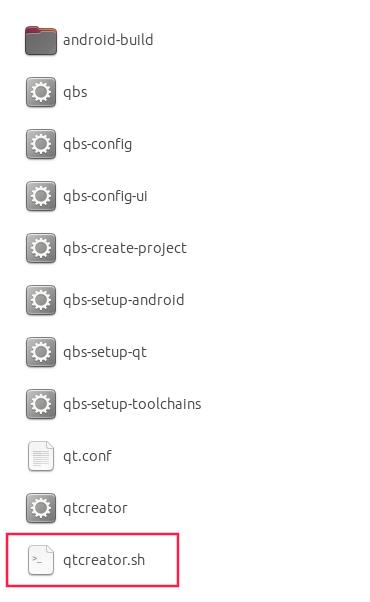
三 添加权限
新增AndroidManifest.xml
项目 -> 构建 -> 创建模板

概要是界面显示
XML源是xml脚本显示

<manifest xmlns:android="http://schemas.android.com/apk/res/android" package="org.qtproject.example" android:installLocation="auto" android:versionCode="-- %%INSERT_VERSION_CODE%% --" android:versionName="-- %%INSERT_VERSION_NAME%% --"> <supports-screens android:anyDensity="true" android:largeScreens="true" android:normalScreens="true" android:smallScreens="true"/> <application android:name="org.qtproject.qt.android.bindings.QtApplication" android:hardwareAccelerated="true" android:label="-- %%INSERT_APP_NAME%% --" android:requestLegacyExternalStorage="true" android:allowNativeHeapPointerTagging="false" android:allowBackup="true" android:fullBackupOnly="false"> <activity android:name="org.qtproject.qt.android.bindings.QtActivity" android:configChanges="orientation|uiMode|screenLayout|screenSize|smallestScreenSize|layoutDirection|locale|fontScale|keyboard|keyboardHidden|navigation|mcc|mnc|density" android:label="-- %%INSERT_APP_NAME%% --" android:launchMode="singleTop" android:screenOrientation="unspecified" android:exported="true"> <intent-filter> <action android:name="android.intent.action.MAIN"/> <category android:name="android.intent.category.LAUNCHER"/> intent-filter> <meta-data android:name="android.app.lib_name" android:value="-- %%INSERT_APP_LIB_NAME%% --"/> <meta-data android:name="android.app.arguments" android:value="-- %%INSERT_APP_ARGUMENTS%% --"/> <meta-data android:name="android.app.extract_android_style" android:value="minimal"/> activity> application> <uses-permission android:name="android.permission.READ_EXTERNAL_STORAGE"/> manifest>- 1
- 2
- 3
- 4
- 5
- 6
- 7
- 8
- 9
- 10
- 11
- 12
- 13
- 14
- 15
- 16
- 17
- 18
系统权限
在android:versionName="-- %%INSERT_VERSION_NAME%% --"后面加入一行android:sharedUserId="android.uid.system"- 1
即
<manifest xmlns:android="http://schemas.android.com/apk/res/android" package="org.qtproject.example" android:installLocation="auto" android:versionCode="-- %%INSERT_VERSION_CODE%% --" android:versionName="-- %%INSERT_VERSION_NAME%% --" android:sharedUserId="android.uid.system">- 1
- 2
- 3
- 4
- 5
- 6
四 添加签名
项目 -> 构建 -> 应用签名

输入密码完成 -
相关阅读:
【kali-漏洞利用】(3.2)Metasploit基础(下):MSF终端利用过程
vue provide inject使用
Vue3简介
计算机组成原理4小时速成:硬件软件,编译,控制器,存储器,运算器,输入输出设备,存储字长
Lora升级!ReLoRa!最新论文 High-Rank Training Through Low-Rank Updates
【C语言刷LeetCode】378. 有序矩阵中第 K 小的元素(M)
网络套接字编程(三)
ThinPlateSpline(TPS)理论和代码
java毕业设计软件源代码SSM家庭理财|个人理财管理系统|记账系统
《Linux驱动:USB设备驱动看这一篇就够了》
- 原文地址:https://blog.csdn.net/flyfish1986/article/details/133858866